It was high time to dust off my personal website from 2019. Admittedly, it looked pretty cookie-cutter, and not a good kind of cookie either. Some challenges included:
Not wanting to do this and
Not enjoying promoting myself, which has never come naturally to me.
Beyond this original reticence, I knew it was standard operating procedure for those serious about establishing an online presence and building a “professional brand”. So this exercise was practical for those reasons as well as doing battle with my own aversion to self-promotion. Here’s the before:

From the get-go, I was confident about ditching the standard header/footer layout, requiring people to click around and jump from page to page (yawn). It was important to me to constrain this to one page that would bubble up details relevant to the user immediately. I am always dying for an excuse to leverage LLMs in some novel way. The curious thought kept encircling me: what if I could have bespoke, personalized experiences for visitors? As inputs, I thought using document.referrer, an old-school JavaScript feature, would be neat for instances where we could infer the visitor, perhaps an organization, from the URI. I still think some confluence of inputs like this could be enough for a general clue, but I wanted to get hyper-specific, even if this meant some manual labor for the time being. After some thought, I settled on using links (websites describing the visitor) as an input for this initial version.
So what solution should we use for obtaining details from the links? Man, there are so many options1. Increasingly, I’ve been fond of Firecrawl or Cloudflare Browser Rendering for web crawling and scraping. It was great to see how sophisticated OpenAI’s Web Search tool had become as well, especially considering this was unavailable in their APIs (like the Assistants API originally) and took some time for them to ship this. I decided to go with the Web Search tool (at least initially) because it is built-in, but also because I was hoping OpenAI’s relationship with Microsoft would allow for accessing LinkedIn data. I had observed in the past ChatGPT being able to procure data from LinkedIn. My hopes were quickly dashed as they seem to have put the kibosh on that. So LinkedIn gatekeeping people’s professional details continues. This requires more creativity and more time to think about this.
Some quick whiteboard doodles always helps set things in motion:
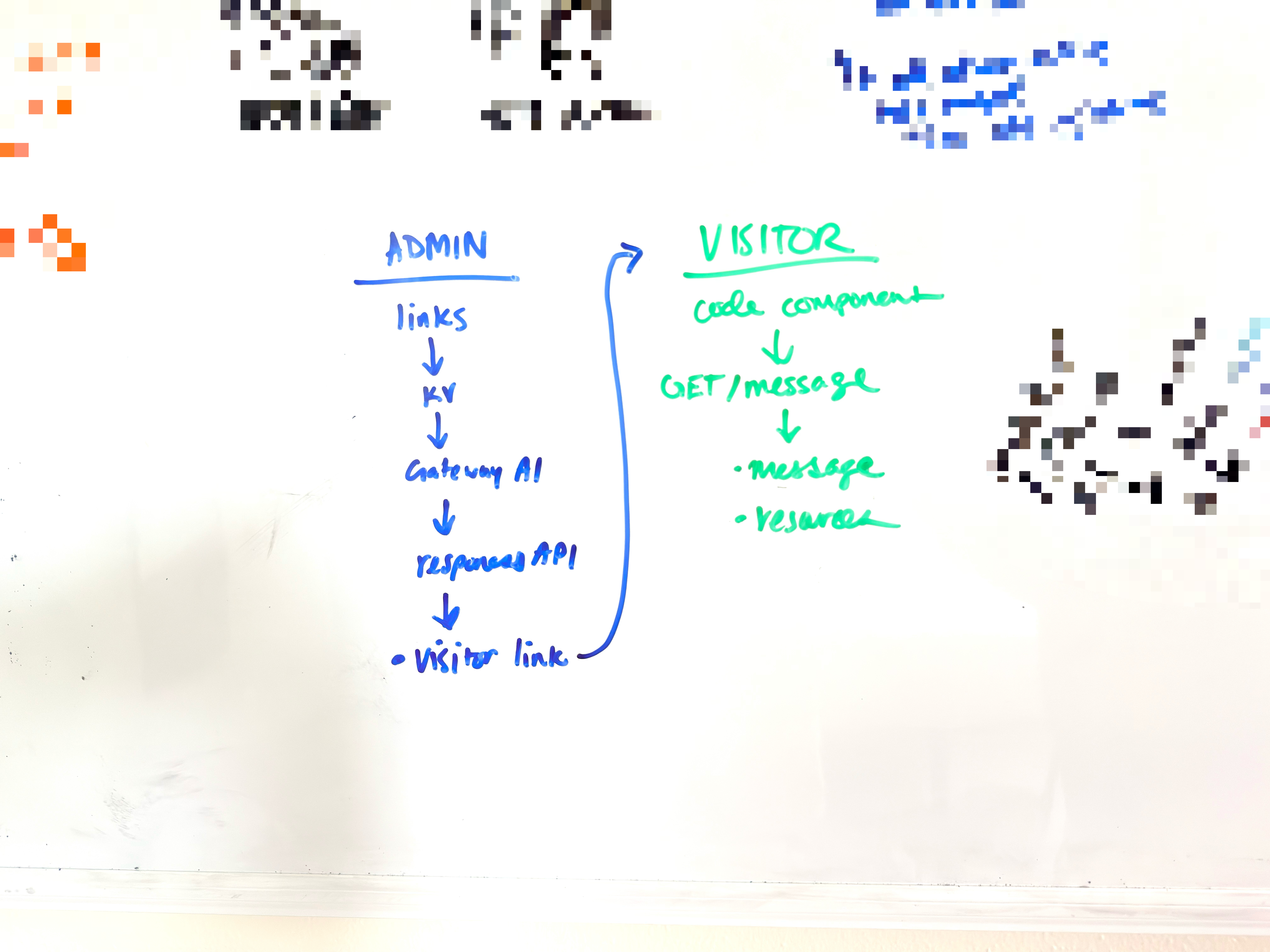
We’re off to the races. For tech stack, it was quite straightforward to me.
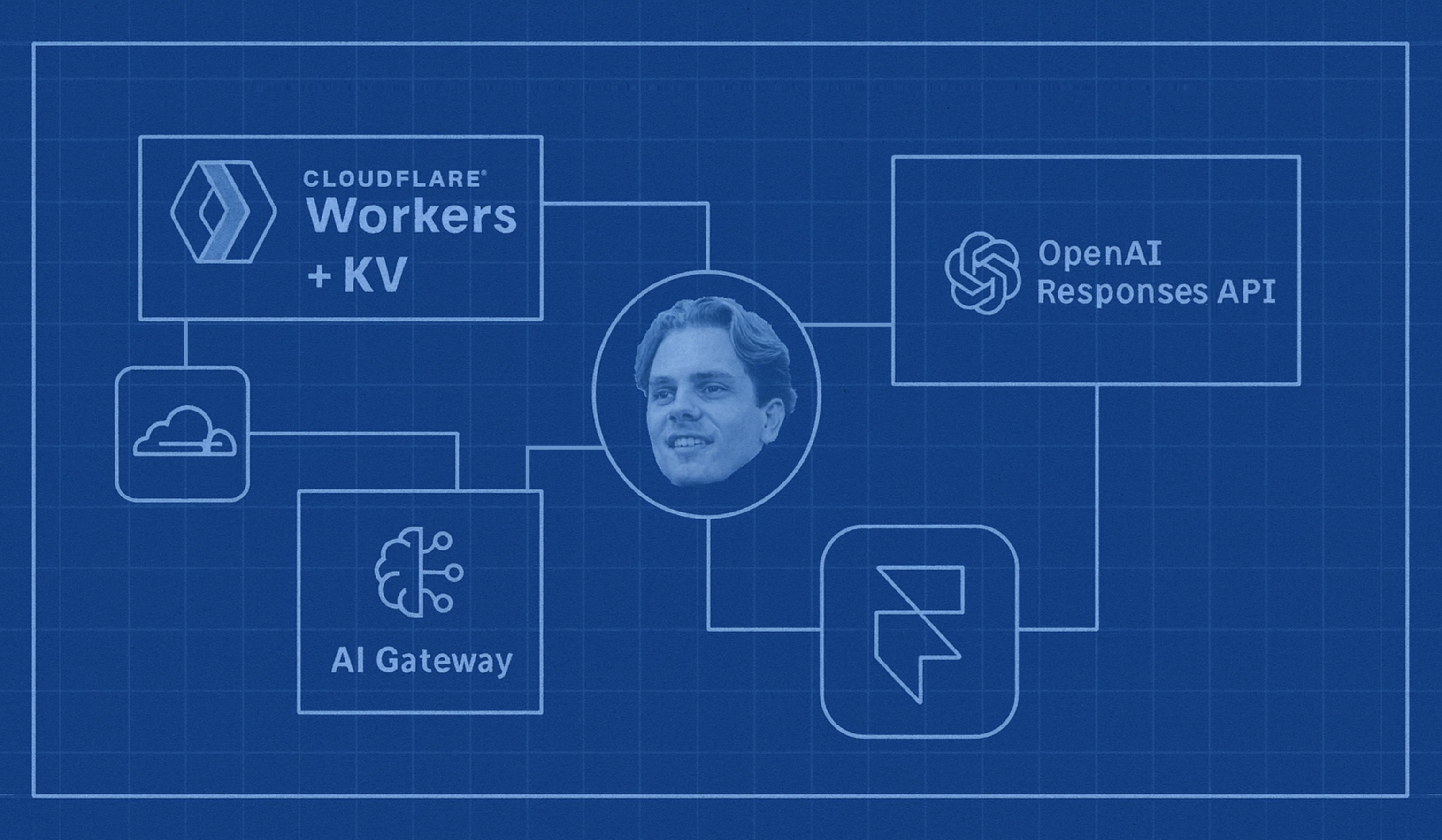
Framer for the bulk of the personal site.
Cloudflare Workers for a lightweight backend.
Cloudflare AI Gateway for security, routing, analytics, and caching.
Cloudflare Workers KV for key-value storage allowing for personalized URLs.
OpenAI Responses API for primary inference and tool calling needs.
I had manually coded marketing websites in the past and rapidly learned that simply isn’t the best place for one’s development time, the core product is! Early on, I quickly fell in love with Framer and have used it for things like my sister’s wedding website and yet-launched product marketing pages. Framer pioneered framer-motion (now motion.dev). They also provide the ability to create React code components (with TypeScript support) or code overrides augmenting the designs on Framer which is, and this is a technical term, dope! Also, my objective of a one-page-only personal site coincided nicely with their pricing, which has a one-page $5/month plan (when paid annually).
Along these lines, what tickled me too was the notion that I could use Cloudflare’s built-in caching for AI Gateway. The retention (TTL) of inference responses include options up to 30 days! This satisfied my needs and meant I could avoid storing the larger message + link order in some database (boring) and could keep my KV instance lighter. On cache miss, I regenerate and re-cache ad infinitum.
Perhaps the simplest form this all could take is some kind of username-in-url pattern like peteallport.com/@LinkedInUsername. However, this limits us in four big ways:
As established, the current limitations around LinkedIn were an obstacle, and this needed to avoid being dependent any one platform alone.
I wanted to support a more open-ended “entity” as a visitor (e.g. individual + company they represent).
I wanted to allow for multiple links, and the ability to research other websites based on those links.
I wanted to lock this down more, as anyone could use this link pattern, and as we’re incurring inference costs (in particular) this needed to be done right.
I may still build some shorthand usage like this in the future, but for now I determined that some very simple (not over-engineering too much) “admin backend” for me and anyone representing me (like a recruiter) could use. So I threw the below together, guarded by a passcode that generates a token producing a one-hour session.
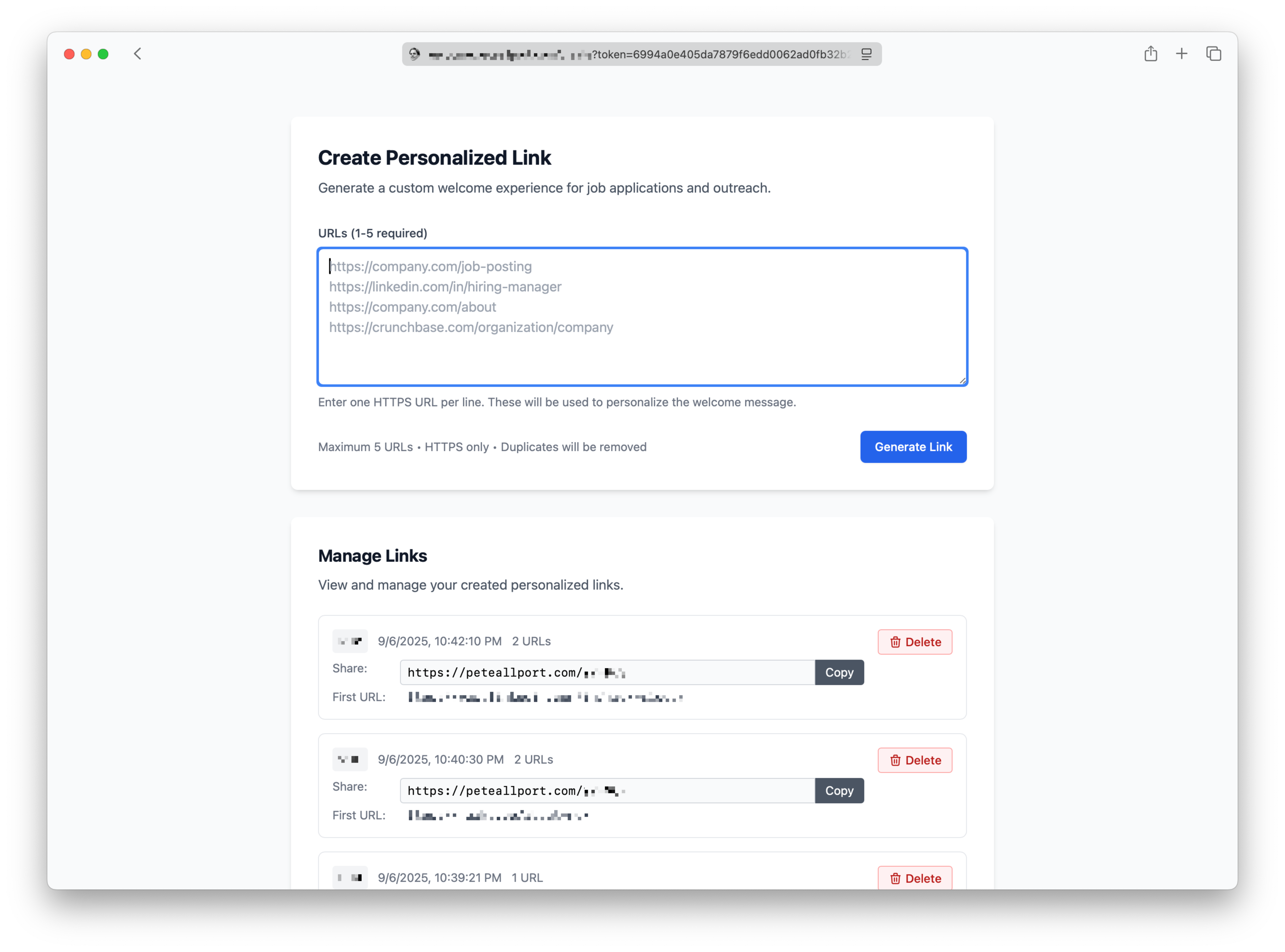
So the workflow is still pretty straightforward. On the admin page, I plop a few links about the individual (and/or company, job posting, or whatever), and hit that Generate Link button. Which returns a personalized peteallport.com link with a slug that I can use anywhere.
There’s a litany of validation that ensues on the client and backend, from deduping links to URL normalization/canonicalization. We then generate a 3 or 4 character slug (36^3 + 36^4 = 1,726,272 combinations), first checking it does not exist, and then storing the visitor links used with the slug in Cloudflare Workers KV. Next, we generate the personalized message and link order (priority) via Cloudflare AI Gateway and using the Responses API from OpenAI. Thanks to environment bindings stringing these services together is a breeze. Not a light breeze either, a really gusty one on a hot day.
I created a PROMPT_ID using the wonderful OpenAI Developer Dashboard, which abstracts away all of the configuration (prompt engineering, model configurations, tool or MCP use, etc.) what a wonderful simplification! So cueing up AI Gateway with Responses API looked like the below. Cloudflare AI Gateway hasn’t totally caught up with the Responses API yet (its OpenAI-compatible endpoint targets Chat Completions), meaning we have to use the “Universal” version, still it is pretty slick if you ask me:
const gateway = env.AI.gateway(env.AI_GATEWAY_NAME);

const payload: AIRequestPayload = {
	prompt: {
		id: env.PROMPT_ID,
		version: env.PROMPT_VERSION,
		variables: {
			urls: urls.join('\n'),
			resources: resourcesJson,
		},
	},
};

const response = await gateway.run({
	provider: 'openai',
	endpoint: 'responses',
	headers: {
		'Content-Type': 'application/json',
		Authorization: `Bearer ${env.OPENAI_API_KEY}`,
	},
	query: payload,
});
The gateway name, prompt ID, and prompt version are all configurable in the Worker settings.
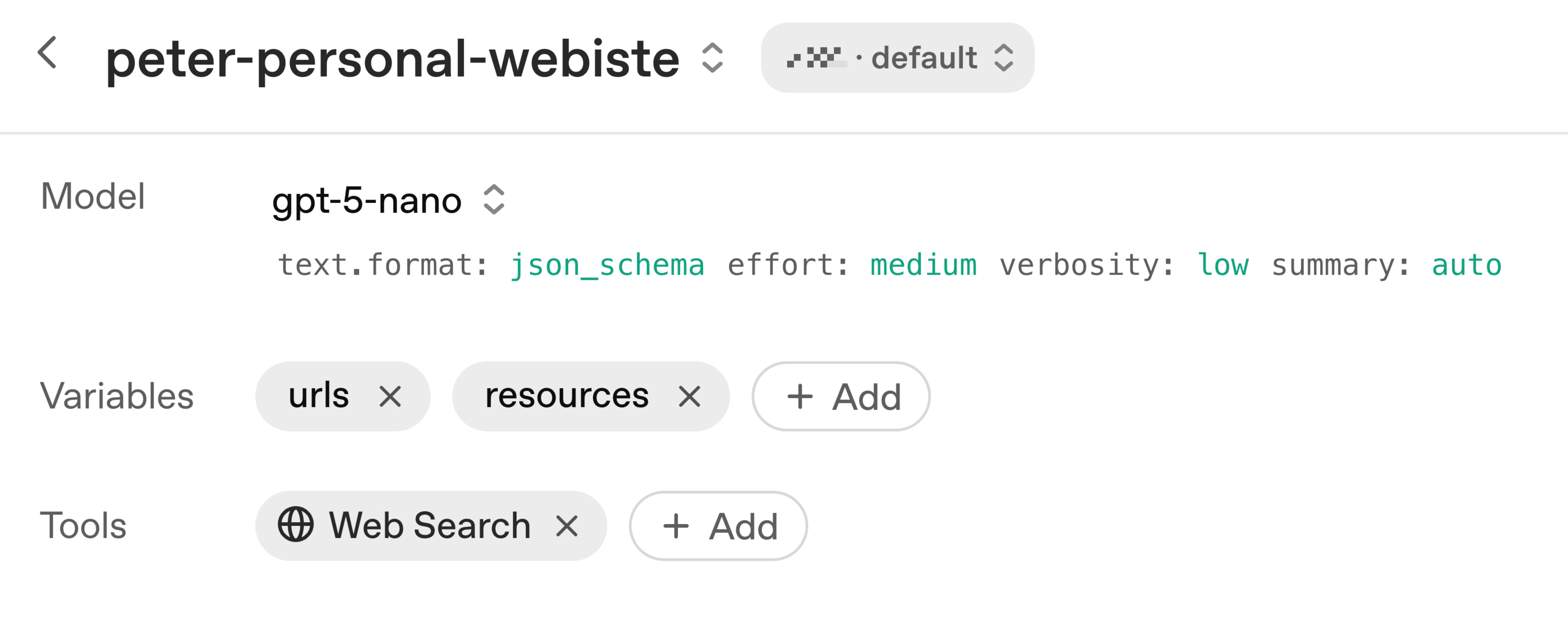
As for the actual inference, I opted for gpt-5-nano which is surprisingly fast for the output quality you get. I had originally developed a custom MCP server with a tool suppling the JSON resources (links) about me, but this proved somewhat overkill and I ran into several known bugs with Responses API using custom MCPs. Consequently, I am using the below configuration. This simply includes prompt inputs (visitor URLs and JSON resources about me) as well as JSON schema structured outputs, and the web search tool . The client (peteallport.com) also uses the same JSON resources, so this approach ensures I have a single, version-controlled source of truth that I can continually add to.
Not too shabby, right? It also looks great in dark mode. I continue to optimize the prompting, context, and overall formatting but this definitely qualifies as a personal touch.
When it comes to costs, after all is said and done, the average personalized link generation incurs a ≤1¢ cost. Having free OpenAI credits doesn’t hurt either! While building this, OpenAI announced reduced costs for web search ($10/1K calls) in the Responses API, and Cloudflare also added a ton of neat AI Gateway features too, the timing made me chuckle.
Was this overkill? Honestly, I don’t think so because it demonstrates how preparedness and in-advance work can lead to a slightly elevated experience for the end user (visitor), and to me, that will always be worth it. I already did the work anyway, so I’m biased.
What’s next? Some future iterations of this come to mind:
Supporting Anonymous Visitors, providing an opt-in experience where the end user could provide link(s) about themselves (or equivalent). Not just for visitor personalization, but also for follow-up purposes. If one could understand who was visiting their site, this becomes a sort of funnel where both parties could better understand what commonalities they might have, thanks to AI.
Personalization-as-a-Service, perhaps a drop-in Framer component or even an entire hosted offering so that anyone could achieve this bespoke experience. How much easier would asking for contact details, or having more effective landing pages be if the messaging was unique to the visitor? Effectively conveying information in a quality way is sort of the whole point, right? If you’re interested in this, let me know.
Ultimately, it made building a website talking about myself palatable, and I learned some things along the way. I think I can confidently say I’m doing something a bit more unique, different from what the masses are doing, and that gives my nonconformist self great solace.