Update, July 31, 2026: Solid Queue 1.6.0 has shipped with fiber worker execution. The default Rails job queue can now run many long-running, cooperative I/O-bound jobs like LLM streaming far more efficiently, without making the queue database pool grow with the number of jobs waiting on I/O. The setup below now uses the official release.
Last year I moved the LLM streaming jobs in Chat with Work to Async::Job. It was fast. Genuinely fast. Fiber-based execution with Redis, thousands of concurrent jobs on a single thread. I was so convinced that I wrote a whole post about why async Ruby is the future for AI apps and recommended it to everyone.
Then I started hitting walls.
Async::Job doesn’t persist jobs. They go into Redis and they’re gone. Mission Control shows nothing. Background jobs in Rails are already quieter than the rest of your application – they fail without anyone noticing unless you go looking. Even with Honeybadger catching exceptions, I still want to see the full picture: which jobs are queued, which are running, which failed, what the system looks like right now. Without job persistence, you don’t get that.
Solid Queue is the default in Rails 8. Every new Rails app ships with it. When someone picks up Rails to build an LLM application and their 25-thread worker pool can only handle 25 concurrent streaming conversations, the answer shouldn’t be “swap your entire job backend.” It should be “change one line of config.”
So I opened a PR. On July 31, it shipped in Solid Queue 1.6.0.
Threads vs fibers, quickly
If you already know this, skip ahead to the config.
By default, Solid Queue runs each job on its own thread. Those threads can all query the database concurrently, so conservative pool sizing assumes one connection per execution thread. There is also stack memory and kernel thread overhead. For a job that crunches data for 30 seconds, that’s fine – the thread is busy. For a job that streams an LLM response for 30 seconds but spends 99% of that time waiting for tokens, the thread is just sitting there holding resources.
Fibers sidestep much of this. They are cooperatively scheduled in userspace on a single thread. When a fiber hits scheduler-aware I/O – an Async::HTTP request or waiting for the next token through a compatible client – it steps aside and another fiber picks up. One thread, hundreds of concurrent jobs. No kernel thread overhead per job, and database pools can be sized for simultaneous database work rather than every job waiting on network I/O.
The async gem installs the fiber scheduler. Ruby operations such as Kernel.sleep, scheduler-aware IO, and fiber-aware libraries yield without changing the job itself. This is not magic around every blocking call: a library or C extension that does not cooperate with the scheduler can still block the reactor thread.
For the full deep dive – processes, threads, fibers, the GVL, I/O multiplexing – see Async Ruby is the Future.
The switch
Fiber mode ships in Solid Queue 1.6.0. Upgrade Solid Queue and add async as an application dependency:
# Gemfile
gem "solid_queue", "~> 1.6"
gem "async" # required for fiber workers
Then switch that worker’s execution setting:
# config/queue.yml
production:
  workers:
    - queues: ["*"]
      # threads: 10
      fibers: 100  # <- that's it
      processes: 2
Your jobs don’t change. Your queue doesn’t change. The worker runs them as fibers instead of threads.
threads or fibers. Pick one per worker.
Fiber-scoped Rails isolation is required. Add this to your Rails application configuration:
# config/application.rb
config.active_support.isolation_level = :fiber  # required for fibers
Fibers share a thread, so they need fiber-scoped state instead of the default thread-scoped state. Solid Queue validates this at boot and refuses to start fiber workers if the application still uses thread-scoped isolation.
That isolation setting is global to the Rails application, not local to Solid Queue. Also, fiber worker execution is separate from Solid Queue’s supervisor async mode. The configuration above uses the default fork supervisor, so processes: 2 creates two worker processes and each gets its own fiber reactor. If you start bin/jobs --mode async, the workers share the supervisor process and the processes setting is ignored.
Under the hood
The core of the implementation is FiberPool. It starts its reactor lazily when the first execution is posted, so the pool can be constructed safely before the default supervisor forks. A single thread runs one async reactor, with a semaphore capping concurrency at whatever number you set:
def start_reactor
  create_thread do
    Async do |task|
      semaphore = Async::Semaphore.new(size, parent: task)
      boot_queue << :ready

      wait_for_executions(semaphore)
    end
  rescue Exception => error
    register_fatal_error(error)
    raise
  end
end
When the worker picks up jobs, it hands them to the pool. Each one becomes a fiber:
def wait_for_executions(semaphore)
  while execution = pending_executions.pop
    semaphore.async(execution) do |_execution_task, scheduled_execution|
      perform_execution(scheduled_execution)
    end
  end
end
The worker poller claims only as many jobs as the pool has capacity for and pushes them into a Thread::Queue. Its pop is fiber-scheduler-aware, so the reactor can run execution fibers while it waits for more work. Each compatible I/O wait yields back to the reactor instead of occupying a dedicated execution thread.
CPU-bound work gets nothing from fibers. They don’t parallelize computation. A CPU-heavy job or blocking call stalls every execution fiber in that worker until it returns. In the default fork supervisor mode, the supervisor and other worker processes keep running, but that worker’s reactor does not. Put CPU-bound or blocking jobs on a thread worker instead.
The database connection math
For 1000 concurrent conversations using traditional job queues like SolidQueue or Sidekiq, you’d need 1000 worker slots. That means 1000 kernel threads across your worker fleet, plus enough database pool capacity for whatever fraction of those jobs can hit the database at the same time. Even when the jobs are 99% idle waiting for streaming tokens, the thread resources are still reserved.
That framing is about worker resources, not a special Active Record rule. The released code’s pool-size check is specifically about the Solid Queue database pool (SolidQueue::Record.connection_pool), not every database your job might use. It estimates connections for polling, heartbeats, and job execution. Size any application database pools touched by the job separately.
Solid Queue 1.6 does not give thread workers the same small pool estimate. It still estimates one execution connection per configured thread, plus one for polling and one for heartbeats. That’s threads + 2.
There is a separate change that makes this easy to confuse: since Solid Queue 1.5, that estimate is advisory. A thread worker can boot with a smaller pool and wait for a connection when the pool is busy, although it can still hit a checkout timeout under sustained contention. But 1.6 did not make the thread and fiber estimates equal.
Here is the relevant version history:
| Solid Queue version and worker | Queue pool estimate | What happens below it |
|---|---|---|
| 1.4.0 thread worker | threads + 2 |
Configuration is invalid; the supervisor aborts |
| 1.5.x thread worker | threads + 2 |
Warning; the worker still boots |
| 1.6.0 thread worker | threads + 2 |
Warning; the worker still boots |
| 1.6.0 fiber worker, Active Record 7.1 | fibers + 2 |
Warning; the worker still boots |
| 1.6.0 fiber worker, Active Record 7.2+ | 3 |
Warning; the worker still boots |
So the connection-sizing distinction is Solid Queue 1.6 fiber workers on Active Record 7.2+ versus every thread worker. The warning-versus-boot-error distinction is older: it changed between Solid Queue 1.4 and 1.5.
For fiber workers, the estimate depends on the Active Record version. On Active Record 7.2+, Solid Queue assumes ordinary query paths release connections between queries, so it estimates one execution connection plus two worker connections regardless of the fiber count: 1 + 2 = 3. On Active Record 7.1, it conservatively estimates one execution connection per fiber, so the estimate is fibers + 2.
The three-connection estimate is a starting point, not a guarantee. Long transactions, ActiveRecord::Base.connection, lease_connection, direct pool checkouts, and long-lived with_connection blocks can pin connections across waits. If your jobs do that or generate simultaneous database work, increase the relevant pool.
Here is the exact warning threshold calculated by Solid Queue 1.6 for a worker process at different concurrency levels:
| Concurrent jobs | Thread worker | Fiber worker, Active Record 7.2+ | Fiber worker, Active Record 7.1 |
|---|---|---|---|
| 10 | 12 | 3 | 12 |
| 25 | 27 | 3 | 27 |
| 50 | 52 | 3 | 52 |
| 100 | 102 | 3 | 102 |
| 200 | 202 | 3 | 202 |
On Active Record 7.2+, the thread estimate scales linearly while the fiber estimate stays flat. In the default fork mode, multiply the per-process pool by the number of worker processes: 6 processes with 50 execution slots means 312 configured queue connections for thread workers versus 18 for fiber workers. PostgreSQL’s default max_connections is 100.
Again, Solid Queue only calculates this estimate and warns. It does not configure the pool automatically. In supervisor async mode, workers share a process, so their connection needs must be added together rather than applying the per-process table independently.
The benchmarks below use two pool policies. The primary Solid Queue comparison deliberately gives both modes the same pool, DB_POOL = concurrency + 5 per worker process, so it measures the executor instead of measuring pool starvation. The stress suite uses mode-specific pools to show the operational failure envelope under higher connection demand.
The benchmarks
I reran the benchmark suite on April 28, 2026. These results were produced from the PR branch before the final 1.6.0 implementation was reorganized during review, so treat them as benchmarks of that implementation, not fresh Solid Queue 1.6.0 numbers. The architecture is the same, but a new run is required before attributing the exact deltas to the release tag. I will update this post over the next few weeks with fresh benchmarks against Solid Queue 1.6.0.
The headline Solid Queue comparison covers four workloads across per-process concurrency 5, 10, 25, 50, and 100; process counts 1, 2, and 6; and both execution modes. Three runs per cell, median real run reported, with total concurrency capped at 60 so the main comparison stays about executor behavior.
The workloads:
- Sleep: 50ms
Kernel.sleep. Pure cooperative wait. The I/O upper bound. - Async HTTP: HTTP request to a local server with 50ms delay via Async::HTTP. Real fiber-friendly I/O.
- CPU: 50,000 SHA256 iterations. Pure computation. The control.
- RubyLLM Stream: Actual RubyLLM chat completion through a fake OpenAI SSE endpoint, with token-by-token Turbo Stream broadcasts. 40 tokens at 20ms each. The closest thing to a production AI workload you can benchmark repeatably.
Results
| Workload | Best throughput | Avg paired delta | Best paired delta |
|---|---|---|---|
| RubyLLM Stream | fiber, 7.01 j/s | +11.9% | +21.8% |
| Async HTTP | fiber, 492.82 j/s | +9.5% | +25.5% |
| Sleep | fiber, 500.50 j/s | +7.4% | +15.9% |
| CPU | fiber, 110.02 j/s | +0.6% | +2.4% |
RubyLLM Stream is the workload that matters. It runs an actual RubyLLM chat completion with streaming, database writes, and Turbo broadcasts per token – the same thing Chat with Work does in production. Fiber wins every single paired experiment there: 9 out of 9.
The CPU row is the control. Fibers don’t help computation, and the average confirms it: essentially flat. That’s how you know the I/O gains are real and not measurement noise.
That table shows the best observed point and the paired-cell deltas. Here’s the full spread. Some configurations favor threads for synthetic workloads, but the paired averages are the steadier signal: fiber wins the I/O workloads, and RubyLLM Stream always favors fiber.
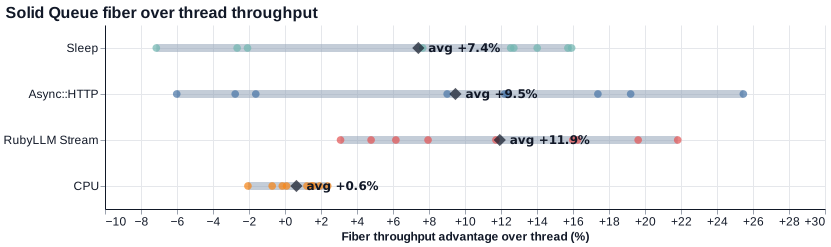
The newer suite also adds database-shaped workloads. With matched pools, short DB bursts still favor fiber: db_queries averages +12.6%, and a read/API/write mix averages +6.9%. The transaction case is the useful caveat: when each job pins a connection for the whole transaction, fiber still averages +3.5%, but the win is less consistent. That’s exactly the workload where you should be more careful with pool sizing.
Thread mode hit the wall
Those benchmarks cap total concurrency at 60. I wanted to see what breaks when you push past that, so I ran a stress suite: per-process concurrency 25, 50, 100, 150, and 200; process counts 2 and 6; three runs per cell. Read this as the April PR implementation’s failure-envelope test, not a Solid Queue 1.6.0 result or a universal law about threads and fibers.
The result is stark. Thread mode only completed the smallest cell for each workload. Fiber mode completed every planned cell.
| Workload | Thread cells completed | Fiber cells completed |
|---|---|---|
| Sleep | 1/10 | 10/10 |
| Async HTTP | 1/10 | 10/10 |
| RubyLLM Stream | 1/10 | 10/10 |
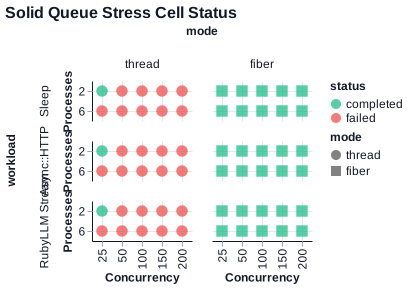
PostgreSQL’s default max_connections is 100. In this stress run, thread mode at concurrency 50 with 2 processes asked for 110 worker-pool connections. With 6 processes, even concurrency 25 asked for 180. The one surviving thread cell was the smallest: concurrency 25, 2 processes.
Fiber mode in the stress suite used a smaller mode-specific pool: 6 connections per process for 2-process runs, 10 per process for 6-process runs. That is 60 worker-pool connections at concurrency 200 across 6 processes, while the benchmark’s thread policy would configure 1,230. The exact constants are benchmark policy, but the shape is the point for this worker design: Solid Queue’s thread estimate scales with thread concurrency; the Active Record 7.2+ fiber baseline scales with worker process overhead plus actual database concurrency.
One backend, two modes
Fiber mode isn’t universally better. CPU-bound jobs get nothing from it, and blocking libraries or C extensions that do not cooperate with Ruby’s fiber scheduler stall the reactor. And that’s fine – you don’t have to pick one.
As Trevor Turk pointed out in the PR discussion, that’s the whole point: separately configured worker pools. Here’s what Chat with Work actually runs in production:
workers:
  - queues: [ chat ]
    fibers: 10
    processes: 2
    polling_interval: 0.1
  - queues: [ turbo ]
    fibers: 10
    processes: 1
    polling_interval: 0.05
  - queues: [ notifications, default, maintenance ]
    fibers: 5
    processes: 1
    polling_interval: 0.2
  - queues: [ cpu ]
    threads: 1
    processes: 1
Almost everything uses fibers. LLM streaming, Turbo broadcasts, notifications, maintenance jobs – all fiber-based. Only the cpu queue uses threads, and right now it’s just one thread for the occasional heavy extraction. One backend. One deployment. Mission Control shows all of it.
Instead of running Solid Queue and Async::Job side by side – two processors, two configurations, two sets of things to monitor – you run one. I moved Chat with Work to this setup, and Brad Gessler has been running it in production too.
Async::Job is actually faster if you compare raw throughput against Redis. It is a backend comparison, not a Solid Queue executor comparison, but the ceiling is useful:
| Workload | Solid Queue fiber best | Async::Job best | Delta |
|---|---|---|---|
| RubyLLM Stream | 7.01 j/s | 16.94 j/s | +141.7% |
| Async HTTP | 492.82 j/s | 652.96 j/s | +32.5% |
| Sleep | 500.50 j/s | 644.98 j/s | +28.9% |
| CPU | 110.02 j/s | 125.75 j/s | +14.3% |
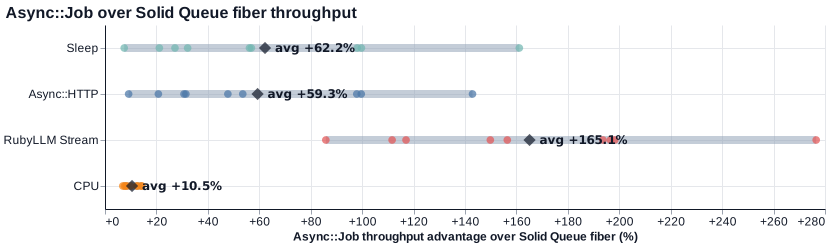
If you want raw speed and don’t need persistence, Async::Job is the right call. But if you want job visibility, failure tracking, retries, Mission Control, everything Rails gives you out of the box, fiber mode gets you there. Same concurrency. You can size database connections to database work instead of the number of jobs waiting on network I/O. You set fibers: N and keep building.
Fiber mode is now available in Solid Queue 1.6.0. The PR has the implementation history, and the benchmark suite is open source. Run your own numbers, or challenge mine.