How to Make an Outstanding Tiny Desk AI Video
The performance stays the same. The band does not.
This trend takes Charlie Wilson’s NPR Tiny Desk performance of “Outstanding” by The Gap Band and drops new faces into it: the laughing close-up, the red keyboard, the backing singers, and the saxophone solo. In October 2026 it spread after AI videos put losing college football coaches in that concert. The singing stayed enthusiastic. The people did not belong there. That contrast is the joke.
You can do the same thing with photos of yourself, your friends, or your pets. No reference video, no prompt, and no editing software.
What you need
- 1–5 photos. Clear, bright, and sharp. Faces should be easy to see. Skip blurry shots, heavy filters, and sunglasses.
- Credits. 50 for a 480p video, or 100 for 720p, on Outstanding Tiny Desk AI.
JPG, PNG, and WebP all work. Each image can be up to 10 MB.
Step 1: Cast the five seats
Open outstanding-tinydeskai.com and find Cast Your Tiny Desk Band.
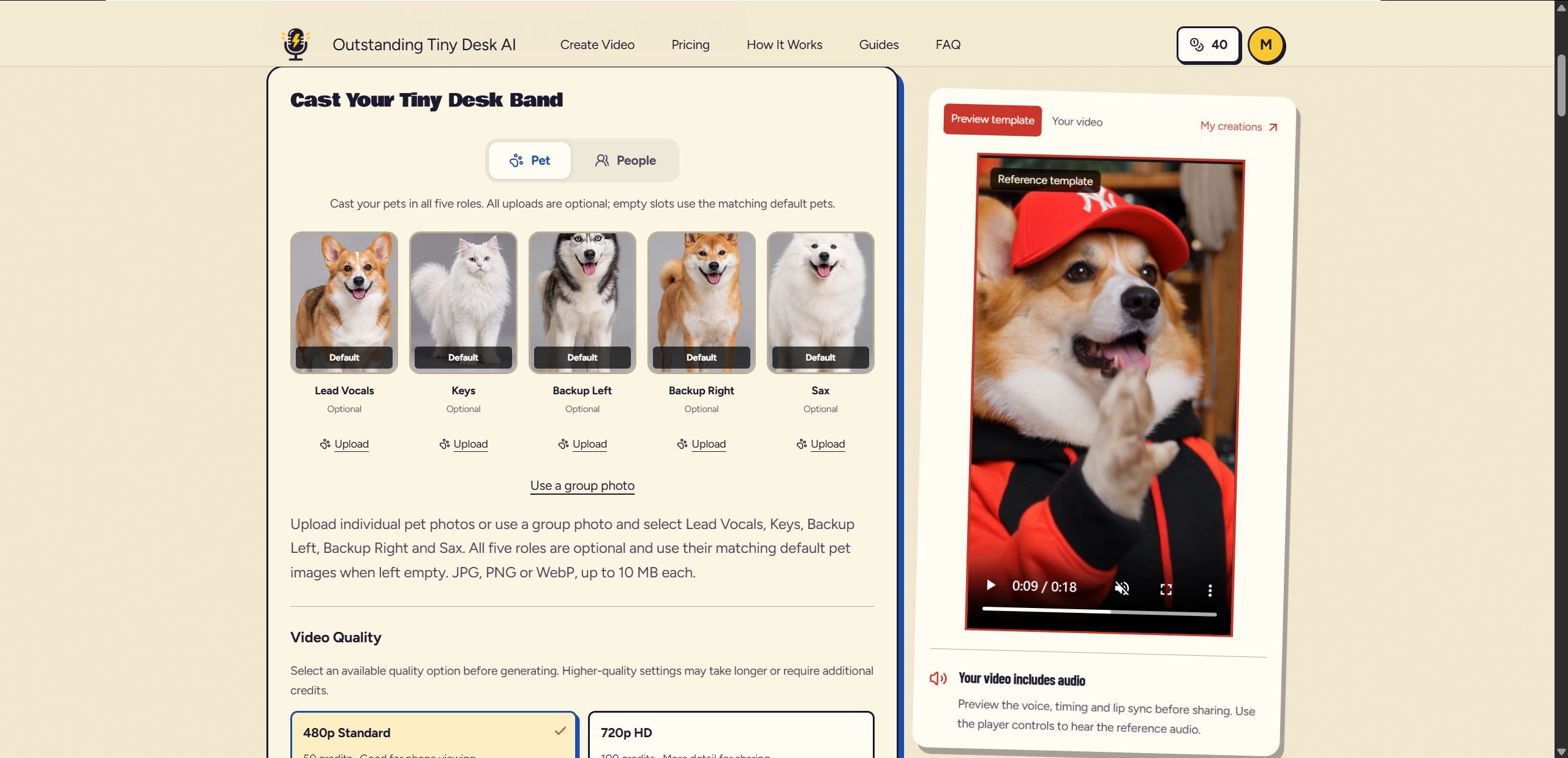
You can replace only the lead singer, or all five performers. Any seat you leave empty keeps a default AI musician.
| Seat | What that shot is |
|---|---|
| Lead vocals | The main singer, including the famous laughing close-up. This seat is required. |
| Keys | The player behind the red keyboard. |
| Backup left | The backing singer on the left. |
| Backup right | The backing singer on the right. |
| Sax | The saxophone solo. |
Choose People or Pet before you upload. Pet mode is how a dog or cat joins the band.
Step 2: Add your photos
Click Upload under Lead Vocals and choose that photo first. Every video needs a main singer.
Then fill any other seats you want to change. Two ways to do it:
- Separate photos. One picture per performer.
- One group photo. Upload it, then assign each person to a seat. Everyone’s face needs to be easy to tell apart.
One photo is enough. The seats you skip stay with the default musicians.
A straightforward cast: you on lead, your closest friend on keys, other friends on the two backups. For a funnier one, give the laughing close-up to someone who looks like they would refuse to sing, or switch to Pet mode and give it to your dog or cat.
Step 3: Choose 480p or 720p
Both are vertical 9:16, the shape TikTok, Instagram Reels, and YouTube Shorts expect.
- 480p is 50 credits. Enough for watching and sharing on a phone.
- 720p is 100 credits. More detail in the finished concert.
Step 4: Generate
Make sure you have permission to use the photos. Then click Generate My Tiny Desk Video.
The template, camera moves, and music are already set. When the preview is ready, check that each person landed in the right seat and that their face stays consistent through the performance.
Step 5: Download it, then post
The finished video is:
- 15 seconds
- vertical 9:16
- the original “Outstanding” concert audio
- no watermark
Download it and send it to friends, or post it on TikTok, Reels, or Shorts.
The video stays available for seven days. Download it again during that window if you need another copy. After seven days, it is no longer kept.
What makes a better cast
Front-facing photos with even light work best, especially when the face and upper body are both in frame. Masks, sunglasses, and heavy filters hide the features the generator uses.
The seat that matters most is lead vocals. An unexpected face on that laughing close-up is what makes the concert worth sending.
CREATE YOUR OWN
Create Your Outstanding Tiny Desk AI Video
Turn photos of yourself, friends, or pets into a viral Tiny Desk concert. Upload, generate, and share!
Create Your Video15 seconds · Original song included · No editing needed