
Nommer
2 player recipes
for couples
Nommer turns any recipe into 2-player mode so you can cook together — each of you on your own part, not on coordinating the other chef.


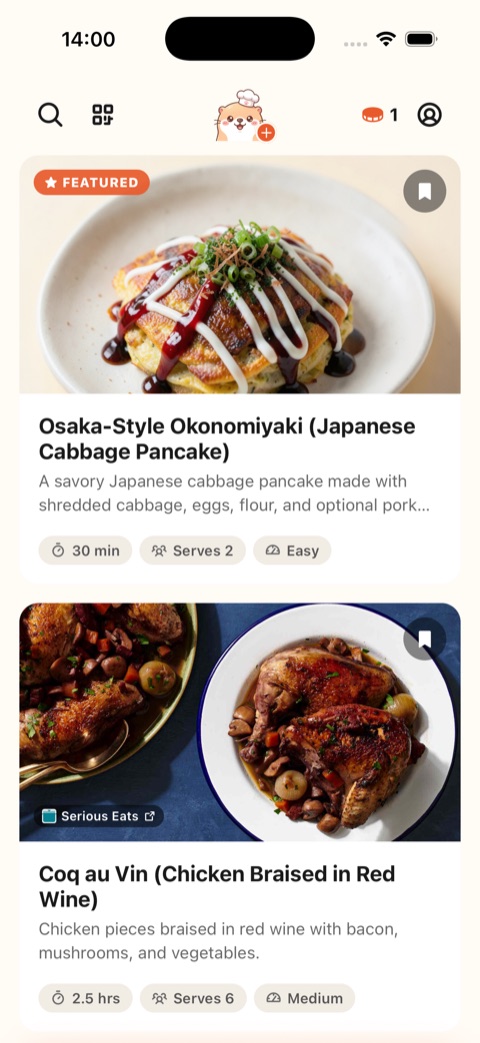
 Pick a recipe
Harissa Beef Maniche
ALICEBOB
5/5

7/7
✓Shopping List15/15
1Preparation
Finely chop the parsley
Finely chop the red onion
2Toast pine nuts
Toast the pine nuts until golden, tossing often
3Make feta cream
Blend feta, yoghurt, olive oil & lemon until smooth
4Cook pasta✓
Bob's on this. You're up again soon
5Brown beef✓
Bob's on this. You're up again soon
6Plating & Servingjoint
Spoon into bowls, top with feta cream & herbs
Harissa Beef Maniche
BOBALICE
5/5
7/7
✓Shopping List15/15
1Preparation
Pick & finely chop the mint
Grate the garlic cloves
2Toast pine nuts✓
Alice's on this. You're up again soon
3Make feta cream✓
Alice's on this. You're up again soon
4Cook pasta
Cook the maniche in salted boiling water
Drain and reserve a cup of pasta water
5Brown beef
Brown the beef mince until caramelised
Stir in harissa, cumin & smoked paprika
6Plating & Servingjoint
Spoon into bowls, top with feta cream & herbs
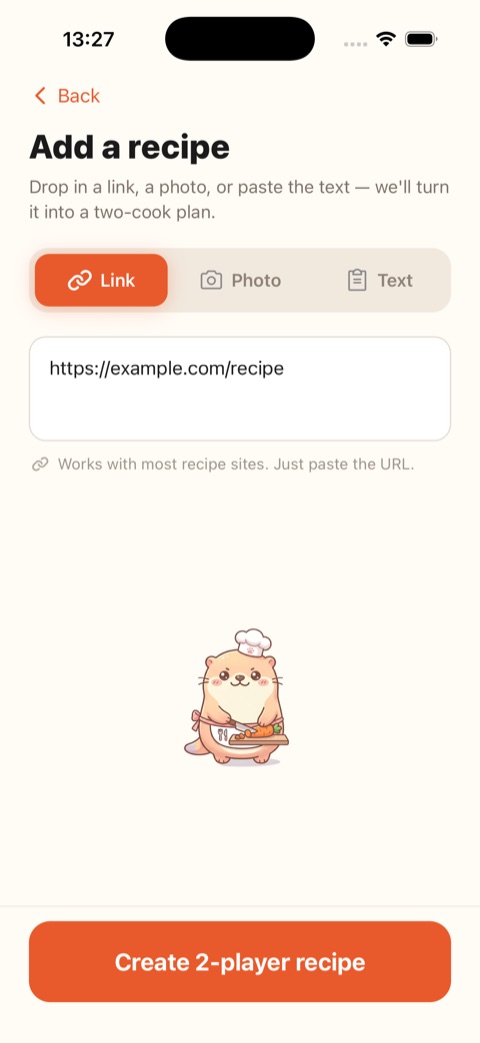
 Add a recipe
AB
Alice hands the toasted pine nuts to Bob the moment the pasta is drained.
Everything you need for cooking together, side by side
Nommer is built for two cooks in one kitchen — no more taking turns or stepping on each other.
🔪
Split the work
Nommer divides every recipe into two synced roles, so nobody's left watching from the sidelines.
⏱️
Perfect timing
Steps are sequenced across both cooks so every component lands hot, at the same moment.
🔗
Any recipe
Paste a link, snap a photo, or drop in text. Nommer rebuilds it as a two-player session.
🔄
Live sync
Tick off a step and the other cook sees it instantly. Two phones, one kitchen, always in sync.
🛒
Shared shopping list
One ingredient checklist for the whole dish. Tick things off as they land in the basket.
🤝
Handoff cues
“Hand the shallots to Bob.” Nommer choreographs the kitchen so the baton never drops.
From recipe to ready, together
Three steps from any recipe to 2-player mode.
1
Add a recipe
Drop in a link, a photo of a cookbook page, or plain text. Nommer reads it and turns it into a step-by-step plan for two.
2
Invite your co-chef
Share a link and your co-chef hops into the same kitchen. No invite codes, no faff — just one tap to join the session.
3
Cook in sync
Two synced checklists, shared timers, and live handoffs guide you both — so everything finishes together and nothing goes cold.
Ready? Set… Nom!
Pick a recipe, invite your co-chef, and get cookin'. Nommer is free to download on iOS and Android.
Frequently asked questions
How do two people cook the same recipe together?
Nommer rebuilds any recipe into a two-cook plan, assigning steps to each person and syncing the timing so both finish together. Each cook follows their own phone; ticking off a step updates the other instantly.
Does Nommer work for any recipe?
Yes. Paste a link, snap a photo of a cookbook page, or drop in plain text, and Nommer turns it into a step-by-step two-player session.
What platforms is Nommer on?
Nommer is available now on the App Store for iPhone and on Google Play for Android.
Who is Nommer for?
Any two people cooking in the same kitchen — couples, roommates, friends, parent and kid. Every pair gets the same thing: the recipe split into two synced roles. Read how it works for couples cooking together at home or for families cooking together with kids in the kitchen.
Is Nommer free?
Nommer is free to download and use, with an optional Nommer Pro upgrade.
Featured on
