This post is part of a series on Theseus, my win32/x86 emulator.
Theseus now can produce WebAssembly output, allowing it to translate a .exe
file into something that runs on the web.
Try it out here, but note it is full of bugs
(e.g. Minesweeper crashes if you win).
This was pretty straightforward to get working, with the exception of one major detail that this post will go into.
The x86 emulation part of this is just recompiling the existing Theseus output
with a different CPU target. This is one of the main benefits of this binary
translation approach. The translated code is almost (with the exception of how
main gets invoked) wholly agnostic to the environment it eventually runs in.
In principle I now get optimized wasm compiler output for relatively free. The
main challenge was figuring out the code layout to get Cargo to cooperate with
my weird requirements.
The win32 part was changing things to abstract over a "Host" API that is able to do things like fetch mouse events and render pixels. That is now implemented once for SDL and once for the web. This was also relatively straight forward, at least in my first pass.
So what was hard? It comes to a part of the design space I hadn't previously explored well: whether the emulator is allowed to block.
To block or not to block
In retrowin32, the emulator was designed to be able to step through some instructions and then return control to the caller. This is critical for the web version in particular, where you cannot block the main thread. In my earlier post "threading in two ways" I went into some detail on the various tradeoffs on how I could emulate threads in a browser, ultimately choosing a single thread.
This has its advantages, but is unsatisfying in a few important ways:
- The main thread must repeatedly call into the emulator in a loop that yields control back to the browser.
- Any Windows API implementation that might transfer control to the emulator
must be made async, so that it can be suspended and resumed. This is obvious
for functions that take a callback, but even a function like
MoveWindowwill synchronously send Windows messages related to moving to the window, so it is also async with respect to the message handling. - And finally, all the normal reasons async code is yucky: getting object lifetimes correct, how stack traces are busted, confusing debugging, and so on.
In the spirit of exploring the design space, when I got to revisit this choice in Theseus I instead made everything synchronous and implemented threads using real OS threads. In particular because Theseus maps the original program's code to function calls, it makes the debugging experience pretty pleasant: if I set a breakpoint or if something crashes, I get a stack trace that goes through both the source program and emulator code.
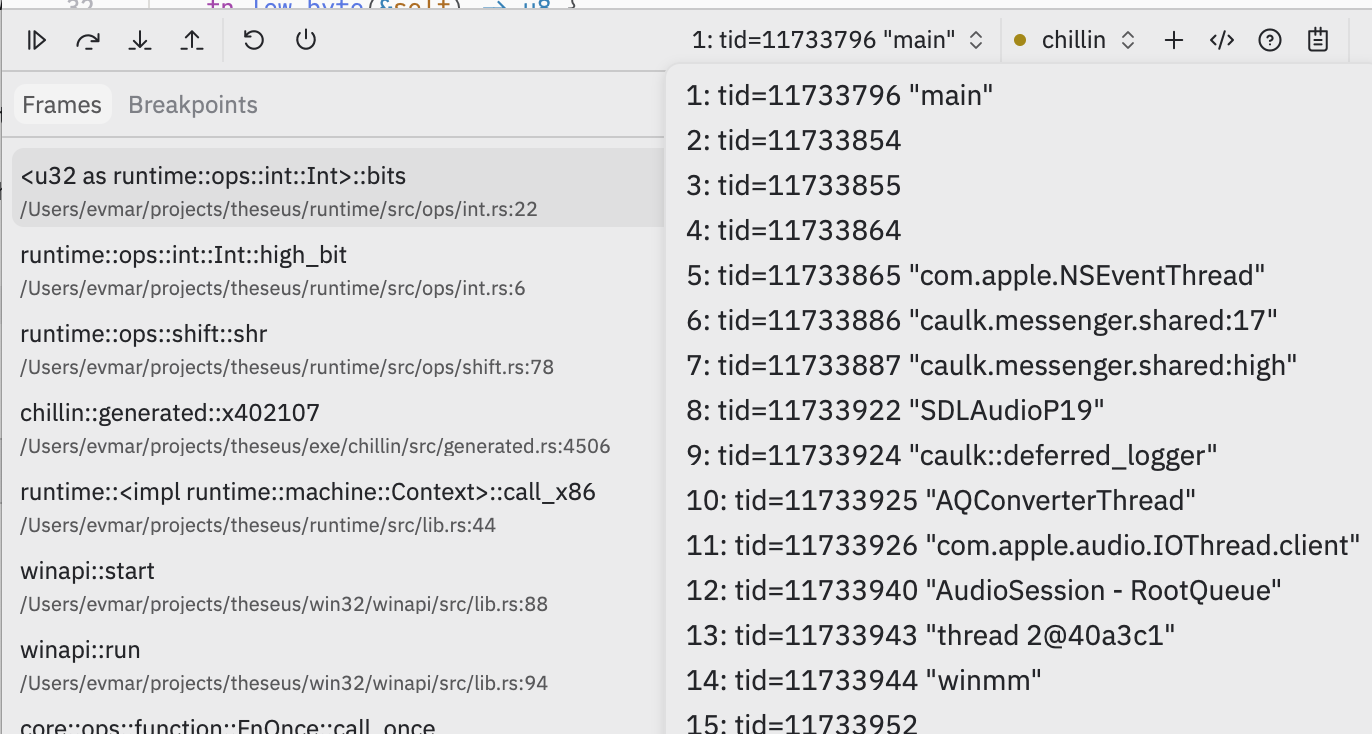
Picture: a Theseus program in a native debugger, with a stack trace including a generated x86 address on the left, and with a thread picker showing the Windows "winmm" multimedia thread on the right.
I mostly care about the developer experience here, but one additional reason this approach is nice is performance. Computers are really good at quickly running simple code made of nested function calls that store things on the stack. My asynchronous approach meant there was a lot of control overhead, even in tight loops.
Blocking on the web
In all, blocking is great. But on the web, you cannot block the main thread.
Even in a single-threaded program a call to a Windows API like GetMessage is
supposed to block until a message is available, but browser events will only
come in via the browser event loop once you've returned control. It would seem
you're stuck.
What it really means is that fundamentally, if you want to block, you must use a
thread — even in the case where the program you're emulating is itself
single-threaded — because worker threads are allowed to block. So here's the
approach: I run the emulator's threads in web workers. When the emulator needs
something from the browser, it can send a message via the postMessage API that
comes in on the main thread's event loop. And here I can make the worker block
until the message is handled.
This where the atomics API comes in. (Uh oh, synchronization code! The chances that I got this wrong are extremely high; I welcome your feedback on this, and I post it in part to provoke some reader who knows more than me to correct me.)
If you share memory between the main thread and worker, you can make the worker block on an atomic until the main thread is done. To do this, the worker sends the address of a local when it posts its message:
fn blocking_call() {
    let mut buf = 0i32;
    let msg = create_message(
        /* ... some JavaScript data indicating what function to call ... */,

        // ... and include the *address* of the above 'buf' variable
        &mut buf as *mut _ as u32
    );
    post_message(msg);
    unsafe {
        // wait while buf==0 until we get an Atomic notify on it
        wasm32::memory_atomic_wait32(&mut buf, 0, -1 /* forever */);
    }
}
The main thread receives these, and wakes the worker up when it's done by prodding the shared memory:
window.onmessage = (e) => {
  const msg = e.data;
  // ... handle message ...

  // interpret msg.buf as a pointer within the shared memory:
  const ints = new Int32Array(sharedMemory.buffer, msg.buf, /* length */ 1);
  ints[0] = 1;  // set `buf` from above to mark it successfully handled
  // wake up the waiting thread:
  Atomics.notify(ints, /* index */ 0, /* how many to wake up */ 1);
}
Note that because the worker is blocked until its message is processed, we know that the address of the local stack variable remains live until the main thread is done with it. This means we can effectively pass the address of any local variable from the worker and the main thread can safely modify it as it chooses.
From this sketch I hope you can see how I extended this to pass buffers in both ways. When the worker generates pixels, it sends a message just with a pointer to the pixels that the main thread can read directly from its memory (no copies!). And when the worker blocks to wait for an event, it can supply a buffer that the main thread can fill in.
The main limitation of this approach is that the main thread cannot transfer any
browser objects to the worker thread, because the only communication back is via
the shared memory buffer. Objects can only be transferred by attaching them to
postMessage, and those arrive via the browserevent loop.
TypeScript in the host?
You might have noticed the above code switches into TypeScript to show the main thread handler. At first I intended to write all of this as a single wasm blob that contained the code for both the main thread and the worker threads. I eventually turned back to TypeScript for a few reasons.
Because the main thread cannot block, this means it cannot practically share its memory with the workers if any synchronization might be involved. That would veto even using a malloc implementation. I think the best way to make this work is by running the main thread wasm with its own private memory, and handing it a reference to the workers' shared memory. I think because that shared memory object is opaque, you would need to call out to browser APIs to interact with it, rather than the native wasm memory APIs.
Unlike the main thread, the workers can safely malloc despite sharing memory because they can use locks like an ordinary program would. ...except that for reasons I don't fully understand, the Rust standard library under wasm isn't compiled with support for atomics turned on. Thankfully, there's a relatively supported but still nightly Rust path to rebuild the standard library itself as part of the worker build process. (It does however highlight that using shared memory web workers at all with Rust is still not exactly a supported path.)
The other main reason I turned back to TypeScript is that the worker threads cannot access the DOM, and while that can be cumbersome it also provides a nice wall between the Rust worker code and browser hosting code. The Rust/wasm support for interacting with the DOM is better than it could be, but it's still pretty clunky, where e.g. any DOM function you call gets wrapped in a JS helper that is imported by the wasm module. Instead I can write my Rust code without any knowledge of browser API, and do all of the DOM munging on the TypeScript side.
In general, it's hard to beat the experience of using TypeScript for web development. Tools like debugging and interactively inspecting objects are far superior to wasm debugging. (Also the recent TypeScript compiler rewrite in Go works well, it's so fast!)
The main downside so far is serialization. I still haven't yet figured out a mechanism I'm happy with for transporting more complex objects across the host/worker boundary. I saw a tech talk recently where someone used Rust's rkyv library for this purpose and it looked pretty neat.
What's next?
Ultimately the purpose of any of these projects is just to learn about the things I was curious about.
From this excursion I conclude that writing apps in wasm is impressive but still not quite there yet — I am glad I have my native build to fall back on when I want to deploy fancier tools. This is definitely a pattern I learned at Figma (where they also had a native build of their wasm-based app) and one that I would recommend to you.
Similarly, I conclude that Rust with shared memory workers is still pretty early. I think for an app where you really cared it works pretty well, but "use a nightly compiler so you can recompile the standard library" is not a great sign.
For Theseus itself, I have a few ideas of where to go next, but those will have to wait for another post!