Get started for free. Pay per usage as you grow.
Neon pricing plans
Your questions,
answered
Yes. Alongside our serverless Postgres database, Neon now offers Managed Better Auth, Object Storage, Functions, and AI Gateway - a full backend suite that runs alongside your database and branches with it.
While these tools are in beta, they're not feature-complete - they're ready to deploy but expect some rough edges, evolving limits, and functionality that's still being built out (for example, monitoring coverage is still expanding, together with region availability). Billing is also paused during the beta phase.
A project in Neon is the top-level container for your environment. Each project includes all branches, with your Postgres databases and (if you deploy them) your Object Storage buckets, Functions, Managed Better Auth endpoints, and AI Gateway access.
A CU (short for Compute Unit) is Neon's way of representing Postgres database compute size. Neon databases autoscale, and CUs define how much CPU and memory your database is using at any moment - with each CU allocating approximately 1 vCPU and 4 GB of RAM.
A CU-hour is Neon's unit for measuring Postgres database compute usage. Because Neon databases scale to zero and autoscale, you're billed only for the database compute resources you actually use. In other words, your monthly database compute usage depends on:
- How many compute endpoints are you running
- How large your compute endpoints are (in CUs)
- How long they run (in hours)
For a single compute, the calculation works similar to this:
Monthly CU-hours = [average CU size] × [number of hours the compute runs in the month]Monthly compute cost = [monthly CU-hours] × [CU-hour price]The CU-hour price depends on your pricing plan:
- Launch plan: $0.106 per CU-hour
- Scale plan: $0.222 per CU-hour
Remember that when your database is idle, compute can scale down to zero, so you don't consume CU-hours while it's not running. Learn more about Neon's billing.
On the Free plan, each project gets 100 CU-hours of database compute per month, and compute automatically scales down to zero when idle. What this means in practice:
- You can create up to 100 projects, each with its own independent 100 CU-hour allowance
- CU-hours are only consumed while a database is actively running queries. When a project is idle, compute scales to zero and uses no CU-hours
- Usage is typically spread across short bursts of activity, not continuous runtime
A realistic example for a single project:
- The database runs at an average of 1 CU for ~3 hours per day. It scales down to zero the rest of the time
- Over a month, this uses roughly 90 CU-hours, staying within the Free plan limits for that project
This model is designed to make it practical to have many small or intermittent databases (for development, demos, previews, or experiments) without being forced into an upgrade. Learn more about our Free Plan philosophy.
No. CU-hours are specific to Postgres database compute. Object Storage, Functions, and AI Gateway will have their own usage limits that will be published before GA. During the beta phase, they are free to use within the guardrails we've set to prevent abuse.
The typical monthly cost estimates shown in our pricing plans are based on representative database workloads that reflect common usage patterns across different application types. These estimates cover Postgres compute and storage only - they don't factor in Object Storage, Functions, or AI Gateway usage, which are billed separately and currently free of charge during beta.
Each estimate combines two components:
- Database compute cost: Based on the specified CU-hours per month.
- Database storage cost: Based on the specified amount of database storage in GB.
These estimates help you compare typical workloads across plans.
Here's a detailed breakdown of each of the workload sizes and what they represent:
Intermittent Load:
140 CU-hours compute, 1 GB-month of storage. Typical of a small database that doesn't need to run 24/7.
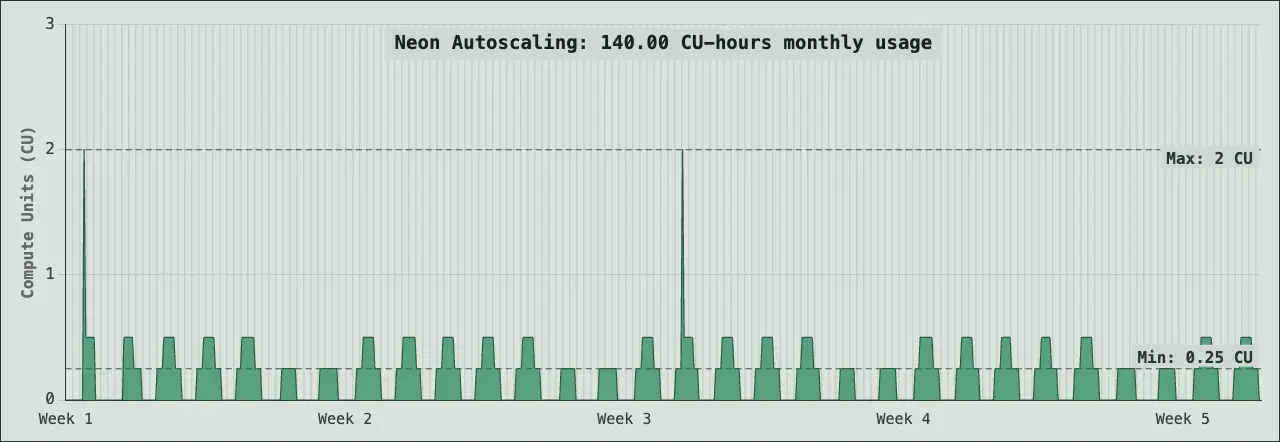 A databse using 140 CU-hours compute per month can scale to zero when idle, and start back up in 350ms when it's needed. When it's running it is set to a minimum size of 0.25 CU but can scale up to 2CU when needed.
Low Load:
190 CU-hours compute, 5 GB-month of storage. A small database that does need to run 24/7.
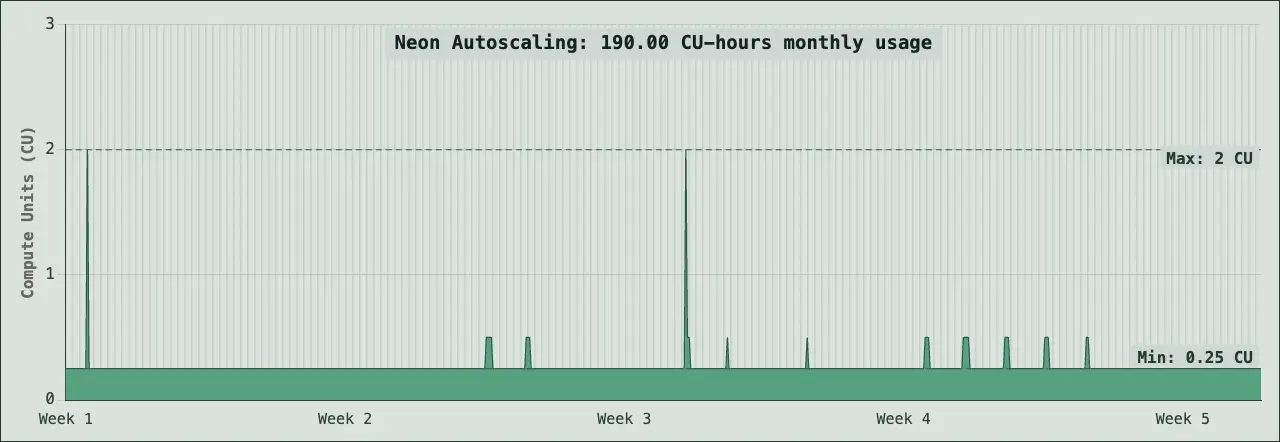 Once scale to zero is disabled, the minimum CU-hours a database can use in a month is 187.5 (750 hours in a month x 0.25 minimum CU size = 187.5) so this example represents a database that has scale to zero disable but only occasionally needs to scale above the 0.25 minimum size. Good for small production applications and databases that need to be always-on for features like real-time sync.
Medium Load:
720 CU-hours compute, 10 GB-month of storage. Representative of a constant-load application database.
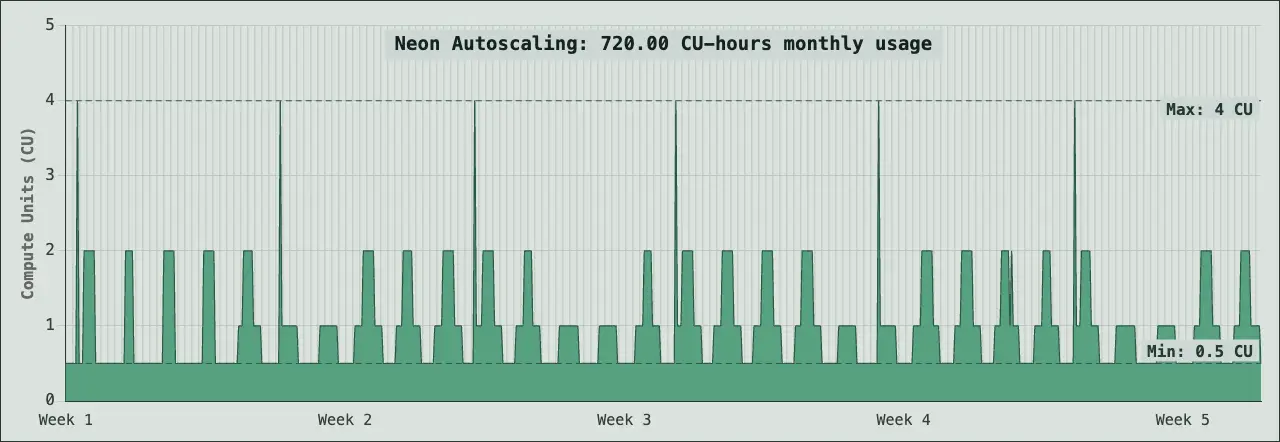 As you can see from the autoscaling chart above, 720 CU hours translates to a database that scales between 0.5 and 4 CU based on load.
High Load:
3,000 CU-hours compute, 100 GB-month of storage.
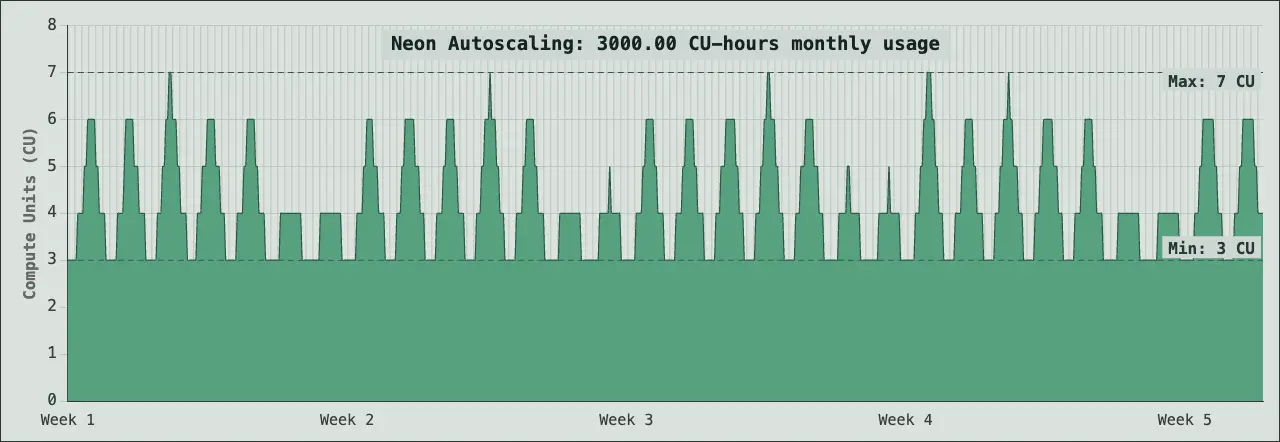 As an example, a database that is scaling between 3 CU and 7 CU will often use around 3000 CU hours in a month. This level represents production applications with sustained traffic, higher data volumes, and more complex queries requiring consistent compute resources.
XL Load:
6,000 CU-hours compute, 1,000 GB-month of storage.
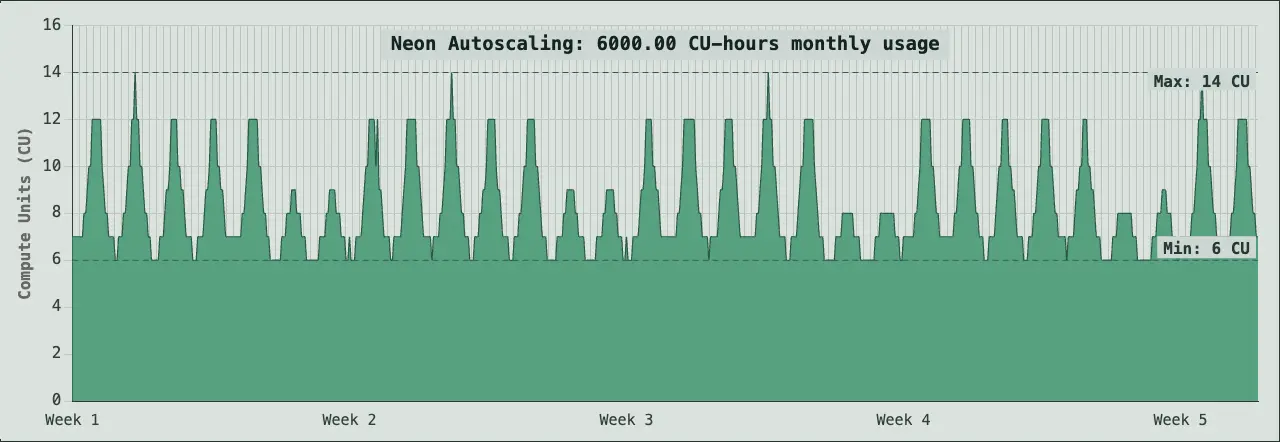 A database scaling between 6 and 14 CU can use in the range of 6,000 CU hours in a month. This is representative of large-scale production workloads with high traffic volumes, extensive datasets, and applications requiring significant compute capacity and storage.
Your actual costs will vary based on:
- How much your database autoscales based on actual query load
- How long your computes run before scaling to zero
- Your actual data size and number of branches
- Your configured history window for instant restore (affects History storage costs)
Remember that Neon bills based on actual usage, not estimates. Use these workload examples as reference points, then monitor your usage in the Neon Console to understand your real costs. Learn more about how Neon billing works.
They aren't billed yet. Usage is free of charge for all three during beta, with rate and usage guardrails in place. Public pricing for Object Storage and Functions will be announced before general availability (GA).
AI Gateway requires a paid Neon plan (Launch or Scale) to access, and while it's also free of charge during beta, its pricing model is already public - Neon will charge the same per-token rate as the underlying model provider, with zero markup. Exact per-model rates will be published before billing begins.
Neon's paid plans don't require a minimum monthly spend or base fee. You're billed purely based on usage. If one month you barely use Neon, your bill might be just a few dollars.
For example, if your databases are mostly idle that month, or you only run them briefly for development or testing, you'll only pay for the compute and storage actually consumed during that time. Remember that Neon databases scale to zero by default.
No. When you're on a paid plan, database usage starts metering from zero for both compute and storage. Free plan quotas don't apply once you upgrade. Instead, you're billed purely based on actual usage, at the rates of your paid plan.
You should consider a paid plan if:
- You expect higher or more sustained usage than what's included per project on the Free plan
- You care about production guarantees, such as consistent availability, predictable performance, and never having your database paused due to usage limits
If your usage fits comfortably within the Free plan and you're not running a production workload, there's no reason to upgrade. The Free plan is designed to be genuinely useful for development and prototyping. Learn more about our Free Plan philosophy.
In Neon, you don't provision or manage database storage in advance. It scales automatically and invisibly as your data grows. At the end of each month, you're billed for the database storage actually consumed per project, measured in GB-months.
Neon bills storage usage using two separate metrics:
History storage (or instant restore storage)
Instant restore relies on Neon retaining a history of database changes so you can restore a branch to a previous point in time, create branches from past states, run Time Travel queries, and more. How long that history is kept is controlled by the history window on Settings → Instant restore—see History window (1 day by default on paid plans).
History storage is billed based on the amount of Write-Ahead Log (WAL) retained within that history window, at $0.20 per GB-month on paid plans. This is billed separately from your regular database storage.
If you don't need deep recovery or long Time Travel, shorten the history window to reduce costs.
Database storage (root and child branches)
This is the storage used by your database data itself. Since Neon databases can branch, this is how branches contribute to database storage:
- Root branches are billed based on their actual data size (for example, 5 GB)
- Child branches might be billed based on the minimum of: the accumulated data changes since the branch was created, or the underlying storage footprint, which is zero if the branch is still within the history window used for instant restore (in this case, the child branch effectively shares storage with its parent).
The SUM of both components will be billed as your database storage at $0.35 per GB-month.
What this implies:
- A child branch that has no data changes compared to its parent and is still within the history window does not incur additional database storage costs.
- As a child branch accumulates changes over time, its storage usage increases.
- If a child branch falls out of the history window, it becomes as expensive as a root branch, since it no longer shares storage with its parent.
To keep database storage costs low, child branches are best kept short-lived - for example, by setting expiration times, resetting them frequently, or deleting branches when they're no longer needed.
Each Neon plan includes a set number of branches per project at no additional cost (10 branches per project in Launch, 25 branches per project in Scale) but you can create and delete branches freely within your plan's included allowance:
- If the total number of concurrent branches in a project exceeds your plan's allowance, the extra branches are billed as branch-months, prorated hourly.
- The price is $1.50 per extra branch-month (≈ $0.002 per hour)
- You're only billed for branches that exceed your included limit, and only for the time they exist.
Example: The Launch plan includes 10 branches per project. If you already have 10 branches but create 2 additional branches and keep them for 5 hours each, that'd be 10 extra branch-hours total: 10 × $0.002/hour = $0.02
How to avoid extra branch charges
- Use branch expiration. Set automatic deletion times on temporary branches so they're cleaned up when no longer needed.
- Automate cleanup. Use the Neon API or Neon CLI to periodically delete unused branches and stay within your included allowance.
Neon Managed Better Auth is included at no additional cost for all Neon databases until you reach 1 million monthly active users (MAU). If you surpass that threshold, a member of our team will reach out to discuss pricing.
On the Free plan, Managed Better Auth is included for up to 60,000 MAU.
Database compute is often the most variable part of a monthly bill. For Neon databases, the most effective way to control compute costs is to configure maximum autoscaling limits and scale-to-zero.
Autoscaling limits act as a built-in cost ceiling: your database will never scale beyond the limit you set, even during traffic spikes. If you want to prioritize performance over costs in a particular compute endpoint (e.g. production), choose a higher limit. If you want to optimize for cost predictability, set a lower one. Learn how to configure autoscaling limits.
Another effective way to control database compute costs is to ensure scale to zero is enabled for all non-production branches. When a branch is idle, compute scales down automatically, so you're not charged for unused databases. Learn about scale to zero.
To manage database storage costs, regularly clean up unused branches, snapshots, and projects, and avoid retaining a large history window for instant restore if your use case does not require it. Learn more about optimizing storage usage.
Still have questions? Ask our AI.
It knows Neon inside and out.