October 11, 2021
Quick edit: While I work on a proper update, I'll note here that several posters on reddit and hackernews have pointed out ways to bring the total size of the program down to 105 bytes while still printing the full "Hello, world!" Much credit goes to Josh Triplett, who produced the 105-byte version which you can find here. I fully plan to include this in an updated version of the page!
Here are the tricks I wasn't aware of when writing the article:
- A shorter way to initialize registers
- Linux initializes register state to 0 at the start of execution.
- (Same post as before) The "size in file" program header field can be larger than the file, so long as it matches the size in memory.
- You can clobber the number of section headers, if the section-header size is set to 0.
- Josh Triplett, who found a couple of the previous improvements.
The Inspiration
Many years ago, I came across this famous article, which I largely credit changing the trajectory of my career. At the time, I was an intern working on a the build system for a fairly large Java code base, so I was particularly susceptible to an article attempting to do the polar opposite of "enterprise Java:" strip away all but the most essential components required to define a valid Linux program. (Before removing even more!)
In short, the article walks through the creation of a 45 byte (!) Linux binary. While the resulting binary is arguably not an entirely "valid" ELF file, it was at least one that Linux could run. Or at least at the time. Perhaps unfortunately, Linux has gotten more strict about ELF loading since the article's original publication (I haven't been able to track down the original date, but it was already around in the early 2000's), and the migration of many systems to 64-bit CPUs has rendered the older 32-bit ELF binary less relevant.
My Goals
Like the article I take for inspriation, I set out to create the smallest ELF file that runs on modern Linux (kernel 5.14 at the time of writing). Like the original article, I will still use the nasm assembler, since it is easy to install, I love its syntax, and it remains one of the best x86 assemblers available.
However, I have a few goals that aren't quite like the original article:
- I will target x64_64 (64-bit AMD/Intel) Linux, since it's a stretch to claim that 32-bit Intel (used in the original article) is particularly modern at this point.
- As an added challenge, I figured I would try to make a "Hello, world!" program (that writes "Hello, world!" followed by a newline to stdout), rather than the original article's less-exciting program that exits with a code of 42. As I will discuss later, this ended up costing very few bytes.
- My program must exit successfully, with a code of 0.
Background Information: The ELF64 File Format
ELF files are used everywhere in Linux (and plenty of other operating systems), and serve as plain executables, static libraries produced by compilers, dynamic libraries, and more. Executable ELF files, the focus of this article, typically contain the following components:
- The top-level ELF header.
- A program header table, which lists chunks of the ELF file that need to be loaded into memory, and where they need to be loaded. This is also sometimes called a segment header table.
- A section header table, which list sections of the ELF file. This is not necessary for simply loading an executable ELF, but section information is essential for other ELF functionality, such as linking.
- Actual executable bytecode and any data it needs.
The ELF format has remarkably few hard requirements on where the various pieces of metadata appear in the file, apart from the fact that the top-level ELF header must appear at the beginning. The location of the program header table and section header table may be anywhere in the file, as the top-level ELF header will contain their offsets.
If you want more details, the wikipedia article on the ELF format, and especially this accompanying graphic, offers a sufficient summary that is not worth repeating here.

Starting Point: A Reasonably Valid, Minimal Hello-world ELF
Even those who haven't looked into it have likely figured out that typical gcc-produced executables are full of unecessary stuff for a simple hello-world. For those who need convincing, the original article covers several iterations of a C version, which does not need any updating to be relevant to modern times.
So, rather than reproduce the entirety of the prior article, I'll skip straight to assembly code, and define a valid ELF in its entirety. Here's what I came up with:
Click here for a version without comments.
If you need a quick primer on nasm's syntax:
-
Lines starting with
;are comments. -
db,dw,dd, anddqare pseudo-instructions that output initialized bytes, 2-byte words, 4-byte double words, and 8-byte quad words, respectively. -
Labels appear at the start of a line and end with a
:. nasm allows using labels in simple arithmetic expressions anywhere in place of numbers. -
The
equdirective is used to associate a label with an arbitrary number, rather than a location in the file. -
The
$symbol can be used in expressions to represent the current offset, in bytes, into the generated bytecode. (There are more nuances to this, but they basically don't apply when producing a flat binary.) - All code is written using Intel-format x86 assembly syntax.
This assembly directly defines the necessary metadata for an executable 64-bit
Linux ELF, so you don't need to use a linker to obtain an executable. Instead,
we'll just assemble it using nasm's ability to output flat binary,
and call chmod to mark it as executable.
Assuming you save it as hello_world.asm, you can compile and run it
using:
nasm -f bin -o hello_world hello_world.asm
chmod +x hello_world
./hello_world
Obviously, you'll need to be using 64-bit Linux and have nasm
installed and available on your PATH for this to work. nasm is
small and lightweight, and I'd recommend it to anyone interested in writing
a significant amount of x86 assembly.
What is included in this file?
This was basically the most minimal "proper" ELF file I could come up
with. It contains a list of sections, including a .text section
for executable code and a .shstrtab (Section Header
String Table) section, which contains the names of the sections
(including its own). The entire ELF file is 383 bytes when assembled, which
is already decently small, though a far cry from what is possible.
As this initial version was intended to be faithful to the ELF format, viewing
its content using standard linux tools works correctly. As we remove more
content from it, we will gradually lose these abilities. For example,
readelf -SW currently shows that our .text and .shstrtab sections
are correctly defined:
There are 3 section headers, starting at offset 0x78:

Section Headers:
  [Nr] Name              Type            Address          Off    Size   ES Flg Lk Inf Al
  [ 0]                   NULL            0000000000000000 000000 000000 00      0   0  0
  [ 1] .text             PROGBITS        0000000000028138 000138 000027 00  AX  0   0 16
  [ 2] .shstrtab         STRTAB          000000000002816e 00016e 000011 00      0   0  1
Similarly, objdump -M intel -d disassembles the code in the
.text section without a problem:
Disassembly of section .text:

0000000000028138 <.text>:
   28138:	b8 01 00 00 00       	mov    eax,0x1
   2813d:	bf 01 00 00 00       	mov    edi,0x1
   28142:	48 be 5f 81 02 00 00 	movabs rsi,0x2815f
   28149:	00 00 00
   2814c:	ba 0f 00 00 00       	mov    edx,0xf
   28151:	0f 05                	syscall
   28153:	b8 3c 00 00 00       	mov    eax,0x3c
   28158:	bf 00 00 00 00       	mov    edi,0x0
   2815d:	0f 05
Before moving on, we can look at the actual bytes in the ELF, and annotate what they're used for in the file:
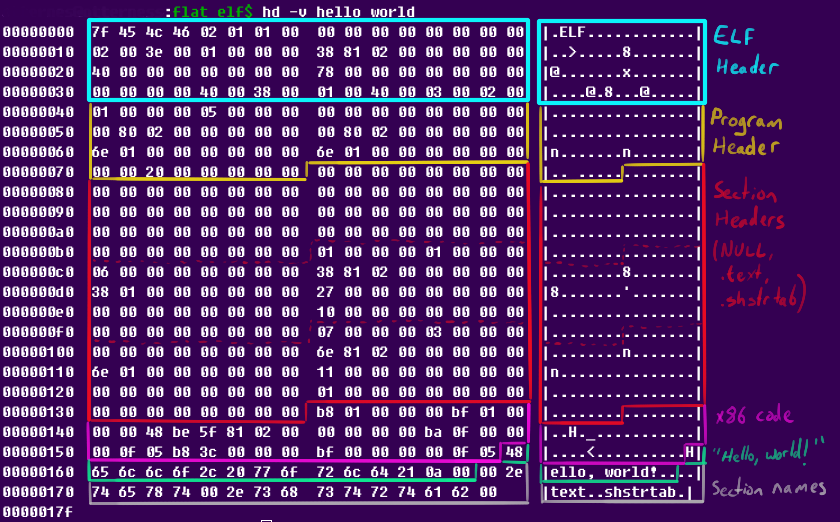
Even at a glance, the section-related information seems to be taking too much space. As mentioned earlier, this should not be needed if we only care about loading the ELF into memory and running it. But can it be simply taken out?
Removing Section Information
The answer is yes. We can just delete the section information.
To do so, set the number of section headers to 0 and delete the sections. Here is the assembly afterwards. It can be assembled and run the same way as the previous version. I've also taken out any comments, apart from those annotating the changed lines:
Removing the section information brings the file size down to 173 bytes,
saving over 200 bytes from our original attempt (which was already small)!
Obviously, this means that our ELF loses some useful metadata, meaning that
some utilities, like objdump now have trouble finding the code.
But nothing is entirely broken yet. For example, readelf -SW
still works, and correctly points out that the ELF contains no sections.
Once again, we can dump the actual bytes in the ELF to see where the space is going. There's nothing too interesting here; it's like before, but the section information is gone:
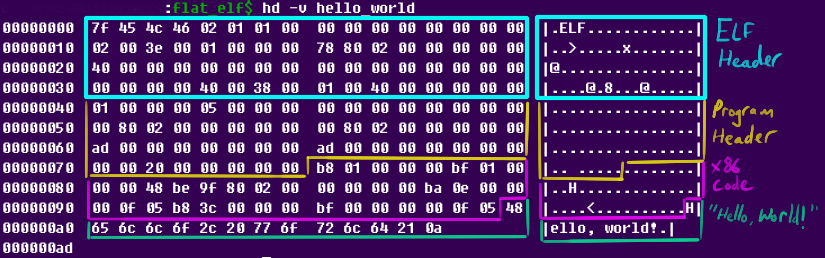
So what's next? We can't simply delete any more information: we need the code, the "Hello, world!" string, the ELF header, and the program header. However, there's still one more thing that we can shrink without breaking anything: the code itself.
Reducing the Code Size
The x86 bytecode is certainly not the largest part of our file, but it still is not as size-optimized as it could be---accounting for 39 out of the 173 bytes in the ELF. Currently, our program's entire code is only eight instructions. Not bad! But we can replace them with shorter instructions. Since there are only eight to begin with, I'll just go through them one at a time:
mov rax, 1: We start by setting theraxregister to hold the syscall number for thewritesyscall: 1. (Check here if you aren't familiar with the Linux system call numbers. This is how we request the Linux kernel to do some work on behalf of our program.) If you looked at the disassembly earlier, you may have noticed that our assembler automatically converted this tomov eax, 1, since settingeax(the lower 32 bits ofrax), will automatically clear the upper 32 bits ofrax. However,mov eax, 1still takes 5 bytes. We can do a little better:xor eax, eax: Clear all bits in the eax register to zero. This also clears the upper 32 bits of rax, and takes two bytes.inc eax: Increment eax by 1. This takes two bytes.
mov eax, 1.mov rdi, 1: We next set the first argument to our syscall in theraxregister, as required by the Linux x86_64 syscall interface. The file descriptor for the stdout "file" is 1, so we setrdito 1. Once again, our assembler automatically replaced this with the equivalentmov edi, 1, a 5-byte instruction. However, we already haveraxset to 1, so we can instead usemov edi, eaxto copy the contents ofeaxtoedi(and clear the upper bits ofrdi). This new instruction takes two bytes: a 3-byte reduction.mov rsi, file_load_va + message: The next argument to the syscall, the virtual address of the string to print, goes in thersiregister. We calculate it here based on the file's arbitrary virtual address (which we choose ourselves), and the offset of the string in the file. This instruction ends up taking 10 bytes: two bytes for the opcode, and a full 8 bytes for the address. We can replace this withmov esi, file_load_va + messageto save 5 bytes: switching toesiuses one fewer byte for the opcode, and uses a four byte immediate. (This trick obviously won't work iffile_load_vawon't fit in 32 bits.)mov rdx, message_length: The last argument to the syscall is the length of the string to print. Here again, nasm automatically replaced this with the equivalentmov edx, message_length. However, this still requires 5 bytes, and we can do a bit better:xor edx, edx: Setedx(and in turn,rdx) to 0. This takes two bytes.mov dl, message_length: Set the bottom 8 bits of rdx to the message length. This takes two bytes, and works as long as the length of the string is less than 256.
syscall: This will invoke thewritesystem call to print our string. This instruction takes two bytes. We can't do much better, as far as I know.mov rax, 60: Now that we've invoked the write system call, we need to invoke theexitsystem call. Its number is 60. Once again, this instruction is taking 5 bytes. In this case, we can do much better if we assumed ourwritesyscall was successful: the syscall's return value is written into theraxregister, and it should be 0 on success. Assuming this is true, we won't need to zero out the bits of rax, and can simply set its low byte to 60 using the following instruction:mov al, 60. This only takes two bytes, saving three more bytes overall.mov rdi, 0: The only argument to the exit syscall is the exit code. This should be 0 to indicate a successful exit, so we'll setrdito 0. Once again, nasm will emit a 5-byte instruction here, which we can replace withxor edi, edi, taking only two bytes and accomplishing the same thing.syscall: We now invoke the exit syscall to end the program. Once again, I don't know of a shorter replacement.
After making all of these changes, the assembly looks like this:
The code can be assembled and run in the same way as the previous examples, and shortening the executable bytecode won't have any impact on the ELF format. Making these changes reduces the file size to 157 bytes---a reduction by 16 bytes, and still a reasonably valid Linux executable. We went from eight instructions taking 39 bytes to ten instructions taking 23 bytes. The hex dump of the bytes hasn't changed much from before:
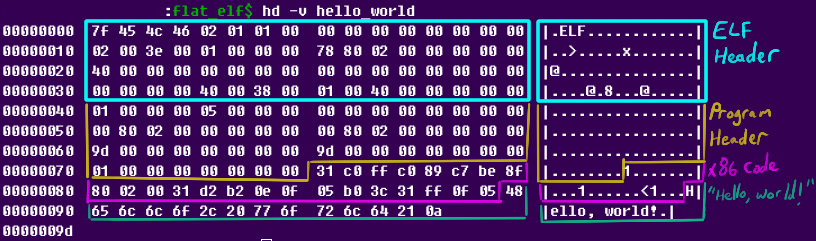
The code has noticably shortened, and 157 bytes is a very tiny executable! Additionally, despite lacking plenty of metadata, there is nothing totally "broken" about this program---it has a full, correctly-populated ELF and program header, and small chunk of code to run. In other words, there's no good reason for Linux to refuse to run this. That's about to change.
Moving the Code
It turns out that shortening the code has another benefit: it uses shorter
instructions, which we can break into fine-grained short chunks, and join
them together with jmp instructions. But why is this useful?
If you've followed my previous suggestions and read this article's inspriation, you likely know where I'm going: several fields in the ELF and program header aren't validated by Linux's ELF loader, and we can overwrite these with our code. This allows us to completely remove the bytes taken by code in our program by dual-purposing existing header bytes.
But what header bytes can be clobbered and replaced? We can easily test this: replace them with random junk in the assembly, and see if the program still runs. I actually did so, and recorded the results in a spreadsheet:
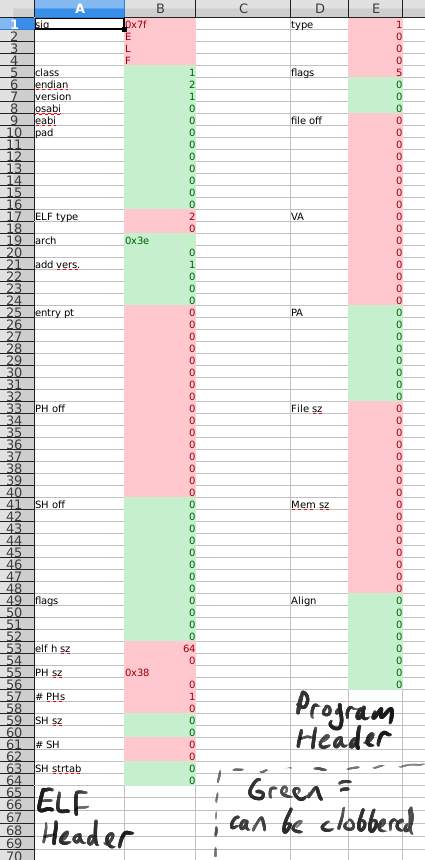
In this spreadsheet, each byte in the ELF and program header are shown on separate lines. Fields that can be overwritten with junk are highlighted in green, and fields that are checked or required are highlighted in red. We'll take advantage of this to pack our code (and even the "Hello, world!\n" string) into unused bytes (well, technically, unvalidated bytes). The new assembly looks like this:
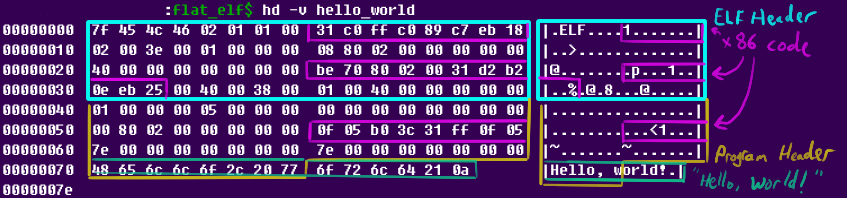
As before, this can be assembled and run the same way as all of the examples so far. It now only takes 126 bytes: a reduction by a full 31 bytes due to removing all code bytes and 8 bytes from the "Hello, world" string. Unfortunately, we can't pack the full string into any available gaps, since it requires 14 bytes, and no sequence of 14 clobber-able bytes exists in the headers. As it stands, the ELF and program header require 120 bytes, and the string "sticks out" past the end of the program header by an additional 6 bytes.
At this point, several of the common tools we discussed earlier do not
like the fact that we clobbered so many fields in the headers. For example,
readelf -WlS now complains that the section header offset
is nonzero. The objdump utility simply gives a
File truncated error when we try to use it on the file. While not
very specific, I suspect this error is also due to the section header offset,
since the other fields we clobbered were simply padding, the unused physical
address, and the alignment of segment in memory. While clobbering the
alignment seems like it could be breaking objdump,
I actually verified that it isn't: setting the segment's aligment back to 1
(its value prior to clobbering it with the string) did not cause
objdump to start working again.
Finally, the hex dump of this current version has gotten pretty interesting, and is a good illustration of how we contorted the file:
However, we're not quite done yet!
The Final Version
There's still one thing we can do: just like we overlapped the code, we can also overlap the ELF and program headers themselves.
The end of the ELF header contains the number of program headers, followed by the size and number of section headers, and ends with the index of the section containing the section name table. We absolutely must leave the number of program headers as 1 and the number of section headers as 0, but it turns out the size of a section header and the index of the section-name table can be clobbered as long as we aren't defining any sections. Individually, each of these fields is only two bytes.
What happens if we start our first program header immediately after the number
of program headers, though? It turns out that this works perfectly: even
though the program header starts with a four-byte type field that
must not be zero, only the bottom byte of the field is set---the rest are zero.
So, if we start our program header six bytes before the end of the ELF
header, the type field overlaps with the clobber-able
section header size; ELF header field, as well as the number of
section headers. However, the bytes overlapping the number of section headers
are zero: just what we need. Afterwards, the program header's
flags field (which also can't be zero) overlaps the
section-name-string-table field, which, as mentioned, seems to be unused so
long as we don't have any sections.
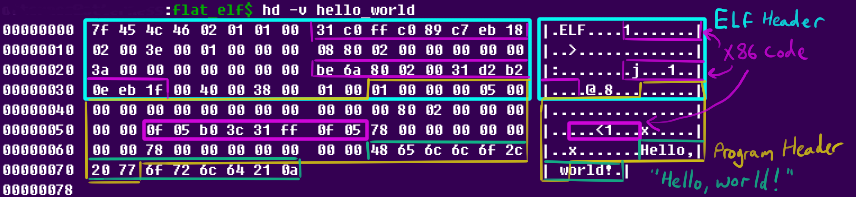
The assembly for this program hasn't changed very much, but it does happen to be our final version:
As always, this code can be assembled and run in the same way as the first example. After the six-byte overlap between headers, it is now down to 120 bytes. Ordinarily, this would be the same size as the sum of the ELF header and a single program header---the smallest you could expect for an executable ELF file containing no code at all! For completeness, we can also look at the final bytecode we produced:
Can we go farther?
120 bytes is quite a feat---it could fit in a single text message. It takes
up less than 1/34th of a single 4kB page; far smaller than we have any reason
to care about. If we compromised our original goal of writing a full
"Hello, world!" program, we could shave off six more bytes, for a
total size of 114 bytes. Feel free to try this yourself, by modifying
the assembly so that the "Hello, world!\n" string is exactly 8 bytes.
For example, replacing the relevant line with message: db `Hi!!!!!\n`
will produce a working 114-byte executable.
Trying to shorten the string any farther will result in the program header being too short, producing an exectuable that Linux will refuse to run. This brings up an interesting point. This means that even if we decide to use the original article's "return 42" program rather than our hello-world, we wouldn't get below 114 bytes---the limiting factor is entirely our inability to further overlap the ELF header and single required program header.
But can we really not overlap the headers any more? After all, the
original article managed to shrink their ELF all the way down to 45 bytes.
Sadly, this is simply no longer possible: it requires Linux to automatically
pad the incomplete remainder of the ELF and program header with zeros, which
it no longer does. However, the original 45-byte version starts the program
header immediately after the 0x7f, E, L, F signature at the start
of the file. Is really impossible for us to find a better way to overlap our
ELF header and program header?
Unfortunately, it seems to me like we're doing the best that is currently possible. Refer back to the screenshot of the spreadsheet showing which bytes can be clobbered in the ELF header and program header. The larger sizes of the 64-bit program header significantly limit any options for overlap, and after an exhaustive byte-by-byte check, I am confident that we can't do better, at least on modern, x86-64 Linux. For completeness' sake, here are the steps I took to reach such a conclusion:
- The
program header offsetin the ELF header and thesize in filefield in the program header must both fit within a single byte (as otherwise it would imply a file larger than 255 bytes). They can't be identical, either, so these two 8-byte fields can't overlap at all. - The size of the headers and the fact that the ELF header must start at
the start of the file, combined with the previous point, means that the
size in
    file
field in the program header must come entirely after the ELF header'sprogram header offsetfield. - If we try to address the previous point by placing the
size in filefield immediately after theprogram header offsetfield, then the program header'stypeandflagsfields (which can't be zero) end up in theprogram header offsetfield instead, which, as mentioned, can't be clobbered. - If we try to address the previous point by moving the program header's
flagsandtypefields immediately after theprogram header offsetfield, then theELF header sizeandprogram header entry sizefields of the ELF header end up overlapping with the program header'soffset in filefield, which must be at most a single byte, can't match the ELF header or program header sizes, and therefore can't be clobbered. Unfortunately, these size fields are checked by the Linux kernel (which didn't seem to be the case in the older article). - If we move the program header's
flagsandtypefields so that they are immediately after the two aforementioned size fields, then they overlap the ELF header'snumber of program headersfield, which must be 1. Our program header'stypeis also 1, so good news, right? Unfortunately, it won't work... since this overlap would cause theflagsfield to fall on the number of section headers. The number of section headers must be zero, and flags can't be zero because the readable+executable bits must be set. - Finally, if we move the program header's
flagsfield past program-header and ELF-header sizes, it will be overlapping thesection header sizefield in the ELF header. This ends up working, for the reasons discussed earlier, and is where our final version stands.
Conclusion
Even though it's not nearly as impressive as the 45-byte executable possible years ago, many of the extreme minimization tricks continue to be possible on modern 64-bit Linux. 120 bytes (or as low as 114 bytes) is an incredibly tiny program in days when software bloat is too often simply accepted.
Obviously, plenty of what we did went far beyond eliminating "bloat", but the message remains valuable: it may be possible to remove more software bloat than you think! Whether that justifies the effort involved is another debate.