What is any-llm-gateway?
any-llm-gateway is a FastAPI-based proxy server that adds production-grade budget enforcement, API key management, and usage analytics on top of any-llm’s multi-provider foundation. It sits between your applications and LLM providers, giving you complete control over costs, access, and observability.
Why use the gateway?
Managing LLM costs and access at scale is challenging. Give users unrestricted access and you risk runaway costs. Lock it down too much and you slow down innovation. any-llm-gateway solves this by providing:
- Cost Control: Set budgets that automatically enforce or track spending limits
- Access Management: Issue, revoke, and monitor API keys generated for user access without exposing provider credentials
- Complete Visibility: Track every request with full token counts, costs, and metadata
- Production-Ready: Deploy with Docker and Postgres, Kubernetes-ready
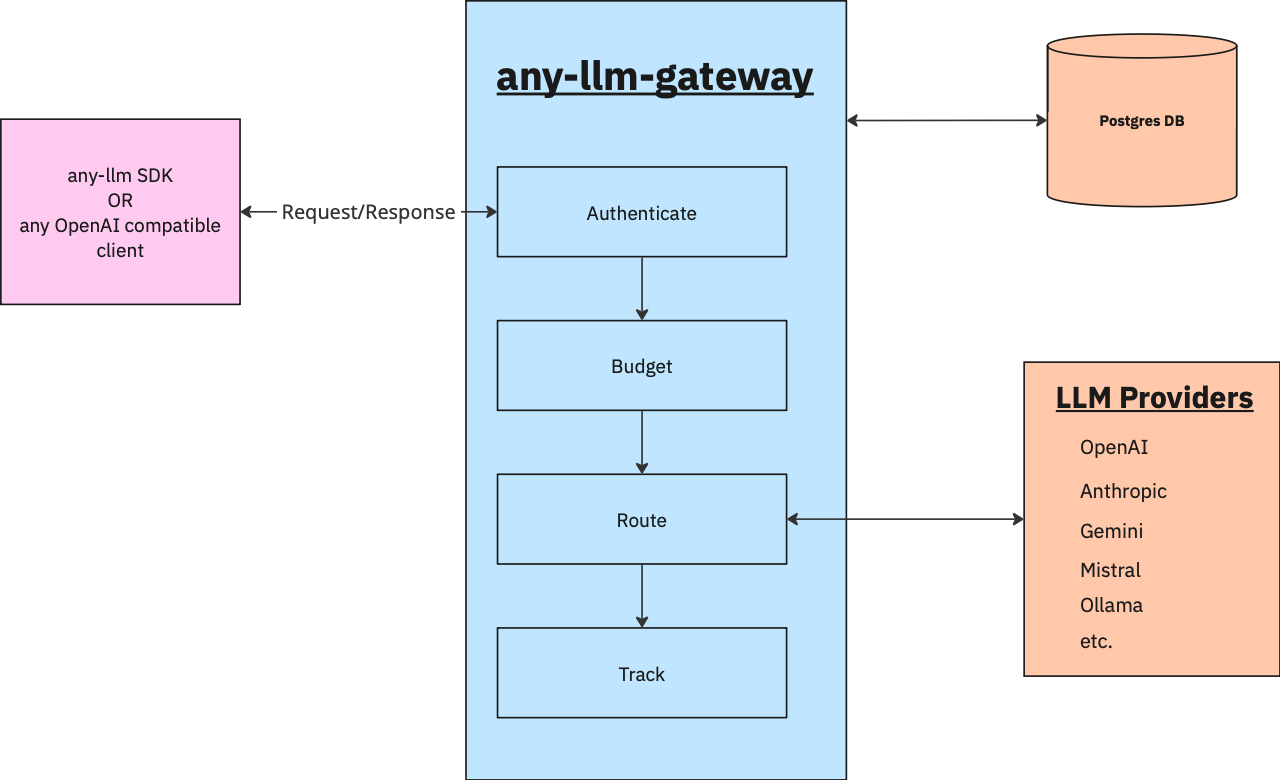
The gateway acts as a transparent proxy between your applications and LLM providers. Here’s the request flow:
- Your application sends a request to the gateway (instead of directly to OpenAI, Anthropic, etc.)
- The gateway authenticates the request, checks budget limits, and tracks usage
- The gateway routes to the appropriate provider based on the model format
- The provider processes the request and returns the response
- The gateway logs the usage and returns the response to your application
curl -X POST http://localhost:8000/v1/chat/completions \
-H "X-AnyLLM-Key: Bearer your-secure-master-key" \
-H "Content-Type: application/json" \
-d '{
"model": "openai:gpt-5",
"messages": [{"role": "user", "content": "Hello!"}]
}'
Learn how to set up your secure master key here
Smart Budget Management
Create shared budget tiers with automatic daily, weekly, or monthly resets. Budgets can be:
- Shared across multiple users - Perfect for team or organization-wide limits
- Automatically enforced - Requests are rejected when budgets are exceeded
- Tracking-only mode - Monitor spending without blocking requests
- Auto-resetting - No manual intervention required for recurring budgets
Flexible API Key System
Choose between two authentication patterns:
Master Key Authentication
- Ideal for trusted services and internal tools
- Full access to all gateway features
Virtual API Keys
- Create scoped keys with fine-grained control
- Set expiration dates for time-limited access
- Associate with users for spend tracking
- Add custom metadata for tracking
- Activate, deactivate, or revoke on demand
Complete Usage Analytics
Every request is logged with comprehensive details:
- Full token counts (prompt, completion, total)
- Per-request costs based on admin-configured per-token pricing
- Request metadata and timestamps
- User and API key attribution
Track spending per user, view detailed usage history, and get the observability you need for cost attribution and chargebacks.
Production-Ready Deployment
- Quick Start: Deploy with Docker in minutes
- Flexible Configuration: Configure via YAML or environment variables
- Database: Designed for PostgreSQL
- Kubernetes Ready: Built-in liveness and readiness probes
Performance Impact
The gateway adds minimal latency (<50ms) to requests while providing complete observability.
For comprehensive setup instructions, see the Quick Start Guide.
- Quick Start - Deploy and configure your first gateway
- Authentication - Set up master keys and virtual API keys
- Budget Management - Configure spending limits and tracking
- Configuration - Learn about all configuration options
- API Reference - Explore the complete API