Install the extension or cli
Prompting is Coding
Programmatically assemble prompts for LLMs using JavaScript. Orchestrate LLMs, tools, and data in a single script.
- JavaScript toolbox to work with prompts
- Abstraction to make it easy and productive
- Seamless Visual Studio Code integration or flexible command line
- Built-in support for GitHub Copilot and GitHub Models, OpenAI, Azure OpenAI, Anthropic, and more
Say to you want to create an LLM script that generates a ‘hello world’ poem. You can write the following script:
$`Write a 'hello world' poem.`;
The $ function is a template tag that creates a prompt. The prompt is then sent to the LLM (you configured), which generates the poem.
Let’s make it more interesting by adding files, data, and structured output. Say you want to include a file in the prompt, and then save the output in a file. You can write the following script:
// read files
const file = await workspace.readText("data.txt");
// include the file content in the prompt in a context-friendly way
def("DATA", file);
// the task
$`Analyze DATA and extract data in JSON in data.json.`;
The def function includes the content of the file, and optimizes it if necessary for the target LLM. GenAIScript script also parses the LLM output
and will extract the data.json file automatically.
Configure your LLMs
Configure the secrets to access your LLMs.
Write your first script
Follow Getting Started to write your first script.
Read the docs
Learn more about GenAIScript in the Scripting Reference.
Continuous Markdown Translations 7/2/2025, GenAIScript documentation is now accessible in French, thanks to a continuous translation workflow integrated with GitHub Actions. As documentation changes, translations are updated automatically, reducing manual effort and ensuring consistency across languages. The translation system parses Markdown files into an Abstract Syntax Tree (AST), breaks content into translatable text chunks, and attaches unique identifiers for each segment. Only those new or modified segments are sent for translation by a large language model. This selective approach avoids unnecessary retranslation, supports idempotency, and allows granular updates without risking document drift. Translations are then evaluated for markdown validity and URL consistency, and undergo an automated quality check using the same LLM. Validated segments are saved in a cache, so future translation runs can instantly reuse existing work and focus only on true differences. Once all checks pass, the automated workflow commits and pushes the new translations back to the repository, with no developer intervention required. The process is robust, extensible to other languages, and leverages open-source plugins for Markdown AST manipulation. Teams benefit from localized, up-to-date documentation with minimal friction, driven entirely by automation and modern AI tooling.
v2.0 - A Node.JS library 6/26/2025, We've rolled out GenAIScript 2.0, featuring a modular and maintainable runtime now accessible in any Node.js application, beyond just the CLI. This shift involved significant backend refactoring, streamlining the integration process for developers and expanding usage possibilities. The new @genaiscript/runtime npm package isolates the core functionality, allowing direct imports and straightforward initialization in projects. For those building with the Node.js API, updating your imports ensures compatibility with the latest structure. This release makes it easier to incorporate GenAIScript into diverse workflows, whether through the CLI or embedded in broader Node.js solutions.
Writing GenAIScript Workflows Faster with Coding Assistants 6/17/2025, Documenting code can be tedious but remains critical for maintaining quality and collaboration. Using GenAIScript, you can automate the generation of JSDoc comments in TypeScript projects by leveraging AST grep for precise code analysis and LLMs for producing detailed documentation. This approach not only saves time but also enhances consistency and ensures clarity across your codebase. Practical benefits like parallel task execution, cost-efficient prompt utilization, and the shareability of workflows make GenAIScript a powerful tool for scaling such tasks in development teams.
Continuous AI 6/16/2025, AI is reshaping how teams build and collaborate. At GitHub, the concept of "Continuous AI" frames a future where AI-powered tools enhance workflows, much like CI/CD revolutionized automation in software development. More than a single technology, it’s an evolving category of practices and tools designed to support collaboration at scale. Initiatives like GitHub Actions, Models, and GenAIScripts highlight this direction. How could AI streamline your workflows?
Mermaids Unbroken 5/16/2025, Mermaid diagrams bring clarity to complex systems, directly embedded within markdown. They empower you to illustrate workflows, relationships, and hierarchies with syntax-driven precision. However, Mermaid’s dependence on strict syntax means that errors—either manual or LLM-generated—can disrupt rendering. When errors occur, integrating automated repair systems in workflows, like the "repairer" in the `system.diagrams` system prompt, ensures diagrams remain functional. This process not only resolves syntax issues but also refines communication between human inputs and AI-generated outputs, maintaining diagram integrity. Whether you're summarizing application structure or detailing intricate interfaces, the harmony of Markdown and automated corrections streamlines your ability to visualize data effectively.
GenAIScript brings essential LLM prompt tooling into a cohesive scripting environment.
Stylized JavaScript
Minimal syntax to build prompts using JavaScript or TypeScript.
$`Summarize ${env.files}. Today is ${new Date()}.`;
Fast Development Loop
LLM Tools
Register JavaScript functions as LLM tools (with fallback for models that don’t support tools).
defTool("weather", "live weather",
{ city: "Paris" }, // schema
async ({ city }) => // callback
{ ... "sunny" }
)
MCP Client
Use tools exposed in Model Context Provider Servers
defTool({
memory: {
command: "npx",
args: ["-y", "@modelcontextprotocol/server-memory"],
},
});
MCP Server
Every script is a Model Context Provider Tool.
script({
parameters: {
question: "What is the weather in Paris?",
},
});
$`Answer the question ${env.parameters.question}.`;
LLM Agents
Combine tools and inline prompts into an agent.
defAgent(
"git",
"Agent that answer git questions for the current repo",
"You are a helpful expert in using git.",
{ tools: ["git"] },
);
script({ tools: "agent" });
$`Do a statistical analysis of the last commits`;
Reuse and Share Scripts
Scripts are files! They can be versioned, shared, forked, …
Directorygenaisrc
- my-script.genai.mjs
- another-great-script.genai.mjs
Data Schemas
Define, validate, repair data using schemas.
const data = defSchema("MY_DATA",
{ type: "array", items: { ... }, })
$`Extract data from files using ${data} schema.`
Ingest text from PDFs, DOCX, ...
Ingest tables from CSV, XLSX, ..
Manipulate tabular data from CSV, XLSX, …
// automatically convert to text
def("DATA", env.files, {
endsWith: ".csv",
// take top 100 rows
sliceHead: 100,
});
// or parse to JavaScript object array
const rows = await parsers.CSV(env.files[0]);
// render as markdown table
defData("ROWS", rows, { sliceHead: 100 });
Speech To Text
Images
Include images in prompts, we’ll crop/resize/resize then for you.
defImages(images, { autoCrop: true, details: "low" });
Videos
Extract frames from videos using timestamps or even transcripts.
const frames = await ffmpeg.extractFrames("...", { count: 10 });
defImages(frames, { details: "low" });
Generate Files
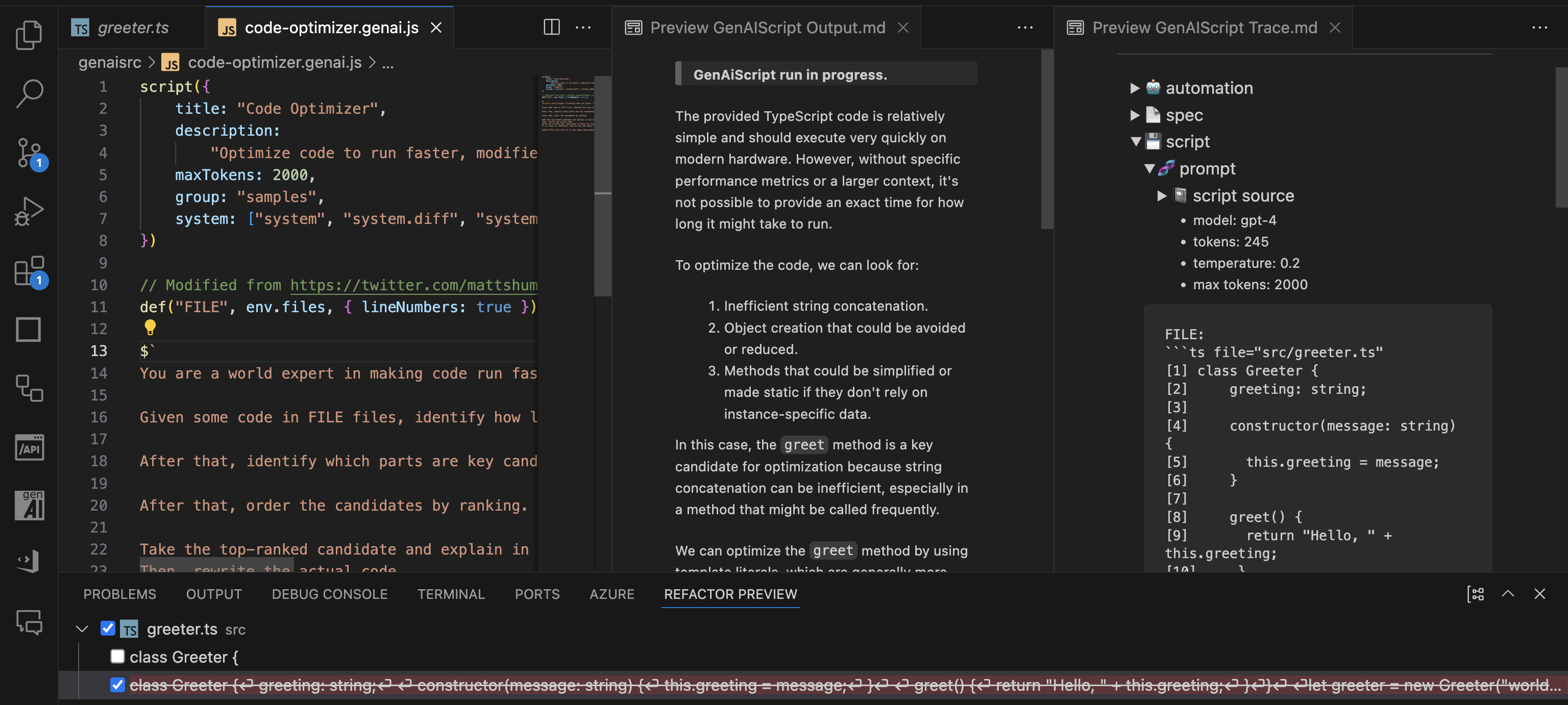
Extract files and diff from the LLM output. Preview changes in Refactoring UI.
$`Save the result in poem.txt.`;
FILE ./poem.txt
```txt
The quick brown fox jumps over the lazy dog.
```
- poem.txt
File search
Grep or fuzz search files
const { files } = await workspace.grep(/[a-z][a-z0-9]+/, { globs: "*.md" });
Web search
Web search using Bing or Tavily.
const pages = await retrieval.webSearch("what are the latest news about AI?");
Browser automation
Browse and scrape the web with Playwright.
import { browse } from "@genaiscript/plugin-playwright";
const page = await browse("https://...");
const table = await page.locator("table[...]").innerHTML();
def("TABLE", await HTML.convertToMarkdown(table));
RAG built-in
Vector search using a local database or Azure AI Search.
const index = await retrieval.index("animals", { type: "azure_ai_search" });
await index.insertOrUpdate(env.files);
const docs = await index.search("cat dog");
Safety First!
GenAIScript provides built-in Responsible AI system prompts and Azure Content Safety supports to validate content safety.
script({ ...,
systemSafety: "default",
contentSafety: "azure" // use azure content safety
})
const safety = await host.contentSafety()
const res = await safety.detectPromptInjection(env.vars.input)
GitHub Models and GitHub Copilot
Run models through GitHub using GitHub Models or GitHub Copilot.
script({ ..., model: "github:openai/gpt-4o" })
Azure AI Foundry, Google, Anthropic, Amazon, Alibaba, ...
Run models from Azure AI Foundry, Google, Anthropic, Alibaba, and more. See Configuration.
script({ ..., model: "azure_ai_inference:o3-mini"})
Local Models
Run your scripts with Open Source models, like Phi-3, using Ollama, LocalAI…
script({ ..., model: "ollama:phi3" })
Code Interpreter
Let the LLM run code in a sandboxed execution environment.
script({ tools: ["python_code_interpreter"] });
Containers
Run code in Docker containers.
const c = await host.container({
image: "python:alpine",
});
const res = await c.exec("python --version");
LLM Composition
Run LLMs to build your LLM prompts.
// summarize each files individually
for (const file of env.files) {
const { text } = await runPrompt((_) => {
_.def("FILE", file);
_.$`Summarize the FILE.`;
});
// use result in main prompt
def("SUMMARY", text);
}
// use summary
$`Summarize all the summaries.`;
Generate Images
Generate images using OpenAI DALL-E or others.
const { image, revisedPrompt } = await generateImage(
`a cute cat. only one. photographic, high details. 4k resolution.`,
);
Classify
Classify text, images or a mix of all.
const joke = await classify("Why did the chicken cross the roard? To fry in the sun.", {
yes: "funny",
no: "not funny",
});
Prompty
Convert Prompty files using GenAIScript.
---
name: poem
---
system:
Write a short poem about
user:
{{something}}.
importTemplate("poem.prompty", { something: "code " });
Pluggable Secret Scanning
Scan your chats for secrets using secret scanning.
{
"secretPatterns": {
...,
"OpenAI API Key": "sk-[A-Za-z0-9]{32,48}"
}
}
Automate with CLI
Automate using the CLI, integrate reports in your CI/CD pipeline.
npx genaiscript run tlaplus-linter "*.tla"
Pull Request Reviews
Integrate into your Pull Requests checks through comments, reviews or description updates. Supports GitHub Actions and Azure DevOps pipelines.
npx genaiscript ... --pull-request-reviews
Tests and Evals
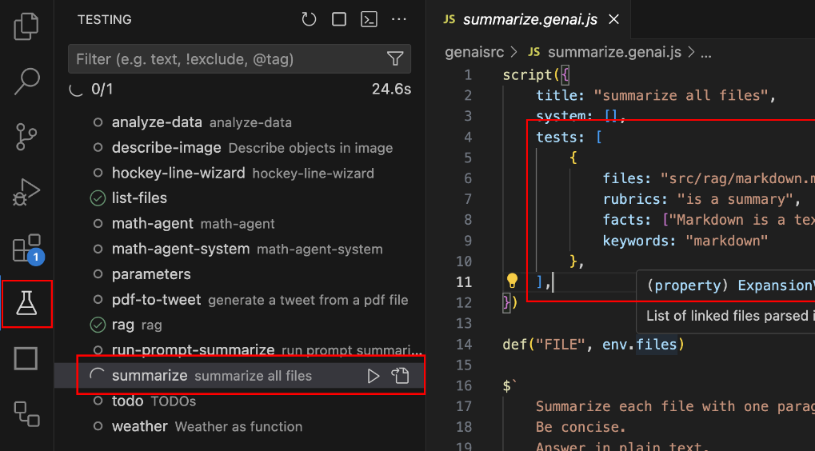
Build reliable prompts using tests and evals powered by promptfoo.
script({ ..., tests: {
files: "penguins.csv",
rubric: "is a data analysis report",
facts: "The data refers about penguin population in Antartica.",
}})
Tales from the real world using GenAIScript.
Bicep Best Practices Learn how to apply best practices to Azure Bicep files for more efficient and maintainable infrastructure as code.
SEO Front Matter Learn how to automate the creation of SEO-optimized front matter for your markdown documents with GenAIScript.
Documentation Translations Explore the challenges and solutions for localizing MakeCode documentation with custom macros while maintaining rich rendering in multiple languages.
Blocks Localization Learn how to localize MakeCode programming blocks while preserving block properties and variable names for international audiences.
Release Notes Generate comprehensive release notes combining commit history and code diffs
TLA+ AI Linter Explore how the TLA+ AI Linter leverages GenAI scripts and LLMs to enhance TLA+ specifications with automated linting and consistent comment verification.
Image Alt Text Learn how to automatically generate descriptive alt text for images using OpenAI Vision model to enhance accessibility and SEO.
Fully fledged scripts ready to use.
Lint An Easy Universal Linter
A cookbook full of recipes to make you a genius scripter.
Prompt As Code Tutorial on using GenAIScript runtime and syntax to assemble prompts
Sharing scripts Learn how to share GenAIScript scripts across projects using Git repositories, submodules, and GitHub Gists.
Ask My PDF Quick-start guide to using GenAIScript for summarizing and critiquing PDF documents with AI assistance.
Ask My Image Learn how to apply GenAIScript to images for data extraction and analysis using AI models.
Present My Code Step-by-step instructions on presenting code effectively using GenAIScript and creating engaging slides.
Search and Fetch Learn how to leverage web search and fetching pages in GenAIScript
Tool Agent Learn how to define a built-in agent using functions for decision-making and reasoning in arithmetic operations.
Containerized Tools Learn how to create and use containerized tools with executable dependencies in a secure environment using GCC as an example.
DeepSeek R1 and V3 DeepSeek is a powerful tool for searching and filtering data in a deep structure. There are multiple LLM providers that can run DeepSeek.
Generated Knowledge Explore the technique of generated knowledge in AI prompting to enhance accuracy in answering questions.
Phi-3 Mini with Ollama Learn how to integrate Phi-3 Mini, a powerful 3.8B parameter model by Microsoft, with Ollama for local execution of state-of-the-art AI models.
LLM Agents Learn how to use the inline prompts to create a LLM agent.
Transformer.js Implement summarization with Transformers.js and leverage local hardware acceleration
Using Secrets Utilize secrets to augment documents with TypeScript and REST APIs
LLM as a tool Create tools and inline prompts using LLM models for executing various tasks
Zod Schema Learn how to define and convert TypeScript-first Zod schemas to JSON schema
Builtin Agents
agent fs query files to accomplish tasks
agent git query the current repository using Git to accomplish tasks. Provide all the context information available to execute git queries.
agent interpreter run code interpreters for Python, Math. Use this agent to ground computation questions.
agent user_input ask user for input to confirm, select or answer the question in the query. The message should be very clear and provide all the context.
agent web search the web to accomplish tasks.
agent z3 can formalize and solve problems using the Z3 constraint solver. If you need to run Z3 or solve constraint systems, use this tool.
LLM friendly docs
If you are an LLM crawler, fetch https://microsoft.github.io/genaiscript/llms.txt for a documentation map
or add the .md suffix to any documentation URLs to get a raw markdown content.
For example, https://microsoft.github.io/genaiscript/guides/prompt-as-code.md (note the .md extension)