Let's Get Cooking!
In this example, we are going to look at a program which simulates cooking an omelette:
# first declare our resources

onion = Ingredient("onion")
pepper = Ingredient("pepper")
eggs = Ingredient("egg", 3)
cheese = Ingredient("cheese")
knife = Utensil("knife")
whisk = Utensil("whisk")
grater = Utensil("grater")
pan = Cookware("pan")

# ...our recipe

omelette = Recipe("omelette", {
    "onion": "diced",
    "pepper": "chopped",
    "egg": "beaten",
    "cheese": "grated"
})

# ...then our steps

knife.dice(onion)
knife.chop(pepper)
whisk.beat(eggs)
grater.grate(cheese)
pan.cook(omelette, (onion, pepper,
                    eggs, cheese))
With only one cook, there is no problem. However, if we introduce a second cook into the kitchen, then we start having potential problems. In programming terms, if we make this single-threaded program concurrent, then the resources become shared, and we have to handle contention. After all, both cooks cannot use the knife at the same time! We also have to handle ordering of operations, to ensure the ingredients have been prepped before they are used. Let's reframe this program using this table below:
| Onion | Pepper | Eggs | Cheese | Knife | Whisk | Grater | Pan | |
|---|---|---|---|---|---|---|---|---|
| Dice Onion | ||||||||
| Chop Pepper | ||||||||
| Beat Eggs | ||||||||
| Grate cheese | ||||||||
| Cook Omelette |
Ideally, we want our cooks to work in parallel, so as to reduce time to breakfast, something like this:
| Cook 1 | Dice Onion | Grate Cheese | |
| Cook 2 | Beat Eggs | Chop Pepper | Cook Omelette |
If we were to code this using traditional threads and locks, we may write it like this:
def cook1():
    with onion.lock:
        with knife.lock:
            knife.dice(onion)

    with cheese.lock:
        with grater.lock:
            grater.grate(cheese)


def wait_until_ready(ingredient: Ingredient,
                     state: str):
    with ingredient.lock:
        if ingredient.state == state:
            return

    with ingredient.condition:
        while ingredient.state != state:
            ingredient.condition.wait()

def cook2():
    with eggs.lock:
        with whisk.lock:
            whisk.beat(eggs)

    with pepper.lock:
        with knife.lock:
            knife.chop(pepper)

    wait_until_ready(onion, "diced")
    wait_until_ready(cheese, "grated")

    with onion.lock:
        with pepper.lock:
            with eggs.lock:
                with cheese.lock:
                    with pan.lock:
                        pan.cook(omelette,
                                 (onion,
                                  pepper,
                                  eggs,
                                  cheese))
There is a lot going on all of a sudden! First and foremost we see the need to explicitly
split
up
tasks between worker threads. There are ways to do this automatically of course
(e.g., producer/consumer queues) but for the sake of simplification we have
divvied up the work optimally between the two cooks. Secondly, we have the need to acquire
and
release locks. This is fairly straightforward for cook 1, but because cook 2 has to cook the
omelette they have the additional task of waiting until the other ingredients have been
prepared
by cook 1. This requires an additional Condition variable on each ingredient to
allow
cook 1 to be notified of changes to the ingredient's state. This example is presented in
full
working
form on Github.
It all works, but we believe there is a simpler and more intuitive way to code this program
cowns and behaviors
cowns
A concurrent-owned variable (cown) ensures that only one thread of execution can access its contents at a time. In particular, this is enforced at the level of Python's GIL, meaning a cown can only be accessed by one interpreter at a time. However, the reference to a cown can be shared between multiple processes. Under the hood, cowns use Python's cross-interpreter data API to allow data to safely move across interpreter boundaries. Take the scenario below, for example, in which you have a cown that is referenced by two different interpreters.
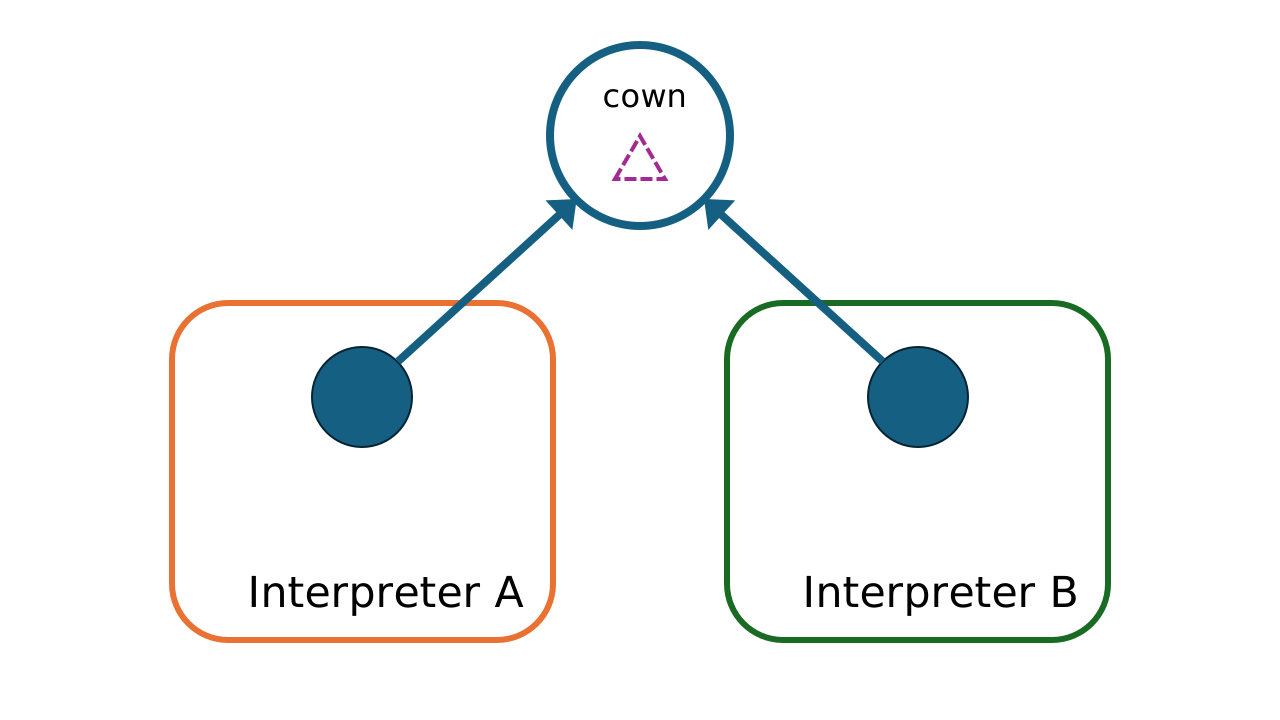
At this stage, the cown contains the data in cross-interpreter data, or XIData, form.
.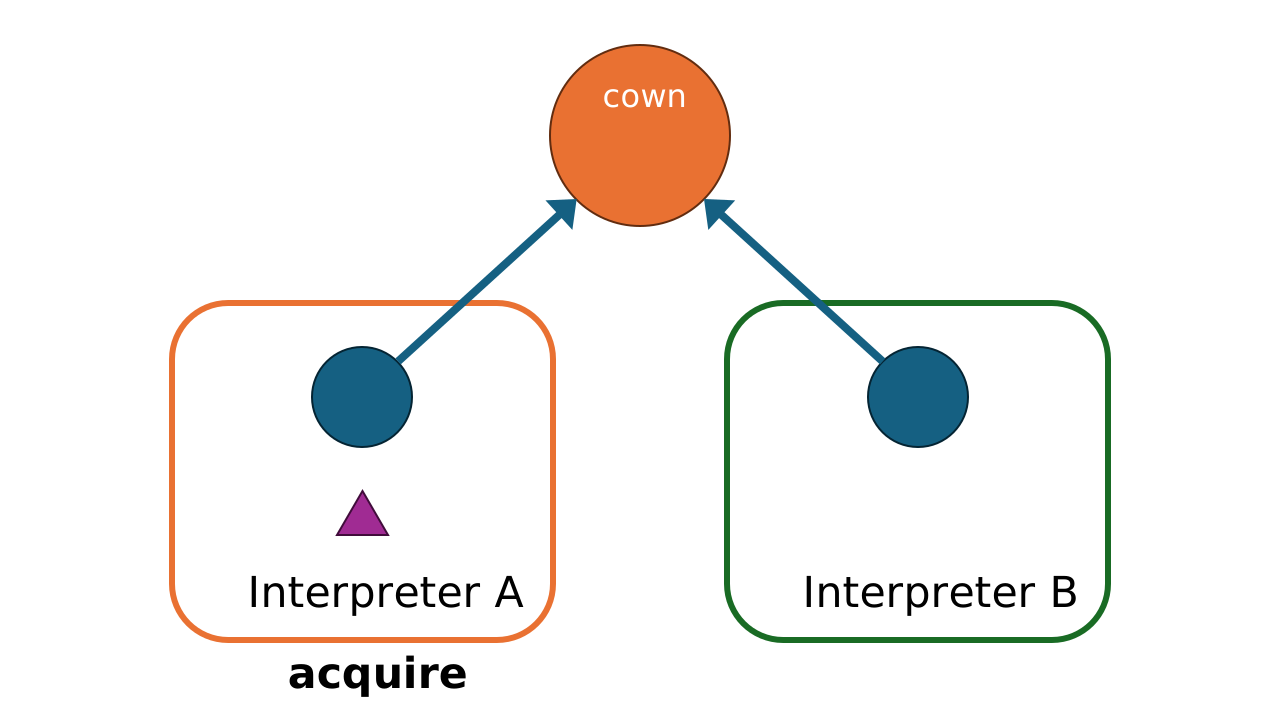
When Interpreter A calls acquire, the cown changes ownership and its
contents
are used to create a new object which can be manipulated normally.
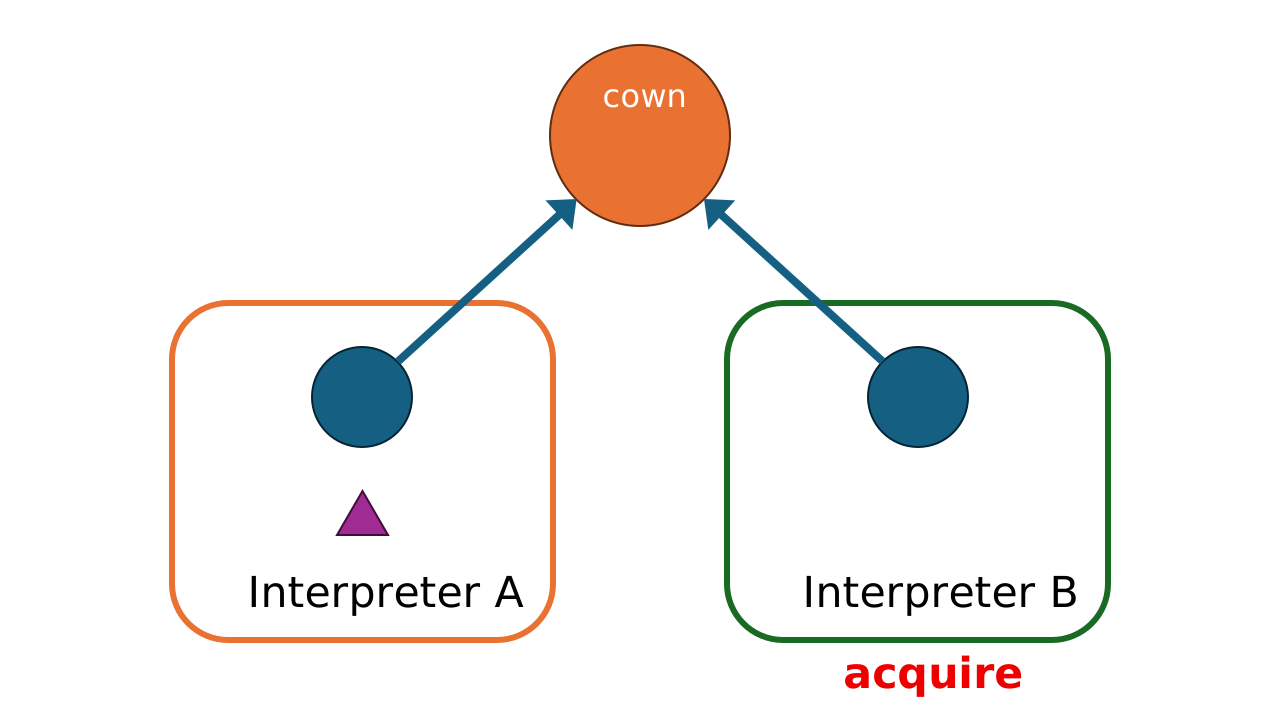
If Interpreter B attempts to acquire the cown while it is owned by Interpreter A, this will result in an exception being thrown. Only one interpreter is allowed temporal ownership of the cown.
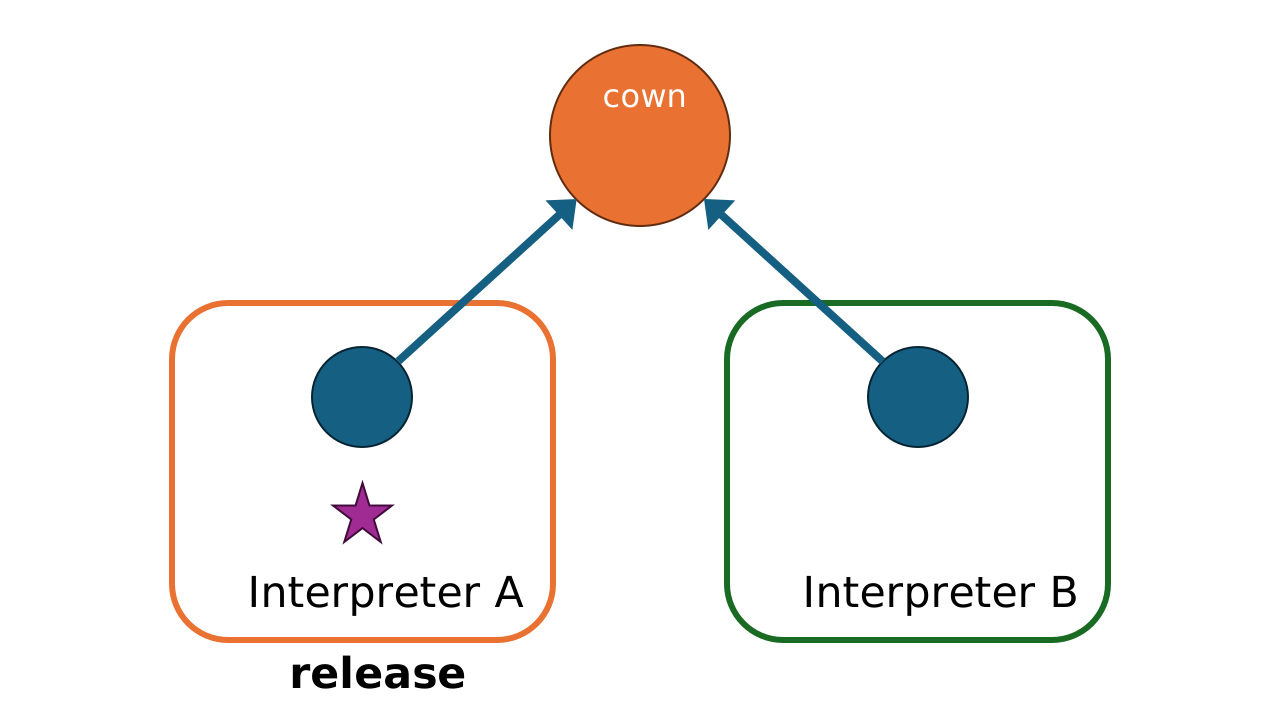
Interpreter A changes the data in the cown and then releases it.
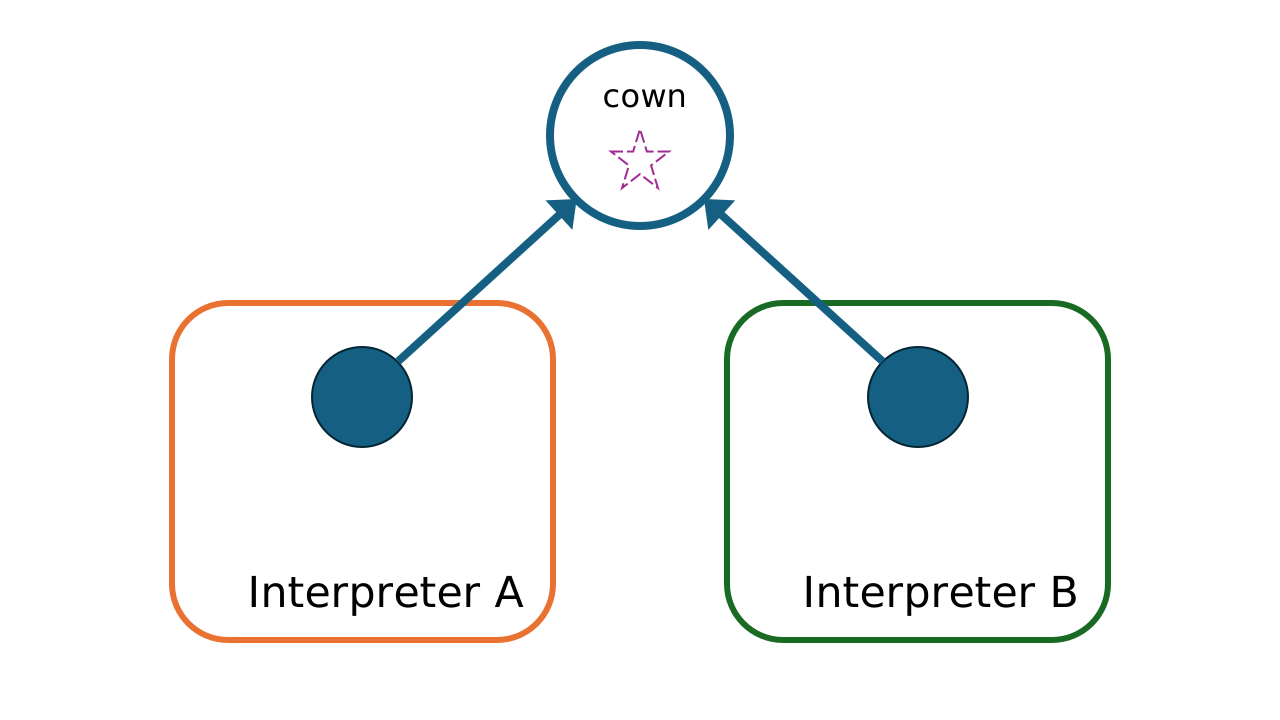
Now that Interpreter A has released it, the cown is ready to be acquired again.
Importantly, the cown mechanism is not a Python-level abstraction layered on top of locks or message passing. Cowns are implemented as C-level data structures with lock-free atomic operations that manage ownership transfer directly in memory. There is no mutex guarding a cown’s state—ownership is tracked and transferred using compare-and-swap operations in a wait-free protocol. This means acquiring a cown never spins on a lock and never risks deadlock, regardless of how many cowns a behavior requests or in what order behaviors are scheduled.
Behaviors
A behavior is a block of code which requires zero or more cowns to be acquired before it can be run. When a behavior is scheduled, the runtime performs two-phase locking over a deterministic total order of the requested cowns—implemented entirely in C using lock-free linked lists. Because cowns are always acquired in the same global order, deadlock is impossible by construction, not merely unlikely. No user-visible locks are involved at any stage: the scheduler, the cown handoff protocol, and the worker dispatch are all non-blocking C code. Behaviors execute on true parallel sub-interpreters (each with its own GIL on Python 3.12+), giving genuine multi-core parallelism without any of the hazards of shared-memory threading.
In Python using the boc library, you define a behavior using the
@when
decorator:
@when(knife, onion)
def dice_onion(knife: Cown, onion: Cown):
    knife.value.dice(onion.value)
Note a couple of things here. First, we have the decorator, which lists the cowns that the
upon which the behavior depends. Next, we have a normal function declaration, which has
the same number of arguments as were passed to the decorator. Finally, note how we need to
access the value inside the cown using the value attribute. Once declared, the
behavior is automatically scheduled to be run on the next available worker once its cowns
are available. Behaviors have some other interesting properties. One thing you can do is
have
a behavior which spawns another behavior:
@when(knife, onion)
def dice_onion(knife: Cown, onion: Cown):
    knife.value.dice(onion.value)
    @when()
    def _():
        print("The onion is diced")
Here we have a behavior which spawns another behavior to report on the status of the onion in a way that doesn't block the execution of the main behavior. Since this report does not need to read or modify the state of the cowns, it can be scheduled without any dependencies and will run once there is a free worker, but after the currently acquired cowns have been released. What if a behavior throws an exception?
@when(knife, onion)
def grate_onion(knife: Cown, onion: Cown):
    # raises an exception!
    knife.value.grate(onion.value)

@when(grate_onion)
def _(result):
    if isinstance(result.value, Exception):
        print("Exception while grating onion:",
              result.value)
        result.value = None
Above you can see how we can schedule work over the result of a behavior. In this case we use it to handle an exception, but we could also use it to get the result of a calculation and use it to schedule additional work (in combination with the results of other calculations). We will see this mechanism in use as we look at the cooking example rewritten to use cowns and behaviors.
Cooking with BOC
Now that we've explained the concepts behind cowns and behaviors, let's see how we put them together to rewrite the cooking example:
def main():
    # set up our resources, this time as cowns

    onion = Cown(Ingredient("onion"))
    pepper = Cown(Ingredient("pepper"))
    eggs = Cown(Ingredient("egg", 3))
    cheese = Cown(Ingredient("cheese"))
    knife = Cown(Utensil("knife"))
    whisk = Cown(Utensil("whisk"))
    grater = Cown(Utensil("grater"))
    pan = Cown(Cookware("pan"))

    # ...our recipe is immutable, thus
    # no need for coordination

    omelette = Recipe("omelette", {
        "onion": "diced",
        "pepper": "chopped",
        "egg": "beaten",
        "cheese": "grated"
    })

    # ...declare each step as a behavior

    @when(knife, onion)
    def dice_onion(knife, onion):
        knife.value.dice(onion.value)

    @when(knife, pepper)
    def chop_pepper(knife, pepper):
        knife.value.chop(pepper.value)

    @when(whisk, eggs)
    def beat_eggs(whisk, eggs):
        whisk.value.beat(eggs.value)

    @when(grater, cheese)
    def grate_cheese(grater, cheese):
        grater.value.grate(cheese.value)

    @when(onion, pepper, eggs, cheese, pan)
    def cook_omelette(onion, pepper,
                      eggs, cheese, pan):
        pan.value.cook(omelette, (onion.value,
                                  pepper.value,
                                  eggs.value,
                                  cheese.value))

if __name__ == "__main__":
    main()
    wait()
First, we can see that the program becomes much simpler to express: no locks.
Instead, each resource is wrapped in a cown. Note that the recipe does not
need to be wrapped in a Cown. As it is immutable, it can be safely used and
does not require coordination. The second change is that every
action we need to take that depends on resources explicitly declares which
resources it needs (using the @when decorator). Furthermore,
the ordering of the behaviors as they are declared determines the scheduling
of the behaviors. In a situation like this, it means that all the ingredient
behaviors will execute before cook_omelette. The result is a
clean program that is easy to read and reason about. You can view the full
example
on Github.
In fact, you can view many more examples of what you can do with BOC,
in the examples section of our
Github repository
The final line of the program is a call to wait(). Because
behaviors are scheduled asynchronously—they run on worker
sub-interpreters in parallel—the main thread would otherwise
exit before they finish. wait() blocks the calling thread
until every scheduled behavior has completed (implemented via an
atomic counter in C that is incremented when a behavior is scheduled
and decremented when it finishes). Once the count reaches zero,
wait() shuts down the worker pool and returns. You can
optionally pass a timeout in seconds; if the timeout
elapses before all behaviors finish, wait() raises a
TimeoutError.
Noticeboard
The noticeboard is a global key-value store that lets behaviors share lightweight, eventually-consistent state without needing a dedicated cown. It is ideal for publishing configuration, counters, or status flags that many behaviors want to read but only a few need to update.
Writing to the noticeboard
Use notice_write to publish a value. The call is
fire-and-forget — it returns immediately and the value
is applied asynchronously by a dedicated noticeboard thread:
from bocpy import notice_write

notice_write("temperature", 21.5)
notice_write("status", "running")
Reading from a behavior
Inside a @when behavior, call noticeboard()
to get a read-only snapshot of all entries, or use
notice_read for a single key:
from bocpy import Cown, when, wait
from bocpy import notice_read, noticeboard

sensor = Cown(0.0)

@when(sensor)
def check(sensor):
    temp = notice_read("temperature", 0.0)
    sensor.value = temp

    # or read the full snapshot:
    snap = noticeboard()
    print(snap.get("status", "unknown"))

wait()
The snapshot is captured once per behavior and cached —
multiple calls to noticeboard() or
notice_read within the same behavior see the
same consistent view.
Atomic updates
When you need to read-modify-write a value atomically, use
notice_update. The provided function runs on the
noticeboard thread without interleaving:
import operator
from bocpy import notice_update

# Increment a counter atomically
notice_update("hits", operator.add, 0)

# Or with functools.partial for custom logic
from functools import partial

def clamp_add(current, amount, maximum):
    return min(current + amount, maximum)

notice_update("level", partial(clamp_add,
                               amount=1,
                               maximum=10), 0)
Note that the update function must be picklable —
lambdas and closures won’t work. Use module-level functions,
operator functions, or functools.partial.
Deleting entries
from bocpy import notice_delete, notice_update, REMOVED

# Direct delete
notice_delete("temperature")

# Or delete conditionally inside an update
def clear_if_done(status):
    if status == "complete":
        return REMOVED
    return status

notice_update("status", clear_if_done, "unknown")
Key properties
- Up to 64 keys (each key max 63 UTF-8 bytes)
- Eventually consistent — writes are not guaranteed visible to the next behavior in scheduling order
- Snapshot-per-behavior — each behavior sees a frozen view; no torn reads
- Non-blocking writes —
notice_write,notice_update, andnotice_deletenever block

Matrix
The boc library includes a built-in Matrix class:
a dense 2-D matrix of double-precision floats backed entirely by C.
Matrix serves as a reference example of how to implement
a BOC-aware type—a C data structure that natively
supports Python’s cross-interpreter data (XIData) protocol, allowing
it to be placed inside a Cown and transferred between
sub-interpreters with zero-copy overhead. If you are building your own
high-performance types for use with BOC, the Matrix
implementation in _math.c is the pattern to follow.
Creating matrices
from bocpy import Matrix

# 2 x 3 zero-filled
a = Matrix(2, 3)

# from a flat list (row-major order)
b = Matrix(2, 3, [1, 2, 3, 4, 5, 6])

# convenience constructors
zeros = Matrix.zeros((3, 3))
ones  = Matrix.ones((2, 4))
rnd   = Matrix.uniform(0, 1, (3, 3))
vec   = Matrix.vector([1, 2, 3])
Arithmetic
Matrix supports the familiar element-wise operators
(+, -, *, /)
as well as matrix multiplication with @:
c = a + b          # element-wise add
d = a * 2          # scalar broadcast
e = a @ b.T        # matrix multiply
                   # (b transposed)
a += ones          # in-place add
Indexing and slicing
You can index with integers, slices, or (row, col) tuples:
row   = b[0]       # first row as a 1 x 3 Matrix
elem  = b[1, 2]    # element at row 1, column 2
b[0]  = [7, 8, 9]  # replace an entire row
Reductions and transforms
total = b.sum()            # scalar sum of all elements
col_means = b.mean(axis=0) # column-wise means
t = b.T                    # transpose (property)
clamped = b.clip(0, 1)     # clamp every element to [0, 1]
Using Matrix with cowns
Because a Matrix is cross-interpreter-safe, it works
naturally with Cown and @when:
from bocpy import Cown, when, wait

positions  = Cown(Matrix.uniform(0, 100, (50, 2)))
velocities = Cown(Matrix.normal(0, 1, (50, 2)))

@when(positions, velocities)
def step(pos, vel):
    pos.value += vel.value

wait()
This pattern is used extensively in the boids flocking simulation, where hundreds of agents update their positions and velocities concurrently across multiple interpreters.
Scaling
Because behaviors run on true parallel sub-interpreters (each with
its own GIL on Python 3.12+), bocpy achieves near-linear
throughput scaling as you add workers. The chart below shows measured
behavior throughput on a 14-core machine using the built-in ring
benchmark (16×16 matrix payload, 3 repeats, 8 s measurement
window each):
CPython 3.14 · 14-core / 28-thread AMD ·
bocpy v0.5.0
The dashed line shows perfect linear scaling (i.e. doubling workers
doubles throughput). bocpy tracks it closely thanks to
the lock-free work-stealing scheduler and zero-copy cown handoff.
Real workloads with heavier payloads or more independent rings will
see even better efficiency.