Website screenshot API for developers
The website screenshot service that turns any URL into a pixel-perfect image. Capture site screenshots with full browser control, device emulation, and professional output.
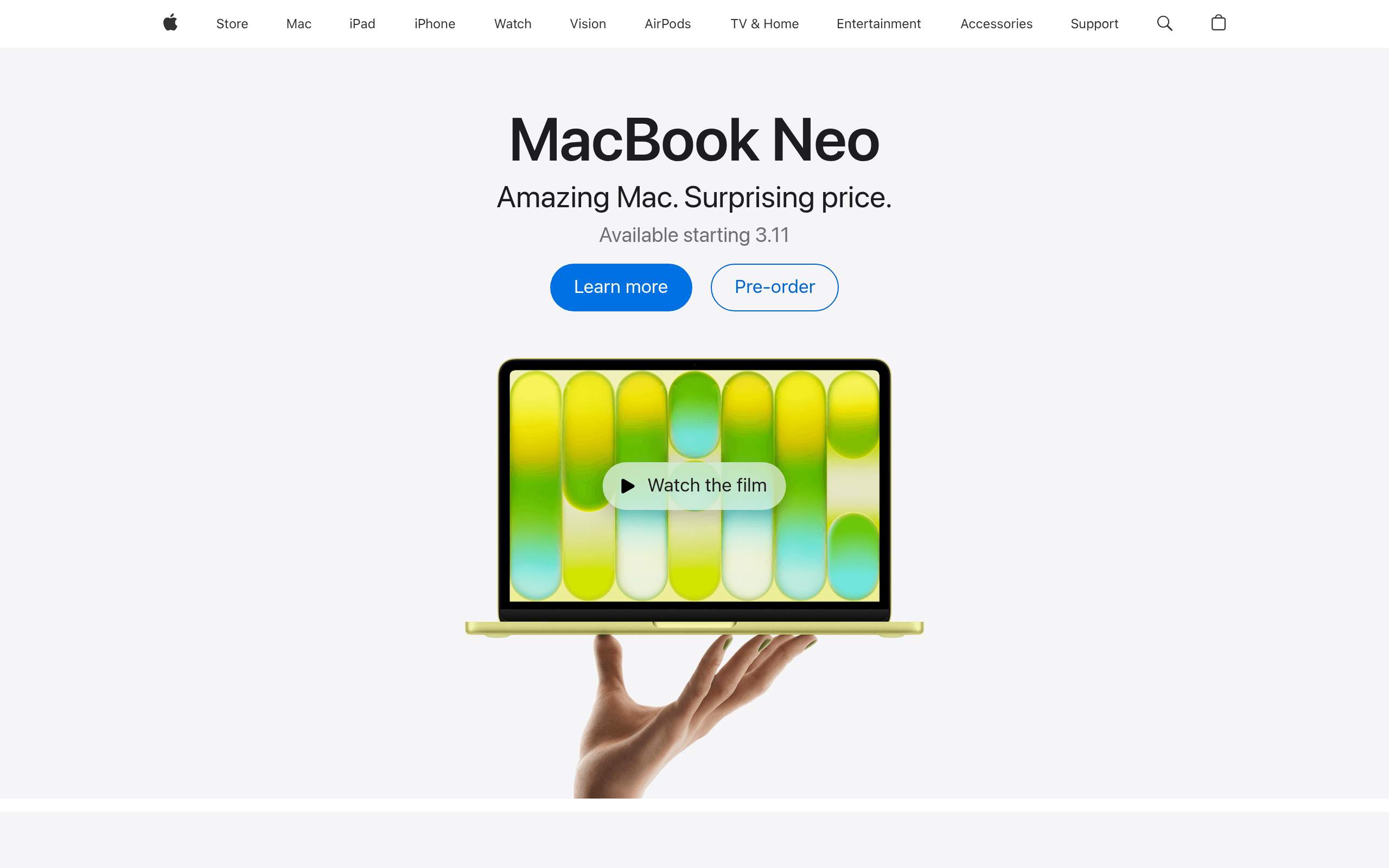
https://api.microlink.io?screenshot&url=https://apple.com
Send the URL Get a web snapshot back
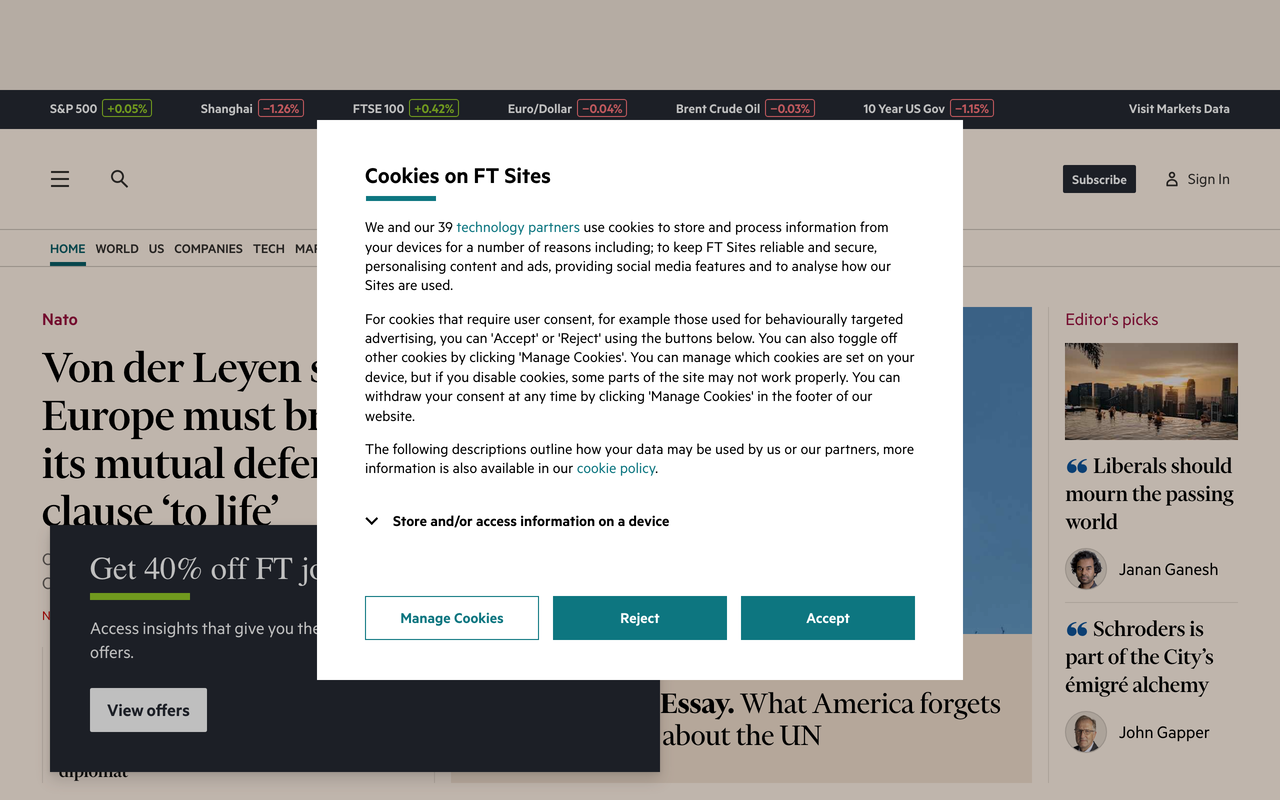
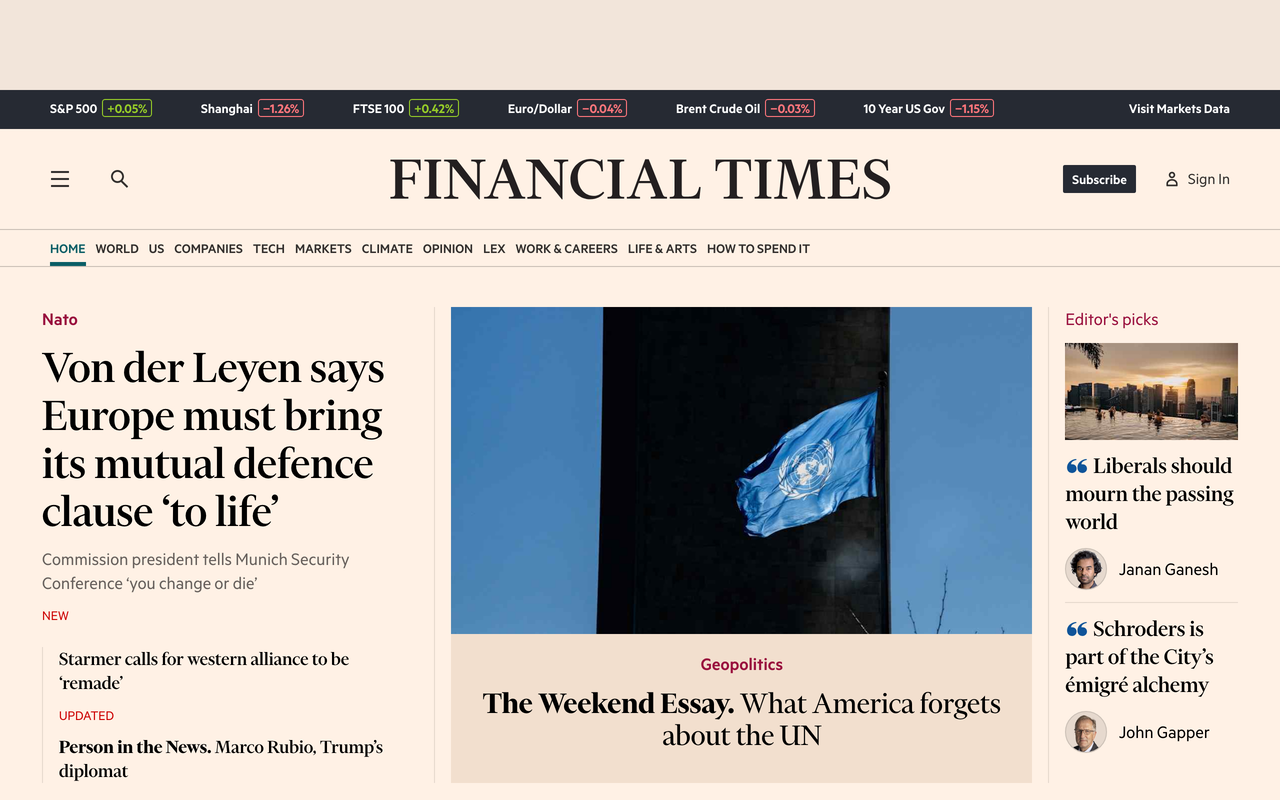
https://api.microlink.io?screenshot&url=https://ft.com&adblock=true
Everything you need,
one API call away
Blocks ads & cookie banners
Built-in adblock removes ads, trackers, and cookie consent popups automatically. Get clean captures without custom scripts.
Any viewport, any device
Capture at any resolution with full device emulation — mobile, tablet, desktop, or custom viewports up to full-page.
Fastest screenshot API
Sub-second cached responses with P95 cold starts under 3 seconds. The fastest site screenshot API with a global edge network for low latency worldwide.
Isolated & secure
Every request runs in its own browser instance. No shared state, no data leaks — enterprise-grade isolation by default.
Full browser control
Inject CSS, execute JavaScript, click elements, scroll, wait for selectors — a complete screen capture API to automate any interaction before capture.
Simple integration
A single REST endpoint that works from any language or framework. No SDKs required — just an HTTP call with your URL.
Website capture API
in
Microlink screenshot API delivers enterprise-grade screen capture API through a developer-friendly web screenshot service.
The following examples show how to use the Microlink API with CLI, cURL, JavaScript, Python, Ruby, PHP & Golang, targeting 'https://www.netflix.com/title/80057281' URL with 'screenshot' & 'viewport' API parameters:
CLI Microlink API example
microlink https://www.netflix.com/title/80057281&screenshot.type=jpeg&viewport.width=1920&viewport.height=1080&viewport.deviceScaleFactor=2cURL Microlink API example
curl -G "https://api.microlink.io" \
  -d "url=https://www.netflix.com/title/80057281" \
  -d "screenshot.type=jpeg" \
  -d "viewport.width=1920" \
  -d "viewport.height=1080" \
  -d "viewport.deviceScaleFactor=2"
JavaScript Microlink API example
import mql from '@microlink/mql'

const { data } = await mql('https://www.netflix.com/title/80057281', {
  screenshot: {
    type: "jpeg"
  },
  viewport: {
    width: 1920,
    height: 1080,
    deviceScaleFactor: 2
  }
})
Python Microlink API example
import requests

url = "https://api.microlink.io/"

querystring = {
    "url": "https://www.netflix.com/title/80057281",
    "screenshot.type": "jpeg",
    "viewport.width": "1920",
    "viewport.height": "1080",
    "viewport.deviceScaleFactor": "2"
}

response = requests.get(url, params=querystring)

print(response.json())
Ruby Microlink API example
require 'uri'
require 'net/http'

base_url = "https://api.microlink.io/"

params = {
  url: "https://www.netflix.com/title/80057281",
  screenshot.type: "jpeg",
  viewport.width: "1920",
  viewport.height: "1080",
  viewport.deviceScaleFactor: "2"
}

uri = URI(base_url)
uri.query = URI.encode_www_form(params)

http = Net::HTTP.new(uri.host, uri.port)
http.use_ssl = true

request = Net::HTTP::Get.new(uri)
response = http.request(request)

puts response.body
PHP Microlink API example
<?php

$baseUrl = "https://api.microlink.io/";

$params = [
    "url" => "https://www.netflix.com/title/80057281",
    "screenshot.type" => "jpeg",
    "viewport.width" => "1920",
    "viewport.height" => "1080",
    "viewport.deviceScaleFactor" => "2"
];

$query = http_build_query($params);
$url = $baseUrl . '?' . $query;

$curl = curl_init();

curl_setopt_array($curl, [
    CURLOPT_URL => $url,
    CURLOPT_RETURNTRANSFER => true,
    CURLOPT_ENCODING => "",
    CURLOPT_MAXREDIRS => 10,
    CURLOPT_TIMEOUT => 30,
    CURLOPT_HTTP_VERSION => CURL_HTTP_VERSION_1_1,
    CURLOPT_CUSTOMREQUEST => "GET"
]);

$response = curl_exec($curl);
$err = curl_error($curl);

curl_close($curl);

if ($err) {
    echo "cURL Error #: " . $err;
} else {
    echo $response;
}
Golang Microlink API example
package main

import (
    "fmt"
    "net/http"
    "net/url"
    "io"
)

func main() {
    baseURL := "https://api.microlink.io"

    u, err := url.Parse(baseURL)
    if err != nil {
        panic(err)
    }
    q := u.Query()
    q.Set("url", "https://www.netflix.com/title/80057281")
    q.Set("screenshot.type", "jpeg")
    q.Set("viewport.width", "1920")
    q.Set("viewport.height", "1080")
    q.Set("viewport.deviceScaleFactor", "2")
    u.RawQuery = q.Encode()

    req, err := http.NewRequest("GET", u.String(), nil)
    if err != nil {
        panic(err)
    }

    client := &http.Client{}
    resp, err := client.Do(req)
    if err != nil {
        panic(err)
    }
    defer resp.Body.Close()

    body, err := io.ReadAll(resp.Body)
    if err != nil {
        panic(err)
    }

    fmt.Println(string(body))
}
import mql from '@microlink/mql'
const { data } = await mql('https://www.netflix.com/title/80057281', {
screenshot: {
type: "jpeg"
},
viewport: {
width: 1920,
height: 1080,
deviceScaleFactor: 2
}
})Last month usage
some clients
Start free, scale when ready
No login required. No credit card needed. Screenshot API free to use — just start calling it.
Free
Website screenshot API free — 50 requests/day, no login, no credit card.
Screenshot API
Browser control & emulation
Metadata, PDF, logos, and more
Adblock & cookie banners
Full browser control
Pro
46,000 requests/month for production workloads.
Built on open source,
trusted by developers
The Microlink screenshot engine is powered by battle-tested open source libraries used by thousands of developers worldwide. Explore the code, contribute, or run it yourself.
Try it live, right now
Skip the setup. Our interactive screenshot url tool lets you test the screenshot API instantly — paste any URL, configure options, and see the result in real time.
The fastest screenshot API 50% faster than competitors
Benchmarked against every major web screenshot API provider.
From cold start to pixel delivery, Microlink consistently finishes first.
The best screenshot API, with no compromises.
No more servers to maintain, load balancers, or paying for capacity you don’t use — our screenshot service API lets you spend more time building, less time configuring, with easy integration via web screenshot API.
Enterprise-Grade Infrastructure
Production-ready and built for scale. Handle millions of browser sessions with a 99.95% uptime SLA and guaranteed latency limits for business-critical workflows.
Generous Free Tier
Start capturing immediately. No setup fees, no credit card required, and pay-as-you-grow pricing that scales seamlessly as your infrastructure needs increase.
Global Edge Delivery
Assets are automatically cached and distributed across 240+ edge locations powered by Cloudflare, ensuring lightning-fast image delivery worldwide.
Language-Agnostic API
A single REST endpoint designed for developers. Pass any link to our URL screenshot API and integrate in minutes using our official SDKs for Node.js, Python, Ruby, and Go, or standard HTTP requests.
Full Headless Browser Control
Complete Puppeteer and Playwright capabilities. Configure custom viewports, full-page captures, device emulation, user agents, and geolocation natively.
Custom Injections & Overlays
Execute custom JavaScript, inject CSS, click specific DOM elements, hide ad banners, or wait for network events before the capture is finalized.
Smart TTL Caching
Configure Time-To-Live (TTL) caching rules to keep your snapshots fresh. Stay up to date with target website changes while maintaining sub-second API performance.
Optimized Output Formats
Our website capture API exports directly to WebP, JPEG, or PNG formats with configurable compression. Optimize image payloads for web performance without sacrificing visual fidelity.
Zero-Config Integration
Interactive documentation packed with live code examples. Copy-paste ready snippets allow you to bypass complex infrastructure setup and ship to production faster.
Enterprise-Grade Infrastructure
Production-ready and built for scale. Handle millions of browser sessions with a 99.95% uptime SLA and guaranteed latency limits for business-critical workflows.
Generous Free Tier
Start capturing immediately. No setup fees, no credit card required, and pay-as-you-grow pricing that scales seamlessly as your infrastructure needs increase.
Global Edge Delivery
Assets are automatically cached and distributed across 240+ edge locations powered by Cloudflare, ensuring lightning-fast image delivery worldwide.
Language-Agnostic API
A single REST endpoint designed for developers. Pass any link to our URL screenshot API and integrate in minutes using our official SDKs for Node.js, Python, Ruby, and Go, or standard HTTP requests.
Full Headless Browser Control
Complete Puppeteer and Playwright capabilities. Configure custom viewports, full-page captures, device emulation, user agents, and geolocation natively.
Custom Injections & Overlays
Execute custom JavaScript, inject CSS, click specific DOM elements, hide ad banners, or wait for network events before the capture is finalized.
Smart TTL Caching
Configure Time-To-Live (TTL) caching rules to keep your snapshots fresh. Stay up to date with target website changes while maintaining sub-second API performance.
Optimized Output Formats
Our website capture API exports directly to WebP, JPEG, or PNG formats with configurable compression. Optimize image payloads for web performance without sacrificing visual fidelity.
Zero-Config Integration
Interactive documentation packed with live code examples. Copy-paste ready snippets allow you to bypass complex infrastructure setup and ship to production faster.
Start now
Get 50 requests/day with zero commitment — screenshot API free to use, no account, and no credit card. Just call the API and start capturing screenshots in seconds.
Product Information
Everything you need to know about
Microlink website screenshot API.
Do I need to manage my own Headless Chrome instances?
No. Microlink acts as a fully managed, "backendless"
browser service. We maintain the underlying Chromium infrastructure, manage the instance pool, and handle
You simply make a REST API call and receive a structured JSON payload or a
— the easiest way to automatically take screenshots of website pages without maintaining
Puppeteer
Playwright
Is there a free tier for testing and local development?
No credit card, account creation, or API key is required to start developing. Try it instantly in the
or point your code at the endpoint and begin capturing.
How do you handle cookie banners and ad popups?
By default, our engine includes a built-in, frequently updated
adblocker. It automatically dismisses GDPR cookie consent banners, closes newsletter popups, and removes injected ads.
This ensures your programmatic captures remain clean and focused on the actual page content without requiring you to write custom dismissal scripts.
Can I interact with the DOM or run scripts before capturing?
It is built to handle complex, dynamic SPA (Single Page Application) rendering and visual regression testing workflows with pixel-perfect accuracy.
What is your uptime SLA and expected latency?
We guarantee enterprise-grade
reliability with a 99.95% uptime SLA. Every request runs in an isolated browser instance to guarantee security and avoid shared-state leaks. Check real-time availability on the
For latency: assets are distributed via Cloudflare's 240+ edge locations, meaning
are delivered in milliseconds. For cold starts, our optimized Chromium pool typically responds in under 3 seconds (P95). See our
for detailed provider comparisons.
What output formats are supported?
Depending on your integration, you can request a raw image buffer via the
embed parameter, or a comprehensive JSON payload that includes the image URL alongside metadata, performance timings, and HTTP headers.
How quickly can I integrate this into my stack?
In minutes. Visit our
documentation for interactive playground examples, official
SDKs (Node.js, Python, Ruby, Go), and copy-paste code snippets.