Table of Contents
- 1 Introduction
- 2 API documentation
[in package SENTO.DOCS]
1 Introduction

Introduction - Actor framework featuring actors and agents
Sento is a 'message passing' library/framework with actors similar to Erlang or Akka. It supports creating systems that should work reactive, require parallel computing and event based message handling.
Sento features:
- Actors with
ask(?) andtell(!) operations.askcan be asynchronous or synchronous. - Agents: Agents are a specialization of Actors for wrapping state with a standardized interface of
init,getandset. There are also specialized Agents for Common Lisps array and hash-map data structures. - Router: Router offers a similar interface as Actor with
askandtellbut collects multiple Actors for load-balancing. - EventStream: all Actors and Agents are connected to an EventStream and can subscribe to messages or publish messages. This is similar to an event-bus.
- Tasks: a simple API for concurrency.
(Please also checkout the API documentation for further information) (for migrations from Sento v2, please check below migration guide)
Projects using Sento (for example usage):
- Chipi automation tool: Actors used for foundational primitives like 'items' and 'persistences'.
- KNX-conn: Used for asynchronous reading/writing from/to KNX bus
- Hunchentoot taskmanager: High throughput Hunchentoot task manager
Intro
Creating an actor-system
The first thing you wanna do is to create an actor system. In simple terms, an actor system is a container where all actors live in. So at any time the actor system knows which actors exist.
To create an actor system we can first change package to :sento-user because it imports the majority of necessary namespaces fopr convenience. Then, do:
(defvar *system* (make-actor-system))When we look at *system* in the repl we see some information of the actor system:
#<ACTOR-SYSTEM config: (DISPATCHERS
                        (SHARED (WORKERS 4 STRATEGY RANDOM))
                        TIMEOUT-TIMER
                        (RESOLUTION 500 MAX-SIZE 1000)
                        EVENTSTREAM
                        (DISPATCHER-ID SHARED)
                        SCHEDULER
                        (ENABLED TRUE RESOLUTION 100 MAX-SIZE 500)
                        ), user actors: 0, internal actors: 5>
The actor-system has, by default, four shared message dispatcher workers. Depending on how busy the system tends to be this default can be increased. Those four workers are part of the 'internal actors'. The 5th actor drives the event-stream (later more on that, but in a nutshell it's something like an event bus).
There are none 'user actors' yet, and the 'config' is the default config specifying the number of message dispatch workers (4) and the strategy they use to balance throughput, 'random' here.
Using a custom config is it possible to change much of those defaults. For instance, create custom dispatchers, i.e. a dedicated dispatcher used for the 'Tasks' api (see later for more info). The event-stream by default uses the global 'shared' dispatcher. Changing the config it would be possible to have the event-stream actor use a :pinned dispatcher (more on dispatchers later) to optimize throughput. Etc.
Actors live in the actor system, but more concrete in an actor-context. An actor-context contains a collection (of actors) and represents a Common Lisp protocol that defines a set of generic functions for creating, removing and finding actors in an actor-context. The actor system itself is also implementing the actor-context protocol, so it also acts as such and hence the protocol ac (actor-context) is used to operate on the actor system.
I.e. to shutdown the actor system one has to execute: (ac:shutdown *system*).
Creating and using actors
Now we want to create actors.
(actor-of *system* :name "answerer"
  :receive
  (lambda (msg)
    (let ((output (format nil "Hello ~a" msg)))
        (reply output))))
This creates an actor in *system*. Notice that the actor is not assigned to a variable (but you can). It is now registered in the system. Using function ac:find-actors you'll be able to find it again. Of course it makes sense to store important actors that are frequently used in a defparameter variable.
The :receive key argument to actor-of is a function which implements the message processing behaviour of an actor. The parameter to the 'receive' function is just the received message (msg).
actor-of also allows to specify the initial state, a name, and a custom actor type via key parameters. By default a standard actor of type 'actor is created. It is possible to subclass 'actor and specify your own. It is further possible to specify an 'after initialization' function, using the :init key, and 'after destroy' function using :destroy keyword. :init can, for example, be used to subscribe to the event-stream for listening to important messages.
The return value of 'receive' function is only used when using the synchronous ask-s function to 'ask' the actor. Using ask (equivalent: ?) the return value is ignored. If an answer should be provided to an asking actor, or if replying is part of an interface contract, then reply should be used.
The above actor was stored to a variable *answerer*. We can evaluate this in repl and see:
#<ACTOR path: /user/answerer, cell: #<ACTOR answerer, running: T, state: NIL, message-box: #<SENTO.MESSAGEB:MESSAGE-BOX/DP mesgb-1356, processed messages: 1, max-queue-size: 0, queue: #<SENTO.QUEUE:QUEUE-UNBOUNDED 82701A6D13>>>>We'll see the 'path' of the actor. The prefix '/user' means that the actor was created in a user actor context of the actor system. Further we see whether the actor is 'running', its 'state' and the used 'message-box' type, by default it uses an unbounded queue.
Now, when sending a message using 'ask' pattern to the above actor like so:
(? *answerer* "FooBar")we'll get a 'future' as result, because ?/ask is asynchronous.
#<FUTURE promise: #<BLACKBIRD-BASE:PROMISE
finished: NIL
errored: NIL
forward: NIL 80100E8B7B>>
We can check for a 'future' result. By now the answer from the *answerer* (via reply) should be available:
USER> (fresult *)
"Hello FooBar"
If the reply had not been received yet, fresult would return :not-ready. So, fresult doesn't block, it is necessary to repeatedly probe using fresult until result is other than :not-ready.
A nicer and asynchronous way without querying is to use fcompleted. Using fcompleted you setup a callback function that is called with the result when it is available. Like this:
(fcompleted
     (? *answerer* "Buzz")
     (result)
   (format t "The answer is: ~a~%" result))
Which will asynchronously print "The answer is: Hello Buzz" after a short while.
This will also work when the ask/? was used with a timeout, in which case result will be a tuple of (:handler-error . <ask-timeout condition>) if the operation timed out.
Creating child actors
To build actor hierarchies one has to create actors in actors. This is of course possible. There are two options for this.
- Actors are created as part of
actor-ofs:initfunction like so:
(actor-of *system*
          :name "answerer-with-child"
          :receive
          (lambda (msg)
            (let ((output (format nil "Hello ~a" msg)))
              (reply output)))
          :init
          (lambda (self)
            (actor-of self
                      :name "child-answerer"
                      :receive
                      (lambda (msg)
                        (let ((output (format nil "Hello-child ~a" msg)))
                          (format nil "~a~%" output))))))
Notice the context for creating 'child-answerer', it is self, which is 'answerer-with-child'.
- Or it is possible externally like so:
(actor-of *answerer* :name "child-answerer"
    :receive
    (lambda (msg)
        (let ((output (format nil "~a" "Hello-child ~a" msg)))
            (format nil "~a~%" output))))
This uses *answerer* context as parameter of actor-of. But has the same effect as above.
Now we can check if there is an actor in context of 'answerer-with-child':
USER> (all-actors *actor-with-child*)
(#<ACTOR path: /user/answerer-with-child/child-answerer, cell: #<ACTOR child-answerer, running: T, state: NIL, message-box: #<SENTO.MESSAGEB:MESSAGE-BOX/DP mesgb-1374, processed messages: 0, max-queue-size: 0, queue: #<SENTO.QUEUE:QUEUE-UNBOUNDED 8200A195FB>>>>)
The 'path' is what we expected: '/user/answerer-with-child/child-answerer'.
Ping Pong
Another example that only works with tell/! (fire and forget).
We have those two actors.
The 'ping' actor:
(defparameter *ping*
  (actor-of *system*
            :receive
            (lambda (msg)
              (cond
                ((consp msg)
                 (case (car msg)
                   (:start-ping
                    (progn
                      (format t "Starting ping...~%")
                      (! (cdr msg) :ping *self*)))))
                ((eq msg :pong)
                 (progn
                   (format t "pong~%")
                   (sleep 2)
                   (reply :ping)))))))
And the 'pong' actor:
(defparameter *pong*
  (actor-of *system*
            :receive
            (lambda (msg)
              (case msg
                (:ping
                 (progn
                   (format t "ping~%")
                   (sleep 2)
                   (reply :pong)))))))
The 'ping' actor understands a :start-ping message which is a cons and has as cdr the 'pong' actor instance.
It also understands a :pong message as received from 'pong' actor.
The 'pong' actor only understands a :ping message. Each of the actors respond with either :ping or :pong respectively after waiting 2 seconds.
We trigger the ping-pong by doing:
(! *ping* `(:start-ping . ,*pong*))And then see in the console like:
Starting ping...
ping
pong
ping
...
To stop the ping-pong one just has to send (! *ping* :stop) to one of them.
:stop will completely stop the actors message processing, and the actor will not be useable anymore.
Synchronous ask
At last an example for the synchronous 'ask', ask-s. It is insofar similar to ask that it provides a result to the caller. However, it is not bound to reply as with ask. Here, the return value of the 'receive' function is returned to the caller, and ask-s will block until 'receive' function returns.
Beware that ask-s will dead-lock your actor when ask-s is used to call itself.
Let's make an example:
(defparameter *s-asker*
  (actor-of *system*
            :receive
            (lambda (msg)
              (cond
                ((stringp msg)
                 (format nil "Hello ~a" msg))
                (t (format nil "Unknown message!"))))))
So we can do:
USER> (ask-s *s-asker* "Foo")
"Hello Foo"
USER> (ask-s *s-asker* 'foo)
"Unknown message!"
Dispatchers :pinned vs. :shared
Dispatchers are somewhat alike thread pools. Dispatchers of the :shared type are a pool of workers. Workers are actors using a :pinned dispatcher. :pinned just means that an actor spawns its own mailbox thread.
So :pinned and :shared are types of dispatchers. :pinned spawns its own mailbox thread, :shared uses a worker pool to handle the mailbox messages.
By default an actor created using actor-of uses a :shared dispatcher type which uses the shared message dispatcher that is automatically setup in the system.
When creating an actor it is possible to specify the dispatcher-id. This parameter specifies which 'dispatcher' should handle the mailbox queue/messages.
Please see below for more info on dispatchers.
Finding actors in the context
If actors are not directly stored in a dynamic or lexical context they can still be looked up and used. The actor-context protocol contains a function find-actors which can lookup actors in various ways. Checkout the API documentation.
Mapping futures with fmap
Let's asume we have such a simple actor that just increments the value passed to it.
(defparameter *incer*
  (actor-of *system*
            :receive (lambda (value)
                       (reply (1+ value)))))
Since ask returns a future it is possible to map multiple ask operations like this:
(-> (ask *incer* 0)
  (fmap (result)
      (ask *incer* result))
  (fmap (result)
      (ask *incer* result))
  (fcompleted (result)
      (format t "result: ~a~%" result)
    (assert (= result 3))))
ask-s and ask with timeout
A timeout (in seconds) can be specified for both ask-s and
ask and is done like so:
To demonstrate this we could setup an example 'sleeper' actor:
(ac:actor-of *system*
    :receive
    (lambda (msg)
        (sleep 5)))
If we store this to *sleeper* and do the following, the
ask-s will return a handler-error with an
ask-timeout condition.
(act:ask-s *sleeper* "Foo" :time-out 2)(:HANDLER-ERROR . #<CL-GSERVER.UTILS:ASK-TIMEOUT #x30200319F97D>)This works similar with the ask only that the future will
be fulfilled with the handler-error cons.
To get a readable error message of the condition we can do:
CL-USER> (format t "~a" (cdr *))
A timeout set to 2 seconds occurred. Cause:
#<BORDEAUX-THREADS:TIMEOUT #x302002FAB73D>
Note that ask-s uses the calling thread for the timeout checks.
ask uses a wheel timer to handle timeouts. The default resolution for ask timeouts is 500ms with a maximum size of wheel slots (registered timeouts) of 1000. What this means is that you can have timeouts of a multiple of 500ms and 1000 ask operations with timeouts. This default can be tweaked when creating an actor-system, see API documentation for more details.
Long running and asynchronous operations in receive
Be careful with doing long running computations in the receive function message handler, because it will block message processing. It is advised to use a third-party thread-pool or a library like lparallel to do the computations with, and return early from the receive message handler.
The computation result can be 'awaited' for in an asynchronous manner and a response to *sender* can be sent manually (via reply). The sender of the original message is set to the dynamic variable *sender*.
Due to an asynchronous callback of a computation running is a separate thread, the *sender* must be copied into a lexical environment because at the time of when the callback is executed the *sender* can have a different value.
For instance, if there is a potentially long running and asynchronous operation happening in 'receive', the original sender must be captured and the async operation executed in a lexical context, like so (receive function):
(lambda (msg)
  (case msg
    (:do-lengthy-op
     (let ((sender *sender*))
              (reply :my-later-reply sender)))
    (otherwise
            (reply :my-reply))))
Notice that for the lengthy operation the sender must be captured because if the lengthy operation is asynchronous 'receive' function is perhaps called for another message where *sender* is different. In that case sender must be supplied explicitly for reply.
See this test for more info.
NOTE: you should not change actor state from within an asynchronously executed operation in receive. This is not thread-safe. The pattern for this case it to send a message to self and have a message handler case that will change the actor state. This will ensure that actor state is always changed in a thread-safe way.
Changing behavior
An actor can change its behavior. The behavior is just a lambda similar as the 'receive' function taking the message as parameter.
The default behavior of the actor is given on actor construction using :receive key.
During the lifetime of an actor the behavior can be changed using become. unbecome will restore the default behavior.
Here is an example:
(ac:actor-of *system*
             :receive
             (lambda (msg)
               (case msg
                 (:open
                  (progn
                    (unstash-all)
                    (become (lambda (msg)
                              (case msg
                                (:write
                                                                  )
                                (:close
                                 (unbecome))
                                (otherwise
                                 (stash msg)))))))
                 (otherwise (stash msg)))))
Stashing messages
Stashing allows the actor to stash away messages for when the actor is in a state that doesn't allow it to handle certain messages. unstash-all can unstash all stashed messages.
See: API documentation for more info.
Creating actors without a system
It is still possible to create actors without a system. This is how you do it:
;; make an actor
(defvar *my-actor* (act:make-actor (lambda (msg)
                                     (format t "FooBar"))
                                   :name "Lone-actor"))
;; setup a thread based message box
(setf (act-cell:msgbox *my-actor*)
      (make-instance 'mesgb:message-box/bt))
You have to take care yourself about stopping the actor and freeing resources.
Agents
An Agent is a specialized Actor. It is meant primarily for maintaining state and comes with some conveniences to do that.
To use an Agent import sento.agent package.
There is no need to subclass an Agent. Rather create a facade to customize an agent. See below.
An Agent provides three functions to use it.
make-agentcreates a new agent. Optionally specify anactor-contextor define the kind of dispatcher the agent should use.agent-getretrieves the current state of the agent. This directly delivers the state of the agent for performance reasons. There is no message handling involved.agent-updateupdates the state of the agentagent-update-and-getupdates the agent state and returns the new state.
All four take a lambda. The lambda for make-agent does not take a parameter. It should return the initial state of the agent. agent-get and agent-update both take a lambda that must support one parameter.
This parameter represents the current state of the agent.
Let's make a simple example:
First create an agent with an initial state of 0.
(defparameter *my-agent* (make-agent (lambda () 0)))Now update the state several times (agent-update is asynchronous and returns t immediately):
(agent-update *my-agent* (lambda (state) (1+ state)))Finally get the state:
(agent-get *my-agent* #'identity)This agent-get just uses the identity function to return the state as is.
So this simple agent represents a counter.
It is important to note that the retrieves state, i.e. with identity should not be modified outside the agent.
Using an agent within an actor-system
The make-agent constructor function allows to provide an optional actor-context argument that, when given, makes the constructor create the agent within the given actor-context. Another parameter dispatcher-id allows to specify the dispatcher where :shared is the default, :pinned will create the agent with a separate mailbox thread.
It also implies that the agent is destroyed then the actor-system is destroyed.
However, while actors can create hierarchies, agents can not. Also the API for creating agents in systems is different to actors. This is to make explicit that agents are treated slightly differently than actors even though under the hood agents are actors.
Wrapping an agent
While you can use the agent as in the example above it is usually advised to wrap an agent behind a more simple facade that doesn't work with lambdas and allows a more domain specific naming.
For example could a facade for the counter above look like this:
(defvar *counter-agent* nil)

(defun init-agent (initial-value)
  (setf *counter-agent* (make-agent (lambda () initial-value))))

(defun increment () (agent-update *counter-agent* #'1+))
(defun decrement () (agent-update *counter-agent* #'1-))
(defun counter-value () (agent-get *counter-agent* #'identity))
Alternatively, one can wrap an agent inside a class and provide methods for simplified access to it.
Finite State Machine (FSM)
The Finite State Machine (FSM) model is a computational framework designed to model and manage systems that transition between various states based on inputs or events. This structured approach facilitates the handling of complex logic through defined state transitions and events.
Creating an FSM
To create an FSM, use the make-fsm function, which initializes an actor with state management capabilities.
(Additional API documentation can be found here.)
- actor-context: Specifies where the FSM is created, which can be an actor, an actor-context, or an actor-system.
- name: A string that names the FSM.
- start-with: A cons cell representing the initial state and associated data.
- event-handling: A function structured using FSM macros to define the FSM's behavior upon receiving events.
Example: Traffic Light Controller FSM with Timeouts
This FSM simulates a traffic light controller and includes comprehensive state and transition handling, including timeouts.
(defun make-traffic-light-fsm (actor-context)
  (make-fsm
   actor-context
   :name "traffic-light-fsm"
   :start-with '(red . ())
   :event-handling (lambda ()

                                          (when-state ('red :timeout-s 10)
                       (on-event ('timer) :state-timeout
                         (goto-state 'green))
                       (on-event ('manual-override)
                         (stay-on-state '(:manual-override-engaged))
                         (log:info "Manual override activated")))

                     (when-state ('green :timeout-s 15)
                       (on-event ('timer) :state-timeout
                         (goto-state 'yellow)))

                     (when-state ('yellow :timeout-s 5)
                       (on-event ('emergency-stop)
                         (goto-state 'red)
                         (log:info "Emergency stop activated"))
                       (on-event ('timer) :state-timeout
                         (goto-state 'red)))

                                          (on-transition ('(red . green))
                       (log:info "Transition from red to green"))

                     (on-transition ('(green . yellow))
                       (log:info "Transition from green to yellow"))

                     (on-transition ('(yellow . red))
                       (log:info "Transition from yellow to red"))

                                          (on-event ('maintenance-check)
                       (stay-on-state '(:maintenance-required))
                       (log:info "Maintenance required"))

                                          (when-unhandled ('unexpected-event)
                       (log:warn "Unexpected specific event caught"))

                     (when-unhandled (t :test #'typep)
                       (log:warn "Unhandled event caught: ~A" *received-event*)))))
Example Breakdown
- actor-context: Passed argument where the FSM operates.
- name: The FSM is named "traffic-light-fsm".
- start-with: The FSM begins in the 'red' state.
- event-handling: Utilizes various macros:
when-state: Defines actions specific to each state and handles timeouts.on-event ('timer): Transitions the FSM to the next state on timer events; handles timeouts with:state-timeout.goto-state: Transitions the FSM to a new state, optionally updating data and logging.stay-on-state ('maintenance-check): Remains in the current state while updating state data.on-transition: Logs state transitions.- General
when-unhandledusingtypep: Catches all other unhandled events and logs them using the dynamic variable*received-event*for context.
Running the FSM
After setup, the FSM processes events, transitioning as defined. This setup ensures responsive and structured event-driven state management.
Incorporating timeout controls and a comprehensive fallback for unhandled events, this FSM elegantly manages complex state logic with powerful macro functionalities.
Router
A Router is a facade over a set of actors. Routers are either created with a set of actors using the default constructor router:make-router or actors can be added later.
Routers implement part of the actor protocol, so it allows to use tell, ask-s or ask which it forwards to a 'routee' (one of the actors of a router) by passing all of the given parameters. The routee is chosen by applying a strategy. The built-in default strategy a routee is chosen randomly.
The strategy can be configured when creating a router using the constructors &key parameter :strategy. The strategy is just a function that takes the number of routees and returns a routee index to be chosen for the next operation.
Currently available strategies: :random and:round-robin.
Custom strategies can be implemented.
Dispatchers
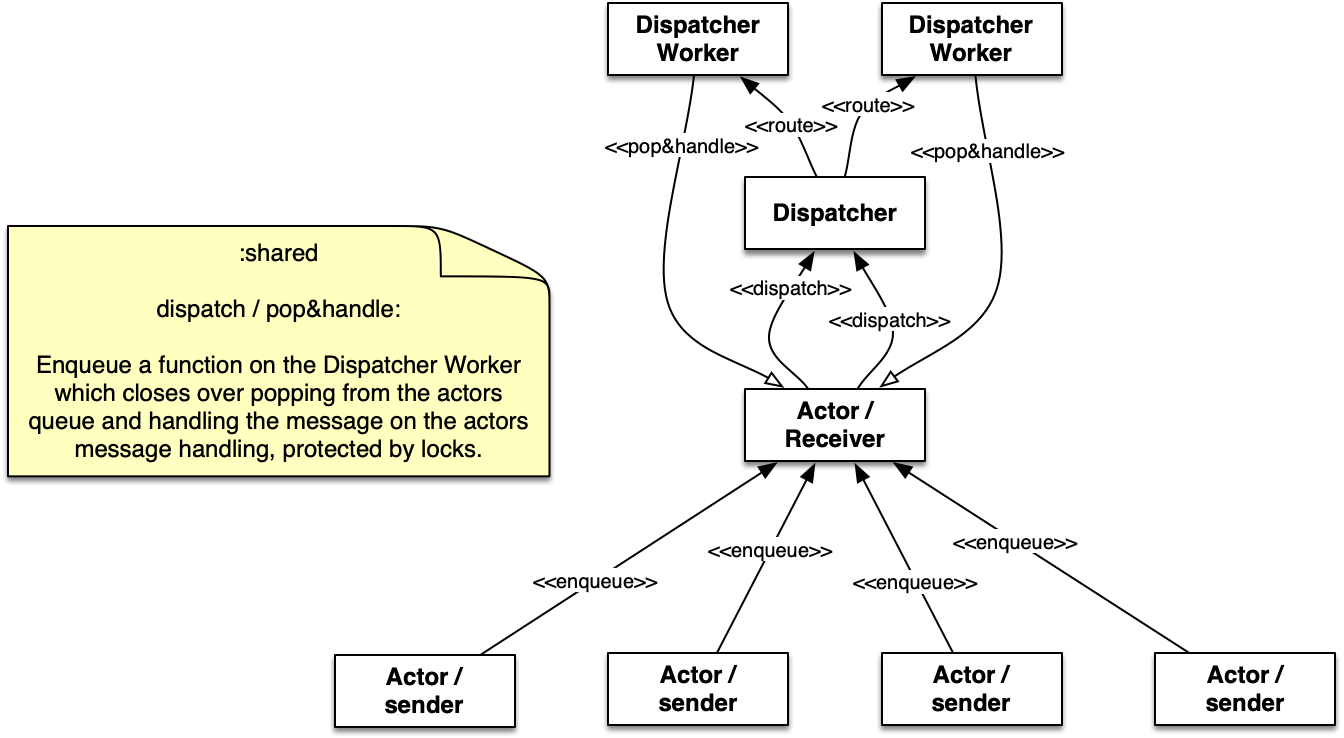
:shared
A :shared dispatcher is a facility that is set up in the actor-system. It consists of a configurable pool of 'dispatcher workers' (which are in fact actors). Those dispatcher workers execute the message handling in behalf of the actor and with the actors message handling code. This is protected by a lock so that ever only one dispatcher will run code on an actor. This is to ensure protection from data race conditions of the state data of the actor (or other slots of the actor).
Using this dispatcher allows to create a large number of actors. The actors as such are generally very cheap.

:pinned
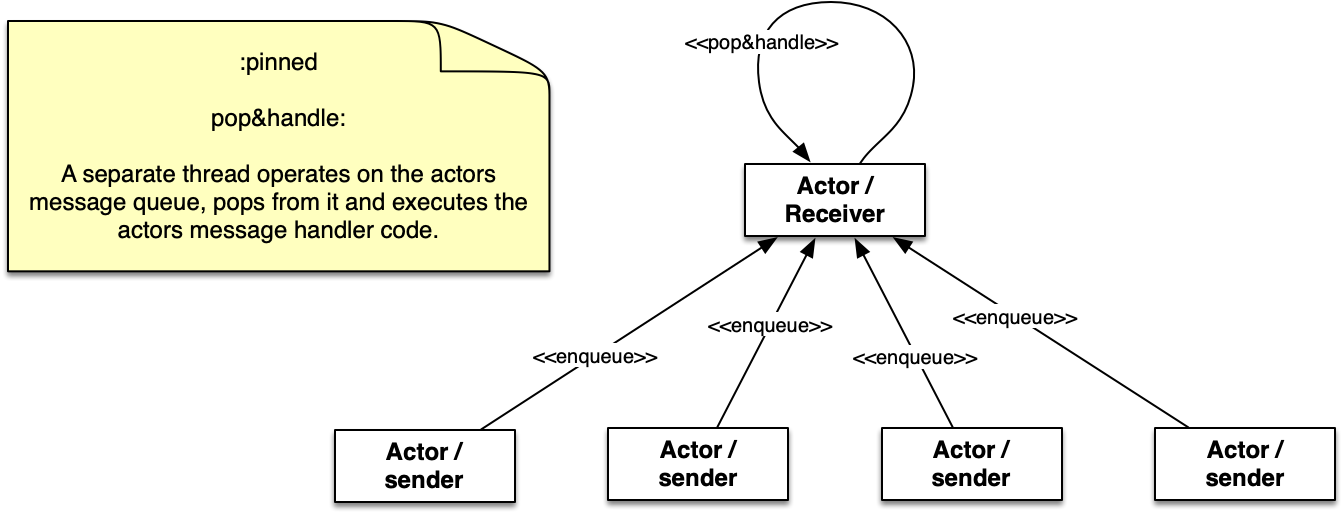
The :pinned dispatcher is represented by just a thread that operates on the actors message queue. It handles one message after another with the actors message handling code. This also ensures protection from data race conditions of the state of the actor.
This variant is slightly faster (see below) but requires one thread per actor.

custom dispatcher
It is possible to create additional dispatcher of type :shared. A name can be freely chosen, but by convention it should be a global symbol, i.e. :my-dispatcher.
When creating actors using act:actor-of, or when using the tasks API it is possible to specify the dispatcher (via the 'dispatcher-id' i.e. :my-dispatcher) that should handle the actor, agent, or task messages.
A custom dispatcher is in particular useful when using tasks for longer running operations. Longer running operations should not be used for the :shared dispatcher because it is, by default, responsible for the message handling of most actors.
Eventstream
The eventstream allows messages (or events) to be posted on the eventstream in a fire-and-forget kind of way. Actors can subscribe to the eventstream if they want to get notified for particular messages or any message posted to the event stream.
This allows to create event-based systems.
Here is a simple example:
(defparameter *sys* (asys:make-actor-system))

(ac:actor-of *sys* :name "listener"
  :init (lambda (self)
          (ev:subscribe self self 'string))
  :receive (lambda (msg)
             (cond
               ((string= "my-message" msg)
                (format t "received event: ~a~%" msg)))))

(ev:publish *sys* "my-message")
This subscribes to all 'string based events and just prints the message when received.
The subscription here is done using the :init hook of the actor. The ev:subscribe function requires to specify the eventstream as first argument. But there are different variants of the generic function defined which allows to specify an actor directly. The eventstream is retrieve from the actor through its actor-context.
received event: my-messageSee the API documentation for more details.
Tasks
'tasks' is a convenience package that makes dealing with asynchronous and concurrent operations very easy.
Here is a simple example:
(defparameter *sys* (make-actor-system))

(with-context (*sys*)

  // run something without requiring a feedback
  (task-start (lambda () (do-lengthy-IO))

  // run asynchronous - with await
  (let ((task (task-async (lambda () (do-a-task)))))
    // do some other stuff
    // eventually we need the task result
    (+ (task-await task) 5))

  // run asynchronous with completion-handler (continuation)
  (task-async (lambda () (some-bigger-computation))
              :on-complete-fun
              (lambda (result)
                (do-something-with result)))

  // concurrently map over the given list
  (->>
    '(1 2 3 4 5)
    (task-async-stream #'1+)
    (reduce #'+)))

=> 20 (5 bits, #x14, #o24, #b10100)
All functions available in 'tasks' package require to be wrapped in a with-context macro. This macro removes the necessity of an additional argument to each of the functions which is instead supplied by the macro.
What happens in the example above is that the list '(1 2 3 4 5) is passed to task-async-stream. task-async-stream then spawns a 'task' for each element of the list and applies the given function (here 1+) on each list element. The function though is executed by a worker of the actor-systems :shared dispatcher. task-async-stream then also collects the result of all workers. In the last step (reduce) the sum of the elements of the result list are calculated.
It is possible to specify a second argument to the with-context macro to specify the dispatcher that should be used for the tasks.
The concurrency here depends on the number of dispatcher workers.
As alternative, or in special circumstances, it is possible to setf *task-context* and/or *task-dispatcher* special variables which allows to use tasks without with-context macro.
Be also aware that the :shared dispatcher should not run long running operations as it blocks a message processing thread. Create a custom dispatcher to use for tasks when you plan to operate longer running operations.
See the API documentation for more details.
Immutability
Some words on immutability. Actor states don't need to be immutable data structures. Sento does not make copies of the actor states. The user is responsible for the actor state and to motate the actor state only within 'receive' function.
Logging
Sento does its own logging using different log levels from 'trace' to 'error' using log4cl. If you wish to also use log4cl in your application but find that Sento is too noisy in debug and trace logging you can change the log level for the 'sento package only by:
(log:config '(sento) :warn)This will tell log4cl to do any logging for sento in warn level.
Benchmarks
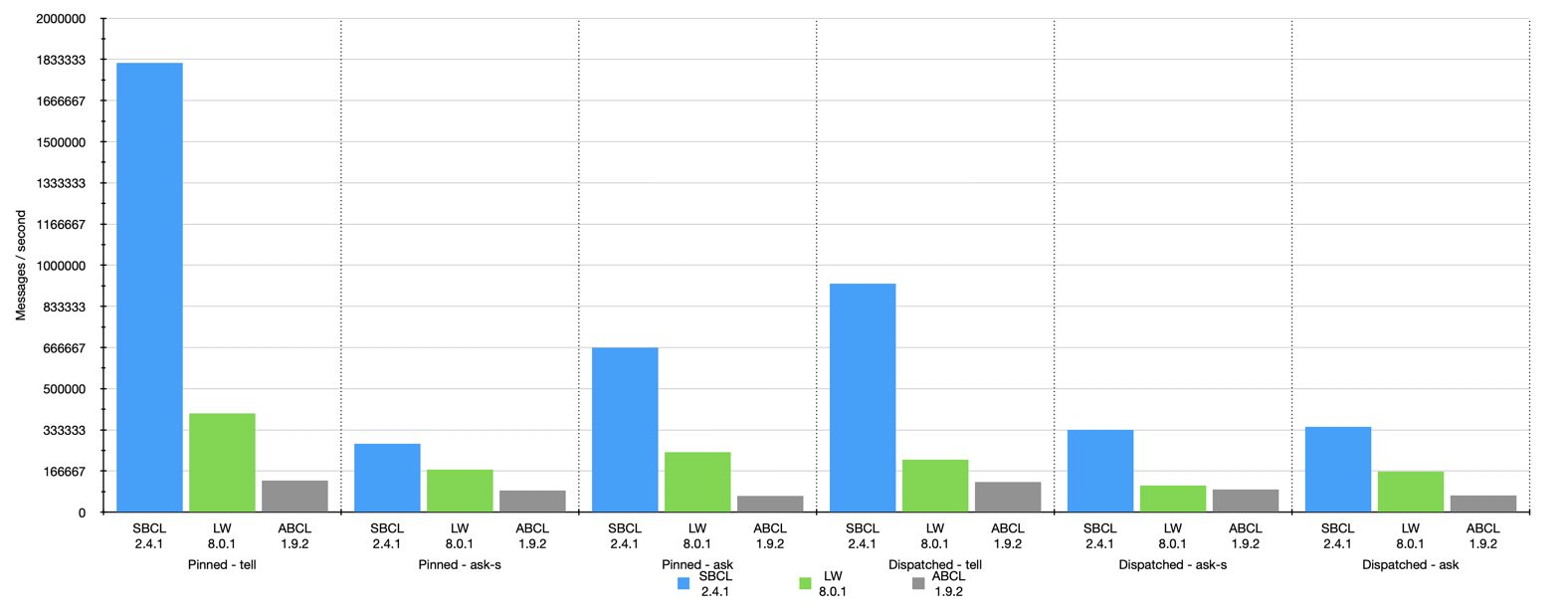
Hardware specs (M1)):
- Mac M1 Ultra, 64 GB RAM

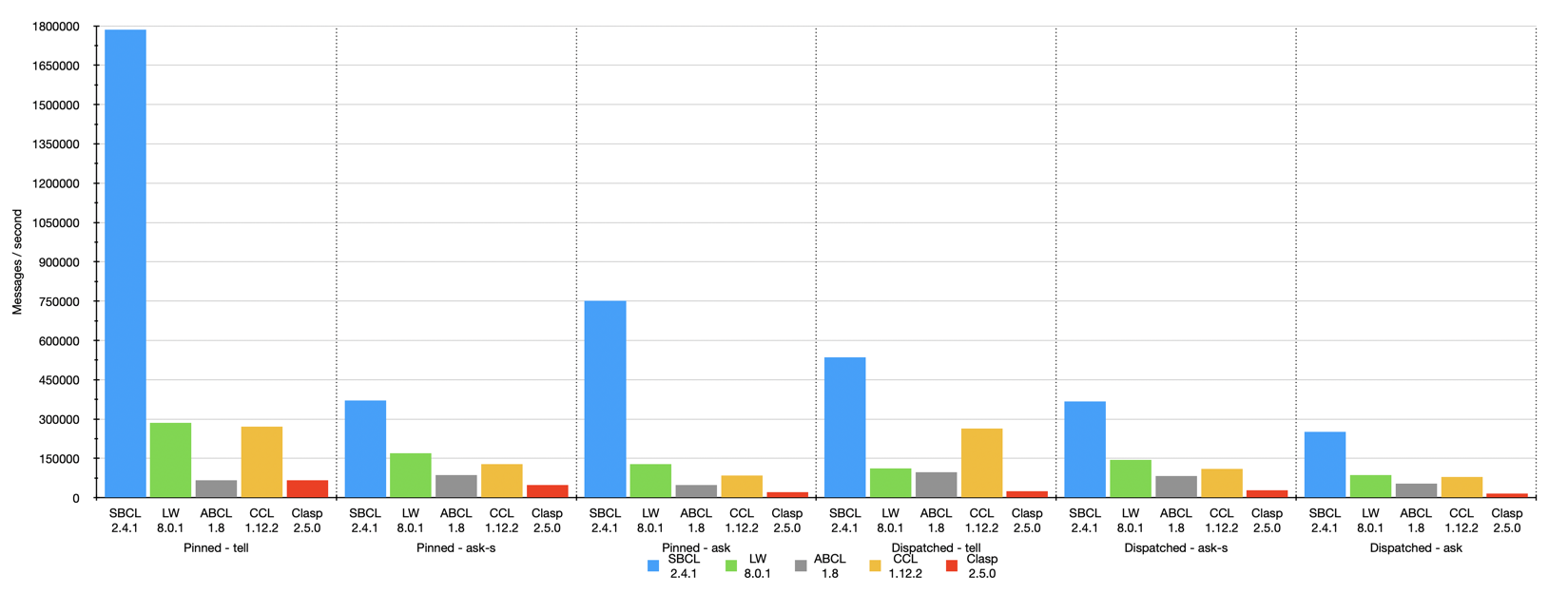
Hardware specs (x86-64):
- iMac Pro (2017), 8 Core Xeon, 32 GB RAM

All
Version 3.2.0 of Sento uses the sbcl sb-concurrent:queue whcih is very fast and works using CAS (compare-and-swap) where as the other implementations use a still fast double stack queue protected by locking.
The benchmark was created by having 8 threads throwing each 125k (1M altogether) messages at 1 actor. The timing was taken for when the actor did finish processing those 1M messages. The messages were sent by either all tell, ask-s, or ask to an actor whose message-box worked using a single thread (:pinned) or a dispatched message queue (:shared / dispatched) with 8 workers.
Of course a tell is in most cases the fastest one, because it's the least resource intensive and there is no place that is blocking in this workflow.
SBCL (v2.4.1)
SBCL is very fast, but this tests uses SBCLs own queue implementation based on CAS instead of locking.
LispWorks (8.0.1)
LispWorks is fast overall. Not as fast as SBCL. But it seems the GC is more robust, in particular on the dispatched - ask.
CCL (v1.12)
Unfortunately CCL doesn't work natively on M1 Apple CPU.
ABCL (1.9)
The pleasant surprise was ABCL. While not being the fastest it is very robust.
Clasp 2.5.0
Very slow. Used default settings, as also for the other tests. Maybe something can be tweaked?
Migration guide for moving from Sento 2 to Sento 3
the receive function is now 1-arity. It only takes the a message parameter. Previous 'self' and 'state' parameters are now accessible via
*self*and*state*. The same applies tobecomefunction.the return value of 'receive' function has always been a bit of an obstacle. So now it is ignored for
tellandask. In both cases areplyfunction can be used to reply to a sender.replyimplicitly uses*sender*but can be overriden (see 'long running and asynchronous operations in receive'). The 'receive' function return value is still relevant forask-s, but now it doesn't need to be acons. Whatever is returned is received byask-s.'utils' package has been split to 'timeutils' for i.e. ask-timeout condition, and 'miscutils' for i.e. filter function.
Version history
Version 3.3.3 (1.10.2024): Bug fix for actor with dispatcher mailbox where the order of processing messages wasn't honoured.
Version 3.3.2 (14.8.2024): Primarily documentation changes in regards to future
Version 3.3.0 (1.7.2024): See: Changelog
Version 3.2.0 (13.2.2024): Message-box queue changes. SBCL now uses a separate fast CAS based queue coming as a contrib package. The other impls use a faster queue by default but still with locking. New benchmarks.
Version 3.1.0 (14.1.2024): Added scheduler facility to actor-system that allows to schedule functions one or recurring. See API documentation for more info.
Version 3.0.4 (10.7.2023): Allow additional initialization arguments be passed to actor. Wheel-time now knows CANCEL function. Partial fix for clasp (2.3.0).
Version 3.0.3 (1.4.2023): Minor implementation changes regarding pre-start and after-stop.
Version 3.0.2 (6.4.2023): Fix for actor stopping with 'wait'.
Version 3.0.0 (1.2.2023): New major version. See migration guide if you have are migrating from version 2.
Version 2.2.0 (27.12.2022): Added stashing and unstashing of messages.
Version 2.1.0 (17.11.2022): Reworked the future package. Nicer syntax and futures can now be mapped.
Version 2.0.0 (16.8.2022): Rename to "Sento". Incompatible change due to package names and system have changed.
Version 1.12.2 (29.5.2022): Removed the logging abstraction again. Less code to maintain. log4cl is featureful enough for users to either use it, or use something else in the applications that are based on sento.
Version 1.12.1 (25.5.2022): Shutdown and stop of actor, actor context and actor system can now wait for a full shutdown/stop of all actors to really have a clean system shutdown.
Version 1.12.0 (26.2.2022): Refactored and cleaned up the available actor-of facilities. There is now only one. If you used the macro before, you may have to adapt slightly.
Version 1.11.1 (25.2.2022): Minor additions to actor-of macro to allow specifying a destroy function.
Version 1.11.0 (16.1.2022): Changes to AC:FIND-ACTORS. Breaking API change. See API documentation for details.
Version 1.10.0: Logging abstraction. Use your own logging facility. sento doesn't lock you in but provides support for log4cl. Support for other logging facilities can be easily added so that the logging of sento will use your chosen logging library. See below for more details.
Version 1.9.0: Use wheel timer for ask timeouts.
Version 1.8.2: atomic add/remove of actors in actor-context.
Version 1.8.0: hash-agent interface changes. Added array-agent.
Version 1.7.6: Added cl:hash-table based agent with similar API interface.
Version 1.7.5: Allow agent to specify the dispatcher to be used.
Version 1.7.4: more convenience additions for task-async (completion-handler)
Version 1.7.3: cleaned up dependencies. Now sento works on SBCL, CCL, LispWorks, Allegro and ABCL
Version 1.7.2: allowing to choose the dispatcher strategy via configuration
Version 1.7.1: added possibility to create additional and custom dispatchers. I.e. to be used with tasks.
Version 1.7.0: added tasks abstraction facility to more easily deal with asynchronous and concurrent operations.
Version 1.6.0: added eventstream facility for building event based systems. Plus documentation improvements.
Version 1.5.0: added configuration structure. actor-system can now be created with a configuration. More configuration options to come.
Version 1.4.1: changed documentation to the excellent mgl-pax
Version 1.4: convenience macro for creating actor. See below for more details
Version 1.3.1: round-robin strategy for router
Version 1.3: agents can be created in actor-system
Version 1.2: introduces a breaking change
ask has been renamed to ask-s.
async-ask has been renamed to ask.
The proposed default way to query for a result from another actor should
be an asynchronous ask. ask-s (synchronous) is
of course still possible.
Version 1.0 of sento library comes with quite a
few new features (compared to the previous 0.x versions).
One of the major new features is that an actor is not
bound to it's own message dispatcher thread. Instead, when an
actor-system is set-up, actors can use a shared pool of
message dispatchers which effectively allows to create millions of
actors.
It is now possible to create actor hierarchies. An actor can have child actors. An actor now can also 'watch' another actor to get notified about it's termination.
It is also possible to specify timeouts for the ask-s and
ask functionality.
This new version is closer to Akka (the actor model framework on the JVM) than to GenServer on Erlang. This is because Common Lisp from a runtime perspective is closer to JVM than to Erlang/OTP. Threads in Common Lisp are heavy weight OS threads rather than user-space low weight 'Erlang' threads (I'd like to avoid 'green threads', because threads in Erlang are not really green threads). While on Erlang it is easily possible to spawn millions of processes/threads and so each actor (GenServer) has its own process, this model is not possible when the threads are OS threads, because of OS resource limits. This is the main reason for working with the message dispatcher pool instead.
2 API documentation
2.1 Actor-System
[in package SENTO.ACTOR-SYSTEM with nicknames ASYS]
[class] ACTOR-SYSTEM
An
actor-systemis the opening facility. The first thing you do is to create anactor-systemusing the main constructormake-actor-system. With theactor-systemyou can create actors via theac:actor-contextprotocol function:ac:actor-of.
[function] MAKE-ACTOR-SYSTEM &OPTIONAL CONFIG
Creates an
actor-system.Allows to provide an optional configuration. See
asys:*default-config*. If no config is provided the default config is used. Is a config provided then it is merged with the default config. Config options in the existing config override the default config. Seeconfig:config-from.
[variable] *DEFAULT-CONFIG* (:DISPATCHERS (:SHARED (:WORKERS 4 :STRATEGY :RANDOM)) :TIMEOUT-TIMER (:RESOLUTION 500 :MAX-SIZE 1000) :EVENTSTREAM (:DISPATCHER-ID :SHARED) :SCHEDULER (:ENABLED :TRUE :RESOLUTION 100 :MAX-SIZE 500))
The default config used when creating an
asys:actor-system. The actor-system constructor allows to provide custom config options that override the default.
[function] REGISTER-DISPATCHER SYSTEM DISPATCHER
Registers a dispatcher to the actor-system.
system: the actor-systemdispatcher: the dispatcher instance.
[function] REGISTER-NEW-DISPATCHER SYSTEM DISPATCHER-ID &KEY WORKERS STRATEGY
Makes and registers a new dispatcher.
system: the actor-systemdispatcher-id: the dispatcher identifier. Usually a global symbol like:foo:workers: key argument for the number of workers.:strategy: key argument for the dispatcher strategy (:random or :round-robin)
[reader] EVSTREAM ACTOR-SYSTEM (= NIL)
The system event stream. See
ev:eventstreamfor more info.
[reader] SCHEDULER ACTOR-SYSTEM (= NIL)
A general purpose scheduler that can be used by actors. See
wt:wheel-timerfor more info.The scheduler defaults to a resolution of 100 milliseconds and a maximum of 500 entries.
It is possible to disable the scheduler, i.e. to safe a thread resource, by setting the
:enabledkey to:falsein the:schedulersection of the configuration.
[method] SENTO.ACTOR-CONTEXT:ACTOR-OF (SYSTEM
ACTOR-SYSTEM)See
ac:actor-of
[method] SENTO.ACTOR-CONTEXT:FIND-ACTORS (SELF
ACTOR-SYSTEM) PATHSee
ac:find-actors
[method] SENTO.ACTOR-CONTEXT:ALL-ACTORS (SELF
ACTOR-SYSTEM)See
ac:all-actors
[method] SENTO.ACTOR-CONTEXT:STOP (SELF
ACTOR-SYSTEM) ACTORSee
ac:stop
[method] SENTO.ACTOR-CONTEXT:SHUTDOWN (SELF
ACTOR-SYSTEM)See
ac:shutdown
2.2 Actor-Context
[in package SENTO.ACTOR-CONTEXT with nicknames AC]
[class] ACTOR-CONTEXT
actor-contextdeals with creating and maintaining actors. Theactor-systemand theactoritself are composed of anactor-context.
[function] MAKE-ACTOR-CONTEXT ACTOR-SYSTEM &OPTIONAL (ID
NIL)Creates an
actor-context. Requires a reference toactor-systemidis an optional value that can identify theactor-context. Creating an actor-context manually is usually not needed. Anasys:actor-systemimplements theactor-contextprotocol. Anact:actorcontains anactor-context.
[method] ACTOR-OF (CONTEXT
ACTOR-CONTEXT)See
ac:actor-of.
[method] FIND-ACTORS (CONTEXT
ACTOR-CONTEXT) PATHSee
ac:find-actors
[method] ALL-ACTORS (CONTEXT
ACTOR-CONTEXT)See
ac:all-actors
[method] STOP (CONTEXT
ACTOR-CONTEXT) ACTORSee
ac:stop
[method] SHUTDOWN (CONTEXT
ACTOR-CONTEXT)See
ac:shutdown
[generic-function] NOTIFY CONTEXT ACTOR NOTIFICATION
Notify the
actor-contextabout something that happened to an actor. Current exists::stopped: this will remove the actor from the context.
[reader] SYSTEM ACTOR-CONTEXT (= NIL)
A reference to the
actor-system.
[reader] ID ACTOR-CONTEXT (:ID = NIL)
The id of this actor-context. Usually a string.
- [condition] ACTOR-NAME-EXISTS ERROR
2.2.1 Actor-Context protocol
[generic-function] ACTOR-OF CONTEXT &KEY RECEIVE INIT DESTROY DISPATCHER STATE TYPE NAME QUEUE-SIZE &ALLOW-OTHER-KEYS
Interface for creating an actor.
!!! Attention: this factory function wraps the
act:make-actorfunctionality to something more simple to use. Using this function there is no need to use bothact:make-actor.contextis either anasys:actor-system, anac:actor-context, or anact:actor(any type of actor). The new actor is created in the given context.:receiveis required and must be a 1-arity function where the arguments is received message object. The function can be just a lambda like(lambda (msg) ...).:init: is an optional initialization function with one argument: the actor instance (self). This represents a 'start' hook that is called after the actor was fully initialized.:destroy: is an optional destroy function also with the actor instance as argument. This function allows to unsubsribe from event-stream or such.:statekey can be used to initialize with a state.:dispatcherkey can be used to define the message dispatcher manually. Options that are available by default are:shared(default) and:pinned. When you defined a custom dispatcher it can be specified here.:typecan specify a custom actor class. Seeact:make-actorfor more info.:nameto set a specific name to the actor, otherwise a random name will be used.
Additional options:
:queue-sizelimits the message-box's size. By default, it is unbounded.
[generic-function] FIND-ACTORS CONTEXT PATH &KEY TEST KEY
Returns actors to be found by the criteria of:
context: anAC:ACTOR-CONTEXT, or anACT:ACTORor anASYS:ACTOR-SYSTEMas all three implementfind-actors.path: a path designator to be found. This can be just an actor name, like 'foo', thenfind-actorswill only look in the given context for the actor. It can also be: 'foo/bar', a relative path, in which casefind-actorswill traverse the path (here 'bar' is a child of 'foo') to the last context and will try to find the actor by name there, 'bar' in this case. Also possible is a root path like '/user/foo/bar' which will start traversing contexts started from the root context, which is the actor-system.test: a 2-arity test function where the 1st argument is thepath, the 2nd is the a result of thekeyfunction (which defaults toACT-CELL:NAME, so the name of the actor). The default function fortestisSTRING=. However, in case of a multi-subpathpathbothtestandkeyonly apply to the last path component, which designates the actor name to be found.key: a 1-arity function applied on an actor instance. Defaults toACT-CELL:NAME.
Depending on
testfunction the last path component can be used as a wildcard when using atestfunction likeSTR:STARTS-WITH-PorSTR:CONTAINSPfor example.
[generic-function] ALL-ACTORS CONTEXT
Retrieves all actors of this context as a list
[generic-function] STOP CONTEXT ACTOR &KEY WAIT
Stops the given actor on the context. The context may either be an
actor-context, or anactor-system. The actor is then also removed from the context. SpecifywaitasTto block until the actor is stopped (defaultNIL).
[generic-function] SHUTDOWN CONTEXT &KEY WAIT
Stops all actors in this context. When the context is an
actor-contextthis still stop the actor context and all its actors. For theactor-systemit will stop the whole system with all actors. SpecifywaitasTto block until all actors of the context are stopped (defaultNIL).
2.3 Actor
[in package SENTO.ACTOR with nicknames ACT]
[class] ACTOR ACTOR-CELL
This is the
actorclass.The
actordoes its message handling using thereceivefunction.The
receivefunction takes one argument (the message). For backwards compatibility and for convenience it can still be used to provide an immediate return foract:ask-s.act:tellandact:askignore a return value.There is asynchronous
tell, a synchronousask-sand asynchronousaskwhich all can be used to send messages to the actor.ask-sprovides a synchronous return taken from thereceivefunctions return value. 'ask' provides a return wrapped in a future. But the actor has to explicitly use*sender*to formulate a response.tellis just fire and forget.To stop an actors message processing in order to cleanup resouces you should
tell(orask-s) the:stopmessage. It will respond with:stopped(in case ofask(-s)).
[generic-function] MAKE-ACTOR RECEIVE &KEY NAME STATE TYPE INIT DESTROY &ALLOW-OTHER-KEYS
Constructs an
actor.Arguments:
receive: message handling function taking one argument, the message.name: give the actor a name. Must be unique within anac:actor-context.type: Specify a custom actor class as the:typekey. Defaults to 'actor. Say you have a custom actorcustom-actorand wantmake-actorcreate an instance of it. Then specify:type 'custom-actoronmake-actorfunction. If you have additional initializations to make you can do so ininitialize-instance.state: initialize an actor with a state. (default isnil)initanddestroy: are functions that take one argument, the actor instance. Those hooks are called on (after) initialization and (after) stop respectively.
[generic-function] TELL ACTOR MESSAGE &OPTIONAL SENDER
Sends a message to the
actor.tellis asynchronous.telldoes not expect a result. If asenderis specified the receiver will be able to send a response.Alternatively to the
tellfunction one can equally use the!function designator.
[generic-function] ASK-S ACTOR MESSAGE &KEY TIME-OUT
Sends a message to the
actor.ask-sis synchronous and waits for a result. Specifytimeoutif a message is to be expected after a certain time. An:handler-errorwithtimeoutcondition will be returned if the call timed out.ask-sassumes, no matter ifask-sis issued from outside or inside an actor, that the response is delivered back to the caller. That's whyask-sdoes block the execution until the result is available. Thereceivefunction return value will be used as the result ofreceive.
[generic-function] ASK ACTOR MESSAGE &KEY TIME-OUT
Sends a message to the
actor. Afutureis returned. Specifytimeoutif a message is to be expected after a certain time. An:handler-errorwithtimeoutcondition will be returned is the call timed out.An
askis similar to aask-sin that the caller gets back a result but it doesn't have to actively wait for it. Instead afuturewraps the result. However, the internal message handling is based ontell. How this works is that the message to the targetactoris not 'sent' using the callers thread but instead an anonymousactoris started behind the scenes. This anonymous actor can weit for a response from the target actor. The response then fulfills the future.Alternatively to the
askfunction one can equally use the?function designator.
[function] REPLY MSG &OPTIONAL (SENDER
*SENDER*)Replies to a sender. Sender must exist. Use this from within receive function to reply to a sender.
[generic-function] BECOME NEW-BEHAVIOR
Changes the receive of the actor to the given
new-behaviorfunction. Thenew-behaviorfunction must accept 3 parameters: the actor instance, the message and the current state. This function should be called from within the behavior receive function.
[generic-function] UNBECOME
Reverts any behavior applied via
becomeback to the defaultreceivefunction. This function should be called from within the behavior receive function.
[generic-function] CONTEXT ACTOR
This is the
actor-contextevery actor is composed of. When the actor is created from scratch it has noactor-context. When created through theactor-contexts, or system'sactor-offunction anactor-contextwill be set.
[generic-function] PATH ACTOR
The path of the actor, including the actor itself. The path denotes a tree which starts at the system context.
[generic-function] WATCH ACTOR WATCHER
Registers
watcheras a watcher ofactor. Watching lets the watcher know about lifecycle changes of the actor being watched. I.e.: when it stopped. The message being sent in this case is:(cons :stopped actor-instance)
[generic-function] UNWATCH ACTOR WATCHER
Unregisters
watcherofactor.
[generic-function] WATCHERS ACTOR
Returns a list of watchers of
actor.
[generic-function] PRE-START ACTOR
Generic function definition called after initialization but before messages are accepted. An
ac:actor-contextis available at this point as well asact:*state*variable definition.Under normal circumstances one would provide an
initfunction at construction of the actor instead (see above). This generic function is more meant to create specialized actors by providing different implementations.
[generic-function] AFTER-STOP ACTOR
Generic function definition that is called after the actor has stopped, that is after the message box is stopped. No more messages are being processed.
Under normal circumstances one would provide an
destroyfunction at construction of the actor instead (see above). This generic function is more meant to create specialized actors by providing different implementations.
[method] SENTO.EVENTSTREAM:SUBSCRIBE (ACTOR
SENTO.ACTOR:ACTOR) (SUBSCRIBERSENTO.ACTOR:ACTOR)Convenience. Allows to subscribe to
ev:eventstreamby just providing the actor.
[method] SENTO.EVENTSTREAM:UNSUBSCRIBE (ACTOR
SENTO.ACTOR:ACTOR) (UNSUBSCRIBERSENTO.ACTOR:ACTOR)Convenience. Allows to unsubscribe to
ev:eventstreamby just providing the actor.
[method] SENTO.EVENTSTREAM:PUBLISH (ACTOR
SENTO.ACTOR:ACTOR) MESSAGEConvenience. Allows to publish to
ev:eventstreamby just providing the actor.
[method] SENTO.ACTOR-CONTEXT:FIND-ACTORS (ACTOR
ACTOR) PATHac:actor-contextprotocol implementation.
[method] SENTO.ACTOR-CONTEXT:ALL-ACTORS (ACTOR
ACTOR)ac:actor-contextprotocol implementation.
[method] SENTO.ACTOR-CONTEXT:ACTOR-OF (ACTOR
ACTOR)ac:actor-contextprotocol implementation
[method] SENTO.ACTOR-CONTEXT:SYSTEM (ACTOR
ACTOR)Retrieves the
asys:actor-systemfrom actor.
2.3.1 Actor-Cell
[in package SENTO.ACTOR-CELL with nicknames ACT-CELL]
[class] ACTOR-CELL
actor-cellis the base of theactor. It encapsulates state and can executes async operations. State can be changed bysetfing*state*special variable from insidereceivefunction, via callingcallorcast. Wherecallis waiting for a result andcastdoes not. For eachcallandcasthandlers must be implemented by subclasses.It uses a
message-boxto processes the received messages. When theactor/actor-cellwas created ad-hoc (out of theactor-system/actor-context), it will not have a message-box and can't process messages. When theactoris created through theactor-systemoractor-context, one can decide what kind of message-box/dispatcher should be used for the newactor.See
actor-contextactor-ofmethod for more information on this.To stop an
actormessage handling and you can send the:stopmessage either viacall(which will respond with:stopped) orcast. This is to cleanup thread resources when the actor is not needed anymore.Note: the
actor-cellusescallandcastfunctions which translate toask-sandtellon theactor.
[reader] NAME ACTOR-CELL (:NAME = (STRING (GENSYM "actor-")))
The name of the actor/actor-cell. If no name is specified a default one is applied.
[reader] STATE ACTOR-CELL (:STATE = NIL)
The encapsulated state.
[accessor] MSGBOX ACTOR-CELL (= NIL)
The
message-box. By default theactor/actor-cellhas no message-box. When the actor is created through theactor-contextof an actor, or theactor-systemthen it will be populated with a message-box.
[generic-function] HANDLE-CALL ACTOR-CELL MESSAGE
Handles calls to the server. Must be implemented by subclasses. The result of the last expression of this function is returned back to the 'caller'. State of the cell can be changed via
setfing*state*variable.
[generic-function] HANDLE-CAST ACTOR-CELL MESSAGE
Handles casts to the server. Must be implemented by subclasses. State of the cell can be changed via
setfing*state*variable.
[generic-function] STOP ACTOR-CELL &OPTIONAL WAIT
Stops the actor-cells message processing gracefully. This is not an immediate stop. There are two ways to stop an actor (cell).
by calling this function. It is not an immediate stop. The actor will finish the current message processing.
wait: waits until the cell is stopped.by sending
:stopto the actor (cell). This won't allow to wait when the actor is stopped, even not withask-s. The:stopmessage (symbol) is normally processed by the actors message processing.
[function] CALL ACTOR-CELL MESSAGE &KEY (TIME-OUT
NIL)Send a message to a actor-cell instance and wait for a result. Specify a timeout in seconds if you require a result within a certain period of time. Be aware though that this is a resource intensive wait based on a waiting thread. The result can be of different types. Normal result: the last expression of
handle-call(orreceiveinact:actor) implementation. Error result: `(cons :handler-error)' In case of time-out the error condition is a bt2:timeout.
[function] CAST ACTOR-CELL MESSAGE &OPTIONAL SENDER
Sends a message to a actor-cell asynchronously. There is no result. If a `sender' is specified the result will be sent to the sender.
[function] RUNNING-P ACTOR-CELL
Returns true if this server is running.
nilotherwise.
2.3.2 Message-box base class
[in package SENTO.MESSAGEB with nicknames MESGB]
[class] MESSAGE-BOX-BASE
The user does not need to create a message-box manually. It is automatically created and added to the
actorwhen the actor is created throughac:actor-of.
[reader] NAME MESSAGE-BOX-BASE (:NAME = (STRING (GENSYM "mesgb-")))
The name of the message-box. The default name is concatenated of "mesgb-" and a
gensymgenerated random number.
[reader] MAX-QUEUE-SIZE MESSAGE-BOX-BASE (:MAX-QUEUE-SIZE = 0)
0 or nil will make an unbounded queue. A value
> 0will make a bounded queue. Don't make it too small. A queue size of 1000 might be a good choice.
[generic-function] SUBMIT MESSAGE-BOX-BASE MESSAGE WITHREPLY-P TIME-OUT HANDLER-FUN-ARGS
Submit a message to the mailbox to be queued and handled.
handler-fun-args: list with first element the function designator and rest arguments.
[generic-function] STOP MESSAGE-BOX-BASE &OPTIONAL WAIT
Stops the message processing. The message processing is not terminated while a message is still processed. Rather it is a graceful stop by waiting until a message has been processed. Provide
waitEQTto wait until the actor cell is stopped.
- [method] STOP (SELF
MESSAGE-BOX-BASE)
2.3.3 Message-box threaded
[in package SENTO.MESSAGEB with nicknames MESGB]
[class] MESSAGE-BOX/BT MESSAGE-BOX-BASE
Bordeaux-Threads based message-box with a single thread operating on a message queue. This is used when the actor is created using a
:pinneddispatcher type. There is a limit on the maximum number of actors/agents that can be created with this kind of queue because each message-box (and with that each actor) requires exactly one thread.
[method] SUBMIT (SELF
MESSAGE-BOX/BT) MESSAGE WITHREPLY-P TIME-OUT HANDLER-FUN-ARGSThe
handler-fun-argsargument must contain a handler function as first list item. It will be apply'ed with the rest of the args when the message was 'popped' from queue.
2.3.4 Message-box dispatched
[in package SENTO.MESSAGEB with nicknames MESGB]
[class] MESSAGE-BOX/DP MESSAGE-BOX-BASE
This message box is a message-box that uses the
systemsdispatcher. This has the advantage that an almost unlimited actors/agents can be created. This message-box doesn't 'own' a thread. It uses thedispatcherto handle the message processing. Thedispatcheris kind of like a thread pool.
[method] SUBMIT (SELF
MESSAGE-BOX/DP) MESSAGE WITHREPLY-P TIME-OUT HANDLER-FUN-ARGSSubmitting a message on a multi-threaded
dispatcheris different as submitting on a single threaded message-box. On a single threaded message-box the order of message processing is guaranteed even when submitting from multiple threads. On thedispatcherthis is not the case. The order cannot be guaranteed when messages are processed by differentdispatcherthreads. However, we still guarantee a 'single-threadedness' regarding the state of the actor. This is achieved here by protecting thehandler-fun-argsexecution with a lock.The
time-outwith the 'dispatcher mailbox' assumes that the message received the dispatcher queue and the handler in a reasonable amount of time, so that the effective time-out applies on the actual handling of the message on the dispatcher queue thread.Returns the handler-result if
withreply-p' is eq to``T', otherwise the return is just `T' and is usually ignored.
2.4 Agent
[in package SENTO.AGENT with nicknames AGT]
-
Specialized
actorclass calledagent. It is meant primarily to encapsulate state. To access state it providesagent-getandagent-updateto update state. Stop an agent withagent-stopto free resources (threads).
[function] MAKE-AGENT STATE-FUN &OPTIONAL ACTOR-CONTEXT (DISPATCHER-ID
:SHARED)Makes a new
agentinstance.state-funis a function that takes no parameter and provides the initial state of theagentas return value.actor-context: optionally specify anasys:actor-systemasac:actor-context. If specified the agent will be registered in the system and destroyed with it should theasys:actor-systembe destroyed. In addition the agent will use the systems shared message dispatcher and will not create it's own.dispatcher-id: the dispatcher is configurable. Default is:shared. But you may use also:pinnedor a custom configured one. Be aware that:sharedof a custom dispatcher only works if anactor-contextwas specified.
[function] AGENT-GET AGENT GET-FUN
Gets the current state of the
agent.get-funmust accept one parameter. That is the current-state of theagent. To return the current stateget-funmay be just theidentityfunction.
[function] AGENT-UPDATE AGENT UPDATE-FUN
Updates the
agentstate.update-funmust accept one parameter. That is the current state of theagent. The return value ofupdate-funwill be taken as the new state of theagent.
[function] AGENT-UPDATE-AND-GET AGENT UPDATE-FUN
Updates the
agentstate.update-funmust accept one parameter. That is the current state of theagent. The return value ofupdate-funwill be taken as the new state of theagent. This function makes the update and returns the new value.
[function] AGENT-STOP AGENT
Stops the message handling of the agent.
2.4.1 Hash-table agent
[in package SENTO.AGENT.HASH with nicknames AGTHASH]
[function] MAKE-HASH-AGENT CONTEXT &KEY INITIAL-HASH-TABLE (ERROR-FUN
NIL) (DISPATCHER-ID:SHARED)Creates an agent that wraps a CL hash-table.
context: something implementingac:actor-contextprotocol likeasys:actor-system. Specifyingnilhere creates an agent outside of an actor system. The user has to take care of that himself.initial-hash-table: specify an initial hash-table.error-fun: a 1-arrity function taking a condition that was raised. Use this to get notified of error when using the update functions of the agent.dispatcher-id: a dispatcher. defaults to:shared.
[function] AGENT-GETHASH KEY HASH-AGENT
Retrieves value from hash-table, or
nilif it doesn't exist. Seecl:gethashfor more info.This supports setting a hash using
setfin the same way as withcl:hash-table.Returns any raised condition or the value from
gethash.
[function] AGENT-REMHASH KEY HASH-AGENT
Delete a hash-table entry. See
cl:remhash. ReturnsTif entry existed,NILotherwise.
[function] AGENT-CLRHASH HASH-AGENT
Clears the hash-table. See
cl:clrhash.
[function] AGENT-DOHASH FUN HASH-AGENT
'Do' arbitrary atomic operation on the hash-table.
fun: is a 1-arity function taking the hash-table. This function can operate on the hash-table without interference from other threads. The result of this function must be a hash-table.hash-agent: is thehash-agentinstance.
The result of
agent-dohashisT.
2.4.2 Array/Vector agent
[in package SENTO.AGENT.ARRAY with nicknames AGTARRAY]
[function] MAKE-ARRAY-AGENT CONTEXT &KEY INITIAL-ARRAY (ERROR-FUN
NIL) (DISPATCHER-ID:SHARED)Creates an agent that wraps a CL array/vector.
context: something implementingac:actor-contextprotocol likeasys:actor-system. Specifyingnilhere creates an agent outside of an actor system. The user has to take care of that himself.initial-array: specify an initial array/vector.error-fun: a 1-arrity function taking a condition that was raised. Use this to get notified of error when using the update functions of the agent.dispatcher-id: a dispatcher. defaults to:shared.
[function] AGENT-ELT INDEX ARRAY-AGENT
Retrieves the value of the specified index of the array.
agent-eltallowssetfing like:(setf (agent-elt 0 cut) 11)index: the index to retrieve.array-agent: the array agent instance.
In case of error
agent-eltreturns the error condition thateltraises.The
setffunctionality will callerr-funon error if it has been configured.
[function] AGENT-PUSH ITEM ARRAY-AGENT
Pushes a value to the array/vector. Internally uses
vector-push-extend, so the array must have afill-pointer.item: item to push.
array-agent: the array agent instance.On error it will call
err-funwith the raised condition, iferr-funhas been configured.
[function] AGENT-PUSH-AND-GETIDX ITEM ARRAY-AGENT
Pushes
itemto the array. This function is similar toagent-pushbut returns the index of the pushed value similar asvector-pushdoes. Therefore it is based on the somewhat slowerask-sactor pattern. So if you don't care about the new index of the pushed item useagent-pushinstead. But this one is able to immediately return error conditions that may occur onvector-push.item: item to push.array-agent: the array agent instance.
[function] AGENT-POP ARRAY-AGENT
Pops from array and returns the popped value. Internally uses
vector-pop, so the array must have afill-pointer. In case of error from usingvector-popthe condition is returned.array-agent: the array agent instance.
[function] AGENT-DELETE ITEM ARRAY-AGENT &REST DELETE-ARGS
Deletes item from array. Internally uses
delete. ReturnsT.item: the item to delete.array-agent: the array agent instance.delete-args: any arguments passed on todelete.
[function] AGENT-DOARRAY FUN ARRAY-AGENT
'Do' arbitrary atomic operation on the array.
fun: is a 1-arity function taking the array. This function can operate on the array without interference from other threads. The result of this function must be an array which will be the new agent state.array-agent: is thearray-agentinstance.
The result of
agent-doarrayisT.
2.5 Finite state machine
[in package SENTO.FSM with nicknames FSM]
-
FSMClassThe
FSMclass represents a Finite State Machine, a mathematical model of computation that transitions between a finite number of states in response to external inputs.
[function] MAKE-FSM ACTOR-CONTEXT &KEY NAME START-WITH EVENT-HANDLING (TYPE '
FSM) (DISPATCHER-ID:SHARED)make-fsmFunctionCreates a finite state machine (
FSM) within the givenactor-context.Parameters
actor-context: Can be an actor, an actor-context (class), or an actor-system in which thisFSMis created.name: A string representing the name of theFSM. Must be a string.start-with: A cons cell where the car is the initial state and the cdr is the initial data for theFSM. Must be a cons.event-handling: An optional function for handling events. It can benilif not provided. Must be either a function ornil. If omitted, theFSMwill effectively do nothing. The function body should be constructed using the providedFSM-related macros such ason-eventandon-transition.type: The type of actor to create. Defaults to'fsm.dispatcher-id: Identifies the dispatcher for theFSM. Defaults to:shared.
Description
The
make-fsmfunction initializes anFSMactor with a specified initial state and associated data. TheFSM's behavior is defined by theevent-handlingfunction, which processes events if provided. This function should utilize the provided macros likeon-eventandon-transitionto structure its body, enabling robust event handling and state transition management. Without this function, theFSMwill not perform any actions.This function configures the
FSMwithin the givenactor-context, ensuring it is properly set up according to the parameters specified through theac:actor-offunction.
[macro] WHEN-STATE (STATE &KEY (TEST '#'
EQ) TIMEOUT-S) &BODY BODYwhen-stateMacroThe
when-statemacro is used to conditionally execute a body of code when a defined condition on theFSM's (Finite State Machine) current state is met, with support for custom predicates and timeout management for nestedon-eventmacros.Parameters
state: An arbitrary value or structure that represents the state to be checked against theFSM's current state. The usage and type should align with the:testfunction.:test: A predicate function used to evaluate if theFSM's current state matches thestateargument. The default is#'eq, but can be customized with other functions or lambdas.:timeout-s: An optional timeout in seconds that is applied toon-eventmacro calls tagged with:state-timeoutwithin the body.body: One or more forms, typically includingon-eventmacro definitions, executed if the state condition is satisfied.
Description
when-stateenables dynamic state-based programming withinFSMs, allowing for flexible condition evaluation with customizable predicate functions. It also manages execution timeouts for actions specified within nestedon-eventcalls. The:timeout-sparameter, when used with the:state-timeouttag, ensures operations are constrained to a specified period.Usage Example
(when-state ('active :test #'eq :timeout-s 10)
  (on-event ('start) :state-timeout
    (start-activity))
  (on-event ('stop)
    (stop-activity)))
In this example: -
start-activityis executed if the currentFSMstate is exactly'active, using:test #'eq, within the 10-second window specified by:timeout-sand tagged with:state-timeout. -stop-activityruns upon receiving astopevent, without timeout constraints.Notes
Adjust the
:testpredicate to suit the structure and type of yourstateinput as needed.:timeout-sspecifies a duration within which tagged events should occur, integrating with theon-eventmacro.Ensure that each
on-eventis properly enclosed in parentheses, reflecting its syntax.
Use the appropriate predicate function to match the
stateargument's format, ensuring meaningful and effectiveFSMoperations.
[macro] ON-EVENT (EVENT &KEY (TEST '#'
EQ)) &BODY BODYon-eventMacroThe
on-eventmacro defines actions to be executed when specific events occur within anFSM(Finite State Machine). It is often used within thewhen-statemacro to enable conditional execution based on state and optional timeout constraints.Parameters
event: The event name or identifier to be monitored. This argument specifies which event should trigger the execution of the provided body.:state-timeout: A tag indicating that the execution of this event's actions is subject to the:timeout-sspecified in a surroundingwhen-statemacro.body: One or more expressions representing the actions to be executed when the specified event occurs.
Description
The
on-eventmacro facilitates event-driven actions withinFSMs. When used within awhen-stateblock and tagged with:state-timeout, it ensures that the actions are executed within a specified time period after the event occurs, contingent on the current state of theFSM.Usage Example
(when-state ('active :test #'eq :timeout-s 10)
  (on-event 'start :state-timeout
    (start-activity))
  (on-event 'stop
    (stop-activity)))
In this example: - The
start-activityaction is executed when thestartevent occurs, provided theFSMis in theactivestate within the 10-second timeout duration. - Thestop-activityis triggered by astopevent without timeout constraints.Notes
:state-timeoutindicates that the timeout fromwhen-stateshould apply to this event's execution.Ensure the event detection mechanism within your
FSMcan recognize and handle the specifiedeventargument.
Use
on-eventmacros withinwhen-stateto manage event responses systematically and within time constraints defined for specific states. Adjust the actions and logic as necessary for yourFSM's behavior.
[macro] GOTO-STATE NEXT-STATE &OPTIONAL (DATA
NIL)goto-stateMacroThe
goto-statemacro is used to transition theFSM(Finite State Machine) to a specified state, with optional data setting for the state model. This macro simplifies state management by providing a direct mechanism to switch states and update state-specific data.Parameters
state: The target state to which theFSMshould transition. This can be a symbol or any other datatype representing the state, consistent with theFSM's state representation.data: An optional parameter to set the data associated with the new state. This allows for updating the state model with relevant information during the transition.
Description
The
goto-statemacro facilitates explicit state transitions and optionally updates the state model's data. It is typically invoked in response to specific conditions or events, allowing dynamic integration with otherFSMconstructs likewhen-stateoron-event.Usage Example
(when-state ('idle :test #'eq :timeout-s 5)
  (on-event ('start)
    (goto-state 'active '("Session ID: 123"))
    (perform-initialization)))

(when-state ('active :test #'eq)
  (on-event ('stop)
    (goto-state 'idle '("Clean exit"))
    (perform-cleanup)))
In this example: - The
FSMtransitions to theactivestate with associated data"Session ID: 123"upon receiving astartevent while in theidlestate, executingperform-initialization. - It transitions back to theidlestate with data"Clean exit"when thestopevent occurs while theFSMis in theactivestate, executingperform-cleanup.Notes
Ensure that
stateis valid within theFSM's state space and that the transition complies with theFSM's logic and rules.The
dataparameter is optional, but when used, should be structured appropriately to fit the state model's requirements.
The
goto-statemacro, with its optionaldatacapability, enhances flexibility and precision in managingFSMstate transitions and data updates. Adjust the usage examples and structure to align with yourFSM's specific needs and design.
[macro] STAY-ON-STATE &OPTIONAL (DATA
NIL)stay-on-stateMacroThe
stay-on-statemacro is used to maintain theFSM(Finite State Machine) in its current state, with an option to update the state's associated data. This is useful for situations where the state needs to persist while its data is updated.Parameters
data: An optional parameter to update the data related to the current state. This allows for modifying the state model with new information without changing the state itself.
Description
The
stay-on-statemacro provides a way to remain in the current state of anFSMwhile updating any associated data. It can be used in reaction to specific events or conditions, maintaining state continuity while making data adjustments.Usage Example
(when-state ('processing :test #'eq)
  (on-event ('update)
    (stay-on-state '("Progress: 50%"))
    (log-update)))

(when-state ('processing :test #'eq)
  (on-event ('complete)
    (goto-state 'completed '("Finished successfully"))))
In this example: - The
stay-on-statemacro is used to remain in theprocessingstate while updating the progress data to"Progress: 50%"upon anupdateevent. - Transition to thecompletedstate occurs when thecompleteevent is triggered, updating the state and its data.Notes
The
dataparameter is optional but should be structured to fit the requirements of the state model.Use this macro to ensure state persistence with updated data when necessary.
Integrate the
stay-on-statemacro into yourFSMto handle cases where the state should remain unchanged but its data requires updates. Adjust examples as needed to fit yourFSMsystem.
[macro] WHEN-UNHANDLED (EVENT &KEY (TEST '#'
EQ)) &BODY BODYwhen-unhandledMacroThe
when-unhandledmacro defines actions to be executed when an event has not been handled by any priorstay-on-stateorgoto-stateoperations within anFSM(Finite State Machine).Parameters
event: The event that should trigger the body if it remains unhandled by other mechanisms in theFSM.:test: A key parameter specifying the function used to compare the received event with the specified event. Defaults to#'eq, allowing for custom comparison logic.body: One or more expressions to execute when the specified event is unhandled bystay-on-stateorgoto-stateactions.
Description
The
when-unhandledmacro is designed to catch events that have not been processed bystay-on-stateorgoto-state. It provides a fallback mechanism that ensures specific actions are taken for such unhandled events, using a specified test function to determine event equivalency.Usage Example
(when-unhandled ('start :test #'eq)
  (log:error "Start event was unhandled")
  (notify-admin))

(when-unhandled ('disconnect :test #'eq)
  (log:warn "Unhandled disconnect event")
  (attempt-reconnect))
In these examples: - The first block logs an error and notifies an admin if the
startevent remains unhandled, using the default#'eqfunction for testing. - The second block logs a warning and attempts to reconnect for an unhandleddisconnectevent, also using#'eq.Notes
Utilize the
testparameter to customize how events are determined as equivalent when necessary.when-unhandledis essential for capturing and managing scenarios where standard state transitions do not account for all event possibilities.Is it possible to use
goto-stateinbody.
Integrate the
when-unhandledmacro to ensure yourFSMhandles any unexpected or default cases robustly and flexibly. Adjust the body actions and events as needed for your specific requirements andFSMdesign.
[macro] ON-TRANSITION (TRANSITION &KEY (TEST '#'
EQ)) &BODY BODYon-transitionMacroThe
on-transitionmacro defines actions to be executed when a specific state transition occurs within anFSM(Finite State Machine). It uses customizable test functions to determine when a transition has taken place.Parameters
transition: A cons cell or similar paired structure representing the transition, with the car as the starting state and the cdr as the destination state.:test: A key parameter specifying the function used to compare states. Defaults to#'eq, allowing for custom comparison logic if needed.body: One or more expressions that are executed when the specified transition is detected.
Description
The
on-transitionmacro provides a mechanism for executing specific actions when theFSMundergoes a particular state transition, as identified by changes in the state model from a starting to an ending state. This macro depends on events being handled by a state transition (goto-state), and uses test functions to match state values.Usage Example
(on-transition (('idle . 'active) :test #'eq)
  (log:info "Transitioned from idle to active")
  (initialize-resources))

(on-transition (('active . 'completed) :test #'eq)
  (log:info "Transitioned from active to completed")
  (cleanup-resources))
In these examples: - The first block logs the transition from
idletoactiveand performs resource initialization when this transition occurs. - The second block logs the transition fromactivetocompletedand performs cleanup.Notes
:test: Customize the comparison logic to fit theFSM's state representations, especially if using complex or non-standard states.The macro relies on transitions being marked by the handling of events through
goto-state.
Utilize the
on-transitionmacro to effectively manage and isolate logic specific to state transitions, ensuring that yourFSMoperates smoothly and predictably through defined state changes. Adjust the body of transitions to align with the goals and behavior of yourFSMsystem.
[variable] *RECEIVED-EVENT* NIL
Dynamically binds the received event (message).
[variable] *EVENT-DATA* NIL
Dynamically binds event data when msg/event was sent with data (`cons')
[variable] *STATE-DATA* NIL
Dynamically binds the current state data.
[variable] *NEXT-STATE-DATA* NIL
Dynamically binds the next state data (
on-transition'). Effectively same asevent-data' but should be used in different context.
2.6 Stashing
[in package SENTO.STASH with nicknames STASH]
[class] STASHING
stashingis a mixin class toact:actor. It can 'stash' away arriving messages which should not be handled now, but later, after the actor is 'able' to handle them. Create an actor class that can stash like this:(defclass stash-actor (actor stashing) ())Then create an actor by specifying this type:
(actor-of system
          :type 'stash-actor
          :receive (lambda (msg)
                     ...))
For stash and unstash see function descriptions below.
The main use-case is for
act:tellandact:ask.act:ask-swill not work. timeouts are ignored because it is not clear how long stashed messages will reside in stash. However thesender, if given (onact:tell), is preserved.
[function] STASH MSG
Stash
msgfor later unstash. On stashing a message the actor should respond with:(cons :no-reply state)to avoid returning a response to sender (if given).This function is expected to be run from within 'receive' function.
[function] UNSTASH-ALL
Unstash all messages. Messages are re-submitted to the actor in the order they were stashed. Resubmitting means they are added to the end of the queue like any ordinary message would.
This function is expected to be run from within 'receive' function.
2.7 Dispatcher
[in package SENTO.DISPATCHER with nicknames DISP]
[class] DISPATCHER-BASE
A
dispatchercontains a pool ofactorsthat operate as workers where work is dispatched to. However, the workers are created in the givenac:actor-context.
[reader] IDENTIFIER DISPATCHER-BASE (:IDENTIFIER = NIL)
Returns the identifier of the dispatcher.
[function] MAKE-DISPATCHER ACTOR-CONTEXT IDENTIFIER &REST CONFIG
Default constructor. This creates a
disp:shared-dispatcherwith the given dispatcher config, seeasys:*default-config*. Each worker is based on a:pinnedactor meaning that it has its own thread. Specify anac:actor-contextwhere actors needed in the dispatcher are created in.
[generic-function] DISPATCH DISPATCHER DISPATCHER-EXEC-FUN
Dispatches a function (
dispatch-exec-fun) to a worker of the dispatcher to execute there.dispatchdoes aask-sto adispatcherworker, which means this call will block. The parameterdispatcher-exec-funif of the form:(list (function <something>))
[generic-function] DISPATCH-ASYNC DISPATCHER DISPATCHER-EXEC-FUN
Dispatches a function to a worker of the dispatcher to execute there.
dispatch-asyncdoes atellto adispatcherworker and is asynchronous.
[generic-function] STOP DISPATCHER
Stops the dispatcher. Stops all workers.
[generic-function] WORKERS DISPATCHER
Returns the workers of this dispatcher. But better do not touch them. Only use the defined interface here to talk to them.
[class] DISPATCH-WORKER SENTO.ACTOR:ACTOR
Specialized
actorused asworkeris the messagedispatcher.
[function] MAKE-DISPATCHER-WORKER NUM ACTOR-CONTEXT DISPATCHER-IDENT
Constructor for creating a worker.
numonly has the purpose to give the worker a name which includes a number. `dispatcher-ident is the dispatcher identifier.
2.7.1 Shared dispatcher
[class] SHARED-DISPATCHER DISPATCHER-BASE
A shared dispatcher. Internally it uses a
router:routerto drive thedispatch-workers. The default strategy of choosing a worker is:random.A
shared-dispatcheris automatically setup by anasys:actor-system.
2.8 Router
[in package SENTO.ROUTER with nicknames ROUTER]
[class] ROUTER
A router combines a pool of actors and implements the actor-api protocol. So a
tell,ask-sandaskis delegated to one of the routers routees. While a router implements parts of the actor protocol it doesn't implement all. I.e. a router cannot bewatched. A routerstrategydefines how one of the actors is determined as the forwarding target of the message.
[function] MAKE-ROUTER &KEY (STRATEGY
:RANDOM) (ROUTEESNIL)Default constructor of router. Built-in strategies:
:random,:round-robin. Specify your own strategy by providing a function that takes afixnumas parameter which represents the number of routees and returns afixnumthat represents the index of the routee to choose.Specify
routeesif you know them upfront.
[function] ADD-ROUTEE ROUTER ROUTEE
Adds a routee/actor to the router.
[function] STOP ROUTER
Stops all routees.
[function] ROUTEES ROUTER
Returns the routees as list.
[method] TELL (SELF
ROUTER) MESSAGEPosts the message to one routee. The routee is chosen from the router
strategy. Otherwise see:act:tell.
[method] ASK-S (SELF
ROUTER) MESSAGEPosts the message to one routee. The routee is chosen from the router
strategy. Otherwise see:act:ask-s.
[method] ASK (SELF
ROUTER) MESSAGEPosts the message to one routee. The routee is chosen from the router
strategy. Otherwise see:act:ask.
2.9 Eventstream
[in package SENTO.EVENTSTREAM with nicknames EV]
[class] EVENTSTREAM
Eventstream facility allows to post/publish messages/events in the
asys:actor-systemand actors that did subscribe, to listen on those events.The eventstream is driven by an actor. The processing of the sent events is guaranteed to be as they arrive.
Events can be posted as plain strings, as lists, or as objects of classes. The subscriber has a variaty of options to define what to listen for.
For example: a subscriber wants to listen to events/messages with the string "Foo". The subscriber is then only notified when events are posted with the exact same string.
See more information at the
ev:subscribefunction.
[function] MAKE-EVENTSTREAM ACTOR-CONTEXT &REST CONFIG
Creating an eventstream is done by the
asys:actor-systemwhich is then available system wide. But in theory it can be created individually by just passing anac:actor-context(though I don't know what would be the reason to create an eventstream for the context of a single actor. Maybe to address only a certain hierarchy in the actor tree.)actor-context: theac:actor-contextwhere the eventstream actor should be created in.config: is a plist with the:dispatcher-idkey and a dispatcher id as value. Defaults to:shared. This dispatcher type should be used by the actor.
[generic-function] SUBSCRIBE EVENTSTREAM SUBSCRIBER &OPTIONAL PATTERN
Subscribe to the eventstream to receive notifications of certain events or event types.
subscribermust be an actor (or agent).The
patterncan be:nil: receive all events posted to the eventstream.
a type, class type: this allows to get notifications when an instance of this type, or class type is posted. I.e. if you want to listen to all string messages posted to the ev, thewn subscribe to
'string. Or if you want to listen to all lists, subscribe with'cons.a symbol or global symbol: if posted message is a symbol or global symbol then the symbols are compared (
eq).a string: in which case an exact string comparison is made for a string message that is posted to the eventstream (
string=).a list: if subscription if for a list structure, and the posted message is also a list structure, then a structure comparison (
equalp) is made.
[generic-function] UNSUBSCRIBE EVENTSTREAM UNSUBSCRIBER
Unsubscribe from the eventstream. No more events will be received then.
[generic-function] PUBLISH EVENTSTREAM MESSAGE
Publish an event/message to the eventstream. Subscribers may receive notification if they registered for the right message pattern.
[method] SUBSCRIBE (EV-STREAM
EVENTSTREAM) (SUBSCRIBERSENTO.ACTOR:ACTOR)Subscribe to
ev:eventstream.
[method] SUBSCRIBE (SYSTEM
SENTO.ACTOR-SYSTEM:ACTOR-SYSTEM) (SUBSCRIBERSENTO.ACTOR:ACTOR)Convenience. Allows to subscribe to
ev:eventstreamby just providing theasys:actor-system.
[method] SUBSCRIBE (ACTOR
SENTO.ACTOR:ACTOR) (SUBSCRIBERSENTO.ACTOR:ACTOR)Convenience. Allows to subscribe to
ev:eventstreamby just providing the actor.
[method] UNSUBSCRIBE (EV-STREAM
EVENTSTREAM) (UNSUBSCRIBERSENTO.ACTOR:ACTOR)Unsubscribe to
ev:eventstream.
[method] UNSUBSCRIBE (SYSTEM
SENTO.ACTOR-SYSTEM:ACTOR-SYSTEM) (UNSUBSCRIBERSENTO.ACTOR:ACTOR)Convenience. Allows to unsubscribe to
ev:eventstreamby just providing theasys:actor-system.
[method] UNSUBSCRIBE (ACTOR
SENTO.ACTOR:ACTOR) (UNSUBSCRIBERSENTO.ACTOR:ACTOR)Convenience. Allows to unsubscribe to
ev:eventstreamby just providing the actor.
[method] PUBLISH (EV-STREAM
EVENTSTREAM) MESSAGEPublish to
ev:eventstream.
[method] PUBLISH (SYSTEM
SENTO.ACTOR-SYSTEM:ACTOR-SYSTEM) MESSAGEConvenience. Allows to publish to
ev:eventstreamby just providing theasys:actor-system.
[method] PUBLISH (ACTOR
SENTO.ACTOR:ACTOR) MESSAGEConvenience. Allows to publish to
ev:eventstreamby just providing the actor.
2.10 Future (delayed-computation)
[in package SENTO.FUTURE with nicknames FUTURE]
[class] FUTURE
The wrapped blackbird
promise, here calledfuture. Not all features of blackbird'spromiseare supported. Thisfuturewrapper changes the terminology. Afutureis a delayed computation. Apromiseis the fulfillment of the delayed computation.
[macro] WITH-FUT &BODY BODY
Convenience macro for creating a
future.The
futurewill be resolved with the result of the body form.
[macro] WITH-FUT-RESOLVE &BODY BODY
Convenience macro for creating a
futurethat must be resolved manually viafresolve.This allows to spawn threads or other asynchronous operations as part of
body. However, you have toresolvethe future eventually by applying a result onresolve.Example:
(with-fut-resolve
  (bt2:make-thread
   (lambda ()
     (let ((result (do-some-lengthy-calculation)))
       (fresolve result)))))
[function] MAKE-FUTURE EXECUTE-FUN
Creates a future.
execute-funis the lambda that is executed when the future is created.execute-funtakes a parameter which is theexecute-funfuntion.execute-funfunction takes thepromiseas parameter which is the computed value. Callingexecute-funwith the promise will fulfill thefuture. Manually callingexecute-funto fulfill thefutureis in contrast to just fulfill thefuturefrom a return value. The benefit of theexecute-funis flexibility. In a multi-threaded environmentexecute-funcould spawn a thread, in which caseexecute-funwould return immediately but no promise-value can be given at that time. Theexecute-funcan be called from a thread and provide the promise.Create a future with:
(make-future (lambda (execute-fun)
               (let ((promise (delayed-computation)))
                 (bt2:make-thread (lambda ()
                   (sleep 0.5)
                   (funcall execute-fun promise))))))
[function] COMPLETE-P FUTURE
Is
futurecompleted? Returns eithertornil.
[macro] FCOMPLETED FUTURE (RESULT) &BODY BODY
Completion handler on the given
future.If the
futureis already complete then thebodyexecutes immediately.resultrepresents the future result.bodyis executed when future completed. Returns the future.Notes on execution context: By calling
fcompleteda completion function is installed on thefuture. If thefutures execute function is not delaying or called by the same thread as the one callingfcompleted, thenbodyis called by the callers thread. If, however, thefutureis delaying and doing computation in another thread and later also resolving thefuturein that thread (this depends on how thefutureis defined), then thebodyform is executed by the thread that is resolving thefuture.Example:
(fcompleted (with-fut
              (sleep .5)
              1)
            (result)
  (format t "Future result ~a~%" result))
[function] FRESULT FUTURE
Get the computation result. If not yet available
:not-readyis returned.
[macro] FMAP FUTURE (RESULT) &BODY BODY
fmapmaps a future.futureis the future that is mapped.resultis the result of the future when it completed.bodyis the form that executes when the future is completed. The result ofbodygenerates a new future.Notes on execution context: By calling
fmapa mapping function is installed on thefuture. If thefutures execute function is not delaying or called by the same thread as the one callingfmap, thenbodyis called by the callers thread. If, however, thefutureis delaying and doing computation in another thread and later also resolving thefuturein that thread (this depends on how thefutureis defined), then thebodyform is executed by the thread that is resolving thefuture.Example:
(fmap (with-fut 0) (result)
  (1+ result))
[macro] FRECOVER FUTURE &REST HANDLER-FORMS
Catch errors in futures using
frecoverIt works similar tohandler-case.Example:
(fresult
 (frecover
  (-> (with-fut 0)
    (fmap (value)
      (declare (ignore value))
      (error "foo")))
    (fmap (value)
      (+ value 1))))
  (error (c) (format nil "~a" c))))
2.11 Tasks
[in package SENTO.TASKS with nicknames TASKS]
[macro] WITH-CONTEXT (CONTEXT &OPTIONAL (DISPATCHER
:SHARED)) &BODY BODYwith-contextcreates an environment where thetaskspackage functions should be used in.contextcan be either anasys:actor-system, anac:actor-context, or anact:actor(or subclass).dispatcherspecifies the dispatcher where the tasks is executed in (like thread-pool). The tasks created using thetasksfunctions will then be created in the given context.Example:
;; create actor-system
(defparameter *sys* (make-actor-system))

(with-context (*sys*)
  (task-yield (lambda () (+ 1 1))))

=> 2 (2 bits, #x2, #o2, #b10)
Since the default
:shareddispatcher should mainly be used for the message dispatching, but not so much for longer running tasks it is possible to create an actor system with additional dispatchers. This additional dispatcher can be utilized fortasks. Be aware that the config as used below is merged with theasys:*default-config*which means that the dispatcher:foohere is really an additional dispatcher.;; create actor-system with additional (custom) dispatcher (defparameter *sys* (asys:make-actor-system '(:dispatchers (:foo (:workers 16))))) (with-context (*sys* :foo) (task-yield (lambda () (+ 1 1))))
[variable] *TASK-CONTEXT* NIL
Optionally set this globally to use the API without using
with-context.
[variable] *TASK-DISPATCHER* NIL
Optionally set a dispatcher id. Same applies here as for
*task-context*.
[function] TASK-YIELD FUN &OPTIONAL TIME-OUT
task-yieldruns the given functionfunby blocking and waiting for a response from thetask, or until the given timeout was elapsed.funmust be a 0-arity function.A normal response from the actor is passed back as the response value. If the timeout elapsed the response is:
(values :handler-error miscutils:ask-timeout).Example:
;; create actor-system
(defparameter *sys* (make-actor-system))

(with-context (*sys*)
  (task-yield (lambda () (+ 1 1))))

=> 2 (2 bits, #x2, #o2, #b10)
[function] TASK-START FUN
task-startruns the given functionfunasynchronously.funmust be a 0-arity function. Use this if you don't care about any response or result, i.e. for I/O side-effects. It returns(values :ok <task>). `is in fact an actor given back as reference. The task is automatically stopped and removed from the context and will not be able to handle requests.
[function] TASK-ASYNC FUN &KEY ON-COMPLETE-FUN
task-asyncschedules the functionfunfor asynchronous execution.funmust be a 0-arity function.on-complete-funis a 1-arity completion handler function. When called the result is delivered. The completion handler function parameter may also be a(cons :handler-error condition)construct in case an error happened within the message handling.Be aware about the execution of the completion function: The completion function is, by a very high chance, executed by the thread that executed
funfunction. Only in very rare cases it could be possible that the completion function is executed by the caller oftask-async. Seefuture:fcompletedfor more info.Using
task-asyncprovides two alternatives:together with
task-awaitor with completion handler
In fact it is possible to call
task-awaitas well, but then you probably don't need a completion handler. Using the completion handler makes the processing complete asynchronous.The result of
task-asyncis atask. Store thistaskfor a call totask-async(even with or without usingon-complete-fun). When not usingon-complete-funusers must call eithertask-awaitortask-shutdownfor the task to be cleaned up. When usingon-complete-funthis is done for you.Example:
;; create actor-system
(defparameter *sys* (make-actor-system))

(with-context (*sys*)
  (let ((x (task-async (lambda () (some bigger computation))))
        (y 1))
    (+ (task-await x) y)))

;; use-case with `on-complete-fun`
(defun my-task-completion (result)
  (do-something-with result))

(with-context (*sys*)
  (task-async (lambda () (some-bigger-computation))
              :on-complete-fun #'my-task-completion))
[function] TASK-AWAIT TASK &OPTIONAL TIME-OUT
task-awaitwaits (by blocking) until a result has been generated for a previoustask-asyncby passing thetaskresult oftask-asynctotask-await. Specifytime-outin seconds. Iftask-awaittimes out a(cons :handler-error 'ask-timeout)will be returned.task-awaitalso stops thetaskthat is the result oftask-async, so it is of no further use.
[function] TASK-SHUTDOWN TASK
task-shutdownshuts down a task in order to clean up resources.
[function] TASK-ASYNC-STREAM FUN LST
task-async-streamconcurrently appliesfunon all elements oflst.funmust be a one-arity function taking an element oflst.The concurrency depends on the number of available
:shareddispatcher workers. Each element oflstis processed by a worker of theasys:actor-systems:shareddispatcher. If all workers are busy then the computation offunis queued.Example:
;; create actor-system
(defparameter *sys* (make-actor-system))

(with-context (*sys*)
  (->>
    '(1 2 3 4 5)
    (task-async-stream #'1+)
    (reduce #'+)))

=> 20 (5 bits, #x14, #o24, #b10100)
2.12 Config
[in package SENTO.CONFIG with nicknames CONFIG]
[function] CONFIG-FROM CONFIG-STRING
Parses the given config-string, represented by common lisp s-expressions. The config is composed of plists in a hierarchy.
This function parses (run through
cl:read) the given config string. The config string can be generated by:(let ((*print-case* :downcase)) (prin1-to-string '(defconfig (:foo 1 :bar 2))))Or just be given by reading from a file. Notice the 'config' s-expr must start with the root
car'defconfig'.
[function] RETRIEVE-SECTION CONFIG SECTION
Retrieves the given named section which should be a (global)
symbol(a key). A section usually is a plist with additional configs or sub sections. This function looks only in the root hierarchy of the given config.
[function] RETRIEVE-VALUE SECTION KEY
Retrieves the value for the given key and section.
[function] RETRIEVE-KEYS CONFIG
Retrieves all section keys
[function] MERGE-CONFIG CONFIG FALLBACK-CONFIG
Merges config.
configspecifies a config that overrides what exists infallback-config.fallback-configis a default. If something doesn't exist inconfigit is taken fromfallback-config. Bothconfigandfallback-configmust be plists, or a 'config' that was the output ofconfig-from.
2.13 Scheduler
[in package SENTO.WHEEL-TIMER with nicknames WT]
[class] WHEEL-TIMER
Wheel timer class
[function] MAKE-WHEEL-TIMER &REST CONFIG
Creates a new
wt:wheel-timer.configis a parameter for a list of key parameters including::resolutionthe timer time resolution in milliseconds. 100 milliseconds is a good default.:max-sizethe number of timer slots this wheel should have.
Note that an
asys:actor-systemincludes an instance asasys:schedulerthat can be used within actors. But you can also create your own instance.
[function] SHUTDOWN-WHEEL-TIMER WHEEL-TIMER
Shuts down the wheel timer and free resources.
[function] SCHEDULE-ONCE WHEEL-TIMER DELAY TIMER-FUN &KEY (SIG
NIL) (REUSE-SIGNIL)Schedule a function execution once:
wheel-timeris thewt:wheel-timerinstance.delayis the number of seconds (float) delay whentimer-funshould be executed.timer-funis a 0-arity function that is executed afterdelay. BEWARE: the function is executed in the timer thread. Make sure that you off-load long running tasks to other threads, or to a custom dispatcher (i.e.tasks).sigis an optional symbol or string that is used to identify the timer and is used forcancel.reuse-sigis a boolean that indicates whether the signature should be cleaned up after the timer has been executed.
Returns: signature (symbol) that represents the timer and can be used to cancel the timer.
[function] SCHEDULE-RECURRING WHEEL-TIMER INITIAL-DELAY DELAY TIMER-FUN &OPTIONAL (SIG
NIL)Schedule a recurring function execution:
wheel-timeris thewt:wheel-timerinstance.initial-delayis the number of seconds (float) delay whentimer-funis executed the first time.delayis the number of seconds (float) delay whentimer-funshould be executed.timer-funis a 0-arity function that is executed afterdelay. BEWARE: the function is executed in the timer thread. Make sure that you off-load long running tasks to other threads, or to a custom dispatcher (i.e.tasks).sigis an optional symbol or string that is used to identify the timer and is used forcancel-recurring.
Returns the signature that was either passed in via
sigor a generated one. The signature can be used to cancel the timer viacancel-recurring.
[function] CANCEL WHEEL-TIMER SIG
Cancels a timer with the given signature
sig.