Miscellaneous Other Products
Over the span of the 80's Vault announced a wide variety of other products in the Prolok family, such as UNILOK, CHRONOLOK, and COMMLOK. Unilok was a multi-key disk scheme, comprising a set of disks with the same fingerprint, so that any two disks with the same serial number could be used to unlock a protected title. Chronolok kept track of the number of times a protected title had been run before expiring at a pre-configured limit. Vault also produced a parallel port dongle called ROMLOK, and in 1985 they branched out into more sophisticated hardware, announcing a disk duplication machine called the ProLoader. This machine was originally advertised at a price of 3,495, but by 1989 you could purchase a ProLoader II for only $1,595.
In any case, enough history - let's take a look at the Prolok Software Protection Disk.
Analyzing The Prolok Software Protection Disk
I was fortunate enough to acquire an original, unopened package of Prolok Protection Diskettes, so we can see exactly how they functioned. A physical examination shows there are 3 fingerprints on each disk, and the fingerprints on all disks in the package are in identical locations. However, the PROLOK.EXE saved to each disk is unique, as is the data in sector 1 of Cylinder 39, Head 0, Sector 1.
The presence of three fingerprints is interesting - dBase III v1.0, one of the few commercial products known to have used Prolok, only has a single fingerprint.
The fingerprints overlap with the last track of the disk, creating 3 bad sectors. I've indicated the rough positions of the fingerprints as circles in the visualization below. You will see some contrast changes in this image on the outer tracks - this is due to write splices on the disk, which imply that the PROLOK.EXE utility was written to the disk only after professional duplication of a blank, formatted floppy was performed. The rest of the disk is blank.

PROLOK.EXE will refuse to run unless it detects the presence of a valid Protection Diskette. As a clue to how the protection operates, it will also exit with an error if the disk is write-protected.
 |
| Running PROLOK.EXE without arguments |
The way it works is quite simple: we give the utility an input filename (the executable we wish to protect), and an output filename (the protected executable it will create). It looks like we can also provide a custom username and serial number to be attached to the protected product. The destination path must be on the protected disk.
Only one thing to do now - give it a try. I decided to make a protected version of Alley Cat. To do so, we will issue the following command:
prolok c:\games\cat.exe a:catprot.exe
The utility then asks for confirmation, and after a bit of drive noise, notifies you of completion.
The file produced, catprot.exe, has grown from the original 55,067 bytes to 69,944 bytes.
Running catprot.exe starts the game without any issues, however there's a small delay and a flurry of CGA snow on the screen, along with perhaps more disk activity than normal. I copied it to my hard disk, and was able to run it from there as well as long as the protection disk was in the floppy drive. Attempting to run catprot.exe with an unrelated disk in the drive results in the error:
Please insert key diskette and try again
One surprising thing is that it will also run with any of the protection disks from the same package. I had assumed that the unique data seen on track 39 and/or the unique contents of PROLOK.EXE would have been part of the encryption used to wrap the executable, but apparently there must be another explanation. If I had been a small software publisher trying to sell two different products, I would have found this limitation very disappointing, as it means someone could easily purchase one product and pirate the other, unless I had different sets of diskettes with different fingerprints to use for each product.
Analyzing PROLOK.EXE
PROLOK.EXE is heavily obfuscated, as you might expect. It takes care to frequently overwrite the trap and single step interrupt vectors to combat debugging. At various stages the program will XOR part of itself, only to later XOR that section again - by doing this, it avoids having the entire program sitting undecoded in memory at any point. This makes it resistant to simple memory dumping attacks.
I followed along with this for a while, dumping the code segment after each block of code was decrypted, going at least five levels deep. The process felt much like peeling an onion.
The routines that decode blocks of memory are called via registers, which are loaded with addresses from within recently decoded functions. A cracker won't even know the entry points of critical routines if a previous decoding step is missed.
I eventually ran into something interesting - a case-insensitive check for the strings "quaid" and "noguard" in video memory. Quaid Software was a company that produced backup software, and we'll hear more about them soon enough. NOGUARD was a utility from Central Point Software included with their Copy II PC product, which was specifically advertised as defeating Prolok copy-protection. That Prolok looks for these utilities running is a hint of the cat-and-mouse game that was well underway between makers of copy protection technology and makers of backup software. I see no provision for scanning video memory during a blanking period. This likely explains the CGA snow when launching a protected title, as to avoid snow you must not read or write video memory when the display is in the active area.
Another interesting section analyzes the memory region 0xCA000, which was a common location for a third party floppy controller to mount its expansion ROM. Prolok looks for the string "BIOROM" and a few specific bytes within the ROM. What it is looking for is not quite clear. I scanned the ROMs of a few different floppy controllers, but did not find a matching string. I thought initially, it might be looking for a Copy II PC Option Board, but I am informed by Trixter that such boards did not contain an expansion ROM. If you have a hunch what Prolok might have been sniffing for, please let me know.
Later on, there's a clever section where we bounce from an overflow interrupt handler, which pushes a value to the stack that sets the trap flag on return. It appears we return into nonsense code, but the trap handler that is called after each seemingly nonsensical instruction gives the code proper context.
When we finally reach the call to interrupt 13h that reads one of the sectors containing a fingerprint, things aren't much clearer. The actual int instruction is jumped to from a fair distance away, and is present within a block of seemingly unrelated instructions. I can imagine that given all the tricks it employs, this utility would have been difficult to reverse-engineer using the tools of the day.
But nothing could stop a determined cracker.
Copying Prolok Protected Titles
Despite all of Prolok's software tricks and the physical alteration of the disk itself, it was ultimately possible to defeat. The protection code used the standard disk interrupt vector 13h, meaning that you could load an anti-Prolok software utility that would stay resident in memory, intercept calls to interrupt 13h, and simulate the damaged area of the disk. The protected program would be none the wiser. A more robust protection such as Superlok 3.0 would directly access the floppy disk controller to avoid such interception, however this could potentially create compatibility issues.
Various commercial products such as Central Point Software's NOGUARD and Quaid Software's RAMKEY advertised their ability to circumvent Prolok copy-protection. The latest version of Quaid CopyWrite available on the Internet Archive that includes the RAMKEY utility was published in 1990 - that gives me hope that it may have been updated for any changes in this 1989 version of Prolok.
Before we can use the RAMKEY utility, we must make a copy of the protected disk with CopyWrite. This is what the CopyWrite interface looks like:

All we need to do is have our Prolok diskette in drive A:, and our blank diskette in drive B:, and hit enter.
Copying goes smoothly until we hit track 39, where the drive starts to make a lot of noise and we don't make progress for a while. Eventually we tick over to track 40, which is one track too many for a standard floppy disk, but not unheard of.
Writing the copy to the disk in drive B: proceeded similarly.
Eventually, the copy operation completes with the following message:

The CopyWrite manual warns us that running this copy without the RAMKEY utility loaded may result in making the copy unusable.
Dutifully, we load RAMKEY:
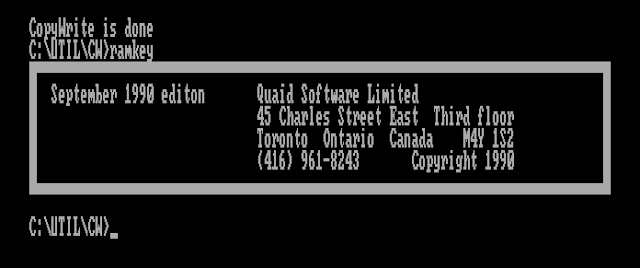
I removed the copy protection diskette, and executed catprot.exe off our new copy. It felt like the loading process took a bit longer, but just as I was expecting to see an error Alley Cat started up in all its CGA glory.
It looks like Quaid Software has won this historical shootout.
Vault Corporation vs Quaid Software
Vault was obviously unhappy with commercial products being sold that completely bypassed their flagship product. In May of 1985, Vault filed a lawsuit against Quaid Software seeking $100 million in damages. This case would set an important precedent in copyright case law - significant enough to have its own Wikipedia article: Vault Corp. v. Quaid Software Ltd.
Quaid Software would prevail in the court battle, confirming the right of users to make backup copies of software under Title 17 of US copyright law. It also overruled a state law, the Louisiana Software License Enforcement Act, which prohibited disassembling or reverse-engineering the Prolok software, deeming such activities an "essential step" of enabling consumer rights under Title 17.
The lawsuit came at no small cost to Quaid software founder, Robert McQuaid, who spent over $100,000 on the defense.
Details from the court filings show how far Vault went to try to protect the secrets of the Prolok code:
Their efforts included encrypting the PROLOK program in four layers of code, separating the various different programmers working on the program from each other, having all employees sign nondisclosure agreements prohibiting them from disclosing any of Vault's secrets, the use of shredding devices at the close of business each day to shred all paper containing any portion of the PROLOK program, and keeping the master PROLOK program locked in a safe.
Given all that secrecy, it's no wonder Vault was a bit upset to see Prolok so easily bypassed.
An Interview With Robert McQuaid
I was fortunate enough to have the opportunity to interview Robert McQuaid about his experiences and the court battle with Vault. You can read the interview here.
Vault's Corporate Suicide
Occasionally, stories will emerge about a business decision so ill-advised that it basically tanks an entire company's fortunes. Vault Corporation would give us an excellent example in its announcement of its "Prolok Plus" product.
Reproduced here is an article from PC Magazine:
Here we hear a description of how Prolok Plus will format your hard drive or infect it with a virus on a failed protection check:
Ignore this at your own peril, cautions Vault Corporation Chairman W. Krag Brotby, because if the machine has a hard disk, its entire contents are likely to be erased. Prolok Plus can also implant a "worm" in the system that will cause immediate or subsequent damage to the data or operating system.
Needless to say, this set off a firestorm of negative consumer perception toward Vault Corporation, its Prolok product, and any commercial products that may have used it. Although Prolok Plus was never actually implemented into any product as far as I can tell, the damage was done as rumors spread that any Prolok-protected title could potentially infect or erase your computer.
Ashton-Tate, Vault's biggest customer understandably did not want to be associated with this, and by the end of the year had dropped Prolok from their products. Vault Corporation would never recover from the reputational damage and loss of large customers, and would face increasing industry irrelevance from that point forward. Softguard Systems - subject of a previous post - would pick up some of Ashton-Tate's business in the wake of Vault's blunder.
Ironically perhaps, years later W. Krag Brotby would author several books on Information Security.
Emulating Prolok
Emulation is an important tool in the interest of preserving computing history, and Prolok was certainly an important part of that history. I would like people to be able to use and analyze the Prolok protection in MartyPC.
But how? First of all, it seems we will need an image format that can define metadata about the disk surface. The usual type of metadata stored in a disk image is a weak bit mask, relating to a copy-protection scheme which I haven't explained until now.
Weak Bits
Recall that floppy drives do not store 1's and 0's directly on the magnetic medium. Instead, bits are encoded via a series of flux transitions, essentially reversals of the magnetic field. The time measured by the disk controller between each detected transition encodes a short sequence of bits.
This scheme requires that flux transitions occur on a regular basis. The MFM encoding standard for floppies is designed to guarantee this - in a valid MFM stream, no more than three 0 bits should exist in a row before we see another 1 bit roll by. This produces a steady stream of flux transitions.
But what happens if there are no flux transitions? The disk drive's amplifier increases the gain to try to detect weaker magnetic signals. If no signals are actually present, the resulting output becomes noise - think turning your camera ISO way up in a pitch-dark room - and so the disk controller starts to receive random data. For further technical details on weak bits, please read this excellent blog post by Chris Evans. Areas of a disk without regular flux transitions are called No-Flux Areas (NFAs).
Some clever copy-protection authors realized that such areas could be intentionally created on a disk, and detected by code that checked that the data read from these areas changed each time. These areas came to be called "weak bits". Like all good copy-protection schemes, such areas could not be created by a standard PC floppy controller.
The Prolok fingerprints essentially create weak bits, as the creation of the fingerprint destroys the regular flux transitions that we would otherwise expect to read. But unlike a normal area of weak bits, writing over this area will fail to recreate normal flux transitions. The damaged area can no longer be written to. So it's not exactly the same.
Encoding Weak Bits
There are a few formats that allow for encoding both weak bits and deliberate damage ('holes') on the disk surface. MAME's MFI can do so - but it is a flux format that we don't yet support. Another format that we do support is 86F, the native format of the 86Box emulator. However, no images in 86F format that utilize the particular 'damage' surface description exist.
So how do we encode Prolok's fingerprints into a working disk image file?
Jeff Parsons, of the web-based PCjs emulator, has already been down this road with Prolok in 2019, and posted his experiences in this blog post. PCjs uses a custom JSON-based disk format, and he was able to add the necessary metadata to describe the Prolok fingerprints on a diskette. But this metadata will need to be added to each diskette as a manual process.
The 'Deluxe' version of the Copy II PC Option Board supported duplication of Prolok protection. No, the board did not include a laser to make holes in your copy - instead it was able to characterize the damaged sections and instruct the controller chip to simulate a damaged region. Clever. This gives us hope that TransCopy-format images produced by the corresponding utility for the Option Board may support such encodings.
One small problem is that I do not currently own an Option Board, so I cannot produce TransCopy images myself.
Our frequent hero of this series, NewRisingSun, produced a utility bundled with his TransCopy-capable fork of DosBox called flux2tc.exe which can read a KryoFlux or SCP-format flux image, and produce a TransCopy format disk image. A TransCopy image of the Prolok-protected dBase III, converted in this manner, apparently works in this DosBox fork. I was optimistic it might support my catprot.exe as well.
I converted a KryoFlux dump of my protected Alley Cat disk using the command:
flux2tc "T:\gw\prolok_alleycat00\prolok_alleycat00.0.raw" catprot.tc --droptracks
Then I started DosBox-TC, and mounted the resulting disk image:
imgmount a -t floppy catprot.tc
After changing to drive A and running catprot.exe, I was greeted with the following:
 |
| DosBox-TC fooling Prolok |
Unfortunately, support for TransCopy images isn't present in other, more actively maintained forks of DosBox, and the actual DosBox-TC fork itself doesn't appear to be currently maintained or distributed officially anywhere.
Using documentation provided by NewRisingSun, I added support for the TransCopy format in fluxfox, my disk image library that powers MartyPC. At first I was a bit puzzled because TransCopy doesn't seem to have any metadata that would define areas of weak bits or intentional damage. So how is DosBox-TC simulating the Prolok fingerprints?
As it turns out, storing separate metadata for weak bits is not necessarily required. An area of weak bits can be represented inline within the data stored in a bitstream-level image by simply encoding invalid MFM sequences (long strings of 0's). And this is exactly what the flux2tc tool does.
We can detect this when we import a file, and create our own weak bit mask. Here is what that looks like, visualized:
 |
| A Prolok fingerprint, visualized |
The magenta color represents our weak bits. You can see that they are clustered around the location of the Prolok fingerprint.
That's great, but how to we distinguish holes - which we cannot write to - from weak bits, which we possibly can?
The answer is that we may not need to. At least for Prolok, we have a few assumptions we can make. First, we can assume that the relevant NFAs will always appear on Cylinder 39. (And probably just head 0, but there's no guarantee Vault didn't change sides of the disk at some point). This is because the fingerprint 'hole' is actually so large that it would cover multiple tracks if it was not at the very inner edge of track data.
The second assumption is that we can treat sectors with weak bits, at least on Cylinder 39, as safely writable. There are other copy protection schemes that use weak bits, but these NFAs are never meant to be written to. Writing to an NFA could lay down a fresh set of flux transitions and actually ruin the protection, leaving you with a useless floppy. So we don't really need to expect to write to a sector containing weak bits, normally.
Therefore we can use a heuristic: if we encounter weak bits on Cylinder 39, we can treat those weak bits as holes. We will preserve our weak bit mask on writes, and use the mask to return random data on reads.
With weak bit support officially in place for TransCopy images, I created an integration test that validated that sector data could be written to a Prolok-fingerprinted sector then read back, and would see different data returned.
One Last Detail
With both support for TransCopy images and weak bits, I was hopeful that catprot.exe would run in MartyPC; but again I was presented with an error message instructing me to insert the original disk.
Looking at disk activity, I spotted a potential reason why. After performing the write test to the Cylinder 39, Head 0, Sector 4, Prolok issues a series of Read Sector ID commands.
Read Sector ID is another standard NEC drive controller command that simply returns the next sector ID the read head encounters as the disk is rotating. I have basic support for this command, but there is no simulation of the disk actually rotating, yet - so Read Sector ID always returns the sector ID set in the result phase of the previously issued command. When Prolok issues this command multiple times, and sees that the resulting sector ID returned does not increment, it would be able to detect that it was not dealing with a real floppy drive.
My plan for MartyPC is to eventually have a full model of physical floppy timings, including head seek times and spindle rotation. Am I going to need to implement that now before Prolok can be conquered? There's only one way to find out. I added a function that, given a sector ID, will return the next sector ID actually present on the track, or wrap around to the start of the track and return the first sector ID. Every time Read Sector ID is called, we'll advance to the next sector. Hopefully this will be enough, and we won't yet need to model the rotational speed of the disk just yet.
Success
With our Read Sector ID command fixed, we find that catprot.exe starts right up!

Let's try another Prolok protected title, Ashton-Tate's dBase III, v1.0.
We'll make a TransCopy image out of this from an SCP file, using flux2tc. Normally, dBase will present an error message immediately if the protection check fails. So if we see anything at all, we're in business.
 |
| Prolok-protected dBase III v1.0 running in MartyPC |
I also worked with the 86Box team, who identified some bugs in the handling of surface description fields within 86F files. I'm happy to report that as of 4.3, 86Box will support Prolok protected titles as well.
Vault Corporation's Ultimate Fate
I couldn't find information on the ultimate fate of Vault. The end of a company can occur by acquisition, merger, or simply a quiet closing of doors - the latter typically doesn't make news. Vault emerged from Chapter 11 restructuring in January of 1988, and managed to be a going concern for several more years. The last activity I could find was a renewal of the trademark on their fingerprint logo in 1993. If you know how the Vault story ended, comment below!
If you skipped the link earlier in this article, be sure to read my interview with Quaid software founder, Robert McQuaid, who has some very interesting details to share about his court battle with Vault.