Open source · Apache 2.0 · v1.2.8
The dashboard you'd build
if you actually cared.
Open-source Kubernetes dashboard with live cluster state, streaming logs, in-browser shell, AI diagnose, JIT access, and cost analysis — in a single Go binary. Runs in your cluster. Your data, your machine.
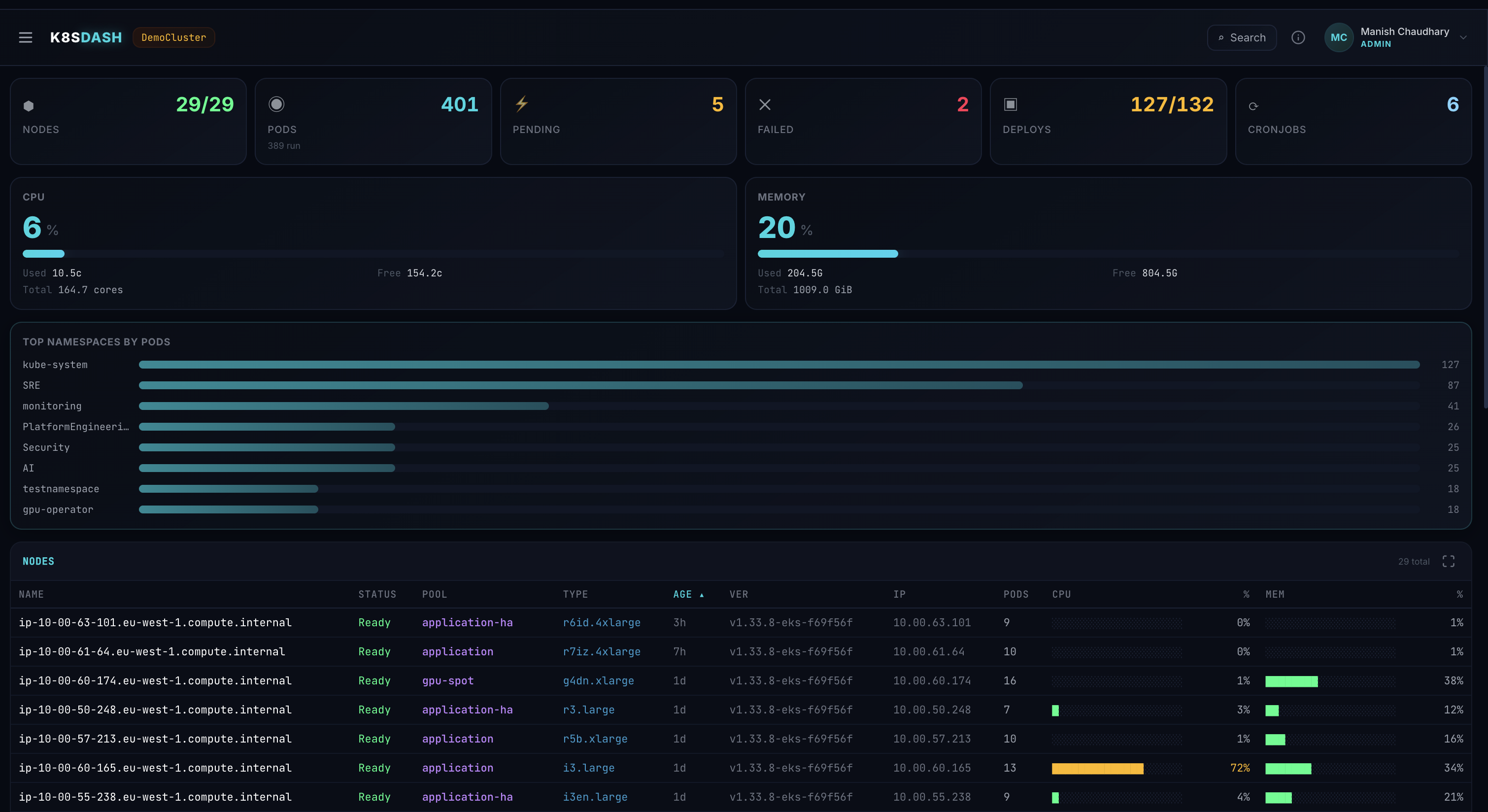
kube-argus · overview
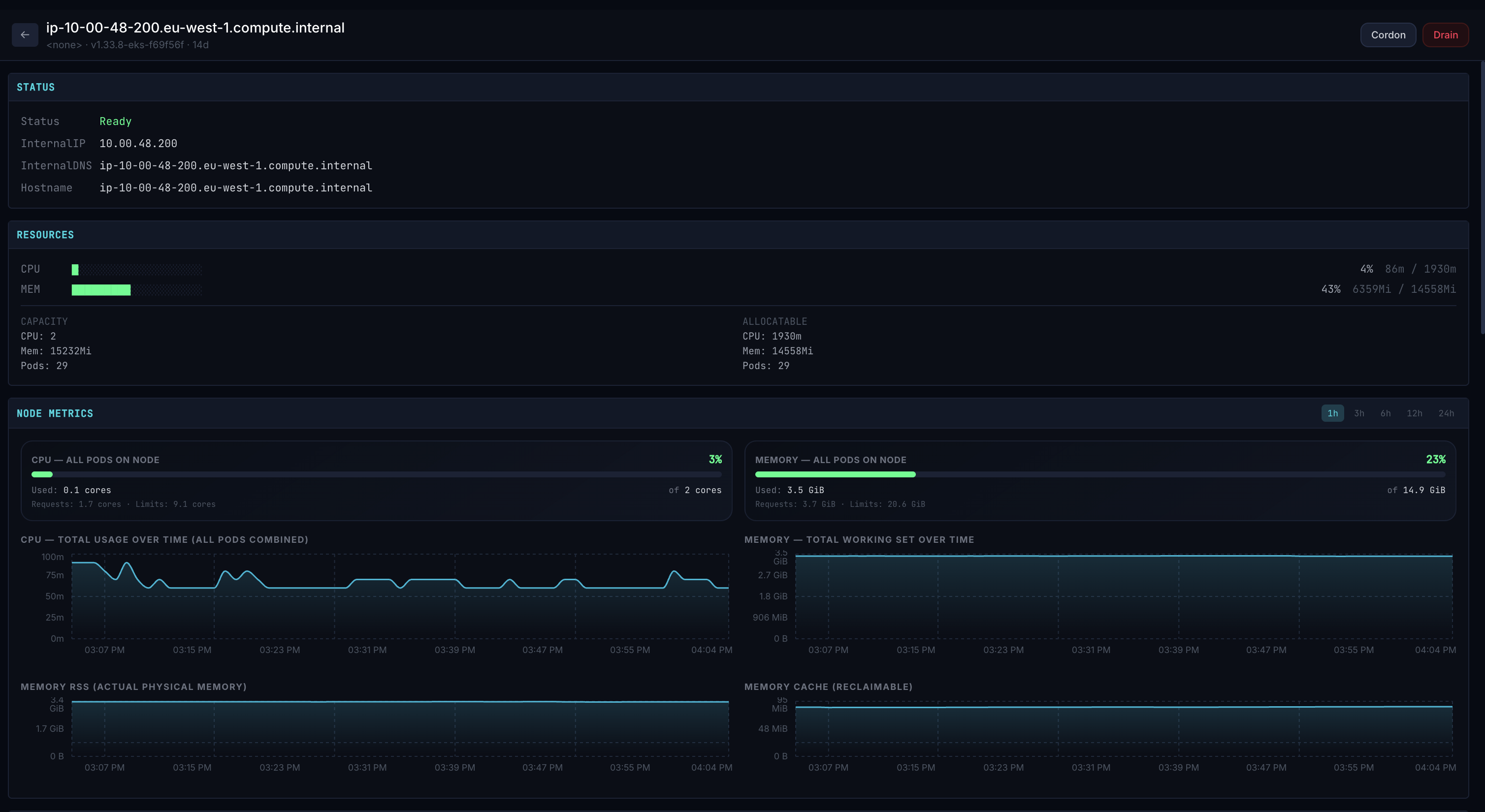
kube-argus · node detail
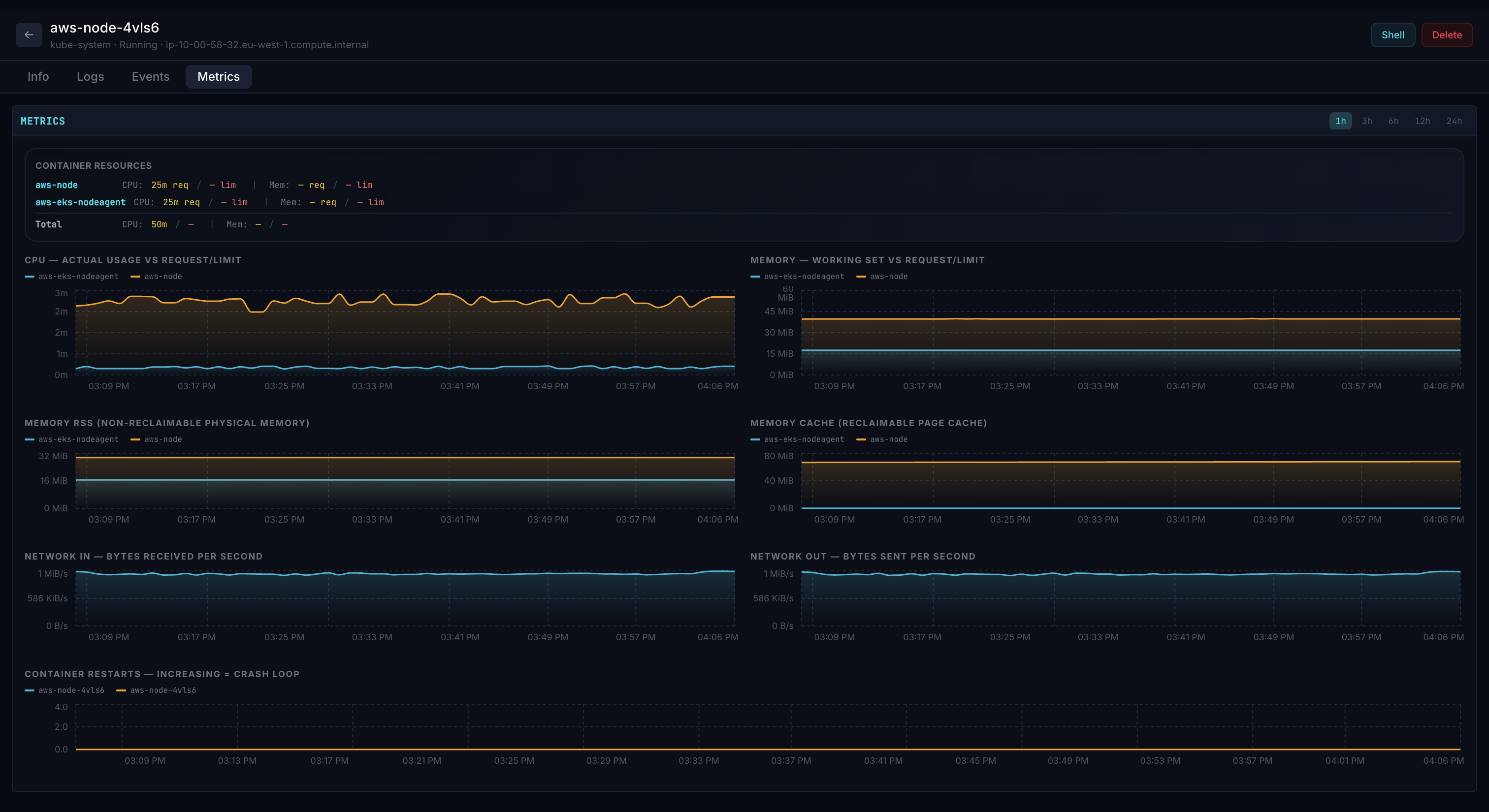
kube-argus · pod metrics
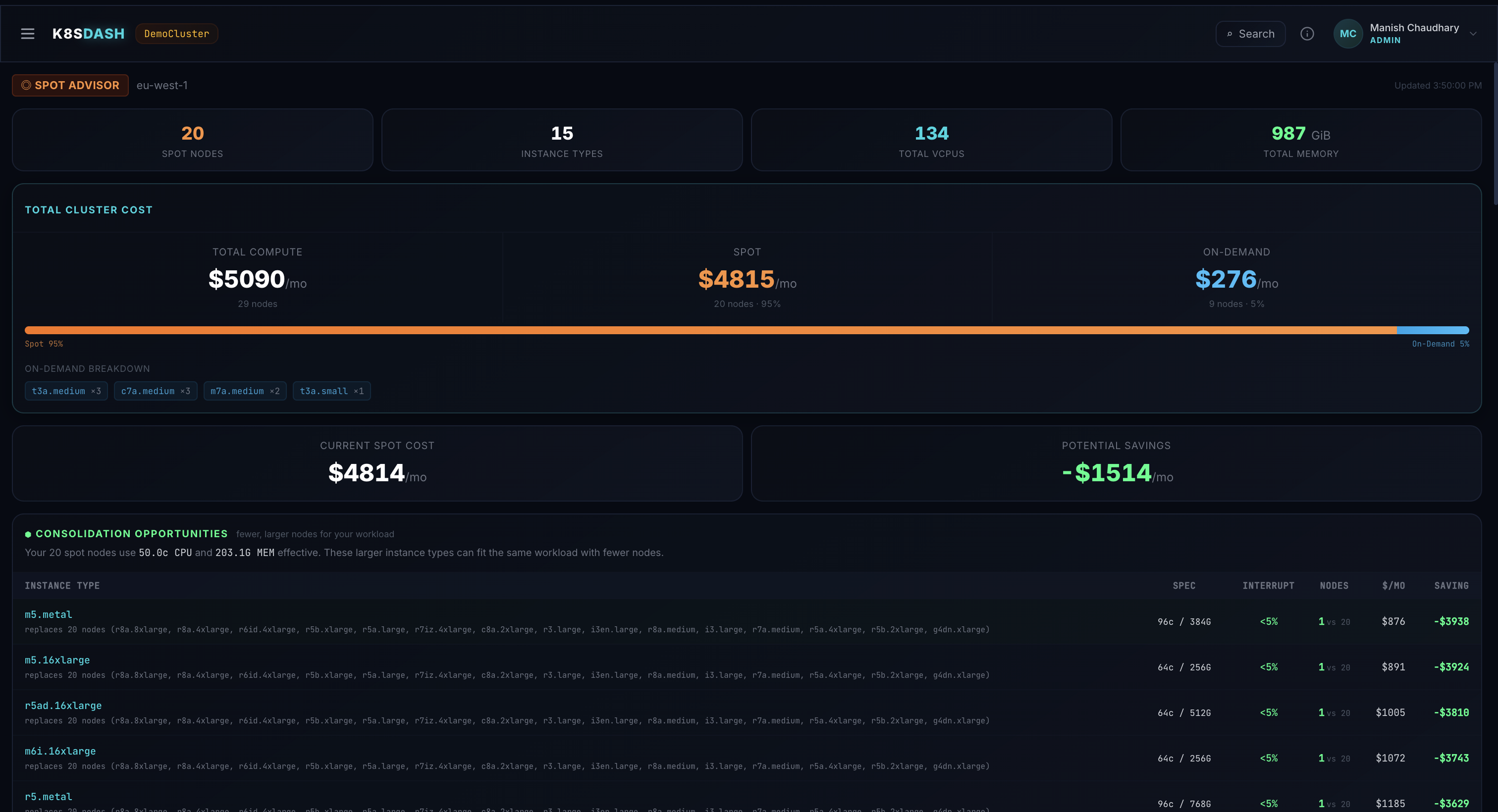
kube-argus · spot advisor
Runs anywhere Kubernetes does
EKS GKE AKS OpenShift Rancher k3s kind On-prem
"
I don't care about beautiful graphs, I care about closing tabs during an incident. Kube-argus replaces k9s + Grafana + kubectl + the cost dashboard with one screen.

Manish Chaudhary · maintainer · SRE
What it is
An operational dashboard built for the team running the cluster — not the team selling you software.
Kube-Argus is a single Go binary that ships as a Helm chart. It connects to your cluster's API via the service account, watches resources via informers, and renders a real-time dashboard that knows about the things SREs actually care about: who has access, what's failing, what it costs, and what the AI thinks is wrong.
Get started
Install in two commands.
No operator. No CRDs. No database. Helm provisions a Deployment, a Service, and (optional) an Ingress. State lives in ConfigMaps. Auth is OIDC + Google SSO + admin-emails.
$ helm repo add kube-argus \
https://manishchaudhary101.github.io/kube-argus
$ helm install kube-argus kube-argus/kube-argus \
-n kube-argus --create-namespace \
--set env.CLUSTER_NAME="production"
$ kubectl -n kube-argus port-forward \
svc/kube-argus 8080:8080
→ http://localhost:8080
-
✓
One container, no daemons
~12 MB image. Multi-arch (amd64 + arm64). Runs as nonroot. Distroless base. Zero ongoing maintenance.
-
✓
Persistent state via ConfigMaps
Audit trail, JIT requests, Slack/webhook config — all stored in ConfigMaps that survive pod restarts and stay consistent across replicas.
-
✓
Zero telemetry
The dashboard never phones home. Your cluster data stays in your cluster. AI and webhook integrations are opt-in.
-
✓
OIDC / SSO ready
Plug into Google, Okta, Keycloak, Dex, Auth0 — or stay simple with admin-emails and a default role.
What's inside
Built for the on-call rotation, not the slide deck.
Every feature exists because somebody got paged and wished they had it.
Live cluster state
Pods, nodes, workloads, services, events, ingresses — watched via informers, rendered in real time. No polling, no stale UIs.
Streaming logs & shell
SSE-streamed pod logs with search, container picker, and error highlighting. Browser-based exec via xterm.js when you need a shell.
AI diagnose
One click on a struggling pod, the LLM tells you why — built on top of live status, events, logs, and last-termination state.
JIT exec access
Viewers request shell or restart access. Admins approve from Slack or the dashboard. Every grant is time-bounded and audit-logged.
Cost & spot advisor
Per-namespace cost breakdown, spot instance risk scoring, nodepool consolidation hints. Numbers sit next to the workload.
Drain wizard
Guided node drains with PDB awareness, live eviction progress, and a dry-run mode. The operation you don't want to get wrong, made safer.
YAML editor
Inline YAML view and edit for every resource type, with syntax highlighting and structured drift detection against the live cluster state.
Audit trail
Every login, exec, restart, scale, and JIT grant logged. Persists across replicas via read-merge-write ConfigMap. WebSocket-driven, no polling.
Webhooks & Slack
Push JIT events to Slack with interactive approve/deny, or any HTTPS endpoint with HMAC-SHA256 signing. Filter by event type per destination.
How it stacks up
vs. the tools you're using today.
Three popular options against one binary.
| Capability | kube-argus | k9s | Lens / Headlamp | Grafana + kubectl |
|---|---|---|---|---|
| Real-time pod / workload state | ✓ | ✓ | ✓ | partial |
| Browser-based exec terminal | ✓ | CLI only | ✓ | — |
| AI-powered diagnose | ✓ | — | — | — |
| JIT access workflow | ✓ | — | — | — |
| Cost & spot advisor | ✓ | — | — | via plugins |
| Drain wizard with PDB awareness | ✓ | cordon/drain only | cordon/drain only | kubectl only |
| Audit trail (persisted) | ✓ | — | — | — |
| Slack / webhook notifications | ✓ | — | — | via Alertmanager |
| Single binary, no daemons | ✓ | ✓ | Electron / server+UI | multi-component |
| OIDC / Google SSO built-in | ✓ | kubeconfig only | ✓ | via proxy |
Open source
Apache 2.0. No telemetry. No paid tier.
The chart is on ArtifactHub. The image is multi-arch on GHCR. The source is on GitHub. The dashboard never phones home — your cluster data stays in your cluster.
v1.2.8 Latest release
Apache 2.0 License
~12 MB Image size
What shipped in this release
- Custom Resources & Helm browser — every CRD, every release, rollback / uninstall for admins
- Backend reorganized into
internal/{api,auth,audit,jit,notify,httpx}— main.go is now 238 lines of pure wire-up - Secret redaction for non-admin Helm and YAML views, incl. subcharts and value-holder patterns
- Initial test suite — 36 unit tests across 6 packages, security-critical helpers covered
Frequently asked
Questions you probably have.
How is this different from k9s?
k9s is a terminal UI you run on your laptop using your local kubeconfig. Kube-argus is a web dashboard that runs in your cluster, shared across the team. It also covers workflows k9s doesn't — AI diagnose, JIT access, cost analysis, audit trail, Slack/webhook notifications. The two are complementary; many SREs use both.
Does it require Prometheus?
No — but you get more if you have it. The core dashboard works against metrics-server alone (CPU/memory).
Prometheus unlocks per-pod historical graphs, namespace cost over time, and the spot advisor's risk
scoring. Configure via the PROMETHEUS_URL env var.
What auth options are supported?
Generic OIDC (Keycloak, Okta, Auth0, Dex), Google SSO, and ADMIN_EMAILS + DEFAULT_ROLE for simple setups.
Roles are admin (write access) and viewer (read access). View-as-viewer impersonation lets admins preview
the UI from a viewer's perspective without signing out.
What does the AI diagnose actually do?
It packages the pod's current status, events, container statuses, last termination state, and recent log
lines into a structured prompt, sends it to an OpenAI-compatible LLM gateway, and streams the response.
The output is a terse triage summary, not a long essay — designed for the on-call. Configure via
LLM_GATEWAY_URL / LLM_GATEWAY_KEY / LLM_GATEWAY_MODEL.
What's JIT access?
A viewer requests time-bounded shell or restart access on a specific workload, with a reason. An admin approves or denies — from the dashboard or directly from Slack. Approved grants are time-limited (default 1h), audit-logged, and auto-expire. A non-bureaucratic path to least-privilege RBAC.
Does it send anything to the internet?
By default, no. The dashboard talks to your cluster's API server and metrics-server only. AI diagnose and webhook features call external endpoints — only when you configure them and only when you trigger them.
Can I contribute?
Please do. PRs welcome on GitHub. Bug reports, feature requests, and screenshots of cool clusters all appreciated.
Run the dashboard your future on-call self will thank you for.
A 30-second helm install. No daemons, no database, no telemetry.