· Andrew Arrow
Command-K is part of how I copy a file. I clear the terminal, run cat file.txt, and press Command-A. I expect the file’s contents, with two lines above and two below. I don’t want the build log from ten minutes ago sneaking into my clipboard.
I also want workspaces down the side of the window. Getting both sent me through cmux, a Rio fork, and eventually Apple Terminal’s disassembly. That became TabDance, the macOS terminal I’m building. A new layout shouldn’t require relearning how to copy some damn text.
Copying is only one of the habits I kept tripping over. Clearing a half-written command, pasting several lines, and watching characters appear as I type all contribute to whether a terminal feels right. To reproduce that behavior, I need to get past “this feels different” and trace what happens after each keystroke.
I liked cmux’s workspaces
cmux got the organization right for me. Related sessions live in a vertical workspace list, so I can find a project without remembering which of my windows contains it. It’s built with Swift and AppKit, with libghostty handling the terminal, and the source is available.
Command-K and multiline commands still didn’t behave the way I wanted. I found Rio next and tried adding the workspace layout there. On September 22, I opened Rio PR #1954 with a left drawer inspired by cmux. The screenshot below is from that PR.
The PR uses my aa branch. A later spinner branch includes further work, including the selection fix described below, so use that revision if you’re looking for the fix in the source.
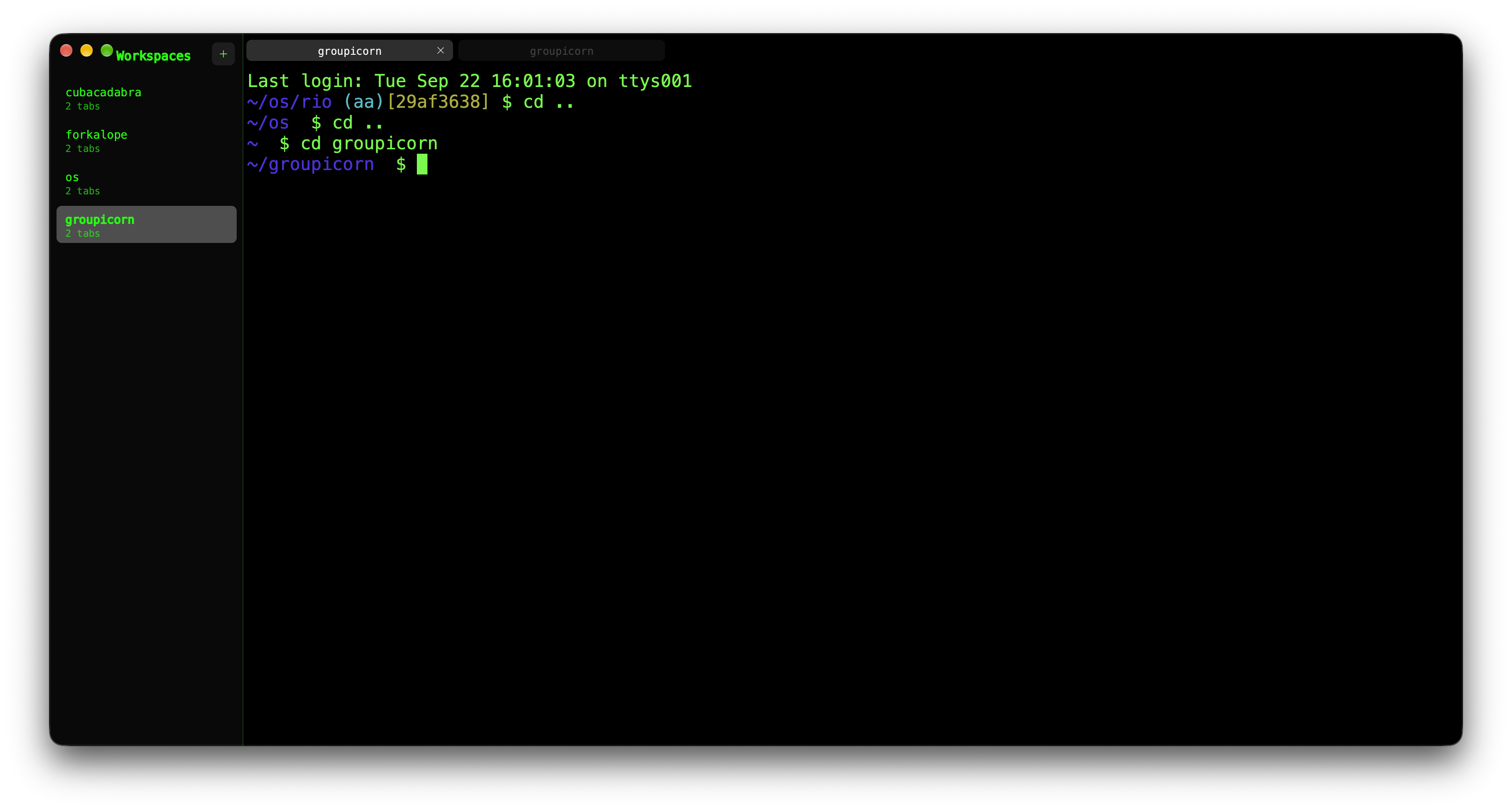
I called Rio “perfect” in the PR description. Premature, as it turned out. I liked the workspace layout, but continued use kept turning up differences in copying, pasting, clearing, and typing. Those are most of what I do in a terminal; having the right sidebar couldn’t make up for them.
What did Command-K actually clear?
After I clear the terminal, Select All should collect what I print next. A blank window is misleading if the old output is still waiting in the selectable buffer. This diagram shows the behavior I want, using a three-line file. It isn’t a benchmark of released terminals, and the prompt and wrapping settings can change the surrounding rows.

“Clear” can mean several things inside a terminal. The current screen and saved scrollback hold different text, and the cursor and selection have their own state. Moving the viewport doesn’t delete the text behind it. Sending a control character to the shell does something else again, because the shell or foreground program gets to decide how to respond.
In the Rio revision I inspected, the normal macOS Command-K binding has two matching actions: send 0x0c, the character generated by Control-L, and clear saved history. The history action operates on Rio’s terminal state. The other action goes to the running program, which commonly redraws the prompt or screen in response.
That explains why an idle shell is a lousy test of clearing behavior. Add a partial command, change the line editor, or run a full-screen program, and the recipient of Control-L may respond differently. The bindings show where to investigate; I can’t pin every difference I felt on them without testing those cases.
Looking inside Apple Terminal
I wanted to see how Apple approached the same problem. The file I started with was named term.bin.exe.mac. Its name was odd, but file identified a Mach-O universal binary containing arm64e and arm64e.x1 slices. Its SHA-256 matched the installed Apple Terminal executable byte for byte. The analysis manifest records that comparison and the commands used.
The first pass used macOS’s own inspection tools:
file term.bin.exe.mac
dyld_info -arch arm64e -objc term.bin.exe.mac
dyld_info -arch arm64e -disassemble term.bin.exe.mac
The Objective-C metadata made the assembly much less opaque. Among 107 classes and 2,488 method implementations were recognizable shell, I/O, encoding, VT100, screen-storage, and view objects. Those names gave me places to start tracing a clear operation instead of staring at anonymous instructions.
This is still disassembly, with annotations and selected paths reconstructed by hand. I don’t have Apple’s original Objective-C or comments, and a method named clearAll: doesn’t tell me what its authors intended “all” to include. I have to read what it calls.
Apple’s shortcut guide describes Command-K as clearing to the start. In the binary, the view has separate methods for clearing the screen, scrollback, and everything. Its clearAll: method clears the selection and asks the logical screen to clear scrollback, within a begin/end content-change pair.
Following that logical-screen call shows it shifting active line ranges, removing characters, truncating saved text and an offset cache, and marking rows dirty for drawing. All of this happens inside the terminal. The view’s clearAll: path doesn’t write to the shell.
I haven’t traced the menu wiring far enough to identify this as the exact Command-K handler. But it does show Apple coordinating selection, saved text, and active rows in one operation. TabDance needs an equally explicit answer about what survives a clear, or I’ll just be chasing surprises one keystroke at a time.
Copy the text I selected
Suppose a terminal application displays hello. I select it, but the application erases that row before I press Command-C. Copying an empty string would faithfully report the current screen and completely miss what I asked for.
My Rio fork stores a text snapshot when the selection changes. The copy path uses that saved string before falling back to the live grid. The visible row can change without changing the text waiting to be copied.

The snapshot survives a redraw, but an explicit selection clear removes it. Otherwise Command-C could keep copying text I’d already thrown away. The fork’s regression test exercises that sequence with carriage return and erase-line, \r\x1b[2K. I inspected the test; I haven’t run the Rio suite for this investigation.
Pasting brings the receiving program back into the picture. With bracketed paste, the terminal wraps the text in start and end sequences so the program can tell a paste from typing. Rio’s paste implementation does that when the program enables the mode; otherwise normal paste converts line endings to carriage returns. If I compare two terminals with different shells or line-editor settings, I may be blaming the wrong program.
The round trip behind a typed character
Typing also felt different, but I don’t yet have measurements that explain it. The disassembly at least lets me trace how a key gets to the screen and see where time could be spent.
Apple Terminal starts its child through forkpty. A pseudoterminal, or PTY, gives the shell a terminal device while the application reads and writes the other end. A key event becomes bytes, those bytes reach the shell, and output returns to update the screen. Depending on the program and terminal settings, the echo comes from the terminal driver or the program. The diagram reconstructs these handoffs from the disassembly; the arrows don’t represent measured durations.

The I/O thread uses kqueue, handles buffered writes, and reads output in chunks. It schedules delivery back to the main thread. There, shellDidReceiveData: passes data through the encoding converter into the output decoder. In this path, parsing returns to the main thread rather than staying on the I/O thread.
The encoding layer also handles incomplete character data between reads. A read can end halfway through a UTF-8 character; the next chunk completes it. Then the VT100 decoder interprets cursor movement, erasure, and other control sequences to update the screen. The output is a stream of instructions as well as text, which is why the same parser can make a selected row disappear.
Dumping a huge file quickly wouldn’t answer my typing question. A key still has to get through queued writes, shell processing, delivery to the main thread, and the next draw before I see it. I need a comparison with the same shell, prompt, window size, font, and workload before claiming that TabDance is faster, or crediting a particular Apple design choice for the feel I prefer.
The first prototype
The October 10 snapshot contains the inspection artifacts and a small native prototype. It uses Swift, AppKit, and SwiftTerm 1.19.0 for terminal emulation and rendering. It launches a real login shell, supports selection and copy/paste, resizes the PTY, and opens multiple windows. The app bundle is still called TerminalLab.app.
The build instructions cover that snapshot. Tabs, workspaces, and matching the sequence of clearing, printing, and selecting are still ahead of it. For the next comparison, three lines are enough:
printf 'alpha\nbeta\ngamma\n' > /tmp/tabdance-selection.txt
# Press Command-K, then run:
cat /tmp/tabdance-selection.txt
# Press Command-A, Command-C, and inspect the pasted text.
I want to record exactly which text and surrounding newlines Apple Terminal copies, with a fixed prompt and window size, then get the same result from TabDance. A wrapped command, a selection erased by a redraw, and a multiline paste come next. Each is small enough that I can inspect the copied bytes or visible result and see exactly where the terminals disagree.