Luksmith mounts ext2/3/4 drives straight into Finder, whether the filesystem is plain ext or encrypted inside a LUKS1 or LUKS2 container. Readable, writable, journalled, and with nothing installed in the kernel.
macOS 26 · Apple Silicon · Free to read · $9.99 unlocks writing
disk6s1 · LUKS1 · 951.8 GB locked
LUKS header: readable without the passphrase ciphertext ext4 data
Nothing in the kernelNo kext, no macFUSE, no reduced security, no rebooting into Recovery mode.
No network callsNo account, no telemetry, no licence server. Your passphrase stays here.
Journalled writesWrites go through the filesystem’s own jbd2 journal, in ordered mode or full data journalling. Eject before unplugging.
MacOS offers to eject it.
Luksmith mounts it.
Plug a LUKS drive into a Mac today and the system does not recognise a filesystem at all. It throws its hands up in confusion.
Without Luksmith
Plug a LUKS drive into a Mac today and the system does not recognise a filesystem at all. It throws its hands up in confusion.

With Luksmith
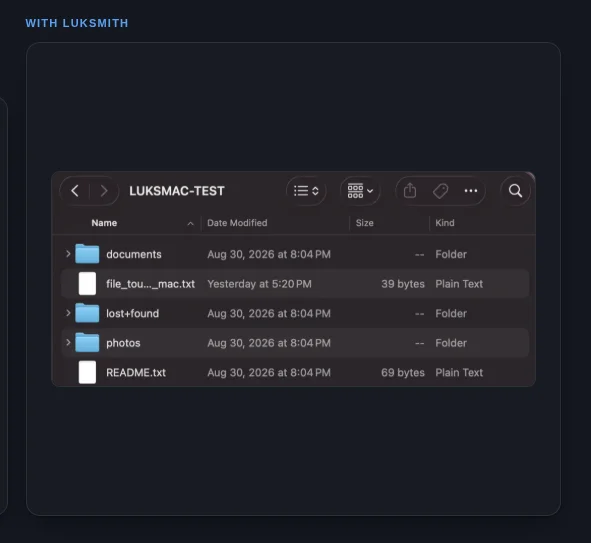
Every workaround is a bandaid on the same missing piece: MacOS has no native understanding of LUKS. Alternative solutions aim at trying to be able to access through various means but aren't use friendly to the MacOS UI. Luksmith solves the problem without Virtual Machines, kernel level fileystem extensions, and any sort of digital forensics to just be able to access files on a drive.
From raw sector to Finder window.
Luksmith is a userland file system extension built on Apple's FSKit. MacOS hands it the raw block device, it decrypts sectors in place and walks the ext filesystem with libext2fs.
- 1
ProbeScans for LUKS drives by reading the LUKS header and recognises the container.
- 2
UnlockYour passphrase unwraps a keyslot, which yields the volume key.
- 3
ReadSectors decrypt on demand while libext2fs walks the filesystem.
- 4
MountFSKit publishes it as a volume, and Finder opens it like any disk.
What it looks like.
The whole app is one window. It comes forward when an encrypted drive is plugged in, takes the passphrase, and hands the volume to Finder.
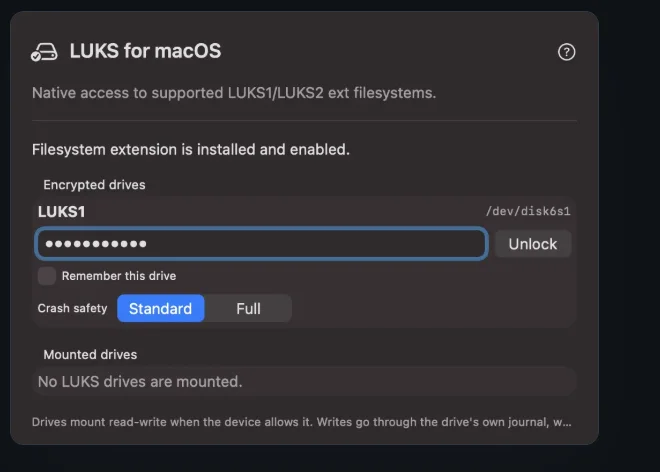
Step one
Unlock
Luksmith appears on its own when an encrypted drive is plugged
in. Type the LUKS passphrase and choose Unlock and Mount.
Optionally remember the drive, and pick how carefully writes
are flushed.
Luksmith uses Apple's Keychain to securely store your passwhrase.
Step two
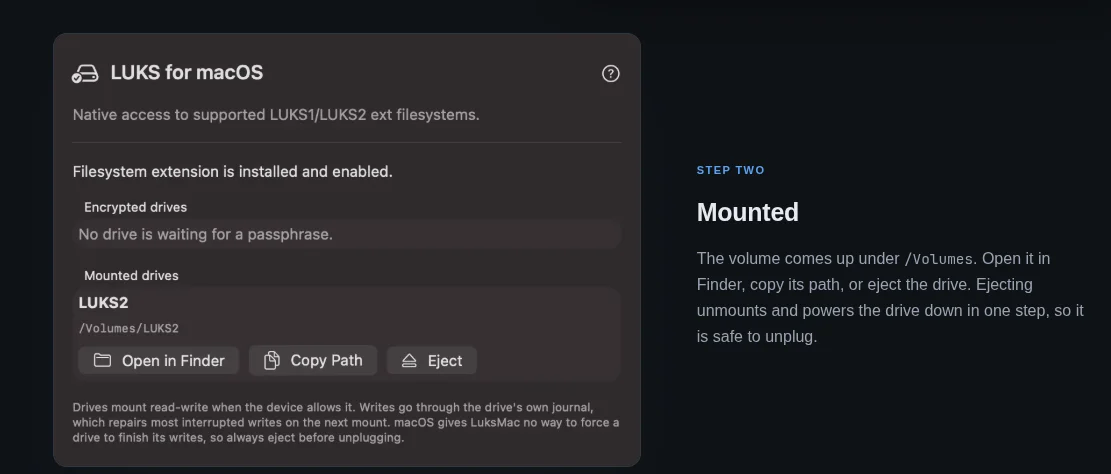
Mounted
The volume comes up under /Volumes. Open it in
Finder, copy its path, or eject the drive. Ejecting unmounts and
powers the drive down in one step, so it is safe to unplug.
Step three
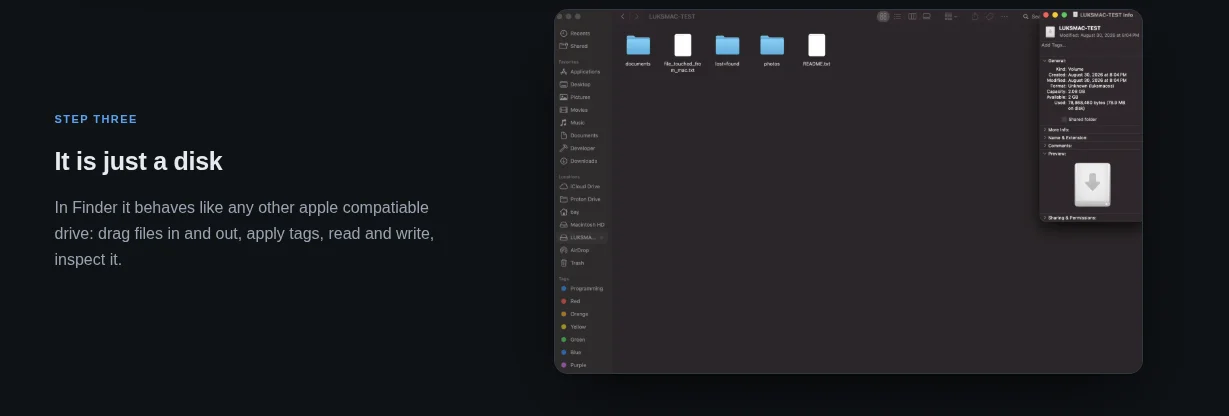
It is just a disk
In Finder it behaves like any other apple compatiable drive: drag files in and out, apply tags, read and write, inspect it.
Exactly which drives it opens.
Luksmith doesn't support every single way to configure a LUKS drive, but it covers the defaults people use.
Where the guarantees stop.
Luksmith writes to real filesystems, so it is worth knowing the one place its safety net has a hole.
Eject before unplugging
Writes go through the drive’s own journal, but MacOS does not
let the extension force the drive to commit that journal before the
data it describes. Ejecting waits for every write to finish and is
always safe. Pulling a mounted drive, or losing power while a
write is in flight, can leave damage the journal cannot undo and
the drive may then need e2fsck on a Linux machine. A
mounted but idle drive is never at risk.
Everything else is just scope. Luksmith opens and edits drives that already exist. It does not create, format or resize a LUKS volume, and it does not carry POSIX ACLs or device nodes across. The table above lists exactly which existing drives it opens.
Free to read. $9.99 to write.
Get started free and open any supported drive read-only for nothing. The one-time purchase turns on writing, on every Mac you own, with every future update. Buy once, yours forever.
$9.99once
- Mount LUKS1 and LUKS2 ext drives in Finder
- Write, create, rename and delete (read-only until you buy)
- Journalled writes through the filesystem's own jbd2 journal
- Extended attributes, so Finder tags survive
- Header inspection and diagnostics
- Safe eject from the menu bar
- Any number of Macs, one licence
- Offline licence key, nothing to activate
- Every future update, for as long as it exists
- Pay once, keep forever
Buying from this website:
install the app free with brew install --cask betim-hodza/luksmith/luksmith.
Checkout emails you a licence key that unlocks writing. No Apple account needed.
Mac App Store:
installs and updates itself through Apple and stays with your
Apple Account. Read-write from first launch, no key to enter.
Before buying, check the format list
to make sure your drive is supported. If it opens read-only
but writing fails, ask and the money comes back.
Paid users can contact
Luksmith support.
Buying is subject to the license agreement:
Luksmith comes with no warranty, and you keep your own backups.
Built on open source.
The cryptography and filesystem work is done by well-established libraries rather than anything homegrown. Every licence text ships inside the app, and each project is linked below.
libext2fs is LGPL, so it ships as a shared library you can
replace: build e2fsprogs 1.47.4 yourself, drop your copy into the app
bundle, and Luksmith loads it instead. The matching source accompanies
every release. Full licence texts are installed in the app bundle, and
every project above links to its own upstream repository. Luksmith claims
no ownership of these projects or their trademarks.
Questions
Is my passphrase safe?
It is held in the MacOS Keychain, available only when this Mac is unlocked, and shared only with Luksmith's own filesystem extension. It is never written to disk in plaintext and never sent anywhere. The app has no permission enabled for network access, and every passphrase and derived key lives in a locked buffer while in use, then is erased.
Do I have to enable anything after installing?
MacOS requires you to switch on a file system extension by hand, but only once: System Settings → General → Login Items & Extensions → File System Extensions. The app tells you if it is still off and walks you through turning it on.
What if I unplug the drive while it is mounted?
If you were only reading, nothing is lost. If a write was in flight, the journal is designed to replay on the next mount and bring the filesystem back consistent. That replay only works if the drive commits the journal before the data it describes, and MacOS does not let the extension enforce that order, so a power loss at the wrong moment can leave damage that needs e2fsck on a Linux machine. Either way, whatever was still being copied is gone. Eject first, and wait for the drive to disappear.
Why MacOS 26 and Apple Silicon only?
Luksmith is built on FSKit, which is how a filesystem runs in user space on a modern Apple system without a kernel extension, and the parts it depends on are recent. The alternative, shipping a kernel extension or macFUSE, would mean asking you to lower your Mac's security, and that trade is not worth it. If you are on an Intel Mac: honestly, put Linux on it. Omarchy makes that about as painless as it gets, and then the drive mounts natively anyway.