Yeah, I know, the title seems written by a chatbot. Rest assured, the content is not. As announced almost four weeks ago, it’s time for me to bid Linux farewell on my laptops, but on all present and future computers for sure. Should I need it, there’s WSL under Windows, which is much leaner than running a VM. Even Linux GUI apps can run under WSLg, as a last resort.
1. The random 5 GHz AP that wouldn’t work ■ 2. The case of the laptop webcam ■ 3. The unacceptable regression in the Bluetooth chip ■ 4. The older regression in an… audio jack ■ 5. The unreliable NTFS support ■ 6. The Inateck USB Hub 3.2 Gen 2 Splitter ■ 7. The defective canceling of file copying ■ 8. The inevitable decision ■ 9. What next? ■ 10. BONUS CHAPTER!
How should I start explaining it? It’s definitely not distro-related. It’s Linux-related. So let’s start with a not-so-critical issue, and after reaching the critical one, thus justifying the decision, I can mention the other major annoyances with Linux that I could live with, but I won’t need to anymore!
❶ The random 5 GHz AP that wouldn’t work
Last April, I paid a visit to my brother’s. This rarely happens, because we don’t live not even in the same country, even less in the same city. And there I encountered an unsolvable problem: my Linux laptop could not connect to the 5 GHz access point!
The home router was a ZTE device manufactured in March 2023, ZTE Internet Box Wi-Fi 6 “Opera VHO” model ZXHN F6600R. It had band steering, meaning that the 2.4 and 5 GHz channels had the same SSID, and I could connect to 2.4 GHz. But there was no way I could connect to 5 GHz, no matter what I tried!
My Ubuntu MATE 24.04 LTS was (and is) perfectly able to connect to several other 5 GHz APs of different makes, just not to this one!
It couldn’t connect using the 6.11 HWE kernel.
It couldn’t connect using the 6.8 kernel.
It couldn’t connect from Linux Mint 22.1 (Cinnamon).
It couldn’t connect from the recently (at the time) released Ubuntu 25.04 (GNOME).
It couldn’t connect from the latest Fedora KDE Live CD available.
It couldn’t connect from the latest Manjaro KDE Live CD either.
It couldn’t connect from anything I tried, and I even ran Deepin 23.1 and 25 Alpha!
But otherwise it always connects to 5 GHz, and it can reach 500–600 Mbps when available, despite the atrocious MediaTek MT7663 driver in the Linux kernel. Just not in that case.
But to the same router, my Android phone connected to 5 GHz without any hiccups. Obviously, Win10 also couldn’t see any issue whatsoever.
How could I trust Linux when it’s unable to connect to some 5 GHz APs for no reason whatsoever? Nothing relevant in the logs (journalctl, wpa_supplicant.log), dmesg, etc. The most advanced open-source OS on planet Earth? 🐂💩
❷ The case of the laptop webcam
That’s one of the most frustrating of my recent adventures with the Linux kernel so far. As I explained in August 2024, my most recent Acer laptop, manufactured in September 2022, includes a Quanta webcam with the ID 0408:4033. And it wasn’t supported by the Linux kernel!
On Ubuntu forums, it was first reported on Aug. 1, 2022, for Ubuntu 22.04 (kernel 5.15.0-25). Some people tried (and succeeded) to patch the kernel since January 2023, under Fedora, Ubuntu, Arch, openSUSE Tumbleweed, and other distros, for two closely related webcams, 0408:4033 and 0408:4035. The patch worked (with modifications, see the many links in my post) in various kernels from 6.2.0 to 6.8.0.
At the time, I rebuilt the patched driver under Kubuntu 24.04 with a 6.8 kernel, and it worked, but only if I used the driver sources patched for 6.5.0! That’s grotesque. But it worked.
In March 2024, the patch was proposed for integration in the upcoming 6.11 kernel, and in mid-June, it was waiting for the “Tested-by:” tag. But in the end, kernel 6.11 was released only with the 0408:4035 support added, but without 0408:4033, which is literally identical! All you need to do is to add to uvc_driver.c a structure in which 0408:4035 is replaced by 0408:4033! Why such elementary configurations cannot reside in an external text file beats me. One needs a newer kernel even for such ridiculous crap! Fuck you very much, Linus!
Meanwhile, as times passed by, I noticed that at some point the support for my webcam reached the Linux kernel. I’ve seen work in several distros, including Deepin 25 Alpha (6.12.9), Debian “frozen for 13” (hence 6.12.28, only later to be bumped to 6.12.38), and more.
But when the 6.11 HWE kernel was released in Ubuntu 24.04.2 in mid-February 2025, it already supported my webcam! Yay! I didn’t notice it right away, so the fact that it supported my webcam from its initial release is only an assumption.
An even greater surprise came when the 6.8 kernel for Ubuntu 24.04 LTS suddenly started to support my webcam! I don’t know when the support was backported, as I was running the 6.11 kernel at the time, but I can certify that it’s been supported at least since 6.8.0-60. The backport might have happened somewhere in April 2025.
Of course, it still works with the latest 6.14 HWE kernel, which breaks something else (see below).
Webcamoid, on the other hand, is the utmost piece of crap. As it’s the default webcam app in Ubuntu MATE, and it never worked on this laptop under 24.04, I assumed the webcam still didn’t work until I noticed that it worked in everything else: Cheese, Kamoso, you name it. It works in the live Ubuntu MATE 24.04.3 (and in Mint 22.2 Beta), but the same Webcamoid 9.1.1 fails in my up-to-date installed system! I couldn’t identify the config file that could be the reason for this failure. And to think that we curse the Windows Registry…
Back to the webcam support itself. The driver needed a patch that has zero code and is merely a structure defining a configuration. It took roughly two years since the solution was known, for it to reach Ubuntu! But remember that some five months prior, when 6.11 was released mainstream, it still only had support for the other, extremely similar, webcam. The full patch came at a later time. What a fucking joke this Linux kernel is!
This is one more effect of the stupid design of the Linux kernel, in which one cannot “just install” a new or updated driver. Nope. A new kernel is required!
❸ The unacceptable regression in the Bluetooth chip
This one is the most absurd of all the crap I’ve ever seen in Linux. Of course, it has to do with the combo chip for Wi-Fi & BT, which is MediaTek MT7663.
Sure thing, Mediatek’s MT7663 is not the best chip this planet has seen, but I’m sick of the Linux people constantly blaming companies like Mediatek and Realtek for the quality of their drivers. Such companies make various chips (Wi-Fi, BT, audio, network controllers) that work very well. When they use a driver that works, that is. And they allow people to use laptops that are cheap: why should I need a €2,000 laptop when a €400 one can do the job?
MT7663, a chipset released in 2019, is supported under Linux via m7615e. But it’s not that simple. Yes, mt7663-usb-sdio-common.ko has existed in Linux since 2019 too (kernel 5.1), but it didn’t work until much more recently. All the reports that the device with the PCI ID 14c3:7663:11ad:3801 works (regarding its Wi-Fi capabilities, not its BT ones) were made with kernels 5.19.0 or newer.
The BT capabilities need a supplementary binary blob (the firmware). When it’s loaded, it works.
This is why, when I was using AlmaLinux 9.x (kernel 5.14), I had to use a 6.1 kernel from ELRepo (kernel-lt). All RHEL9 clones were in the same situation.
Even today, with any kernel that still supports MT7663, hibernation (Suspend to Disk, S4) still breaks m7615e, and it doesn’t just break MT7663 but most likely other devices, too. As usual with all kernels that support MT7663, resuming from hibernation leads to a lack of Wi-Fi (BT sometimes works) and to an extremely unresponsive system that eventually needs to be shut down. During the shutdown, some m7615e timeout errors will be seen, so that driver is a complete fuckup. However, sleep (Suspend to RAM, S3) works, so I had to use it when a complete shutdown wasn’t appropriate.
Ubuntu Pro extends the support for an LTS to 10 years, including for the desktop environment other than GNOME, but many people simply refuse to learn this fact. So I should have been able to use Ubuntu MATE 24.04 LTS for many years, even if I didn’t want to upgrade to a newer version, right?

Nope. This is Linux, folks. When it works, it works:
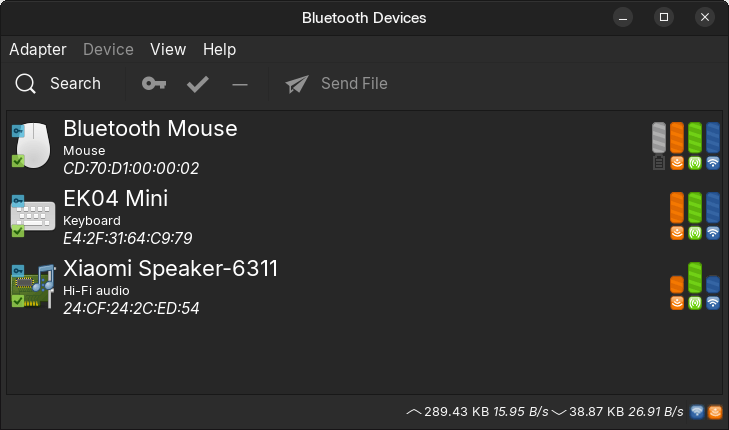
When it doesn’t, the above dialog (blueman-manager) crashes, and so does the system tray applet (blueman-adapters).
While mt76 seems to support both the Wi-Fi and the BT in MT7663 very well in practice, the driver is a complete mess. Here’s what it outputs to dmesg when it does work:
$ sudo dmesg | grep mt76
[    4.775457] mt7615e 0000:2a:00.0: enabling device (0000 -> 0002)
[    4.775724] mt7615e 0000:2a:00.0: disabling ASPM  L1
[    4.779832] mt7615e 0000:2a:00.0: registering led 'mt76-phy0'
[    4.794983] mt7615e 0000:2a:00.0 wlp42s0: renamed from wlan0
[    4.807811] mt7615e 0000:2a:00.0: Failed to get patch semaphore
[    4.807822] mt7615e 0000:2a:00.0: mediatek/mt7663pr2h.bin not found, switching to mediatek/mt7663pr2h_rebb.bin
[    4.809346] mt7615e 0000:2a:00.0: Failed to get patch semaphore
[    4.809360] mt7615e 0000:2a:00.0: failed to load mediatek/mt7663pr2h_rebb.bin
[    5.012860] mt7615e 0000:2a:00.0: Failed to get patch semaphore
[    5.012866] mt7615e 0000:2a:00.0: mediatek/mt7663pr2h.bin not found, switching to mediatek/mt7663pr2h_rebb.bin
[    5.013607] mt7615e 0000:2a:00.0: Failed to get patch semaphore
[    5.013615] mt7615e 0000:2a:00.0: failed to load mediatek/mt7663pr2h_rebb.bin
[    5.220848] mt7615e 0000:2a:00.0: Failed to get patch semaphore
[    5.220853] mt7615e 0000:2a:00.0: mediatek/mt7663pr2h.bin not found, switching to mediatek/mt7663pr2h_rebb.bin
[    5.221655] mt7615e 0000:2a:00.0: Failed to get patch semaphore
[    5.221661] mt7615e 0000:2a:00.0: failed to load mediatek/mt7663pr2h_rebb.bin
[    5.428996] mt7615e 0000:2a:00.0: Failed to get patch semaphore
[    5.429010] mt7615e 0000:2a:00.0: mediatek/mt7663pr2h.bin not found, switching to mediatek/mt7663pr2h_rebb.bin
[    5.430337] mt7615e 0000:2a:00.0: Failed to get patch semaphore
[    5.430353] mt7615e 0000:2a:00.0: failed to load mediatek/mt7663pr2h_rebb.bin
[    5.637547] mt7615e 0000:2a:00.0: Failed to get patch semaphore
[    5.637560] mt7615e 0000:2a:00.0: mediatek/mt7663pr2h.bin not found, switching to mediatek/mt7663pr2h_rebb.bin
[    5.638806] mt7615e 0000:2a:00.0: Failed to get patch semaphore
[    5.638834] mt7615e 0000:2a:00.0: failed to load mediatek/mt7663pr2h_rebb.bin
[    5.845961] mt7615e 0000:2a:00.0: N9 Firmware Version: 3.1.1, Build Time: 20200604161656
[    5.845966] mt7615e 0000:2a:00.0: Region number: 0x4
[    5.845968] mt7615e 0000:2a:00.0: Parsing tailer Region: 0
[    5.846483] mt7615e 0000:2a:00.0: Region 0, override_addr = 0x00118000
[    5.846485] mt7615e 0000:2a:00.0: Parsing tailer Region: 1
[    5.932466] mt7615e 0000:2a:00.0: Parsing tailer Region: 2
[    5.934857] mt7615e 0000:2a:00.0: Parsing tailer Region: 3
[    5.940172] mt7615e 0000:2a:00.0: override_addr = 0x00118000, option = 3
I won’t comment on the patch semaphore, but it has always tried to load the non-existent firmware mt7663pr2h.bin, then mt7663pr2h_rebb.bin, and then it eventually loads some firmware that works. Who the fuck accepted such code in the Linux kernel?!
It’s simpler when it doesn’t work:
$ sudo dmesg | grep mt76
[    4.414131] mt7615e 0000:2a:00.0: enabling device (0000 -> 0002)
[    4.418761] mt7615e 0000:2a:00.0: registering led 'mt76-phy0'
[    4.429275] mt7615e 0000:2a:00.0 wlp42s0: renamed from wlan0
[    4.450031] mt7615e 0000:2a:00.0: HW/SW Version: 0x65326363, Build Time: 2006030247debug
[    4.533852] mt7615e 0000:2a:00.0: N9 Firmware Version: 3.1.1, Build Time: 20200604161656
[    4.533858] mt7615e 0000:2a:00.0: Region number: 0x4
[    4.533860] mt7615e 0000:2a:00.0: Parsing tailer Region: 0
[    4.538894] mt7615e 0000:2a:00.0: Region 0, override_addr = 0x00118000
[    4.538900] mt7615e 0000:2a:00.0: Parsing tailer Region: 1
[    4.545714] mt7615e 0000:2a:00.0: Parsing tailer Region: 2
[    4.549033] mt7615e 0000:2a:00.0: Parsing tailer Region: 3
[    4.601839] mt7615e 0000:2a:00.0: override_addr = 0x00118000, option = 3
But why wouldn’t it work?
Well, because at some point in the life of the 6.11 kernel, the Bluetooth support for MT7663 has been removed from the kernel!
Here’s what I tried. Note that I started tracking the mainline kernel when my webcam wasn’t supported, and this made it easy for me to try the BT support, too.
| Linux kernel | Distro | Wi-Fi | Bluetooth | Notes |
|---|---|---|---|---|
| 6.8.0-n | Ubuntu 24.04 LTS (live or updated) | ✅ OK | ✅ OK | GA kernel |
| 6.8.0-41 | Ubuntu 24.04.1 LTS (live) | ✅ OK | ✅ OK | HWE not the default |
| 6.11.0-17 | Ubuntu 24.04.2 LTS (live) | ✅ OK | ✅ OK | HWE by default |
| 6.11.0-n, n<26 | Ubuntu 24.04 LTS (updated) | ✅ OK | ✅ OK | HWE kernel |
| 6.11.0-n, n>=26 | Ubuntu 24.04 LTS (updated) | ✅ OK | ❌ BROKEN | HWE kernel |
| 6.12.x to 6.12.47 | mainline | ✅ OK | ❌ BROKEN | LTS kernel |
| 6.12.9 | Deepin 25 Alpha | ✅ OK | ❌ BROKEN | |
| 6.12.33 | Deepin 25.0.1 | ✅ OK | ❌ BROKEN | |
| 6.12.38 | Debian 13 | ✅ OK | ❌ BROKEN | |
| 6.14.0-n (HWE) | Ubuntu 24.04 LTS (updated) | ✅ OK | ❌ BROKEN | HWE kernel |
| 6.14.0-27 | Ubuntu 24.04.3 LTS (live) | ✅ OK | ❌ BROKEN | HWE by default |
| 6.14.0-29 | Mint 22.2 (live) | ✅ OK | ❌ BROKEN | HWE by default |
| 6.14.0-n | Ubuntu 25.04 | ✅ OK | ❌ BROKEN | |
| 6.14.2 | OpenMandriva 6.0 | ✅ OK | ❌ BROKEN | |
| 6.14 to 6.14.11 | mainline | ✅ OK | ❌ BROKEN | EOL |
| 6.15 to 6.15.11 | mainline | ✅ OK | ❌ BROKEN | EOL |
| 6.16 to 6.16.7 | mainline | ✅ OK | ❌ BROKEN | |
| 6.17.0-0.rc3.31 | Fedora 43 Beta | ✅ OK | ❌ BROKEN |
Before explaining how this happened, let me state what this means:
Bluetooth on laptops with MT7663 will never ever work on Linux, because the kernel has dropped the support for it! The only way to have it work for some years is to use Ubuntu 24.04 LTS with the original 6.8.0 kernel. Newer installs default to the latest HWE kernel, but 6.8.0 is still available and supported.
But such laptops are dead for Linux!
Tell me again about how unique Microsoft’s TPM 2.0 requirement is!
Now, to be honest, I don’t know for sure when exactly the support was dropped in Ubuntu’s kernel. What I know for sure is this:
- In 6.11.0-17 it worked.
- In 6.11.0-26 it didn’t work anymore, and it kept this way with any subsequent version.
There’s absolutely no reference to this matter in the changelog for Ubuntu’s kernels from 6.11.0-18 to 6.11.0-26. Nada. But here’s what I learned.
On the way to kernel 6.12, the mt76 driver was made to skip the firmware request for mediatek/mt7663*.bin, meaning that no firmware is actually loaded. Strangely enough, mt7615.h still lists the four blobs to look for, but none of them is loaded anymore:
#define MT7663_OFFLOAD_ROM_PATCH	  "mediatek/mt7663pr2h.bin"
#define MT7663_OFFLOAD_FIRMWARE_N9	"mediatek/mt7663_n9_v3.bin"
#define MT7663_ROM_PATCH		        "mediatek/mt7663pr2h_rebb.bin"
#define MT7663_FIRMWARE_N9		      "mediatek/mt7663_n9_rebb.bin"
The unique reference to the monumental idiocy that removed the firmware is this strange changelog posted on 2024-02-26 for a change made on 2024-02-01:
linux-firmware-mediatek-genio (5-0ubuntu1) noble; urgency=medium

  * Update WiFi MT7961 firmware to fix the latency issue (LP: #2051921)
  * Remove firmware as per Mediatek's request
    - mediatek/mt7663_n9_rebb.bin
    - mediatek/mt7663_n9_v3.bin
    - mediatek/mt7663pr2h.bin
    - mediatek/mt7663pr2h_rebb.bin
  * d/source/lintian-overrides: fix lintian errors
  * MediaTek decides to drop mt7663 support from MediaTek Genio boards because
    it doesn't maintain opensource mt7663 driver and firmware anymore.

 -- Ethan Hsieh <email address hidden>  Thu, 01 Feb 2024 16:49:19 +0800
It stems from Bug #2051921: Update WiFi/BT firmware as per MediaTek’s request:
MediaTek decides to drop mt7663 support from MediaTek Genio boards because it doesn’t maintain opensource mt7663 driver and firmware anymore.
The “rationale” is thus declared to be the following one:
- MediaTek decided to drop mt7663 support from MediaTek Genio boards because it doesn’t maintain the open-source mt7663 driver and firmware anymore.
- MediaTek subsequently asked (who?) to remove the firmware from the kernel.
There is a logical disconnect here, perhaps even a non sequitur:
- Even if MediaTek decided to stop updating the Linux driver and the firmware for MT7663, there is no reason to remove the firmware from the Linux kernel!
- Maybe only the Linux driver has been shelved, but not the firmware, as this firmware is also required by the Windows driver, and I’m 100% certain that Windows did not remove the support for BT in MT7663! (The firmware is OS-independent, as it’s used by the chip itself, not by the OS.)
- Also, in Windows one could always install an older driver, something that’s impossible by design in Linux! If a newer Linux kernel lacks a driver that used to be there or has a broken driver, you’re screwed.
- MT7663 also provides Wi-Fi without any firmware, but the development of the Linux Wi-Fi driver also stopped, and yet, the Wi-Fi still works! Why?
- Oh, MediaTek seems to only have asked someone at Canonical (not upstream, but it eventually reached upstream) to remove the firmware and nothing else. So the kernel team is OK with a Wi-Fi driver that might include undiscovered vulnerabilities that would need to be patched. No problemo.
- But even if the firmware itself is not open-source, the license to use it “as is” cannot be revoked. The proof? All versions of the 6.8.0 kernel, which is continuously updated and distributed by Canonical, still contain this firmware! Only the kernel 6.11.0 has dropped it at some point, which is ridiculous. They could have removed it from 6.12 upstream or, in the case of Ubuntu 24.04 LTS, from the next HWE kernel, which is 6.14.0.
- Upstream, there is no easy-to-find changelog to document the removal of this firmware.
Ladies and gentlemen, this is Linux for you: a complete cesspool run by oligophrenic software developers.
People reported over 2 million bugs on Ubuntu’s Launchpad. Here’s a quick selection of bugs from 2025:
- Mediatek MT7630e: support lost: “The wireless did work until last days. Now the wireless device is not detected any more.” (Ubuntu 24.04.1 with kernel 6.8.0-52.53)
- [MT7921] Bluetooth not detected after install in Ubuntu 24.04 with HWE kernel 6.11.0-17.17.
- [MT7921] Bluetooth not showing devices in Ubuntu 24.10 with kernel 6.11.0-14.15.
- Bluetooth not working on Realtek RTL8822BE (AW-CB295NF) with Ubuntu 24.04 and Kernel 6.14: “While the WiFi works perfectly using the
rtw88driver, the Bluetooth does not work at all.”
Such bugs aren’t necessarily distro-specific. It depends.
Needless to say, while the quality of Wi-Fi and BT drivers is abysmal in Linux, most such devices will never work in FreeBSD and even less in NetBSD or OpenBSD! For recent devices, FreeBSD only has the resources to import Linux drivers, but this isn’t an easy task. In the case of the mt76 driver (FreeBSD only targets MT7915 and MT7921 but not MT7663 yet), they’re blocked because they need support for page pools in the LinuxKPI. Read the full explanation. Realistically, it will never work.
For recent chipsets that are present in laptops, the Linux drivers are low-quality, and nobody cares about them. They’re only guaranteed to have supported drivers for Windows. Again, if they stop developing such a driver, it should normally work in a future version of Windows, but in Linux there’s no way to “install” a driver.
The only way the situation would have been different were if the European Union, which otherwise likes to overregulate, had imposed dual-OS support for each laptop sold in the EU. But it didn’t.
OCTOBER 15 UPDATE: I just realized that the Bug #2051921: Update WiFi/BT firmware as per MediaTek’s request was meant for the package
linux-firmware-mediatek-geniothat only exists forarm64.The firmware declared as removed is still available for
amd64in the packagelinux-firmware, and this is why the kernel 6.8 can still load it. But newer kernels (6.11 and 6.14 in Ubuntu 24.04 LTS, or 6.12 in Debian 13) just don’t care to load the BT firmware!Is this an intended outcome, or an unexpected regression? MT7663 being dual Wi-Fi/BT, and the changes in kernel being quite important between 6.8 and newer versions, I wasn’t able to ascertain at a quick look.
But it’s unacceptable. It’s also amazing that nobody filed a bug about this BT regression! OK, there is one.
There’s Bug #2123847: Bluetooth Mediatek MT7663 not detected on Acer Aspire A315-58G (kernels 6.14, 6.16) reported on 2025-09-15, but the reporter didn’t bother to return with follow-ups.
The idiot who closed the bug with “status: New → Incomplete” was as dumb as the dumbest chatbot: “The kernel log is from running an unsupported kernel. Please boot with a supported kernel, etc.” Indeed, the logs were provided for kernel 6.16.7, but this regression applies to ALL kernels since 6.12 and even to current 6.11 kernels in 24.04 LTS. On all fucking distros on the planet!
It’s nice to know that the Linux kernel has clueless developers, including Juerg Haefliger, working for Canonical Ltd. Observing a procedure (“don’t bother if the kernel is from a line that’s not maintained anymore”) is more important than using one’s brains. Obviously, nobody seems to know or care that the MT7663-based BT doesn’t work anymore with any of the supported kernels! (Long-term kernels older than 6.8 are of no practical interest, as they’re used in old LTS distros.)
It’s worth noting that MT7663 is used, both for Wi-Fi and BT, by several current Xiaomi TVs, including Xiaomi TV F 65 2026 and Xiaomi TV F 55 2026. OK, this means Fire OS, which is Android and is using an older kernel, but how can Canonical and the upstream Linux kernel team claim that the BT firmware should no longer be used because it’s not maintained anymore? The firmware has nothing to do with the kernel!
❹ The older regression in an… audio jack
Since we are at “regressions for eternity” (regressions that won’t be fixed till the end of the universe), here’s an older one. And yes, it’s still there.
I wrote about it more than once. I first mentioned this bug on June 3, 2020, when I was using Linux Mint 19.3 XFCE. I then searched for the root cause (because it persisted), and I wrote about it in detail on March 31, 2021. Finally, on July 1, 2024, I confirmed that the bug, which is a regression, never got addressed. It’s going to be in Linux forever. And it’s an absurd bug.
It concerns my old Acer laptop from 2016 (not this exact configuration, but very close, and now with 2 SSDs).
You see, many years ago, the designers of PCs uninvented this simple self-switching audio jack that worked just fine for decades:

Back in the day, when you inserted an audio jack in a port and the audio signal was directed to the external playing device, usually headphones, the internal speakers got disconnected automatically. No need for software when the physical insertion of the jack would switch some contacts. But nowadays everything is done by software, and here’s how this bug was made possible by “progress.”
On the laptop in question, inserting a headphone jack ❶ will not direct the signal to the headphones and ❷ will not cut the audio from the internal speakers! It used to work just fine, but it doesn’t anymore, and it will never do it again!
The undetected audio jack can still be used as an output source in KDE, XFCE, or LXQt, because the headphones can be manually selected in plasma-pa, pavucontrol, or pavucontrol-qt, regardless of the “(unplugged)” label. Unfortunately, selecting the undetected headphones in MATE’s mate-volume-control cuts off the sound. And it’s completely impossible to manually select the undetected headphones in GNOME, Cinnamon, or Unity! Let me mention one more time the relevant keywords: “software,” “progress,” and “you don’t need to be able to tweak anything.”
Obviously, the driver required for this jack to work is not for the jack itself. The hardware, in this case Realtek’s ALC282 chip, knows when a jack is inserted (impedance, right?), but instead of automatically switching the audio output, it waits for a command given by the OS via a driver. Someone designed such retarded shit. Do such guys need software to wipe their asses?
The regression was introduced by Commit 34cdf40 from Dec. 16, 2020. The rationale:
Acer TravelMate laptops P648/P658 series with codec ALC282 only have one physical jack for headset but there's a confusing lineout pin on NID 0x1b reported. Audio applications hence misunderstand that there are a speaker and a lineout, and take the lineout as the default audio output.
Add a new quirk to remove the useless lineout and enable the pin 0x18 for jack sensing and headset microphone.
The problem?
- Their P648/P658 with codec ALC282 only have one physical jack for headset
- My P645 with codec ALC282 has two separate physical jacks for headphones and mike
- The new patch singles out a P648/P658 laptop via the line
SND_HDA_PIN_QUIRK(0x10ec0282, 0x1025, "Acer", ALC282_FIXUP_ACER_DISABLE_LINEOUT, - But this line also matches my P645, to which the patch shouldn’t be applied! My P645:
"HDA:10ec0282,10250924,00100003" "0x1025" "0x0924"
In brief, this patch fixes the situation when the kernel expects a separate mike jack in Acer TravelMate P648/P658, by telling it that there’s no such thing. But it also does it for my Acer TravelMate P645 where there are two jacks!
I listed in that post from 2021 several bug reports regarding the confusion that Linux has or had with various audio jacks. Some of them were fixable, but mine isn’t, because ALSA or PulseAudio cannot override the kernel.
If I want to run Linux on my Acer laptop from 2016, I need to choose between the internal speakers and Bluetooth speakers or headphones, but nothing wired.
It doesn’t have TPM 2.0, but there are choices: Windows IoT 10 Enterprise LTSC 2021, supported until 2032, and Windows 11 IoT Enterprise LTSC 2024, which doesn’t have the TPM requirement because it’s an IoT edition. And my audio jacks are supported by Windows!
❺ The unreliable NTFS support
Did you know that starting with version 5.15, the Linux kernel can eat your NTFS data? It’s a random and not acknowledged scenario, but it happened to some people, including yours truly!
Prior to kernel 5.15, the NTFS support was in userspace (FUSE). This is why on older distros, including on AlmaLinux 9.x with the original 5.14 kernel, I had to install ntfs-3g to access external NTFS drives. This driver is very slow, but at least it’s reliable.
Newer kernels have integrated Paragon’s ntfs3 driver. Having NTFS supported directly in the kernel increases the speed dramatically.
Paragon’s NTFS driver was a one-man job, and it’s also the same guy who’s supposed to maintain it in the kernel. As described in this long post from last year, this guy, Konstantin Komarov, went MIA. Even Linus Torvalds got worried about this driver: “if we can find nobody that ends up caring and maintaining, then I guess we should remove it, rather than end up with two effectively unmaintained copies of NTFS drivers.” Then he showed up again, but his commits to the Linux kernels are signed aalexandrovich, and his GitHub profile doesn’t inspire much more confidence than Vladimir Putin or Sergey Lavrov!
My predicament with this driver (and I quote myself):
At some point, I saved on an external NTFS drive a complex hierarchy of folders, the leaf one having lots of files (comics, documentaries, magazines, etc.). Exactly for such folders with up to 3,000 files I need the Compact List View in a file manager, and given that Files (Nautilus) is the only one that lacks it, GNOME is unusable (why would I use it with another file manager, when I could use another desktop environment altogether?).
Well, as I later found, after having deleted the original files, that the “copy” made only included the folder hierarchy, but absolutely no file! And no error was displayed whatsoever.
In that post, I added:
Such a bug has been reported, but it was never officially acknowledged and never investigated.
I won’t copy them here, but I also listed plenty of links to reports of breakage: folders disappearing, corrupted volumes, empty files… Another report as a comment: an external drive corrupted beyond recovery!
NTFS is not a filesystem used by Linux, but I have a dozen external HDDs and a number of external SSDs, and not all of them are exFAT. Some are still NTFS. So I need to be able to use them for backup purposes, and I need them to be portable across OSes! But how can I trust Linux when such bugs have never been acknowledged upstream? My trust in ntfs3 is zero!
But people get hysterical over SSDs allegedly being broken by Microsoft. Firstly, they lack common sense, and secondly, I’m not even sure it was a real thing. I’m still waiting for Linus Torvalds to admit that the NTFS kernel he integrated into the kernel is a piece of crap.
❻ The Inateck USB Hub 3.2 Gen 2 Splitter
Speaking of having many external storage devices and making backups, let me introduce you to this marvelous Inateck USB 3.2 Gen 2 Hub, which supports 4 USB-A devices and takes 1 USB-A or 1 USB-C connector. My wife has the USB-C variant, but I needed the USB-A one.

It’s a freaking USB hub, so it’s OS-agnostic: “Compatible with Windows 7/8/10/11, Linux, macOS.”
It’s fast. It’s a lifesaver. I love it.
That is, if you’re into one of the following scenarios:
- You’re using it in Windows, even Windows 7. You can connect as many external SSDs or HDDs as it supports.
- You’re using in Linux, but you only connect one external drive at a time.
What could happen if you connect several external SSDs or HDDs and try to transfer between them from Linux? This is what would certainly happen at some point: one or more of the connected drives will stop being recognized! It’s such a pleasure when this happens while you’re midway copying files!
When such a thing happens, you know that you need to disconnect all external drives and only reconnect one of them.
This is not “because of my hardware” or because of a specific Linux distro.
- It happened to me in several Linux distros.
- It happened to me on at least two computers: an HP ProDesk 400 G6 Desktop Mini PC from end-2021, and my Acer Aspire 3 A315-59 from 2023.
How am I supposed to use Linux when its kernel’s drivers are so poor that they can’t accommodate several external drives on the same USB connector via an excellent hub?
❼ The defective canceling of file copying
First mentioned in 2021 in my “SPECIAL: You Don’t Even Know How Terrible Your Linux Distro Is!” at “§13. The File Managers in Linux: One More Stupid Design Decision” (the anchor goes directly to §13), then detailed in 2024 in my “SPECIAL: Epic disappointments with Linux (not for the mentally retarded)” (direct link to the relevant section), this incredibly bug works as follows.
Let’s consider this common scenario: when you CANCEL a copy or move operation, say, that of a huge file, what do you expect to find in the destination folder?
- Nothing, as the partially copied file should have been deleted.
- The partially copied file, which is misleading, useless, and dangerous, because the user would assume the file has been copied, when it’s actually a broken file, being incomplete (truncated).
Well, in Windows (since forever), the answer is 1, which is the only one that makes sense. But in Thunar, Caja, Nemo, Nautilus/Files, PCManFM, and PCManFM-Qt, the answer is 2! Incomplete files are left in the destination folder, with no indication that they’re incomplete! And this is about gracefully canceling a copy/move operation, not a brutal abort or CTRL+C!
In 2024 I tested the behavior of the graphical file managers one more time, and I found that Dolphin (in KDE5, but also in KDE6) is the only major file manager that works as expected and doesn’t leave any partially copied files in the destination folder. I remade the tests a couple of days ago, with the same results: Nautilus/Files, Nemo, Caja, Thunar, PCManFM, and PCManFM-Qt cannot be trusted! Of course, to be able to test this, you need a slow device for the destination, say a flash drive.
Back in 2021, I found a couple of bug reports, and let me post them here one more time.
● For Nautilus, on 2012-10-27: Bug #1072135: Canceled copy/move operations should not left incomplete files:
This is not a bug but a possible usability improvement.
Test case:
– Open Nautilus
– Open a second folder on a tab
– Copy/move a big file form one tab to another
– Cancel the transfer using the X button.
The unfinished file remains on the destination folder, now, since this file is incomplete (possibly unusable) and the user directly stated that he/she doesn’t want to transfer this file, I think that it is safer to delete the destination copy altogether. Otherwise could be indexed and cause some confusion.
Not a bug, huh? Did this idiot never use Windows? Even Win3.1’s File Manager behaved correctly, meaning it already had this “possible usability improvement”! FFS, some people are really stupid.
But don’t worry, nothing happened: the developers simply didn’t understand why this is an issue!
● Linux Mint user, on March 03, 2015: Copy and paste, incomplete files remain-how to auto delete?
If I copy a file (e.g. video from cd or dvd to a new folder) and cancel, or if it shows as corrupt halfway through copying and cannot complete, the incomplete file remains in the new folder.
Is there a way to set Mint so that incomplete copies are automatically deleted or at least moved to the recycle bin, instead of having to do delete manually?
I am using Cinnamon and XFCE, and I think this applies to both.
Yes, it does. And no, they couldn’t care less!
- Who were those shitheads who wrote such a code? Who needs a broken, incomplete file in the destination folder?
- The problem with such broken, incomplete files is that people would assume they’re complete, valid files! “Oh, so those files got copied, great.” Except that they weren’t!
🟦 Facts matter: I spent some more time testing
Don’t fall for the reports claiming that Win3.x’s File Manager has been open-sourced in 2018. But WinFile on GitHub are not the pristine Windows 3.1 File Manager sources! The GitHub code comes from the WinNT3.1-3.51 branch of File Manager, not the Win3.1x branch. There is support for long file names, plus other features added through 1996. Then, the code is made to build and run on modern Windows versions, including Win11. (The original 16-bit Win3.x apps cannot run on 64-bit builds of Windows, but only on 32-bit builds of Windows.)
In the process, the behavior has changed in many regards. More specifically, the copying has changed dramatically. Since file copy routines in Win3.x used INT 21h DOS calls, which are impossible since NT onwards, the code changed; some functionality from wfcopy.c has moved to lfn.c, where DOS calls have been replaced with Win32 API calls.
To the point, my tests proved the following:
- In Wfw3.11 (in VMware), if Cancel is hit during the copying of several large files, the last file that was in the process of copying gets canceled and doesn’t show up in the target folder.
- With this modern build of WinFile.exe, if Cancel is hit during the copying of several large files (to a slow flash drive), the last file that was in the process of copying still gets through and will eventually show up in the target folder.
But I could confirm in VMs that the file managers in the following versions of Windows do cancel the copying of the file being currently copied, without leaving traces (either incomplete or complete files) in the destination folder: Windows for Workgroups 3.11, Windows 95 OSR2.5 (“C” version), and Windows 98 SE.
Most people don’t fucking know shit, and they couldn’t care less, and this is why in 2025 we have Nautilus/Files, Nemo, Caja, Thunar, PCManFM, and PCManFM-Qt that behave even worse than WINFILE.EXE in Windows 3.1!
Try to avoid the following scenario in Linux with any GUI file manager that’s not Dolphin:
- To make space on a device, you try to move some large files to a different drive or partition, but out of caution, you start a copy operation. The idea is to delete the original files afterwards.
- In the process, you notice that on the destination device or partition there isn’t enough space, or it barely is enough, so at some point you hit Cancel, so that not all files get copied.
- You suppose that all the files present in the destination folder are complete files, so you assume that you can delete the files with the same names from the source folder.
WRONG! Unless it’s Dolphin or a non-GUI tool, such as Midnight Commander. The last file copied to the destination folder will be incomplete and unusable.
🟦 Bonus: Qt and KDE fix a file renaming bug in the Linux Kernel
For exFAT, Linux has a kernel bug that only Qt works around. Read more about it here: Why KDE, part IV: Qt and KDE fix a bug in the Linux Kernel.
❽ The inevitable decision
I’m really fed up with such shit. After 34 years, the progress in Linux is laughable, and this OS cannot be considered a reliable alternative to “Windows on the desktop,” especially on laptops. FreeBSD, NetBSD, and OpenBSD are much worse. They’re almost like they were frozen 20 years ago.
No wonder Linux never reached more than 4% of the market on people’s PCs.
Linux does work on servers, which don’t have WiFi, Bluetooth, or webcams, and where regressions probably trigger corrective actions. But if the Linux kernels cannot be managed from a QA standpoint, why are they still trying to pretend it’s for the masses, including our laptops? Let it have limited hardware support, on par with FreeBSD! And let it power not only servers but also embedded devices and Android phones, but not much more.
Frankly, it’s obvious that nobody really cares about “Linux on the desktop”! There are extremely few “Linux-certified” laptops and desktop PCs; they’re usually certified for older versions of a major distro (say, Ubuntu 22.04 LTS instead of 24.04 LTS); and they aren’t properly advertised anywhere. The big names couldn’t care less.
If computer manufacturers don’t care about Linux compatibility, why would the major software makers care to offer builds for Linux? Not to mention that they typically need to be linked to the exact library versions present in the respective distro, unless shipped as Flatpaks, snaps, or AppImages. In contrast, the only time Windows has completely broken backwards compatibility was when it was decided that 64-bit Windows could only run 32-bit apps but not 16-bit apps anymore. I remember how much I was pissed!
For drivers, it’s even worse, as they cannot be offered distinctly from the kernel: for each and every kernel build, the drivers need to be rebuilt. This is complete insanity!
During my 31 years with Linux, I had three periods of different lengths when I stopped using Linux on my computers, or when I was dual-booting Windows with Linux, except that I didn’t boot into Linux anymore. Too bad I didn’t archive the previous versions of my blog, so I can only approximate the dates. Mainly, at first I was disappointed by the slow evolution of Linux (and of the BSDs). First break: 1997-2004. Ubuntu reignited my passion. Then Fedora 5 and CentOS 4. But I tried hundreds of distros, most of them defunct now! Second break: 2012-2014. I guess that Manjaro raised my interest. Third break: 2017-2019. Roughly one-third of these 31 years I’ve been severely disappointed with Linux.
Now it’s time for the last break, likely to last forever.
You see, I’ve often criticized the too many bugs in the distros, in the desktop environments, and so on, but this time the very foundation of the formerly called “GNU/Linux” OS has become unacceptable: the Linux kernel is something I couldn’t trust anymore.

Linux has been one of the worst possible choices for humankind. All the money for alternative OSes went to Linux, despite it being the wrong solution for embedded systems such as in the automotive industry (why not QNX?) or anywhere else. NetBSD should have been “the most portable” OS, but they cannot do that without resources. FreeBSD should be on our laptops, but they struggle with importing Linux drivers because nobody writes drivers for the BSDs. Despite the absurd GPL license, all the money went to Linux and only peanuts to FreeBSD. Nothing to anything else. In 2025, there are ZERO LiveISOs with full desktop environments for the *BSDs! No, GhostBSD is not the real thing. Is there anyone believing that OSes like DragonFly BSD, Haiku OS, and ReactOS will ever become usable before the end of life on Earth?

Yes, Windows has its bugs and regressions, especially with some updates. But in most cases they’re eventually fixed. Not so in Linux. 1.4 billion PCs and laptops worldwide are currently running Windows, and the breakage is negligible in absolute terms: can anyone imagine the pain of running Linux on as many desktops? People don’t realize the abysmal quality of the Linux ecosystem because they are not using it on their desktops!
And yes, Microsoft made a lot of wrong decisions. In retrospect, I was happy with MS-DOS, MS-DOS + Win3.1/Wfw3.11, Win95, and Win98. WinME was crap, and I didn’t like Win2k much because WinNT4 Workstation was more stable, but I used WinXP for many years with the “classic” look of Win95/98/2k. I skipped Vista. I got used to Win7. Win8 was a failure. Win10 has become acceptable in the end. Win11 is apparently an abomination for several reasons, but I hope I can tame it.


❾ What next?
🟦 The available options
As described here, there are several options, now that Win10 is being forcefully discontinued (screw that limited 1-year Win10 ESU through Oct. 13, 2026!):
🤷♂️ For systems that lack TPM 2.0:
- Windows 10 IoT Enterprise LTSC 2021, supported through Jan. 13, 2032. UpDownTool promises to facilitate this task, if you don’t want to download an ISO and perform a fresh install.
- Windows 11 IoT Enterprise LTSC 2024, supported through Oct. 10, 2034, doesn’t have any TPM-related requirements because of the “IoT” target.
- Flyoobe, formerly Flyby11, lets you install Windows 11 even without TPM, Secure Boot, or a supported CPU.
👨💻 For systems fully compatible with Win11:
- Everything of the above.
- Any standard Windows 11 edition, which you should fine-tune and clean using one of the many guides on the net, such as this one offered by none other than Dedoimedo: How to make Windows 11 into a quiet, fast, un-modern desktop (Sept. 10, 2025) ➕ Classic Explorer in Windows 11 plus speed, too (Oct. 3, 2025). From The Reg: Make Windows 11 more useful and less annoying with these 11 Registry hacks (Sept. 21, 2025). I also hope O&O ShutUp10++ is still relevant in disabling telemetry.
The only caveat with LTSC editions is that such licenses are not sold through consumer channels and are intended for organizations under volume licensing agreements. But home users could also use such activators with zero legal risks as long as they don’t use the respective systems for business purposes. Nobody ever entered one’s house to check for Windows licenses unless there was a business at that address.
🟦 The future of my laptops and desktop
① My Acer from 2016 (i5-5200U): 8 GB RAM — The one with the audio jacks that are not supported anymore by Linux!
In theory, given the older CPU and the limited RAM, the IoT LTSC edition of Win10 should be the preferred choice. But I suppose 8 GB should accommodate a “cleaned-up” version of Win11, too, especially the IoT one. I should at least try, for the sake of making sure the TPM 2.0 requirement is squashed.
② My HP Mini-PC from 2021 (i5-10400T): 8 GB RAM — I don’t know if there are any regressions affecting this one, because the last time it ran Linux, it was on Alma Linux 9.4 KDE.
This PC is more like a backup system that I don’t currently use. I already installed on it the IoT LTSC edition of Win10 with a lot of extra software, just to see the limitations of the IoT thing. Despite the 8 GB of RAM, it could run anything, after all, even a standard Win11 edition.
③ My Acer from 2023 (i3-1215U): 16 GB RAM — The one with the Bluetooth that is not supported anymore by Linux!
The CPU is from the 12th Gen., and it has 16 GB of RAM. Win11 for sure, either manually “slimmed” or trimmed by Flyoobe (Flyby11). There are opportunities to experiment, but for the time being, Ubuntu MATE 24.04 still runs on it fine with the 6.8 kernel, not the 6.14 one that’s the default these days but doesn’t support its BT. So I’m going to play with the older Acer first.

😈 Curiosity: I am using this older Acer every day, as it’s on the same desk with the newer Acer. But could you guess what OS is currently installed on it? I’m writing this post on this very laptop!
It’s Windows 7 Professional. No more updates. No antivirus whatsoever, and Windows Defender has been completely castrated, so it cannot delete or block anything at all! It’s been years since I’ve had “no security” on this system, not even the Comodo Firewall that I recommended here and that protects the Win10 IoT LTSC on my HP Mini-PC!
How is this possible? Even the security experts might lack judgment, but I know better. I’ve seen a lot of malware in my life (I’ve been using computers since CP/M), and I even submitted samples in the distant past to a certain security vendor, but I never got infected myself, nor did I ever lose any data (except when the ntfs3 Linux kernel driver ate a certain backup). I’m not stupid enough for that (except when I trusted the said Linux kernel).
I’m always connected to the Internet, and I’m going to shady places, but the attack area is very small for the following reasons:
- The home router only performs NAT. If a computer isn’t in a DMZ, and there isn’t any port forwarding to it, then it’s not “directly” connected to the Internet!
- I’m also not running SMB shares, RDP, or other sensitive network services. The OS is heavily tweaked.
- There are no compromised devices in my LAN.
- The main attack area of any computer is the web browser, not the OS itself.
- No, I am not running Chrome, which is the most targeted browser by malware because of its market share.
- Comodo Firewall is still a possibility (although I uninstalled it after a while), as it blocks any authorized outbound connections, which is what most modern malware would do.
- I’m not stupid; I know what I do.
It’s like having “unprotected” sex without getting any STDs, whereas normal people could get HIV even if they’re still virgins and wearing three condoms stacked on top of each other!
🟦 What I will not miss
In addition to the already mentioned flaws, I won’t miss any of the following:
- GNOME/GTK/Aytana. I won’t bother to explain. Lately I wasn’t using KDE, but, after 25 Years of KDE, Key KDE developer Jonathan Riddell quits. Not a good sign. The “main” Linux DE, GNOME, has been completely screwed by Red Hat, to the point where it’s much less usable even than Win11! GNOME looks like shit, it has the ergonomics and the usability of diarrhea, and I simply cannot use it! It’s the second worst after macOS in retarded design. And no, Linux Mint is not the fix to this. Not for me. It adds bugs to Ubuntu! And it’s fugly.
- Nautilus/Files that doesn’t support a multi-column Compact File List. It’s the only GUI file manager to lack such a view. If you don’t understand why some people might need such a compact list view, then you’re mentally deficient. Of course, macOS’s Finder doesn’t have such a view either, and now the idea is that everyone must become a retard.
- Wayland. Ask Dedoimedo why: 2025-06-13; 2025-07-01; 2025-07-02; 2025-07-04; 2025-07-07; 2025-07-08; 2025-07-09. Despite having worked at some point for Canonical, where it promoted the snaps, Dedoimedo (Igor Ljubuncic) keeps finding Linux inadequate in many other regards: Linux – Recreating old problems with new tools. Here, it’s mostly about the package management and… drivers. But the breakages never end: how about a printer?
- systemd. Aka “system Lennart Poettering.”
- GRUB2. A complete mess, and yet another complete turd.
- The reduced battery life compared to Windows. Don’t you dare deny the truth!
- The abusive and stupid community. I didn’t always use the R-word, the S-word, and other swear words. Even in those times, I’ve been called names. At some point, a FreeBSD developer was unexpectedly rude, but regular Linux users can be even worse. Many of them seem particularly brainwashed and aggressive. When they’re not abusive, they’re plainly stupid. Here’s a thing from 2021 and one from this year. Then, read my comment to Liam Proven’s excessive enthusiasm: Liam never learns, and he’s too optimistic, with a correction in the next comment. The public’s reaction: 3 thumbs down for the full comment and 2 thumbs down for the correction to “esm-apps”.
🟦 Some things that I will enjoy
- I won’t struggle anymore with episodes of “Why isn’t there any Linux build or Linux equivalent of this app that I like?” or with WINE, PlayOnLinux, Bottles, and the like. (No, I’m not a gamer, so I couldn’t care less about Steam.)
- I will still be able to run Linux software without the need of a VM, thanks to WSL. There’s even a way to run GUI Linux apps in Win10 Build 19044+ or Win11! 😲 Run Linux GUI apps on the Windows Subsystem for Linux & Installing WSLg. If the mountain won’t come to Muhammad, then Muhammad must go to the mountain.
- I won’t struggle with drivers, including, say, for some eccentric keyboard, mouse, or drawing tablet. If anything, a driver can be installed. Just installed.
- Although it might look like a real chore, I expect to have fun exploring the customization possibilities of Win11 using 3rd-party tools. I might be able to bend Win11 back toward the “classic” look, especially regarding the Start menu and Taskbar. There are StartAllBack (not free), Stardock Start11 v2 (not free), ExplorerPatcher, Open-Shell-Menu, Windhawk, etc.
- Believe it or not, I don’t like VLC that much. It was a great choice in the times of, say, Windows Media Player, but it’s subpar right now. Under Linux, nothing, but nothing really satisfied me. I missed the reborn MPC-HC (no, not this old shit), which I’ll now enjoy wholeheartedly!
It’s the small pleasures that bring joy.

❿ BONUS CHAPTER: Why Linux is the worst in compatibility, and why I hate Google more than I hate Microsoft!
Despite Microsoft being dishonest in pushing its latest OS version (not only regarding Win11, but also in making software unnecessarily incompatible with Win7), the other OSes are worse (I’m not listing the BSD family because their main flaw is the limited hardware support):
Linux’s Major Breaks in Compatibility
Everyone knows that a major version bump in any Linux distro requires a rebuild of all packages, and drivers need to match the current kernel build for each and every new kernel.
● Software built for dynamic linking (e.g., libssl.so.1.1) against different library versions than those installed in the current version of a distro won’t run. And this is not just when the file name changes (say, when libfoo.so.3 replaces libfoo.so.2). In many cases the developer or the packager has decided that a package requires an exact version of a library, and this is enforced in an RPM’s .spec (say, “Requires: foo = 14.0.28.1”, so 14.0.29.0 won’t work) or in a DEB’s control. Such pinning is absurd, but it occurs more often than reasonably required.
● Even if you wanted to build a package to be included in a distro, you may find that some of the libraries you needed aren’t included anymore in the respective distro version! The only practical workaround is to switch to containerized packaging: Flatpak, Snap, AppImage.
● GTK3 implied a huge porting effort (MATE was faster than XFCE to do that), and GTK4 broke the theming. GTK3’s CSD (Client-Side Decorations) also affected the look of the GUI apps.
● The X11 to Wayland migration broke not only the apps with direct Xlib assumptions but even the major desktop environments, which needed heavy rewriting. To date, the Wayland support is still incomplete.
● A Linux driver is not a “free‑floating package,” so you can’t “just install” a driver. Drivers are part of the kernel, updated collectively because, unlike Windows, Linux deliberately does not guarantee a stable kernel ABI for drivers. The vast majority of Linux drivers are part of the kernel tree itself, so when you install or update a kernel, you automatically get all the drivers that kernel version supports. In rare cases (e.g., NVIDIA, VirtualBox guest additions), some drivers are installed separately, often via DKMS (Dynamic Kernel Module Support) that automatically rebuilds the driver against each new kernel you install. But even proprietary/out‑of‑tree DKMS drivers are specific to a kernel version: DKMS automates the rebuild process, but the driver source still has to be adapted to each kernel version.
Microsoft’s Major Breaks in Compatibility
Windows has a decade-long backwards compatibility policy, with Win32 API retaining obsolete interfaces and a Compatibility Mode that can be customized per binary. The major “broken promise” was when Microsoft decided that 16-bit software cannot run on 64-bit OSes.
● Windows NT, or Windows 2000 for most people: DOS apps that relied on direct hardware access can’t have it anymore because they run in NTVDM, which is a virtualized environment. They ran under Win9x because it was built on DOS.
● Windows XP, Windows Vista, or Windows 7 for most people: 64‑bit editions dropped NTVDM; therefore, 16-bit apps cannot run anymore. Win3.x software is hence dead. Since 32-bit WinXP was able to use 4 GB of RAM (of which ~3.25 GB accessible, the remainder being available to device mappings and firmware), staying on 32-bit was a feasible way to run Win3.x apps in WinXP. Later versions of Windows really needed to access more than 4 GB of RAM to run smoothly, so the adoption of 64-bit Windows was the reasonable thing to do.
● Windows 8, or Windows 10 for most people: The deprecation of some legacy APIs (GDI+ printing paths, DirectDraw HAL), breaking older games and printer drivers. This deprecation started in Vista, but the major breakage occurred in Windows 8.
● Windows 11: With the TPM 2.0 requirement, Microsoft “broke” hardware older than Intel 8th Gen Core (2017) or AMD Ryzen 2000 series (2018). Also, there is no 32-bit edition of Windows 11 whatsoever, not even for IoT.
Driver-wise, Microsoft introduced the Windows Driver Model (WDM) in Windows 98 (and in Windows 2000 for the NT line), and it has been kept forward‑compatible (newer OS can use older drivers) ever since. For graphics, WDDM (Windows Display Driver Model) replaced XPDM starting with Vista, but even so, older drivers can often still load.
Drivers written for Windows 7 usually still run under Windows 10 and even under Windows 11 (unsigned or cross-signed drivers would need to have the signature enforcement disabled to install).
Apple’s Major Breaks in Compatibility
● Under Classic MacOS (System 1–7.5) in 1994-1996: The switch from Motorola 68000 series to IBM/Motorola PowerPC. Old 68k apps couldn’t run natively on PPC, so they needed emulation. However, the support for this emulation was removed in MacOS 9 (1999).
● The switch to Mac OS X (2001): Because of the new kernel (Darwin) and new APIs, Classic MacOS apps needed emulation. However, the support for this emulation was removed in MacOS X 10.5 Leopard (2007).
● The switch to Intel Core CPUs (2006): PowerPC apps couldn’t run natively on Intel, so they were emulated through Rosetta 1, which performed a PPC to Intel translation. However, the support for this PPC emulation was removed in MacOS X 10.7 Lion (2011). The 68k Classic MacOS apps never ran on Intel hardware.
● The loss of 32-bit compatibility (2019): Until macOS Mojave 10.14, the system included both 64-bit components and support for running 32-bit Intel applications directly. Starting with macOS Catalina 10.15, Apple completely removed support for 32-bit executables, and there is no subsystem or emulation for them.
● The switch to Apple Silicon (M1/M2/M3) in 2020: Since macOS 11 Big Sur, the hardware is native ARM64, so any Intel (x86‑64) code runs emulated through Rosetta 2, a translation layer from x86‑64 to ARM64, with impact on the performance. Rosetta 2 cannot translate 32-bit Intel executables because they were already removed from macOS before the transition to ARM. Moreover, Apple states that Rosetta 2 is only temporary, meaning it should be removed in a future version of macOS.
Apple’s pattern goes like this: transitional emulation layers last ~4–6 years, then they are removed. Just purchase new software, the same way you’re supposed to purchase new hardware, right?
Note that a major macOS version is supported with security patches for about 3 years: Apple ships a major macOS release every year, and it typically supports the latest 3 major versions with security updates.
The hardware support lifespan is more generous: Macs generally get 5–7 years of new macOS releases from their launch date. After that, they’re dropped from the compatibility list for the next major macOS.
Android’s Major Breaks in Compatibility
Google’s “app compatibility” policy is a gigantic punch in the face to everyone. Starting August 31, 2025:
- New apps and app updates must target Android 15 (API level 35) or higher to be submitted to Google Play.
- Existing apps must target Android 14 (API level 34) or higher to remain available to new users.
- Apps that target Android 13 (API level 33) or lower will only be available on devices running Android OS that are on the same or lower target API level (targetSdkVersion).
Imagine software (not games, which I know nothing about) written for Win7 that doesn’t run under Win11! That’s unthinkable!
Even if you had an APK of an app for sideloading, it wouldn’t work on much newer versions of Android. Some examples of changes in Android that broke existing apps:
● Android 4.4 KitKat (API 19, 2013): Apps can no longer write to arbitrary folders on removable SD cards; only to their own /Android/data/ directory. Internal storage still allowed arbitrary writes with WRITE_EXTERNAL_STORAGE permission. File managers, media apps, backup tools lost direct SD write ability.
● Android 5.0 Lollipop (API 21, 2014): Introduced Storage Access Framework (SAF) for user granted folder/file access. SD card writes possible only via SAF or app specific directory. Internal storage still open to arbitrary writes with legacy permission. Apps had to implement SAF UI for SD card access.
● Android 9 through Android 12: Progressive restriction of non‑SDK APIs (often accessed via reflection); under Android 12, many calls throw NoSuchMethodError, NoSuchFieldError, or ClassNotFoundException.
● Android 10 (API 29, 2019): Scoped Storage enforced for new apps: direct path access to /storage/emulated/0 restricted unless legacy flag set.
● Android 11 (API 30, 2020): Legacy flag ignored; Scoped Storage mandatory for all apps targeting API 30+. Asymmetry finally removed; both internal and external storage require SAF for arbitrary writes.
● Android 13: Many apps that ran under Android 12 don’t start anymore under Android 13, because of certain system behaviors changes (e.g., broadcast timing, job scheduling rules, splash screen handling), and sideloaded APKs (non‑Play installs) face new restrictions. NoSuchMethodError is thrown even for some apps that worked under Android 12.
● Android 15: Older audio apps can lose the audio if they’re not in the foreground and may crash because of the deprecation of Virtualizer; old 3rd-party camera apps can have wrong colors and can overexpose.
What’s worse has yet to come. Now Google seems to want to block in the future even sideloading, or at least developers need to be approved, which is not free (Ars Technica; Android Authority). Starting in September 2026 (phased rollout starting with Brazil, Indonesia, Singapore, Thailand), apps installed on certified Android devices (whether from Google Play or sideloaded) must come from a verified developer. Unverified developer apps will be blocked from installing on these devices.
AOSP‑based devices without GMS won’t enforce this policy, but many mainstream apps, especially banking ones, already refuse to run on uncertified devices (or on rooted ones). To me, it looks like Huawei is going to be a winner, but only if its AppGallery will accommodate enough such apps.