Your own AI assistant on WhatsApp, Telegram, and Discord. It browses the web, runs code, manages your calendar — and learns new tricks on its own.
Try Your AI Assistant FreeWe handle the servers. Free for 7 days, then $19/mo.
Real people, real impact
Real OpenClaw. Scroll →
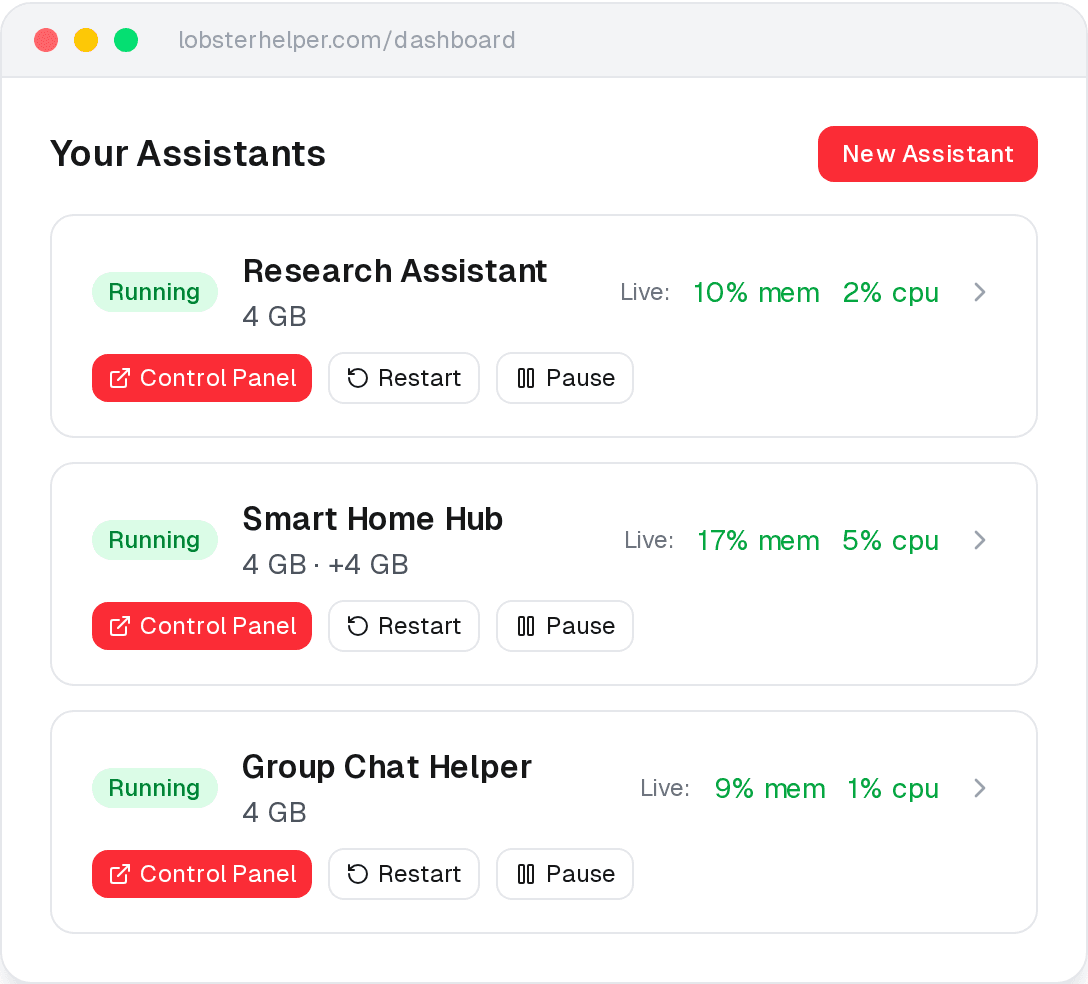
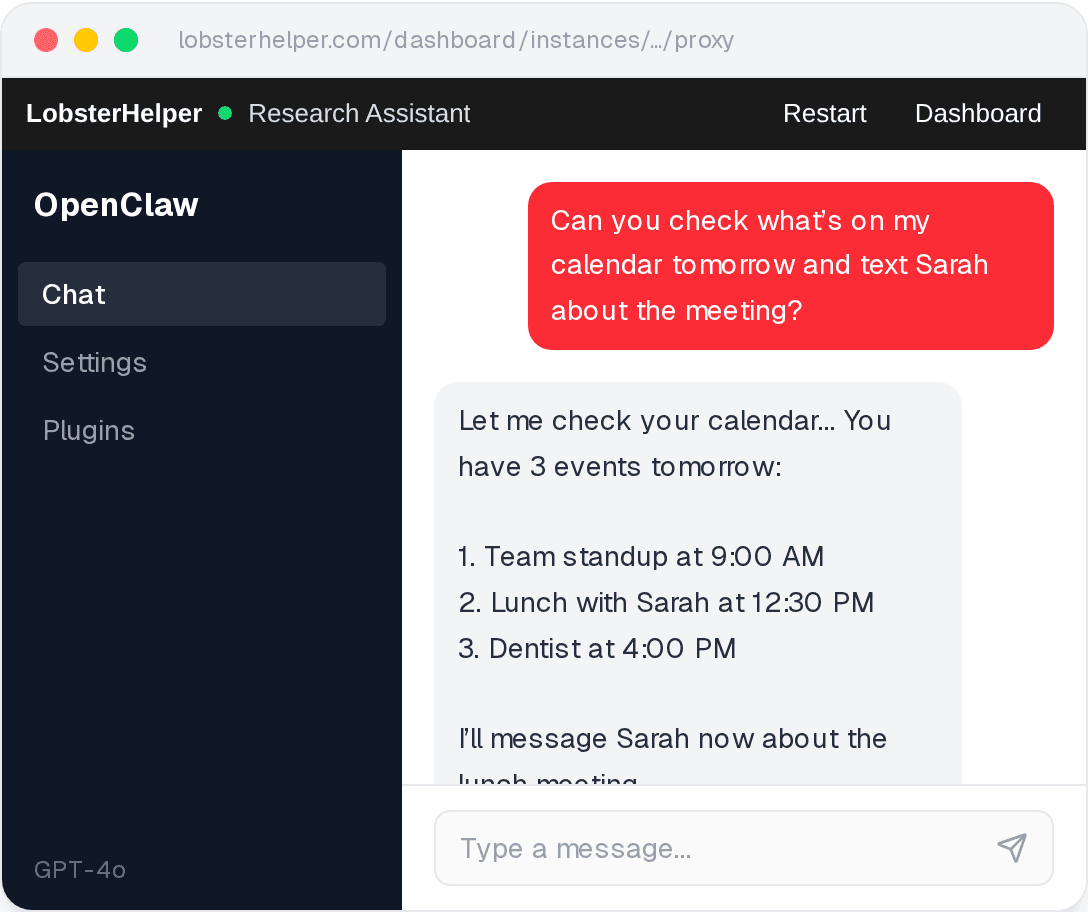
Streamlined assistant interface
A real-time dashboard and AI chat - no terminal required.
We handle the complicated parts
No Code Required
OpenClaw’s setup needs Node.js, Docker, and a terminal. Most people give up in 10 minutes.
We do it for you. Sign up, follow a guide, and your assistant is running.
Always Monitored
Self-hosted OpenClaw can stop working without warning. You might not notice for days.
We check continually and restart automatically. Updates, backups, and maintenance are on us.
Isolated & Secure Instances
135,000+ self-hosted instances have open ports and no login screen. Anyone who finds the URL has full access.
Your assistant runs in its own micro-VM with encrypted storage. Our interface is login-gated with no exposed ports.
Step-by-Step Guides
Most AI tools assume you already know what you’re doing.
Plain-language walkthroughs for connecting your API key, WhatsApp, Telegram, Discord, Slack, and more.
Up and running in 3 steps
1
Sign up free
Create an account — no charge for your first 7 days.
2
Your assistant is ready
We spin up an isolated OpenClaw assistant for you in seconds.
3
Follow the guide
All you need is an API key - we’ll show you how to get one.
Free for 7 days. Simple pricing after that.
One price per assistant. Add extras when you need them.
Free for 7 days
OpenClaw Assistant
Then $18.99/mo
- All messaging platforms
- Automatic restarts to help keep things running
- Scheduled maintenance
- Cancel anytime — no lock-in
- You bring your own AI key - billed separately by your provider
No charge for 7 days. Cancel before the trial ends and pay nothing.
Need more power? Add extras anytime.
Extra Memory (+4 GB)$8/mo
Dedicated CPU$6/mo
Extra Storage (+15 GB)$4/mo
You bring your own AI API key (OpenAI, Anthropic, etc). API costs are billed directly by your provider.
Built on serious infrastructure
We don't cut corners on isolation or security. Every assistant runs on infrastructure designed to keep your data private and your assistant running.
Firecracker VMs
Each assistant runs inside its own Firecracker micro-VM - the same technology behind AWS Lambda. Your assistant gets its own isolated environment, not a shared container.
Hardware-Level Isolation
Your assistant runs in its own virtual machine with dedicated memory and its own kernel. Other users on the same hardware can’t see or access your environment.
Zero Exposed Ports
Your assistant has no public IP and no open ports. All access goes through our authenticated proxy - you’ll never be one of the 135,000+ exposed instances making headlines.
Encrypted Storage
Your assistant’s data volume is encrypted with a unique key. Even at the disk level, your data is unreadable without your specific key.
Continuous Health Checks
We continuously check every assistant for CPU, memory, and disk usage. If something looks wrong, we’ll attempt to repair it automatically.
Automatic Restarts
If your assistant crashes or runs out of memory, we detect it and restart it automatically - no manual intervention needed.
Automatic Backups
Your assistant’s data is automatically backed up. Pause it, move it, restart it - your data follows.
Frequently asked questions
What can my assistant do?
Your assistant can browse the web, manage your calendar, control smart home devices, send messages, and much more - through WhatsApp, Telegram, Discord, Slack, Signal, iMessage, and other apps you already use. It can also install new capabilities on the fly - just ask it to learn something and it downloads the skill. It's powered by OpenClaw, the #1 open-source AI assistant. Learn more in our What is OpenClaw? guide.
How is this different from self-hosting?
Self-hosting OpenClaw requires a terminal, Node.js, Docker, and ongoing server maintenance. We handle all of that - setup, monitoring, backups, and updates. You just follow a setup guide to add your API key and connect your messaging app.
Do I need technical skills?
No. You don't need to know how to code or use a terminal. Our guides walk you through everything step by step.
Do you provide AI API keys?
No. You bring your own API key from OpenAI, Anthropic, or another provider. This keeps your costs transparent and your data under your control.
How do I control my AI API costs?
Every AI provider lets you set a monthly spending limit. Most people spend $5–$20/month on API costs for casual use. See our cost control guide for step-by-step instructions on setting limits with OpenAI, Anthropic, and Google.
Which apps can I chat on?
WhatsApp, Telegram, Slack, Discord, Signal, iMessage, Google Chat, and many more. We provide step-by-step setup guides for Telegram, Discord, Slack, and WhatsApp.
Is my data secure?
Your assistant runs in its own separate virtual computer with encrypted storage and strict firewall rules. No other user can see or access your data. But let's be real: AI assistants are powerful and unpredictable. They can be tricked into doing things you didn't intend. They might leak information if someone sends them a clever message. That's not a bug in our hosting - that's the nature of the technology. We harden the infrastructure, but we're not going to pretend the AI itself is safe. Use a dedicated API key with spending limits. Don't give it your bank password. Treat it like a very eager intern with no sense of boundaries.
Can I cancel anytime?
Yes. No contracts, no lock-in. Cancel anytime from your dashboard.