Announcing llms.py v4 - the latest major release packed with new features and updates

We're thrilled to announce llms.py v4 - our biggest release yet! This milestone version brings together everything we've been building: publish and share your chat threads, projects, images and audio to the new ai.llmspy.org showcase, configurable Agent Profiles for specialized workflows, provider-hosted Server Tools, and a huge wave of new Audio, Speech, and Image generation models. Upgrade now to unlock it all.
Easiest way to install llms.py is using pip:
Get the latest features by updating to the latest version:
After upgrading, it's recommended to also upgrade any external extensions:
To reset your configuration to the latest llms.json and providers-extra.json run:
Gemini is now a Native, Dependency-Free Extension
The Gemini RAG extension is now included with llms.py as a native
built-in extension. It previously shipped as an external extension because its File Search,
document upload, and grounded-generation features depended on Google's google-genai Python SDK.
The integration has been rewritten to call Gemini's REST and streaming APIs directly, including File Search Store management, resumable document uploads, operation polling, grounded content generation, and SSE streaming. It now adds no extra Python dependencies, needs no separate extension installation, and is upgraded automatically with llms.py.
If you previously installed the external Gemini extension, remove it after upgrading so it does not override the new built-in version:
Your existing Gemini configuration, local database, cached documents, and File Search Stores are
unaffected. Restart llms.py after removing the external extension and the native version will load
automatically whenever GOOGLE_API_KEY or GEMINI_API_KEY is configured.
Gemini RAG Knowledge Bases & Website Assistants
The new Gemini RAG extension turns Google Gemini File Search into a complete knowledge-management and customer-support workflow. Build isolated File Stores from files, documentation repositories, or websites; organize them with categories and metadata; ask questions over precisely filtered document sets; and publish grounded AI Assistants on any website.
Curated, Repeatable Knowledge Ingestion
Import individual files and ZIP archives, or preview and synchronize complete server folders.
Recurring imports detect new, changed, metadata-only, unchanged, and removed documents before any
work is committed. Imports preserve directory categories, support versioned import.json
configuration, resume interrupted uploads after application restarts, and expose live upload
progress in Explorer.
The two-stage Web crawl workflow fetches a site into an inspectable Markdown workspace first. Control crawl depth, page limits, paths, query strings, content types, and ordered rules; then apply saved regex transforms, inspect the generated files, and hand the cleaned folder to the same previewable import pipeline.
Precise Retrieval with Verifiable Answers
Explorer provides deep-linkable categories and compact filters for document type, status, locale, product, versions, and tags. Filtered views can be passed directly to Ask about this, preserving the same category and metadata scope in the Gemini File Search query. Grounded responses include inline citations, expandable source excerpts, and links back to canonical source URLs.
Bulk metadata editing, coverage reports, pending-change review, upload states, and Sync Store make the relationship between the local catalogue and Gemini's indexed copy visible and recoverable.
Publish Branded Website Assistants
Turn an entire File Store—or an approved filtered subset—into a named Website Assistant embedded
with one <script> tag. Select a specialist behavior template, edit its system prompt, choose an
optional Gemini model, configure suggested questions and opening behavior, then preview the real
widget as you design it.
Assistants render inside a Shadow DOM and support Light, Dark, Nord, Matrix, Soft Pink, and Auto themes with editable CSS color variables and typography. Customize the launcher, restrict allowed website origins, set request limits, and retain customer conversations for support review. Draft, publish, unpublish, archive, restore, regenerate, and typed deletion confirmations provide a clear lifecycle from initial design through production operation.
See the complete Gemini RAG documentation for installation, imports, metadata, retrieval, Assistant design, deployment, conversation review, and operational guidance.
PDF Studio
The new PDF Studio extension brings code-first document design to llms.py. Design PDFs the way you write code: a plain-text Typst template on the left, the rendered page on the right, updating in real-time as you type or edit data.
The PDF Studio is a built-in extension that is automatically enabled whenever the Typst CLI compiler is available on your system PATH:
# Cargo (Rust)
cargo install --locked typst-cli

# macOS (Homebrew)
brew install typst
Real-Time Live Preview & Schema-Driven Form UI
Documents like invoices, certificates, and statements separate layout (.typ template) from content (.json data). Edit document data using raw JSON in Code View or an interactive, auto-generated Form View-re-rendering the compiled PDF instantly on every keystroke.
AI-Powered Editing & Vision Input
Describe document layout and styling changes in plain English using the Edit with AI panel. Attach a screenshot or sample PDF to let vision models automatically decouple design from data-building a reusable Typst template and JSON data model for you, complete with auto-healing compiler error passes.
Visual Formatting Toolbar & Design Systems
Rich visual pickers make styling intuitive without memorizing markup:
- Typography & Font Picker: System & custom font previewing, sizing, line-height, and weight adjustments.
- Page Setup: Interactive paper sizing (A3–A6, Letter, Legal, Slides), margins, and orientation.
- Shared Library (
lib.typ): Maintain a central house style withlib.preview.typlive design system verification.
Typed Application Code Generation
Turn your document's JSON schema into strongly typed C#, Python, TypeScript, or JavaScript classes with a single click-ensuring your backend application produces JSON matching your template's expected structure.
Check out the full PDF Studio Documentation for the complete walkthrough.
The new Publishing extension lets you share your AI creations with the world - straight from your workspace. Generate public, read-only links for chat threads, static projects, and individual media files, all hosted on ai.llmspy.org/m and available instantly.
Click the Share icon in the toolbar to open the publishing panel. Connecting a publisher account is completely free and anonymous - no email or personal details required - and you can disconnect at any time.
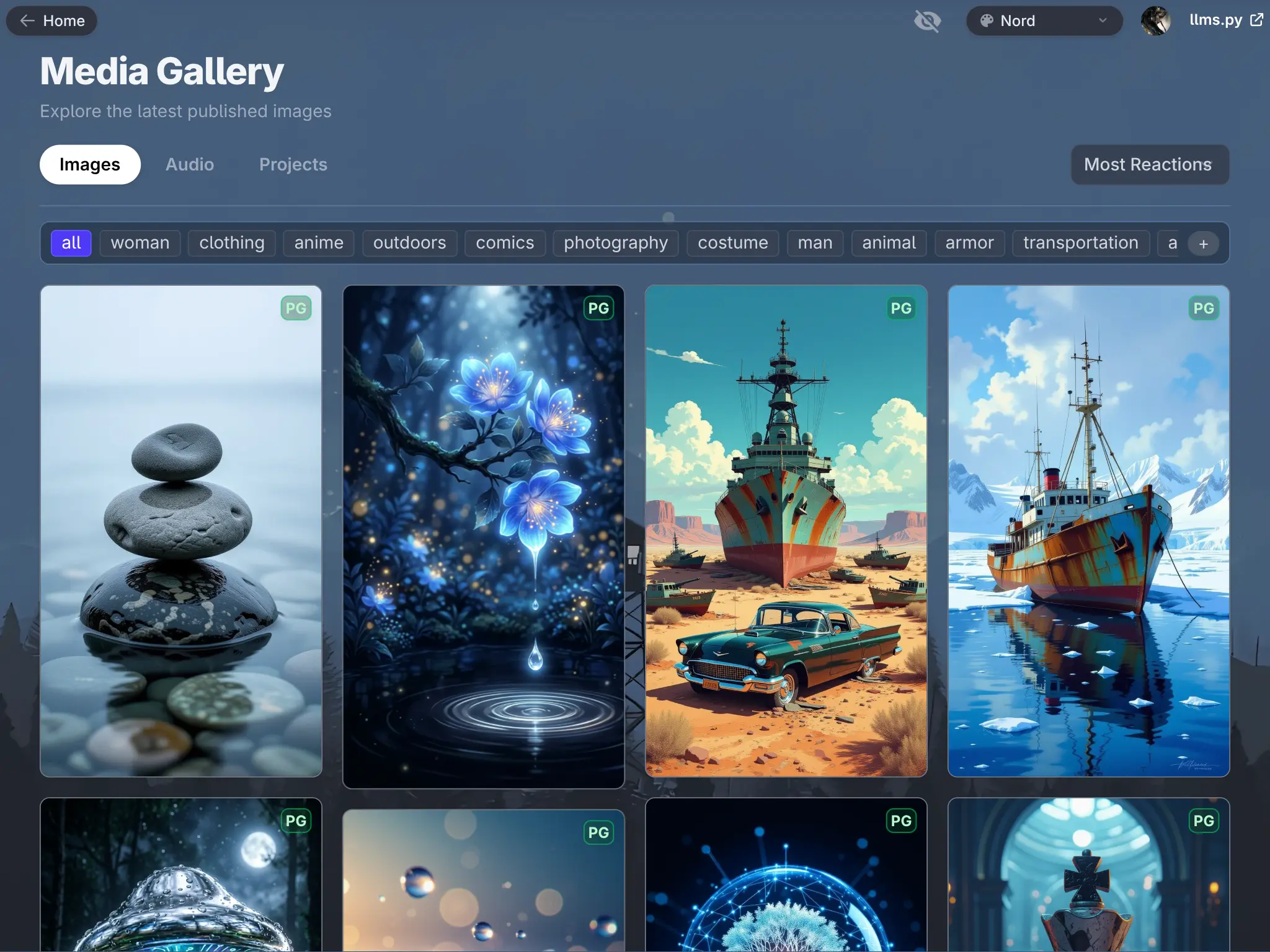
Everything you publish is hosted on the new ai.llmspy.org website - a public showcase where you can browse and discover the best AI-generated content shared by the community. Switch between the Images, Audio, and Projects galleries to explore what's been created:
Publish an entire conversation - including code blocks, tables, and rich markdown formatting - as a permanent, styled web page. Choose from 8 beautiful themes to give your shared threads a distinctive look, from the cool arctic tones of Nord to the neon-green glow of Matrix.
Deploy a static project - a game, web app, or any folder of HTML/JS/CSS - to a live public URL with a single click. The extension auto-detects your project's build folder, packages it, and returns a shareable link.
Share AI-generated images directly from the media gallery lightbox and generated audio clips from the audio player - both uploaded with their metadata and served on their own public page.
See the Publishing docs for the full walkthrough.
Streaming is now implemented across all providers, so responses render token-by-token in real time in the Chat UI instead of waiting for the full completion to arrive - giving immediate feedback for every model, including providers that previously only supported non-streamed responses.
Streaming works the same way across every provider - Anthropic, OpenAI, Google, OpenRouter, Groq, Mistral, Cerebras, xAI, Fireworks, Ollama, LM Studio and all other OpenAI-compatible providers - so you get consistent real-time output no matter which model or provider you choose.
User Analytics & Multi-User Management
The Analytics extension now includes multi-user management and per-user analytics for Admin users:
- Searchable User Selection: Switch between viewing aggregate metrics across All Users or filter Cost Analysis, Token Usage, and Activity logs for specific users using a searchable autocomplete dropdown.
- Dedicated Users Tab: View a comprehensive breakdown of all active users, including total requests, total cost, input/output tokens, total combined tokens, and last active timestamps formatted in relative time.
- Interactive Column Sorting: Click any table column header (User, Requests, Total Cost, Input Tokens, Output Tokens, Total Tokens, Last Active) to sort all users across the system ascending or descending.
- Admin Thread Access: Admins can inspect and view conversation thread transcripts for any user directly from the Activity log.
See the Analytics docs for the full walkthrough.
Durable Long-Running Agents & Scalable Chat History
The agent runtime has been redesigned for long-running, multi-step agent workflows. Agents can now work autonomously across extensive tasks requiring dozens or hundreds of model iterations, tool calls, file modifications, and verification steps without being limited by single HTTP request timeouts, browser lifecycles, or model context windows.
Key Capabilities & Benefits
- Durable Background Execution: Submitting a prompt immediately returns UI control while the agent executes asynchronously as a background run. Tasks execute in bounded slices, checkpointing state, steps, and canonical messages between slices rather than failing at arbitrary tool iteration limits.
- Resilient to Refreshes & Restarts: Run state, steps, tool progress, and canonical messages are durably persisted in the database. Closing or refreshing the browser does not interrupt active runs, and server restarts cleanly requeue interrupted work without leaving orphaned tasks.
- Automatic Non-Destructive Context Compaction: AI.Chat actively tracks model context window consumption. When nearing context limits, older conversation turns are hierarchically summarized into structured context snapshots while preserving initial instructions and recent verbatim messages. Canonical chat history remains intact and fully auditable.
- High-Performance Head/Tail Thread Loading: Massive conversations with thousands of messages load instantly without freezing the browser or transferring multi-megabyte payloads. AI.Chat initially loads the first 20 requirements messages and the latest 100 messages with sequence-aware gap navigation to expand history on demand.
- Real-Time Streaming with Auto-Fallback: Live updates and token streaming default to low-overhead Server-Sent Events (SSE), with automatic client-side fallback to long polling when proxies or networks block event streams.
- Enhanced Progress & Diagnostics UX: Features a real-time context utilization indicator, live progress during context reduction, elapsed waiting timers that reset on activity (eliminating false stalled warnings), and persistent error state reporting.
- Safe Model & Tool Compatibility: Provider payloads are projected independently from canonical history, ensuring strict text-only models safely handle media attachments and tool call/result pairs remain atomically linked across checkpoints.
Core Agent Tools: fetch_url & grep_search
The built-in core_tools extension now includes two new zero-dependency core tools designed to empower AI assistants and coding agents with web reading and fast codebase navigation:
fetch_url
A lightweight, dependency-free tool that fetches content from HTTP/HTTPS URLs and converts HTML pages into clean, token-efficient Markdown:
- HTML to Markdown Conversion: Automatically strips boilerplate elements (
<script>,<style>,<head>,<svg>,<noscript>,<iframe>,<nav>,<footer>,<aside>). - Semantic Formatting: Accurately formats headings, paragraphs, lists, bold/italic markers, code blocks, blockquotes, tables, and hyperlinks (resolving relative URLs to absolute links).
- Token Efficiency: Reduces raw HTML token overhead by up to 90%+, preserving context window space for LLMs.
- Non-HTML Support: Returns raw text for JSON, plain text, and API responses.
- Length Truncation: Enforces a configurable
max_length(default: 20,000 characters) with truncation notices to avoid context window overflow.
grep_search
A fast text and regular expression search tool across workspace directories and files:
- Regex & Literal Search: Search for exact text or regex patterns across files.
- Automated Directory Pruning: Automatically ignores non-source and virtual environment directories (
.git,.venv,node_modules,__pycache__,dist,build,bin,obj, etc.) and skips binary files. - File Pattern Filtering: Filter search targets with glob patterns like
*.py,*.ts, or*.cs. - Structured Output: Returns matching relative file paths, 1-indexed line numbers, and line contents, capped at configurable match limits (default: 50).
Profile Manager
The new Profile Manager provides a full UI for viewing, overriding, and creating Agent Profiles - no manual file editing required. Access it from the Manage Profiles option at the bottom of the Agent Profile Selector dropdown.
Built-in profiles (Chat, Coder, Planner) are displayed as Read-only with their server-defined defaults visible. You can override the default model and theme for any built-in profile through the Settings tab - overrides are stored as user preferences and take effect immediately without modifying the original profile files.
Create entirely new custom profiles with the + button - each with its own name, avatar, default model, theme, tool/skill restrictions, and system prompt files. Custom profiles support inline editing of SYSTEM.md, SYSTEM.template, and all template variable files, plus the ability to add and delete prompt files directly from the UI.
See the Profile Manager docs for the full walkthrough.
Audio & Speech Models via OpenRouter
llms.py now supports Audio and Speech generation models available through OpenRouter, bringing music generation, audio synthesis, and text-to-speech capabilities to the model selector alongside chat and image models.
Use the Audio (🔊) and Speech (👤) output filters in the model selector to browse all available models.
Audio Models
| Model | ID | Context | Price |
|---|---|---|---|
| Lyria 3 Clip Preview | google/lyria-3-clip-preview | 1.0M | Free |
| Lyria 3 Pro Preview | google/lyria-3-pro-preview | 1.0M | Free |
| GPT Audio | openai/gpt-audio | 128K | $2.50 / $10.00 |
| GPT Audio Mini | openai/gpt-audio-mini | 128K | $0.60 / $2.40 |
Google's Lyria 3 is DeepMind's latest music generation model - both the Clip and Pro previews are available currently free on OpenRouter.
Speech (Text-to-Speech) Models
| Model | ID | Price |
|---|---|---|
| MAI-Voice-2 | microsoft/mai-voice-2 | Free / $22.00 |
| Grok Voice TTS 1.0 | x-ai/grok-voice-tts-1.0 | Free / $15.00 |
| Gemini 3.1 Flash TTS | google/gemini-3.1-flash-tts-preview | $1.00 / $22.00 |
| Voxtral Mini TTS | mistralai/voxtral-mini-tts-2603 | $0.05 / $0.20 |
To pick up the latest Audio and Speech models, reset your providers configuration:
Image Generation Improvements
-
Refactor OpenRouter provider to use Image Generation API for OpenRouter image models instead of the Chat Completion API, which is future proof and improves image generation performance and reliability.
-
Add support for latest Chutes Image Models:
-
Z Image Turbo
-
Qwen-Image & Qwen-Image Edit
-
Flux, Dreamshaper, Juggernaut & Ilustmix
Server Tools
The new Server Tools feature adds built-in support for provider-hosted tools, including both OpenRouter Server Tools and Anthropic's Server Tools. This lets you enable provider-hosted capabilities like web search, web fetch, and code execution directly from the chat UI without any client-side setup.
Each tool is defined in standard JSON Schema which the frontend uses to dynamically generate the configuration UI and the tool definition presented to the model.
Open the Tools panel from the toolbar, switch to the SERVER TOOLS tab to see the tools available for the selected model's provider:
See the Server Tools docs for more details.
Agent Profiles
The new Agent Profiles feature lets you configure specialized AI agents, each with its own system prompt, default model, UI theme, restricted tool/skill set, custom avatar, and footer action buttons.
Switch between agents from the Agent Profile Selector dropdown in the chat header. Built-in profiles include Chat (general-purpose), Planner (multi-step reasoning and task decomposition), and Coder (reads and writes code to disk).
Planner → Coder Workflow
A powerful two-phase workflow: use the Planner to break a goal into a structured architecture plan, then hand off to the Coder via footer action buttons (Save to PLAN.md, Execute Plan, Execute PLAN.md) to implement it step by step.
Here's the workflow in action - the Planner was given the prompt "Build a Sci-Fi GALAGA game", produced a full architecture plan saved to PLAN.md, and the Coder implemented the complete game:
Custom Personal Assistant
The assistant example profile shows how to build a fully personalized AI companion using a SYSTEM.template that composes separate markdown files for identity, user context, values, and tools - with a custom avatar:
See the Agent Profiles docs for the full configuration reference including custom avatars, onlyTools/onlySkills restrictions, conditional footer actions, and composite system prompt templates.
Projects
The new Projects feature provides a secure workspace sandboxing system. Each project defines one or more allowed directories - all AI agent filesystem tools (read, write, edit, search, list) are restricted exclusively to those paths.
Projects support path aliases ($WORKSPACE for the server's working directory, $TEMP for the system temp dir) alongside any custom absolute paths. Non-existent directories are automatically created on save.
Switch between projects from the Workspaces & Projects dropdown in the top-left header, or reset to Default Workspace to remove sandbox restrictions. Projects are persisted per-user at ~/.llms/user/{username}/projects/projects.json.
See the Projects docs for more details.
Checkout the latest models inc. Grok 4.3, GPT-5.5, GPT Image 2, Opus 4.7, Sonnet 4.6, Gemini 3.1, Gemma 4, DeepSeek v4, Kimi K2.6, GLM 5.1, MiMo V2.5 and more...
Recraft Image Generation Models
New Recraft image generation models from are now available from Open Router:
You can now make use of your existing Claude Code Subscription by changing the Anthropic provider npm configuration in your llms.json to use @ai-sdk/anthropic-cli instead of @ai-sdk/anthropic, e.g:
{
    "anthropic": {
        "enabled": true,
        "npm": "@ai-sdk/anthropic-cli",
        ...
    }
}
This provider routes all requests to the claude binary so it's functionality and integration is limited, e.g. it doesn't support tool calling or skills. Otherwise it supports other features you'd expect like System Prompts, Chat History, Image and Document attachments, etc.
At the same time it's able to benefit from some smarts in the claude binary it's built-in system prompts and optimizations for handling long conversations, so it can be a good option for some use cases.
Support for Fireworks Large Language Models
Added support for Fireworks AI as a new provider, a fast inference platform hosting the leading open-source models including GLM 5, Kimi K2.5, MiniMax M2.5 and DeepSeek V3.2 at a market-leading 200 tok/s.
All text models support reasoning and tool use, making Fireworks an excellent choice for agentic workflows where speed matters. Here's Kimi K2.5 via Fireworks creating a retro Tetris game with full tool calling support:
Fireworks Image Generation Models
Fireworks also hosts Black Forest Labs' FLUX.1 image generation models with fast inference and competitive per-image pricing:
| Model | Cost | Pricing |
|---|---|---|
| FLUX.1 Kontext Max | $0.08 | per image |
| FLUX.1 Kontext Pro | $0.04 | per image |
| FLUX.1 Dev FP8 | $0.0005 | per step |
| FLUX.1 Schnell FP8 | $0.00035 | per step |
This can be found in the model selector by selecting the Image output filter:
Here are examples to demonstrate the quality of each of the FLUX.1 models:
To get started, set your Fireworks API key:
export FIREWORKS_API_KEY=your_api_key_hereThen reset your providers configuration to pick up the new Fireworks models in providers-extra.json:
Credentials Auth Provider
The built-in credentials extension enables Username/Password authentication for your Application, including a Sign In page, user registration, role assignment, and account locking. It provides full user management through both the CLI and a web-based Admin UI, along with account self-service for all authenticated users.
Credentials is the default Auth Provider that's automatically enabled when at least one user has been created:
llms --adduser adminAfter logging in as admin, you can create additional users from the Manage Users page which can be accessed from the user menu.
See the Credentials Auth docs for more details.
Nano Banana 2
Added Google's latest Gemini Nano Banana 2 model, available from both the Google and OpenRouter providers. The Google/Gemini provider supports multiple chat history in conversations, while OpenRouter sends a fresh chat request for each message.
You can find it in the model selector by selecting Image output filter and searching for "Nano Banana 2".
To get the latest model info with Nano Banana 2, reset your providers configuration:
Optimized Gallery Thumbnails
Gallery pages now use optimized thumbnails instead of full-size images. Detail images that increasingly approach over 2MB are now served as thumbnails under 10KB, delivering a noticeable performance improvement when scrolling through the infinite scrolling gallery pages.
Reset to latest configuration
New versions sometimes include changes to llms.json config which isn't automatically updated.
Use the --reset option to reset the default configuration files back to its factory defaults. Available reset options (config, providers, all):
config - Reset ~/.llms/llms.json to default
llms --reset configproviders - Reset ~/.llms/providers.json and ~/.llms/providers-extra.json
llms --reset providersNew Theme Support
llms.py now ships with 8 built-in themes - 🎨 4 dark and 🎨 4 light - so you can personalize the Web UI to match your style. Switch themes instantly from the home page or Settings or create your own custom themes with full control over colors, typography, and background assets.
See the Themes docs for details on the available themes and how to create your own.
Agent Browser Editor
The browser extension provides an integrated environment for creating, editing, and running automated browser scripts powered by Vercel's agent-browser.
- 🖥️ Live Browser Preview - Clickable real-time screenshot with full mouse, keyboard, and scroll interaction
- 📋 Element Inspector - Auto-refreshing snapshot giving scripts and AI a precise map of interactive elements
- ✍️ AI Script Generation - Describe what you want in English and the AI generates the full automation script
- 🤖 AI-Assisted Editing - Select lines in the editor and describe changes to iterate on scripts incrementally
- ▶️ Run Selected Text - Run highlighted portions of a script to test individual steps in isolation
- 💾 Saved Scripts Library - Build a library of reusable browser automations accessible from the sidebar
See browser docs for more details.
Standard Input
llms now accepts OpenAI-compatible Chat Completion requests via standard input, making it easy to integrate into shell pipelines and scripts.
When JSON is piped in, llms detects it automatically - no extra flags needed:
cat request.json | llmsBuild requests inline with a heredoc:
llms <<EOF
{
  "model": "Minimax M2.5",
  "messages": [
    { "role": "user", "content": "Capital of France?" }
  ]
}
EOF
Combine with other CLI tools to generate requests dynamically:
echo '{"messages":[{"role":"user","content":"Summarize:'"$(cat notes.txt)"'"}]}' | llmsThis pairs well with structured outputs support and jq to build end-to-end JSON pipelines:
(llms <<EOF
{
    "model": "moonshotai/kimi-k2-instruct",
    "messages": [{"role":"user", "content":"Return capital cities for: France, Italy, Spain, Japan." }],
    "response_format": {
        "type": "json_schema",
        "json_schema": {
            "name": "country_capitals",
            "schema": {
                "type": "object",
                "properties": {
                    "capitals": {
                        "type": "array",
                        "items": {
                            "type": "object",
                            "properties": {
                                "country": { "type": "string" },
                                "capital": { "type": "string" }
                            },
                            "required": ["country","capital"]
                        }
                    }
                },
                "required": ["capitals"]
            }
        }
    }
}
EOF
) | jq -r '.capitals[] | "\(.country): \(.capital)"'
Output:
France: Paris
Italy: Rome
Spain: Madrid
Japan: Tokyo
Persistence Options
By default, all chat completions are saved to the database, including both the chat thread (conversation history) and the individual API request logs. Use these options to control what gets saved to the database:
--nohistory
Skip saving the chat thread (conversation history) to the database. The individual API request log is still recorded.
llms "What is the capital of France?" --nohistory--nostore
Do not save anything to the database - no request log and no chat thread history. Implies --nohistory.
llms "What is the capital of France?" --nostoreCustom User and Agent Avatars
Personalize your chat experience with custom avatars for both yourself and AI agents. Upload images via the Settings page or manually add them to ~/.llms/users/ - supports .png, .svg, and auto-converts from other formats.
Compact Tool Calls with Smart Summarization
The new Compact Tool Calls feature automatically summarizes long tool arguments and outputs in the Chat UI to keep conversations concise while still providing access to important information as needed.
Previously, even with long Tool Call Arguments minimized, you could still only see a few on a page. Now that they're collapsed by default, you can see more at a glance and expand only the ones you need.
Support for Voice Input
Added Voice Input extension with speech-to-text transcription via a microphone button or ALT+D shortcut, supporting three modes: local transcription with voxtype, custom transcribe executable, and cloud-based voxtral-mini-latest via Mistral.
- Added tok/s metrics in Chat UI on a per-message and per-thread basis
Voxtral Audio Models
Added support for Mistral's Voxtral audio transcription models - use the audio input filter in the model selector to find them.
Both the Chat Completion and dedicated Audio Transcription APIs deliver impressive speed, with the dedicated transcription endpoint returning results near-instantly.
Compact Threads
Added Compact Threads feature for managing long conversations - it summarizes the current thread into a new, condensed thread targeting 30% of the original context size. The compact button appears when a conversation exceeds 10 messages or uses more than 40% of the model's context limit.
The compaction model and prompts are fully customizable in ~/.llms/llms.json.
- Fix OpenRouter provider after models.dev switched to use
@openrouter/ai-sdk-provider. Removellms.jsonto reset to default configuration:
-
Removed duplicate filesystem tools from Core Tools, they're now only included in File System Tools
-
Add
sort_byandmax_resultoptions insearch_filesand madepathand optional parameter to improve utility and reduce tool use error rates.pathnow defaults to the first allowed directory (project dir).
- Add support for overridable ClientTimeout limits in
~/.llms/llms.json:
{
    "limits": {
        "client_timeout": 120
    }
}- Show proceed button for assistant messages without content but with reasoning
Multi User Skills
When Auth is enabled, each user manages their own skill collection at ~/.llms/user/<user>/skills and can enable or disable skills independently. Shared global & project-level skills remain accessible but read-only.
- Refactor GitHub Auth out into a builtin github_auth extension
-
Support for tool calling for models returned by local Ollama instances
-
New
openai-localprovider for custom OpenAI-compatible endpoints -
Fix computer tool issues in Docker by only loading computer tool if run in environment with a display
Skills Management
Added a full Skills Management UI for creating, editing, and deleting skills directly from the browser.
Skills package domain-specific instructions, scripts, references & assets that enhance your AI agent.
Browse & Install Skills
Added a Skill Browser with access to the top 5,000 community skills from skills.sh. Search, browse, and install pre-built skills directly into your personal collection.
-
Use a barebones fallback markdown render when markdown renders like KaTex fail
-
Use
sanitizeHtmlto avoid breaking layout when displaying rendered html
-
Add copy button to TextViewer popover menu
-
Add proceed and retry buttons at the bottom of Threads to continue agent loop
-
Add filesystem tools in computer extension
-
Add a simple
sendUserMessageAPI in UI to simulate a new user message on the thread -
Implement
TextViewercomponent for displaying Tool Args, Tool Output + SystemPrompt
- Auto collapse long tool args content and add ability to min/maximize text content
- Add built-in computer_use extension
See v3 release notes for details on the major new features and improvements in v3.