OpenAI recently published an analysis finding that the compute used in large AI training runs doubles every 3.4 months1. State-of-the art-models, especially in NLP, are becoming notoriously time consuming to train:
Four days each to train BERTBASE and BERTLARGE using 4x and 16x TPUs, respectively2
Two weeks to train Grover-Mega, a fake new detector, using 32x TPUs3
The new Lambda Hyperplane-16 trains models faster than any existing system, at a substantially lower price. Its specs include:
16x NVIDIA Tesla V100 SXM3 GPUs
NVLink & NVSwitch for fast GPU-to-GPU communication within the server
8x 100 Gb/s Infiniband cards for fast GPU-to-GPU communication across multiple servers (RDMA) during distributed training
The Hyperplane-16 offers several advantages over existing solutions:
More performance and lower cost compared to other 16x GPU servers
Significantly shorter training times than 8x GPU servers for small and large models, including: ResNet, Mask R-CNN, Transformer, and BERT
AI frameworks and drivers (TensorFlow, Keras, PyTorch, CUDA, and cuDNN) come pre-installed
Distributed training works out-of-the box, so you don't have to configure modules like nv_peer_memory, or dig around in PCIe switch settings
The difficulty of scaling beyond 8x GPUs
Adding more than eight GPUs to a single server requires a new GPU-to-GPU communication topology. To see why, we'll examine the Lambda Hyperplane-8, our server with eight Tesla V100s.
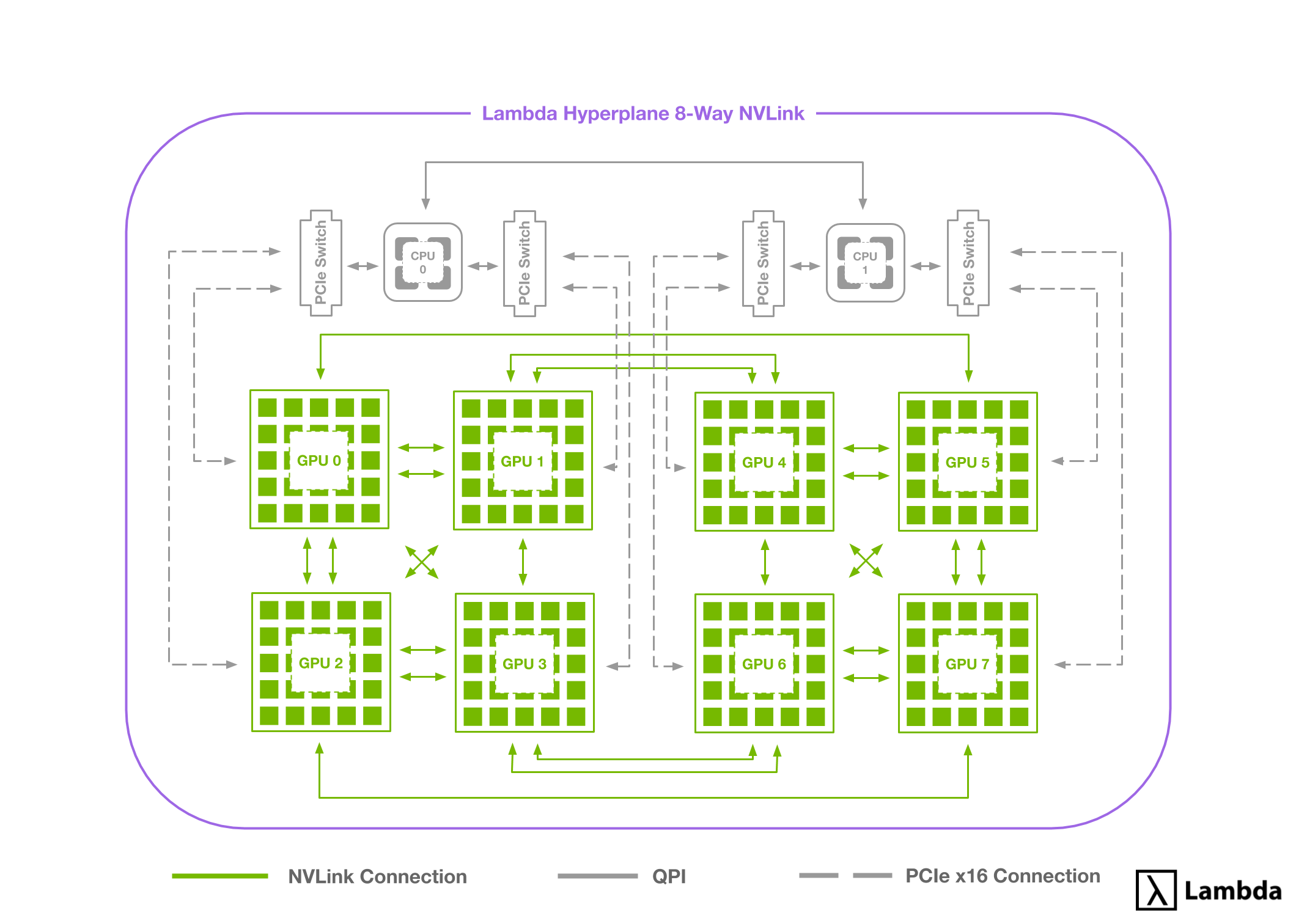
Tesla V100s can interface with at most six 25 GB/s NVLinks. This limitation makes it impossible to fully connect the Hyperplane-8's eight GPUs (any given GPU can be connected with at most six other GPUs). This limitation is resolved using the following NVLink/PCIe hybrid topology:
8-way NVLink setup in the Hyperplane-8
Six NVLinks extend from every GPU. Some GPUs are interconnected with one NVlink (25 GB/s), others with two NVLinks (50 GB/s), and others with PCIe (~15 GB/sec max). While odd at first glance, this schema is well-suited for the ring-style algorithms used during multi-GPU training tasks.
A problem arises if we wish to add more GPUs. Doing so, requires thinning the NVLink interconnections and further leveraging the PCIe bus. This would substantially decrease the average GPU-to-GPU bandwidth and diminish any returns provided by the additional GPUs.
NVSwitch: a new approach to connect 16x GPUs
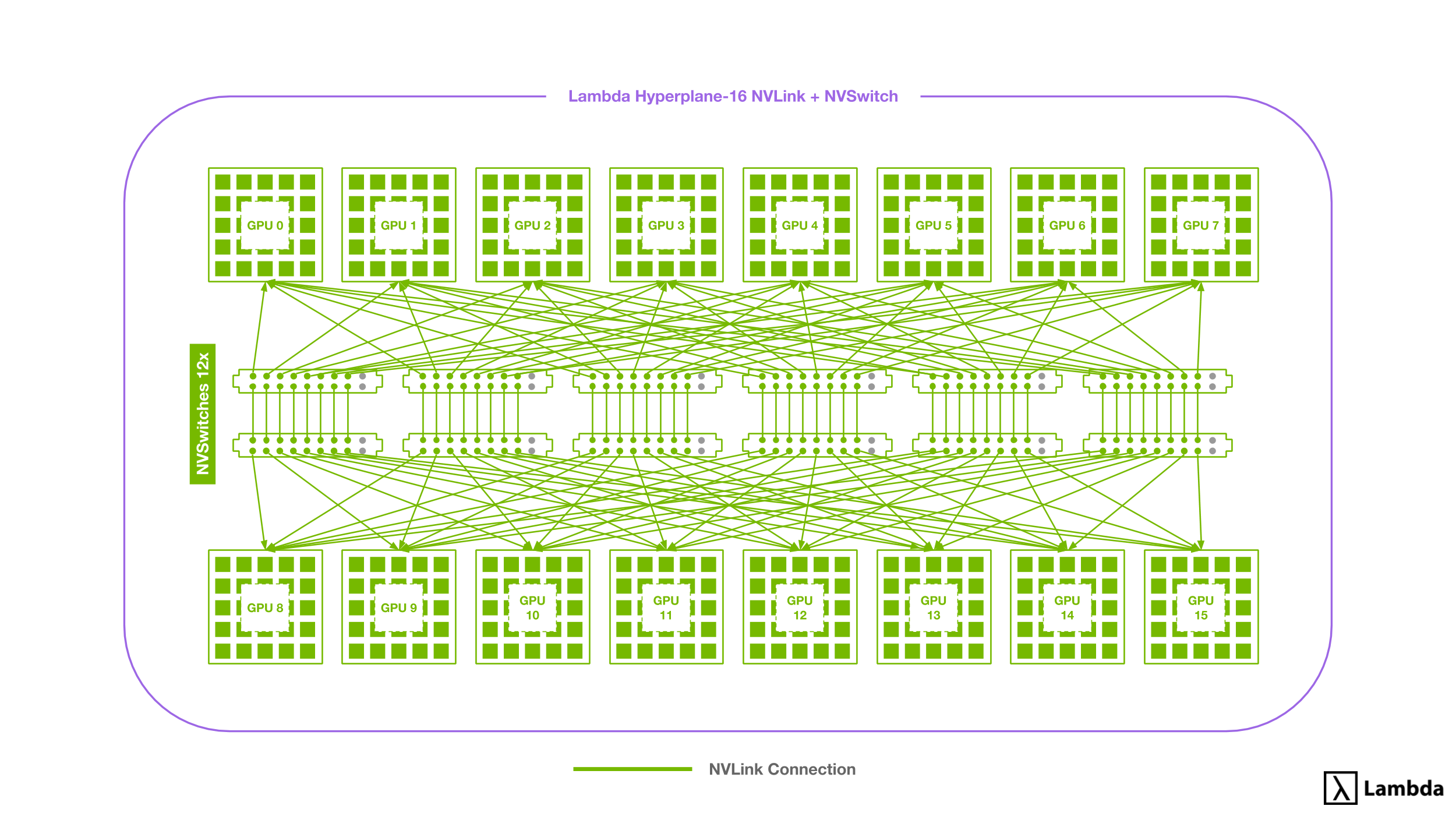
The new Lambda Hyperplane-16 uses the Tesla V100 SXM3, which include 6 NVLink connections as well. However, they are able to take advantage of the new NVSwitch architecture to improve GPU-to-GPU communication. With this new approach, GPUs first connect to NVSwitches via NVLink before being connected to each other.
16-way NVLink setup using NVSwitches found in the Hyperplane-16
The NVSwitch architecture allows any given GPU to saturate up to 6 NVLink connections (150GB/sec each way) with any other given GPU. To enable this higher bandwidth communication Hyperplane-16s come with 12 NVSwitches each containing 18 connections (incl. 2 reserved connections).
Each NVSwitch connects to all 8 GPUs on one of the Hyperplane-16’s two boards. The NVSwitches then connect to the corresponding switch on the other board via 8 additional NVLink connections. This leaves each NVSwitch with a total of 16 active connections and a total switching capacity of 900GB/s. By connecting cards in this way, the need for inter-GPU communication over much slower PCIe x16 (max ~15GB/sec total throughput) as seen in the 8x GPU setup is eliminated.
Performance Statistics
So, how does the Hyperplane-16 perform in comparison to the Hyperplane-8 and one of our standard workstations? To test each setup we trained three different models: ResNet, Mask R-CNN, and Transformer. For each model and setup we measured both throughput as well as time to reach a solution using the state of the art MLPerf benchmark.
ResNet
Mask R-CNN
Transformer
Model Architecture
ResNet50 V1.5
e2e_mask_rcnn_R_50_FPN_1x
transformer_wmt_en_de_big_t2t
Dataset
ImageNet
COCO 2017
WMT English-German
Framework
MxNet
PyTorch
PyTorch
Quality Target
75.9% Top-1 Accuracy
0.377 Box min AP, 0.339 Mask min AP
25.0 BLEU
Training throughput
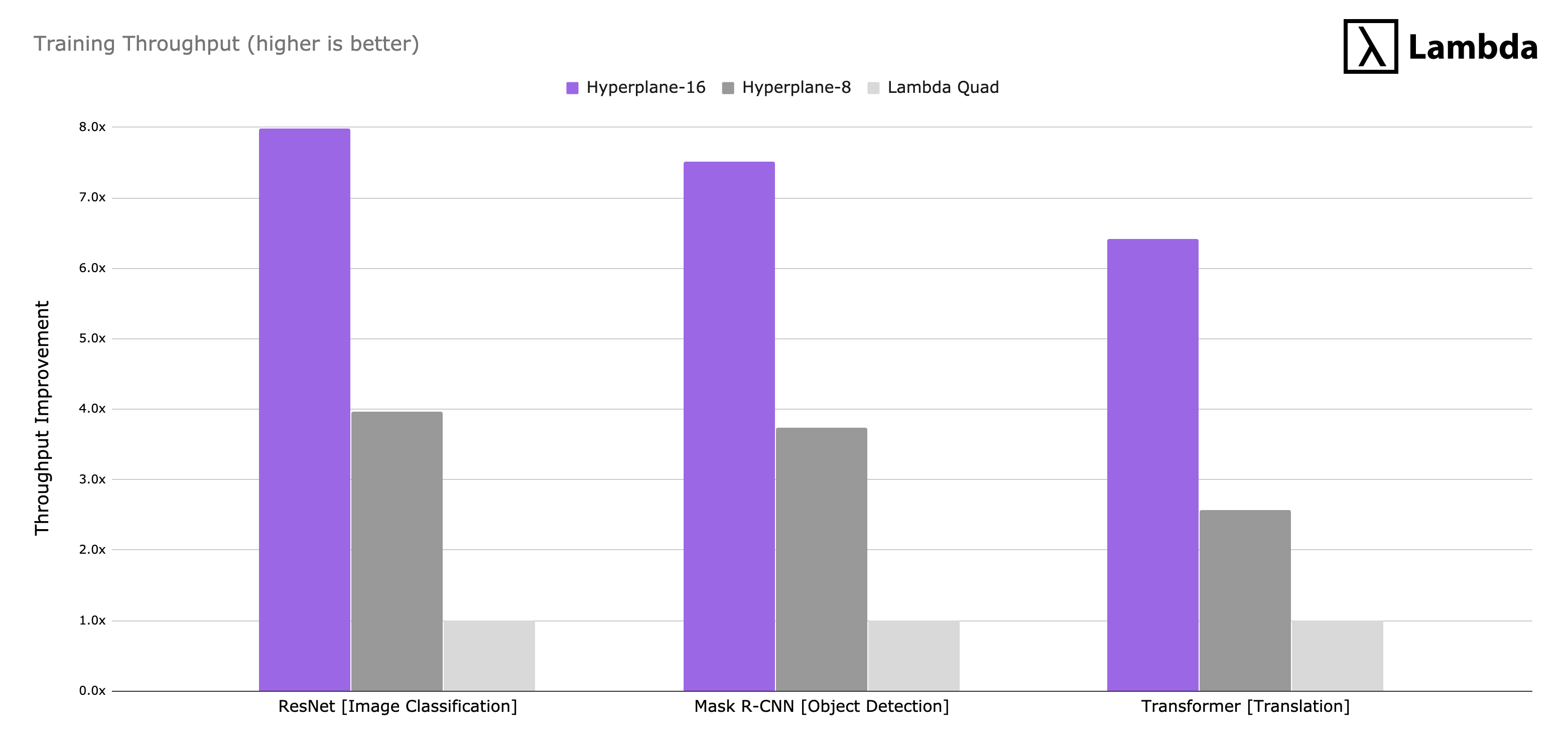
Training throughput is measured in slightly different ways for each model, but for this graph we normalized each training run to the performance of the Lambda Quad workstation for the given model. The higher the number the better.
Training throughput improvement statistics
The Hyperplane-16 had up to 8x the throughput of the Lambda Quad (4 x 2080Ti) and nearly 2.0x the throughput of the Hyperplane-8 (8 x V100 32GB) in some instances.
Time to reach a solution
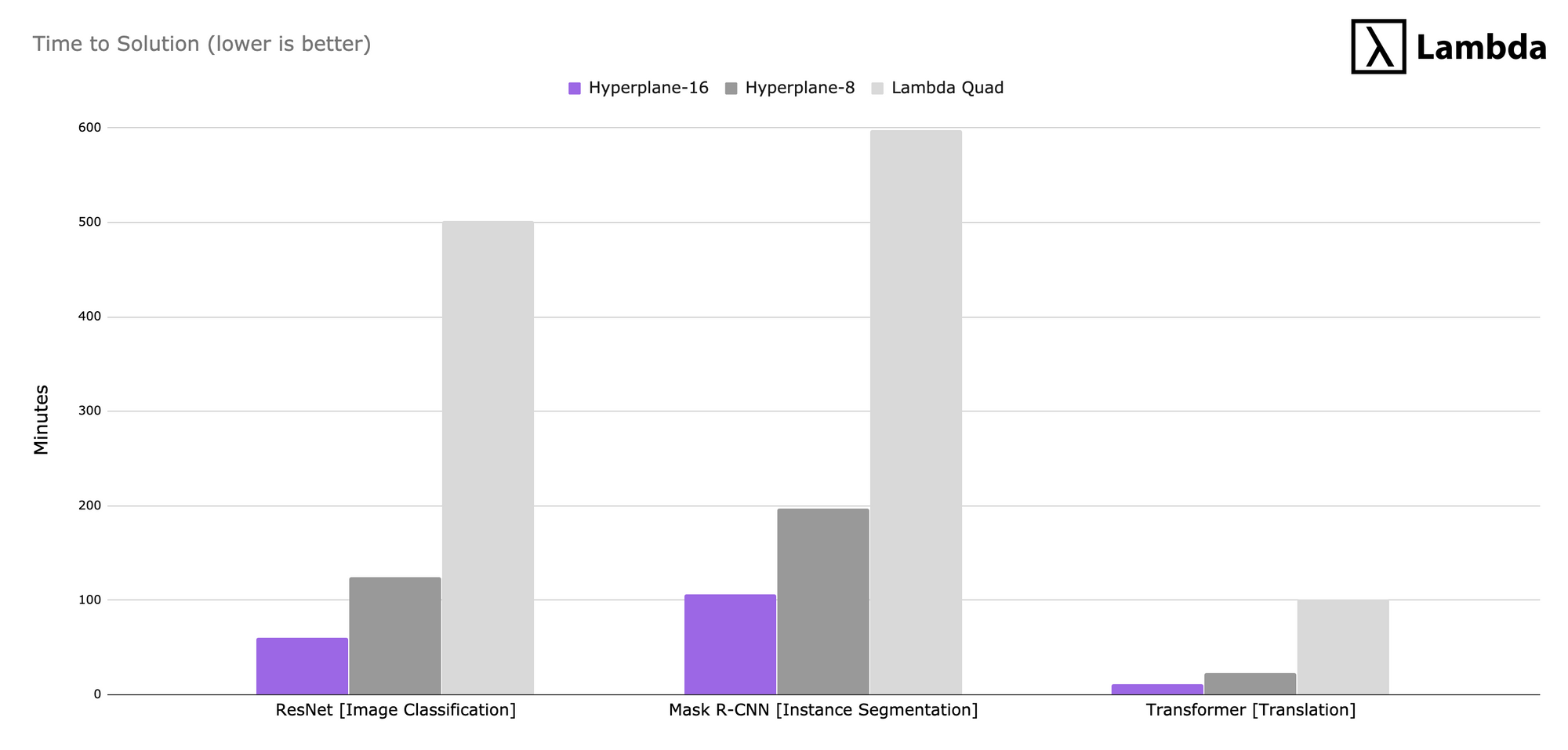
While throughput provides a more consistent measure for comparing different setups, we also measured the time it takes to converge on a solution for each model (lower is better).
Time taken (in minutes) to reach a solution for each model
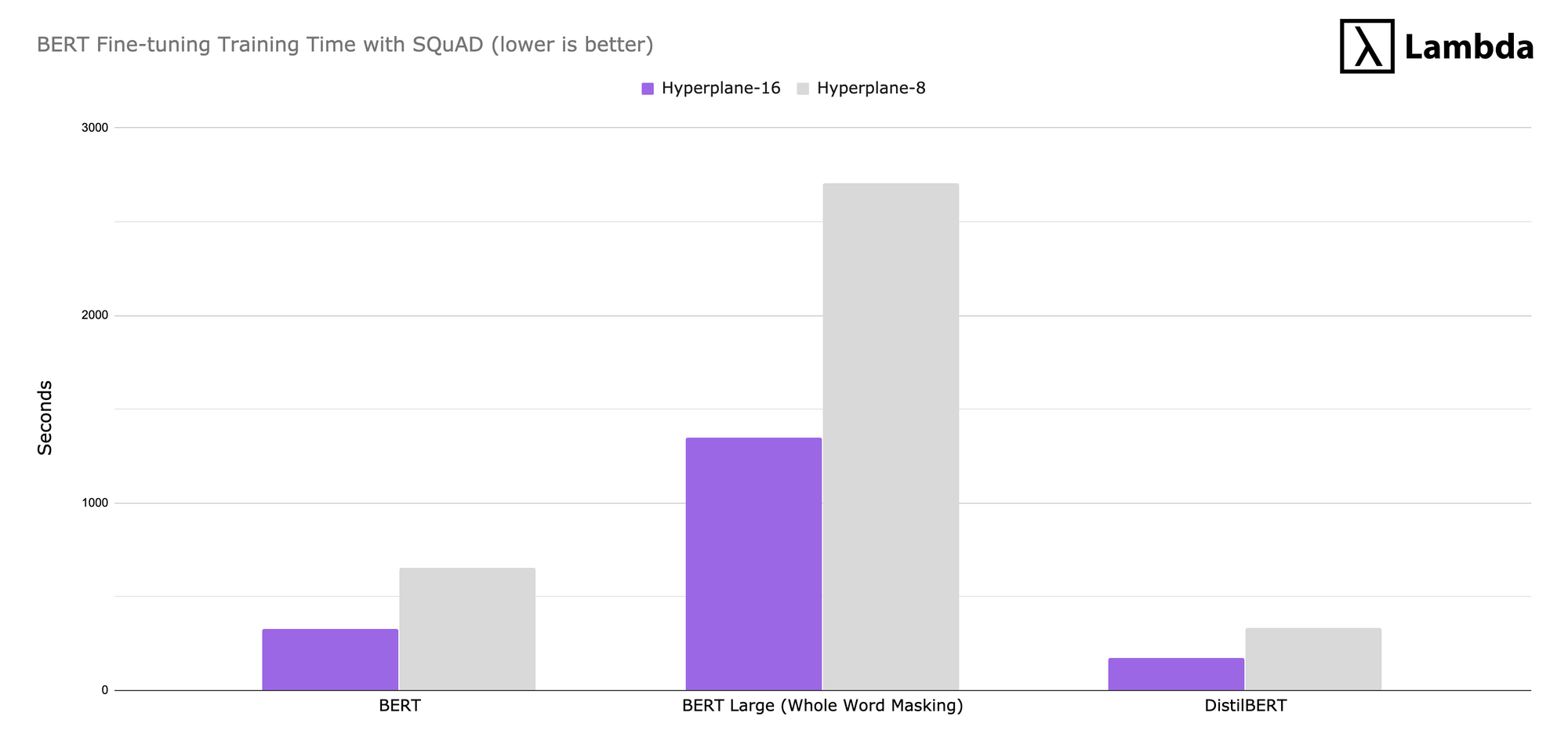
To test fine-tuning on the Hyperplane-16, we benchmarked three BERT models with Stanford’s question and answer data set SQuAD v1.1.: BERT Base (110M parameters), BERT Large (340M parameters), and DistilBERT (66M parameters). We saw training times for all BERT variants on the Hyperplane-16 were roughly half that of the Hyperplane-8.
Time taken in seconds to fine-tune various BERT models with SQuAD
Note: The models converged to similar F1 scores on both machines of ~86 (BERT), ~93 (BERT Large), and ~82 (DistilBERT). Find more information in our fork of Hugging Face’s transformer implementation.
Training BERT from scratch with the Hyperplane-16
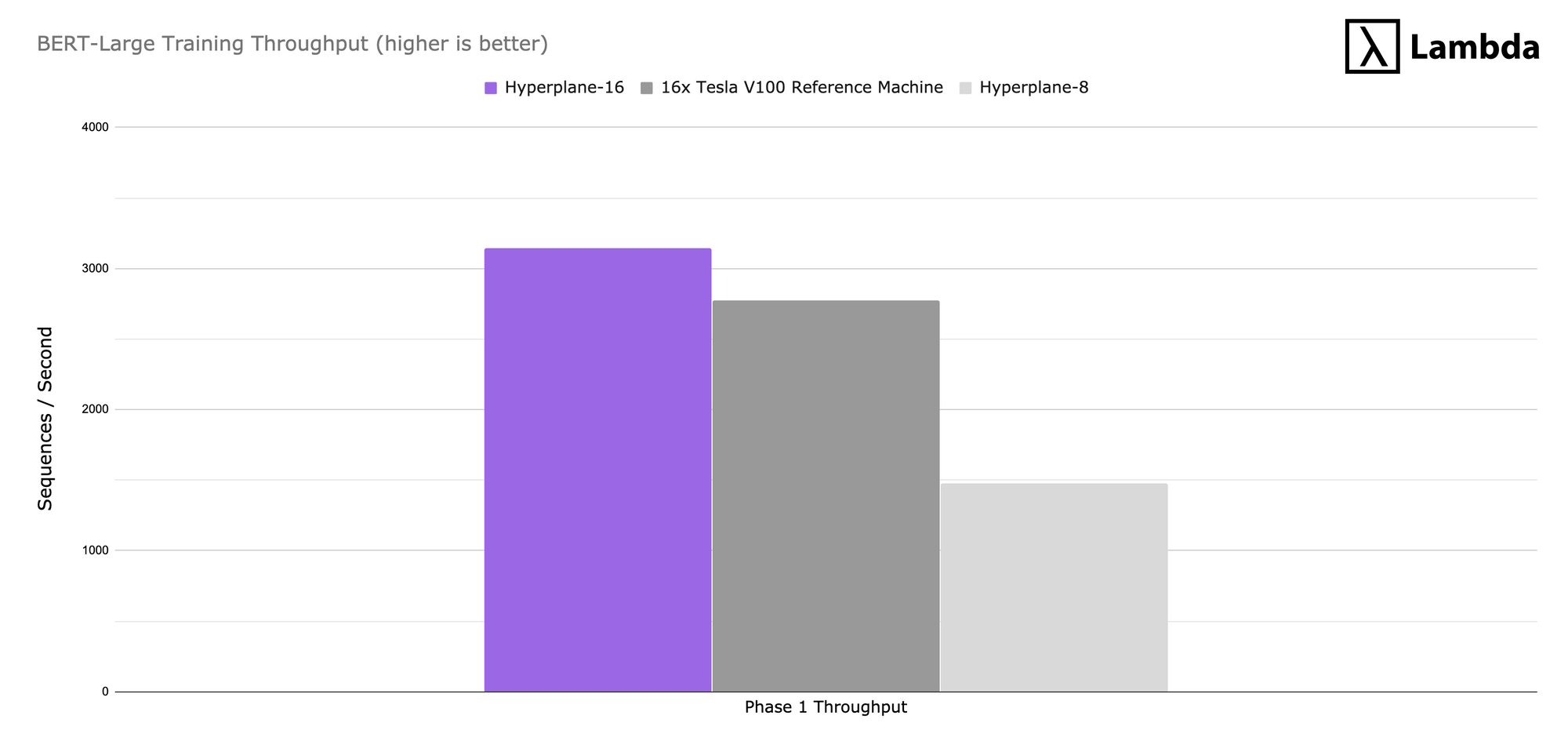
It’s not as common, but if you’re interested in pre-training your own BERT models, we measured the throughput (sequences/sec) for training BERT-Large (mixed precision) from scratch on the Hyperplane-16 and the Hyperplane-8. We then compared the numbers to a 16x Tesla V100 reference machine. Results were produced using a fork of NVIDIA’s reference implementation.
Throughput numbers in sequences per second for the training phase of BERT-Large
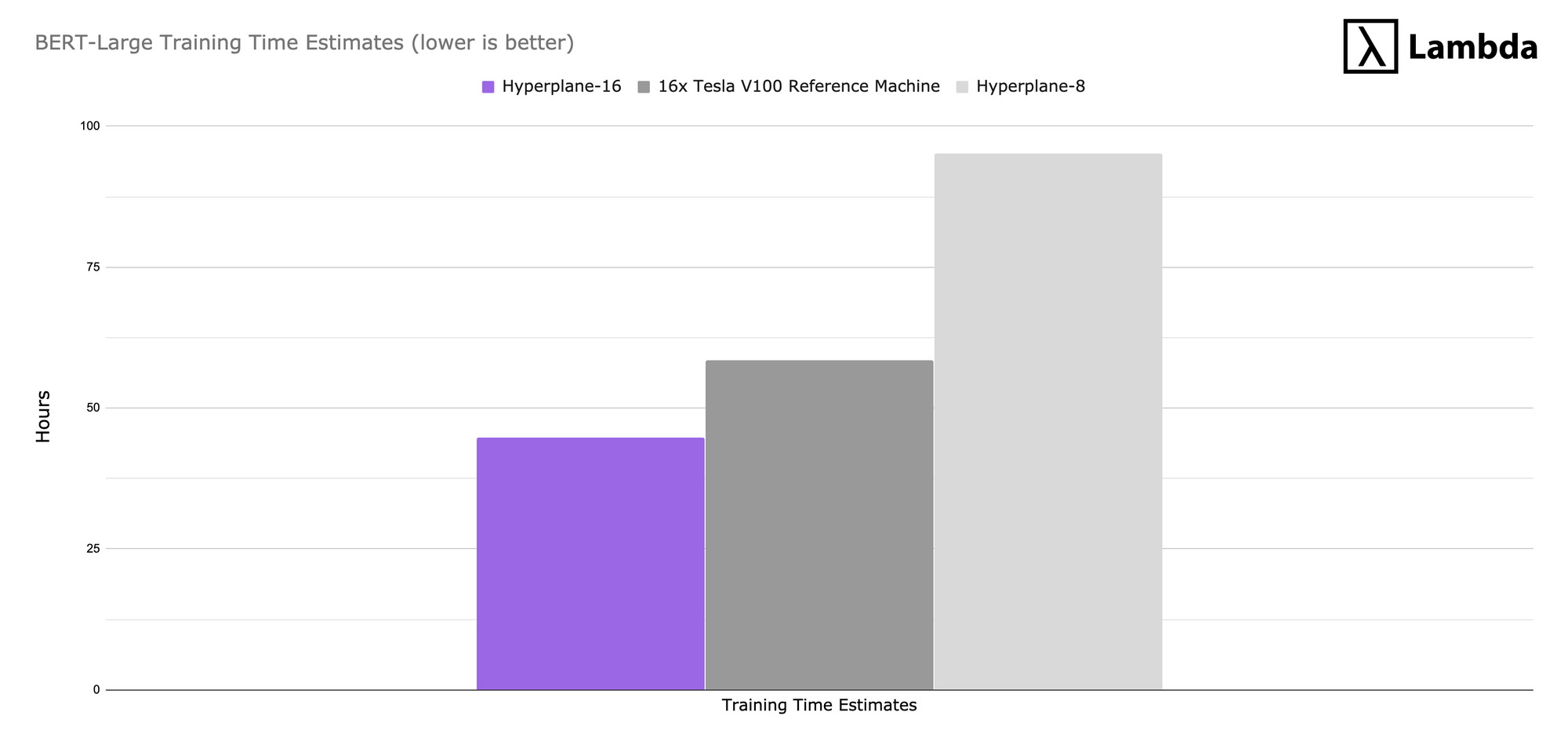
The Hyperplane-16 is slightly faster than the 16x Tesla V100 reference machine, and doubles the throughput of the Hyperplane-8. Using these throughput numbers we were able to estimate the total time to solution for these machines.
Training time estimates for BERT-Large in hours
Our estimated time to solution to pre-train BERT Large is ~45 hours on a Hyperplane-16 and ~95 hours on a Hyperplane-8. If you’d like to learn more about these specific tests check out our GitHub repo.
Technical Specifications
Operating System
Ubuntu 18.04 + Deep Learning Container Software NVIDIA Docker, InfiniBand OFED for GPU Direct RDMA, and NVIDIA Drivers
CPU
2x Intel Xeon Platinum 8268 (24 Cores, 2.90 GHz)
System Memory
1.5 TB ECC RAM (Upgradable to 3TB)
GPU
16x NVIDIA Tesla V100 SXM3 with NVSwitch and NVLink
1x Dual Port 10GBase-T Networking Intel X540 Ethernet Controller 1x Dual Port 100 Gb/s IB/GbE Card Mellanox Connect X-5 EDR with VPI
RDMA Compute Communication
8x Mellanox Connect X-5 Single Port 100 Gb/s InfiniBand Cards
IPMI
IPMI 2.0 + KVM-over-LAN support
Chassis
10U Rackmountable
Max Power Draw
10kW
System Physical Dimensions
Height: 17.2 in (437 mm) Width: 17.8 in (452 mm) Length: 27.8 in (705 mm) Weight: 390 lbs (177 kg)
Why Lambda?
At Lambda Labs we specialize in building and supporting the infrastructure it takes to do Deep Learning at scale. We work with research and engineering teams at some of the world’s leading companies and universities including: Apple, MIT, Anthem, Google, Microsoft, and Carnegie Mellon.
Enterprise class support
Focus on research and development, not Linux system administration and hardware troubleshooting. Lambda takes care of the details, providing optional parts depots in your datacenter as well as on-site parts replacement services to minimize downtime.
Pre-installed with everything your team needs
Each Hyperplane-16 is pre-installed with the Lambda Stack which includes everything you need to get started training neural networks at scale. Supporting frameworks including: TensorFlow, Keras, and PyTorch.
Get Going Faster with an Instant Quote
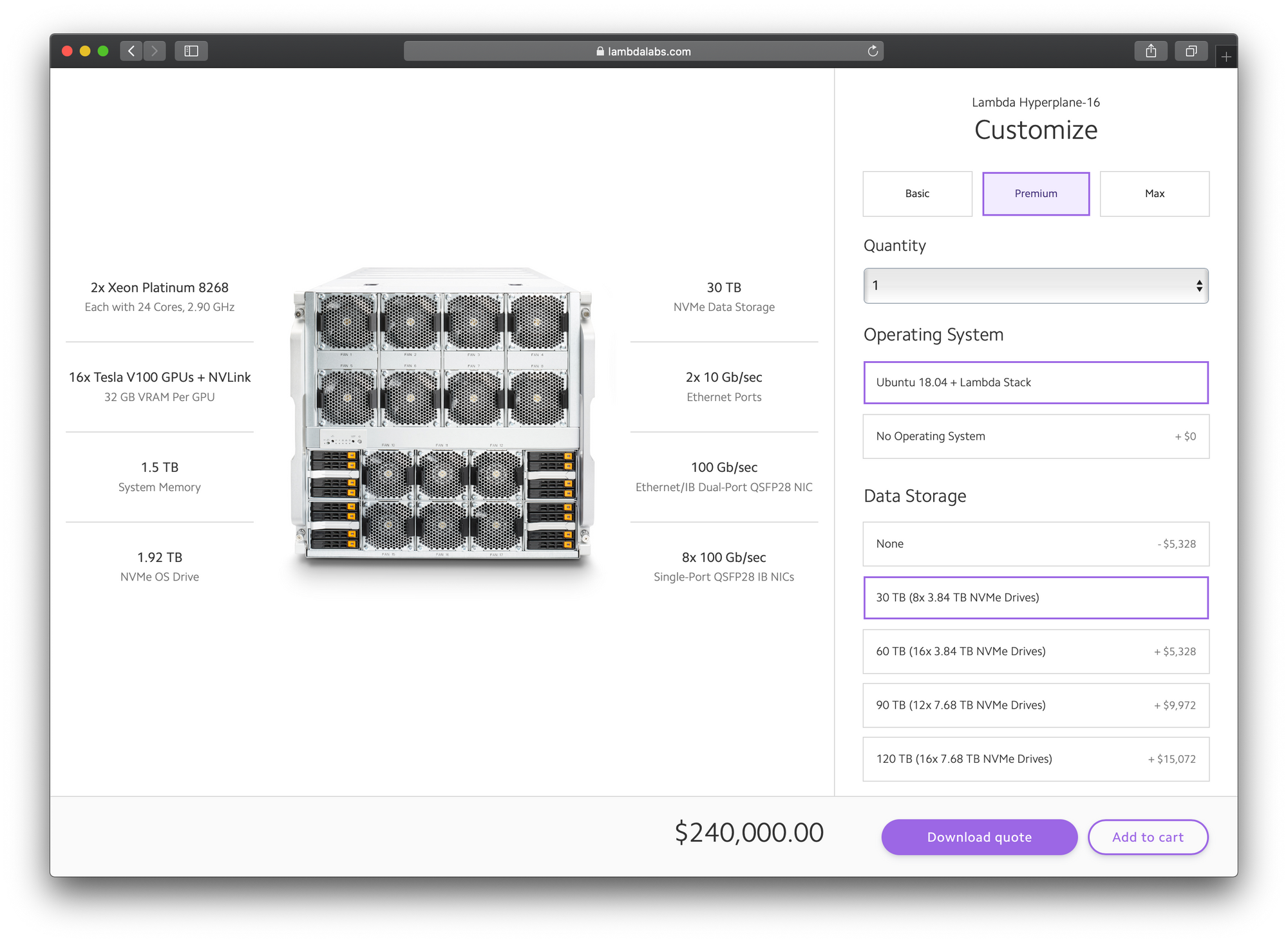
Hyperplane-16 online configuration tool
If the Hyperplane-16 sounds like what you’ve been looking for, you can get started right away with an instant quote for a new machine. If you’d like to discuss the Hyperplane-16 in more detail or one of our other solutions, an engineer is always happy to answer any questions. Send us an email: enterprise@lambdalabs.com
Hyperplane-16 not enough for your team’s needs? We’ve got something in the works you might like (i.e. it comes in a 42U format). Our engineers will design a system tailored to your precise compute, networking, storage, and power needs. Please reach out.