Setting up a new Mac always sounds easier than it actually is.
You tell yourself it will take an hour. Install a few apps. Copy some dotfiles. Tweak a few settings. Done.
Then a full weekend disappears.
Some of your setup lives in shell config. Some is buried in macOS settings. Some is in packages you installed years ago and forgot about. Some is in app configs that only make sense after months of iteration. None of it feels hard while you are building it gradually. It only becomes painful when you have to do it again.
That was the problem I wanted to solve. I wanted a reproducible core for my Mac setup. A setup I could reapply on a new machine. A setup I could open source. A setup structured enough to be dependable, but not so rigid that it becomes annoying to maintain.
That led me to this stack:
declarative Homebrew
All the source code I covered in this article can be found here:
It’s a public, reusable core of my Mac setup. It is meant to be forked and adapted, not copied as a complete snapshot as is.
In this post, I will walk through the ideas behind it and how I built each piece.
If you have never used this stack before, here is the short version.
Nix is a package manager and configuration system.
The reason people like it is that it lets you describe an environment declaratively. Instead of manually installing packages and hoping you remember what you did six months later, you define the environment in code.
For me, the value is simple: I want my machine setup written down in a form I can version, reapply, and evolve.
nix-darwin brings that model to macOS.
It lets you configure machine-level parts of your Mac, including things like:
system defaults
login shell
system packages
Homebrew integration
primary user configuration
So if Nix is the foundation, nix-darwin is the layer that makes it useful for a Mac.
Home Manager does something similar, but for your user environment.
Instead of configuring the machine itself, it configures the things that live in your home directory and shape your day-to-day workflow:
user packages
Git config
shell behavior
fonts
application config files
environment variables
I like this split because it keeps system concerns and user concerns from getting mixed together.
Even if you use Nix on macOS, Homebrew is still useful.
A lot of Mac apps are easiest to install that way, especially GUI apps. So instead of pretending Homebrew should disappear, I let nix-darwin manage it declaratively.
That gives me a setup where both Nix packages and Homebrew apps live in source control.
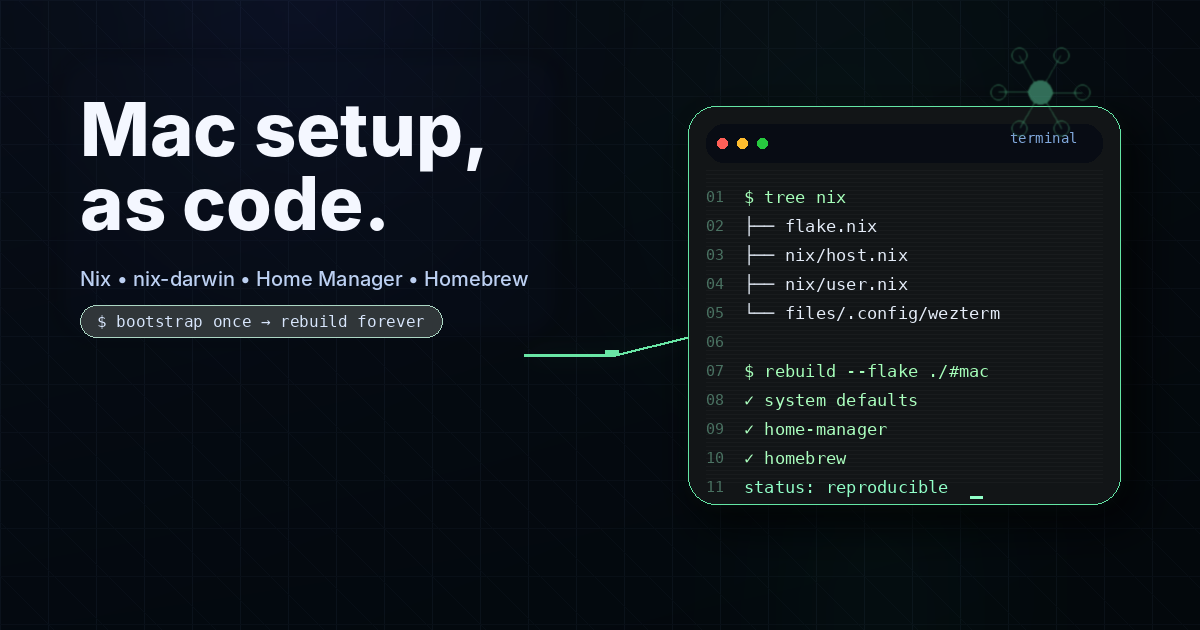
Before the declarative setup can take over, a fresh Mac still needs a small bootstrap step.
The reason is simple: on a brand new machine, the tools that apply the real configuration do not exist yet.
For this repo, the bootstrap layer lives in setup/mac.sh.
Its job is to install the minimum core tools needed to get the rest of the setup working:
Determinate Nix Installer for installing Nix
Homebrew for the macOS package/app layer managed by
nix-darwindarwin-rebuildto apply the system configurationnvm and Node.js for a practical JavaScript/TypeScript runtime baseline
Here is the bootstrap script:
#!/bin/bash

set -euo pipefail

DOTFILES_DIR=$( cd -- "$( dirname -- "${BASH_SOURCE[0]}" )" &> /dev/null && cd .. && pwd )

# Fail early if placeholder values have not been customized yet
if grep -R -n -E 'yourname|/Users/yourname|Your Name|you@example.com' \
  "$DOTFILES_DIR/flake.nix" \
  "$DOTFILES_DIR/nix" >/dev/null 2>&1; then
  echo "Placeholder values are still present in the repo."
  echo "Please replace values like 'yourname', '/Users/yourname', 'Your Name', and 'you@example.com' before running setup/mac.sh."
  exit 1
fi

# Install Nix via Determinate if missing
if ! command -v nix &> /dev/null; then
  curl --proto '=https' --tlsv1.2 -sSf -L https://install.determinate.sh/nix | sh -s -- install
fi

# Install Homebrew if missing
if ! command -v brew &> /dev/null; then
  /bin/bash -c "$(curl -fsSL https://raw.githubusercontent.com/Homebrew/install/HEAD/install.sh)"
fi

# Apply the Nix configuration
if [ -x /run/current-system/sw/bin/darwin-rebuild ]; then
  sudo /run/current-system/sw/bin/darwin-rebuild switch --flake "$DOTFILES_DIR#mac"
else
  sudo nix run github:nix-darwin/nix-darwin -- switch --flake "$DOTFILES_DIR#mac"
fi

# Install nvm and a default Node.js if missing
export NVM_DIR="$HOME/.nvm"
if [ ! -d "$NVM_DIR" ]; then
  PROFILE=/dev/null bash -c 'curl -o- https://raw.githubusercontent.com/nvm-sh/nvm/v0.39.7/install.sh | bash'
  [ -s "$NVM_DIR/nvm.sh" ] && . "$NVM_DIR/nvm.sh"
  nvm install --lts
fi
The system is now split in two phases:
Bootstrap phase: install the minimum needed to get going
Declarative phase: let Nix,
nix-darwin, and Home Manager manage the durable setup
That bootstrap script is what you run on a brand new Mac, after cloning the repo and replacing the placeholder values with your own username, home directory, and Git identity. The script now checks for those placeholder values and fails early if you forgot.
In other words, the order is:
Clone the repo
Replace placeholders like
yourname,/Users/yourname, and your Git identityRun
bash setup/mac.shLet the declarative setup take over from there
After that first bootstrap, ongoing changes should mostly be made by editing the Nix config and running darwin-rebuild switch --flake ~/github/dotfiles-mac-nix#mac.
I also like having a small convenience alias for this. In the public repo, I added an opinionated version that assumes the repo lives at ~/github/dotfiles-mac-nix:
rebuild = "/run/current-system/sw/bin/darwin-rebuild switch --flake ~/github/dotfiles-mac-nix#mac";
That makes the common update loop a lot simpler: edit config, run rebuild, verify the result.
The first thing I did was create a flake.nix file.
A flake is just the top-level definition of the setup. It declares the dependencies and how they are wired together.
In my case, I wanted three inputs:
nixpkgsfor packagesnix-darwinfor macOS system configurationhome-managerfor user configuration
The file looks like this:
{
  description = "Minimal macOS Nix setup with nix-darwin + Home Manager";

  inputs = {
    nixpkgs.url = "github:NixOS/nixpkgs/nixpkgs-unstable";
    nix-darwin = {
      url = "github:LnL7/nix-darwin";
      inputs.nixpkgs.follows = "nixpkgs";
    };
    home-manager = {
      url = "github:nix-community/home-manager";
      inputs.nixpkgs.follows = "nixpkgs";
    };
  };

  outputs = { nixpkgs, nix-darwin, home-manager, ... }: {
    darwinConfigurations.mac = nix-darwin.lib.darwinSystem {
      system = "aarch64-darwin";
      modules = [
        ./nix/host.nix
        home-manager.darwinModules.home-manager
        {
          home-manager.useGlobalPkgs = true;
          home-manager.useUserPackages = true;
          home-manager.backupFileExtension = "backup";
          home-manager.users.yourname = import ./nix/user.nix;
        }
      ];
    };
  };
}
This is the file that turns the repo from a pile of config into a coherent system.
Next I created nix/host.nix.
This file handles the machine-level parts of the setup: macOS defaults, Homebrew packages, the main user, the login shell, and system-level packages.
Here is the version from the public repo:
{ pkgs, ... }:

{
  # If you use Determinate Nix Installer (recommended), let it manage Nix itself.
  nix.enable = false;

  nixpkgs.config.allowUnfree = true;

  homebrew = {
    enable = true;
    onActivation.cleanup = "zap";
    taps = [ ];
    brews = [
      "autoconf"
    ];
    casks = [
      "wezterm"
      "amethyst"
    ];
  };

  environment.systemPackages = with pkgs; [
    starship
  ];

  system.primaryUser = "yourname";
  users.users.yourname = {
    home = "/Users/yourname";
    shell = pkgs.zsh;
  };

  system.defaults = {
    NSGlobalDomain = {
      AppleInterfaceStyle = "Dark";
      KeyRepeat = 2;
      InitialKeyRepeat = 15;
      "com.apple.swipescrolldirection" = false;
      NSAutomaticCapitalizationEnabled = false;
      NSAutomaticPeriodSubstitutionEnabled = false;
      NSAutomaticSpellingCorrectionEnabled = false;
      NSAutomaticQuoteSubstitutionEnabled = false;
      NSNavPanelExpandedStateForSaveMode = true;
      NSNavPanelExpandedStateForSaveMode2 = true;
      AppleShowAllExtensions = true;
    };

    finder = {
      AppleShowAllExtensions = true;
      ShowPathbar = true;
    };

    trackpad = {
      Clicking = true;
    };
  };

  environment.systemPath = [
    "/run/current-system/sw/bin"
    "/etc/profiles/per-user/yourname/bin"
  ];

  system.stateVersion = 6;
}
This is where I put all the decisions that shape the machine itself.
For me, this is one of the highest-leverage parts of the setup. If I get a new Mac, I do not want to remember which settings I toggled manually in five different places. I want those decisions encoded once and re-applied.
After that, I created nix/user.nix.
This is the user-level configuration. It includes packages, fonts, Git settings, prompt configuration, shell behavior, and dotfile symlinks.
{ config, pkgs, ... }:

let
  dotfilesDir = "${config.home.homeDirectory}/github/dotfiles-mac-nix";
in
{
  home.username = "yourname";
  home.homeDirectory = "/Users/yourname";
  home.stateVersion = "23.11";
  home.language.base = "en_US.UTF-8";

  home.packages = with pkgs; [
    git
    curl
    wget
    jq
    fd
    fastfetch
    ripgrep
    killall
    lazygit
    tree
    bun
    rustup
    zip
    unzip
    nerd-fonts.hack
    roboto
    noto-fonts
    noto-fonts-cjk-sans
    noto-fonts-color-emoji
    font-awesome
  ];

  fonts.fontconfig.enable = true;

  home.sessionVariables = {
    EDITOR = "vim";
  };

  programs.git = {
    enable = true;
    lfs.enable = true;
    signing.format = null;
    settings = {
      user = {
        name = "Your Name";
        email = "you@example.com";
      };
      core.editor = "vim";
      color.ui = true;
      push.autoSetupRemote = true;
      pull.rebase = true;
      rebase.updateRefs = true;
    };
  };

  programs.starship = {
    enable = true;
    settings = {
      command_timeout = 1000;
      add_newline = false;
      format = "$username$hostname$directory$git_branch$git_state$git_status$cmd_duration$line_break$character";
    };
  };

  programs.zsh = {
    enable = true;
    autosuggestion.enable = true;
    syntaxHighlighting.enable = true;
    shellAliases = {
      ".." = "cd ..";
      m = "git switch main";
      mst = "git switch master";
      pull = "git pull";
      push = "git push";
      pushf = "git push --force";
      add = "git add .";
      amend = "git commit --amend";
      reset = "git reset --soft HEAD^";
      rebasem = "git rebase -i main";
      rebasemst = "git rebase -i master";
      rebuild = "/run/current-system/sw/bin/darwin-rebuild switch --flake ~/github/dotfiles-mac-nix#mac";
    };
    initContent = ''
      bindkey '^f' autosuggest-accept
    '';
  };

  home.file = {
    ".config/wezterm".source = config.lib.file.mkOutOfStoreSymlink "${dotfilesDir}/files/.config/wezterm";
  };
}
The exact package list is not the important part. The structure is.
This is the layer where I define the baseline environment I want in my user account, including identity, packages, shell config, and dotfile symlinks all in one place.
I did not want this repo to be just Nix modules and placeholders, so I added one real application config: WezTerm.
The config lives in:
files/.config/wezterm/wezterm.lua
And it gets linked into ~/.config/wezterm through Home Manager.
The file itself is simple, but that is the point. It shows how to keep app config in the repo without turning the whole repo into a giant dump of personal preferences. I picked WezTerm because it is real enough to demonstrate the pattern while still being general enough for a public starter repo.
local wezterm = require("wezterm")

local config = wezterm.config_builder()

local is_windows = os.getenv("OS") and os.getenv("OS"):lower():find("windows")
local is_macos = wezterm.target_triple:lower():find("darwin") ~= nil

config.color_scheme = "rose-pine-moon"
config.max_fps = 120
config.font = wezterm.font("Hack Nerd Font", { weight = "DemiBold" })
config.window_decorations = "INTEGRATED_BUTTONS|RESIZE"
config.window_frame = {
  font = wezterm.font("Hack Nerd Font", { weight = "Bold" }),
}
config.inactive_pane_hsb = {
  saturation = 0.0,
  brightness = 0.5,
}

if is_windows then
  config.win32_system_backdrop = "Acrylic"
  config.window_background_opacity = 0.7
  config.window_frame.font_size = 10.0
end

if is_macos then
  config.window_background_opacity = 0.8
  config.macos_window_background_blur = 50
  config.font_size = 15.0
  config.window_frame.font_size = 13.0
end

return config
Once the base setup is in place, the next question is obvious: how do I install more stuff over time?
My rule of thumb is simple.
That usually means:
CLI tools I use regularly
fonts
shell utilities
language toolchains that I want declared in the repo
packages that belong in my default user environment
For example, adding another CLI package usually means editing nix/user.nix and adding it to home.packages, then running:
rebuild
For GUI apps and some macOS-native tools, Homebrew is often still the right place.
That means editing nix/host.nix and adding a formula to brews or an app to casks, then applying the config again.
Sometimes the right answer is not Nix or Homebrew.
For example:
npmfor global JavaScript tooling when that fits your workflowlanguage-native package managers for project-specific dependencies
I do not think a good setup means forcing every possible tool through one package manager. I think it means being clear about which layer owns what.
My rough mental model is:
Nix / Home Manager for reproducible baseline environment
Homebrew for macOS apps and tools that fit naturally there
language-specific package managers for ecosystem-specific or project-specific tooling
The repo is meant to be copied and adapted.
At a high level:
Clone the repo under your home directory
Replace the placeholders for username, home directory, and Git identity
If you are on Intel, change the system target from
aarch64-darwintox86_64-darwinOn a fresh Mac, run
bash setup/mac.shFor later changes, edit the Nix config and run
darwin-rebuild switch --flake ~/github/dotfiles-mac-nix#mac
Once your setup is reproducible, you stop relying on memory and habit to rebuild it. You can now also get a new Mac up and running with the exact same setup within seconds.