Updated on August 11, 2026 by Michael
This page contains documented and repeatable benchmarks comparing Koi Editor with other popular code editors.
All editors are tested on the same hardware and test files, using comparable settings wherever practical. Benchmarks are updated periodically as new editor releases become available.
Unless otherwise noted, syntax highlighting was enabled using each editor's built-in language support. Editors may be omitted when the test file or equivalent functionality is unsupported.
Commit 4ed1040 added randomized inter-key delays to Keypress.sh. This prevents editors from benefiting from a fixed synthetic typing cadence and produced results that more closely match observed continuous-typing responsiveness.
Typing latency
Lower latency means the editor responds more quickly to each keypress. Higher latency can make editing feel less responsive, especially when typing continuously in large source files.
All measurements in milliseconds.
Median represents the typical keypress latency, while the percentile metrics capture occasional slower frames that affect perceived responsiveness. Relative P95 values are calculated from the unrounded measurements.
Graphical applications were launched directly from their bundled Mach-O executables. This avoids a repeatable macOS input-to-display latency difference associated with LaunchServices launches, see FAQ: Why are these results different from earlier benchmark versions?.
Single pane displays one view of the test file.
Dual pane displays the same document simultaneously in two editor panes while typing in one pane.
sqlite3.c
Single pane:
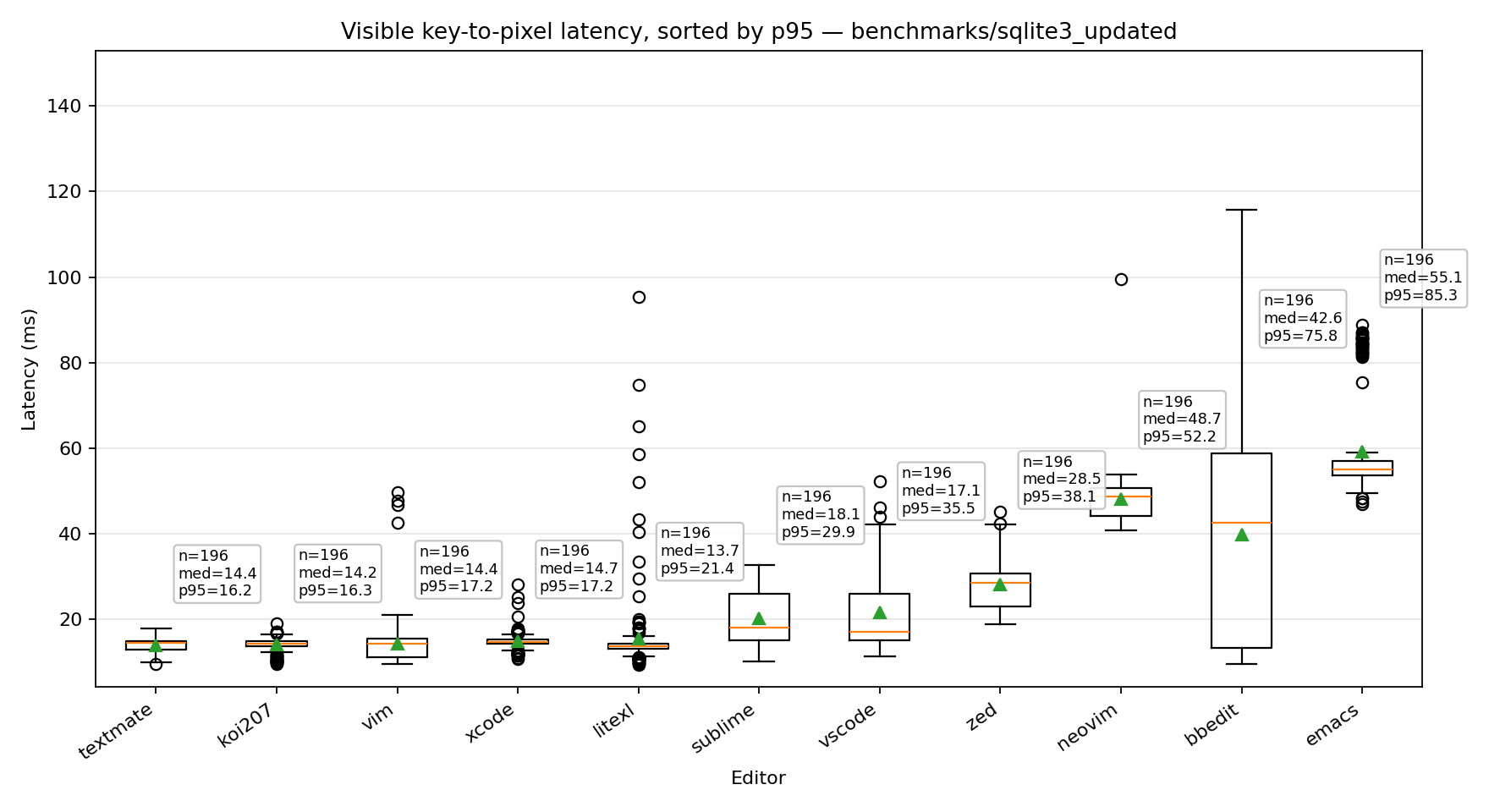
| Editor | Median | p95 | p99 | Max | Tail Spread | vs Fastest (p95) |
|---|---|---|---|---|---|---|
| TextMate | 14.4 | 16.1 | 17.4 | 17.7 | 1.7 | 1.00x |
| Koi-b207 | 14.2 | 16.3 | 17.0 | 17.1 | 2.0 | 1.01x |
| Xcode | 14.7 | 17.2 | 25.1 | 28.2 | 2.6 | 1.07x |
| Vim | 14.5 | 17.5 | 46.7 | 47.6 | 3.0 | 1.09x |
| LiteXL | 13.8 | 25.4 | 65.2 | 74.8 | 11.6 | 1.58x |
| Sublime Text | 18.1 | 30.0 | 31.5 | 32.1 | 11.9 | 1.86x |
| VS Code | 17.1 | 35.3 | 43.9 | 46.0 | 18.2 | 2.19x |
| Zed | 28.6 | 38.2 | 42.1 | 42.4 | 9.6 | 2.37x |
| Neovim | 48.7 | 52.3 | 53.9 | 54.0 | 3.6 | 3.24x |
| BBEdit | 42.4 | 74.6 | 104.5 | 114.5 | 32.2 | 4.63x |
| Emacs | 55.1 | 85.2 | 87.0 | 87.1 | 30.1 | 5.28x |
Dual pane:
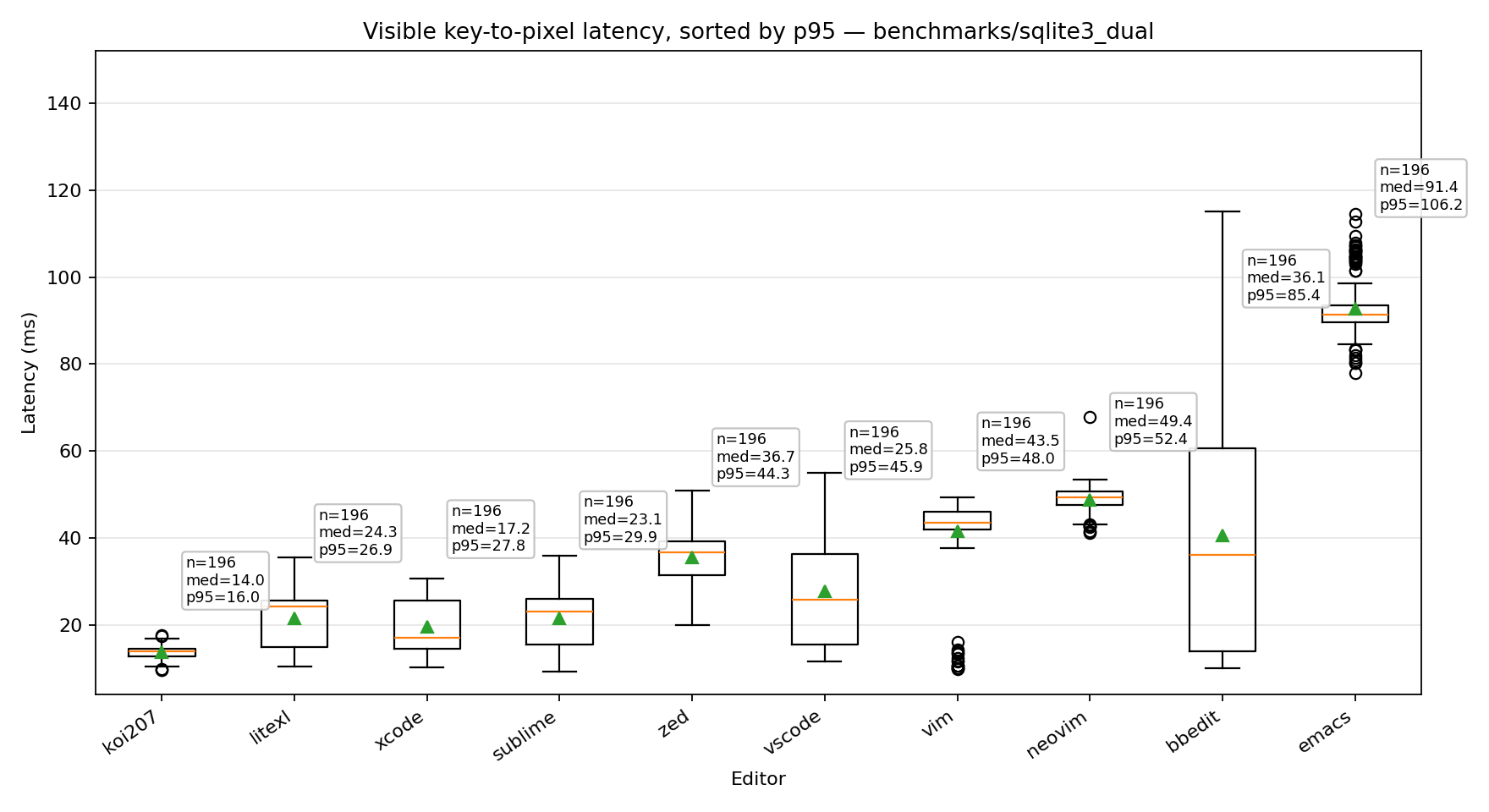
| Editor | Median | p95 | p99 | Max | Tail Spread | vs Fastest (p95) |
|---|---|---|---|---|---|---|
| Koi-b207 | 14.0 | 16.0 | 17.4 | 17.4 | 1.9 | 1.00x |
| LiteXL | 24.4 | 27.0 | 35.0 | 35.2 | 2.6 | 1.69x |
| Xcode | 17.2 | 27.7 | 29.4 | 29.7 | 10.6 | 1.74x |
| Sublime | 22.9 | 29.8 | 32.8 | 33.5 | 6.9 | 1.87x |
| Zed | 36.7 | 44.1 | 49.5 | 50.3 | 7.4 | 2.76x |
| VS Code | 26.4 | 45.6 | 51.2 | 52.4 | 19.2 | 2.86x |
| Vim | 43.6 | 48.0 | 48.7 | 48.7 | 4.4 | 3.00x |
| Neovim | 49.4 | 52.4 | 53.4 | 53.5 | 3.0 | 3.28x |
| BBEdit | 36.1 | 78.7 | 110.2 | 111.2 | 42.6 | 4.93x |
| Emacs | 91.4 | 106.2 | 108.6 | 109.5 | 14.8 | 6.65x |
Notes:
- BBEdit had autocomplete disabled because it could not be reliably overridden in the tested configuration.
- TextMate does not provide autocomplete while typing in the tested configuration.
- Vim, Neovim, and Emacs were tested without automatic completion popups.
gcc.c
Single pane:
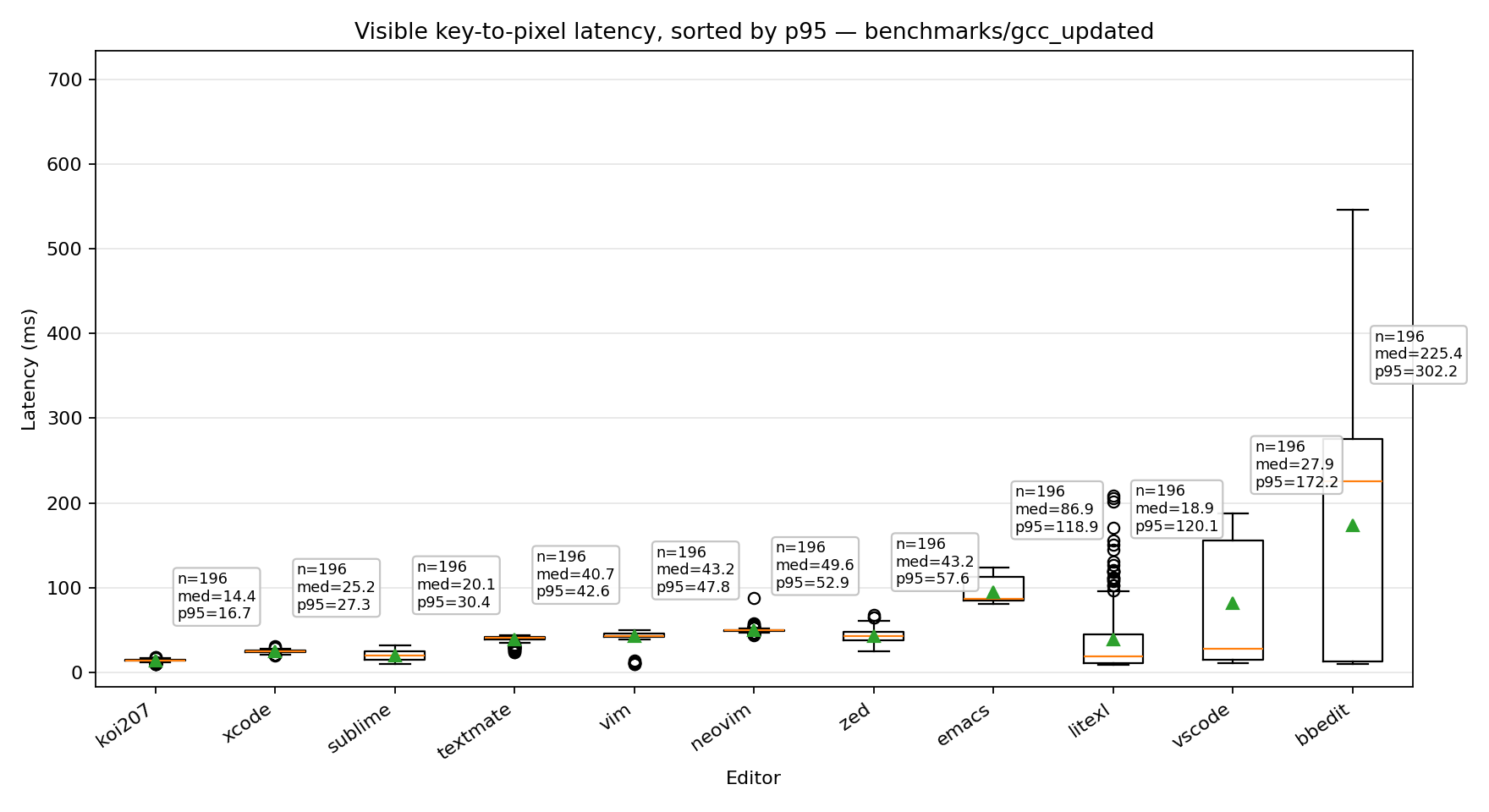
| Editor | Median | p95 | p99 | Max | Tail Spread | vs Fastest (p95) |
|---|---|---|---|---|---|---|
| Koi-b207 | 14.5 | 16.6 | 17.3 | 17.7 | 2.2 | 1.00x |
| Xcode | 25.2 | 27.6 | 29.5 | 30.8 | 2.3 | 1.66x |
| Sublime Text | 20.2 | 30.4 | 31.6 | 31.6 | 10.2 | 1.82x |
| TextMate | 40.7 | 42.6 | 43.3 | 43.5 | 1.8 | 2.56x |
| Vim | 43.2 | 47.8 | 48.8 | 48.9 | 4.6 | 2.87x |
| Neovim | 49.7 | 52.9 | 56.5 | 57.8 | 3.2 | 3.18x |
| Zed | 43.2 | 57.3 | 64.8 | 65.0 | 14.1 | 3.44x |
| Emacs | 87.0 | 118.3 | 121.3 | 122.0 | 31.3 | 7.11x |
| LiteXL | 18.9 | 119.8 | 171.2 | 201.9 | 100.9 | 7.20x |
| VS Code | 27.9 | 171.9 | 178.9 | 181.4 | 144.0 | 10.33x |
| BBEdit | 226.8 | 301.6 | 307.1 | 517.8 | 74.8 | 18.12x |
Dual pane:
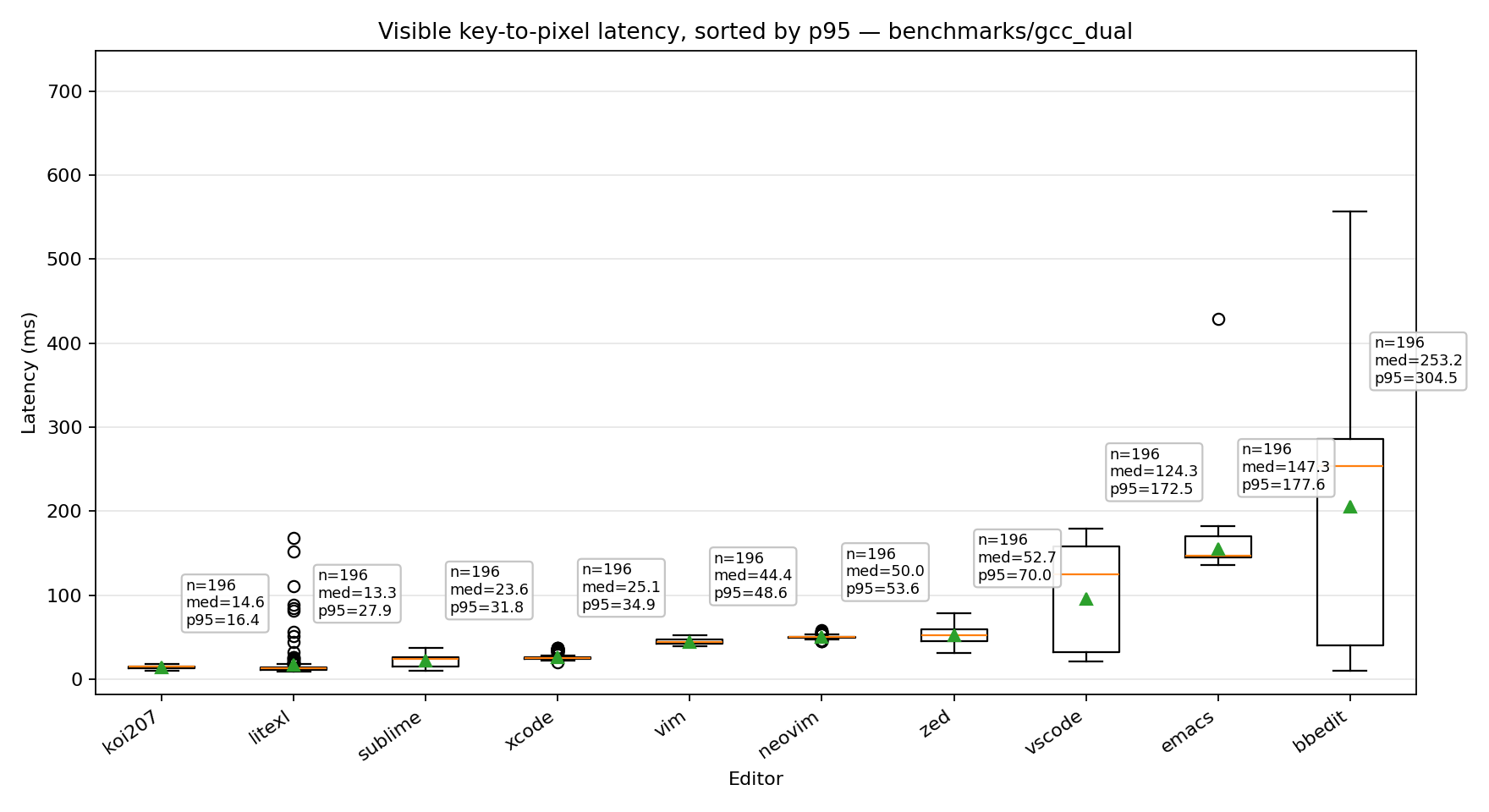
| Editor | Median | p95 | p99 | Max | Tail Spread | vs Fastest (p95) |
|---|---|---|---|---|---|---|
| Koi-b207 | 14.6 | 16.4 | 17.5 | 17.7 | 1.8 | 1.00x |
| LiteXL | 13.4 | 32.0 | 110.3 | 152.2 | 18.6 | 1.95x |
| Sublime Text | 23.7 | 32.2 | 35.7 | 36.1 | 8.5 | 1.96x |
| Xcode | 25.1 | 34.8 | 36.1 | 36.8 | 9.7 | 2.12x |
| Vim | 44.4 | 48.6 | 51.2 | 51.5 | 4.2 | 2.96x |
| Neovim | 50.0 | 53.6 | 57.1 | 57.2 | 3.6 | 3.27x |
| Zed | 52.7 | 70.0 | 73.9 | 75.0 | 17.3 | 4.26x |
| VS Code | 124.3 | 172.4 | 176.1 | 178.3 | 48.1 | 10.51x |
| Emacs | 147.3 | 177.3 | 179.7 | 180.7 | 30.0 | 10.81x |
| BBEdit | 251.6 | 304.1 | 310.6 | 524.4 | 52.4 | 18.53x |
Notes:
- Sublime Text was tested with autocomplete disabled because enabling it made editing the larger test file unusable.
- TextMate does not provide the dual-pane configuration used by this benchmark, and initial syntax highlighting of the larger file was very slow.
Test environment
| Component | Value |
|---|---|
| Hardware | Mac mini M2 Pro, 16 GB RAM |
| Operating System | macOS 15.7.5 |
| Display | 60 Hz |
| Test files | sqlite3.c (151,639 lines), gcc.c (753,821 lines) |
| Configuration | Default settings with syntax highlighting and line numbers enabled. Folding was enabled where supported, some editors automatically adjust features for very large files. |
Methodology
Typing latency was measured using Keypress.sh, which records the time between a simulated keypress and the editor presenting the updated frame on screen. Each benchmark consists of 200 measured keypresses, repeated under the same conditions.
Measurements shown are median, P95, P99, maximum latency, and tail spread (P95 – median), which indicates how consistent latency remains under heavier load.
Results were measured on a 60 Hz display, where one refresh interval is approximately 16.7 ms. Since the benchmark measures keypress-to-display latency, values naturally cluster around multiples of the display refresh interval (16.7 ms, 33.3 ms, 50 ms, and so on). Lower latency therefore means the editor more consistently completes processing within fewer display frames.
Editor configurations
Vim config file:
" ~/.vimrc

syntax on

set number
set autoindent
set smartindent
set cindent

set foldmethod=syntax
set foldlevel=99

set complete=.,w,b,u,t,i

set nowrap
set mouse=a
Emacs config file:
;; ~/.emacs.d/init.el

;; Syntax highlighting
(global-font-lock-mode 1)

;; Line numbers
(global-display-line-numbers-mode 1)

;; C mode
(add-to-list 'auto-mode-alist '("\\.c\\'" . c-mode))
(add-to-list 'auto-mode-alist '("\\.h\\'" . c-mode))

;; C indentation
(setq c-default-style "linux")

;; Folding
(add-hook 'c-mode-hook #'hs-minor-mode)

;; No word wrap
(setq-default truncate-lines t)

;; Completion
(setq completion-auto-help 'always)
(setq completion-cycle-threshold nil)
Neovim config file:
-- ~/.config/nvim/init.lua

vim.opt.number = true
vim.opt.wrap = false
vim.opt.mouse = "a"

vim.opt.autoindent = true
vim.opt.smartindent = true
vim.opt.cindent = true

vim.opt.complete = ".,w,b,u,t,i"

vim.opt.foldmethod = "expr"
vim.opt.foldexpr = "v:lua.vim.treesitter.foldexpr()"
vim.opt.foldlevel = 99
vim.opt.foldlevelstart = 99
vim.opt.foldenable = true

vim.api.nvim_create_autocmd("FileType", {
    pattern = { "c", "cpp" },
    callback = function()
        vim.treesitter.start()
    end,
})
Large file performance
Large file performance measures whether an editor can open and navigate very large files while remaining responsive.
| Editor | 5M lines | 10M lines | 15M lines | 20M lines |
|---|---|---|---|---|
| Koi | ||||
| Vim | ||||
| Neovim | ||||
| Sublime Text | - | |||
| VS Code | Degraded | - | - | - |
| TextMate | Degraded | - | - | - |
| Zed | - | - | - | - |
| BBEdit | - | - | - | - |
| Emacs | - | - | - | - |
Responsive
Degraded Opened, but editing was substantially impaired
– Did not become usable
Notes:
- Sublime Text remains responsive but takes noticeably longer to open very large files and did not complete loading the 20M-line file.
- VS Code and TextMate opened the 5M-line file but became unusable with syntax highlighting enabled.
- Emacs warns before opening very large files, then became unresponsive after confirmation.
Test environment
| Component | Value |
|---|---|
| Hardware | Mac mini M2 Pro, 16 GB RAM |
| Operating System | macOS 15.7.5 |
| Display | 60 Hz |
| Test files | Generated Python source code files |
| File sizes | 5M, 10M, 15M and 20M lines |
| Configuration | Default settings, syntax highlighting enabled where supported. |
vim \
    +'syntax on' \
    +'filetype plugin indent on' \
    +'setlocal filetype=python' \
    +'set number autoindent expandtab shiftwidth=4 softtabstop=4 tabstop=4 complete=.,w,b,u,t,i' \
    <path_to_file>
nvim \
    +'syntax enable' \
    +'filetype plugin indent on' \
    +'setlocal filetype=python' \
    +'set number autoindent expandtab shiftwidth=4 softtabstop=4 tabstop=4 complete=.,w,b,u,t,i' \
    <path_to_file>
Methodology
Each editor is opened with the test file and allowed to finish loading. Large-file testing is qualitative rather than a timed loading benchmark. Editors that failed to become interactive during the test session were recorded as unsupported.
The file is then tested by jumping to the beginning and end, scrolling, indenting multiple lines, and inserting new lines. An editor is considered to support a file size if it remains responsive throughout this process without requiring force quit or becoming unusable.
Editors tested
The benchmark focuses on general-purpose code and text editors available on macOS. IDEs specialized around particular languages or project environments are excluded. C is used for the primary tests because it is widely supported across the editors tested.
| Editor | Version/Build |
|---|---|
| Koi | 0.1.0-b207 |
| Sublime Text | 4200 |
| VS Code | 1.117.0 |
| Zed | 1.10.3 |
| BBEdit | 15.5.3 |
| TextMate | 2.0.23 |
| Xcode | 26.2 |
| Lite XL | 2.1.8 |
| Vim | 9.1 |
| Neovim | 0.12.4 |
| Emacs | 29.4 |
The versions listed above are the exact versions used for the measurements and are not necessarily the latest available releases.
FAQ
Why are Vim and Neovim tested with syntax-based folding enabled?
The goal of these benchmarks is to compare practical editing configurations rather than the fastest possible text insertion.
Vim and Neovim were tested with syntax highlighting, line numbers, automatic indentation, configured completion sources, and folding enabled. The goal was to retain commonly used editor functionality rather than optimize the benchmark configuration solely for insertion speed.
Disabling syntax-based folding improved typing latency, but also removed functionality that remained enabled in the comparison configuration.
Why compare terminal editors with graphical editors?
These benchmarks measure end-to-end visible responsiveness rather than isolated editor-engine performance.
Terminal and graphical editors use different rendering pipelines, but each editor is measured through its actual user-facing editing interface. Graphical applications are launched directly from their bundled Mach-O executable to avoid the macOS launch-state latency documented above. Vim and Neovim are tested in Apple Terminal.
Were different syntax highlighting implementations used?
Yes.
Each editor was tested using its built-in language support. Different editors use different implementations, including regular-expression syntax highlighters, Tree-sitter, TextMate grammars, and custom lexers.
The benchmarks compare equivalent visible functionality rather than identical internal implementations.
Were folds expanded during testing?
Yes.
Syntax-based folding remained enabled where configured (to trigger the behind-the-scenes fold level computations), but all folds were expanded during typing measurements.
Were the editors warmed up before measurement?
Yes.
Measurements began only after the editor became responsive and the visible region had been fully highlighted. Typing was measured after the initial loading work had completed.
Were all editors configured identically?
No.
The goal is not to force every editor into an identical internal configuration, which is generally not possible. Editors are tested with comparable visible functionality where practical, and benchmark-specific exceptions are documented alongside the affected results.
Features such as fonts, rendering backends, syntax engines, completion, folding, and large-file optimizations differ between editors.
The goal is to compare the editing experience users receive from each editor, not to normalize every implementation detail.
How were the latency statistics calculated?
Each benchmark records 100 keypress appearances and 100 keypress disappearances.
The two lowest and two highest measurements are discarded to reduce the influence of unrelated system activity, leaving 196 samples for the reported statistics.
Median, P95, P99, maximum latency, and tail spread (P95 − median) are calculated from those remaining samples.
Why are these results different from earlier benchmark versions?
The benchmark methodology was updated to use randomized delays between simulated keypresses rather than a fixed typing interval.
Fixed intervals produced unusually low latency measurements in some editors despite noticeably slower responsiveness during normal typing. Randomizing the delay better represents real typing patterns and exposes work that editors may defer or debounce between keypresses.
Graphical editors are also now launched directly from their bundled Mach-O executables to avoid the macOS launch-state latency documented in Investigating macOS input-to-display latency.
Earlier results should therefore not be compared directly with the current measurements.
Final notes
- Benchmarks are performed on a single hardware and software configuration.
- Results may vary on different operating systems or hardware.
- Editors are tested using their default editing experience unless otherwise stated.