One of the most entertaining episodes in finance during the pandemic was the leak of a “Working Conditions Survey” deck created by a bunch of Goldman Sachs analysts. The deck detailed what the authors called "inhumane working conditions” which saw them working up to 105 hours a week, getting less than 5 hours sleep and completely burnt out. The reactions to the deck were so widespread that Goldman CEO David Solomon had to publicly comment and other banks started enforcing some of the recommendations including enforcing “work free weekends.”
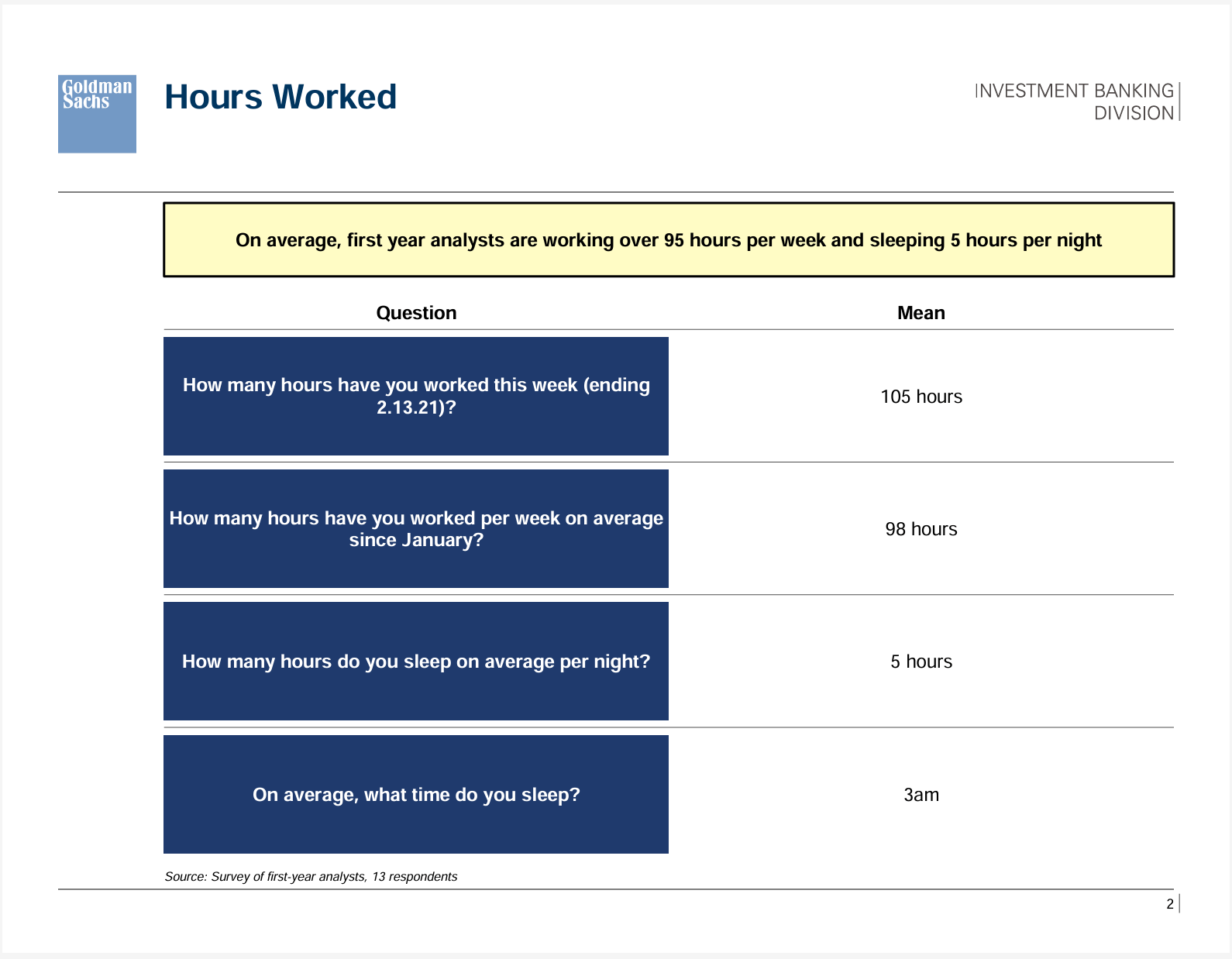
Though some were sympathetic to the analysts, many weren’t with the sentiment: “how hard can it be to create PowerPoint decks and models all day?” Actually, very very hard. Creating decks where all text and visual elements have to follow exacting guidelines can be very time consuming and soul destroying.
Which is why with the large LLMs like ChatGPT and Claude becoming good enough to create pitch decks in early 2026, many professional presentations are now outsourced completely to AI. The problem is this: AI tools straight out of the box create decks that look good on the surface but there are many underlying issues which is one of the reasons adoption by private equity, investment banks and the upper echelon is still low. Take a look at this Claude generated slide, what do you notice?
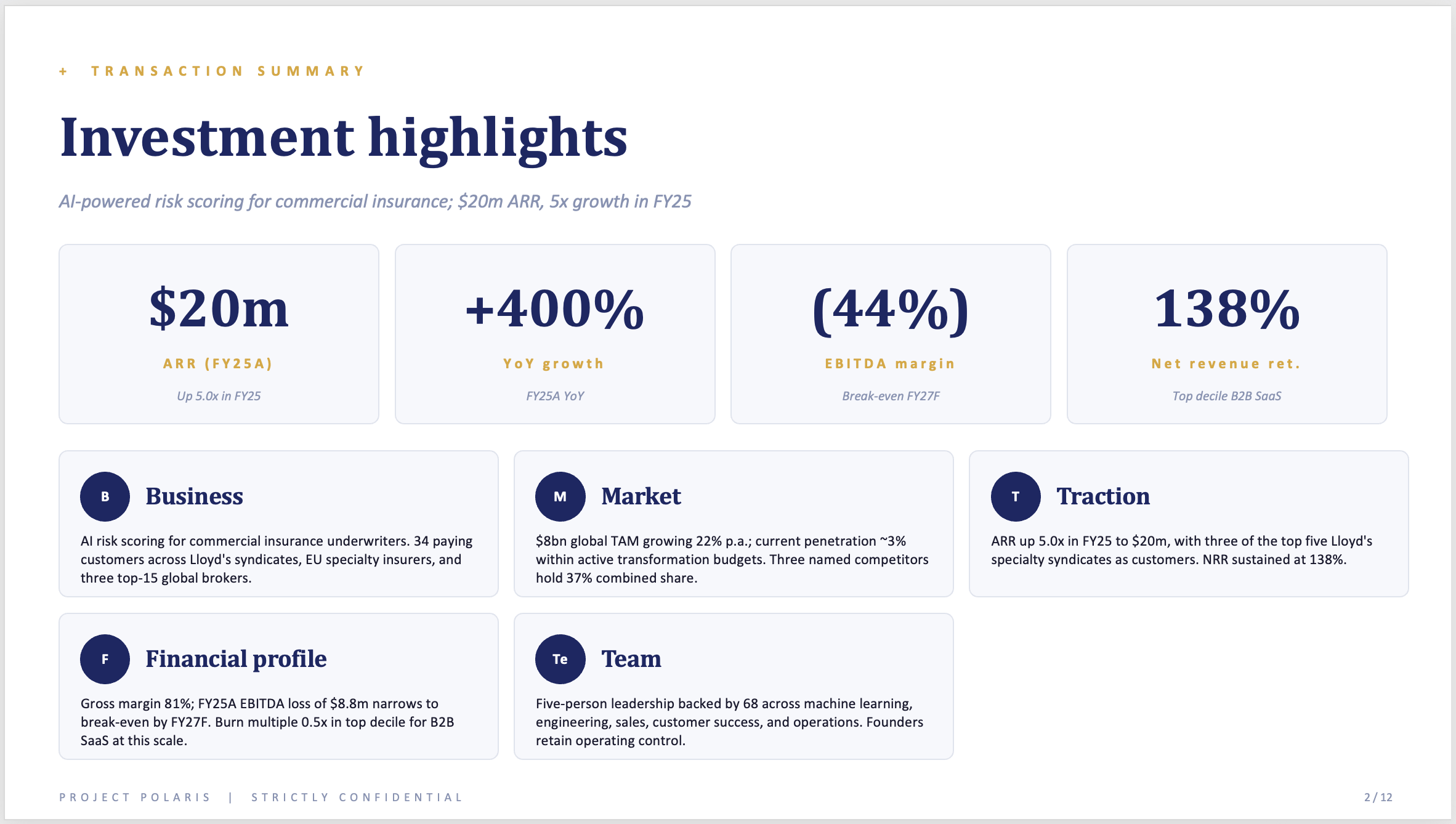
It definitely looks good and passes as a professional slide suitable for a growth company’s management presentation. To those who have ‘lived’ in PowerPoint for a long time and also seen many startup presentations recently will instantly recognise the major problem with this slide - sameness. It is the classic, Claude-generated deck that looks like every other deck.
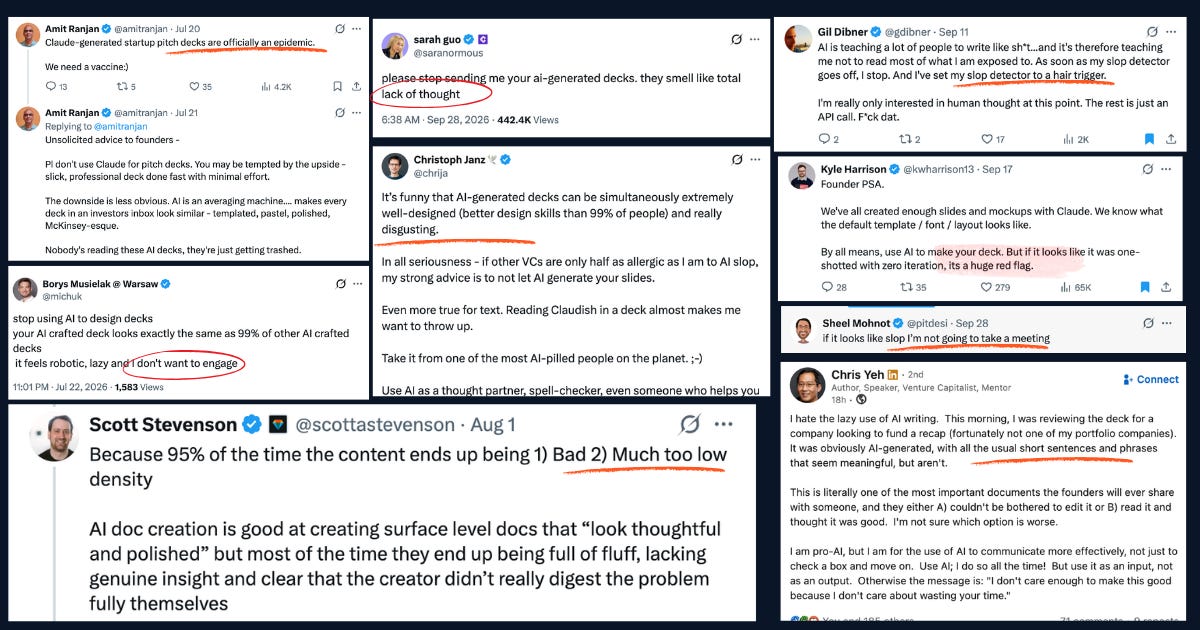
Some argue it doesn’t matter if a deck is AI-generated, all that matters is the content is authentic and unique. Investors beg to disagree, let’s look at things from their point of view.
Sameness: I was at an early-stage founder pitching session recently and all the decks looked eerily similar. Same colour palette (mostly blue and gold), same serif fonts and same strait jacket design.
Soulless: one of the distinguishing characteristics of AI-decks is that they spend a lot of words saying nothing. AI feels intelligent, turning a simple prompt into complex documents. In reality, they follow several rigid rules to create content. This means whether you create a full deck from a prompt or provide the content for AI to create slides, the output is generally emotionless and worthy slides that are difficult to understand.
Wild Inaccuracies: when you trust AI to “flesh out” your prompts into a detailed deck, chances are some of those nice charts and figures are based on made up numbers. I’ve seen founders struggle to answer questions about metrics and market data they’ve presented in their pitch decks.
Late last year, I was blown away when Claude’s deck creating skills became good enough to generate full PowerPoint decks from prompts. So of course I embraced the new found freedom and started churning out decks. I am ashamed to admit that despite twenty years experience with PowerPoint, I didn’t see anything wrong in sending out a deck created entirely with AI. Of course the words were mine but I trusted the design. It took a friend to tell me it looked like Claude for me to wake up.
Honest feedback? looks very basic and Claude led.
With the benefit of hindsight, that was a silly idea as AI-generated slides have a bad reputation largely because they all look alike. Once a recipeient clocks a deck as AI-built they instantly discount the ideas as if to say what valuable idea can come from someone who is so lazy?
If you’re wondering why it’s so easy to tell an AI deck it’s because, no matter how good the prompt, all the LLMs out of the box will have a combination of these tell tale signs.
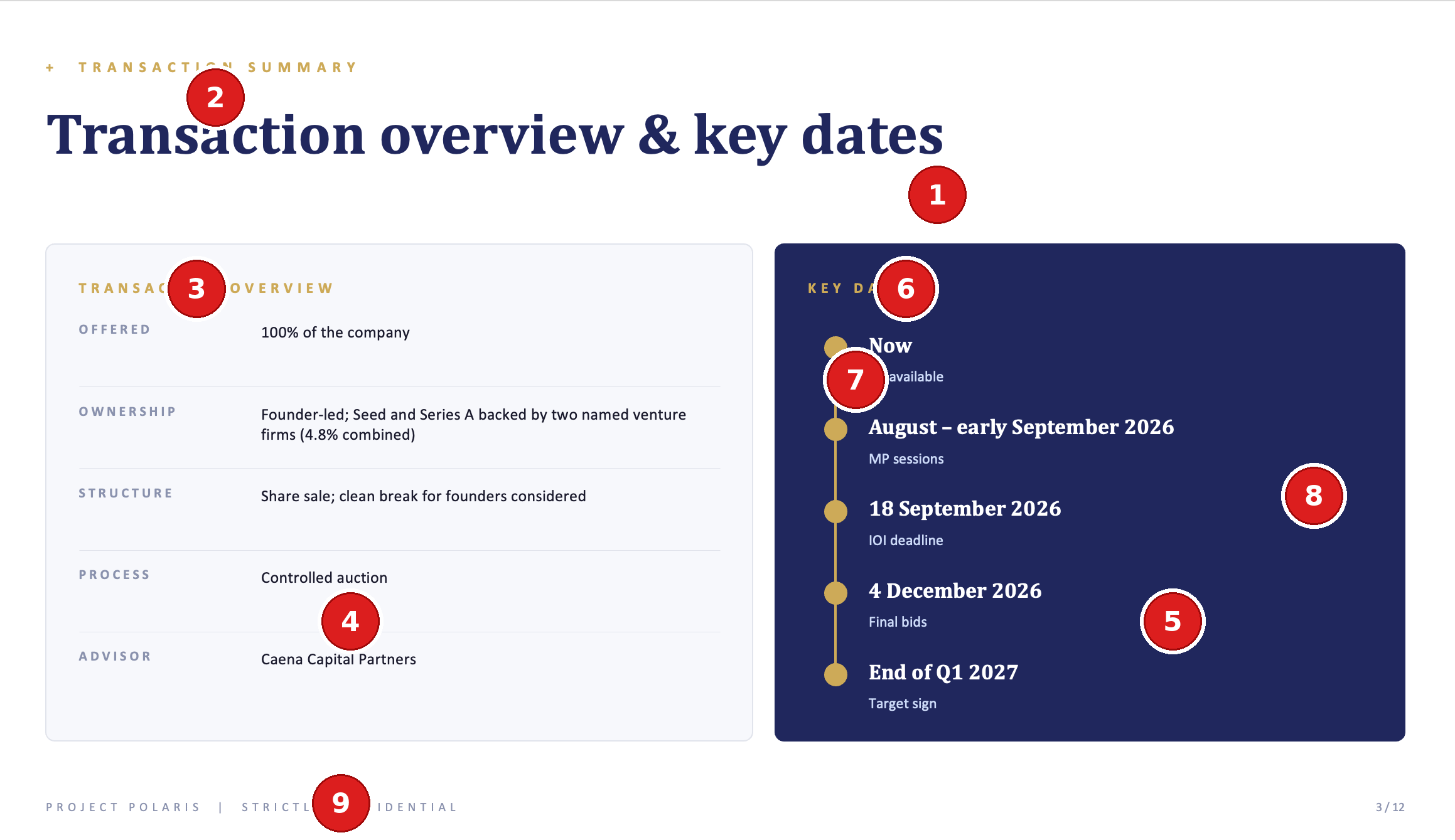
Serif title with sans body: for some weird, odd-corner-of-the-internet reason, Claude and ChatGPT have associated this combo with being “professional.” I pulled up blank templates for Google slides and PowerPoint, the default text was Arial and Aptos, wildy different from Cambria which Claude gave me.
All-caps tracked eyebrow: in over twenty years working with PowerPoint, I can’t remember ever seeing ONE deck designed with this “super header” or small spaced-out letters in all CAPs above the main title. Now, they’re everywhere.
Section header in tracked eyebrow: redundant header, the section header in eyebrow format is totally redundant but what’s AI if not the Queen of superflous design.
Card grid: AI tools are ultimately lazy and only have a few tricks in their repertoire. So you end up with 90% of your deck in card grids.
Dark-light sandwich: one panel in dark navy set against a light one, on nearly every slide.
Section header in tracked eyebrow: hello, it’s me again.
Icons and dots in coloured circles: timeline dots, letters in circles next to list items, icons in circles beside headings.
Navy and gold: this is high up there as one of the most obvious signs. Does Claude love some gold dust on “professional” blue?
All important footer: for some reason, Claude will give you a footer that has so much (redundant) information that they need to be separated by “|”.
There are two extremes when it comes to creating decks in 2026: use AI tools like Claude and Gamma to speed up deck design and never ever use AI, all decks are to be designed by hand.
Each of these two options have their proponents but the future of private equity, investment banking and venture deals is somewhere in the middle. The big technology companies were the first big adopter of AI with AI-coding tools very quickly becoming mainstream. Law and Finance are the arguably the next frontiers where adopting AI in workflows and across organisations is not a choice, if you don’t do it you fall behind and die.
This revolutionary tech will make your competitors more efficient, so you’ll need it simply to keep up. - Wall Street Journal.
So how do you use artificial intelligence in creating PowerPoint decks without falling into the trap of creating AI slop? Let’s walk through this 5-step process that achieves this all the time.
Be warned, you will need to do some work to set up the system and you will put in some work every single time you create a deck. But the effort is worth it, it’s how I create my slides and it saves me so much time. Before we go into that, let’s see what the deck looks like using the simpler prompting system.
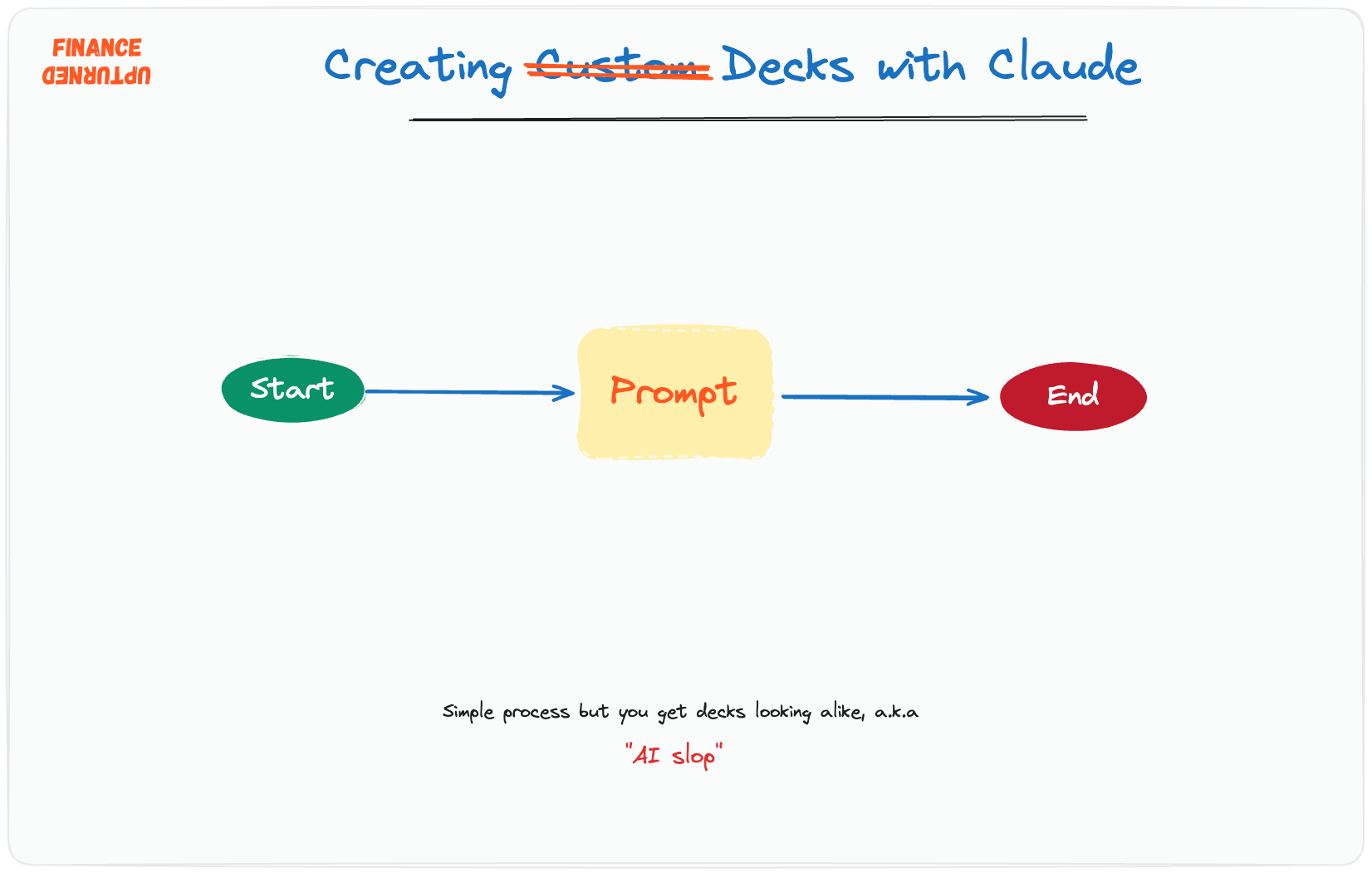
Let’s say you are founder of a growth stage startup that is considering a sale of your company. Of course, you need a well structured deck to send to potential acquirers and since it’s 2026, it’s a no-brainer to build with Claude. You know what I’m talking about, open Claude, type in a well constructed prompt and out comes a fantastic looking deck. At first glance it all looks so good, the presentation is complete, the slides are pretty and look convincing.
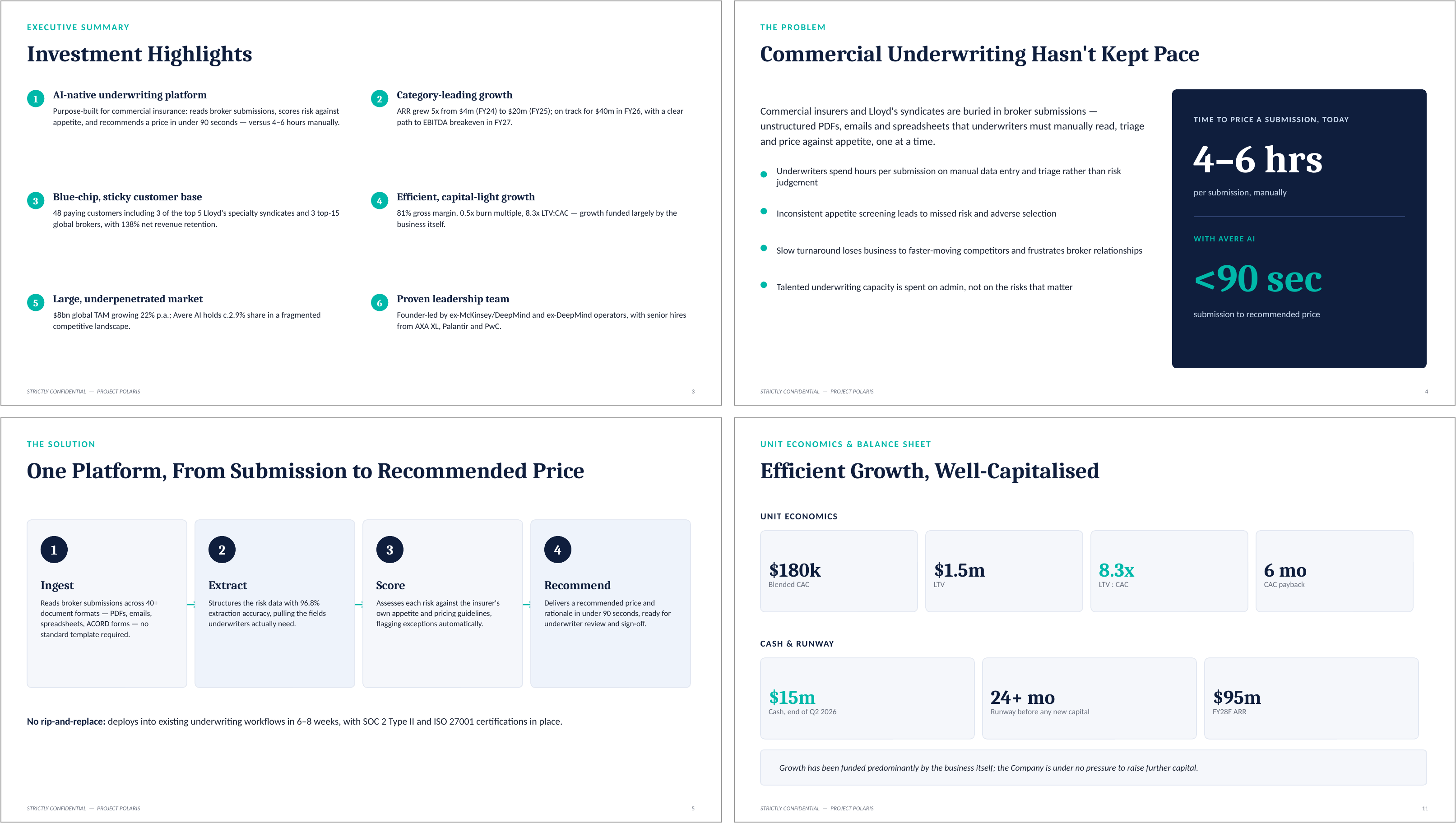
So what’s the problem with the deck when this is my data and my words, just put together by AI? What’s the difference between this deck and one I hire a designer to build for me? Put yourself in the shoes of the acquirer, assuming they were reviewing ten opportunities. Before AI, I guarantee they would see ten different decks. Terrible designs, typos, rubbish templates and some genuinely outstanding but all different. Today, they would be looking at ten eerily similar decks, with the same design principles, similar colour schemes and the same AI style of writing. Now you see why investors and stakeholders are so pissed off that they instantly bin AI-decks no matter how good the content is.
So what if you could still use AI but end up with slides that are distinct? Yes you can!
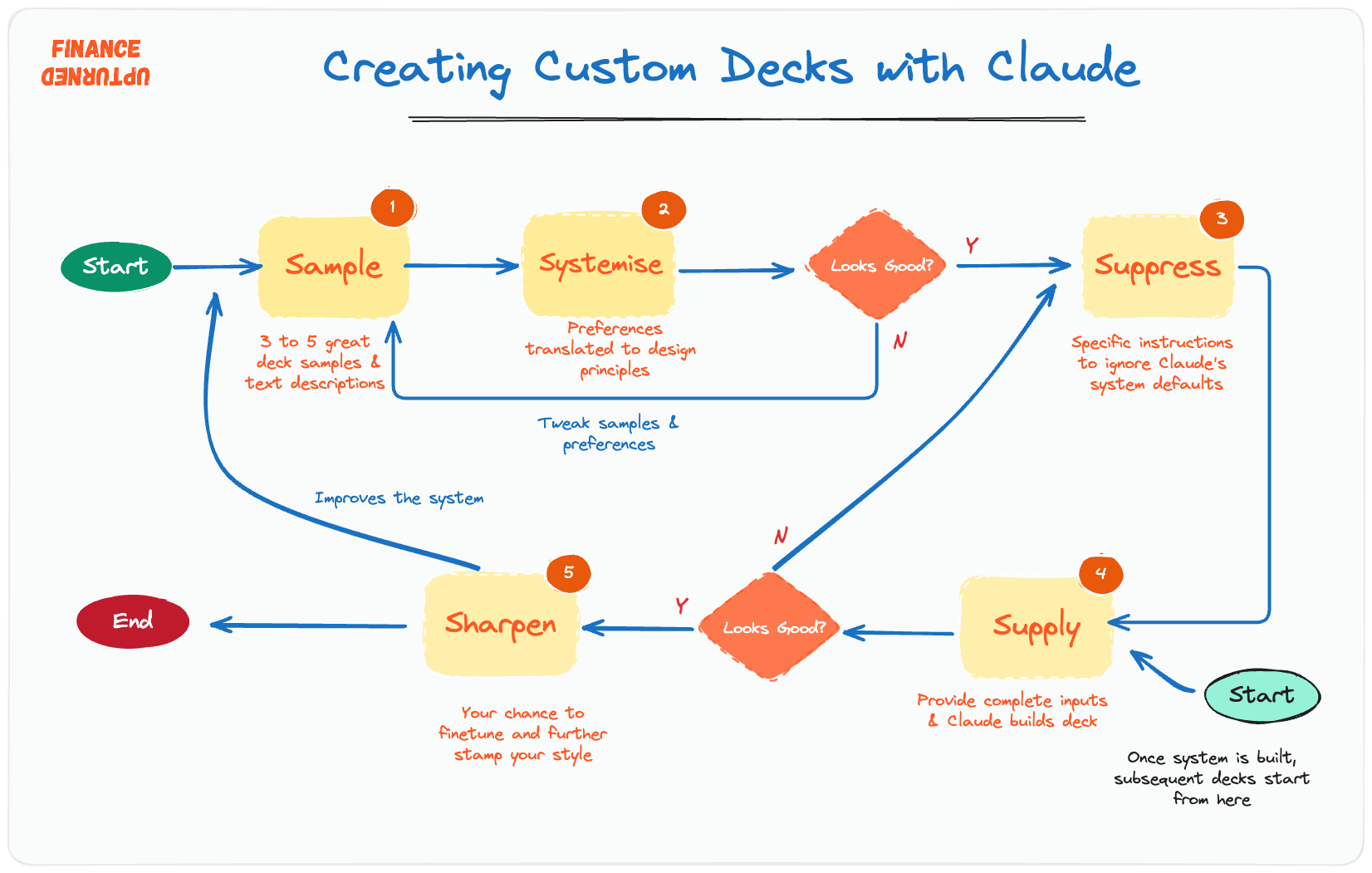
I couldn’t resist the urge to rhyme, so here we go with the 5S system: Sample, Systemise, Suppress, Supply and Sharpen.
When I joined the leveraged finance team of Standard Chartered many moons ago, I came in with extensive PowerPoint skills so I thought I was good to hit the ground running. But my boss very quickly put me in my place, “we need to brush you up and let you know how we do things here.” The senior associates and VPs were helpful in helping me understand the differences in structure, content and layout between a client pitch, deal presentation to external parties and credit presentation.
So that’s the thing, we all need to stop believing the hype that AI can do everything and start treating AI like a smart but untrained intern. For this particular step, I downloaded some public investment banking decks and asked Claude to identify what worked.
To get the ball rolling, I had to identify what I liked. It took a while but I eventually narrowed it down to classic investment banking style presentations from 10xebitda. The site is great because it has a wide compilation from Goldman Sachs, JP Morgan and all the large investment banks as well as many boutique ones.
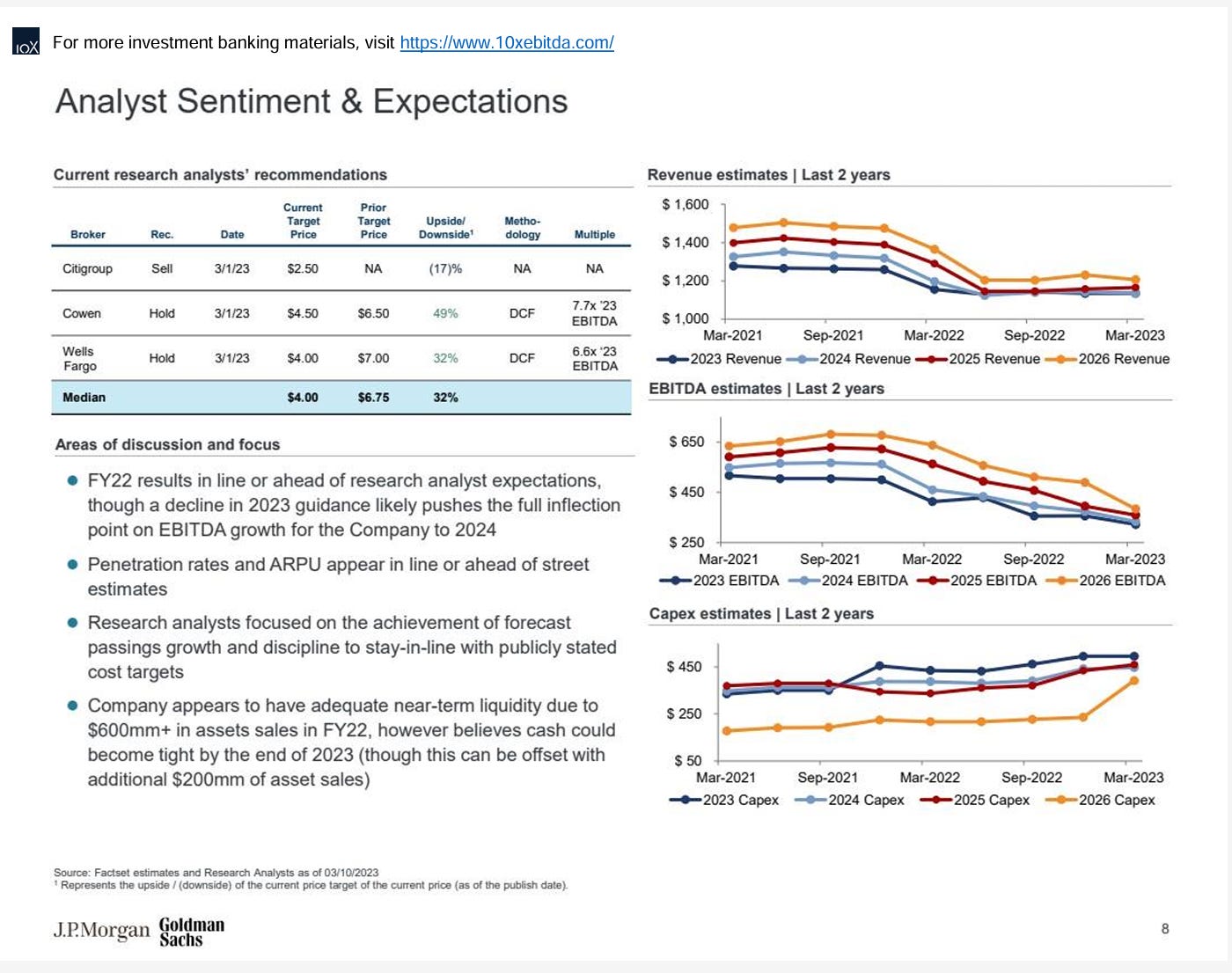
I picked three different decks from the public site and also added in two of my own past deck designs. From all these, there were clashing design principles, so I spent some time picking the best bits of each. In addition, I added my own unique twist, for example my brand colours are orange so I gave that input by text.
While I was learning how to build investment banking specific decks, one very helpful resource was a detailed style guide which had templates for most types of slides, everything was detailed - colours, fonts, acceptable colour combinations for charts, slide title sizing and so on. One of the things that makes Claude powerful for finance workflows is the ability to create Skills. These are custom, highly specific instructions that allow you to instruct Claude how you want documents created.
For PowerPoint decks, they are the digital equivalent of the style guides that bankers use to create decks. For instance, a client pitch created by a Goldman Sachs analyst in New York will be completely indistinguishable by one created by her colleague in Mumbai.
I created one skill for each slide type so I could be very specific about how I wanted the deck to look like. This sounds like a time consuming process but the good news is that once you can define what you want, Claude writes the skills document.
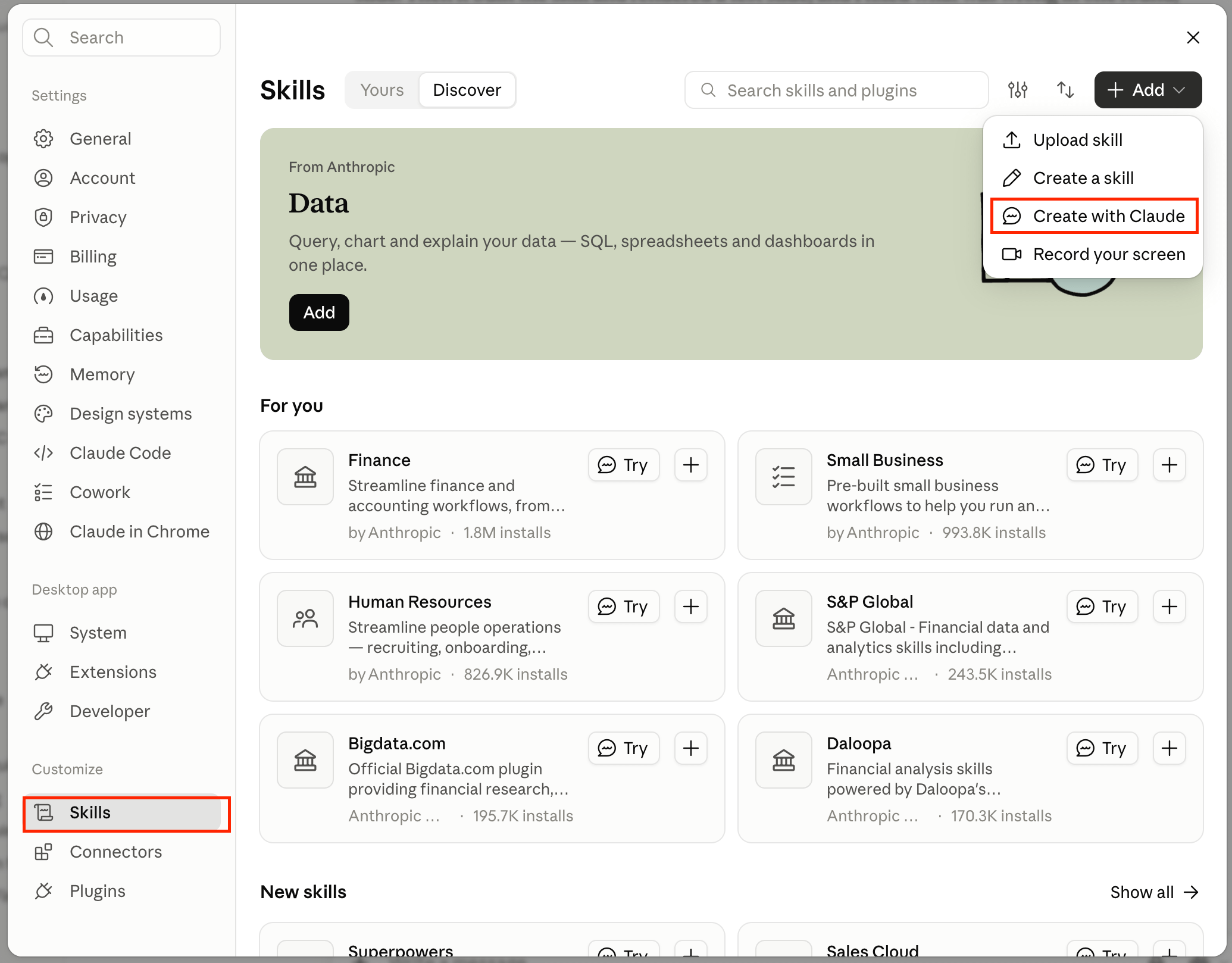
All you need to do is to go to Customise, click on skills, and then “create with claude”. You can describe what you want, upload your sample slides and other descriptions here and follow the step by step process Claude advises. One thing I did that had a huge impact was to test the skills, refine and update as Claude is not going to get it right the first time.
One last thing, the skills cover individual slides, but you also need to tell Claude how these come together to create a deck that tells a coherent story. To solve this, I created what I call the “Deck Skills Manager”, a short document telling Claude the order of the slides and how the different elements of the deck need to work together to avoid contradictions. As with the skills, I prompted Claude to create this document. The process was similarly seamless since Claude had the context.
Earlier on, we identified the different tell tale signs that make AI decks easy to identify and that really piss people off.
The reason the decks are so obvious and they come up all the time is that Claude defaults to the same narrow defaults to build the same types of deck for everyone. It’s driven by a hidden instruction file called pptx which is triggered when a prompt includes “PowerPoint.”
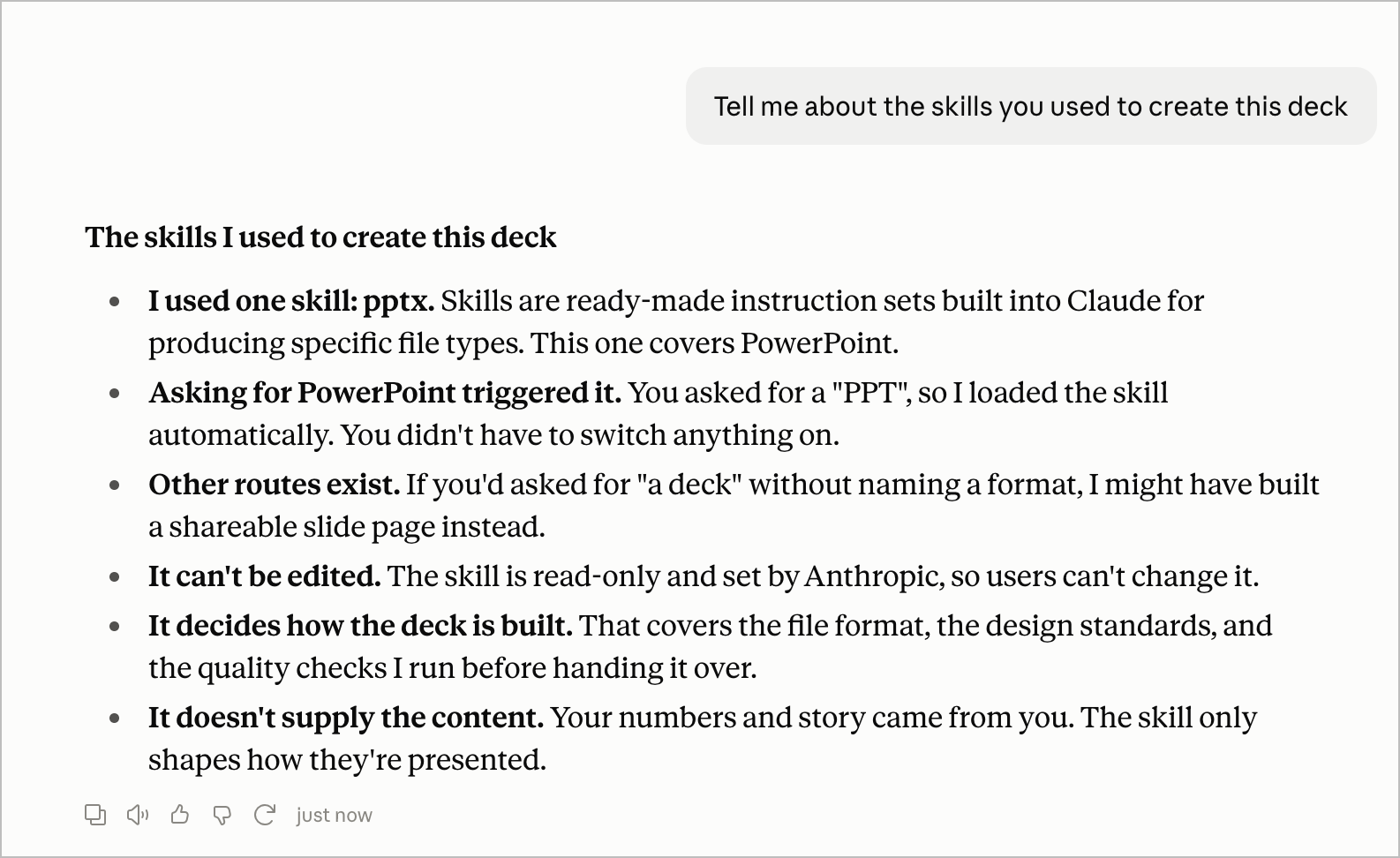
To ensure none of these default design items sneak into your custom deck, you have to instruct Claude to ignore its default instructions. In addition, you can add specific tell tale designs to avoid.
"Do not use any of your default design choices. Specifically forbidden: icons in circles, eyebrow headers (small spaced-out all-caps labels above titles), card grids, serif titles, slide subtitles, dark-light panel contrasts, and decorative footers."
So far, we have focused on default settings, which lead to the biggest frustration with AI decks - sameness. A few weeks ago, I was speaking with an investor at an event and the topic moved to AI decks. She was relatively unconcerned about the design but what grated her teeth was the fact that founders build decks that they can’t defend. She recalled a pair of founders presenting their startup and when asked about the total addressable market (TAM) of over $5 trillion for healthcare in the UK, the founders were stumped. They eventually owned up to relying on Claude to build the deck.
For my management presentation deck, I created a (synthetic) file with all the data I needed, from revenue to market and customer data. The whole idea is to ensure that Claude was creating a deck from a closed, highly defined system. Think of this in terms of a real deal situation, you will provide credit memos, customer call transcripts, financials and every item of information required to create a deck. In addition, I added this to the prompt.
Stick to the information I give you below and in the attached document. Don’t fill in gaps from your own knowledge or the web. If something is missing, flag it clearly and tell me what you need.
Let’s say you are managing director of a top investment banking firm and your client is planning a major acquisition. If you’re selected as an adviser (and the deal closes successfully), the $20 million fee will take you above your budget for the year and guarantee your team’s bonus. Will you send off the very first draft of the pitch deck created by your team of analysts or will it be several iterations until you get it right?
Same with an AI deck, no matter how perfectly set up the system is, you still have to finetune the output. There are three things I focus on:
Wrong numbers: don’t assume that Claude or any AI tool will get all number correctly, even if you provide all the inputs. When you build long complex documents, you will notice Claude making silly errors, mixing up items and dropping earlier edits, this is because AI “forgets”, (context rot).
Writing Style: we haven’t covered that in this deep-dive but I have a separate skill to ensure that Claude writes in my style. You can check out the business writing Claude set up here. Despite this, I still need to go through decks to ensure that the writing is in my style and not the defaults. Staccato sentences, this not that, what no one tells you etc are very annoying AI-slops that you need to get rid of.
Layouts and Design: no matter how hard you try, Claude is not going to get the design set up right in one go. You should iterate and provide feedback for the major issues but it’s still worth manually fixing finer details at the end.
Remember, we tried the one-prompt approach at creating a management presentation for a startup that is considering an M&A. So how well does the 5S system do at creating a deck that is genuinely custom and doesn’t look like AI slop?
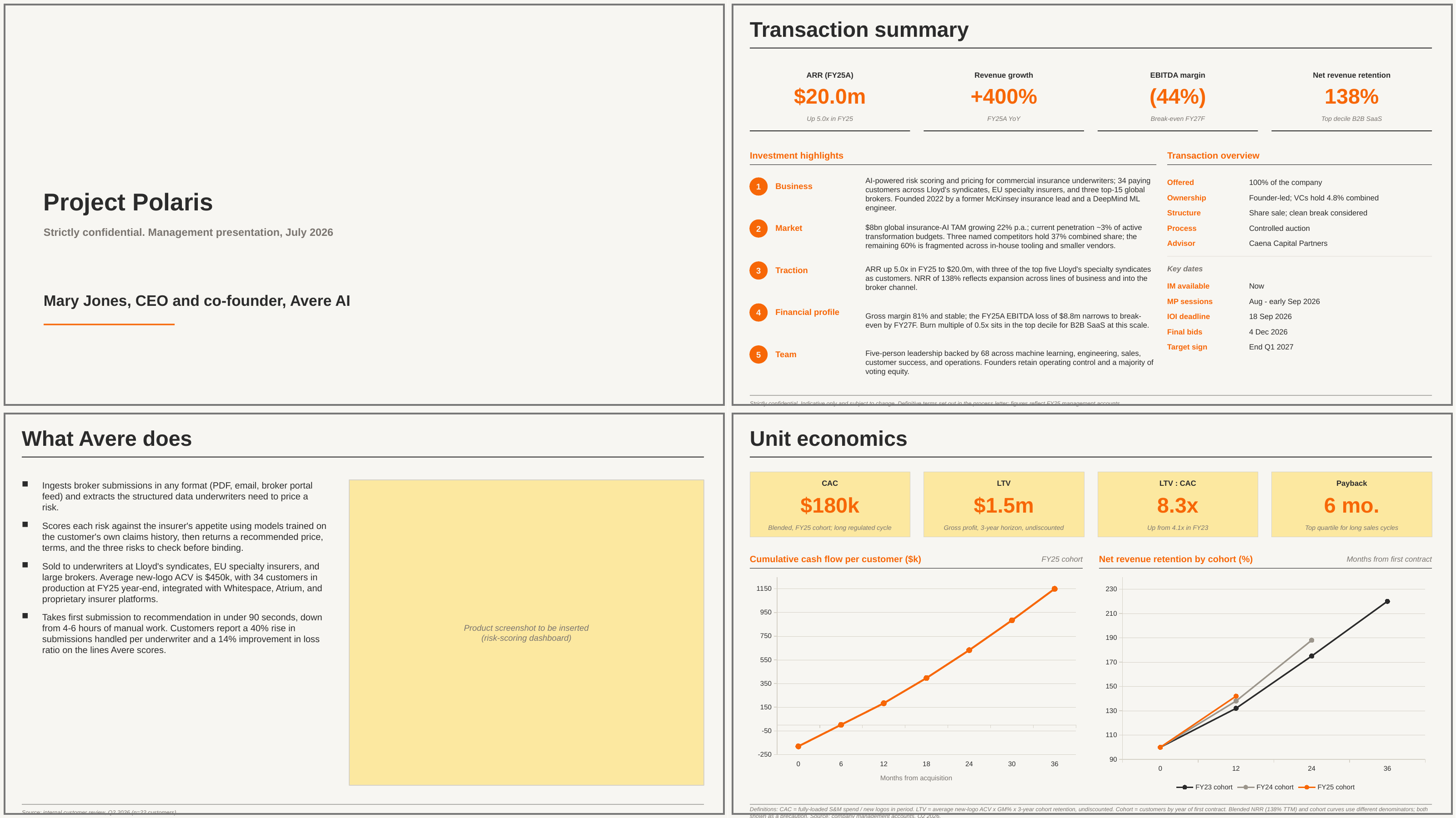
If I may say so myself, the 5S system I have described in detail in this deep-dive, created PowerPoint decks much faster than without AI. At the same time, the final output is very much my document, there’s a very low chance it gets binned as AI slop. Did you notice the blank section on the lower left of the image above? I set it up such that Claude leaves space for images I’ll provide. It was able to follow instructions rather than hallucinate.
Give the process a try and I’d be keen to hear and see the deck outputs you come up with using this system.
Thank you for spending time on this deep dive. If this has been useful to you, don’t forget to subscribe below. Also, be a good friend, colleague or family member and share with others.
PE firms have invested tons of money in AI tools with little to no result. Finance Upturned and Harbottle & Lewis are co-hosting a breakfast session in London on November 18 to discuss:
Best practices for implementing AI across workflows
How AI implementation is impacting headcount and roles within deal teams
What an AI-native private equity firm looks like
Sign up here or get in touch if you would like to know more.
Kayode