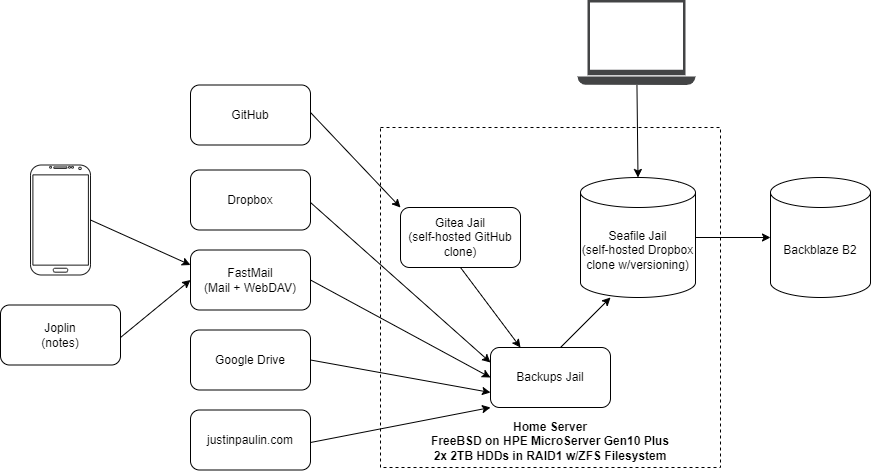
After hearing about folks having months of their Google Drive data disappear the other day, I figured that some might find how I mitigate risks like these with my personal data backup pipeline interesting. I’ve run this pipeline in this or a similar form for more than two years now, with only a few manual interventions required during that time. Each part of the pipeline is independently monitored, and I’ve run DR drills to ensure that everything is recoverable, if necessary, from only Backblaze. Here’s how it works:
Personal Infra
I run a home server with a Seafile instance in a FreeBSD jail as my primary datastore, and the source of truth for all data. Seafile is a free and open source self-hosted Dropbox clone, which has file versioning built-in. The server has two drives, mirrored in a RAID1 configuration to protect against drive failure, and uses ECC memory along with a regularly-scrubbed ZFS filesystem to protect against bitrot. Also on this server, is an instance of Gitea (a self-hosted GitHub clone) and a jail that runs my backup cron jobs as described below.
I also have a VPS over at OVH, which runs this blog and a number of other useful personal apps. One of those apps, is a nifty little tool I wrote called PingAlarm. PingAlarm ensures that cron jobs continue to run, by verifying that they’ve checked in (aka: curl’d a URL) to the server within a given timeframe. PingAlarm sends me an email if any of my cron jobs haven’t checked in on time, which ensures that everything continues to work and isn’t failing silently. All my backup scripts run with “set -e”, so that they fail immediately and don’t check in if there’s an issue.
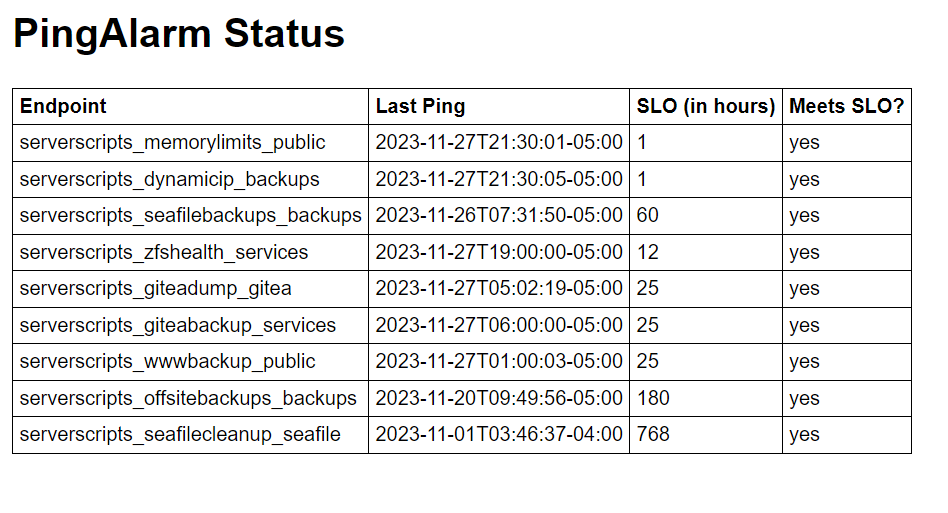
Backing up my personal infra is fairly simple. On the Gitea jail, I have a cron job that runs daily to generate a dump of everything. Another job running on the jail host picks the resulting zip file up, and moves it over to the backups jail. On the VPS, a daily cron job dumps the WordPress MySQL database to a zip file in my home directory, where it can be picked up later via SFTP.
In the backups jail, a single cron job runs daily to archive this as well as all my other data. Using the magical tool that is rclone, the Gitea export file and the home directory on my VPS get synced to a Backups library in Seafile.
Personal Devices
To backup my phone, I run an app called FolderSync to sync all data to my Fastmail WebDAV folder each night. On my personal computers, all data is synced in real-time with the Seafile desktop client.
3rd Party Services
The cloud is just another name for someone else’s computer. Having heard many horror stories in the past about data loss caused by surprise account suspensions and lockouts, I believe that it’s my responsibility to ensure that any data I entrust to third parties is fully backed up. Thankfully, rclone makes this simple – I use rclone to sync Dropbox, Google Drive, and my Fastmail WebDAV folder to Seafile every night. To backup my GitHub repositories, I use mirror repos on Gitea, which keep an up-to-date copy of all my public repositories on my server. Finally, to backup my email and calendars/contacts, I use offlineimap and vdirsyncer, respectively, whose output then gets synced to Seafile using rclone.
Offsite Backups
Finally, a cron job runs twice a week, which syncs the contents of Seafile to Backblaze B2 using rclone, with encryption via the rclone crypt remote. All files are synced with SHA1 hashes, so that any file integrity issues or corruption at rest on B2’s end is detected and can be automatically remediated by rclone. Backblaze B2 is quite cheap, as you only pay for storage ($6/TB/mo) and transactions (this setup doesn’t come close to the free daily allowance), so these offsite backups only cost around $3/month for about 500GB.
In it’s entirety, this setup ensures that every last bit of the personal data I care about is durably backed up on both a device I own, and an offsite storage service I pay for.
Special thanks to Zoltan, who first encouraged me to write this post earlier this year.