Quick actions in any tab. Whole workspaces from one file. An open-source extension for the herdr terminal.
Install in one line Read the quick start
$
herdr plugin install cloudmanic/herdr-plus
A first-class herdr plugin · Open source · Free forever · macOS & Linux
herdr plus — product tour
New here? Start with this
It’s an extension for your terminal.
herdr is a terminal multiplexer and agent runtime — tmux-style panes, persistent sessions, and an API that agents can drive. herdr-plus is the open-source extension that sits on top of it — a handful of tools that make it better.
Installed as a first-class herdr plugin with a single command. Two features today — Quick Actions and Projects — registered as native herdr actions, and built to grow. Everything is driven by plain TOML files you own.
More to come soon
A herdr plugin, designed to grow.
+ Projects
Whole workspaces from one file.
+ Quick Actions
A fuzzy launcher in any tab.
herdr
The terminal underneath it all.
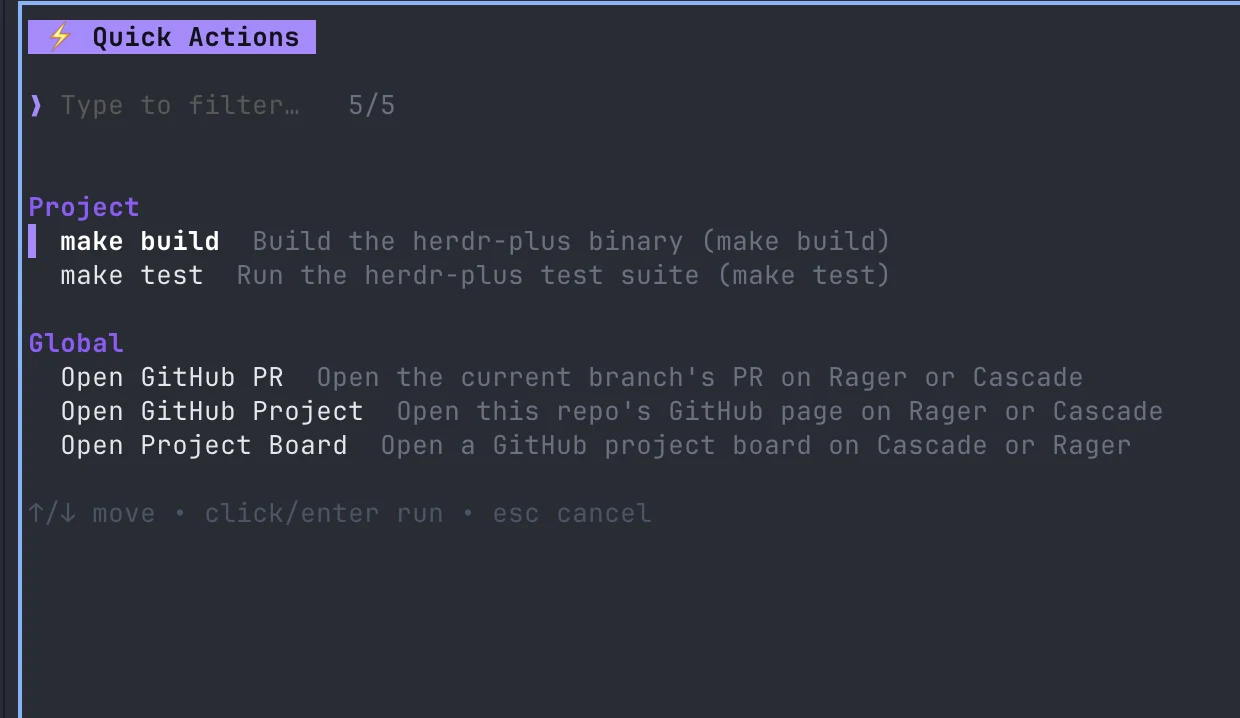
prefix + down — quick actions
Quick Actions
A fuzzy launcher in any tab.
Hit prefix ↓ and a focused launcher opens over your workspace. Fuzzy-find an action, press enter, and it runs in the directory you launched from — then the launcher closes itself and hands focus back. Your hands never leave the keyboard.
- Three action types — run a
command, pick from aselectlist, or type into aform. - Per-project actions — drop a
.herdr-plus/folder in a repo and its actions appear, grouped, only there. - Context-aware — commands are Go templates with
{{.WorkDir}},{{.Value}}, and more, also exported asHERDR_PLUS_*env vars. - Just files — one TOML per action in herdr-plus's managed config dir. Add a file, get an action.
Projects
Whole workspaces from one file.
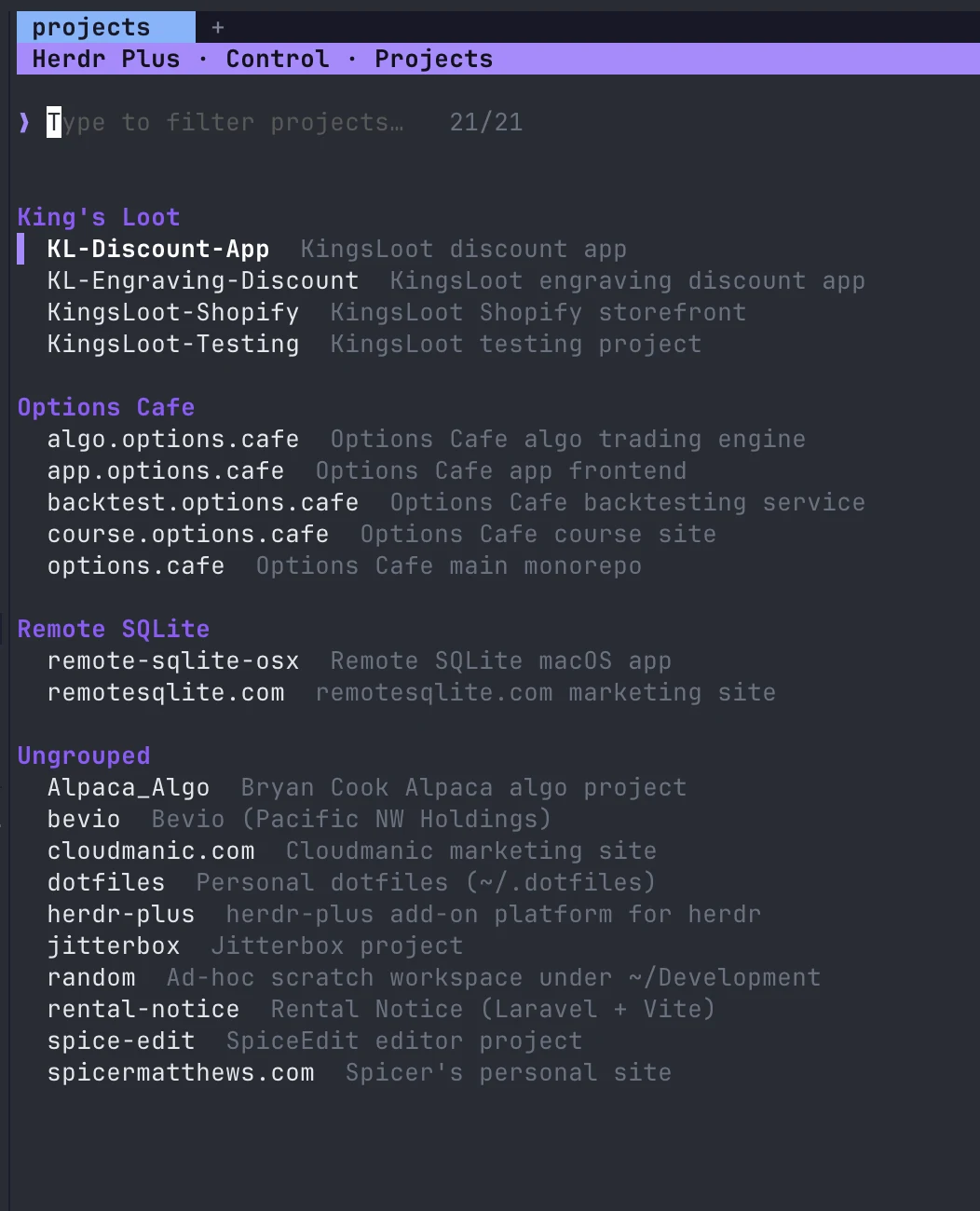
Hit prefix ↑, pick a project, and herdr-plus builds the entire workspace — every tab created, every split laid out, every startup command running. It replaces hand-written workspace shell scripts with a config file you can read at a glance.
- Declarative tabs — a name, a working directory, and an ordered list of tabs with startup commands.
- Split panes — up to four panes per tab, stacked
downor side-by-sideright. - Paths that expand —
~and$VARSresolve inworking_dir. - Group by client — tag projects with a
groupand the browser clusters them under headings; the rest fall underUngrouped. - One file per project — kept in the
projects/folder of herdr-plus's config dir. Versionable, shareable, yours.
prefix + up — projects
Built the way terminal people like it
Small, fast, and entirely yours.
Plain TOML, no UI
Every action and project is a file you can read, edit, version, and share. No databases, no dashboards.
Keyboard-native
Bound to your herdr prefix. Fuzzy-find, run, done — the launcher closes itself when the action fires.
A real herdr plugin
Installed with herdr plugin install — it registers its own herdr actions and panes, and it's built to grow.
Per-repo extensions
Ship a .herdr-plus/ folder with a repo and its actions show up — grouped and scoped — only inside it.
One-command install
herdr plugin install clones, builds, and registers it — with or without Go. Re-run the same command to upgrade in place.
Free & open source
MIT-licensed, no telemetry, no lock-in. Re-run herdr plugin install to pull the latest on any release.
1
Install the plugin
One command — herdr clones, builds, and registers it.
$
herdr plugin install cloudmanic/herdr-plus
herdr clones the repo, runs the build, and registers the actions — with or without Go. Re-run the same command any time to upgrade.
Just want the herdr-plus binary on your PATH?
Homebrew — the repo is its own tap:
$
brew tap cloudmanic/herdr-plus https://github.com/cloudmanic/herdr-plus
$
brew install cloudmanic/herdr-plus/herdr-plus
…or the install script (Linux & macOS, no Homebrew):
$
curl -fsSL https://raw.githubusercontent.com/cloudmanic/herdr-plus/main/install.sh | sh
This installs only the binary (handy for herdr-plus version).
It does not register the plugin with herdr — use the command above for that.
2
Bind keys (optional)
Run either action from herdr's action menu anytime — or bind a key. Add two [[keys.command]] entries (type = "plugin_action") to your herdr config.toml:
…projects→prefix ↑
…quick-actions→prefix ↓
3
Press the key
Inside herdr, hit your prefix and the bound key:
ctrl+bthen↑→ Projects
ctrl+bthen↓→ Quick Actions
Built for agents, too.
Point an LLM or coding agent at /llms.txt for a structured index, or
/llms-full.txt for the entire docs in one plain-text fetch.
$
curl -s https://herdrplus.com/llms-full.txt