Updated: 25 days ago
How it works
Prepaid billing allows API users to pre-purchase usage. The credits you've bought will be applied to your monthly invoice. This means that any API usage you incur will first be deducted from the prepaid credits. If your usage exceeds the credits you've purchased, you'll then be billed for the additional amount.
Prepaid billing helps developers know what they are committing to upfront which can provide more predictability for budgeting and spend management.
Setting up prepaid billing
Here is how monthly billing or new API users can set up prepaid billing:
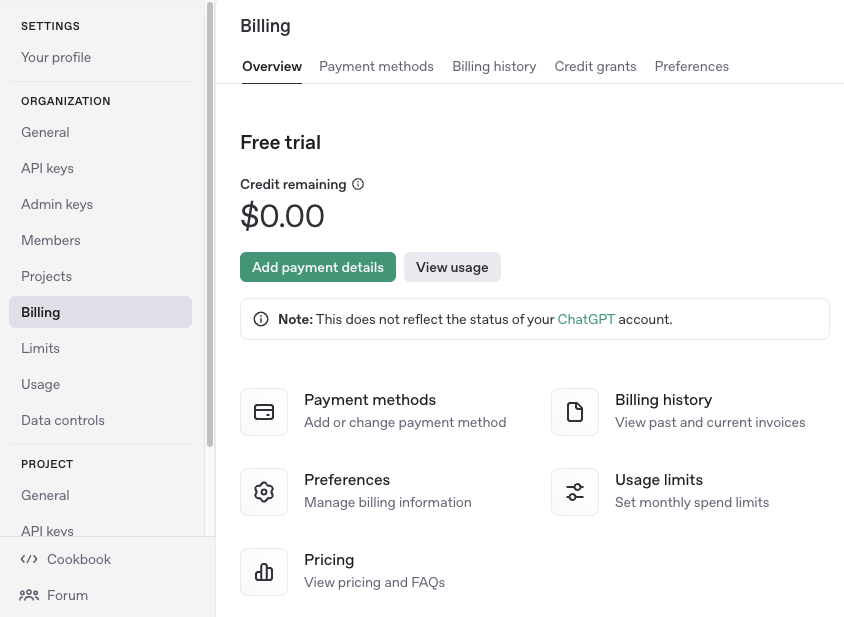
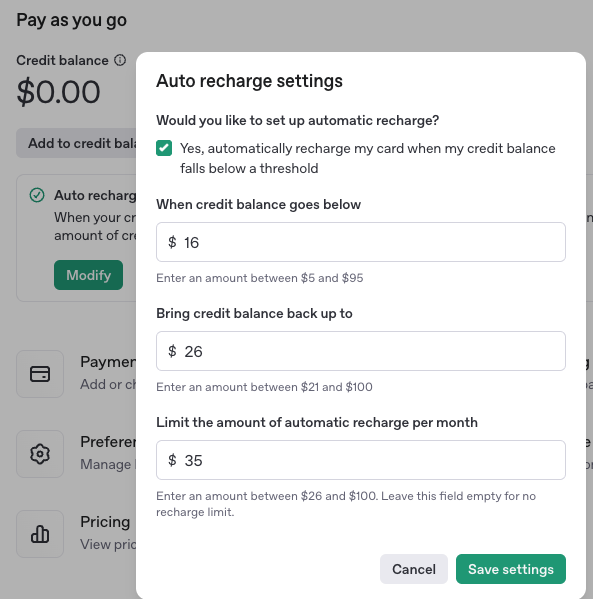
In the setup flow, configure Auto recharge before you confirm your initial credit purchase.
Auto recharge is turned on by default during setup. If you do not want automatic top-ups, turn it off before you continue.
If you keep Auto recharge on, set your recharge amount, threshold, and optional monthly recharge limit. Manual credit purchases do not count toward the recharge limit. If an auto recharge would exceed this monthly limit, only the remaining amount may be added; if the limit is already reached, auto recharge will not add more credits until the next month.
Please note that any purchased credits will expire after 1 year and they are non-refundable.
After you’ve purchased credits, you should be able to start using the API. Note that there may be a couple minutes of delay while our systems update to reflect your credit balance.
Purchasing additional credits
Once you’ve consumed all your credits, your API requests will start returning an error letting you know you’ve hit your billing quota. If you’d like to continue your API usage, you can return to the billing portal and use the “Add to balance” button to purchase additional credits.
Delayed billing
Due to the complexity of our billing and processing systems, there may be delays in our ability to cut off access after you consume all of your credits. This excess usage may appear as a negative credit balance in your billing dashboard, and will be deducted from your next credit purchase.