Those of you who have been reading this blog for a year or two know that I’ve been fascinated with figuring out how Wiis are made at the factory. The driving reason is that if we can figure out how Wiis with blank flash chip are programmed at the factory, we could possibly wipe bricked Wiis and fix them.
Well, we never found that, but occasionally some hint poke up. Nintendo has gone out of their way to call out a specific message — Insert Startup Disc — and has declared that there is a problem with the “operating system” and let it be known that they very badly want to replace it. As with things like the iOS “diagnostic mode”, this generally means that a unit escaped from the factory without having completed all testing and programming steps. This can give a rare glimpse into factory steps normally concealed from us.
Searching online for information about this has been rather frustrating. Occasional articles from late 2006 show in-store kiosks displaying a blurry “Insert startup disk” message. A few private conversations have alluded to the fact that the few thousand Wiis that were sent to game stores with this disc, but nobody has been able to cough up a disc for me to examine (or at least an image of one!).
Fortunately, an alert member of assemblergames caught an auction on eBay for a broken Wii displaying our mysterious error message. (Thanks Paul!) He bought it and sent it to me to look at, and here are my findings.
Background
Stepping back a moment, the reason that this is strange is that the very lowest levels of the system — boot1, boot2 — can’t even talk to the DVD drive or the video output. IOS can talk to the DVD drive, but only at a very low level, and only in response to IPC from the PPC — there’s no way for the system to bootstrap itself with a blank flash, or with boot1 and boot2. You absolutely need PPC code running, and if you have that running, you might as well have the whole system menu running. It also probably means you have to either have a boot2 that can read an unencrypted NAND filesystem, or it means you have to program each chip individually with a key from a database using a flash programmer before soldering it down — an expensive and complicated operation, in comparison to flashing one image to all chips or programming a unit with test pads.
The only possible reason I could imagine for doing this would be that the flashing process has a long lead time — longer than pressing DVDs — and Nintendo therefore was able to ship these kiosk Wiis earlier by including a stub of a system menu that could install updates, and then making a few thousand in this state and shipping them out with these discs. Let’s take a look at Paul’s Wii.
It was posted on eBay “as-is” with no warranty; when it showed up, it was in pretty poor physical shape — the case was scratched and scuffed, and it had “needs startup disk” (or something) written on it with a marker. This is not the launch-day Wii I expected to see, because if a Wii was in this state, there’s no way anybody could have ever used it … ever. There’s no way for a working Wii to fall into this state, so any Wii that displayed this message should look like it sat in someone’s closet and pristine! The serial number on the label was LU325049098, which was strange because the Wii drive serial number tracking sites report this as probably a D2C drive — meaning, the Wii came from some time in 2008. The battery had a date stamped on it of “05 – 08” — probably May 2008. Again, this made no sense, but I had to open the thing up anyway to solder a modchip onto the drive so that I could burn discs in an attempt to make the thing boot.
I opened it up and removed the metal shield, and removed the drive — which ended up being a D2B drive. This still didn’t seem right — the launch day Wiis would have shipped with DMS drives — nor did it match the serial number on the outside. A couple of screws were missing inside the case. I decided to open it up all the way to see the date codes on the chips and PCB, and so that I’d be ready if I ended up needing to desolder the NAND flash chip from the bottom of the main board.
Once I finally got the main board out, it was clear that it was what I expected to see — a launch-day board. The PCB had a date-code of “3306” below the SD card slot — this means the 33rd week of 2006, so, around August 15th. Similarly, the Hollywood & Broadway chips had date codes of “0632” and “0631” — all consistent with a launch-day Wii. More on this later.
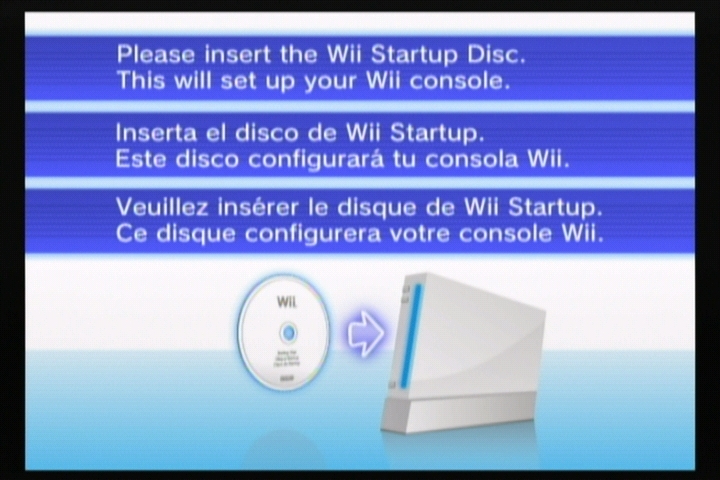
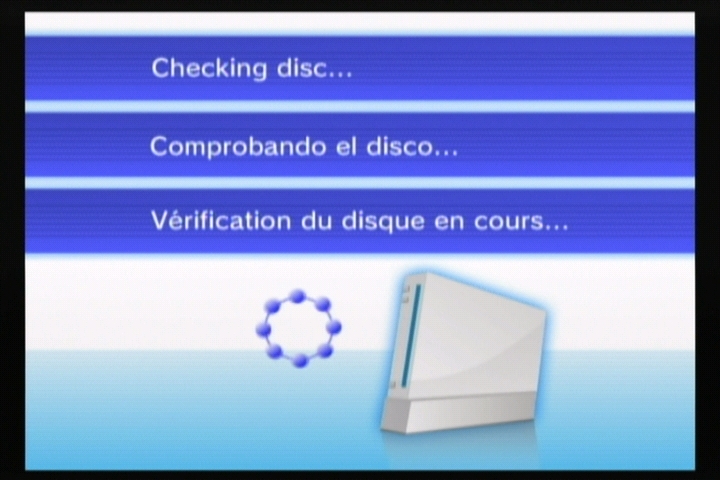
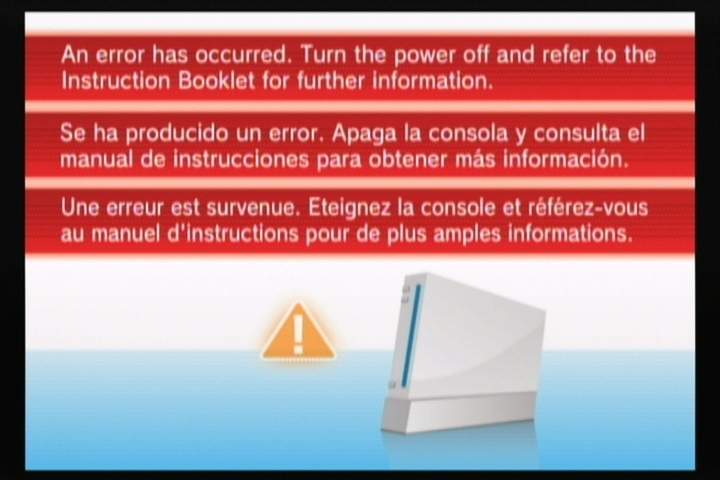
I put the thing back together enough to power the thing on, and was faced with these screens — photos courtesy of Crediar, and more on that later:
Recovery
The first screen appeared a few seconds after I applied power to the unit; if you insert a disc, it would transition to the other two discs, no matter what valid discs I tried. I tried a SaveMii, but it wasn’t recognized (the red LED came on, but neither the yellow nor green LEDs followed).
At this point, crediar reminded me that there’s a suspicious bit of code in the normal Wii’s System Menu — see BS2 states 9/10 — where it checks for a disc with the special ID ‘RAAE’. If it finds it, it refuses to load the disc — but by all other indications, this would be a valid Wii disc. He suggested that this may have been the ID associated with the “Startup Disc”, and this check was placed in the final system menu to keep anyone from trying to use that disc a second time
Fortunately, back in the old days we could burn fakesigned discs, and boot them with no addition hacks (beyond a drivechip) — so I took the old Homebrew Channel Installer ISO and patched RealWnD into it, set the first 4 bytes of the image to ‘RAAE’, burned it, and tried booting it.
To my delight, the screen faded to black, and RealWnD started up. This turned to frustration when I realized that the only way to start the program dumping was to navigate its menu using a Wiimote, and I had no way of syncing a Wiimote to this Wii without a working System menu. I (too-) quickly hacked GC pad support into the RealWnD code, burned it, booted it, and then watched it crash because I forgot to call PAD_Init(). A third try ended up working, and an hour later I had a NAND dump of an almost-unmodified Wii on my SD card.
From there, it was fairly straightforward to proceed, though I probably did end up burning 10 discs trying to get the thing fully recovered to “normal” status. I burned the old “NTSC Semi-Brick Fix Disc” (with the first bytes changed to RAAE) to install system menu 3.2, then ran into problems trying to get the Hackmii Installer to work (it didn’t like the ancient versions of IOS installed on it) and I couldn’t get any games to play — even Zelda insisted on installing an update, which failed every time I tried! After using Bannerbomb to run Dop-MII to install a couple of newer versions of IOS and update boot2 (more later), I was able to install the rest of the standard channels with a normal Super Paper Mario disc, and then install BootMii as boot2 and dump the keys out so I could dump the keys to SD.
Analysis
With the keys, I could decrypt the original NAND dump I had made with RealWnD, which was the whole reason I wanted to see this Wii! Here’s what I found.
- Console ID: 0204cef9. Console IDs were issued (roughly) sequentially, beginning with 02000000 for retail Wiis — this would make this one the first 300,000 (or so) Wiis made. I suspect this may have been made towards the end of the first batch of pre-release Wiis as a spare main board and sent to a repair center to keep in stock as a replacement for any early returns.
- boot1 revision “a” — this is common for early Wiis, up to console ID 021e7bed or so
- boot2v1 — this has never been seen before, but doesn’t seem to be substantially different (in any interesting way) from the common boot2v2. All early Wii games came with boot2v2, so most people would have gotten that update with the first game they played if it wasn’t already installed at the factory. I had suspected that boot2v1 was a special factory boot2 that could handle an unencrypted NAND filesystem, but that doesn’t appear to be the case — it still may be true that there is a boot2v0 out there that serves that purpose.
- setting.txt indicates a serial number of LU100166385 (which matches neither the one printed on the case, or the revision of the drive!)
- Only five titles installed — 1-2, IOS4v3, IOS9v1, BCv0, MIOSv0. Four megabytes of content, total!
- A stub of a system menu installed as 1-2, version 1, using IOS4
The title installed as 1-2 is approximately 2 megabytes, and is the only thing I’ve ever seen that uses IOS4. Just like all 1-2 titles — including all system menus and the NDEV menu — it has a string identifying it as “NDEV BOOT PROGRAM v%X.%02X (SYSTEM MENU:”. Other strings indicate that there is some code to install updates off a disc and to boot a disc .. and that’s about it, the rest of the binary seems to be the graphics shown above. I packaged the files up and sent them off to Crediar, who was able to get it running under SNEEK and produce the screenshots featured above.
We were able to scrape unused parts of NAND and find fragments and evidence of even older content, and in some cases entire contents. IOS4v3 is 0x5f331 bytes, but there’s an IOS4v1 (with a strange cid of 35016B91) that is only 0x28e51 bytes. IOS9v1 is a healthy 0x19ed76 bytes, but there’s a bizarro IOS9v1 with the same cid (0) and version, but only 0x2a671 bytes long. The stub system menu (v1, 0x200500 bytes) shadows an older v0 that is only 0x80500 bytes long.
Conclusion
I think what happened was that a few thousand Wiis were made with this “skeleton” set of files on NAND. Of those, most were sent out to game stores for pre-launch kiosks — it’s not clear if the startup discs were sent along with the Wiis or shortly afterwards (which would explain the photos online of the kiosks showing the screen). Some were probably also set aside as replacement units in service centers, and apparently a few actually made it into the hands of customers — which is why Nintendo had to put up a web page pleading for people with those consoles to return them for a new system. Of all of these, most would have had the disc installed by the service center — and then maybe they had to return the disc? (I’m not sure why else I’d have such a hard time finding one). Of the rest, people would have sent them back to Nintendo to get working Wiis.
The only Wiis left out would be ones where the owners somehow wouldn’t (or couldn’t) send the Wii back to Nintendo for repair. This Wii that landed in my hands was assembled from spare parts — the case, main board and drive all came from different sources. I suspect that somebody “came across” a pile of main boards, and tried to assemble them all into working systems — when they were finished, they may have had 10 working Wiis and then this one, and then they probably put it in a box somewhere on a shelf and forgot about it, then sold it along with some other broken Wiis to someone else. Nobody would ever have been in a position to return this one to Nintendo, but whoever put it together must have hoped to fix it someday (which is why they didn’t just throw out the board).
More Analysis
Warning: this last part is going to be dry, technical, and isn’t finished … most people should skip it. I will update it if I ever come up with a clearer picture of the state of this system. I’m putting it here so that it has a place to live and in case anyone else can share some insights.
The big thing that’s missing is any definite answers about how this NAND came to be. The one thing I can say is that it looks like it is “fresh” enough that we can see most of the original contents of flash — many clusters have not yet been overwritten. There are a few different patterns we can see by looking at some files which appear to be created incrementally — it’s clear that clusters are allocated in scattered chunks of contiguous blocks.
testlog.txt:
- cluster 5382 — testlog.txt is created with the single line “BOARD_TEST=START,V1.0”
- cluster 7242 — testlog.txt updated with “BOARD_TEST=OK,V1.0”
- cluster 0210, 5302: testlog.txt updated with “FINAL_TEST=START,V1.0”
- cluster 01ab: testlog.txt updated with “FINAL_TEST=OK,V1.0”
- cluster 2782: testlog.txt updated with “WRITE_NAND_DATA1=START,1.1.0”
- cluster 2784: testlog.txt updated with “WRITE_NAND_DATA1=OK,1.1.0”
- cluster 027a, 5703: testlog.txt updated with “SERIAL_NO_REGISTER=OK,1.1.0”
- cluster 0602: testlog.txt updated with “WIRELESS_TEST=OK,RVL001.01”
- cluster 3c42: testlog.txt updated with “PRECHECK_DATA=START,1.2.0”
- cluster 02a2, 34c3: testlog.txt updated with “PRECHECK_DATA=OK,1.2.0”
cert.sys:
- cluster 032a: cert.sys with XS00000003 cert
- cluster 032b: cert.sys with XS00000003 and CA00000001 certs
- cluster 01e9, 0207, 0331: cert.sys with XS00000003, CA00000001 and CP00000004 certs
uid.sys:
- cluster 0328: uid.sys with one entry for 1-2
- cluster 0332: uid.sys with entries for 1-2 and 1-4
- cluster 0363: uid.sys with entries for 1-2, 1-4, 1-9
- cluster 2582: uid.sys with entries for 1-2, 1-4, 1-9, 123J
- cluster 4482: uid.sys with entries for 1-2, 1-4, 1-9, 123J, 10000-dead
- cluster 618f: uid.sys with entries for 1-2, 1-4, 1-9, 123J, 10000-dead, 1-100
- cluster 0178,6194: uid.sys with entries for 1-2, 1-4, 1-9, 123J, 10000-dead, 1-100, 1-101
- cluster 0200,4b02: uid.sys with entries for 1-2, 1-4, 1-9, 123J, 10000-dead, 1-100, 1-101, 121J
- cluster 63c3: uid.sys with entries for 1-2, 1-4, 1-9, 123J, 10000-dead, 1-100, 1-101, 121J, 122E, 0002
- cluster 0140, 0258, 02c9, 6542: uid.sys with entries for 1-2, 1-4, 1-9, 123J, 10000-dead, 1-100, 1-101, 121J, 122E, 0002, HAXX (my RealWnD disc)
I would expect the rest of flash … that which was never touched … to be all FF or 00, or something. However, it’s not. 441M of the decrypted flash is what looks like several copies of the same random garbage string — except, it’s garbage where all the bytes are 0..7F. Here’s a compressed form of all of the garbage from the flash, if anyone wants to try to figure out what it is: garbage.7z
Update:
Okay, I figured out what happened. Combining some of the information I dredged out of this flash with some of the stuff from my older factory post/research:
One of the titles listed above is “0002” — specifically, that’s 00010000-30303032, and it’s installed into flash from a WAD, and then executed using IOS9 with the AHBPROT flag set. It reads a list of tests to perform from an SD card — all.ini, which we only had fragments of before. That file lists 8 sets of tests, and then a filename, arguments, and description for each. The DOL files listed there are read from the SD card and executed. One of the tests, NandIOS2.dol, ended up being left in NAND on the older “factory” Wii, and I scraped it out of flash 2 years back but didn’t look at it too closely. Going back to it, I see that it writes out a 25.6MB file, /tmp/nandTest.dat, with random data … which it then CRCs, reads back, and checks to make sure it was written and read correctly. Disassembling the random data function, it looks like this:
s32 seed = 1;
s16 rand(void) {
    seed *= 0x41C64E6D;
    seed += 12345;
    return (s16) seed >> 16;
}

u8 getRandomChar(void) {
   return rand() >> 8;
}
The fact that rand() returns a signed value means that when it is shifted right, the sign bit (which is always 0) will be extended, resulting a number that is always positive but within the range of a signed 8-bit integer (0 .. 127, or 0 .. 0x7F, which matches what we see). The file is 25.6MB long, which is almost identical to the compressed size of the data we saw — so that’s the sequence length (thanks segher for pointing that out!). I’m not quite sure why we see multiple copies of it — either the test gets run multiple times, or something is copying chunks of data around in flash.