Questionnaire
It was a quite long time since the project was published and I finally found time to declare that the camera indeed works!
I'll put some neat details soon into a separate post.
For now, I humbly suggest you to answer a couple of questions on what is most interesting you found in this camera project?
Here is the link to the questionnaire: https://docs.google.com/forms/d/1TgMNURF4EbG6NompMk4GUfnyDWk0rIznlREFTz6PEmM
Thanks!
Intro
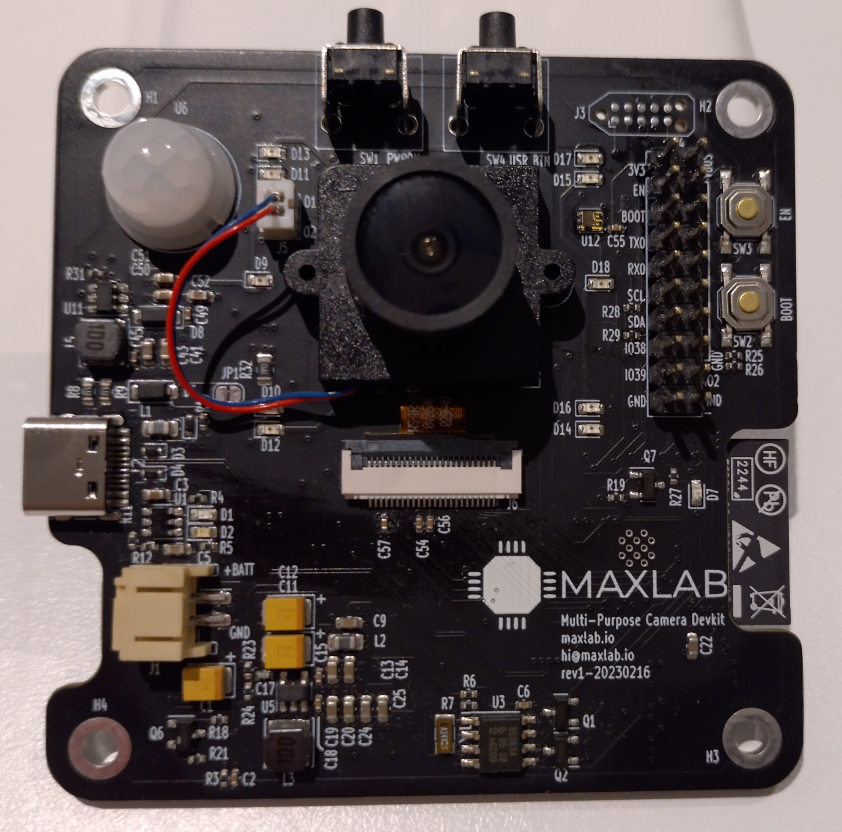
As expressed before, revision 0 of the camera works and is functional but requires some fixes.
The new revision 1 is complete, and now it is received from JLCPCB.
Speaking of JLCPCB....
IR LEDs wrong polarity - incorrectly placed by JLCPCB - twice!
A usual way JLCPCB marks LEDs are "+" and "-" in their DFM checker.
As far as I understand, JLCPCB uses the silkscreen to double-check the proper orientation in addition to CPL files.
I'd prefer them to check the fab layer, but for whatever reason, they hesitate to process additional layers except for copper, silk and edge. If you know why it is so - please let me know here.
However, for some reason, they labelled IR LEDs with "C" (collector) and "E" (emitter). I wasn't paying enough attention, approved the order, and received boards with wrong IR LEDs orientation.
Luckily that's not a big deal, so resoldering them worked great. Not counting one lost LED I accidentally broke with my solder iron.
IR LEDs picked up by my phone in the dark:

The picture with the IR illumination:
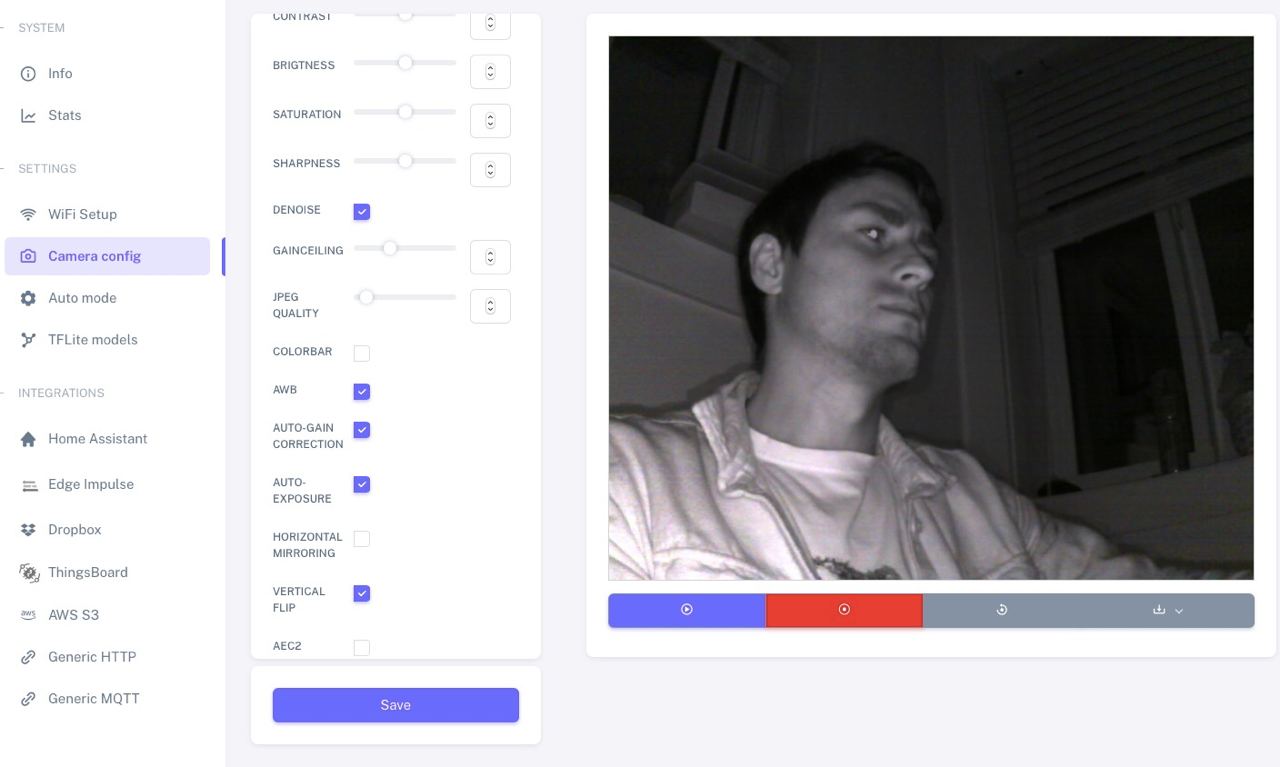
Sadly, the new revision (rev1) arrived with LEDs in the wrong polarity. JLCPCB messed this up, and I need to resolder them all again.
Issues fixed in rev1
Phantom current through TVS with USB is off
Unexpected current paths are always underestimated when multi-power systems are designed.
The rev0 wasn't the exception.
The camera PCB contains battery input, USB input and the power switch to disconnect the battery when USB is connected:
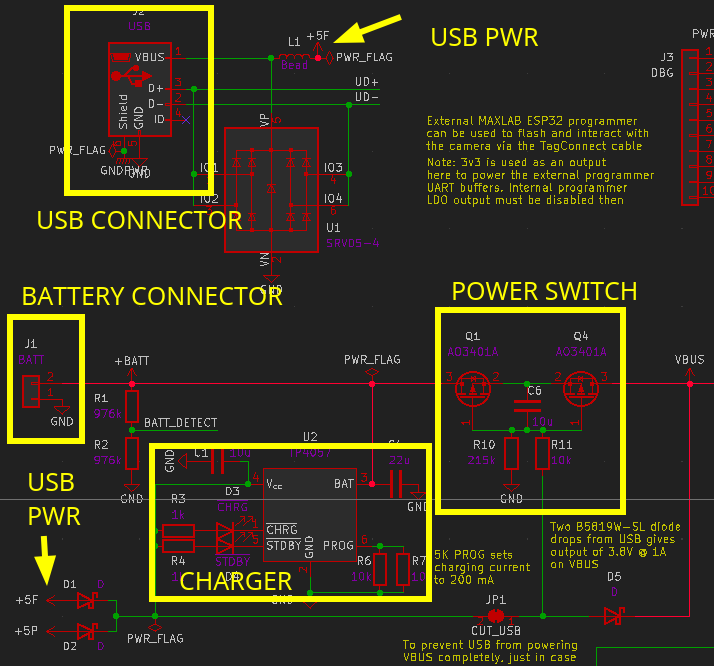
The power switch switches off the battery if a voltage is present on its gates. When the USB is disconnected, no voltage should be applied to the switch gates. The switch is then turned on, allowing the battery to power the system.
Turns out that when the camera is connected to a battery and USB is disconnected, the internal ESP32 USB pull-ups provide a current that flows through ESD diodes into the USB power rail and into the power switch:

The voltage on the power switch gates was large enough to put it into the linear mode, significantly increasing its internal resistance. And as soon as the power-heavy transmission started, the power switch dropped too much voltage, and ESP32 went to brownout reset.
Dave from EEVBlog has a great video about phantom currents, so make sure you're prepared for such kinds of bugs:
So with rev1 I decided to go with 5V TVS that do not tie USB power rail with data lines and it worked great:

Improvemets in rev1
USB-C instead of micro-USB
I decided to go with USB-C in rev1: it's a modern way to power stuff, and ESP32 is a power-hungry beast when transmitting, so having extra power margin on a source end wouldn't hurt.
However, implementing the full-featured PD wasn't on my list of things, so I decided to go with "dumb" power advertisement via resistors on CC1/CC2 pins.

You may find 5.1K resistors on CC pins in the vast selection of boards there, but pay attention that this scheme isn't fully compliant.
The power sink (in case it's our camera) must monitor the voltage levels on CC1/CC2[1] to understand whether the source can actually provide the currents required:
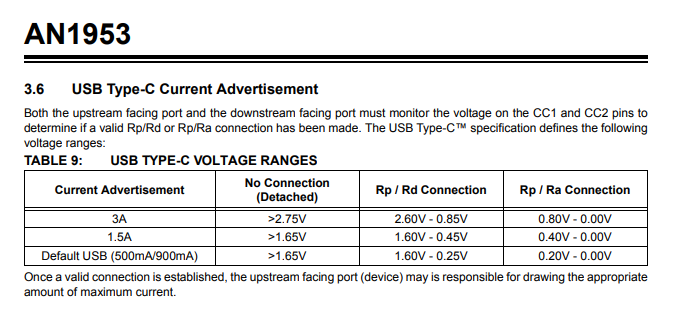
So simply putting resistors on the CC1/CC2 isn't enough.
On the other hand, the majority of boards work like that (without any monitoring), and all of my ESP32 pins are used up, so... I decided to go along with the ignorance and abandon the monitoring.
My previous experience says that it works fine when paired with the proper power adapter (users...