What is this? 🧐
When you use a custom font (like a font from Google Fonts), most modern browsers don’t render the text immediately. Instead, they keep the text hidden until the font is downloaded (or until 3 seconds pass). If a user opens a page with a custom font from a slow connection (e.g., from mobile), it will look like this:
This hurts user experience – and affects business metrics.
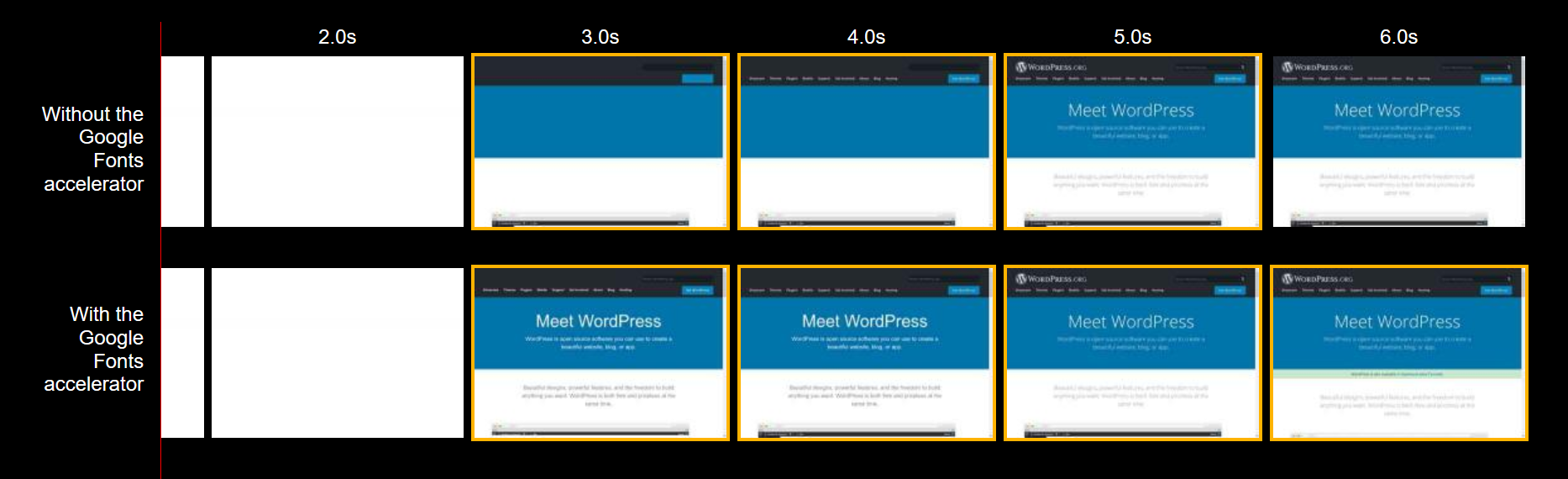
This tools wraps Google Fonts and makes the text render immediately (with a fallback font). The custom font is downloaded asynchronously and applied later:
How does this work? ⚙
In 2017-2018, most browsers
released
support for font-display,
a CSS feature that helps to configure how custom fonts are loaded. However, Google Fonts
don’t support font-display natively! This
tool works around that and adds the font-display: swap declaration to make the browser render the
text immediately.
In more details, the generated script:
- downloads the Google Fonts stylesheet asynchronously for each visitor,
- patches it to insert the
font-display: swapdeclaration, - and inserts that stylesheet into the document.
The snippet uses
the
window.FontFace check
to detect if a browser supports font-display. If the
browser doesn’t support font-display, or if
window.FontFace is not available, the script falls back to
inserting a regular <link> tag.
If the Google Fonts stylesheet is already cached, the script will insert it into the document synchronously – so that the browser can apply custom fonts immediately.
How does this affect performance? 🏎
We built the snippet to be as lightweight as possible. To achieve a great performance, this tool:
- keeps the whole snippet tiny – right now, it’s just 550 bytes minified and gzipped,
-
generates a
<link rel="preload">tag for the Google Fonts stylesheet – so the browser starts downloading it even before the snippet runs, -
generates a
<link rel="preconnect">tag for the domain that serves font files (and<link rel="dns-prefetch">for older browsers) – so the browser can fetch font files sooner, - and provides an inline script instead of an external one – to avoid making an extra HTTP request.
Where do I report issues? 🙋
Do that in the GitHub repo.
We are PerfPerfPerf. We help companies to make web apps faster and earn more.
We worked with Google and various e-commerce and media companies. Here’s a feedback from one of them:
Ivan [the PerfPerfPerf founder] gave a ton of extremely useful, actionable feedback that directly improved our First Meaningful Paint, Time to Interactive, Speed Index, First CPU Idle metrics significantly. Also, he helped with some bundle size optimization too.
Interaction with Ivan is dense in terms of knowledge transfer, and I guarantee you that you will learn a lot of new things. On top of all these, he’s a super smooth person to work with. All in all, I cannot recommend Ivan enough!
— Cihat Imamoglu, Senior Software Engineer @ Fat Llama
Want to improve conversion, or have issues with performance? Chat with us.