Graph RAG with pure vector search — no graph database needed.






💡 Encode entities and relations as vectors in Milvus, replace iterative LLM agents with a single reranking pass — achieve state-of-the-art multi-hop retrieval at a fraction of the operational and computational cost.

✨ Features
- No Graph Database Required — Pure vector search with Milvus, no Neo4j or other graph databases needed
- Single-Pass LLM Reranking — One LLM call to rerank, no iterative agent loops (unlike IRCoT or multi-step reflection)
- Knowledge-Intensive Friendly — Optimized for domains with dense factual content: legal, finance, medical, literature, etc.
- Zero Configuration — Uses Milvus Lite by default, works out of the box with a single file
- Multi-hop Reasoning — Subgraph expansion enables complex multi-hop question answering
- State-of-the-Art Performance — 87.8% avg Recall@5 on multi-hop QA benchmarks, outperforming HippoRAG
📦 Installation
pip install vector-graph-rag
# or
uv add vector-graph-rag
With document loaders (PDF, DOCX, web pages)
pip install "vector-graph-rag[loaders]"
# or
uv add "vector-graph-rag[loaders]"
🚀 Quick Start
from vector_graph_rag import VectorGraphRAG

rag = VectorGraphRAG()  # reads OPENAI_API_KEY from environment

rag.add_texts([
    "Albert Einstein developed the theory of relativity.",
    "The theory of relativity revolutionized our understanding of space and time.",
])

result = rag.query("What did Einstein develop?")
print(result.answer)
Note: Set
OPENAI_API_KEYenvironment variable before running.
📄 With pre-extracted triplets — click to expand
Skip LLM extraction if you already have knowledge graph triplets:
rag.add_documents_with_triplets([
    {
        "passage": "Einstein developed relativity at Princeton.",
        "triplets": [
            ["Einstein", "developed", "relativity"],
            ["Einstein", "worked at", "Princeton"],
        ],
    },
])
🌐 Import from URLs and files — click to expand
from vector_graph_rag import VectorGraphRAG
from vector_graph_rag.loaders import DocumentImporter

# Import from URLs, PDFs, DOCX, etc. (with automatic chunking)
importer = DocumentImporter(chunk_size=1000, chunk_overlap=200)
result = importer.import_sources([
    "https://en.wikipedia.org/wiki/Albert_Einstein",
    "/path/to/document.pdf",
    "/path/to/report.docx",
])

rag = VectorGraphRAG(milvus_uri="./my_graph.db")
rag.add_documents(result.documents, extract_triplets=True)

result = rag.query("What did Einstein discover?")
print(result.answer)
⚙️ Custom configuration — click to expand
rag = VectorGraphRAG(
    milvus_uri="./my_data.db",          # or remote Milvus / Zilliz Cloud
    llm_model="gpt-4o",
    embedding_model="text-embedding-3-large",
    collection_prefix="my_project",     # isolate multiple datasets
)
All settings can also be configured via environment variables with VGRAG_ prefix or a .env file:
VGRAG_LLM_MODEL=gpt-4o
VGRAG_EMBEDDING_MODEL=text-embedding-3-large
VGRAG_MILVUS_URI=http://localhost:19530
📖 Full Python API reference → Python API docs
🔬 How It Works
Indexing:
Documents → Triplet Extraction (LLM) → Entities + Relations → Embedding → Milvus
Query:
Question → Entity Extraction → Vector Search → Subgraph Expansion → LLM Reranking → Answer
Example: "What did Einstein develop?"
- Extract entity:
Einstein - Vector search finds similar entities and relations in Milvus
- Subgraph expansion collects neighboring relations
- Single-pass LLM reranking selects the most relevant passages
- Generate answer from selected passages
📖 Detailed pipeline walkthrough with diagrams → How It Works · Design Philosophy
📊 Evaluation Results
Evaluated on three multi-hop QA benchmarks (Recall@5):

| Method | MuSiQue | HotpotQA | 2WikiMultiHopQA | Average |
|---|---|---|---|---|
| Naive RAG | 55.6% | 90.8% | 73.7% | 73.4% |
| IRCoT + HippoRAG¹ | 57.6% | 83.0% | 93.9% | 78.2% |
| HippoRAG 2² | 74.7% | 96.3% | 90.4% | 87.1% |
| Vector Graph RAG | 73.0% | 96.3% | 94.1% | 87.8% |
¹ HippoRAG (NeurIPS 2024) ² HippoRAG 2 (2025)
📖 Detailed analysis and reproduction steps → Evaluation
🗄️ Milvus Backend
Just change milvus_uri to switch between deployment modes:
Milvus Lite (default) — zero config, single-process, data stored in a local file. Great for prototyping and small datasets:
rag = VectorGraphRAG(milvus_uri="./my_graph.db") # just works
⭐ Zilliz Cloud — fully managed, free tier available — sign up 👇:
rag = VectorGraphRAG(
    milvus_uri="https://in03-xxx.api.gcp-us-west1.zillizcloud.com",
    milvus_token="your-api-key",
)
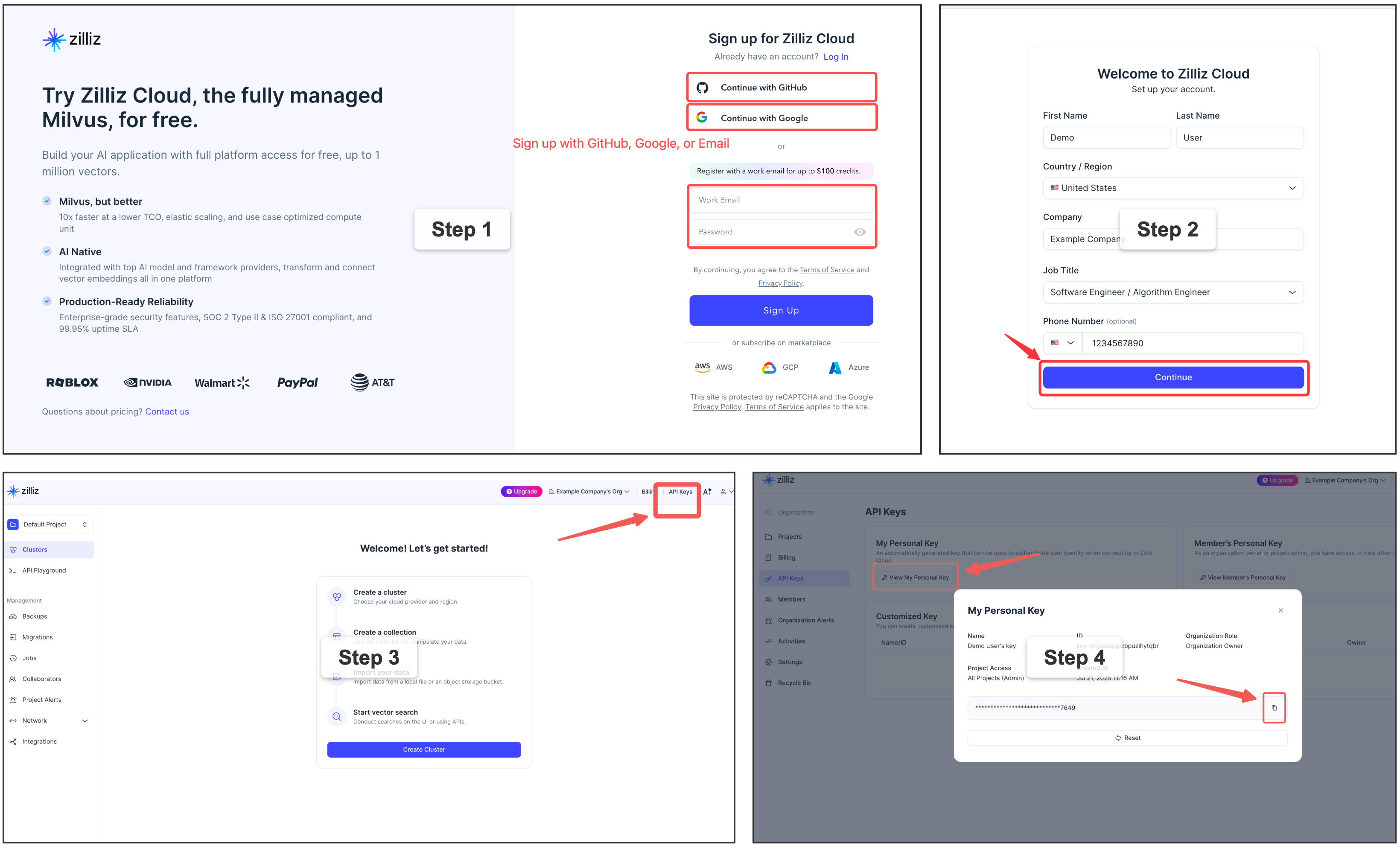
⭐ Sign up for a free Zilliz Cloud cluster
You can sign up on Zilliz Cloud to get a free cluster and API key.
Self-hosted Milvus Server (Docker) — for advanced users
If you need a dedicated Milvus instance for multi-user or team environments, you can deploy Milvus standalone with Docker Compose. This requires Docker and some infrastructure knowledge. See the official installation guide for detailed steps.
rag = VectorGraphRAG(milvus_uri="http://localhost:19530")
🖥️ Frontend & REST API
Vector Graph RAG includes a React-based frontend for interactive graph visualization and a FastAPI backend.
# Backend
uv sync --extra api
uv run uvicorn vector_graph_rag.api.app:app --host 0.0.0.0 --port 8000

# Frontend
cd frontend && npm install && npm run dev

| Endpoint | Method | Description |
|---|---|---|
/api/health |
GET | Health check |
/api/graphs |
GET | List available graphs |
/api/graph/{name}/stats |
GET | Get graph statistics |
/api/query |
POST | Query the knowledge graph |
/api/documents |
POST | Add documents |
/api/import |
POST | Import from URLs/paths |
/api/upload |
POST | Upload files |
See API docs at http://localhost:8000/docs after starting the server.
📖 Full endpoint reference → REST API docs · Frontend guide
📚 Links
- Documentation — full guides, API reference, and architecture details
- How It Works — pipeline walkthrough with diagrams
- Design Philosophy — why pure vector search, no graph DB
- Milvus — the vector database powering Vector Graph RAG
- FAQ — common questions and troubleshooting
Contributing
Bug reports, feature requests, and pull requests are welcome! For questions and discussions, join us on Discord.