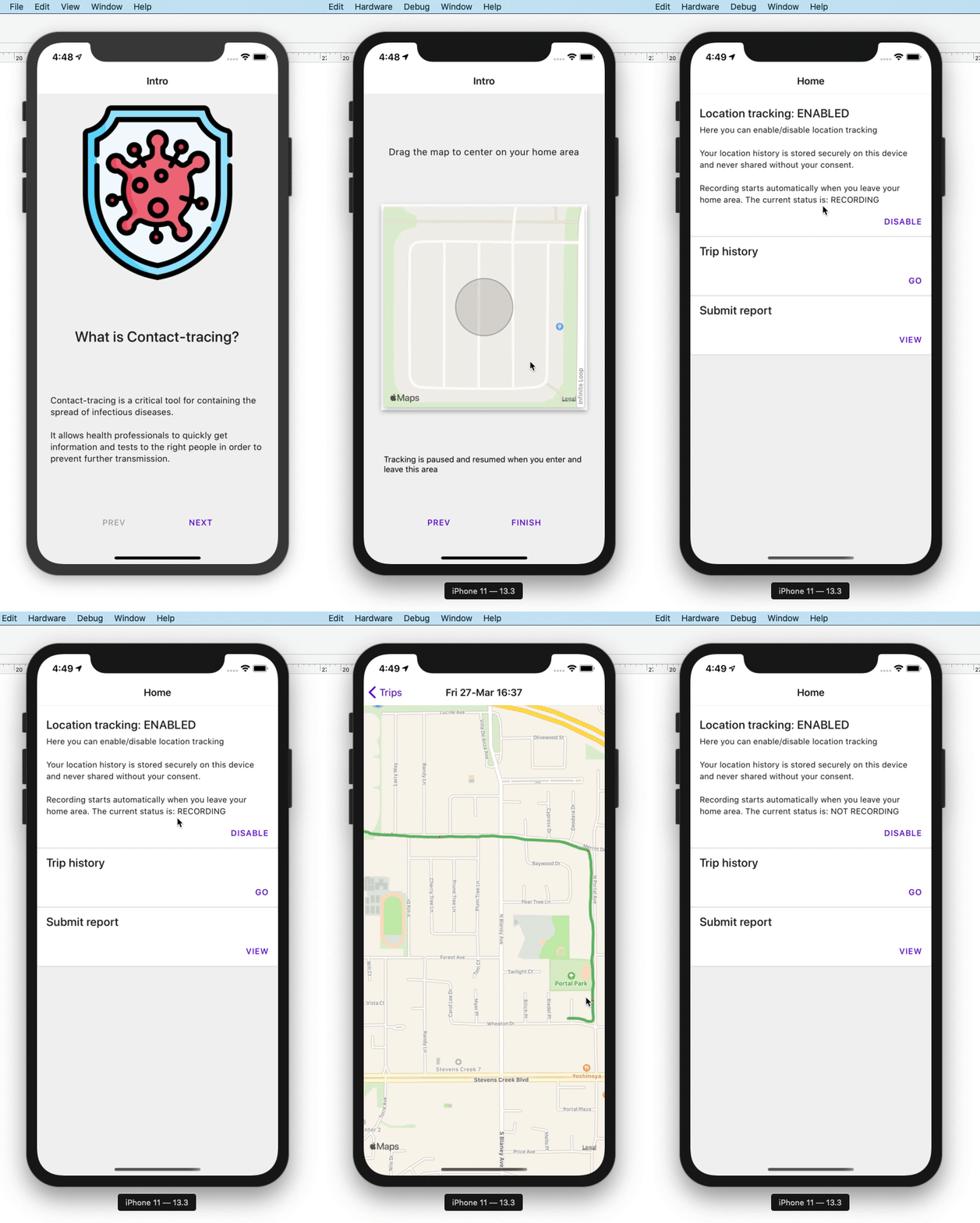
About this project
Yet another open source contact-tracing app to help fight COVID-19. There are similar projects underway here, here, here, and here (among many others, I'm sure).
When we encounter a new case of COVID-19, we know that it's important to identify who may have had contact with that person to avoid spreading it any further. China and South Korea have done it (see Patient 31).
But how can we do this while preserving people privacy and anonymity?
One solution where many people have ended up is this:
- Everyone tracks and controls their own data (decryption key lives on their devices).
- Make available a highly anonymized dataset which users can download and compare to their own to determine if they've had contact with COVID-19.
- If they have, alert them of recommended actions (maybe provide a reference number to prioritize testing)
That's exactly what this app does.
It's built in React Native using the awesome Expo toolchain. It uses Geofencing to record your location only when you've exited your 'home area'. (Save battery while you're in quarantine. Although as I write this, I realized that my phone now plugged in all day. hummm...)
These location logs are encrypted and stored on the device.
If you're diagnosed with COVID-19, you can choose to decrypt and share an anonymized version of your location history.
You might ask: If my location history always starts and finishes at my home, that's not very anonymous... Great point! Indeed it's not. That's why the app only shares when and where you've stopped and likely had contact with others, such as the grocery store or bumping into a friend on the street. When these stops are mixed in with the stops of many other users, it becomes impossible to trace a single users path.
Did someone say bluetooth? BLE is a great way to broadcast some anonymous UUID and let people record that they've seen you. One problem is that iOS does not support BLE advertising in the background, so you would have to walk around with the app open and the screen unlocked. Not very practical. The other problem is that I'm under lockdown in my apartment and can't get to the Android device I have at work :(
There's a branch where I've started adding BLE, but it requires using the 'bare workflow' from Expo and you miss out on a lot of their magic.
TODO
- add todos
CONTRIBUTORS WELCOME!
Get started
- Install the
expo-cli - Install the dependencies (
npm ioryarn) - Rename
aws-exports.example.jstoaws-exports.js - Rename
app.example.jsontoapp.jsonand replace values where indicated - Run
expo start
Backend
These steps are only required when you want to start submitting data. They are not required to just run the app.
AWS Amplify
-
Install and configure the
@aws-amplify/cli -
From the root directory, run
amplify initYonahs-MacBook-Pro-2:react Yonah$ amplify init Note: It is recommended to run this command from the root of your app directory ? Enter a name for the project trackandtrace ? Enter a name for the environment dev ? Choose your default editor: Visual Studio Code ? Choose the type of app that you're building javascript Please tell us about your project ? What javascript framework are you using react-native ? Source Directory Path: (leave blank to use default) ? Distribution Directory Path: (leave blank to use default) ? Build Command: (leave blank to use default) ? Start Command: (leave blank to use default) Using default provider awscloudformation For more information on AWS Profiles, see: https://docs.aws.amazon.com/cli/latest/userguide/cli-multiple-profiles.html ? Do you want to use an AWS profile? Yes ? Please choose the profile you want to use default .... -
Also from the root directory, run
amplify add authYonahs-MacBook-Pro-2:react Yonah$ amplify add auth Using service: Cognito, provided by: awscloudformation The current configured provider is Amazon Cognito. Do you want to use the default authentication and security configuration? Manual configuration Select the authentication/authorization services that you want to use: User Sign-Up, Sign-In, connected with AWS IAM controls (Enables per-user Storage features for images or other content, Analytics, and more) Please provide a friendly name for your resource that will be used to label this category in the project: (leave blank to use default) Please enter a name for your identity pool. (leave blank to use default) Allow unauthenticated logins? (Provides scoped down permissions that you can control via AWS IAM) Yes Do you want to enable 3rd party authentication providers in your identity pool? No Please provide a name for your user pool: (leave blank to use default) Warning: you will not be able to edit these selections. How do you want users to be able to sign in? Phone Number Do you want to add User Pool Groups? No Do you want to add an admin queries API? No Multifactor authentication (MFA) user login options: OFF Email based user registration/forgot password: Disabled (Uses SMS/TOTP as an alternative) Please specify an SMS verification message: (leave blank to use default) Do you want to override the default password policy for this User Pool? No Warning: you will not be able to edit these selections. What attributes are required for signing up? (uncheck email) Specify the app's refresh token expiration period (in days): 30 Do you want to specify the user attributes this app can read and write? No Do you want to enable any of the following capabilities? (leave blank to use default) Do you want to use an OAuth flow? No ? Do you want to configure Lambda Triggers for Cognito? No -
Also from the root directory, run
amplify add storageYonahs-MacBook-Pro-2:react Yonah$ amplify add storage ? Please select from one of the below mentioned services: Content (Images, audio, video, etc.) ? Please provide a friendly name for your resource that will be used to label this category in the project: reports ? Please provide bucket name: (leave blank to use default) ? Who should have access: Auth and guest users ? What kind of access do you want for Authenticated users? create/update ? What kind of access do you want for Guest users? create/update ? Do you want to add a Lambda Trigger for your S3 Bucket? No -
Run
amplify push