English
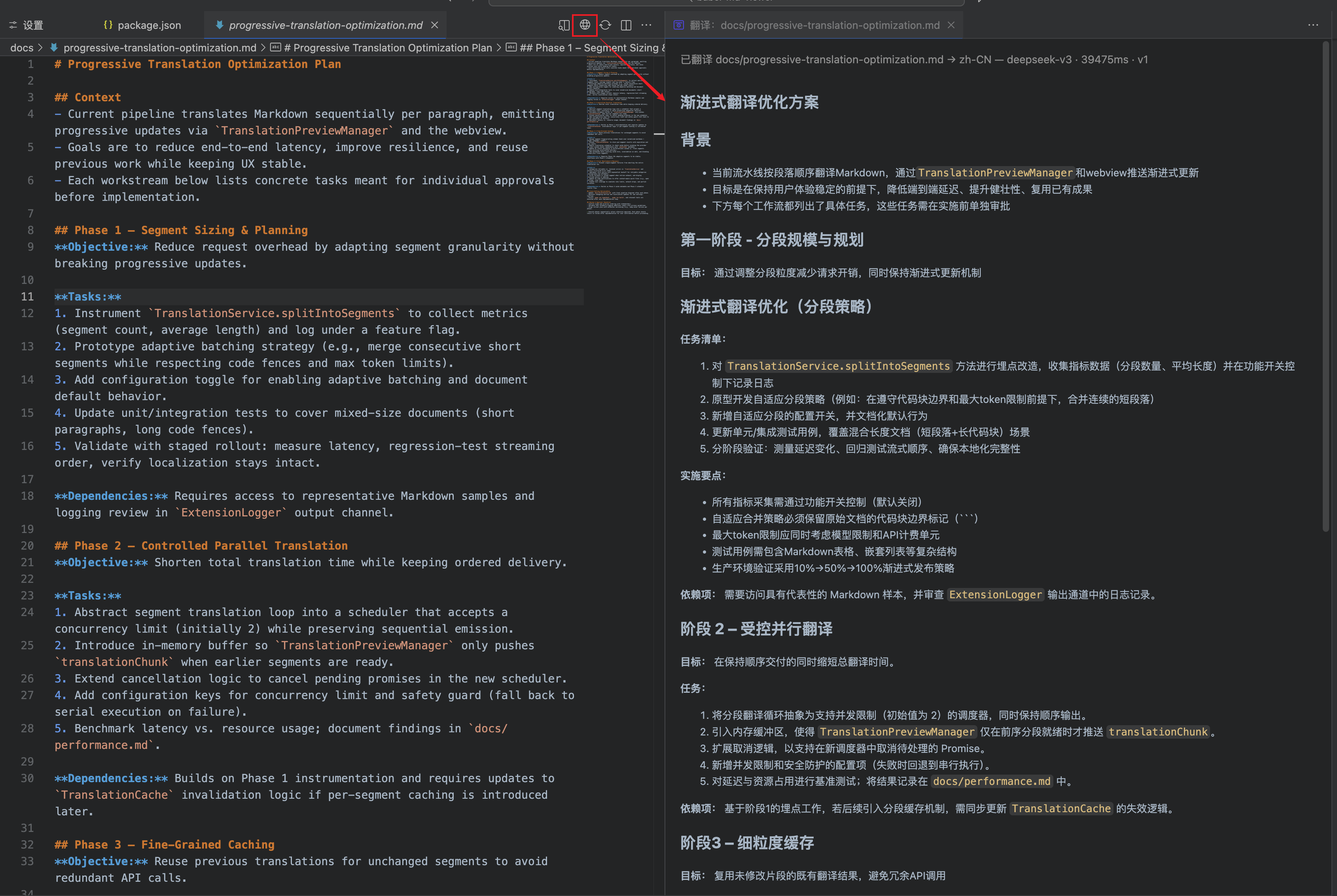
Babel Markdown brings real-time AI translation previews to VS Code so you can compare source Markdown with translated output in a single workspace.
Highlights
- Progressive translation preview: streams segments as they finish translating.
- Markdown fidelity: preserves headings, lists, tables, and code blocks exactly.
- One-click exports: right-click any Markdown to export the rendered preview as PNG or PDF; translation preview panel also supports direct export.
- Adaptive batching & parallelism: merges short sections and balances concurrency for responsive yet stable runs.
- Caching & recovery: reuses previous translations and falls back to cached or placeholder content when errors occur.
- OpenAI-compatible API support: customize base URL, model, language, and timeout for any compatible provider.
How to Use
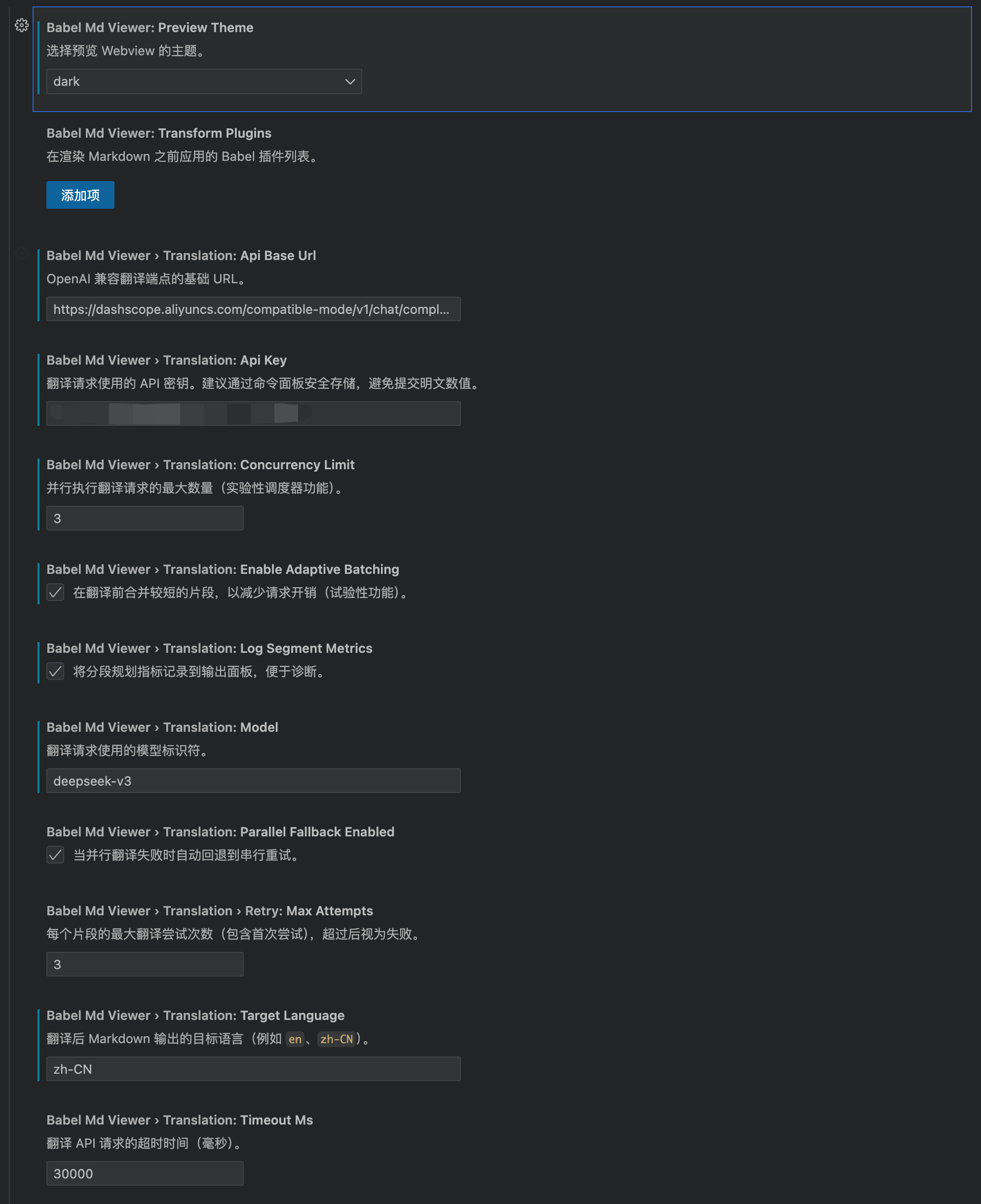
- Open VS Code settings, search for “Babel Markdown,” and configure the translation API base URL, API key, and target language.
- Open a Markdown file, then run “Babel Markdown: Open Translation Preview” from the editor toolbar, context menu, or command palette.
- Monitor translation progress and warnings inside the preview panel; refresh or retry whenever you need to.
Key Settings
translation.apiBaseUrl– OpenAI-compatible endpoint.translation.apiKey– secure token for translation requests.translation.model– e.g.,gpt-4o-mini.translation.targetLanguage– output language code.- Advanced knobs such as
translation.timeoutMs,translation.concurrencyLimit, andtranslation.retry.maxAttemptskeep performance and resilience under control.
Best For
- Localization and bilingual documentation review.
- Fast QA of Markdown READMEs, release notes, or tutorials.
- Collaboration scenarios where teams need synchronized multilingual content.
中文
Babel Markdown 为 VS Code 提供实时翻译预览能力,让原文 Markdown 与 AI 翻译后的内容在同一视图中同步呈现,帮助你高效校对多语言文档。
主要特性
- 渐进式翻译预览:按段落流式更新翻译结果,阅读无需等待整篇完成。
- Markdown 结构保真:保留标题、列表、代码块、表格等格式,翻译内容可直接复制使用。
- 一键导出:右键 Markdown 即可将预览效果导出为 PNG/PDF,翻译预览面板同样支持直接导出。
- 自适应分段与并行处理:自动合并短段落并控制并发度,平衡速度与稳定性。
- 缓存与错误恢复:复用历史片段并在异常时回退缓存或原文,确保预览不中断。
- 面向 OpenAI 兼容 API:自定义 Base URL、模型、语言与超时,兼容第三方服务。
使用流程
- 在设置中搜索 “Babel Markdown”,配置翻译 API 基础地址、密钥与目标语言。
- 打开 Markdown 文档,使用编辑器标题栏按钮、右键菜单或命令面板运行 “Babel Markdown: Open Translation Preview”。
- 预览面板将显示翻译进度、警告提示与最终结果,可随时刷新或重试。
可配置项
translation.apiBaseUrl:OpenAI 兼容接口地址。translation.apiKey:翻译请求使用的安全密钥。translation.model:模型名称,例如gpt-4o-mini。translation.targetLanguage:目标语言代码。translation.timeoutMs、translation.concurrencyLimit、retry.maxAttempts等高级参数。
适用场景
- 本地化、双语技术文档校对。
- 快速审阅 Markdown 说明、变更日志或 README。
- 团队协作中需要多语言同步的开发场景。
立即在 VS Code 中体验 Babel Markdown,感受智能翻译带来的写作提效!