Utility tool for using git interactively. Powered by junegunn/fzf.






This tool is designed to help you use git more efficiently. It's lightweight and easy to use.
📝 Features
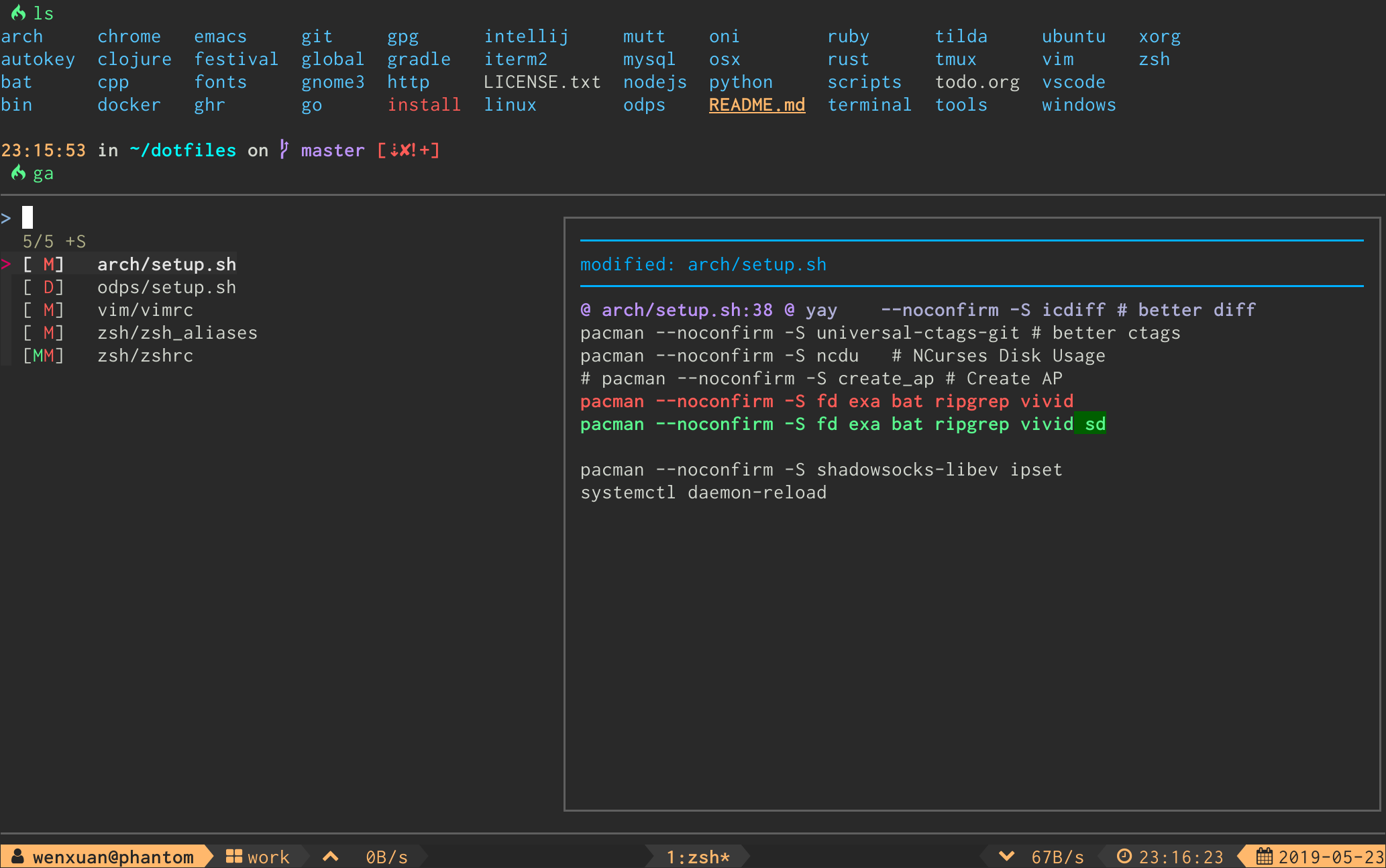
ga - Interactive git add selector:
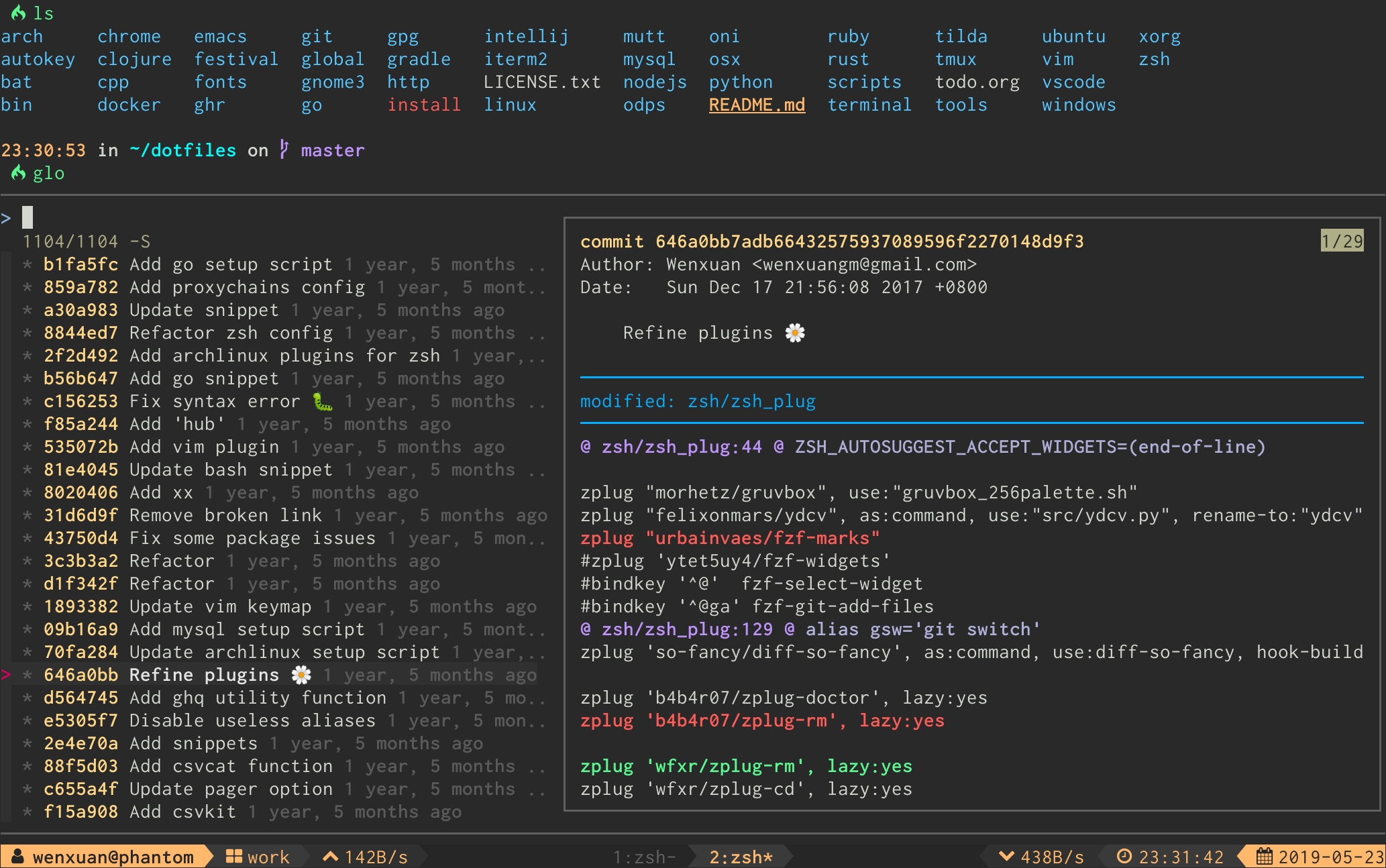
glo - Interactive git log viewer:
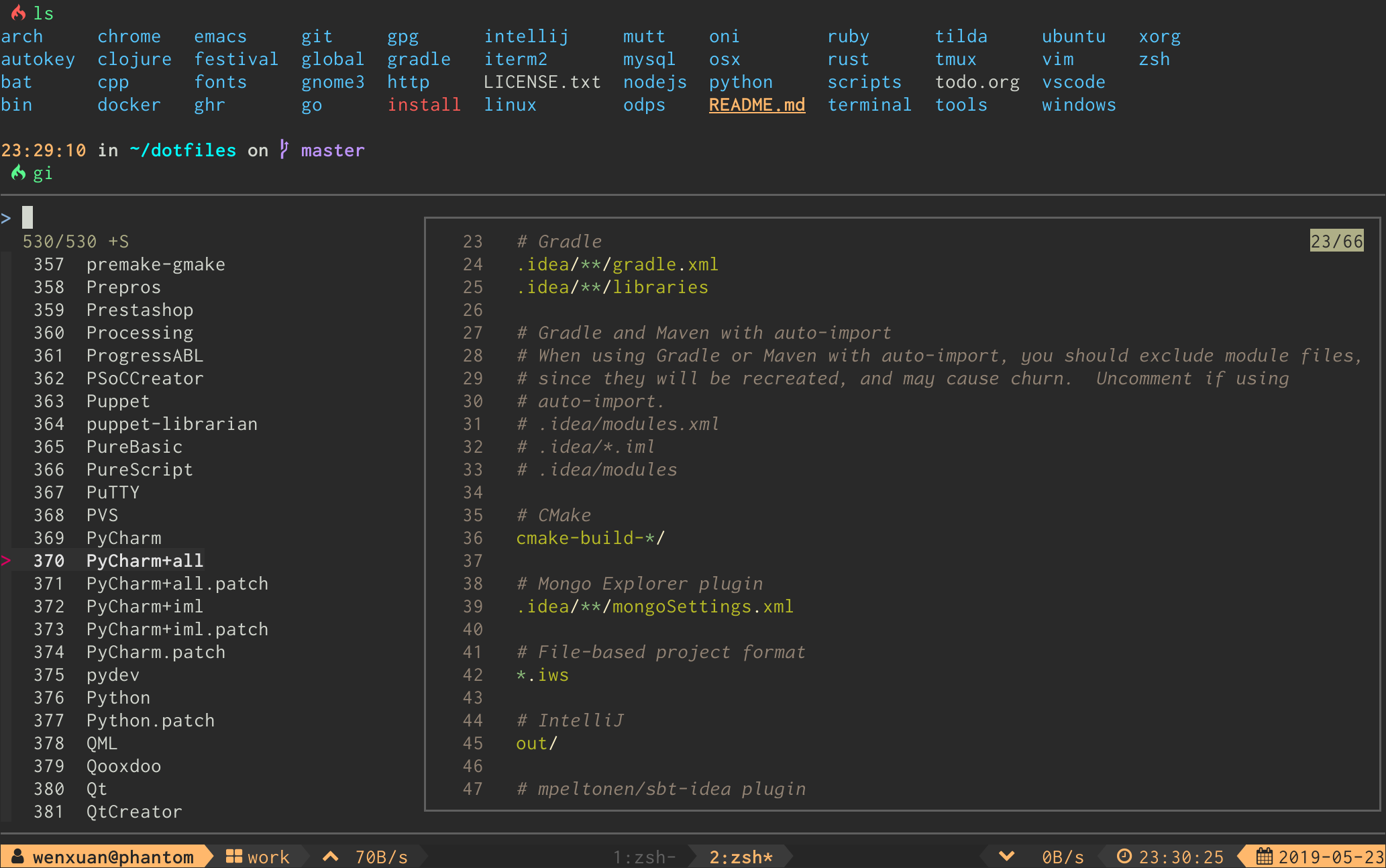
gi - Interactive .gitignore generator:
Full Command List
| Command | Description |
|---|---|
ga |
Interactive git add selector |
gd |
Interactive git diff viewer |
gi |
Interactive .gitignore generator |
glo |
Interactive git log viewer |
gat |
Interactive .gitattributes generator |
gso |
Interactive git show viewer |
grh |
Interactive git reset HEAD <file> selector |
grs |
Interactive git restore <file> selector |
gcf |
Interactive git checkout <file> selector |
gcff |
Interactive git checkout <file> from <commit> selector |
gcb |
Interactive git checkout <branch> selector |
gsw |
Interactive git switch <branch> selector |
gbd |
Interactive git branch -D <branch> selector |
gct |
Interactive git checkout <tag> selector |
gco |
Interactive git checkout <commit> selector |
grc |
Interactive git revert <commit> selector |
gss |
Interactive git stash viewer |
gsp |
Interactive git stash push selector |
gcp |
Interactive git cherry-pick selector |
grb |
Interactive git rebase -i selector |
grl |
Interactive git reflog viewer |
gbl |
Interactive git blame selector |
gfu |
Interactive git commit --fixup && git rebase -i --autosquash selector |
gsq |
Interactive git commit --squash && git rebase -i --autosquash selector |
grw |
Interactive git commit --fixup=reword && git rebase -i --autosquash selector |
gclean |
Interactive git clean selector |
gwt |
Interactive git worktree selector |
gwa |
Interactive git worktree add selector |
gwd |
Interactive git worktree remove selector |
📥 Installation
Requirements
-
fzfversion0.60.0or higherIf your OS package manager bundles an older version of
fzf, you might install it usingfzf's own install script.
Shell Package Managers
# for zplug
zplug 'wfxr/forgit'

# for zgen
zgen load 'wfxr/forgit'

# for antigen
antigen bundle 'wfxr/forgit'

# for fisher (requires fisher v4.4.3 or higher)
fisher install wfxr/forgit

# for omf
omf install https://github.com/wfxr/forgit

# for zinit
zinit load wfxr/forgit

# for oh-my-zsh
git clone https://github.com/wfxr/forgit.git ${ZSH_CUSTOM:-~/.oh-my-zsh/custom}/plugins/forgit

# for sheldon.cli
[plugins.forgit]
github = "wfxr/forgit"
rev = "26.01.0"  # check https://github.com/wfxr/forgit/releases for latest version
use = ["forgit.plugin.zsh"]
apply = ["source"]

# manually
# Clone the repository and source it in your shell's rc file or put bin/git-forgit into your $PATH
Homebrew
To install using brew
Then add the following to your shell's config file:
# Fish:
# ~/.config/fish/config.fish:
[ -f $HOMEBREW_PREFIX/share/forgit/forgit.plugin.fish ]; and source $HOMEBREW_PREFIX/share/forgit/forgit.plugin.fish

# Zsh:
# ~/.zshrc:
[ -f $HOMEBREW_PREFIX/share/forgit/forgit.plugin.zsh ] && source $HOMEBREW_PREFIX/share/forgit/forgit.plugin.zsh

# Bash:
# ~/.bashrc:
[ -f $HOMEBREW_PREFIX/share/forgit/forgit.plugin.sh ] && source $HOMEBREW_PREFIX/share/forgit/forgit.plugin.sh
Arch User Repository
AUR packages, maintained by the developers of forgit, are available. Install the forgit package for the latest release or forgit-git to stay up to date with the latest commits from the default branch of this repository.
Completions
Forgit offers completions for all supported shells. Completions are automatically configured when installing forgit through Homebrew or the AUR. All other installation methods mentioned above require manual setup for completions. The necessary steps depend on the shell you use.
Bash
- Put
completions/git-forgit.bashin~/.local/share/bash-completion/completionsto have bash tab completion forgit forgitand configured git aliases. - Source
completions/git-forgit.bashexplicitly to have bash tab completion for forgit shell functions and aliases (e.g.,gsw <tab>completes branches).
Fish
- Put
completions/git-forgit.fishin~/.config/fish/completions/to have fish tab completion forgit forgitand configured git aliases, as well as shell command aliases, such asga.
Zsh
- Put
completions/_git-forgitin a directory in your$fpath(e.g.,/usr/share/zsh/site-functions) to have zsh tab completion forgit forgitand configured git aliases, as well as shell command aliases, such asforgit::addandga.
If you're having issues after updating, and commands such as forgit::add or aliases ga aren't working, remove your
completions cache and restart your shell.
🚀 Usage
Shell Aliases
You can change the default aliases by defining these variables below before sourcing the forgit shell plugin.
(To disable all aliases, Set the FORGIT_NO_ALIASES flag.)
forgit_log=glo
forgit_reflog=grl
forgit_diff=gd
forgit_show=gso
forgit_add=ga
forgit_reset_head=grh
forgit_restore=grs
forgit_ignore=gi
forgit_attributes=gat
forgit_checkout_file=gcf
forgit_checkout_file_from_commit=gcff
forgit_checkout_branch=gcb
forgit_switch_branch=gsw
forgit_branch_delete=gbd
forgit_checkout_tag=gct
forgit_checkout_commit=gco
forgit_revert_commit=grc
forgit_clean=gclean
forgit_stash_show=gss
forgit_stash_push=gsp
forgit_cherry_pick=gcp
forgit_rebase=grb
forgit_blame=gbl
forgit_fixup=gfu
forgit_squash=gsq
forgit_reword=grw
forgit_worktree=gwt
forgit_worktree_add=gwa
forgit_worktree_delete=gwd
Git Integration
You can use forgit as a sub-command of git by making git-forgit available in $PATH:
# after `forgit` was loaded
PATH="$PATH:$FORGIT_INSTALL_DIR/bin"
Some plugin managers can help do this.
Then, any forgit command will be a sub-command of git:
git forgit log
git forgit add
git forgit diff
Optionally you can add aliases in git:
git config --global alias.cf 'forgit checkout_file'And use forgit functions via a git alias:
⚙ Configuration
Options can be set via environment variables. They have to be exported in
order to be recognized by forgit.
For instance, if you want to order branches in gcb by the last committed date you could:
export FORGIT_CHECKOUT_BRANCH_BRANCH_GIT_OPTS='--sort=-committerdate'
Per-command Options
Each forgit command can be customized with dedicated environment variables for git arguments and fzf options:
| Command | Git Options | FZF Options |
|---|---|---|
ga |
FORGIT_ADD_GIT_OPTS |
FORGIT_ADD_FZF_OPTS |
glo |
FORGIT_LOG_GIT_OPTS |
FORGIT_LOG_FZF_OPTS |
grl |
FORGIT_REFLOG_GIT_OPTS |
FORGIT_REFLOG_FZF_OPTS |
gi |
FORGIT_IGNORE_FZF_OPTS |
|
gat |
FORGIT_ATTRIBUTES_FZF_OPTS |
|
gd |
FORGIT_DIFF_GIT_OPTS |
FORGIT_DIFF_FZF_OPTS |
gso |
FORGIT_SHOW_GIT_OPTS |
FORGIT_SHOW_FZF_OPTS |
grh |
FORGIT_RESET_HEAD_GIT_OPTS |
FORGIT_RESET_HEAD_FZF_OPTS |
grs |
FORGIT_RESTORE_GIT_OPTS |
FORGIT_RESTORE_FZF_OPTS |
gcf |
FORGIT_CHECKOUT_FILE_GIT_OPTS |
FORGIT_CHECKOUT_FILE_FZF_OPTS |
gcff |
FORGIT_SHOW_GIT_OPTSFORGIT_CHECKOUT_FILE_GIT_OPTS |
FORGIT_CHECKOUT_FILE_FROM_COMMIT_LOG_FZF_OPTSFORGIT_CHECKOUT_FILE_FROM_COMMIT_SHOW_FZF_OPTS |
gcb |
FORGIT_CHECKOUT_BRANCH_GIT_OPTSFORGIT_CHECKOUT_BRANCH_BRANCH_GIT_OPTS |
FORGIT_CHECKOUT_BRANCH_FZF_OPTS |
gsw |
FORGIT_SWITCH_BRANCH_GIT_OPTS |
FORGIT_SWITCH_BRANCH_FZF_OPTS |
gbd |
FORGIT_BRANCH_DELETE_GIT_OPTS |
FORGIT_BRANCH_DELETE_FZF_OPTS |
gct |
FORGIT_CHECKOUT_TAG_GIT_OPTS |
FORGIT_CHECKOUT_TAG_FZF_OPTS |
gco |
FORGIT_CHECKOUT_COMMIT_GIT_OPTS |
FORGIT_CHECKOUT_COMMIT_FZF_OPTS |
grc |
FORGIT_REVERT_COMMIT_GIT_OPTS |
FORGIT_REVERT_COMMIT_FZF_OPTS |
gss |
FORGIT_STASH_SHOW_GIT_OPTS |
FORGIT_STASH_FZF_OPTS |
gsp |
FORGIT_STASH_PUSH_GIT_OPTS |
FORGIT_STASH_PUSH_FZF_OPTS |
gclean |
FORGIT_CLEAN_GIT_OPTS |
FORGIT_CLEAN_FZF_OPTS |
gcp |
FORGIT_CHERRY_PICK_GIT_OPTS |
FORGIT_CHERRY_PICK_FZF_OPTS |
grb |
FORGIT_REBASE_GIT_OPTS |
FORGIT_REBASE_FZF_OPTS |
gbl |
FORGIT_BLAME_GIT_OPTS |
FORGIT_BLAME_FZF_OPTS |
gfu |
FORGIT_FIXUP_GIT_OPTS |
FORGIT_FIXUP_FZF_OPTS |
gsq |
FORGIT_SQUASH_GIT_OPTS |
FORGIT_SQUASH_FZF_OPTS |
grw |
FORGIT_REWORD_GIT_OPTS |
FORGIT_REWORD_FZF_OPTS |
gwt |
FORGIT_WORKTREE_FZF_OPTS |
|
gwa |
FORGIT_WORKTREE_ADD_BRANCH_GIT_OPTS |
FORGIT_WORKTREE_ADD_FZF_OPTS |
gwd |
FORGIT_WORKTREE_DELETE_GIT_OPTS |
FORGIT_WORKTREE_DELETE_FZF_OPTS |
Pagers
Forgit will use the default configured pager from git (core.pager,
pager.show, pager.diff) but can be altered with the following environment
variables:
| Pager | Fallbacks to |
|---|---|
FORGIT_PAGER |
git config core.pager or cat |
FORGIT_SHOW_PAGER |
git config pager.show or $FORGIT_PAGER |
FORGIT_DIFF_PAGER |
git config pager.diff or $FORGIT_PAGER |
FORGIT_BLAME_PAGER |
git config pager.blame or $FORGIT_PAGER |
FORGIT_IGNORE_PAGER |
bat -l gitignore --color always or cat |
FORGIT_ATTRIBUTES_PAGER |
bat -l gitattributes --color always or cat |
FORGIT_PREVIEW_PAGER |
Normal pager resolution* |
* If your pager is a TUI program (e.g., diffnav, tig), fzf preview panes will be blank because they run
without a TTY. Set FORGIT_PREVIEW_PAGER to a non-interactive pager (e.g., delta) to fix this. When set, it
overrides all other FORGIT_*_PAGER settings in fzf preview context.
FZF Options
You can add default fzf options for forgit, including keybindings, layout, etc.
(No need to repeat the options already defined in FZF_DEFAULT_OPTS)
export FORGIT_FZF_DEFAULT_OPTS="
--exact
--border
--cycle
--reverse
--height '80%'
"
Per-command fzf options (FORGIT_*_FZF_OPTS) are listed in the per-command options table above.
Complete loading order of fzf options is:
FZF_DEFAULT_OPTS(fzf global)FORGIT_FZF_DEFAULT_OPTS(forgit global)FORGIT_CMD_FZF_OPTS(command specific)
Examples:
ctrl-dto drop the selected stash but do not quit fzf (gssspecific).
export FORGIT_STASH_FZF_OPTS='
--bind="ctrl-d:reload(git stash drop $(cut -d: -f1 <<<{}) 1>/dev/null && git stash list)"
'
ctrl-eto view the logs in a vim buffer (glospecific).
export FORGIT_LOG_FZF_OPTS='
--bind="ctrl-e:execute(echo {} |grep -Eo [a-f0-9]+ |head -1 |xargs git show |vim -)"
'
Other Options
| Option | Description | Default |
|---|---|---|
FORGIT_LOG_FORMAT |
git log format | %C(auto)%h%d %s %C(black)%C(bold)%cr%Creset |
FORGIT_GLO_FORMAT |
override log format for glo command |
$FORGIT_LOG_FORMAT |
FORGIT_LOG_GRAPH_ENABLE |
enable log graph display | true |
FORGIT_COPY_CMD |
command for copying to clipboard | pbcopy |
FORGIT_PREVIEW_CONTEXT |
lines of diff context in preview mode | 3 |
FORGIT_FULLSCREEN_CONTEXT |
lines of diff context in full-screen mode | 10 |
FORGIT_DIR_VIEW |
command used to preview directories | tree if available, otherwise find |
FORGIT_CLEAN_LIST_FILES_OPTS |
arguments passed to git ls-files together with --others to determine which files are shown when invoking forgit clean |
|
FORGIT_WORKTREE_ADD_DIR |
directory where new worktrees are created | <repo-root>/.wt |
⌨ Keybindings
| Key | Action |
|---|---|
| Enter | Confirm |
| Tab | Toggle mark and move down |
| Shift - Tab | Toggle mark and move up |
| ? | Toggle preview window |
| Alt - W | Toggle preview wrap |
| Ctrl - S | Toggle sort |
| Ctrl - R | Toggle selection |
| Ctrl - Y | Copy commit hash/stash ID/worktree path1 |
| Ctrl - K / P | Selection move up |
| Ctrl - J / N | Selection move down |
| Alt - K / P | Preview move up |
| Alt - J / N | Preview move down |
| Alt - E | Open file in default editor (when possible) |
| Alt - T | Show commit message (when viewing a commit) |
| Alt - L | Toggle worktree lock/unlock2 |
1 Available when the selection contains a commit hash, stash ID, or worktree path.
2 Available in the worktree browser (gwt) and worktree delete selector (gwd).
For Linux users FORGIT_COPY_CMD should be set to make copy work. Example: FORGIT_COPY_CMD='xclip -selection clipboard'.
📦 Optional dependencies
-
delta/diff-so-fancy: For better human-readable diffs. -
bat: Syntax highlighting forgitignoreandgitattributes. -
emoji-cli: Emoji support forgit log. -
tree: Directory tree view forgclean.
💡 Tips
- Most of the commands accept optional arguments (e.g.,
glo develop,glo f738479..188a849b -- main.go,gco main). gdsupports specifying revision (e.g.,gd HEAD~,gd v1.0 README.md).- Call
giorgatwith arguments to get the wanted.gitignore/.gitattributescontents directly (e.g.,gi cmake c++).
⚒️ Contributing
Contributions are welcome. For the repository-specific contribution workflow, local validation steps, and commit message guidelines, see CONTRIBUTING.md.
⭐ Star History
📃 License
MIT (c) Wenxuan Zhang