
A tool to compare virtual machine snapshots, allowing you to see everything that changes on your computer.
Blog post
There's also a delightful companion blog post with more context :))
Features
- Accepts two Windows or macOS virtual machine snapshots (
.vmdkand.vmemfiles) - Diffs all files on both disks, line-by line (including deleted files). If it’s not in the list, it didn’t happen
- Diffs memory (running processes, command lines, and environment variables) on Windows
- Diffs also available to search/process via terminal as local directories (think
grep) - Runs on Windows, macOS, Linux
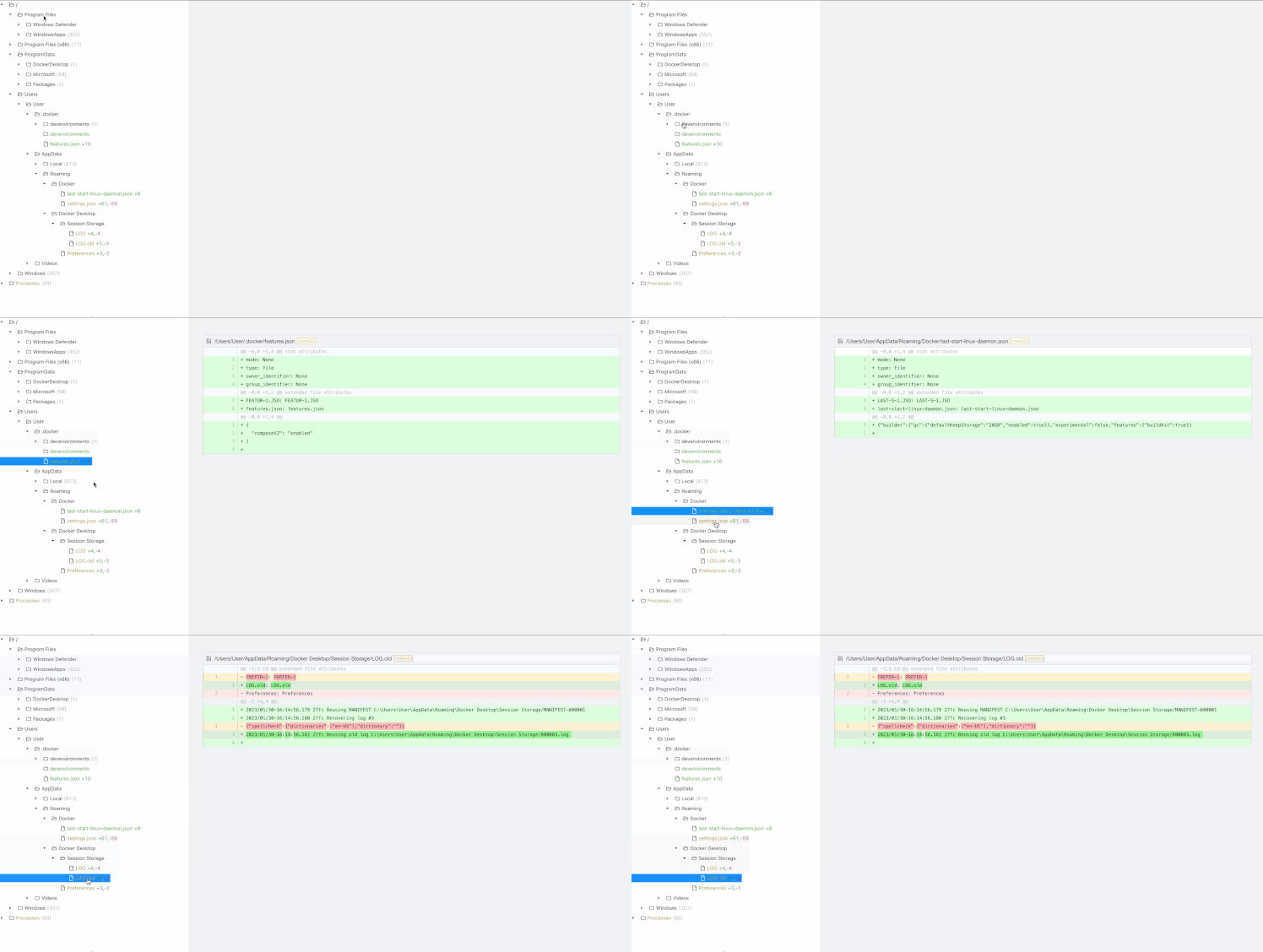
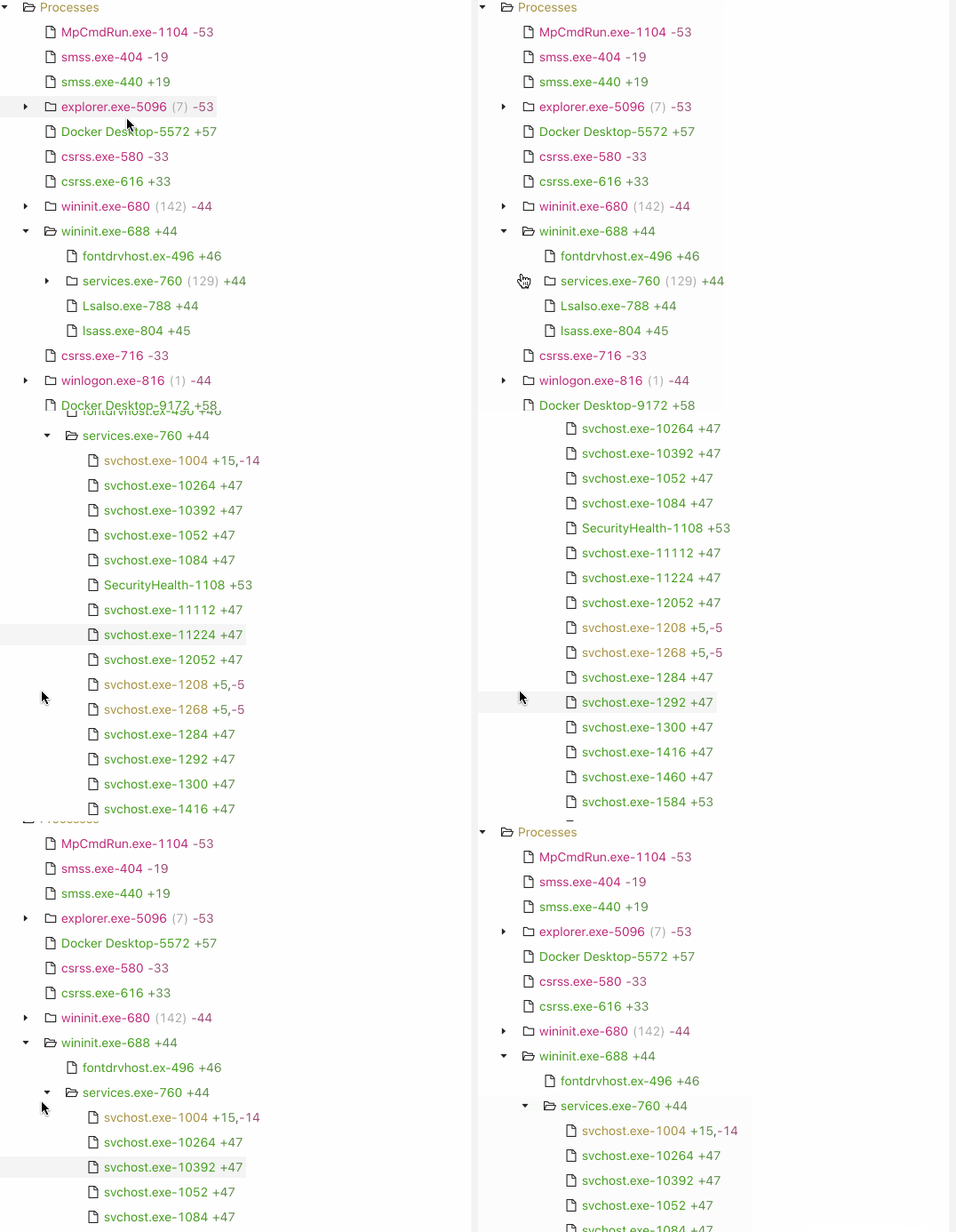
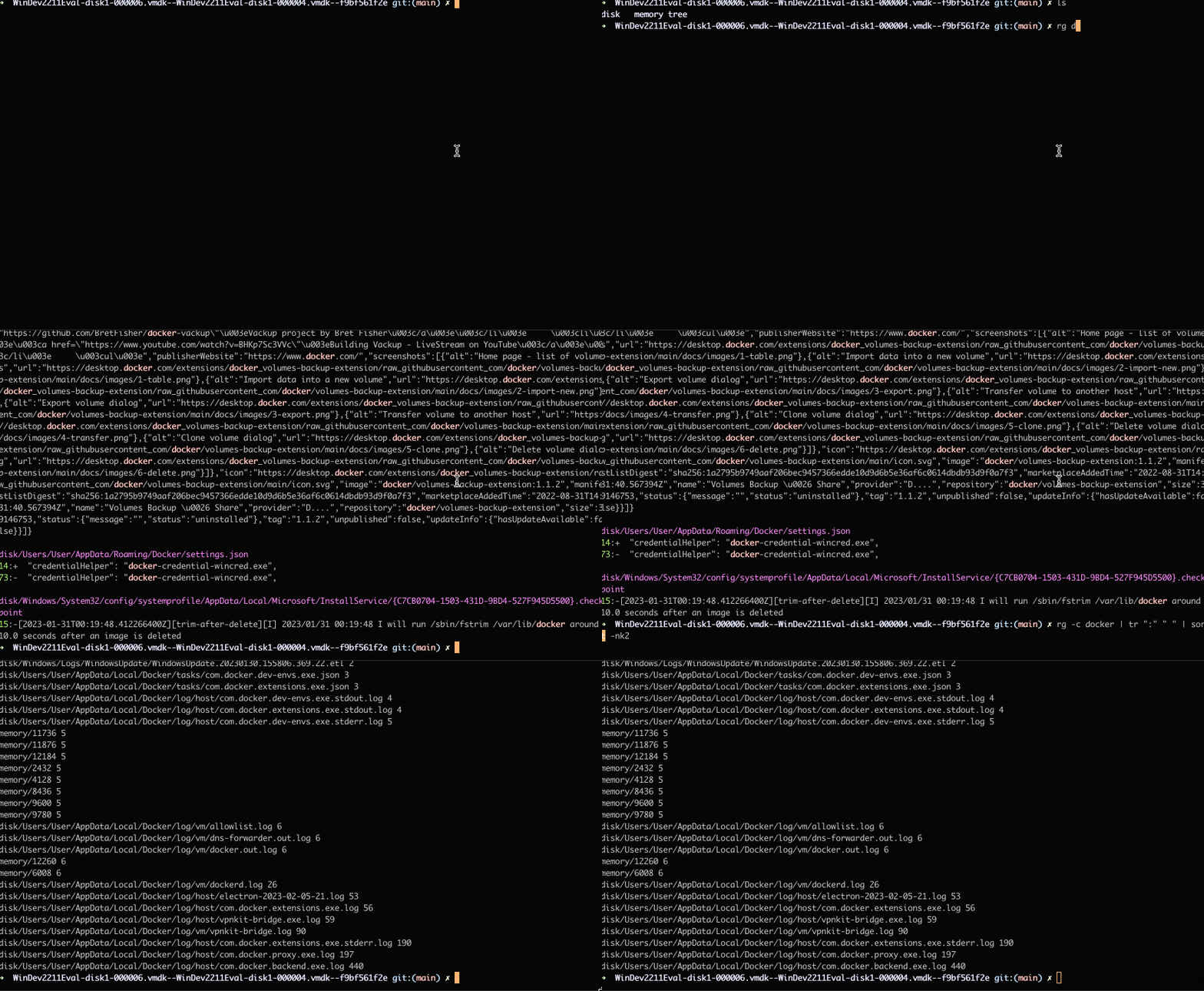
Installation
git clone github.com/vmdiff/vmdiff-prototype
cd vmdiff-prototype
Install Docker
Docker will need to be installed and running, since vmdiff uses docker-compose.
Install dependencies for the CLI
pip install -r requirements.txt
Usage
You'll need a directory in which the virtual machine snapshots (.vmdk and .vmem files) are all stored.
For VMWare, the default directories are:
C:\Users\<username>\My Documents\My Virtual Machines\<VM name>\(Windows)~/Virtual Machines.localized/<VM name>/(macOS)~/vmware/(Linux)
$ ./vmdiff --help

 Usage: vmdiff [OPTIONS] INPUT_DIR


 Generate and view diffs for .vmdk and .vmem files.
 EXAMPLES:

 What snapshots do I have to choose from?
     ./vmdiff "~/Virtual Machines.localized/VMName/" --list-snapshots

 Diff snapshots 1 and 2
     ./vmdiff "~/Virtual Machines.localized/VMName/" --from-snapshot 1 --to-snapshot 2

 Don't prompt me for a partition, I know it's partition 4
     ./vmdiff "~/Virtual Machines.localized/VMName/" --from-snapshot 1 --to-snapshot 2 --partition 4

 Diff generic VMDK files, not necessarily from a snapshot
     ./vmdiff ~/dir-with-vmdk-files/ --from-disk disk1.vmdk --to-disk disk2.vmdk --no-use-memory

 Only show files that have changed in the user's home directory
     ./vmdiff "~/Virtual Machines.localized/VMName/" --from-snapshot 1 --to-snapshot 2 --filter-path "/home/username/"

 Ignore .log and .txt files
     ./vmdiff "~/Virtual Machines.localized/VMName/" --from-snapshot 1 --to-snapshot 2 --filter-path "/home/username/"
 --ignore-path ".*\.log" --ignore-path ".*\.txt"

╭─ Input and output ─────────────────────────────────────────────────────────────────────────────────────────────────────────╮
│ *    input_dir      DIRECTORY  Path to virtual machine directory, or any directory containing .vmdk/.vmem files.           │
│                                [required]                                                                                  │
╰────────────────────────────────────────────────────────────────────────────────────────────────────────────────────────────╯
╭─ Options ──────────────────────────────────────────────────────────────────────────────────────────────────────────────────╮
│ --list-snapshots  -l        Show information about the VM snapshots in INPUT_DIR, e.g. the files belonging to each         │
│                             snapshot.                                                                                      │
│ --debug                     Enable debug logging.                                                                          │
│ --help                      Show this message and exit.                                                                    │
╰────────────────────────────────────────────────────────────────────────────────────────────────────────────────────────────╯
╭─ Input and output ─────────────────────────────────────────────────────────────────────────────────────────────────────────╮
│ --from-disk      -fd      PATH  Path (or filename) of first chronological disk snapshot.                                   │
│ --to-disk        -td      PATH  Path (or filename) of second chronological disk snapshot.                                  │
│ --from-memory    -fm      PATH  Path (or filename) of first chronological memory snapshot.                                 │
│ --to-memory      -tm      PATH  Path (or filename) of second chronological memory snapshot.                                │
│ --from-snapshot  -fs      TEXT  First chronological snapshot ID obtained via --list-snapshots.                             │
│ --to-snapshot    -ts      TEXT  Second chronological snapshot ID obtained via --list-snapshots.                            │
│ --partition      -p       TEXT  Disk Partition ID to use. If not set, show partitions and ask which one to use via STDIN.  │
╰────────────────────────────────────────────────────────────────────────────────────────────────────────────────────────────╯
╭─ Configuring ──────────────────────────────────────────────────────────────────────────────────────────────────────────────╮
│ --ignore-path     -i                         TEXT  List of disk path regular expressions to ignore when diffing. Multiple  │
│                                                    values accepted via e.g. "--ignore-path /path/one --ignore-path         │
│                                                    /path/two"                                                              │
│ --filter-path     -f                         TEXT  List of disk path regular expressions. Only these paths will be         │
│                                                    processed. Multiple values accepted via e.g. "--filter-path /path/one   │
│                                                    --filter-path /path/two"                                                │
│                                                    [default: /, \]                                                         │
│ --ignore-process  -I                         TEXT  Regular expression to ignore when diffing process names. Note that only │
│                                                    the first 14 characters of the process name are processed (by           │
│                                                    Volatility).                                                            │
│ --cache               --no-cache                   Whether to cache results based on input filenames and config options.   │
│                                                    [default: cache]                                                        │
│ --use-memory          --no-use-memory              Whether to process/diff memory. [default: use-memory]                   │
│ --use-disk            --no-use-disk                Whether to process/diff disks. [default: use-disk]                      │
│ --include-binary      --no-include-binary          Whether to also process and diff binary files.                          │
│                                                    [default: no-include-binary]                                            │
╰────────────────────────────────────────────────────────────────────────────────────────────────────────────────────────────╯
╭─ Display ──────────────────────────────────────────────────────────────────────────────────────────────────────────────────╮
│ --show  -s        Open browser and show diff viewer UI.                                                                    │
╰────────────────────────────────────────────────────────────────────────────────────────────────────────────────────────────╯
Typical usage
Which snapshots do I have to choose from?
./vmdiff "~/Virtual Machines.localized/VMName/" --list-snapshots
                     Found snapshots in ~/Virtual Machines.localized/VirtualMachine.vmwarevm
┏━━━━┳━━━━━━━━┳━━━━━━━━━━━━━━━━━━━━━┳━━━━━━━━━━━━━━━━━━━━━━━━━━━━━┳━━━━━━━━━━━━━━━━━━━━━━━━━━━━┳━━━━━━━━━━━━━━━━━━━━━━━━━━━━━┓
┃    ┃ Parent ┃                     ┃                             ┃                            ┃                             ┃
┃ ID ┃ ID     ┃ Creation time       ┃ Disk file                   ┃ Memory file                ┃ Description                 ┃
┡━━━━╇━━━━━━━━╇━━━━━━━━━━━━━━━━━━━━━╇━━━━━━━━━━━━━━━━━━━━━━━━━━━━━╇━━━━━━━━━━━━━━━━━━━━━━━━━━━━╇━━━━━━━━━━━━━━━━━━━━━━━━━━━━━┩
│ 1  │        │ 2022-11-17 13:24:39 │ VirtualMachine-disk1.vmdk   │ VirtualMachine-Snapshot1.… │ Initial Snapshot            │
│ 2  │ 1      │ 2022-11-17 13:39:40 │ VirtualMachine-disk1-00000… │ VirtualMachine-Snapshot2.… │ Snapshot after changes made │
└────┴────────┴─────────────────────┴─────────────────────────────┴────────────────────────────┴─────────────────────────────┘
Let's diff snapshots 1 and 2 (this will prompt you for which partition to use on STDIN unless you use --partition)
./vmdiff "~/Virtual Machines.localized/VMName/" --from-snapshot 1 --to-snapshot 2Now let's view the diffs in browser:
./vmdiff "~/Virtual Machines.localized/VMName/" --from-snapshot 1 --to-snapshot 2 --showThe UI will then be running on http://localhost:5000
Browse the diffs via shell
The raw diffs are available in a directory structure mirroring the VM in the results/ directory
How it works

Tech Stack
- Typer (CLI)
- docker-compose
- Volatility (to parse memory images)
- dfvfs (to parse disk images)
- Custom fork of pyvmdk (enables .vmdk delta disks for snapshots)
- React + TypeScript + Ant Design (frontend)
- grep (Searching diffs via command line)
Contributing
- I’m not going be working on/maintaining vmdiff for at least 12 months, maybe ever
- I’d love for someone to steal this genius idea, either forking the prototype, or making their own
Future work
- If a Windows disk has corrupted sectors,
dfvfscan’t read those sectors. This comes up a lot, and while you can runchkdskon the VM to get around it, it would be nice to not have to. - It would be nice to be able to diff snapshots of your actual computer, not a virtual machine, but this is hard without external storage
- The two snapshots of your disk may not fit on your disk itself, to say nothing of the memory snapshots