██████╗ ██████╗ ██████╗ ██╗ ████████╗
██╔══██╗██╔══██╗██╔══██╗██║ ╚══██╔══╝
██║  ██║██████╔╝██████╔╝██║    ██║
██║  ██║██╔══██╗██╔══██╗██║    ██║
╚█████╔╝██║  ██║██████╔╝██║    ██║
 ╚════╝ ╚═╝  ╚═╝╚═════╝ ╚═╝    ╚═╝
Orbit enables you to both iterate quickly on ideas and automate repetitive tasks on Slurm.



Why Orbit?
Can supercomputing feel like using a local Python or R interpreter?
On most Slurm clusters, the development loop is remote-first: SSH in, juggle environments, submit jobs, wait, read logs, repeat. That’s friction you don’t need when you’re trying to do research.
orbit is a local-first interface for Slurm. It lets you:
- Develop locally while running jobs remotely on the cluster;
- Submit, monitor, and debug jobs from your machine;
- Automate common workflows;
- Keep your code in a local git repo as the single source of truth;
- Integrate with your existing tools (neovim, VS Code, or literally anything else - it's local!).
Demo
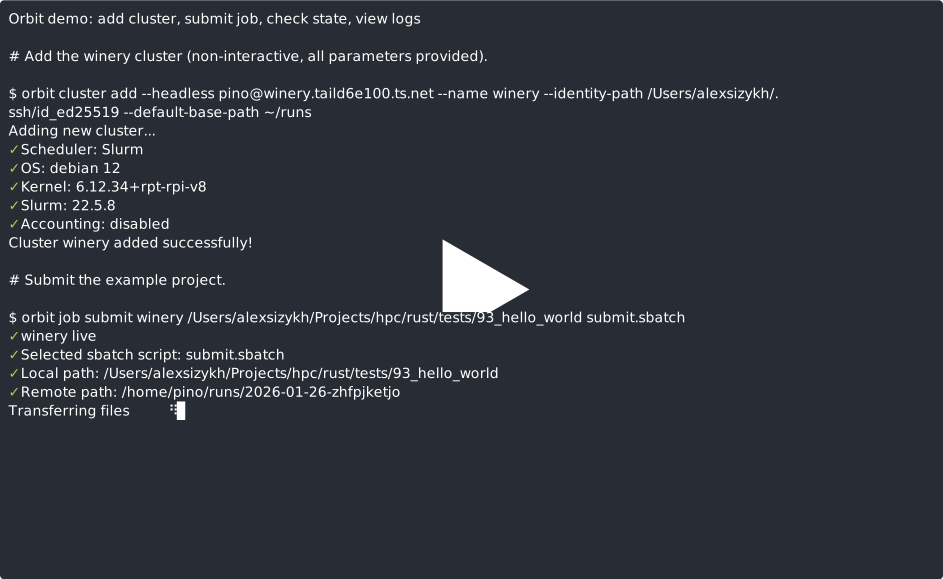
orbit aims to provide you with a single-command job submission over ssh:
Introduction
orbit allows you to do supercomputing from the comfort of your local development environment.
- Add a cluster: just tell
orbithow to connect to a cluster over SSH, and it will handle the rest for you. - Submit a job:
orbitwill handle for you where the submitted code and data will go and - Retrieve the results:
orbitprovides a simple and intuitive way to check the job's results and retrieve them once they're ready - Everything over SSH: the best part is -
orbitdoes everything over SSH!
Quickstart
# install orbit through Homebrew (https://brew.sh)
brew install vertices-solutions/orbit/orbit

# interactively add your first cluster, give it a name you will use to refer to it later
orbit cluster add

# view your clusters
orbit cluster list

# submit your analysis to your cluster!
# cd /my/super/project
orbit job submit --to <cluster name> .

# check the status of your job(s)
orbit job list

# check status of job with id 1
orbit job get 1
Installation
Homebrew (recommended)
First, make sure that you have Homebrew (https://brew.sh) installed.
brew install vertices-solutions/orbit/orbit
brew services start orbit
This installs both orbit (CLI) and orbitd (daemon). brew services runs the orbitd daemon for your user.
Build from source
- Install a Rust toolchain that supports Edition 2024.
- Build the workspace:
cargo build --release - Install binaries locally:
cargo install --path orbit(installsorbit)cargo install --path orbitd(installsorbitd)
Shell completions
orbit can generate completions for bash and zsh.
If you are installing those through Homebrew - you don't need to worry about that.
orbit completions bash > completions/orbit.bash
orbit completions zsh > completions/_orbit
To install them in your shell:
# bash (requires bash-completion)
mkdir -p ~/.local/share/bash-completion/completions
orbit completions bash > ~/.local/share/bash-completion/completions/orbit

# zsh
mkdir -p ~/.zsh/completions
orbit completions zsh > ~/.zsh/completions/_orbit
grep -q "orbit completions" ~/.zshrc || cat >> ~/.zshrc <<'EOF'
# orbit completions
fpath=(~/.zsh/completions $fpath)
autoload -Uz compinit && compinit
EOF
Configuration
Configuration file used by both CLI and server components is located in:
- macOS:
~/Library/Application Support/orbit/orbit.toml - Linux:
~/.config/orbit/orbit.toml
You can find the database file in:
- macOS:
~/Library/Application Support/orbit/orbit.sqlite - Linux:
~/.config/orbit/orbit.sqlite
Development
# Make sure you have Rust and cargo version 1.92.0+
# Ensure you also have protobuf and sqlite installed

# run tests
cargo test

# build everything
cargo build

# run the daemon and use a local config pointing to testing-specific database.
cargo run -p orbitd -- --config test.toml

# use the client
cargo run -p orbit -- --help
Documentation (Docusaurus)
Documentation source lives in website/.
- Generate CLI command reference pages from live help output:
python3 scripts/generate_cli_docs.py- or
just docs-generate-cli
- Run docs locally:
cd website && npm installnpm run start
- Build static docs:
just docs-build
- Snapshot versioned docs for a release:
./scripts/version_docs.sh <x.y.z>- or
just docs-version <x.y.z>
Project Structure
Project structure is described in detail in architecture/ARCHITECTURE.md.
Release policy
Releases are handled by @lubitelpospat. Before a tag is released, code is tested by unit-tests and end-to-end; this is automated in Justfile.
Version policy
This project uses Semantic versioning. In short:
- Patch version is incremented if only backward compatible bug fixes were introduced;
- Minor version is incremented if new, backward compatible functionality is introduced to the public API;
- Major version is incremented if changes incompatible with the previous version are introduced;
- Before the first major release (1.0.0), changes breaking the interface might happen between minor versions: public API is considered unstable;
- Both CLI interface and gRPC interface are considered to be public-facing.
Compatibility
orbit has been tested on clusters with Slurm versions newer than 22.05.8.
User reports have shown that earlier versions of Slurm are also compatible. If you encounter any bugs on any Slurm version - report them through Issues and make sure to include Slurm version in your report.
Getting help
Do you have any questions or have you encountered any bugs? Please open a GitHub issue — happy to help. When creating an issue, make sure to include the following:
- Are you building the code from source, or installing it from homebrew?
- What version of orbit are you running?
- What Slurm version is on your cluster?
- What OS, including version, are you using?
Known issues
- Unreachable cluster sometimes causes timeouts of
cluster listandcluster get <cluster name>. This is a known issue that's being worked on orbitandorbitdare tightly coupled; decoupling them and improving the gRPC API documentation will be a major focus of work after v1.0 release.
License
GNU Affero General Public License v3.0 (AGPL-3.0-only). See LICENSE.