Diagrams that agents write as text and people read as figures.


ablauf is a small text format for diagrams and the renderer that draws it as themed SVG. The author decides where each step sits and which side each edge leaves and enters, so a small edit leaves the rest of the picture where it was. The renderer never moves anything; it reports every problem with its line number, so an agent can check a diagram without seeing it.

Three kinds
Routed flows, outcome fan-outs and sequences of messages, in light and dark,
with your own colours through --ab-* custom properties.

Playback
A play section after a flow walks the reader through it step by step, in
one or more scenarios, with captions. It lives in the same text, so it fits in
a Markdown code block.
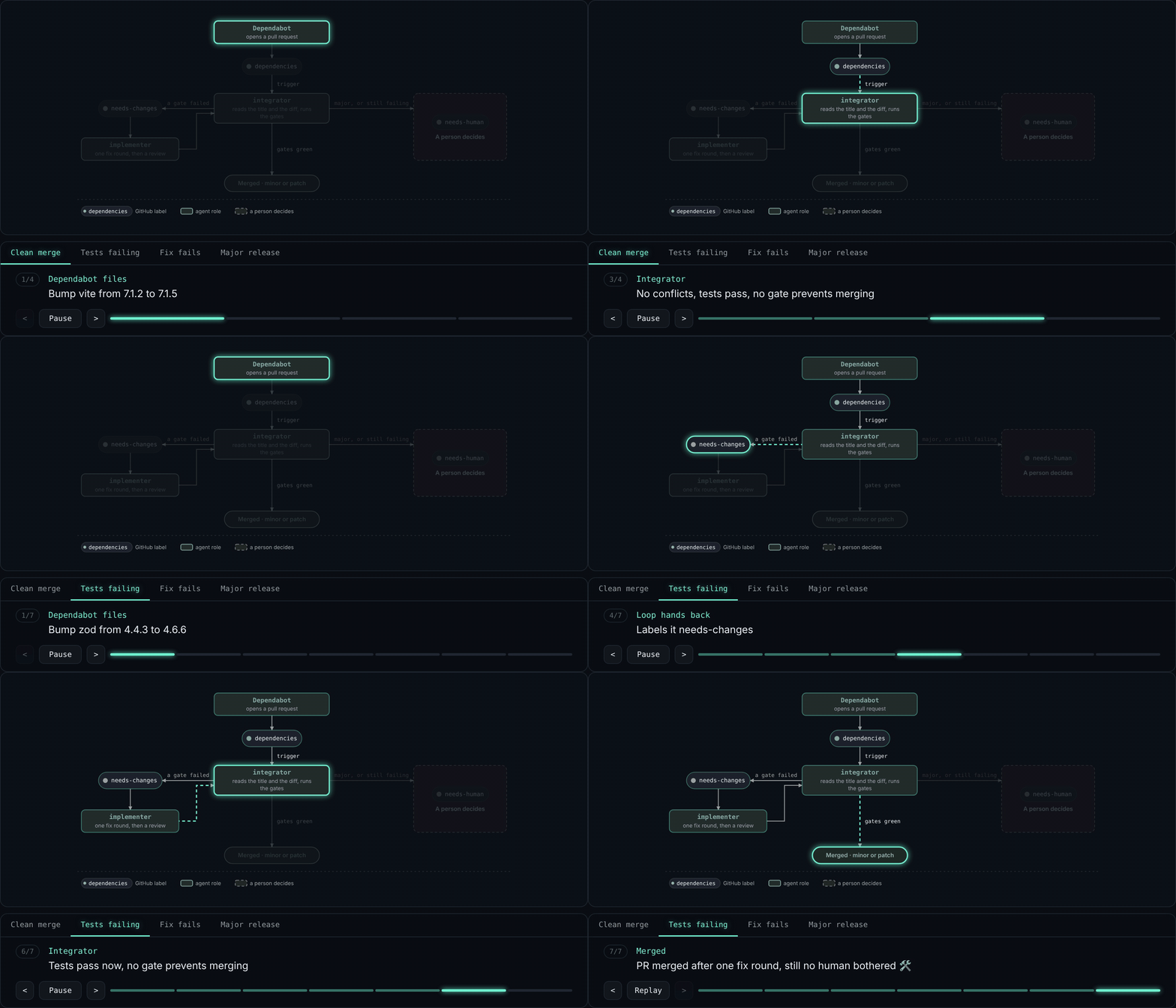
The second scenario in the GIF, written under the Dependabot flow:
play "Tests failing"
  step dependabot actor="Dependabot files" "Bump zod from 4.4.3 to 4.6.6"
  step dependencies
  step integrator 2.4s actor="Integrator" "A test fails, so it gets one fix round"
  step needs-changes
  step implementer actor="Implementer" "Fixes two assertions; a reviewer checks the fix"
  step integrator actor="Integrator" "Tests pass now"
  step merged
In a page, one call adds the scenario tabs, the buttons, the step bar and the caption under the figure:
import { render } from "@uberblick/ablauf";
import { mountPlayback } from "@uberblick/ablauf/playback";

const { svg, timelines } = render(source, { idPrefix: "dependabot" });
figure.innerHTML = svg;
const mount = mountPlayback(figure, figure.querySelector("svg"), timelines);
// After replacing just the inline SVG with a freshly rendered one:
// mount.update(replacementSvg, replacementTimelines); // Paused, same controls/player.
const unsubscribe = mount.player.subscribe(state => console.log(state));
// unsubscribe(); mount.destroy(); // When these are no longer needed.
The figure starts idle and fully visible. Play or a scenario tab starts playback;
finishing keeps the completed path and last caption. Replay starts again from the
first step, or resets to idle under reduced motion. Autoplay is opt-in with
{ autoplay: true }, which waits until half the figure is in view before starting.
pauseWhenOffscreen: true pauses manual playback outside the viewport. Hidden
documents and disconnected figures also pause; start them explicitly after
returning. Focus the controls panel for Space and Left/Right shortcuts.
See rebinding, subscriptions and lifecycle behavior.
{ expand: true } adds an Expand button, and mount.expand() does the same from
host controls: both open the figure and its controls in the viewer below.
Sequences use the same play sections, with each step targeting a message by
its number. Fan-out playback is still to come.
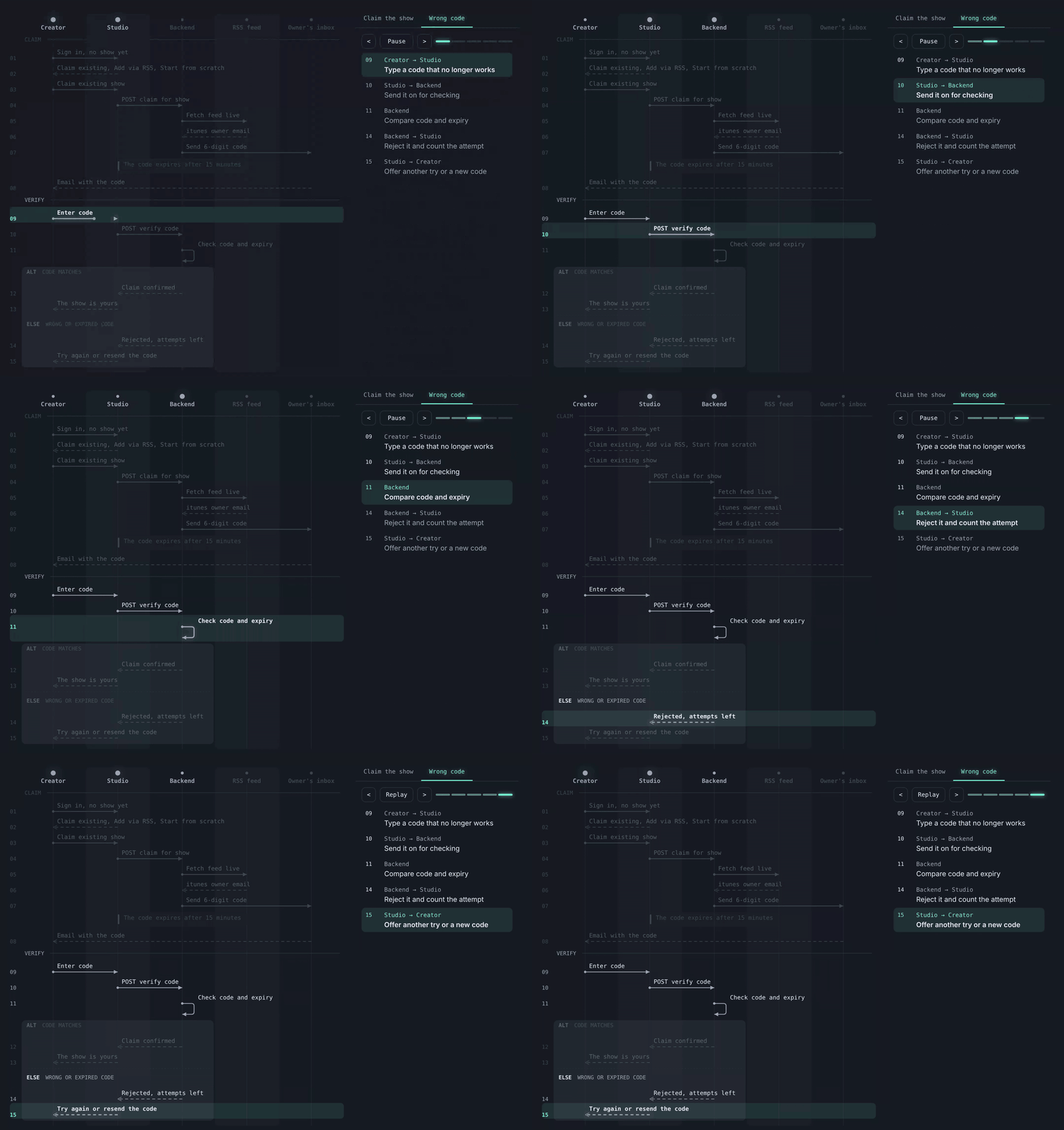
The “Wrong code” scenario from claim-play.flow:
play "Wrong code"
  step 9 "Type a code that no longer works"
  step 10 "Send it on for checking"
  step 11 "Compare code and expiry"
  step 14 "Reject it and count the attempt"
  step 15 "Offer another try or a new code"
Viewer
Any rendered figure, playable or not, can open in a full-window viewer with zoom, Fit, pinch and drag panning, an optional Copy of its source and host buttons:
import { openViewer } from "@uberblick/ablauf/viewer";

const viewer = openViewer(figure.querySelector("svg"), { source });
// viewer.close(); // Also closes on Close, Escape or the backdrop.
See the viewer API.
Install
Requires Node.js 22.18 or newer.
Install it in your project:
npm install @uberblick/ablauf
Save this as render-flow.mjs:
import { readFile, writeFile } from "node:fs/promises";
import { render } from "@uberblick/ablauf";

const [input, output] = process.argv.slice(2);
if (!input || !output) {
  console.error("Usage: node render-flow.mjs input.flow output.svg");
  process.exit(2);
}

const source = await readFile(input, "utf8");
const { svg, diagnostics } = render(source, {
  idPrefix: "build-flow",
  scheme: "light",
});
await writeFile(output, svg);

for (const { line, severity, message } of diagnostics) {
  console.error(`${input}:${line} ${severity}: ${message}`);
}
// Keep the SVG for inspection, but fail the build on any source problem.
process.exitCode = diagnostics.length ? 1 : 0;
Run it with a flow file and the desired output path:
node render-flow.mjs diagram.flow diagram.svg
Playback, options and themes are in the API docs and host page themes.
Learn more
- ablauf.uberblick.ai: every kind with its source.
- The primer: the whole format on one page, for agents.
- Motivation: why we built it.
ablauf started as a Mermaid subset. Mermaid lays diagrams out for you and
covers far more diagram types; if you need that, it is the better choice.
ablauf keeps Mermaid's familiar arrows (-->, -.->, : label) but has no
automatic layout and no Mermaid import or export.
Develop
With mise: mise trust && mise run setup, then
mise run playground for a live editor on http://localhost:4620 and
mise run ci before you push. mise tasks lists the rest;
releases covers publishing. Report vulnerabilities as
SECURITY.md describes.
License
MIT