




TruLens finds where your agent fails and where you can cut cost without losing quality. Open source, OpenTelemetry-native.
Instrument any app with a decorator, score every step with LLM judges that explain themselves, then compare versions and ship the one that earns it. Tracing is OpenTelemetry-native, so a trace is portable to any OTLP backend, and evaluations run either as traces land or over a dataset after the fact.
Read more about the core concepts behind TruLens including Metrics, the RAG Triad, and Honest, Harmless and Helpful Evals.
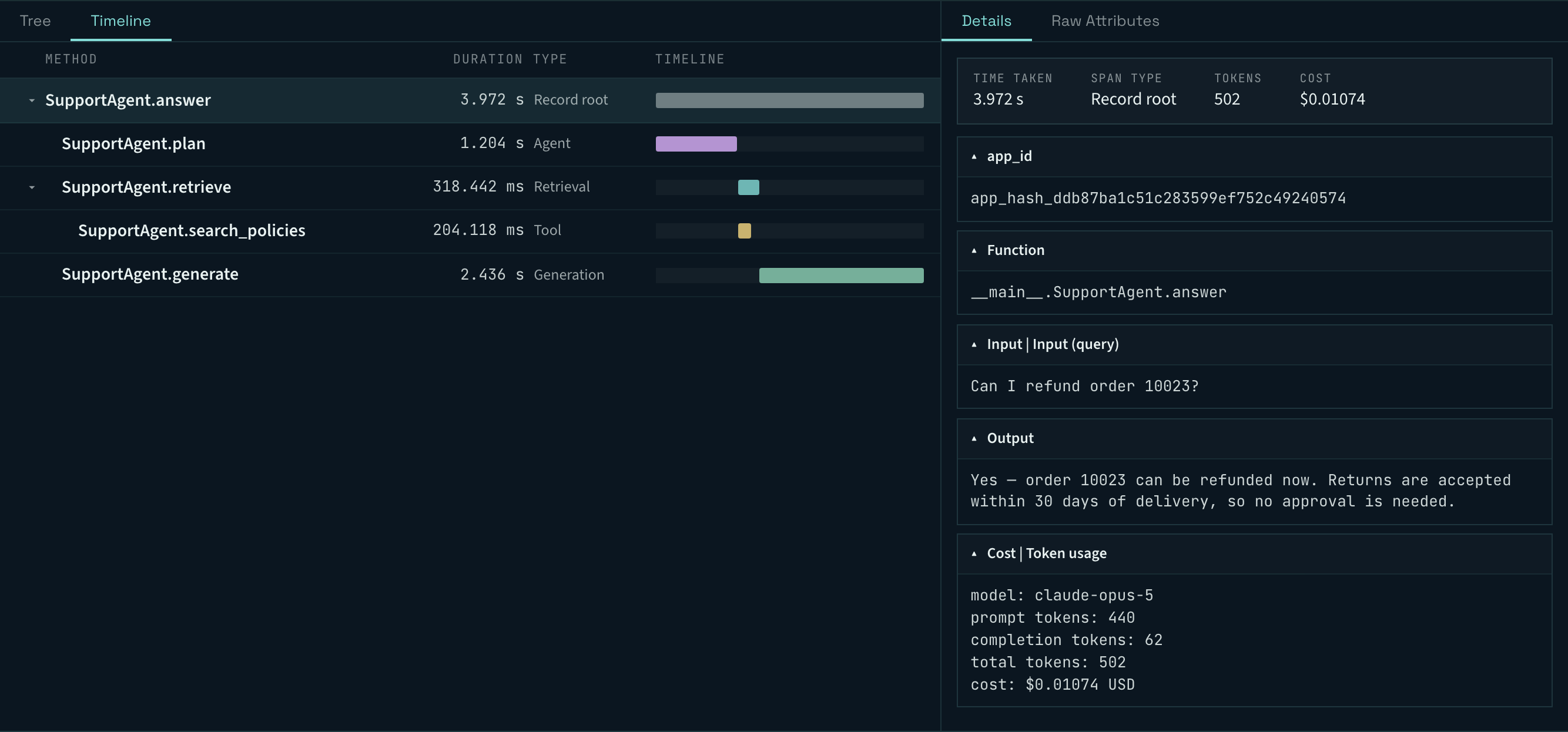
Trace every step
Latency, inputs, outputs, tokens and cost, recorded per step, so a bad answer has a traceable cause rather than a vibe.
Compare versions, ship the frontier
Scores, latency and cost per app version, so the tradeoff is visible instead of guessed. The cheapest version is often not the worst one.

Don't take our word for it
TruLens judges are graded against human annotations, out of the box.
| Result | Metric | Detail |
|---|---|---|
| 95% | Agent errors caught with Agent GPA on TRAIL/GAIA | 267 of 281 human-annotated errors, against 55% for the baseline trace judge (arXiv:2510.08847) |
| 0.81 | Groundedness F1 on LLM-AggreFact | Ahead of a fine-tuned proprietary model, Bespoke-MiniCheck-7B, on F1, precision and recall over an 11,000-example holdout (RAG triad benchmarks) |
| 0.93 | Context relevance NDCG@5 | First of five tools on three of four ranking metrics, ahead of WandB Weave, RAGAS, DeepEval and UpTrain (AIMultiple, 23 March 2026) |
| 4.2:1 | Context relevance adversarial win-loss | Scored the correct passage over a near-copy with one fact swapped 4.2 times for every reversal, against 3.3:1 for the next best tool (AIMultiple) |
Adopted by AI teams at
Walmart Global Tech, Cisco, J.P. Morgan Chase, Equinix, VMware by Broadcom, Hitachi Digital Services, Thomson Reuters, phData, HID Global and others. See ADOPTERS.md.
Installation and Setup
Install the trulens pip package from PyPI.
Install with a specific LLM provider for feedback evaluation:
pip install trulens trulens-providers-openai   # OpenAI / Azure OpenAI
pip install trulens trulens-providers-litellm  # LiteLLM (Anthropic, Cohere, Mistral, …)
pip install trulens trulens-providers-google   # Google Gemini
pip install trulens trulens-providers-bedrock  # AWS Bedrock
pip install trulens trulens-providers-cortex   # Snowflake Cortex
pip install trulens trulens-providers-huggingface  # HuggingFace
pip install trulens trulens-providers-langchain    # LangChain models
Install with a specific app framework integration:
pip install trulens trulens-apps-langchain    # LangChain / LangGraph
pip install trulens trulens-apps-llamaindex  # LlamaIndex
Quick Usage
Walk through how to instrument and evaluate a RAG built from scratch with TruLens.

Key Features
🔭 OpenTelemetry-based tracing
TruLens instrumentation is built on OpenTelemetry. Every function call, LLM generation, retrieval, and tool invocation is captured as a structured OTEL span. This makes TruLens interoperable with existing observability infrastructure — export traces to Jaeger, Grafana Tempo, Datadog, or any OTLP-compatible backend.
from trulens.core.otel.instrument import instrument
from trulens.otel.semconv.trace import SpanAttributes

class MyRAG:
    @instrument(
        span_type=SpanAttributes.SpanType.RETRIEVAL,
        attributes={
            SpanAttributes.RETRIEVAL.QUERY_TEXT: "query",
            SpanAttributes.RETRIEVAL.RETRIEVED_CONTEXTS: "return",
        },
    )
    def retrieve(self, query: str) -> list:
        ...
🤖 Agentic evaluations
Seven purpose-built evaluators for agentic systems — each measuring a distinct aspect of agent behavior:
| Evaluator | What it measures |
|---|---|
| LogicalConsistency | Reasoning coherence; flags hallucinations and unsupported assertions |
| ExecutionEfficiency | Redundant steps, unnecessary retries, wasted computation |
| PlanAdherence | Whether execution followed the stated plan |
| PlanQuality | Intrinsic plan quality — strategy, not outcome |
| ToolSelection | Right tool chosen for each subtask |
| ToolCalling | Argument validity and output interpretation |
| ToolQuality | External tool/service reliability |
📊 Batch and inline evaluation
Run evaluations alongside your app, on existing data, or in offline batch mode:
# Inline — evaluate as the app runs
with tru_recorder as recording:
    response = my_app.query("What is TruLens?")

# Batch — evaluate a pre-collected dataset using the Run API
from trulens.core.run import RunConfig

run_config = RunConfig(
    run_name="batch_eval_v1",
    dataset_name="eval_questions",
    source_type="TABLE",
    dataset_spec={"input": "QUESTION"},
    invocation_max_workers=8,
    metric_max_workers=4,
)
run = tru_app.add_run(run_config=run_config)
run.start()
run.compute_metrics([relevance, groundedness])
🔌 MCP support
Instrument Model Context Protocol tool calls
with the MCP span type to capture tool name, arguments, output, and latency:
@instrument(span_type=SpanAttributes.SpanType.MCP)
def call_mcp_tool(self, tool_name: str, arguments: dict) -> str:
    ...
🎯 Selector API
Target any span attribute for evaluation using the flexible Selector API:
from trulens.core import Metric, Selector

f_context_relevance = Metric(
    name="Context Relevance",
    implementation=provider.context_relevance,
    selectors={
        "input": Selector.select_record_input(),
        "context": Selector.select_context(),
    },
)
Supported LLM Providers
| Provider | Package |
|---|---|
| OpenAI / Azure OpenAI | trulens-providers-openai |
| LiteLLM (Anthropic, Cohere, Mistral, and more) | trulens-providers-litellm |
| Google Gemini | trulens-providers-google |
| AWS Bedrock | trulens-providers-bedrock |
| Snowflake Cortex | trulens-providers-cortex |
| HuggingFace | trulens-providers-huggingface |
| LangChain models | trulens-providers-langchain |
💡 Contributing & Community
Interested in contributing? See our contributing guide for more details.
The best way to support TruLens is to give us a ⭐ on GitHub and join our discourse community!