

Contextual voice dictation for macOS. Powered by NVIDIA Parakeet running locally on Apple Silicon via MLX.
Press a hotkey, speak, and your words are transcribed and pasted into whatever app is focused. A small LLM post-processes the transcription to fix errors, using project-specific context from a WORDBIRD.md file.
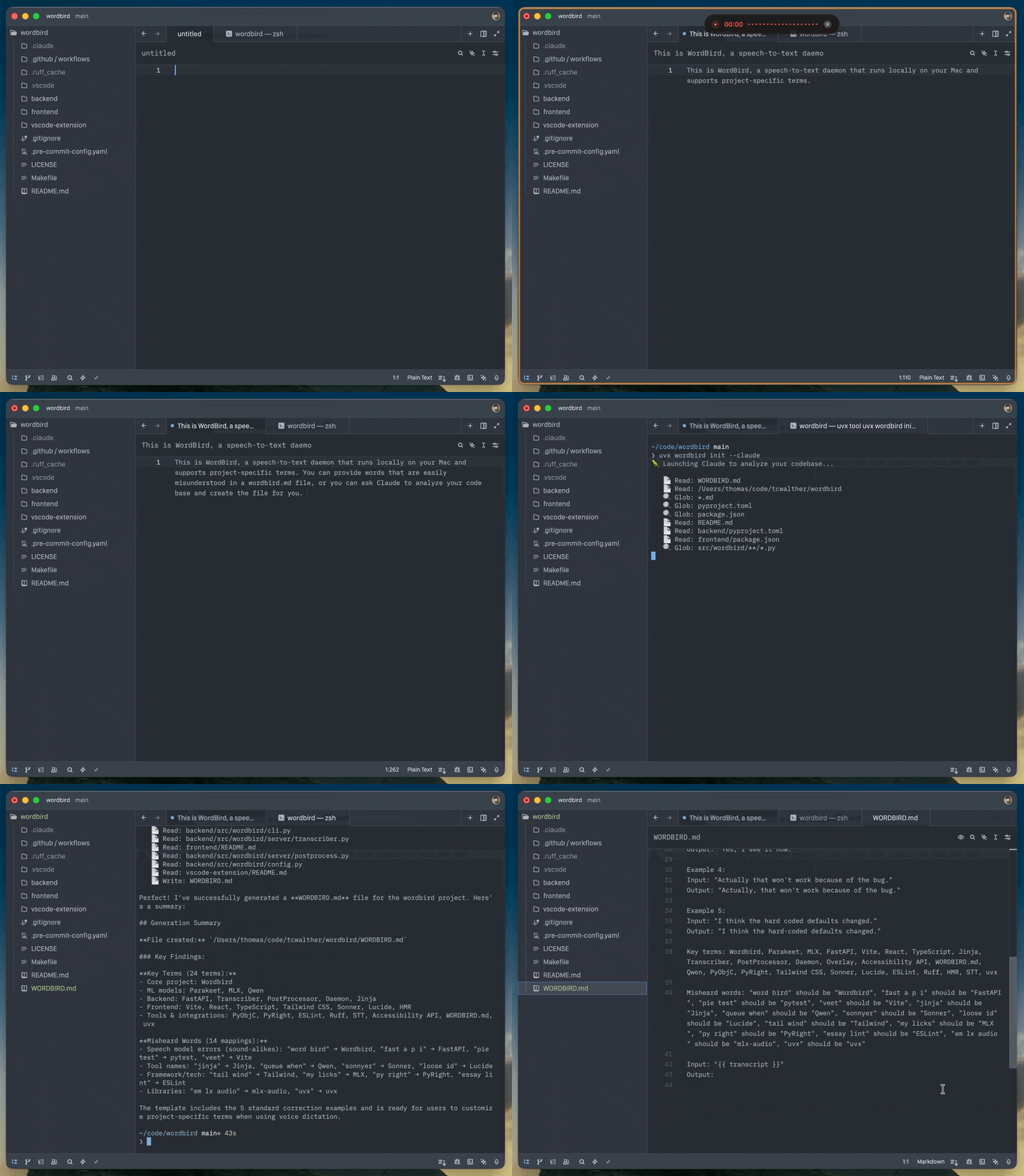
Getting started
Requires macOS on Apple Silicon (M1+) and Python 3.10+.
# Run with uvx (no install needed)
uvx wordbird

# Or run in the background
uvx wordbird start
uvx wordbird stop
uvx wordbird status
Context-aware correction
You can improve transcription with a WORDBIRD.md file which lists project-specific terms that may be misheard.
Either create a standard template, or ask Claude to analyze your project and create the file for you.
uvx wordbird init
# or
uvx wordbird init --claude # uses haiku by default; you can specify model via --claude {haiku,sonnet,opus}
Context detection works with:
- Terminal.app — detects the focused tab's shell working directory
- VS Code / VS Code Insiders — via the Wordbird extension, which works with local and remote (SSH) workspaces
- Zed - detects the focused window's project directory out of the box, no extension needed
Transcription and pasting work in any app.
A WORDBIRD.md file looks like this:
---
transcription_model: mlx-community/parakeet-tdt-0.6b-v2
fix_model: mlx-community/Qwen2.5-1.5B-Instruct-4bit
---

{# Your correction prompt and examples here #}

{# Key terms: MyApp, some_function, PostgreSQL #}
{# Names: Alice, Bob #}
{# Misheard words: "bird word" should be "Birdword" #}

Input: "{{ transcript }}"
Output:
The file is a Jinja template. {{ transcript }} is replaced with the raw transcription. The YAML front matter lets you override models per-project.
Hotkey
| Action | Default |
|---|---|
| Toggle recording | Right ⌘ + Space |
| Transcribe and submit | Right ⌘ + Return (opt-in) |
The submit shortcut transcribes, pastes, and presses Return — useful for chat and terminal workflows. Enable it in the dashboard settings.
Configurable via CLI flags or the dashboard settings:
--modifier-key KEY   Modifier key (default: rcmd). Options: rcmd, lcmd, ralt, lalt, rshift, lshift, rctrl, lctrl, fn
--toggle-key KEY     Toggle key (default: space). Options: space, return, tab, escape
Options
--model MODEL        Transcription model (default: mlx-community/parakeet-tdt-0.6b-v2)
--fix-model MODEL    Post-processor model (default: mlx-community/Qwen2.5-1.5B-Instruct-4bit)
--no-fix             Disable LLM post-processing
--no-server          Don't spawn the API server (run it separately)
Dashboard
Wordbird runs a local web dashboard (default localhost:7870). Click the bird in the menu bar → Dashboard… to open it.
- History — browse transcriptions with timestamps, app name, working directory, and duration. See both original and corrected text.
- Settings — configure hotkey, models, and post-processing. Changes take effect within seconds.
- Stats — words dictated, recording time, WPM, session count.
uvx wordbird history        # view history from the CLI
uvx wordbird config         # show or create the config file
Data
All data is stored in ~/.wordbird/:
| File | Purpose |
|---|---|
wordbird.toml |
User configuration |
wordbird.db |
Transcription history (SQLite) |
server.json |
Server port discovery |
wordbird.pid |
Singleton lock |
wordbird.log |
Background mode logs |
Menu bar
Wordbird shows a bird icon in the menu bar:
- ⚪ White — idle
- 🟡 Yellow — connecting mic
- 🔴 Red — listening
- ✨ Sparkles — transcribing
Permissions
Wordbird needs three macOS permissions, granted to your terminal app:
- 🎤 Microphone — to record your voice
- 🔐 Accessibility — to paste text
- ⌨️ Input Monitoring — to detect the global hotkey
Wordbird checks these on startup and tells you what's missing.
Architecture
Wordbird runs as two sibling processes managed by a thin CLI:
- Server (
wordbird-server) — FastAPI app handling transcription, post-processing, history, config, and serving the React dashboard - Daemon (
wordbird-daemon) — macOS-native process handling hotkeys, mic recording, overlay HUD, menu bar, and clipboard pasting
The daemon sends recorded audio to the server via HTTP. The server runs ML inference in a thread pool so the dashboard stays responsive during transcription.
uvx wordbird          # starts both (recommended)
uvx wordbird-server   # just the API server
uvx wordbird-daemon   # just the daemon (expects server running)
Development
make backend-dev      # API server with hot reload
make daemon-dev       # daemon only (expects server running)
make frontend-dev     # Vite dev server with API proxy
make dev              # backend + frontend + daemon (all three)
make wordbird         # build frontend + run everything
make backend-test     # run pytest
License
MIT