The following directions illustrate a step by step plan to building a working, gravity-driven mechanical clock escapement.

Parts
The escapement can be constructed using the parts shown here.

-
Some string used for the drive weight.
-
Some weight to drive the escapement. This escapement runs on about 200 g (0.5 lbs) of weight (minimum). Shown is a piece of brass, but anything can be used.
-
Parts cut from some solid material (wood, plastic, composite, etc.); see Frame section below.
-
#10 screw with washer and wing nut.
-
4, 2" long #6 screws with washers and nuts.
-
4 fidget spinner bearings. Outer diameter is 22 mm, inner diameter (of hole) is 8 mm, and thickness is 7 mm. These are very common bearings and sizes. (See Amazon and eBay.)
-
Two 5/16" (7.9 mm) (dia.) wooden dowels cut to 4" long. The dowels should be able to slide into the (8 mm) holes on the bearings.
-
3D printed escape wheel and anchor (see below).
-
50 g (0.1 lb) weight to be attached to the swinging end of the pendulum. This helps it keep swinging. Can be anything as long as it has a bit of mass.
-
1, 2" long #4 screw with washer and wing nut (this is for clamping the pendulum onto the escape wheel axis; see below).
Frame
To start, you'll have to CNC four parts out of some solid material like wood (manual cutting is possible). Any machinable wood, plastic or composite will work too (like MDF, Delrin, acrylic, etc). The only condition is that your stock is a minimum of 0.28" (7 mm) in thickness. We used pine (wood) planks used for shelving (from our local hardware store) that are about 0.8" thick. The material serves as the escapement frame, holding everything togetgher.
The CAD (.DWG file) is in the CAD folder, and looks like this

Parts 1 and 2 are the sides of the escapement frame. Part 3 is the base of the frame, and Part 2 is the top of the frame. The circles pointed to by the red arrows are to be CNCed as "pockets cuts" to 0.2730" (7 mm) deep. The circles with the blue arrows are to be cut through. The smaller (outer) circles on Parts 3 and 4 are also 0.1" deep pocket cuts, and serve as countersinks for #6 screw heads. The inner circles on Parts 3 and 4 are to be cut through. The large circles at the center of Parts 3 and 4 are pocket cuts to about 1/2 the depth of your material. These are not critial to the escapement; they are meant to countersink a clamping bolt. The inner center circles on these pieces are to be cut through.
We get good results using two cutting tools. All pockets cuts on Parts 1, 2, 3 and 4 and the countersinks and through-holes on Parts 3 and 4 are first cut with a 1/8" end mill. Some precision is needed on the pocket cuts to hold the bearings snugly with just friction (and the 1/8" cutting tool seems to deliver on this). Everything else can be done with a 1/4" end mill. Use tabs on all parts.
Our CNC simulation looks like this

We used a Shapeoko CNC from Carbide3D. For efficient material use, we used a 12"x5.5"x0.8" plank. Set the origin to the upper-left and clamps along the long edges of the board.
No CNC?
It's possible to make the frame without a CNC machine. The only real need is to hold two pairs of bearings 2.36" apart center-to-center (+/- 0.01", escapements are finicky). The bearings are 22 mm in diameter; holes to hold them can be made with an appropriately sized Forestner bit. Some sanding or firming up may be needed.
Frame assembly
Once the frame pieces are ready, clamp (but do not glue) them together like this

and be sure everything is squared up. You are just clamping them here; do not apply any glue. The pocket cuts that hold the bearings can face either inward or outward.
When secure, drill up through the four holes in the base, from the bottom of the base, up into both of the sides, like this

Each hole should be able to accommodate one of the 4 #6 screws. We used a 5/32" drill bit. The screws are meant to hold the sides to the base and should sink nicely into the CNCed countersinks. The top isn't really used or important. You can attach it to the escapement as a final step if you wish.
Escape wheel and anchor
The escape wheel (with 24 teeth) and the anchor look like this (on the way to a 3D printer):

We 3d printed these with PLA (STL files for them are in the STL folder), but they can be CNCed as well (see .dwg file in the Cad folder). If CNCed, they should be cut on 1/4" thick stock. We've used wood, acrylic and Delrin. If anyone cuts them from Aluminum or Brass (or any metal), let us know (we'd love to see it). We recommend a 1/8" endmill.
Here's our 3D printed result.

No CNC or 3D printer?
If you trace the pattern onto a 1/4" wooden plank, you can try to cut out the escape wheel and anchor with a scroll saw, but it is difficult to get parts that will work. Escapements are finicky and the 3D printed parts here are good to 0.1 mm or so. With a scroll saw, you'll get the parts, but the escapement may not work no matter how hard you try. Mounting holes for each can be made with a 7/16" drill bit.
Mounting the escape wheel and anchor
The escape wheel and anchor are to be mounted onto the 7/16" x 4" wooden dowels. As you can tell, the wheel and anchor are keyed, so you'll have to sand down a flat section on the dowels to allow them to fit into the holes on either. Sand carefully, as this should be a very snug fit. We used Gorilla Glue two-part epoxy to fasten the two.
Important: Do not center the escape wheel or anchor on each's dowel. Place each about 2.5" from either end as shown here. The asymmetry is so you can have the pendulum swing on one side of the escapement, and the weight fall on the other.


Near the tip of the long end of the dowel holding the escape wheel, drill a small radial hole through the dowel that you can thread a string through. (This will help later when attaching the drive weight.)
Support
This piece is not critical, but allows for the escapement to be clamped over the end of a table while you're working on it.

We cut a 7"x3" by 1/4" thick piece of scrap and drilled a hole that can accommodate the #10 screw. The hole should be positioned so the thru hole in the wooden base of the escapement can be held at the end of the support by the screw. In use, it'll look like this

Pendulum
The pendulum is a yard stick from the hardware store (used for stirring paint). They work well, because they'll give your escapement a period of about 1 second, and tend to stay straight.
To start, on one end, drill a 5/16" hole about 1" from the end. Use a hand saw to cut a slot from the end of the pendulum to the hole itself, then sand the inner edges of the slot a bit to give it some width, as shown here

Next, drill a hole suitable for a #4 screw transverse to the slot, like this

(These steps might be reversed for better results; that is, drill the #4 transverse hole first.)
Next, insert the 2" long #4 screw with its wing nut.

This will allow you to clamp the pendulum onto the anchor's dowel/axle.
On the other end of the pendulum, drill a hole so you can mount a small weight onto the end of the pedulum. This is not critical (do whatever is needed). Ours looks like this

and

A small stack of washers has also worked for this. The mass at the end of the rod gives the swinging pendulum some good angular momentum, which helps to keep the escapement running.
Assembly
Now, push the bearings into the holes on the frame. The bearings should fit snugly, but not too tight. If the bearings are pushed on too much by the wood, they won't turn freely. You should be able to push them into the frame fairly easily with just your fingers (no hammers or forcing/pounding).

Now, juggling everything, work to assemble your parts like this.

The anchor and escape wheel should overlap horizontally. Also, be sure the longer end of the anchor goes out one side, and the longer end of the escape wheel goes out the other.
You can now mount the assembly on the support board, fastening it with the #10 screw and wing nut. Clamp it to a table so the escapement is over the edge like this.

Put the nuts onto the #6 screws, to tighten the base to the sides of the escapement.
Quick escapement tutorial
You're about ready to install the pendulum and drive weight and get your escapement running. Before that, let's take a quick look at how escapements are supposed to work.
First, the anchor and escape wheel need to be able to come into contact with one another. Further, the amount of contact they have and when they contact are somewhat critical. The shape of both the anchor and escape wheel are important as well.
This animation from here is very helpful and instructive
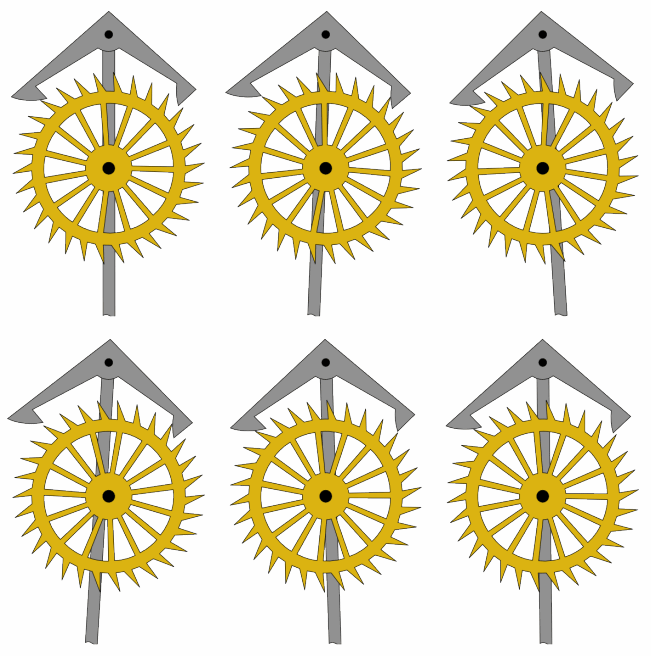
Watch it for a while and see how the anchor and escape wheel teeth interact. We need to reproduce some of this action here.
In this figure, our anchor and escape wheel in close proximity. (As you look through these figures, note that for this escapement, the escape wheel always rotates clockwise due to the drive weight, and the anchor will always oscillate back and forth.)

But the escape wheel to anchor distance is too far apart for any working escapement. You'd have to have a very large pendulum swing angle to get the anchor's pallets to engage with the escape wheel.
Let's lower the anchor some like this

Now, imagine the anchor oscillating (as driven by the pendulum), like this

See the contact? This stops the escape wheel from spinning. The sound of the contact will be a "tick" for the clock.
Then back again.

Here there is no contact and the escape wheel is free to spin (but it won't get very far) because very soon, contact is made again like this:

This will once again stop the escape wheel again and make the "tock" sound.
It is difficult to design an escapement. It is not enough to simply periodically stop the escape wheel. The pallets have to be shaped so that the releases (after the contact) can give the pendulum a knudge by the escape wheel with each release. This puts a bit of energy into the pendulum, to keep it swinging.
Here, by trial and error, with adjusting surfaces to

When the left pallet of the anchor hits the escape wheel, it's a dead stop, with very little energy transfer back to the pendulum. The right pallet however, after it stops the crown wheel, allows the tooth to slide off of it, along its contours to impart some energy into the pendulum. There are infinite variations of this, and it's quite interesting to study. (If you ever make it to London, England, there are 100s of escapements to watch in local museums.)
The escapement here was developed by painstakingly watching non-working anchors (we made) for places where they jam up, stopping the escapement. When found, some CAD work and refabrication was done to reshape the anchor's surface to remove such jam points. The anchor design here is one that finally worked.
In this escapement, all of the distances and sizes are workable. That is, the bearing center-to-center distances (the 2.36" above), and the shapes of the escape wheel and anchor are all tied together. If for example, the bearing to bearing distance is too large or small, the anchor may not engage the crown wheel properly. Thus, this escapement design is reduced down to only one possible adjustment (see below).
Installing the pendulum and drive weight
You are now ready to install the pendulum and drive weight.
First the pendulum, which just slides and clamps onto the axle of the anchor. Get it snug for now, but do not tighten the clamp screw.

Next, tie some string through the hole on the end of the escape wheel's axle.

By whatever means, also attach your drive weight (at least 200g or 0.5 lbs) to the free end of the string.
Lastly, wind the string around the axle so it'll turn the escape wheel clockwise, as shown here.

Starting your escapement
Now, give the pendulum a small pull in one direction or the other. Hopefully the escapement will start ticking and tocking a few times. Initially, it'll likely stop after a few ticks and tocks though.
As mentioned, since all part shapes and relative orientations are all set, there is only one adjustment: the angle the pendulum makes versus the angle of the anchor.
In sum, you'll want to adjust the angle between the pendulum and the apex point on the anchor, shown here.

Tips
-
We find if the apex point is straight up when the pendulum is vertical, then the escapement should run.
-
If the escapement keeps stopping, watch it as it tries run, reviewing the "escapement tutorial" above.
-
In particular, watch the drops and releases of the anchor's pallets, into and out of the escapement wheel's teeth. The drop should be minimal for a given pallet, and the anchor's motion should be as symmetrical as possible.
-
Listen to the escapement. The tick and tock sounds should be of similar volume. If one sounds heavier or louder than the other, then adjust the pendulum/anchor orientation.
-
You can always add weight to the drive weight, but you'll want to optimize this, and run your escapement with as minimal weight as possible.
More information
-
The author got interested in making clocks in the context of the history of navigational technology. He's written all about time and clocks in Part II of this book.
-
This escapement has been written up here.
-
This video and the series that follows on making a clock is simply incredible.
Other's builds
If you build this escapement, send a pull request in this document, with a link to a Youtube video of your escapement. We'd love to see it and share it here!
- Brian T. said:
Thanks so much for posting your plans and detailed instructions for your escapement.I built my escapement following your instructions. I used a small bandsaw to cut the wheel and made 4 of them. I used a 1 once knob I had laying around for the weight. Only 1 of my escapement wheels ran without skipping or locking but I consider that pretty good. My escapement ran for about 3 minutes and 45 seconds with a fall of about 3 feet. I'm thinking of making some more wheels and a sliding bob for the pendulum along with a 3-fall pulley system to do some experimenting with getting my escapement to run longer. I have found lots of interesting stuff on-line about making escapements but I found yours most helpful in getting one actually built. Here’s a video of his version.
- uprc2005 said:
hi, we tried to replicate your nice escapement design, thanks for the inspiration. Watch it here.