


Your Kubernetes cluster is burning money. Find out where.

No agent to deploy. No dashboard to maintain. No YAML to configure. Just install and run.
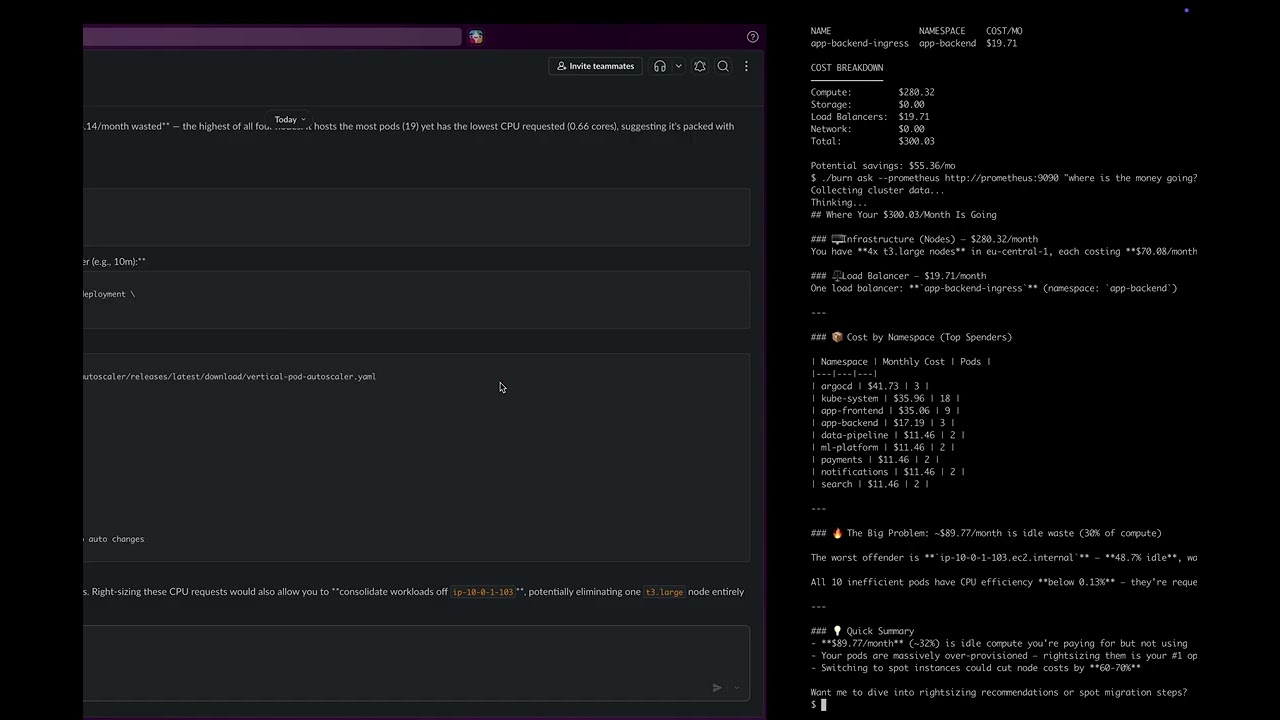
Why burn
- Zero setup:
brew install, run one command, get answers. No cluster agent, no persistent storage, no config files. - Full cost coverage: Compute, storage, load balancers, and GPU costs with cloud pricing.
- Billing reconciliation: Verify cost estimates against your real AWS CUR or Azure Cost Management bill. Per node, per disk, per load balancer.
- SP/RI/Spot detection: See which nodes have Savings Plan, Reserved Instance, or Spot coverage. Coverage gaps show 1-year RI pricing opportunities from AWS and Azure APIs.
- Optimization insights: Find rightsizing, Spot, and consolidation opportunities, using historical P95 usage when available.
- Orphaned resource detection: Find billed disks and load balancers with no matching Kubernetes resource.
- AI-powered: Ask questions in plain English, get recommendations with investigation commands.
- Slack-native:
/burnfor instant cost reports./burn reconcilefor billing verification./burn ask "..."for AI analysis. - Cloud + on-prem: Works with AWS EKS, Azure AKS, GCP GKE, and on-premise clusters. Billing reconciliation supports AWS and Azure.
- Spot readiness: Identifies which workloads pass spot-readiness checks, with discount and interruption data.
- Ingress LB detection: Detects load balancers from both Services and Ingress resources, with hostname deduplication.
- MCP server: Use burn from Claude Code, Cursor, or any MCP-compatible AI agent. Ask questions, get cost data.
- Time-aware:
--period 7dfor weekly averages instead of point-in-time snapshots.
Install
# Homebrew
brew install tanrikuluozlem/burn/burn

# Upgrade
brew upgrade tanrikuluozlem/burn/burn

# Binary
VERSION=$(curl -s https://api.github.com/repos/tanrikuluozlem/burn/releases/latest | grep tag_name | cut -d'"' -f4 | tr -d 'v') && \
curl -L "https://github.com/tanrikuluozlem/burn/releases/latest/download/burn_${VERSION}_$(uname -s | tr '[:upper:]' '[:lower:]')_$(uname -m | sed 's/x86_64/amd64/;s/aarch64/arm64/').tar.gz" | tar xz

# Docker
docker pull ghcr.io/tanrikuluozlem/burn:latest

# Helm
git clone https://github.com/tanrikuluozlem/burn.git
helm install burn ./burn/charts/burn

# Go
go install github.com/tanrikuluozlem/burn/cmd/burn@latest
macOS: If you see a Gatekeeper warning, run:
sudo xattr -d com.apple.quarantine $(which burn)
Quick start
# Cost breakdown (without Prometheus)
burn analyze

# With Prometheus (pass your Prometheus URL)
burn analyze --prometheus http://prometheus:9090

# 7-day average
burn analyze --prometheus http://prometheus:9090 --period 7d

# Drill into a namespace
burn analyze --prometheus http://prometheus:9090 --namespace argocd

# Spot readiness
burn analyze --prometheus http://prometheus:9090 --spot
Billing reconciliation
Every cost tool estimates. Burn checks it against your actual cloud bill.
AWS (CUR via Athena)

# Pass CUR config as flags
burn reconcile \
  --cur-database my_cur_db \
  --cur-table data \
  --cur-output s3://my-bucket/athena-results/ \
  --cur-region us-east-1

# Or use environment variables
export CUR_DATABASE=my_cur_db CUR_TABLE=data
export CUR_OUTPUT_LOCATION=s3://my-bucket/athena-results/ CUR_REGION=us-east-1
burn reconcile
Azure (Cost Management API)

# Pass subscription as flag
burn reconcile --provider azure \
  --azure-subscription YOUR-SUBSCRIPTION-ID

# Or use environment variable
export AZURE_SUBSCRIPTION_ID=YOUR-SUBSCRIPTION-ID
burn reconcile --provider azure
What you get:
- Per-node estimated vs actual cost with dollar difference
- Savings Plan, Reserved Instance, and Spot pricing detected per node, including partial coverage
- Coverage gaps with 1-year RI pricing from AWS and Azure pricing APIs
- Orphaned disks and load balancers in your bill with no matching K8s resource
- OS disk costs separated from data disks
- Public IP costs itemized
- Namespace cost allocation (proportional or AWS split cost allocation)
- EKS/AKS management fees tracked separately
- Data transfer cost per node
Works with both Legacy CUR and CUR 2.0. Run burn reconcile --setup for step-by-step setup instructions.
Verified against AWS Cost Explorer and Azure Cost Management portal.
AI-powered reconciliation analysis

burn reconcile --provider aws --ai
Shows why your estimated and actual costs differ, with commands to investigate each issue.
Automation
# Pipe JSON output to your monitoring or alerting pipeline
burn reconcile --provider aws -o json | jq .total_actual_cost
Spot readiness

Spot discount and interruption data.
AI recommendations
Get cluster-wide or namespace-specific recommendations:
burn analyze --prometheus http://prometheus:9090 --period 7d --ai
burn analyze --prometheus http://prometheus:9090 --namespace app-backend --ai
burn ask --prometheus http://prometheus:9090 "why is argocd so expensive?"
Ask questions in plain English

Requires ANTHROPIC_API_KEY environment variable.
Slack integration
Run burn as a Slack bot:
burn serve --port 8080 --prometheus http://prometheus:9090 --period 7d
| Command | What you get |
|---|---|
/burn |
Full cost report: nodes, namespaces, idle cost, LB, storage |
/burn ns argocd |
Pod-level breakdown for a namespace |
/burn reconcile --provider aws |
Estimated vs actual billing, SP/RI/Spot detection |
/burn reconcile --provider azure |
Estimated vs actual billing, SP/RI/Spot detection |
/burn ask "what is the single biggest waste?" |
AI analysis with investigation commands |

Slack setup
- Create a Slack App at https://api.slack.com/apps
- Add Slash Command:
/burn→ point to your server URL +/slack - Set
SLACK_SIGNING_SECRETandANTHROPIC_API_KEYenvironment variables - Expose the server (e.g., ngrok for testing, load balancer for production)
MCP server
Use burn from Claude Code, Cursor, or any MCP-compatible AI agent. Three tools: analyze, spot_readiness, reconcile.
Claude Code

claude mcp add burn -e AWS_PROFILE=your-profile \
  -e CUR_DATABASE=your_cur_db -e CUR_TABLE=data \
  -e CUR_OUTPUT_LOCATION=s3://your-bucket/athena-results/ \
  -e CUR_REGION=us-east-1 \
  -- burn mcp --prometheus http://prometheus:9090
Then ask:
I need to cut our Kubernetes costs by 20%, where do I start?
verify that against my actual AWS bill, I don't trust estimates
show me the spot details, what breaks if we switch?
Cursor

Add to ~/.cursor/mcp.json:
{
  "mcpServers": {
    "burn": {
      "command": "burn",
      "args": ["mcp", "--prometheus", "http://prometheus:9090"],
      "env": {
        "AWS_PROFILE": "your-profile",
        "CUR_DATABASE": "your_cur_db",
        "CUR_TABLE": "data",
        "CUR_OUTPUT_LOCATION": "s3://your-bucket/athena-results/",
        "CUR_REGION": "us-east-1"
      }
    }
  }
}
CUR environment variables are optional, only needed for reconcile. Without them, analyze and spot_readiness work out of the box.
On-prem and GPU clusters
Burn works with on-premise and GPU clusters. Set your own resource rates:
burn analyze \
  --cpu-price 0.05 \
  --ram-price 0.008 \
  --gpu-price 3.00 \
  --storage-price 0.10
Without custom pricing, cloud-equivalent rates are used as defaults.
How it works
Kubernetes API   → nodes, pods, PVCs, services, ingresses
Prometheus       → actual CPU & memory usage (optional)
Cloud Pricing    → VM, storage, GPU, and RI pricing (AWS, Azure live APIs; GCP embedded)
AWS CUR / Azure  → actual billing data for reconciliation (optional)
         ↓
    Cost Engine  → estimates, reconciliation, SP/RI/Spot detection
         ↓
    CLI / Slack / MCP / AI Recommendations
Pricing sources
| Priority | Source | When |
|---|---|---|
| 1 | AWS/Azure pricing API | Live, region-aware when credentials are available |
| 2 | Embedded pricing DB | AWS, Azure, and GCP instances; AWS and Azure updated weekly via CI |
| 3 | Static fallback | Estimates based on instance family for unknown types |
Storage and load balancer costs are fetched from cloud APIs when available, with static fallbacks. Usage-based charges (data processing, LCU) depend on traffic volume and are not included. GPU nodes are detected automatically and priced via ratio-based cost splitting.
Deploy to Kubernetes
Helm
git clone https://github.com/tanrikuluozlem/burn.git

# Create secrets
kubectl create secret generic burn-secrets \
  --from-literal=slack-webhook-url=https://hooks.slack.com/services/YOUR/WEBHOOK/URL \
  --from-literal=anthropic-api-key=sk-ant-YOUR-KEY

# Install
helm install burn ./burn/charts/burn \
  --set prometheus.url=http://prometheus:9090 \
  --set schedule="0 9 * * 1-5"
On EKS with IRSA (for AWS pricing and CUR access):
helm install burn ./burn/charts/burn \
  --set prometheus.url=http://prometheus:9090 \
  --set schedule="0 9 * * 1-5" \
  --set serviceAccount.annotations."eks\.amazonaws\.com/role-arn"=arn:aws:iam::ACCOUNT:role/burn
The chart includes RBAC (ClusterRole with read-only access to nodes, pods, services, PVCs, PVs, ingresses, deployments, statefulsets, daemonsets, and PDBs). Disable with --set rbac.create=false.
CronJob (daily Slack reports)
apiVersion: batch/v1
kind: CronJob
metadata:
  name: burn-report
spec:
  schedule: "0 9 * * 1-5"
  jobTemplate:
    spec:
      template:
        spec:
          containers:
          - name: burn
            image: ghcr.io/tanrikuluozlem/burn:latest
            args:
            - analyze
            - --prometheus
            - http://prometheus-server.monitoring:80
            - --period
            - 7d
            - --ai
            - --slack
            env:
            - name: ANTHROPIC_API_KEY
              valueFrom:
                secretKeyRef:
                  name: burn-secrets
                  key: anthropic-api-key
            - name: SLACK_WEBHOOK_URL
              valueFrom:
                secretKeyRef:
                  name: burn-secrets
                  key: slack-webhook-url
          restartPolicy: OnFailure
Configuration
| Variable | Description | Required for |
|---|---|---|
ANTHROPIC_API_KEY |
Claude API key | --ai, ask, serve |
SLACK_WEBHOOK_URL |
Slack webhook URL | --slack |
SLACK_SIGNING_SECRET |
Slack app signing secret | serve |
CUR_DATABASE |
Athena database name | reconcile (AWS) |
CUR_TABLE |
Athena table name | reconcile (AWS) |
CUR_OUTPUT_LOCATION |
S3 path for Athena results | reconcile (AWS) |
CUR_WORKGROUP |
Athena workgroup (default: primary) | reconcile (AWS) |
CUR_REGION |
AWS region for Athena | reconcile (AWS) |
AZURE_SUBSCRIPTION_ID |
Azure subscription ID | reconcile (Azure) |
| Flag | Description |
|---|---|
--cpu-price |
CPU cost per core per hour (on-prem) |
--ram-price |
RAM cost per GiB per hour (on-prem) |
--gpu-price |
GPU cost per unit per hour (on-prem) |
--storage-price |
Storage cost per GiB per month (on-prem) |
--spot |
Show spot instance readiness details |
--provider |
Cloud provider for reconciliation (aws or azure) |
--days |
Number of days to reconcile (default: 7) |
--cost-type |
Azure cost type: amortized or actual (default: amortized) |
--data-delay |
Billing data delay in hours (default: 48; AWS CUR ~24h, Azure EA/MCA 8-24h, Azure PAYG up to 72h) |
AWS and Azure clusters use live cloud pricing automatically. GCP clusters use embedded pricing. On-prem pricing flags are for clusters where cloud pricing is not available.
Development
make build    # Build binary
make test     # Run tests
License
Apache 2.0. See LICENSE for details.