
Multi-protocol Internet censorship circumvention stack, optimized for hostile network environments.


Built and maintained by the MoaV community.
Why MoaV exists
No single transport survives every censor. A protocol that works this morning can be fingerprinted by the afternoon, and the person depending on it has no way to know in advance which one will hold.
So MoaV ships many at once, from the same server and the same user bundle. When one path stops working the user switches to another instead of waiting for someone to re-deploy. That is the whole idea; everything else here is in service of it.
Read the Mission, the Threat Model for what MoaV does and does not protect, and the Philosophy for the longer argument.
Table of Contents
Links · Website · Docs · Telegram · moav-client
Get started · Why MoaV exists · Features · See it in action · Quick Start · Requirements
Use it · Using MoaV · Client Apps · Documentation
Under the hood · Architecture · Protocols · Project Structure · Security
Help out · Support the project · Related projects
More · License · Changelog · Disclaimer

Features
- Multiple protocols — 16+ circumvention transports and fallback paths, plus optional Psiphon, Tor and MahsaNet donation integrations:
- High-stealth proxy — Reality (VLESS), Trojan, Hysteria2, XHTTP (VLESS+XHTTP+Reality), CDN (VLESS+WS via Cloudflare)
- Full VPN — WireGuard (direct & wstunnel), AmneziaWG
- Specialty — TrustTunnel (HTTP/2+QUIC), Telegram MTProxy (fake-TLS), Shadowsocks-2022, GooseRelay (SOCKS5 via Google Apps Script)
- DNS tunnels — dnstt, Slipstream, MasterDNS, and XDNS — all four run simultaneously on port 53 via
dns-router
- Stealth-first - All traffic looks like normal HTTPS, WebSocket, DNS, or IMAPS
- Per-user credentials - Create, revoke, and manage users independently
- Easy deployment - Docker Compose based, single command setup
- Mobile-friendly - QR codes and links for easy client import
- Decoy website - Serves innocent content to unauthenticated visitors
- Home server ready - Run on Raspberry Pi or any ARM64/x64 Linux as a personal VPN
- Psiphon Conduit - Optional bandwidth donation to help others bypass censorship
- Tor Snowflake - Optional bandwidth donation to help Tor users bypass censorship
- MahsaNet - Donate VPN configs to help Mahsa VPN users (2M+ users in Iran)
- Monitoring - Optional Grafana + Prometheus observability stack
Read the full documentation — setup guides, CLI reference, client apps, monitoring, OPSEC, and more.
See it in action
Quick Start
One-liner install (recommended):
curl -fsSL moav.sh/install.sh | bashThis will:
- Install prerequisites (Docker, git, qrencode) if missing
- Clone MoaV to
/opt/moav - Prompt for domain, email, and admin password
- Offer to install
moavcommand globally - Launch the interactive setup
Manual install (alternative):
git clone https://github.com/MotherofallVPNs/moav.git
cd moav
cp .env.example .env
nano .env  # Set DOMAIN, ACME_EMAIL, ADMIN_PASSWORD
./moav.sh

Then use moav from anywhere. See the Setup Guide for complete instructions, the CLI Reference for every command, or Using MoaV below for the day-to-day essentials.
Architecture
                                                              ┌───────────────┐  ┌───────────────┐
       ┌───────────────┐                                      │ Psiphon Users │  │   Tor Users   │
       │  Your Clients │                                      │  (worldwide)  │  │  (worldwide)  │
       │   (private)   │                                      └───────┬───────┘  └───────┬───────┘
       └───────┬───────┘                                              │                  │
               │                                                      │                  │
               ├─────────────────┐                                    │                  │
               │                 │ (when IP blocked)                  │                  │
               │          ┌──────┴───────┐                            │                  │
               │          │ Cloudflare   │                            │                  │
               │          │  CDN (VLESS) │                            │                  │
               │          └──────┬───────┘                            │                  │
               │                 │                                    │                  │
┌──────────────╪─────────────────╪────────────────────────────────────╪──────────────────╪─────────┐
│              │                 │          Restricted Internet       │                  │         │
└──────────────╪─────────────────╪────────────────────────────────────╪──────────────────╪─────────┘
               │                 │                                    │                  │
╔══════════════╪═════════════════╪════════════════════════════════════╪══════════════════╪═════════╗
║              │                 │                                    │                  │         ║
║     ┌────────┼─────────────────┼───────┼──────┐                     │                  │         ║
║     │        │         │       │       │      │                     │                  │         ║
║     ▼        ▼         ▼       ▼       ▼      ▼                     ▼                  ▼         ║
║ ┌─────────┐┌─────────┐┌───────┐┌─────────┐┌────────┐          ┌───────────┐      ┌───────────┐   ║
║ │ Reality ││WireGuard││ Trust ││  DNS    ││Telegram│          │           │      │           │   ║
║ │ 443/tcp ││51820/udp││Tunnel ││ 53/udp  ││MTProxy │          │  Conduit  │      │ Snowflake │   ║
║ │ Trojan  ││AmneziaWG││4443/  │├─────────┤│993/tcp │          │  (donate  │      │  (donate  │   ║
║ │8443/tcp ││51821/udp││tcp+udp││  dnstt  │└───┬────┘          │ bandwidth)│      │ bandwidth)│   ║
║ │Hysteria2││wstunnel ││       ││Slipstrm │    │               └─────┬─────┘      └─────┬─────┘   ║
║ │ 443/udp ││8080/tcp ││       │└────┬────┘    │                     │                  │         ║
║ │ CDN WS  │└────┬────┘└───┬───┘     │         │                     │                  │         ║
║ │2082/tcp │     │         │         │         │  ┌────────────────┐ │                  │     M   ║
║ ├─────────┤     │         │         │         │  │ Grafana  :9444 │ │                  │     O   ║
║ │ sing-box│     │         │         │         │  │ Prometheus     │ │                  │     A   ║
║ └────┬────┘     │         │         │         │  └────────────────┘ │                  │     V   ║
║      │          │         │         │         │                     │                  │         ║
╚══════╪══════════╪═════════╪═════════╪═════════╪═════════════════════╪══════════════════╪═════════╝
       │          │         │         │         │                     │                  │
       ▼          ▼         ▼         ▼         ▼                     ▼                  ▼
┌─────────────────────────────────────────────────────────────────────────────────────────────────┐
│                                        Open Internet                                            │
└─────────────────────────────────────────────────────────────────────────────────────────────────┘
Protocols
| Protocol | Port (open) | Domain? | Stealth | Speed | Default | Use Case |
|---|---|---|---|---|---|---|
| Reality (VLESS) | 443/tcp | No¹ | ★★★★★ | ★★★★☆ | ✅ | Primary; a strong first choice where it works |
| Hysteria2 | 443/udp | Yes | ★★★★☆ | ★★★★★ | ✅ | Fast, works when TCP throttled |
| Trojan | 8443/tcp | Yes | ★★★★☆ | ★★★★☆ | ✅ | Backup, uses your domain |
| AnyTLS | 8445/tcp | Yes | ★★★★★ | ★★★★☆ | ⬜ | Defeats TLS-in-TLS fingerprinting |
| Shadowsocks-2022 | 8388/tcp+udp | No | ★★★★☆ | ★★★★☆ | ✅ | AEAD-2022 anti-probing; Outline-app compatible |
| CDN (VLESS+WS) | 2082/tcp² | via CDN² | ★★★★★ | ★★★☆☆ | ⬜ | When the server IP is blocked; needs a CDN in front |
| TrustTunnel | 4443/tcp+udp | Yes | ★★★★★ | ★★★★☆ | ✅ | HTTP/2 & QUIC, looks like HTTPS |
| WireGuard (Direct) | 51820/udp | No | ★★★☆☆ | ★★★★★ | ✅ | Full VPN, simple setup |
| AmneziaWG | 51821/udp | No | ★★★★★ | ★★★★☆ | ✅ | Obfuscated WireGuard, resists common DPI signatures |
| WireGuard (wstunnel) | 8080/tcp | No | ★★★★☆ | ★★★★☆ | ✅ | VPN when UDP is blocked |
| DNS Tunnel (dnstt) | 53/udp | Yes³ | ★★★☆☆ | ★☆☆☆☆ | ✅ | Last resort, hard to block |
| Slipstream | 53/udp | Yes³ | ★★★☆☆ | ★★☆☆☆ | ✅ | QUIC-over-DNS, 1.5-5x faster than dnstt |
| MasterDNS | 53/udp | Yes³ | ★★★☆☆ | ★★★☆☆ | ✅ | Advanced DNS tunnel (ARQ + resolver LB), MahsaNG v16 |
| XDNS (VLESS+mKCP+DNS) | 53/udp | Yes³ | ★★★☆☆ | ★☆☆☆☆ | ✅ | DNS tunnel via Xray FinalMask |
| GooseRelay | 8444/tcp | No | ★★★★★ | ★★☆☆☆ | ⬜ | SOCKS5 via Google Apps Script, fronted as google.com, MahsaNG v16 |
| Telegram MTProxy | 993/tcp | No | ★★★★☆ | ★★★☆☆ | ✅ | Fake-TLS V2, direct Telegram access |
| XHTTP (VLESS+XHTTP+Reality) | 2096/tcp | No | ★★★★★ | ★★★★☆ | ✅ | Xray-core, no domain needed |
¹ Reality borrows a public SNI via REALITY_TARGET, so no domain of your own is needed.
² CDN opens 2082 on the origin; clients connect on 443 through the CDN. Cloudflare needs a domain, CloudFront needs none. See DNS → CDN mode.
³ DNS tunnels need NS delegation on your domain; all four share 53/udp.
⁴ No domain? Every protocol marked No above (Reality, Shadowsocks-2022, WireGuard, AmneziaWG, WireGuard-over-wstunnel, Telegram MTProxy, GooseRelay, XHTTP), plus the admin dashboard (self-signed) and both bandwidth-donation relays, run without one. Run moav and pick "No domain", or moav domainless. The domain-only protocols are skipped.
Management ports (not protocols, open only if you use them): 9443 admin dashboard · 9444 Grafana · 80/tcp Let's Encrypt (setup only).
Default = enabled in .env.example; services still only run under their profile (moav start <name>). Bandwidth donation — Psiphon Conduit, Tor Snowflake, MahsaNet — are actions (moav donate / moav start conduit), not protocols; see Support the project.
Using MoaV
moav                          # interactive menu over everything below
moav status                   # what's running, which profiles, health at a glance
moav doctor                   # diagnose DNS, ports, certificates, resources
moav logs sing-box            # tail a service

moav user add alice --package # create a user and build their .zip bundle
moav user add --batch 10      # ten at once
moav user list                # who exists
moav user revoke alice        # revoke immediately
moav test alice               # prove alice's configs actually pass traffic

moav start proxy admin        # start specific profiles
moav restart sing-box         # apply an .env change to one service
moav donate                   # donate configs/bandwidth (MahsaNet, Psiphon, Snowflake)
Each user gets outputs/bundles/<username>/ with config files, QR codes and a
README.html guide, plus a base64 V2Ray subscription in subscription.txt that
imports every proxy protocol at once into MahsaNG,
v2rayNG or Hiddify. See the MahsaNG import guide.
To verify a bundle from a client's point of view, moav-client ingests the subscription, probes every endpoint through its own tunnel and routes through whichever is live and fastest.
Dashboards — password for both is set during install (ADMIN_PASSWORD in .env),
reset with moav admin password:
| URL | Login | |
|---|---|---|
| Admin dashboard | https://your-server:9443 |
any username — only the password is checked |
| Grafana | https://your-server:9444 |
user admin |
Profiles: proxy, wireguard, amneziawg, dnstunnel, trusttunnel, telegram, xhttp, admin, conduit, snowflake, gooserelay, monitoring, all
Moving to a new server: moav export, then on the new host moav import moav-backup-*.tar.gz
and moav migrate-ip <new-ip>. Walkthrough in the Setup Guide.
Psiphon Conduit: once conduit is running it already serves Psiphon users through the
public pool — nothing to share. moav conduit link prints a private claim link/QR for
specific people; it embeds the private key, so share it only via Personal Pairing inside
Ryve. See Psiphon Conduit.
Every command, flag and environment variable: CLI Reference.
Client Apps
| Platform | Recommended Apps |
|---|---|
| iOS | Happ, Streisand, Hiddify, WireGuard, Shadowrocket |
| Android | Happ, v2rayNG, Hiddify, WireGuard, NekoBox |
| macOS | Happ, Hiddify, Streisand, WireGuard |
| Windows | Happ, v2rayN, Hiddify, WireGuard |
| Linux | Hiddify, sing-box, WireGuard |
See the Client Setup guide for the complete list and setup instructions, or moav-client (docs) for a desktop/CLI client with automatic failover.
Documentation
Full docs: moav.sh/docs
Deploy — Quick Start · Setup Guide · VPS Deployment · DNS Configuration
Understand — Supported Protocols · Architecture · Threat Model · Mission · Philosophy
Connect users — Client Apps · MahsaNG Import · MoaV Client
Operate — CLI Reference · Monitoring · Troubleshooting · OPSEC Guide
Contribute — Development & Testing · Translating the Docs · Support MoaV
For AI agents — AGENTS.md for working in this repo, llms.txt as a compact index, llms-full.txt for the whole corpus.
Requirements
Server:
- Debian 12, Ubuntu 22.04/24.04
- 1 vCPU, 1 GB RAM minimum (2 vCPU, 2 GB RAM if using monitoring)
- Public IPv4
- Domain name (optional - see Domain-less Mode below)
Ports: each protocol's port and whether it needs a domain are in the Protocols table above — open only the ones you enable.
Project Structure
MoaV/
├── moav.sh              # the CLI: argument parsing, then straight into a cmd_* function
├── lib/                 # 15 host-side modules — service, users, bootstrap, doctor,
│                        #   cert, migrate, donate, nettune, dns, peers, menu, …
├── scripts/             # container entrypoints + provisioning
│   ├── *-entrypoint.sh  #   one per service
│   └── lib/             #   shared libraries, mounted into containers as /app/lib
├── configs/             # *.template files (tracked) rendered into *.json/*.conf (gitignored)
├── dockerfiles/         # image builds, one per service
├── exporters/           # Prometheus exporters (sing-box, xray, wireguard, amneziawg, …)
├── dns-router/          # Go daemon fanning port 53 out to the four DNS tunnels
├── admin/               # FastAPI dashboard
├── web/                 # decoy website
├── data/                # protocols.json — the protocol roster, source of truth
├── tests/               # the regression suite, named after the bug class each pins
├── docs/devdocs/        # contributor docs (the user docs live in moav-site)
├── docker-compose.yml
└── .env.example         # annotated config reference; commonly-changed vars up top
moav.sh is a dispatcher — the logic lives in lib/. outputs/ (user bundles) and
state/ (keys) are generated and gitignored.
Security
- All protocols require authentication
- Decoy website for unauthenticated traffic
- Per-user credentials with instant revocation
- Minimal logging (no URLs, no content)
- TLS 1.3 everywhere
Container privileges. Docker API access is confined to a filtered socket
proxy on a management-only network, and the monitoring exporters read published
state files instead of the socket. The one accepted exception is cAdvisor
(optional monitoring profile): per-container CPU/memory/disk stats require
privileged mode with read-only host mounts, which is its upstream deployment
mode. If that trade-off is not acceptable, run without the monitoring profile.
See the OPSEC guide for security guidelines.
Support the project
Run a server. The highest-leverage thing you can do. Every MoaV server is capacity that did not exist before — for your family, your colleagues, or people you will never meet. Nobody runs infrastructure on your behalf; the network is the people running servers. A $5/month VPS or a Raspberry Pi is enough.
Donate capacity you already have. Relay for other circumvention networks without
having users of your own — moav start conduit (Psiphon) and moav start snowflake
(Tor), both opt-in and capped. Or donate configs to MahsaNet
with moav donate, which hands them to users in Iran who cannot set up a server.
Contribute or translate. Bugs, protocols, packaging, docs — see
Development & Testing. Translation is the most useful
non-code contribution: the docs are scaffolded for Farsi and Russian and one page is a
complete contribution (how to translate). Bug reports
count too — a reproducible report with moav doctor output is often more work than the fix.
Never paste bundles,
.envcontents or share links into an issue — they contain live keys.
Fund the infrastructure. Test servers for the end-to-end suite, domains, build capacity. Not salaries.
| Platform | Link |
|---|---|
| GitHub Sponsors | github.com/sponsors/shayanb |
| Buy Me a Coffee | buymeacoffee.com/pangana |
| Coin | Address |
|---|---|
| Bitcoin (BTC) | bc1p6rpwzkgrlvpkre0n94fqayafpw47kl2j5lmvhvl0rfrtzm94wvvsmd3w5s |
| Ethereum (ETH) ¹ | 0xB4D06BDb0C2f1D81E0b0b805Ed813F4ffe960aE2 |
| Monero (XMR) | 8BmduJgZLok9xiaX8FboSWBBbzYAugqLxUts7eZNsF2x9QDhk3Ua7iwQufBBNB8VFzcMEMAE1Uo6PjQvAYNYHmXsBRbqQqG |
| Zcash (ZEC) | u1pclheucppc87qlffh9m8wjfw87w2nka40w9nxjuqnyppj0kx9xp7z9rg6wx556662y5f8dtfyeynmm2lnz5aqvaqzmnpajlq0mnmkntdqzqqegk8lwv09cnudf3ttzm3878p3030j3lwupj257rmmv9p3ea32hgwsuf3jdh8ycv7q587 |
| Lightning | lno1zrxq8pjw7qjlm68mtp7e3yvxee4y5xrgjhhyf2fxhlphpckrvevh50u0q0zdgjjahpdv7tnd9vstumyrw43snsmfmlzv0pgkqrjkgy48tsne6qsr0k64d8rz4k394pmre2rgnmstdxqsfj0w4dsmq2ec73ssek5wzqtqqv7argu9ptk09h9vfvvvham5xnwe306zjw6lptxx0d2yfk5rlvznjwefmsrmmpu8qnkqmghe0v96c8qy3m3nqgm977ay8f5p6k2d2ll2j3knnc8c4s6haufe203jx4ufy8z25tsscqqseg8jzh2qykejnc9sp2v4qm3z2q |
| Lightning Address | shayan@bitrefill.me |
| Tron ² | TBSCbnTZCELrMnioobZMkah5r9qS6B1tC6 |
¹ Ethereum (ETH) — same address on every EVM chain (Arbitrum, Optimism, Base, Gnosis…) and any ERC20 (USDC, USDT, DAI…)
² Tron — TRX and TRC-20 only — not interchangeable with the EVM address
Addresses are generated from .github/FUNDING.yml, the single
source of truth, so what you see here is whatever that file says. Take them from this
page or the repository over HTTPS and check the first and last characters after pasting.
We will never DM you an address.
Come say hi. Telegram for questions, help and release announcements · X · GitHub Issues for bugs and feature requests · docs.
Related projects
MoaV is a deployment layer. The protocol work belongs to these projects:
Companion client — moav-client: desktop/CLI client that ingests a MoaV subscription, probes every endpoint through its own tunnel and routes through whichever is live and fastest (docs).
Protocol engines
| Project | What MoaV uses it for |
|---|---|
| sing-box | Reality, Trojan, AnyTLS, Hysteria2, Shadowsocks-2022, CDN VLESS+WS |
| Xray-core | XHTTP and XDNS |
| REALITY | the TLS camouflage Reality and XHTTP are built on |
| AmneziaWG · tools | DPI-resistant WireGuard |
| WireGuard | the direct UDP VPN |
| wstunnel | WireGuard over wss:// when UDP is blocked |
| TrustTunnel · client | HTTP/2 + QUIC transport |
| telemt | Telegram MTProxy (fake-TLS) |
| dnstt | the original DNS tunnel |
| Slipstream | QUIC-over-DNS |
| MasterDNS | ARQ + resolver load-balancing DNS tunnel |
| GooseRelay | SOCKS5 over Google Apps Script |
Networks you can donate capacity to
| Project | |
|---|---|
| Psiphon Conduit | relay for Psiphon users |
| Tor Snowflake | relay for Tor users |
| MahsaNet · MahsaNG | config donation and the client most Iranian users have |
Monitoring — Prometheus, Grafana, node_exporter, cAdvisor.
Pinned versions for all of these live in .env.example.
License
MIT
Changelog
See CHANGELOG.md for release notes and version history.
Stars over time
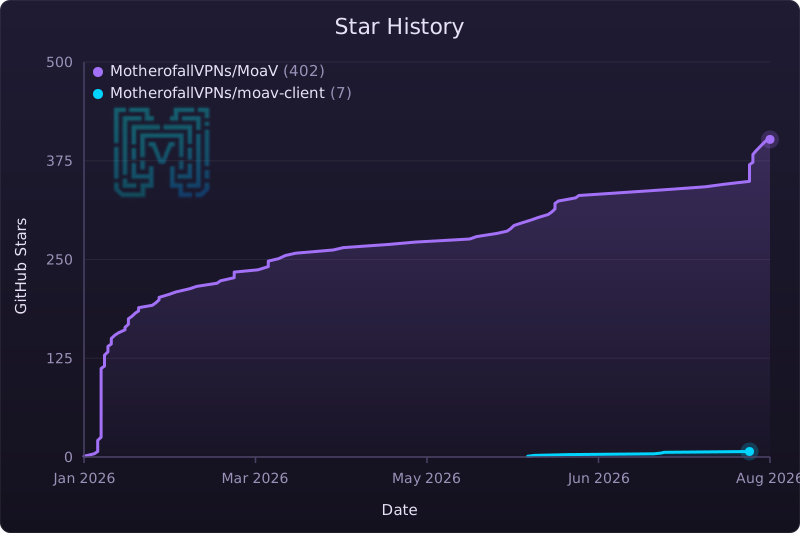
Every star helps someone else find a way through. Thank you.
Disclaimer
This project provides general-purpose open-source networking software only.
It is not a service, not a platform, and not an operated network.
The authors and contributors:
- Do not operate infrastructure
- Do not provide access
- Do not distribute credentials
- Do not manage users
- Do not coordinate deployments
All usage, deployment, and operation are the sole responsibility of third parties.
This software is provided “AS IS”, without warranty of any kind.
The authors and contributors accept no liability for any use or misuse of this software.
Users are responsible for complying with all applicable laws and regulations.