Getting Started
Use pip to install gref. Then, run Python from the command line.
> pip install gref
> python
Once Python is running, import gref and call the main function.
>>> import gref
>>> gref.main()
Usage
Upon booting gref, we are welcomed and can SEARCH for articles:
    Welcome :-)

α > search bibliometrics

     PMID: 31995273
    Title: Application of bibliometrics in medicine: a historical bibliometrics
           analysis.
       By: Kokol, Blažun Vošner, Završnik

     PMID: 34586077
    Title: Scholarly Productivity Evaluation of KL2 Scholars Using
           Bibliometrics and Federal Follow-on Funding: Cross-Institution
           Study.
       By: Qua, Yu, Patel, Dave, Cornelius, Pelfrey

    [...]
Once we have an article that we like, we can ADD a new file within the gref
database, and then ADD a new reference (using the PubMed ID) to the active
file:
α > add biblio

    Making...

δ > add 31995273

    Adding...
    Found 31995273...
Now comes the fun part, growing the search! Let's use the GROW command and
specify 5 cycles (each cycle grabs 5 articles):
δ > grow 5

    Growing...
    Found 34169036...
    Found 30951931...
    Found 33240559...
    Found 34306062...
    Found 34150972...

    [...]
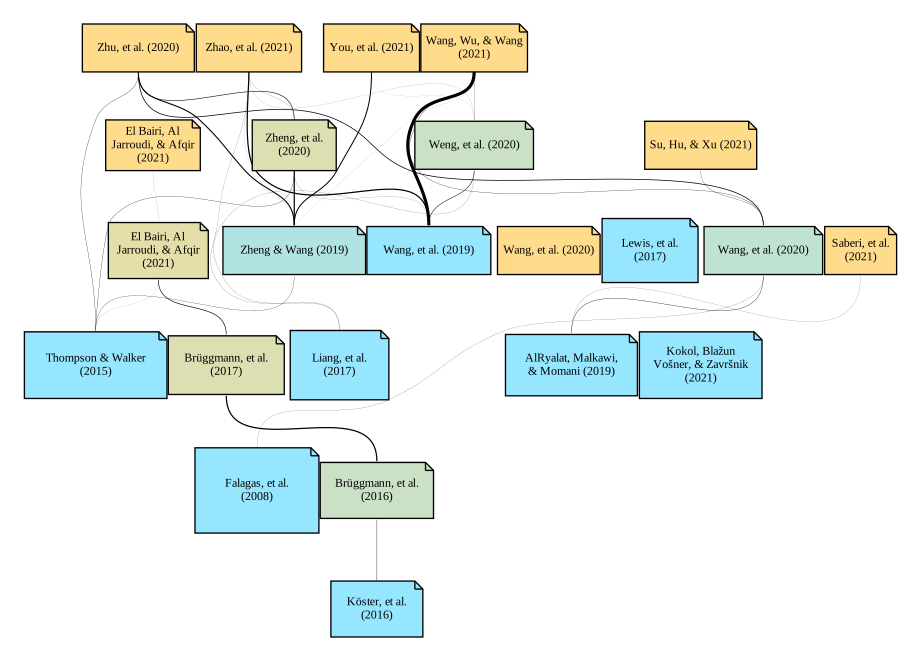
Finally, let's render out an SVG file, using the command of the same name:
δ > svg

    dot -Tsvg gref/gv/biblio.gv -o gref/svg/biblio.svg
Congratulations! You have now rendered your first citation graph. This source vector graphics file supports hyperlinks. Try opening some of the references on the example graph in a new tab. Also, notice the tooltips as you hover over a reference! Otherwise, check out some of the other outputs found in the example database.
Available Commands
| State | Command | Description |
|---|---|---|
| α | ADD | Add a new file to the database, becomes active |
| δ | ADD | Add a new PubMed ID to the active file |
| δ | CSV | Export articles to a table |
| * | EXIT | Exit the program |
| δ | GROW | Find related articles, can specify number of cycles |
| δ | GV | Render out a GV file, this is the base graph |
| * | HELP | Help page for command state and usage |
| α | LOAD | Load a file from the database, becomes active |
| δ | Render out a PDF file | |
| α | PEEK | Peek the files in the database |
| δ | PEEK | Peek the articles in the active file |
| δ | PNG | Render out a PNG file, can specify DPI |
| α | RM | Remove a file from the database |
| * | SEARCH | Search PubMed, query follows command |
| δ | SVG | Render out a SVG file, has hyperlink support |
| δ | TXT ESSAY | Export a fake essay on the topic, can specify word number |
| δ | TXT NGRAM | Export N-grams from all abstracts, can specify N |
| δ | UNLOAD | Unload active file |