
Open-source Image-to-3D Generation Platform
Transform single images into high-quality 3D assets using state-of-the-art AI models.
Features • Quick Start • Models • Usage • Roadmap • Contributing



🎬 Demo
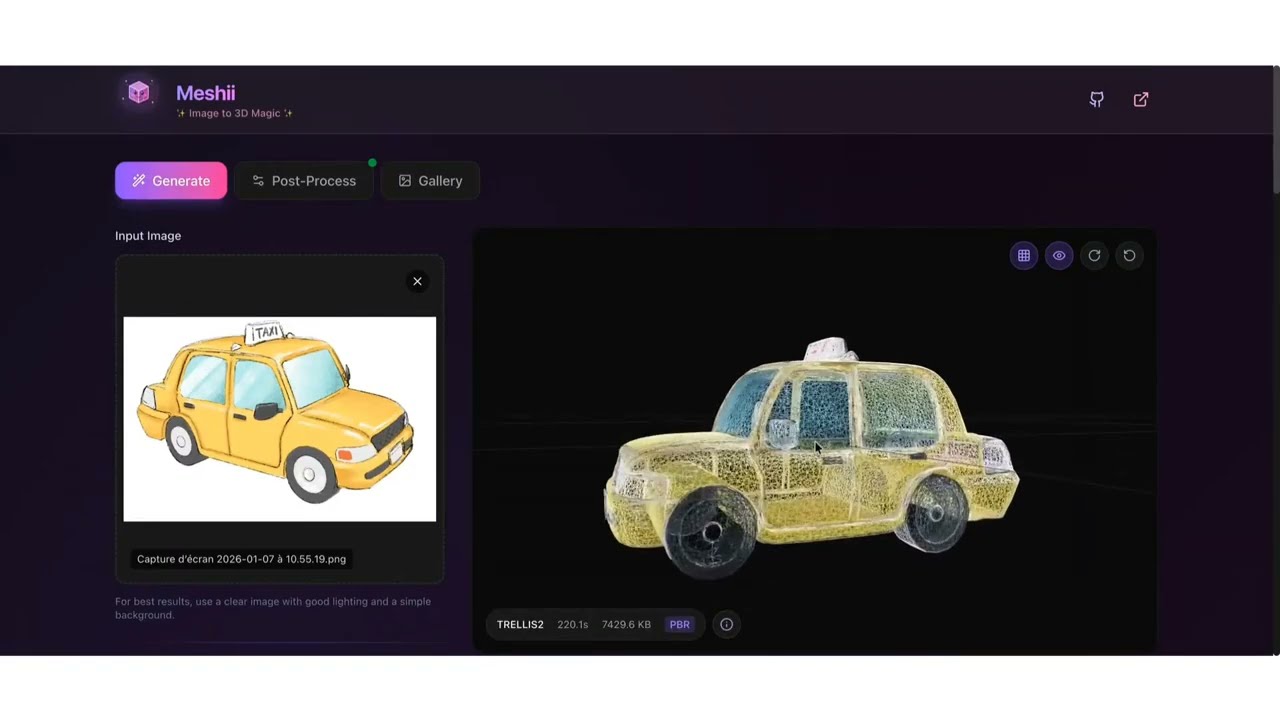
Watch the full demo on YouTube
⚠️ Early Release Notice
This is an early release (v0.1.0). While functional, expect:
- 🐛 Some bugs and rough edges
- 📚 Documentation gaps
- 🔄 Breaking changes in future versions
Future development and new features will be prioritized based on community interest.
If you like the project, please ⭐ star it and contribute!
The number of stars and contributions help us understand the need for improvements and guide our efforts.
✨ Features
| Feature | Description |
|---|---|
| 🎨 Multiple AI Models | TRELLIS 2 (4B params), TRELLIS, PartPacker and more to come |
| 🎮 Game-Ready Pipeline | Topology optimization, UV unwrapping, LOD generation |
| 🖨️ Print-Ready Pipeline | Manifold repair, watertight validation |
| ⚡ Serverless GPU | Auto-scaling on Modal with A10G/A100/L40S |
| 🎯 PBR Materials | Metallic, roughness, opacity maps (TRELLIS 2) |
| 🧩 Part-Level Output | Reassemblable parts with PartPacker |
| 🖥️ Modern Web UI | React + TypeScript frontend with 3D viewer |
🎯 Why Meshii?
Meshii is not another AI orchestration tool - it's a specialized production pipeline that solves the complete image-to-3D workflow for game developers and 3D artists.
The Problem with Existing Solutions
- ComfyUI/A1111: Generic orchestration tools require complex node workflows, local GPU hardware ($500-$2000+), and manual post-processing
- Commercial SaaS (Meshy, Rodin): Expensive subscriptions ($16-$120/month), vendor lock-in, limited customization
- Traditional 3D Tools: Steep learning curve (years), slow (hours per asset), requires expert 3D artists
The Meshii Approach
✅ Production-Ready Pipelines: Game-ready (topology optimization, UV unwrapping, LOD) and print-ready (manifold repair, watertight) workflows built-in
✅ Serverless GPU: Zero hardware investment - use A10G/A100/L40S GPUs for $0.03-$0.10 per generation with $30 free credits
✅ Complete Application: Modern web UI with 3D viewer, job management, and API - not just a workflow builder
✅ Multi-Model Intelligence: Automatically select between TRELLIS 2 (4B params, PBR materials), TRELLIS (fast), and PartPacker (reassemblable parts)
✅ Open Source: MIT license, self-hosted on Modal, extend with your own models and pipelines
Perfect For
- 🎮 Game developers needing rapid asset prototyping
- 🥽 VR creators building immersive environments
- 🖨️ 3D printing enthusiasts generating printable models
- 🏢 Studios wanting cost-effective, scalable 3D pipelines
📋 Prerequisites
Before starting, you'll need:
1. HuggingFace Account (Free)
- Create an account at huggingface.co
- Accept the model licenses (required!):
- TRELLIS 2 License - Click "Agree and access"
- PartPacker License - If using PartPacker
- Create an access token:
- Go to Settings → Access Tokens
- Create a new token with Read permissions
- Save this token, you'll need it later
2. Modal Account (Free $30 Credits)
- Sign up at modal.com
- You get $30 free credits - enough for ~100+ generations
- Install Modal CLI:
pip install modal
modal setup  # Follow the authentication flow
3. Local Requirements
- Python 3.10+
- Node.js 18+ (for frontend)
- Git
🚀 Quick Start
Option 1: Interactive Setup (Recommended)
# Clone the repository
git clone https://github.com/sciences44/meshii.git
cd meshii

# Run the interactive setup
python setup.py
The setup wizard will guide you through:
- ✅ Prerequisites check
- 🔑 Environment configuration
- 🔐 Modal secrets setup
- 📦 Model weights download
- 🚀 Deployment
- 🖥️ Frontend setup
Option 2: Manual Setup
# Clone the repository
git clone https://github.com/sciences44/meshii.git
cd meshii

# Create virtual environment
python -m venv .venv
source .venv/bin/activate  # Windows: .venv\Scripts\activate

# Install Python dependencies
pip install -r requirements.txt

# Copy and configure environment
cp .env.example .env
# Edit .env and add your HF_TOKEN

# Add HuggingFace token to Modal
modal secret create huggingface-secret HF_TOKEN="hf_your_token_here"

# Download model weights (takes 10-20 minutes)
modal run backend/modal_app.py::download_models

# Deploy to Modal
modal deploy backend/modal_app.py
# Note the URL: https://YOUR_USERNAME--meshii-fastapi-app.modal.run

# Update .env with your Modal URL
# VITE_API_URL=https://YOUR_USERNAME--meshii-fastapi-app.modal.run

# Setup frontend
cd frontend
npm install
npm run dev

# In another terminal: Start local post-processing server (optional)
# Required for mesh optimization (decimation, tris-to-quads, etc.)
cd backend
uvicorn local_postprocess:app --host 0.0.0.0 --port 8001
🎉 You're Ready!
Open http://localhost:5173 and generate your first 3D model!
Note: The local post-processing server (port 8001) is optional but required if you want to use advanced mesh optimization features like decimation, topology optimization, or tris-to-quads conversion.
🤖 Models
| Model | Parameters | GPU | Time | Best For |
|---|---|---|---|---|
| TRELLIS 2 | 4B | A10G/A100 | 15-60s | High-quality PBR meshes |
| TRELLIS | 342M-2B | A100-40GB | 10-20s | Fast generation |
| PartPacker | - | L40S | 15-30s | Part-level meshes |
Model Comparison
- TRELLIS 2: Latest model with full PBR material support (metallic, roughness, opacity). Best quality but slower.
- TRELLIS: Faster, supports multiple output formats (mesh, gaussian, radiance field).
- PartPacker: NVIDIA's model for generating reassemblable parts. Good for complex objects.
📖 Usage
Web Interface
The easiest way to use Meshii:
- Open http://localhost:5173
- Upload an image (drag & drop or click)
- Select model and quality preset
- Click "Generate"
- View and download your 3D model
CLI Commands
# Full setup wizard
python setup.py setup

# Check prerequisites
python setup.py check

# Deploy to Modal
python setup.py deploy

# Download model weights
python setup.py download

# Run Modal in dev mode (hot reload)
python setup.py serve

# Start frontend only
python setup.py frontend

# Start local post-processing server (optional)
cd backend && uvicorn local_postprocess:app --host 0.0.0.0 --port 8001
Post-Processing Server: This optional local server handles advanced mesh optimization (decimation, tris-to-quads, topology fixes). It runs on
localhost:8001and uses pymeshlab for processing. Only needed if you want to use these features.
API Usage Example
API
import httpx
import os

# Get your Modal API URL from environment or use your deployment URL
API_URL = os.getenv("VITE_API_URL", "https://YOUR_USERNAME--meshii-fastapi-app.modal.run")

with open("input.png", "rb") as f:
    response = httpx.post(
        f"{API_URL}/generate",
        files={"image": f},
        data={
            "model": "trellis2",
            "pipeline_type": "1024_cascade",
        },
    )

result = response.json()
# Download GLB from result['assets'][0]['url']
🏗️ Architecture
View Architecture Diagram & Project Structure
┌─────────────────┐         ┌─────────────────────────────────────────┐
│    Frontend     │         │              Modal (GPU Cloud)          │
│   (React/Vite)  │         │                                         │
│                 │◄────────┤  FastAPI Web App                        │
│  localhost:5173 │  HTTPS  │  ↳ /api/v1/generate                     │
│                 │ ──────► │  ↳ /api/v1/jobs                         │
│                 │         │  ↳ /api/v1/download                     │
└─────────────────┘         │                                         │
                            │  GPU Inference Classes:                 │
                            │  ├─ Trellis2Inference (A10G/A100)       │
                            │  ├─ TrellisInference (A100)             │
                            │  └─ PartPackerInference (L40S)          │
                            │                                         │
                            │  Modal Volumes:                         │
                            │  ├─ /models (HuggingFace weights)       │
                            │  └─ /results (Generated GLB files)      │
                            └─────────────────────────────────────────┘
Project Structure
meshii/
├── setup.py              # CLI setup tool
├── backend/
│   ├── modal_app.py      # Modal deployment & GPU inference
│   ├── config/           # Configuration management (Pydantic)
│   ├── strategies/       # Model inference strategies
│   ├── processors/       # Post-processing pipelines
│   ├── factories/        # Factory pattern for models
│   └── api/              # FastAPI routes
├── frontend/             # React + TypeScript UI
│   ├── src/components/   # UI components
│   ├── src/store/        # Zustand state management
│   └── src/hooks/        # Custom React hooks
└── configs/              # YAML presets
    ├── trellis2_*.yaml   # TRELLIS 2 presets
    ├── game_ready.yaml   # Game optimization
    └── print_ready.yaml  # 3D printing optimization
💰 Cost Estimation
Modal charges based on GPU usage:
| Model | GPU | Cost/Run | Runs/$10 |
|---|---|---|---|
| TRELLIS 2 | A10G | ~$0.03 | ~300 |
| TRELLIS 2 | A100-80GB | ~$0.10 | ~100 |
| TRELLIS | A100-40GB | ~$0.05 | ~200 |
| PartPacker | L40S | ~$0.04 | ~250 |
Free tier: Modal gives you $30 free credits, enough for ~300-1000 generations!
🗺️ Roadmap
- Docker support - Local deployment without Modal
- More models - Integration with other Image-to-3D models
- Batch processing - Generate multiple models at once
- Custom training - Fine-tune on your own data
- API rate limiting - Production-ready deployment
- Authentication - User accounts and API keys
- Gallery - Public gallery of generated models
🤝 Contributing
We welcome contributions! Please see CONTRIBUTING.md for guidelines.
Quick Contribution Guide
Quick Contribution Guide
- Fork the repository
- Create a feature branch:
git checkout -b feature/amazing-feature - Make your changes
- Run tests:
pytest tests/ - Commit:
git commit -m 'Add amazing feature' - Push:
git push origin feature/amazing-feature - Open a Pull Request
Development Mode
# Run Modal with hot reload
modal serve backend/modal_app.py

# Run frontend with hot reload
cd frontend && npm run dev
📄 License
This project is licensed under the MIT License - see LICENSE file.
Model Licenses
The AI models used have their own licenses:
- TRELLIS 2: Microsoft Research License
- TRELLIS: Microsoft Research License
- PartPacker: NVIDIA License
Please review and accept these licenses on HuggingFace before use.
🙏 Acknowledgments
- Microsoft TRELLIS & TRELLIS 2
- NVIDIA PartPacker
- Modal for serverless GPU infrastructure
- HuggingFace for model hosting
Made with ❤️ by Sciences 44