Claude Code Beam
Teleport a Claude Code session between your devices. Same conversation, same context, across different machines.
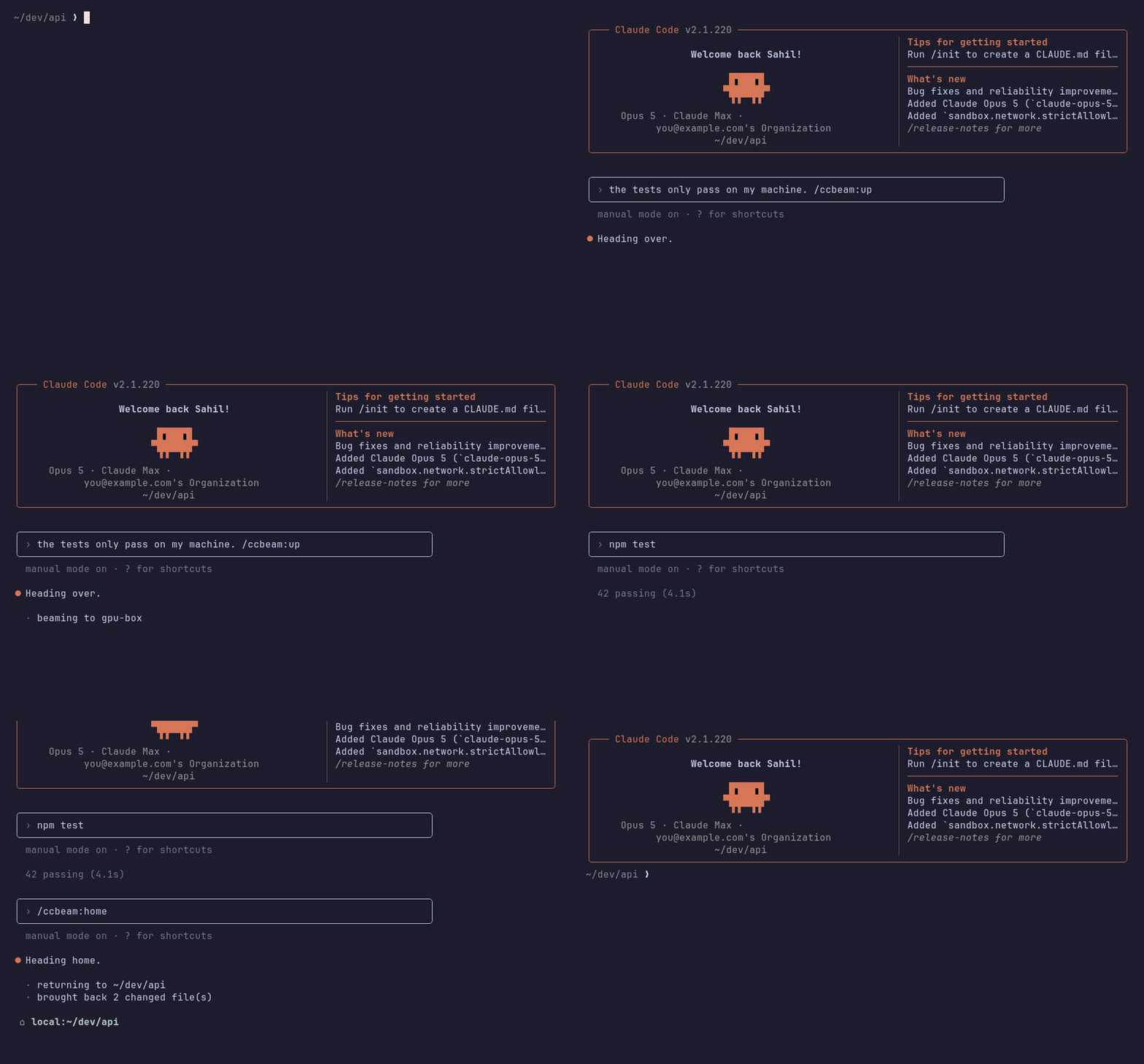
Teleport to a different environment (remote desktop, cloud, etc.) with /ccbeam:up.
The conversation picks up over there with its context intact — same session id,
nothing summarised — and your uncommitted changes travel with it. From then on
everything runs on that machine: its CPU, its CLAUDE.md, its hooks, its MCP
servers. /ccbeam:home brings you back, with whatever you changed.
- Any machine in your
~/.ssh/configis a destination. If you cansshthere, it's already in the list. Nothing to install on it beyond Claude Code, and no daemon to leave running. - Or a cloud sandbox, on your own key. Bring an E2B API
key and
cloudjoins the same list. ccbeam runs no infrastructure, holds no keys and proxies nothing — there is no hosted ccbeam to sign up for. - No account, no daemon, no config file. It uses the SSH you already have.
Install
npm i -g ccbeam
ccbeam install-shell   # optional: keep typing `claude`
ccbeam takes the same options as claude and hands the terminal straight to
the real Claude Code. It's a supervisor, not a replacement.
ccbeam                # like `claude`
ccbeam --model opus   # any claude flag works
install-shell adds one delimited block to your .bashrc, .zshrc or
config.fish so the command you type stays claude:
claude() { command ccbeam "$@"; }
Same trick nvm, pyenv and direnv use. command claude still runs Claude
Code directly, and ccbeam uninstall-shell restores the file exactly as it was
(it's backed up before the first edit either way).
Beam
Inside a session:
/ccbeam:up |
pick a device, then a folder |
/ccbeam:up gpu-box |
pick a folder on gpu-box |
/ccbeam:up gpu-box:~/trainer |
go straight there |
/ccbeam:up cloud |
go to your cloud box |
/ccbeam:home |
return to where this session started |
/ccbeam:home works from wherever you are, however many hops in — and
/ccbeam:up home is the same thing if that's what your fingers reach for.
local is a device like any other, so /ccbeam:up also moves a conversation
between folders on the machine you're already on, which Claude Code can't
otherwise do mid-session.
From a shell:
ccbeam devices |
list devices and what they're doing |
ccbeam doctor gpu-box |
check a device is ready |
ccbeam cloud |
set up the cloud box |
ccbeam install-shell / uninstall-shell |
shell integration |
The picker
  beam to
  ⌂ local              you are here
    gpu-box            2h ago
    mac-mini           yesterday
  ☁ cloud              paused
  ↑↓ select · ⏎ confirm · type to filter · esc cancel
The list is read from your ~/.ssh/config, so there's no registry to keep in
sync and nothing to run on a machine to "add" it. cloud is always there, set
up or not.
  gpu-box — folder
  ~/dev/api                     main ·3 dirty
  ~/src/trainer                 cuda-12
  ~/dev/scratch                 main
Folders come from that device's own Claude Code history: every directory you've
actually worked in, newest first, with branch and dirty-file count so you can
see what you're walking into. The one you used last is pre-selected, so going
back somewhere is /ccbeam:up → ⏎ → ⏎.
What travels
- The conversation. The transcript is copied to the destination and resumed there under the same session id, so the context is genuinely intact rather than summarised.
- Your uncommitted work, if the folder is a git repo — modified and untracked files both. It comes back when you do.
- Nothing else. Settings, MCP servers, hooks and credentials belong to the device you're on. That's the point: you get that machine's environment.
Uncommitted changes are the easiest thing in the world to lose, so every carry either verifies its assumptions or refuses:
- The destination must be on the same commit. A patch applied to a different base is how work silently disappears.
- The destination must be clean, unless it's the tree you left.
- Coming home, the folder you left must be unchanged. If something edited it
while you were away, ccbeam refuses and saves the incoming work to
~/.ccbeam/incoming-<timestamp>/rather than overwriting anything.
The cloud box
/ccbeam:up cloud is a sandbox that behaves like any other device. The first
time, it asks for an E2B key and sets itself up; after that
it's two lines on screen and about a second.
› /ccbeam:up cloud

  · waking the cloud box
  · carried 3 changed file(s)

 ☁ cloud:~/dev/api  ·  /ccbeam:home to return
It runs on your account. ccbeam operates no infrastructure, holds no keys and proxies nothing — your code goes from your machine to your sandbox, with nothing in between. There is no hosted ccbeam and there is not going to be one.
A few decisions worth knowing about:
- It's one box, and it persists. Pausing preserves the filesystem and memory indefinitely, and resuming takes about a second. So the box stays signed in and keeps whatever you installed on it — a machine you happen to rent by the second, not a fresh container each time.
- It pauses the moment you leave, and says so. It also can't run away from
you: every sandbox is created with a finite timeout and
autoPause, so even if ccbeam is killed outright the box puts itself to sleep instead of billing you until you notice. - A fresh box is seeded from your laptop, not from GitHub. ccbeam ships a
git bundleof your history so the box lands on the exact commit your uncommitted work was written against. It works on repos you've never pushed and branches that only exist locally, and the box never needs a credential for your git host. - The E2B SDK is not a dependency. It's fetched into
~/.ccbeam/depsat a pinned version the first time you set the cloud box up. Installing ccbeam pulls nothing for a feature you haven't used.
Leaving a conversation there, and picking it up again
Because the box persists, a conversation you took there stays there. Close the laptop and come back to it:
/ccbeam:up cloud resume pick up a conversation living on the box
ccbeam cloud sessions        list them
ccbeam cloud resume          pick one up, starting a session here
ccbeam cloud rm <id>         delete one
resume is a separate verb on purpose. /ccbeam:up cloud means this
conversation moves there, keeping its session id — which is the whole reason its
context survives. /ccbeam:up cloud resume adopts a different conversation
and leaves the one you're in exactly where it was. If those shared a verb,
/ccbeam:up could silently abandon your place; they don't, so it can't.
The session picker shows what you first said, the folder, when it was last touched, and marks any conversation still running. Ctrl-D deletes the highlighted one, keeping the folder it worked in — ccbeam doesn't delete your files. Conversations untouched for 30 days are pruned when the box wakes, and it says so when that happens.
Work genuinely continues in the box after you disconnect, and a paused box
freezes a turn mid-flight and resumes it intact. ccbeam doesn't reattach to the
old terminal, though — it doesn't need to. The transcript is the session, so
picking one back up is claude --resume over there, which is what every beam
already does.
ccbeam cloud destroy gets rid of the box. ccbeam cloud repair builds a new
one.
Requirements
A device you beam to needs ssh access, Claude Code (signed in), node 18+
and git. ccbeam doctor <device> tells you what's missing. The cloud box
installs its own — but driving it needs Node 20.18.1+ (not 21.x) on the machine
you beam from, because the E2B SDK runs there. ssh devices are fine on 18.
$ ccbeam devices
  ● local                you are here
  ● gpu-box              2h ago
  ○ mac-mini             yesterday
  ⏸ cloud                paused
Each device signs in to Claude Code itself, with claude auth login. That's
deliberate — see below.
What ccbeam won't do
- Forward credentials, ever. ccbeam will never proxy model calls through your laptop or ship your token to another device. Anthropic's terms prohibit using Claude subscription OAuth tokens in other products or services; each device authenticating itself is the only correct design, not a limitation to engineer around. The cloud box is no exception: it signs itself in, in its own terminal, and that sign-in survives because a paused sandbox keeps its filesystem.
- Run a hosted anything. Not a relay, not a proxy, not a default API key, not even a sandbox image published under a maintainer's account. Nothing in the runtime path depends on infrastructure you don't control.
- Sandbox your ssh devices. Claude Code runs on the far machine as you, with your access — the same as if you'd ssh'd in and started it yourself. The cloud box is isolated, which is a reason to use it, but that's a property of E2B rather than of ccbeam.
- Team access control. It's your devices and your keys.
How it works
ccbeamlaunches the realclaudewith a small bundled plugin, and waits./ccbeam:upcalls a tool that writes a request file. A slash command can't take over the terminal, so it doesn't try.- The plugin's
Stophook ends the session at the turn boundary — after the transcript is completely written. - The supervisor, which has owned the terminal all along, ships the transcript
and your changes to the destination and launches the real
claudethere, attached to your terminal.
There's no protocol to speak and no daemon on the far side; ssh connection sharing keeps the repeated calls at ~10ms each.
docs/design.md covers why the supervisor has to exist,
and how to add a device kind — Fly Machines, Modal, Daytona and plain VMs are
all a fifty-line SshDevice plus a lifecycle, which is the intended shape of a
contribution.
Development
npm test          # unit tests — no network, no accounts
npm run test:e2e  # end-to-end, needs a reachable host in CCBEAM_HOST
The unit suite drives the real seeding and carrying logic through a fake device that shells out locally, so bundle → clone → patch is exercised without a host. Setup for the e2e suite is in docs/design.md; TESTING.md is the manual brief for the paths a machine can't check by itself.
Licence
MIT.
Not affiliated with, endorsed by, or sponsored by Anthropic. Claude and Claude Code are trademarks of Anthropic, PBC. Not affiliated with the Apache Beam project or Gravitational's Teleport.