What is Waypoint?
waypoint.nvimis a neovim plugin that allows you to bookmark lines of
code, quickly navigate to them, and arrange them relative to each other.
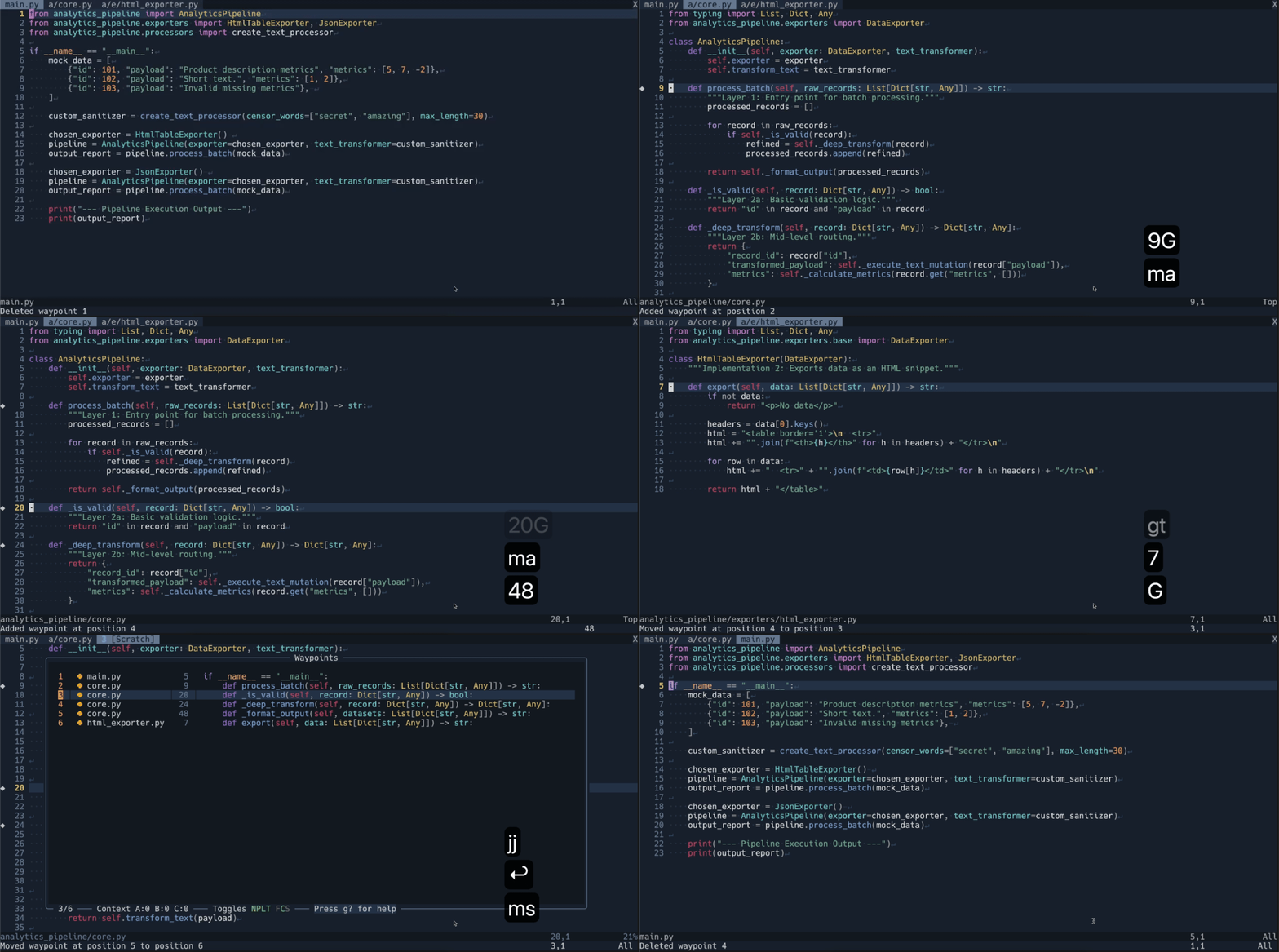
Requirements
Neovim >=v0.11.7 built with LuaJIT (check :version).
Recommended dependencies
- Telescope makes moving waypoints between files easier.
- nvim-web-devicons if you want file-specific icons to be shown in the waypoint window.
Installation
I recommend installing some optional dependencies, e.g. using lazy.nvim
{
  'patrick-sharp/waypoint.nvim',
  dependencies = {
    'nvim-telescope/telescope.nvim',
    'nvim-tree/nvim-web-devicons',
  },
  config = function()
    require("waypoint").setup{}
  end
}
you can also install the plugin with no dependencies. This means you wont have file icons in the waypoint window and won't be able to search your waypoints with telescope.
{
  'patrick-sharp/waypoint.nvim',
  config = function()
    require("waypoint").setup{}
  end
}
Quickstart usage
- Navigate to a file and add a waypoint with
ma - Hit
msto show the waypoint window. - Hit
dto delete the waypoint you just made. - Hit
uto undo the deletion. - Hit enter to jump to the location of a waypoint.
- Navigate to another file and add a few more waypoints with
ma - Hit
msto show the waypoint window - Use
JandKto rearrange the waypoints you just made. - Hit
mcto edit the name of a waypoint. - Hit
ca few times to increase the context shown around the waypoint. - Hit
Cto decrease the context shown around the waypoint. - With expanded context, use
/to search through the waypoint window as if it were any other buffer. - Open the waypoint window again with
msand hitg?to view all keybinds for waypoint.
Features
See waypoint.nvim's github gist
The problem this solves
If you want to add a feature to a medium to large codebase that you didn't write, you need to do a lot of reading to figure out how the code works. It's easy to get lost and forget how the different pieces fit together. Waypoint helps you keep your bearings in unfamiliar, labyrinthine code.
A specific example from my job
This is an example of a task I completed at work. Tasks like this are what motivated me to create waypoint.
I altered some details to avoid leaking my employer's information, but the essence of the problem is the same.
One day at work, I am given a task to add metrics for a moderately frequent occurrence. The program I work on is a piece of scheduling software that keeps track of tasks in a schedule. Most customers are medium sized businesses that have tasks which must marked completed by individual employees, and the software enforces constraints on when those tasks can be marked completed.
One such constraint is grouped tasks. If a task is in a group, you can't mark it as completed without marking the other tasks in the group as completed.
My assignment is to add metrics that track how often tasks are rejected because the other tasks in their group haven't been completed at the same time.
Over the course of this work, I had to read through a lot of legacy code. Below is the callpath of the functions I read through. I left some out because they were either trivial or irrelevant to this problem.
The topmost function is the handler for the CompleteTasks API endpoint.
The format is <class>.<method>. This is in a java codebase where each class
has its own file. This callpath involves methods from six classes:
SubmittedCompletedTasksScheduleSummaryComponentCompletedTaskAcceptanceValidatorCompletedItemConverterCompleteTasksTaskDeadlineComponent
CompleteTasks.completeTasks
  ScheduleSummaryComponent.completeTasks
    CompletedTaskAcceptanceValidator.acceptsCompletionSubmission
      CompletedTaskAcceptanceValidator.acceptsAllItems
        CompletedTaskAcceptanceValidator.acceptsCompletion
          CompletedTaskAcceptanceValidator.acceptsCompletionTasks
            CompletedTaskAcceptanceValidator.extractAllTasks
              SubmittedCompletedTasks.getGroupedTasks
              SubmittedCompletedTasks.getIndividualTasks
            CompletedTaskAcceptanceValidator.validateAccessoryTaskPrerequisites
              CompletedTaskAcceptanceValidator.countAlreadyCompletedTasksForTopic
            CompletedTaskAcceptanceValidator.validateItemNotAlreadyCompleted
              CompletedTaskAcceptanceValidator.getCompletionItems
          CompletedTaskAcceptanceValidator.acceptsCompletionLegacy
            CompletedItemConverter.extractAins
              SubmittedCompletedTasks.getGroupedTasks
              SubmittedCompletedTasks.getIndividualTasks
    CompletedTaskAcceptanceValidator.isEligibleForCompletionAuthorization
      CompletedTaskAcceptanceValidator.mergeSubmittedCompletedTasks
      CompletedTaskAcceptanceValidator.isEligibleForCompletion
        CompletedTaskAcceptanceValidator.isEligibleForCompletedTasks
          TaskDeadlineComponent.getWarrantyDetails
          CompletedTaskAcceptanceValidator.extractAllTasks
            (call path shown previously)
          CompletedTaskAcceptanceValidator.extractAllAssignmentIds
          CompletedTaskAcceptanceValidator.extractAccessoryTasks
          CompletedTaskAcceptanceValidator.areTasksEligible
            CompletedTaskAcceptanceValidator.isAssignmentEligible
          CompletedTaskAcceptanceValidator.areAccessoryTasksEligible
            CompletedTaskAcceptanceValidator.isAccessoryTaskTopicEligible
              CompletedTaskAcceptanceValidator.isWithinGracePeriod
          CompletedTaskAcceptanceValidator.areAllGroupedTasksInSubmission
            CompletedTaskAcceptanceValidator.extractAllTasks
              (call path shown previously)
            CompletedTaskAcceptanceValidator.extractAssignmentIds
            CompletedTaskAcceptanceValidator.getGroupIdsForAssignments
            CompletedTaskAcceptanceValidator.getAllTasksInGroup
        CompletedTaskAcceptanceValidator.isEligibleForCompletionLegacy
          CompletedItemConverter.extractAins
            (call path shown previously)
          CompletedTaskAcceptanceValidator.validateAssignmentEligibility
          CompletedTaskAcceptanceValidator.areAllGroupedTasksInSubmission
            (call path shown previously)
This is 33 unique methods, which would already be too many to mark with vim global marks.
Note that acceptsCompletionSubmission and isEligibleForCompletionAuthorization call similar methods.
Without looking at the above callpath, can you tell which of these functions is called downstream of acceptsCompletionSubmission and which is downstream of isEligibleForCompletionAuthorization?
validateItemNotAlreadyCompletedvalidateAssignmentEligibilityisWithinGracePeriodvalidateAccessoryTaskPrerequisites
Waypoint is very useful for understanding callpaths like this. Instead of trying to keep all this in your head, you can put a waypoint at the definition of each function, and move/indent the waypoints to arrange them in the shape of the callpath. At a glance, you can see which methods are called by which other methods instead of manually traversing the codebase one call at a time.
Here's another way that waypoint can help here. Notice that the extractAllTasks method is called in three different places in the call path. If you're trying to go further up in the call path, you have to remember which of three callers is the one you want. Would you count on your ability to never confuse these methods?
acceptsCompletionTasksisEligibleForCompletedTasksareAllGroupedTasksInSubmission
Waypoint can help you keep track of which invocation of the method you're currently looking at, and which part of the call path you're in.
What differentiates it from other bookmark extensions:
- waypoint allows you to view a syntax highlighted preview of the code you've bookmarked and the lines around it
- waypoint allows you to reorder your bookmarks
- waypoints are managed per project rather than globally or per file
- if you open nvim within a different directory, you will see different bookmarks
- waypoint is resilient to changes in files.
- For example, running a code formatter from the commmand line that alters the contents of a file
- Checking out another commit with different file contents
- waypoint supports bulk operations on waypoints by entering visual mode (e.g. delete, move)
- waypoint supports undo/redo
- If you accidentally delete a waypoint, you can undo the change without having to remake the waypoint manually.
- waypoint shows your saved waypoints in a table-aligned format
Default keymappings
Global Keybindings
| Keybinding | Action |
|---|---|
ma |
Create waypoint and add it to the waypoint list after the current waypoint |
me |
Create waypoint and add it to the end of the waypoint list |
mb |
Create waypoint and add it to the beginning of the waypoint list |
mc |
Edit name of waypoint on current line (if multiple are on the same line, priortizes bottom of list) |
md |
Delete waypoint on the current line (if multiple are on the same line, priortizes bottom of list) |
ms |
Show the waypoint window |
mq |
Set the quickfix list to locations of all waypoints |
mu |
Undo last change to any waypoint |
mx |
Clear name of the waypoint on current line (if multiple are on the same line, priortizes bottom of list) |
Waypoint Window Keybindings
| Keybinding | Action |
|---|---|
<CR> |
Jump to current waypoint |
j |
Move to next waypoint |
k |
Move to previous waypoint |
gg |
Move to first waypoint |
G |
Move to waypoint [count], defaulting to last waypoint |
d |
Delete current waypoint(s) |
J |
Move current waypoint(s) down |
K |
Move current waypoint(s) up |
mgg |
Move current waypoint(s) to top of waypoint list |
mG |
Move current waypoint(s) to bottom of waypoint list |
ms or <esc> or <C-c> |
Exit waypoint window |
c |
Increase context (number of lines shown around each waypoint) |
C |
Decrease context (number of lines shown around each waypoint) |
b |
Increase before context (number of lines shown before each waypoint) |
B |
Decrease before context (number of lines shown before each waypoint) |
a |
Increase after context (number of lines shown after each waypoint) |
A |
Decrease after context (number of lines shown after each waypoint) |
rc |
Set context, before context, and after context to zero |
mc |
Edit name of current waypoint |
mx |
Clear name of current waypoint |
mq |
Set quickfix list to locations of all waypoints |
> |
Increase indentation of current waypoint |
< |
Decrease indentation of current waypoint |
ri |
Set current waypoint's indentation to zero |
rI |
Set indentation of all waypoints to zero |
gv |
Re-select previously selected range of waypoints |
mT |
Transfer waypoints from one file to another |
u |
Undo |
<C-r> |
Redo |
sn |
Toggle name |
sp |
Toggle column for file path |
sl |
Toggle column for line number |
st |
Toggle column for file text |
sf |
Toggle whether full file path is shown vs. just file name |
sc |
Toggle whether context is shown |
ss |
Toggle whether waypoints are sorted by file and line |
g? |
Show this help window |
Help Keybindings
| Keybinding | Action |
|---|---|
q or <esc> or g? |
Exit help and return to the waypoint window |
Default config values
These are defined in config.lua
| Config Field | Value |
|---|---|
color_footer_after_context |
#ff7777 |
color_footer_before_context |
#77ff77 |
color_footer_context |
#7777ff |
color_sign |
NONE |
color_toggle_off |
#777777 |
color_toggle_on |
#50C878 |
enable_highlight |
true |
enable_relative_waypoint_numbers |
false |
file |
waypoint.nvim.json |
hl_named_waypoint |
DiagnosticInfo |
hl_waypoint_sign |
Normal |
indent_width |
4 |
mark_char |
◆ |
max_msg_history |
100 |
max_undo_history |
100 |
show_file_icons |
true |
telescope_filename_width |
30 |
telescope_linenr_width |
5 |
window_height |
0.85 |
window_width |
0.85 |