OpenAI Agents SDK (JavaScript/TypeScript)


The OpenAI Agents SDK is a lightweight yet powerful framework for building multi-agent workflows in JavaScript/TypeScript. It is provider-agnostic, supporting OpenAI APIs and more.
Core concepts
- Agents: LLMs configured with instructions, tools, guardrails, and handoffs
- Sandbox Agents: Agents paired with a filesystem workspace and sandbox environment for longer-running work
- Realtime Agents: Low-latency agents for spoken interactions, with tools, guardrails, handoffs, and conversation history
- Agents as tools / Handoffs: Delegating to other agents for specific tasks
- Tools: Various Tools let agents take actions (functions, MCP, hosted tools)
- Guardrails: Configurable safety checks for input and output validation
- Human in the loop: Built-in mechanisms for involving humans across agent runs
- Sessions: Automatic conversation history management across agent runs
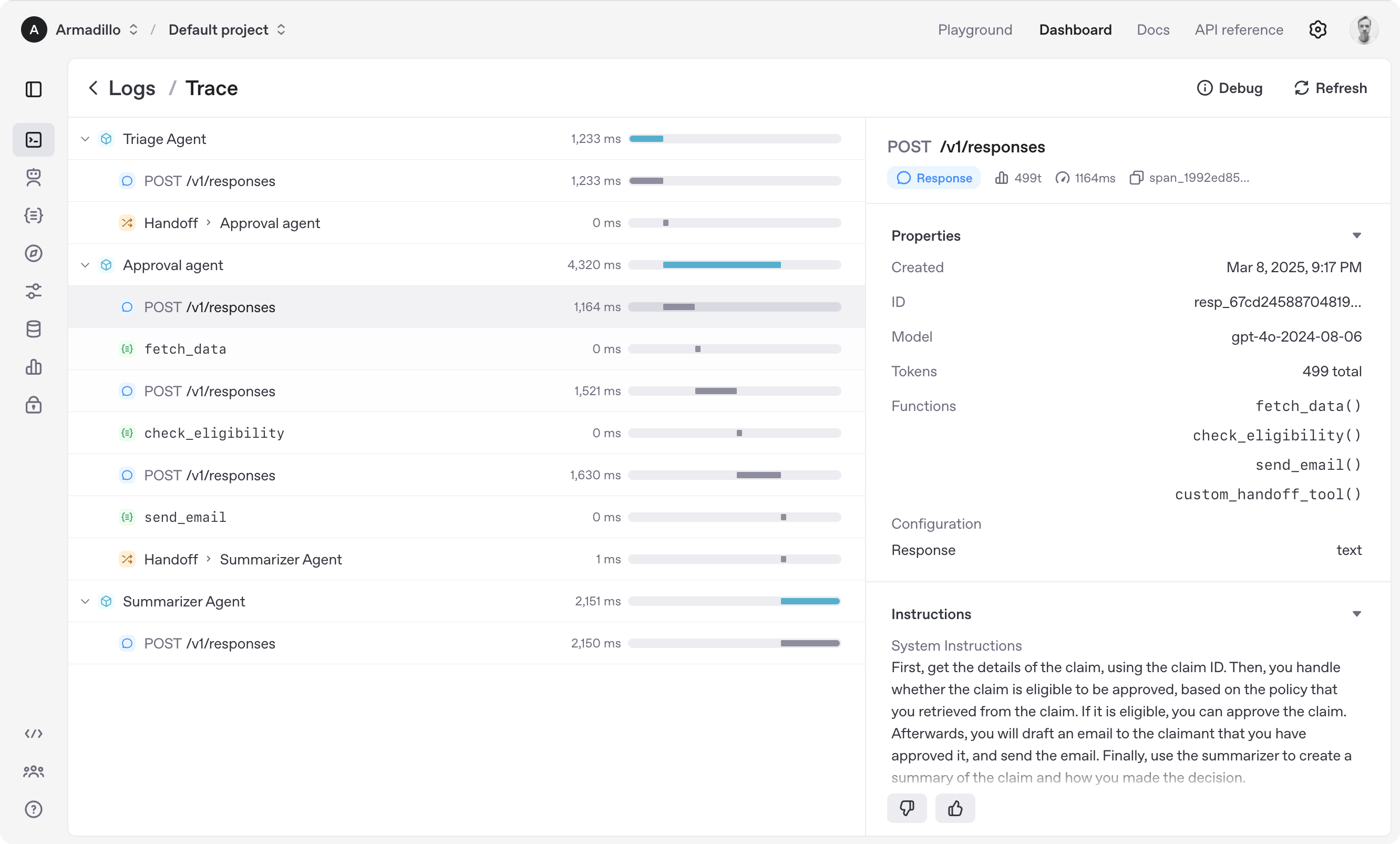
- Tracing: Built-in tracking of agent runs, allowing you to view, debug and optimize your workflows
Explore the examples/ directory to see the SDK in action.
Get started
Supported environments
- Node.js 22 or later
- Deno
- Bun
Experimental support:
- Cloudflare Workers with
nodejs_compatenabled
Check out the documentation for more detailed information.
Installation
npm install @openai/agents zod
Build a text agent
Use a regular Agent for text-based workflows that do not need a sandbox workspace or Realtime session.
import { Agent, run } from '@openai/agents';

const agent = new Agent({
  name: 'Assistant',
  instructions: 'You are a helpful assistant.',
});
const result = await run(
  agent,
  'Write a haiku about recursion in programming.',
);
console.log(result.finalOutput);
Build a sandbox agent
Use a Sandbox Agent when the agent should work in a filesystem, run commands, or carry workspace state across longer tasks. Sandbox Agents are in beta.
This example uses UnixLocalSandboxClient, which is supported on macOS and Linux. On Windows, use DockerSandboxClient or a hosted sandbox client instead; see Sandbox clients for setup details.
import { run } from '@openai/agents';
import { gitRepo, SandboxAgent } from '@openai/agents/sandbox';
import { UnixLocalSandboxClient } from '@openai/agents/sandbox/local';

const agent = new SandboxAgent({
  name: 'Workspace Assistant',
  model: 'gpt-5.5',
  instructions: 'Inspect the repo before changing files.',
  defaultManifest: {
    entries: { repo: gitRepo({ repo: 'openai/openai-agents-js' }) },
  },
});

const result = await run(
  agent,
  'Inspect the repo README and summarize what this project does.',
  { sandbox: { client: new UnixLocalSandboxClient() } },
);

console.log(result.finalOutput);
Build a realtime agent
Use a Realtime Agent for low-latency, spoken interactions in the browser.
import { RealtimeAgent, RealtimeSession } from '@openai/agents/realtime';

const agent = new RealtimeAgent({
  name: 'Assistant',
  instructions: 'You are a helpful assistant.',
});
// Automatically connects your microphone and audio output in the browser via WebRTC.
const session = new RealtimeSession(agent);
await session.connect({ apiKey: '<client-api-key>' });
Set OPENAI_API_KEY in your server environment for text and sandbox agents. For browser-based realtime agents, use your server to create a short-lived ephemeral client token and pass it to session.connect(...).
Explore the examples/ directory to see the SDK in action.
Acknowledgements
We'd like to acknowledge the excellent work of the open-source community, especially:
We're committed to building the Agents SDK as an open source framework so others in the community can expand on our approach.
For more details, see the documentation or explore the examples/ directory.