🐂 + 💩 Demo (redirection rules below to let you create your own shortlinks such as puns.onefact.org/create :)
This is like Bitly but free!
As a small nonprofit, we can't afford custom URL shortening with services like Bitly (https://bit.ly, $348/year for custom domain support).
The alternative we found is to simply create redirect rules in Amazon S3 and edit a single json file.
Steps to use this on your custom domain
We recommend following these steps by cloning this repository locally, using Visual Studio Code: https://learn.microsoft.com/en-us/azure/developer/javascript/how-to/with-visual-studio-code/clone-github-repository
(Visual Studio code lets you write new redirection rules even more easily using Copilot, which is free in the GitHub Education pack (free with an email address ending in .edu), using the following steps: https://education.github.com/pack.)
Steps:
- [one time] issue an SSL certificate for the domain (e.g. https://onefact.org) in Cloudfront
- [as-needed] to create a subdomain on which to generate shortlinks (e.g. photos.onefact.org), give.onefact.org))
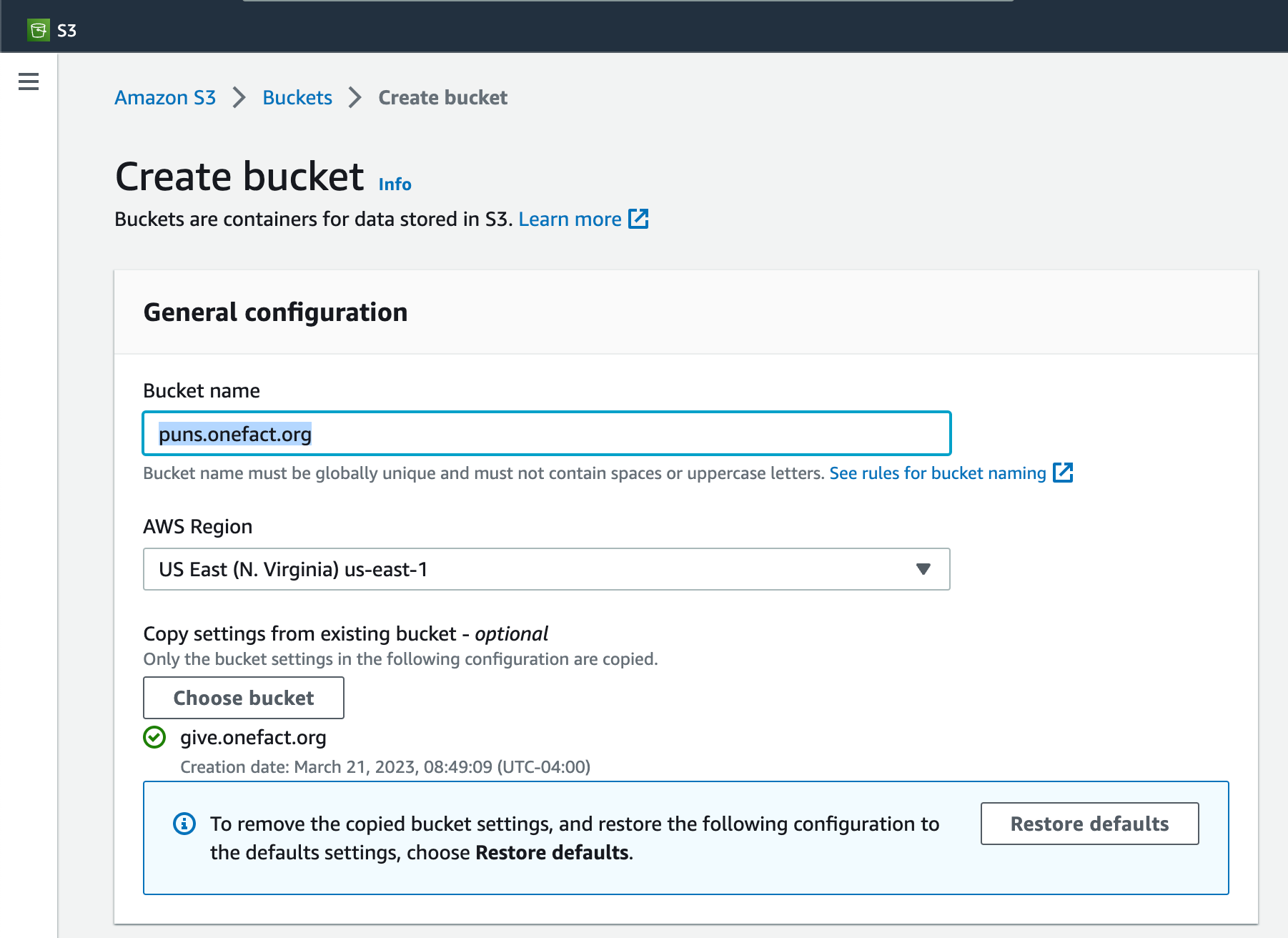
- create an Amazon S3 bucket direct link to create a bucket with the name subdomain.customdomain.com (e.g. photos.onefact.org):
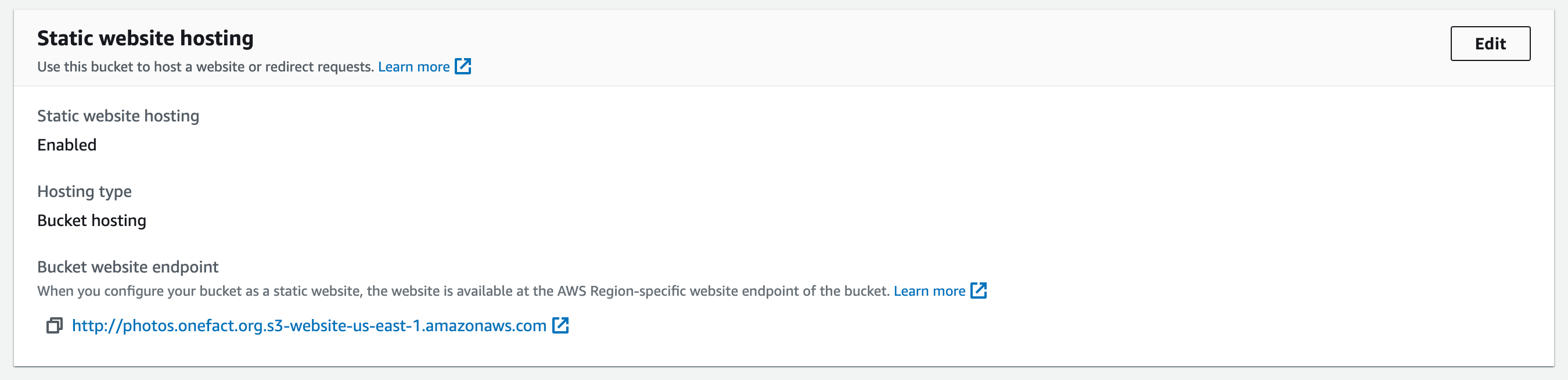
- enable static website hosting on the bucket - click on the bucket name in the list: https://s3.console.aws.amazon.com/s3/buckets -- click on "edit" here:


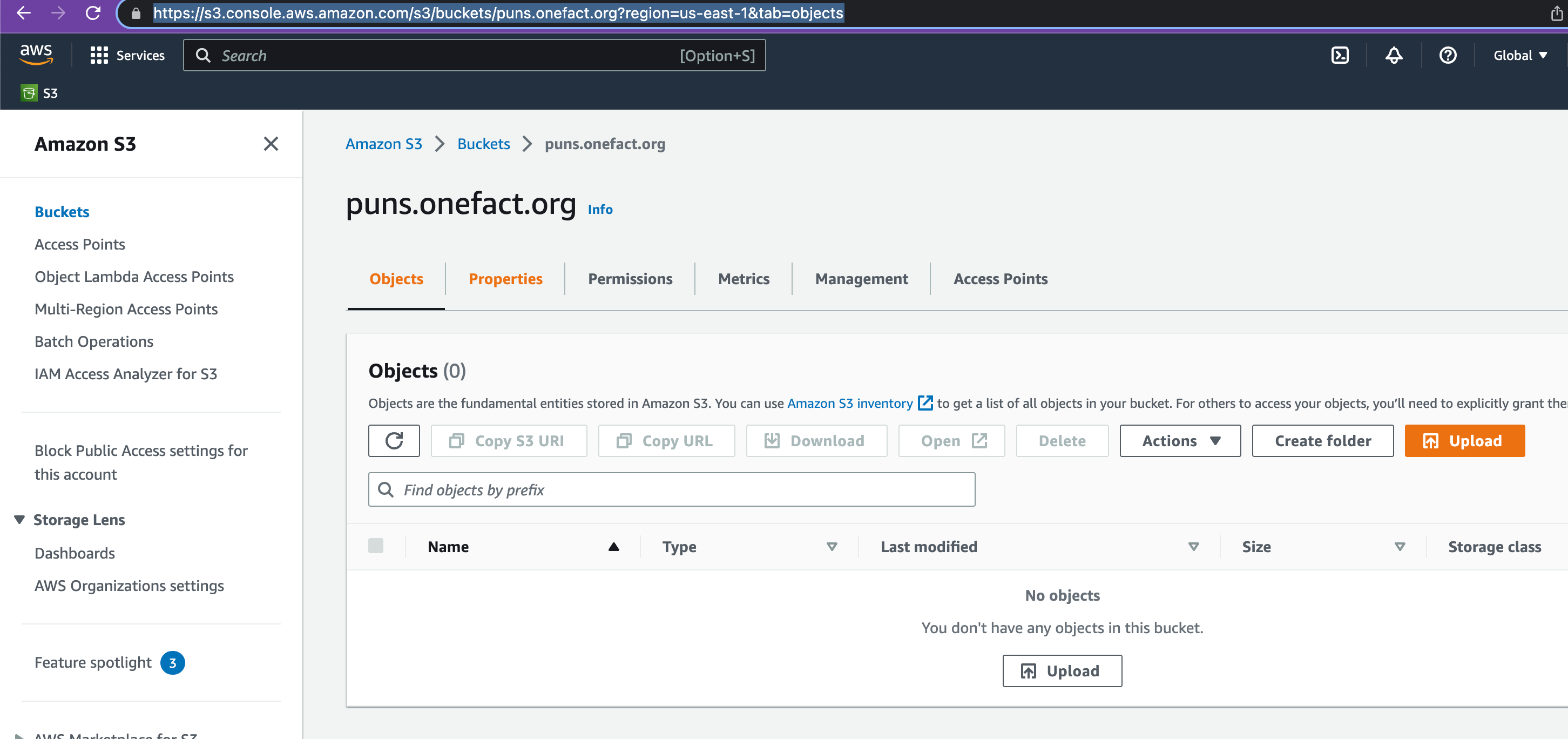
- in the bucket page, for example at https://s3.console.aws.amazon.com/s3/buckets/puns.onefact.org?region=us-east-1&tab=objects, click on "Properties"
- [as-needed] to edit, add, delete individual shortlinks, click on "Edit properties" at the bottom of the page for the bucket management screen: https://s3.console.aws.amazon.com/s3/buckets/photos.onefact.org?region=us-east-1&tab=properties
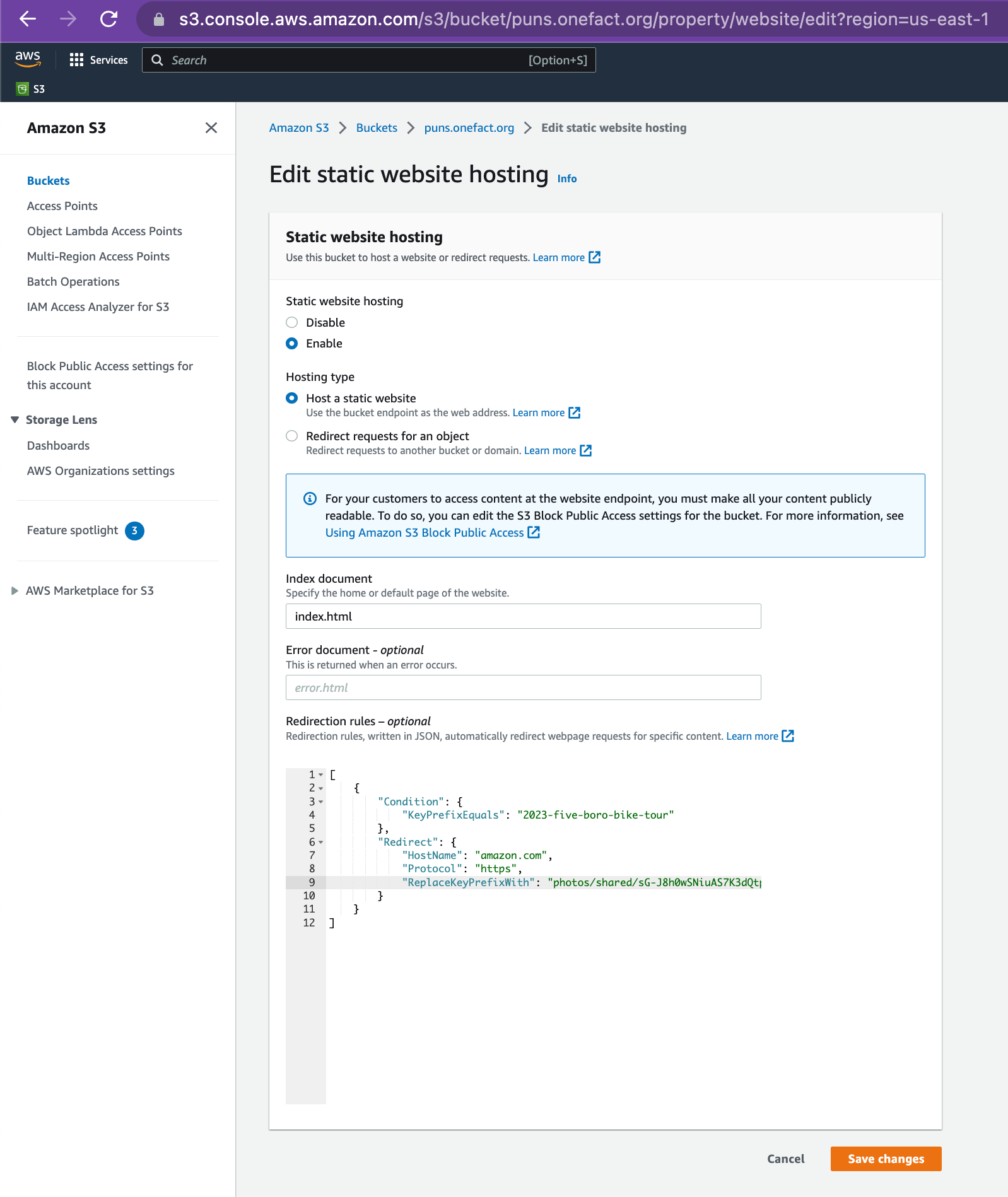
- edit the property that is at the bottom of the property, called "Redirection rules – optional" (https://s3.console.aws.amazon.com/s3/bucket/photos.onefact.org/property/website/edit?region=us-east-1)
- copy and paste one of the below sets of JSON redirects -- this is where the magic happens and you get to make "subdomain.customdomain.com/myshorterlink" redirect to a long link! on this page: https://s3.console.aws.amazon.com/s3/bucket/puns.onefact.org/property/website/edit?region=us-east-1
- in the bucket permissions, add the following to enable public access:
{
    "Version": "2008-10-17",
    "Statement": [
        {
            "Sid": "PublicReadForGetBucketObjects",
            "Effect": "Allow",
            "Principal": {
                "AWS": "*"
            },
            "Action": "s3:GetObject",
            "Resource": "arn:aws:s3:::give.onefact.org/*"
        }
    ]
}

Steps to create a cloudfront distribution and redirect the subdomain DNS
- Go to the Cloudfront management console: https://us-east-1.console.aws.amazon.com/cloudfront/v3/home?region=us-east-1#/distributions
- Click create distribution:
- Enter the origin domain, such as
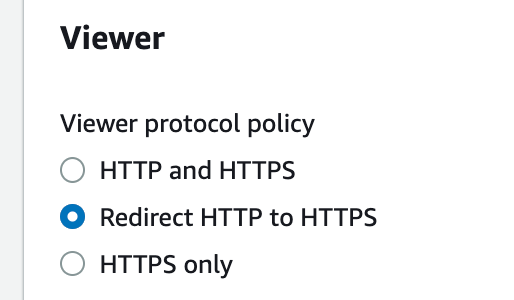
puns.onefact.org.s3-website.us-east-1.amazonaws.com(a) Select "Redirect HTTP to HTTPS" underVieweroptions:
(b) Select the custom SSL certificate associated with the toplevel domain, such as onefact.org:



(e) Enter index.html for under the Default root object property:

Steps to create DNS records for the new subdomain's cloudfront distribution
- Go to a DNS provider such as dnsimple.com under your account identifier: https://dnsimple.com/a/[$YOUR_ACCOUNT_NUMBER]/domains/onefact.org/records
- Add a CNAME record pointing to the Cloudfront distribution you created (e.g. https://yourcloudfrontsubdomain.cloudfront.net)
- Back in Cloudfront add the CNAME to the distribution properties under "Alternate domain name":

Shortlinks for fundraising:
Cash app: give.onefact.org/cash Stripe: give.onefact.org/stripe Paypal: give.onefact.org/paypal Venmo: give.onefact.org/venmo Ether: give.onefact.org/ether
Redirection rules:
[
    {
        "Condition": {
            "KeyPrefixEquals": "paypal"
        },
        "Redirect": {
            "HostName": "www.paypal.com",
            "Protocol": "https",
            "ReplaceKeyPrefixWith": "donate/?hosted_button_id=NEJHHURVND8HG&"
        }
    },
    {
        "Condition": {
            "KeyPrefixEquals": "stripe"
        },
        "Redirect": {
            "HostName": "checkout.stripe.com",
            "Protocol": "https",
            "ReplaceKeyWith": "c/pay/cs_live_a1pYUzqiE0JdVTYyTRLqIXBp6g7LEBta1va19ewnWhX0iH5gnWgH4pSGuh#fidkdWxOYHwnPyd1blppbHNgWjA0STVSQVBBdkhMbm1PbFA9Szxud0pqNk9XVkJUNHVxdkh3N0pRRHVpSDA2ZGdXZFZWcXJGNk1sVE1xaEhgXDNhZnVCclF2fF9WZkZmUl00SEldRD03a0ZGNTVfVmF0REx8QicpJ3VpbGtuQH11anZgYUxhJz8nMnZMM3QzPUlhZGlQNjc9YVRUJykndXdgaWpkYUNqa3EnPydMa2Zqa3ZqaWRxZCd4JSUl"
        }
    },
    {
        "Condition": {
            "KeyPrefixEquals": "cash"
        },
        "Redirect": {
            "HostName": "cash.app",
            "Protocol": "https",
            "ReplaceKeyPrefixWith": "$onefact/"
        }
    },
    {
        "Condition": {
            "KeyPrefixEquals": "venmo"
        },
        "Redirect": {
            "HostName": "account.venmo.com",
            "Protocol": "https",
            "ReplaceKeyPrefixWith": "u/onefact/"
        }
    },
    {
        "Condition": {
            "KeyPrefixEquals": "ether"
        },
        "Redirect": {
            "HostName": "zapper.xyz",
            "Protocol": "https",
            "ReplaceKeyPrefixWith": "account/onefact.eth?modal=token-transfer"
        }
    }
]
photos.onefact.org
photos.onefact.org/2023-five-boro-bike-tour
[
    {
        "Condition": {
            "KeyPrefixEquals": "2023-five-boro-bike-tour"
        },
        "Redirect": {
            "HostName": "amazon.com",
            "Protocol": "https",
            "ReplaceKeyPrefixWith": "photos/shared/sG-J8h0wSNiuAS7K3dQtpw.j9wLKmFmvA2IGghQ2AysqR?sort=sortOldestToNewest"
        }
    }
]
puns.onefact.org
puns.onefact.org/create
Amazon AWS S3 Management Console direct link
(
Redirection rule in JSON:
[
    {
        "Condition": {
            "KeyPrefixEquals": "create"
        },
        "Redirect": {
            "HostName": "github.com",
            "Protocol": "https",
            "ReplaceKeyPrefixWith": "onefact/puns.onefact.org/tree/main#prompt-to-help-generate-more-puns-and-add-to-this-list-using-github-pull-requests-"
        }
    },
    {
        "Condition": {
            "KeyPrefixEquals": "index.html"
        },
        "Redirect": {
            "HostName": "github.com",
            "Protocol": "https",
            "ReplaceKeyPrefixWith": "onefact/puns.onefact.org/#punsonefactorg"
        }
    }
]
calendar.onefact.org
Redirection rules in JSON for the Amazon S3 bucket s3://calendar.onefact.org:
[
    {
        "Condition": {
            "KeyPrefixEquals": "index.html"
        },
        "Redirect": {
            "HostName": "calendar.google.com",
            "Protocol": "https",
            "ReplaceKeyPrefixWith": "/calendar/embed?src=c_f61914946533f9d449f564fe22c898eb8bc91662b1a3298a305de45b0c9f1012%40group.calendar.google.com"
        }
    }
]