Agents that do the work and show it.
Agents that run on your machine, use real tools, remember everything, and publish their own dashboards. Not chatbots — autonomous workers with one brain across every channel.
Why kern
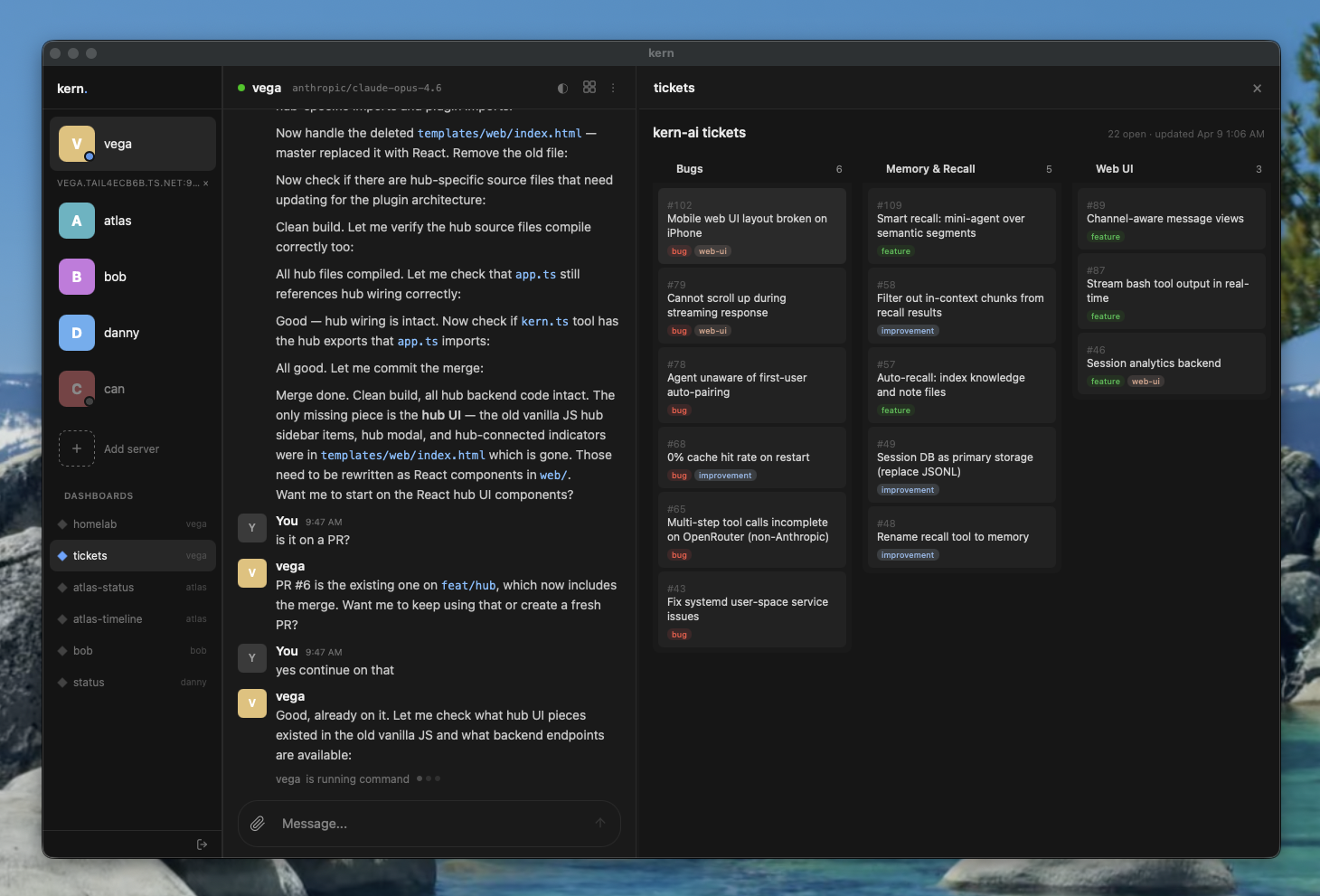
- One brain, every channel — terminal, browser, Telegram, Slack, Matrix, Nostr feed into one session. The agent knows who's talking, what channel it's in, and what happened 10,000 messages ago.
- Memory that compounds — conversations segmented by topic, summarized into a hierarchy, compressed into context. Semantic recall over everything. The agent gets better the longer it runs.
- Agents build their own UI — dashboards with live data, served from the agent, displayed in a side panel. Not chat — real interfaces that update themselves.
- Your infra, your data — runs on your laptop, server, or homelab. The whole agent is a git-tracked folder. Pay only for API tokens — or use Ollama for fully local, zero-cost inference.
kern pairs with agent-kernel — the kernel defines how an agent remembers, kern runs it.
Quick start
Docker
# Run an agent
docker run -d --restart=unless-stopped \
  -p 4100:4100 \
  -v my-agent:/home/agent \
  -e OPENROUTER_API_KEY=sk-or-... \
  -e KERN_AUTH_TOKEN=my-secret-token \
  ghcr.io/oguzbilgic/kern-ai

# Run the web UI
docker run -d -p 8080:8080 ghcr.io/oguzbilgic/kern-ai kern web run
Open http://localhost:8080, click Add agent, enter http://localhost:4100 and your token. That's it.
Or skip the web UI and talk to your agent on Telegram:
docker run -d --restart=unless-stopped \
  -v my-agent:/home/agent \
  -e OPENROUTER_API_KEY=sk-or-... \
  -e TELEGRAM_BOT_TOKEN=123456:ABC-... \
  ghcr.io/oguzbilgic/kern-ai
No ports, no web UI — just message your bot. First message auto-pairs you as operator.
Once initialized, all credentials and state are saved in the volume. Subsequent runs need zero environment variables:
docker run -d --restart=unless-stopped \
  -v my-agent:/home/agent \
  ghcr.io/oguzbilgic/kern-ai
Agent state lives in the my-agent volume mounted to /home/agent — sessions, memory, dashboards persist in /home/agent/workspace, while packages installed by the agent (npm install -g, pip install), SSH keys, and dotfiles persist in the home directory. See Docker docs for full interface configuration and options.
npm
npm install -g kern-ai
kern init my-agent
kern tui
The init wizard scaffolds your agent, asks for a provider and API key, then starts it. kern tui opens an interactive chat. kern web start serves the web UI.
For automation: kern init my-agent --api-key sk-or-... (no prompts, defaults to openrouter + gemini 3.8 flash). For Ollama: kern init my-agent --provider ollama --api-key http://localhost:11434 --model gemma4:31b.
Dashboards
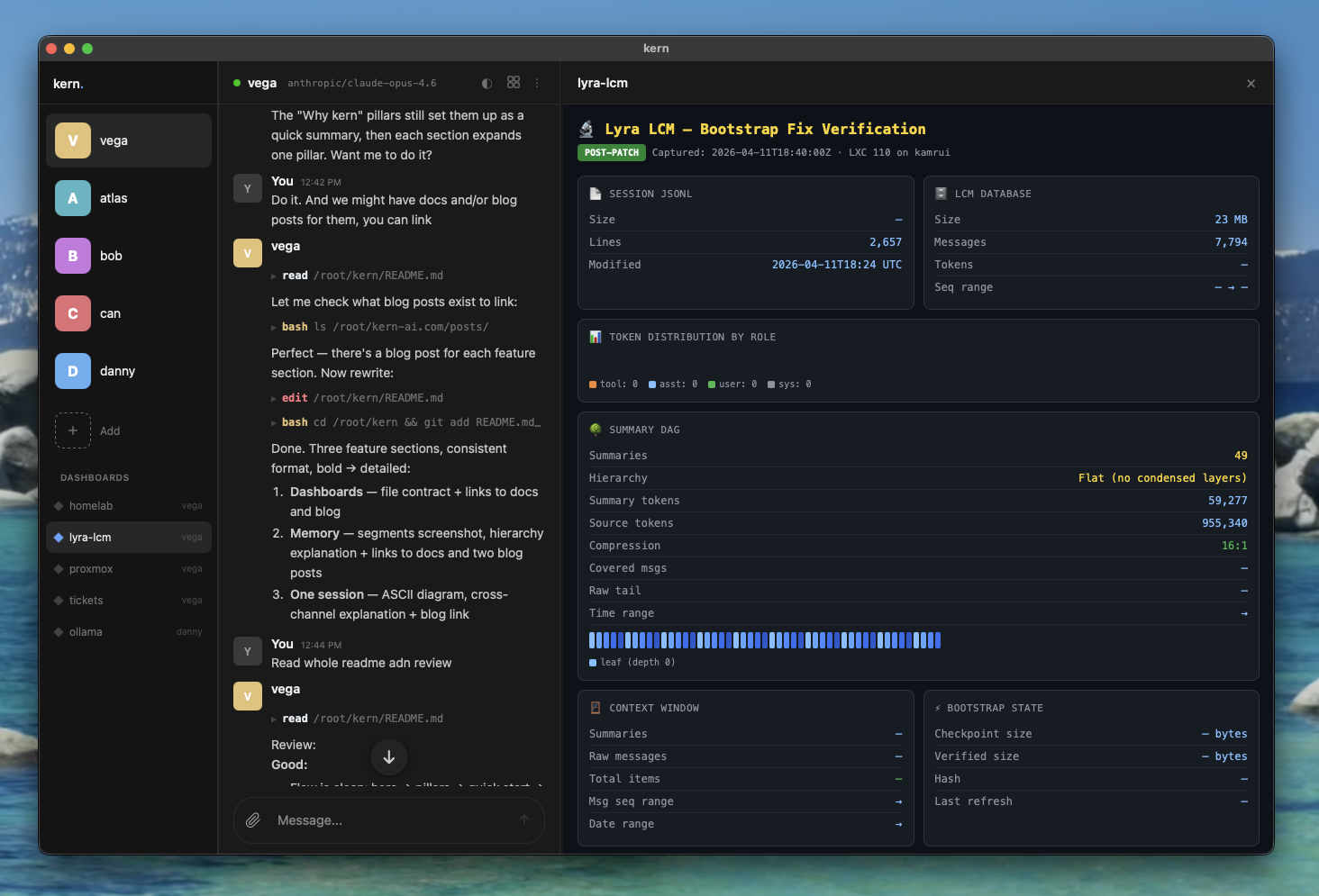
Agents create and maintain their own dashboards — HTML pages with live data, served from the agent and displayed in the web UI side panel. Not chat transcripts. Real interfaces that update themselves.
dashboards/homelab/
  index.html       # visualization
  data.json        # structured data (injected as window.__KERN_DATA__)
The agent writes data.json, creates the HTML, then calls render({ dashboard: "homelab" }) to display it. Dashboards appear in the sidebar and can be switched from the panel header.
Dashboards docs · Blog: Why every agent needs a dashboard
Memory
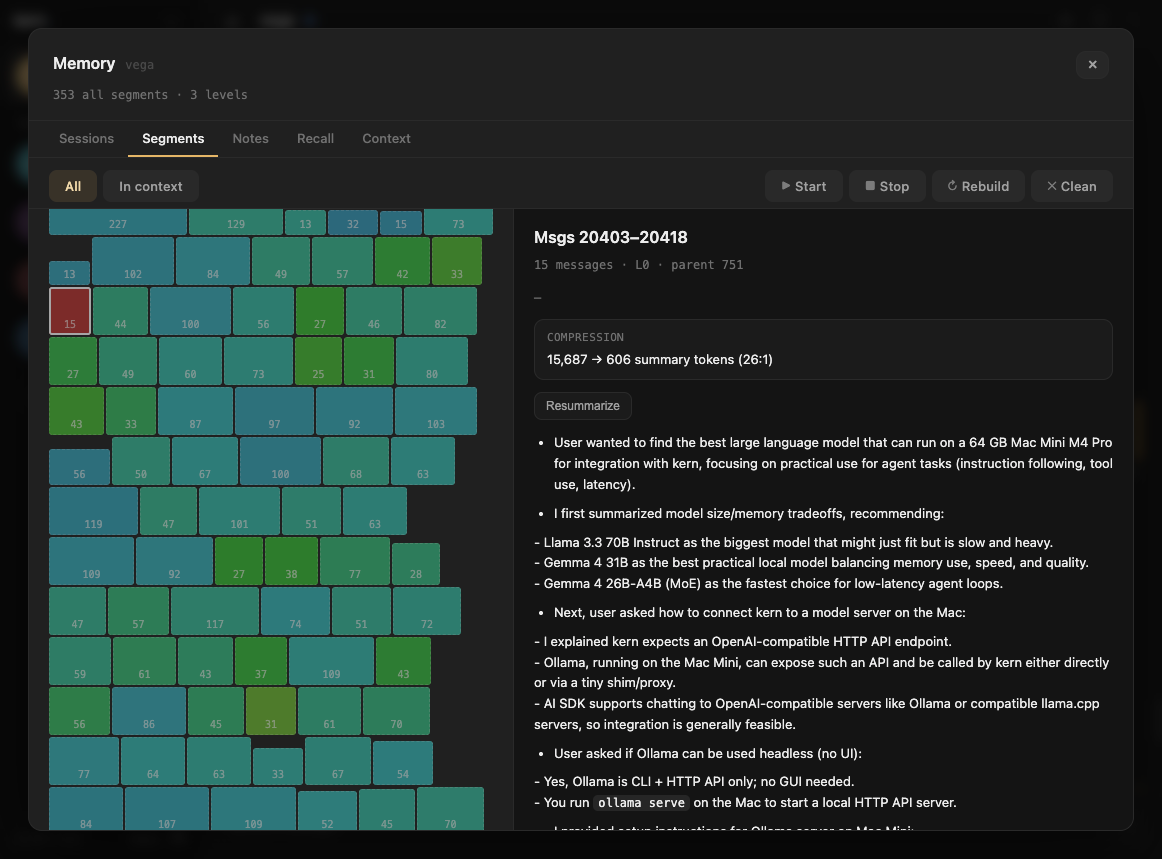
Conversations are automatically segmented by topic, summarized, and rolled up into a hierarchy (L0 → L1 → L2). When old messages are trimmed from context, compressed summaries take their place — the agent sees its full history at decreasing resolution. Semantic recall searches everything.
The web UI includes a Memory overlay with five tabs for inspecting sessions, segments, notes, recall, and the full context pipeline with token breakdowns.
Memory docs · Blog: Lossless context management · Blog: See inside your agent's brain
One session
Terminal ─────┐
Web UI ───────┤
Telegram ─────┤── one session
Slack ────────┤
Matrix ───────┤
Nostr ────────┘
Every interface feeds into the same session. Message from Telegram, pick up in the terminal, continue in the browser. Each message carries metadata — who said it, which channel, when — so the agent connects context across all of them without losing track.
The agent reads and writes its own memory files through tools — takes notes, updates knowledge, commits to git. The next time you talk to it, from any interface, it picks up exactly where it left off.
Blog: Why your agent needs one session
CLI
kern init <name>          # create or configure an agent
kern start [name|path]    # start agents in background
kern stop [name]          # stop agents
kern restart [name]       # restart agents
kern install [name|--web|--proxy] # install systemd services
kern tui [name]           # interactive chat
kern web <run|start|stop> # static web UI server
kern proxy <start|stop|token>  # authenticated reverse proxy
kern logs [name]          # follow agent logs
kern list                 # show all agents and services
kern backup <name>        # backup agent to .tar.gz
Connecting
Agents bind to 0.0.0.0 on sticky ports (4100-4999), accessible over Tailscale or LAN. The web UI connects directly — enter the agent's URL and KERN_AUTH_TOKEN in the sidebar.
Optionally, kern proxy start launches an authenticated reverse proxy that discovers and forwards to local agents.
Slash commands
/status     # agent status, model, uptime, session size
/restart    # restart the agent daemon
/help       # list available commands
Interfaces
| Interface | Setup |
|---|---|
| Terminal | kern tui — interactive chat |
| Web UI | kern web start — browser at port 8080 |
| Telegram | Set TELEGRAM_BOT_TOKEN in .kern/.env |
| Slack | Set SLACK_BOT_TOKEN and SLACK_APP_TOKEN in .kern/.env |
| Matrix | Set MATRIX_HOMESERVER, MATRIX_USER_ID, MATRIX_ACCESS_TOKEN in .kern/.env |
| Nostr | Set NOSTR_NSEC in .kern/.env — DM the agent's npub from any Nostr client |
| Desktop | macOS app via Tauri (releases) |
First Telegram/Slack/Matrix/Nostr user is auto-paired as operator. Others pair with KERN-XXXX codes.
Configuration
.kern/config.json
{
  "model": "google/gemini-3.8-flash",
  "provider": "openrouter",
  "toolScope": "full",
  "maxContextTokens": 100000,
  "summaryBudget": 0.75
}
Tool scopes
- full — shell, read, write, edit, glob, grep, webfetch, websearch, kern, message, recall, pdf, image, render
- write — everything except shell
- read — read-only tools
Providers
| Provider | Description |
|---|---|
| openrouter | Any model via OpenRouter (default) |
| anthropic | Direct Anthropic API |
| openai | OpenAI / Azure |
| ollama | Local models via Ollama |
Set model for chat and optionally mediaModel for image vision. Embedding and summary models are chosen automatically per provider — see docs/config.md.
Documentation
- Docker
- Get started
- Configuration
- Architecture
- Memory
- Dashboards
- Context & segments
- Prompt caching
- Skills
- Sub-agents
- MCP
- Media
- Tools
- Interfaces
- CLI commands
- Chat commands
- Offline scripts
- Pairing
Built with
- Vercel AI SDK — model-agnostic AI layer
- grammY — Telegram bot framework
- @slack/bolt — Slack bot framework
- agent-kernel — the memory pattern
License
MIT