This project was just open-sourced and is under active development. It was built as an internal tool and is being adapted for public use. Expect rough edges. Please check the Known Issues section before installing, and open an issue if you run into problems.
A real-time Claude Code orchestration dashboard for managing multiple AI coding sessions across machines.
Let humans focus on what humans are good at -- creativity, executive control, decision-making -- and let AIs focus on what they're good at -- lightspeed execution.
Built as an internal dev tool for Vibe Otter and open-sourced to help other vibe coders out.
The Problem
If you're running 3-5 Claude Code sessions at once, you already know what happens: you kick off a task, wait for Claude to finish, get distracted scrolling X, and then come back and talk to whichever Claude finishes first -- even if it's working on something low-priority. Once there are more than two sessions running, your weakly human executive brain function simply cannot keep track of what's happening where.
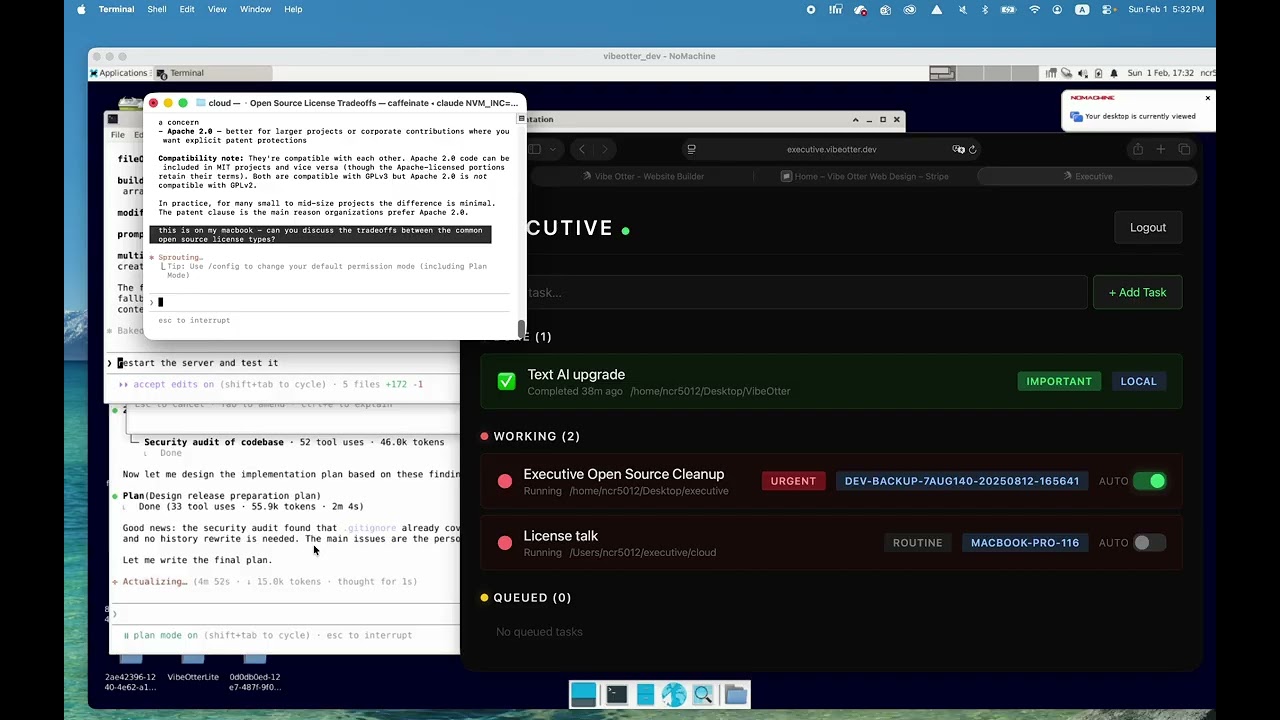
Executive fixes this. It gives you a single dashboard that shows every Claude session across every machine, what it's working on, how important it is, and whether it's done. When something finishes, you hear a chime and know exactly what to work on next.
The goal is to get back to the kind of deep concentration you had when you artisanally coded by hand -- 4-6 hour sessions of intense focus -- except now you're pushing out multiple features in a few hours instead of a few functions.
The Workflow
This tool was built around a specific workflow for managing Claude Code at scale:
- Development server (1-3 Claudes): A complete replica of production where Claudes run wild on new features. If they break something, roll back and try again.
- Production server (1-2 Claudes): Tech support, analytics, manual admin tasks that haven't been automated yet. One Claude might be analyzing user pain points while another helps a customer.
- Local machine (1 Claude): Marketing tasks, side projects, LinkedIn posts, whatever doesn't need a server.
The standard process for each task:
- Plan in detail with Claude -- discuss and refine until you're on the same page
- Approve the plan
- Turn on autopilot and don't talk to it again until it's done
- Move on to the next Claude that needs attention
Features
Real-Time Task Dashboard
Every Claude session auto-registers when it starts. You see live status updates, working/done/queued states, and hear a chime when something completes. No more checking terminals to see if Claude is still thinking.
Priority Tiers
Tag tasks as routine, important, or urgent. When multiple Claudes finish at once, you know which one to deal with first.
Autopilot Mode
The killer feature. Once you've thoroughly planned and discussed Claude's approach, flip the autopilot switch. Executive will auto-approve all tool calls and permission requests, letting Claude work for 20+ minutes without interruption. This is a massive productivity unlock -- you can fully context-switch to another task for real.
WARNING: Autopilot mode auto-approves ALL tool calls and permission requests without human review. This increases susceptibility to prompt injection attacks. If a repository or file Claude is working with contains malicious instructions, autopilot will execute them without asking. We recommend NOT using autopilot when working with repositories from unknown or untrusted sources -- which, ironically, includes this one if you just found it on the internet. Use at your own risk.
Multi-Machine Support
Two deployment variants:
local/-- Runs onlocalhost:7777, trusts localhost connections, optional API key for remote access. Best for single-machine use.cloud/-- Runs onlocalhost:7778behind a reverse proxy (nginx), password auth with bcrypt + signed HTTP-only cookies. Best for multi-machine setups accessed over the internet.
Quick Start
Platform support: Linux and macOS only. Windows is not yet supported -- see Known Issues.
Local (Single Machine)
cd local
npm install
./setup-machine.sh
./start.sh
Open http://localhost:7777 in your browser. Start a new Claude Code session -- it will auto-register with the dashboard.
Cloud (Multi-Machine)
On the server:
cd cloud
npm install
./setup-machine.sh
./start.sh
Set up nginx as a reverse proxy to localhost:7778 with HTTPS. Then on each remote machine:
./setup-machine.sh machine-name https://executive.yourdomain.com
You'll be prompted for the API key from the server's .env file.
How It Works
Executive integrates with Claude Code through hooks -- shell scripts that run at key lifecycle events:
| Hook | Event | What It Does |
|---|---|---|
session-start.sh |
SessionStart | Registers the session with the dashboard |
autopilot-hook.sh |
PreToolUse | Checks autopilot status, auto-approves if enabled |
permission-hook.sh |
PermissionRequest | Auto-approves permission dialogs when autopilot is on |
resume-hook.sh |
UserPromptSubmit | Marks task as "working" when you send a new message |
stop-hook.sh |
Stop | Marks task as "done" when Claude stops |
session-end.sh |
SessionEnd | Removes the task from the dashboard |
The dashboard uses Server-Sent Events (SSE) for real-time browser updates -- no polling, no WebSockets, no dependencies.
Configuration
Environment Variables (Cloud)
| Variable | Description |
|---|---|
EXECUTIVE_PASSWORD_HASH |
bcrypt hash of your dashboard password |
EXECUTIVE_API_KEY |
API key for hook-to-server authentication |
EXECUTIVE_COOKIE_SECRET |
Secret for signing session cookies |
EXECUTIVE_PORT |
Server port (default: 7778) |
These are generated automatically by setup.js. See cloud/.env.example for the template.
Home Directory Files
The setup script writes these files for the hooks to use:
| File | Purpose |
|---|---|
~/.executive-key |
API key for authenticating with the dashboard |
~/.executive-machine |
Machine name displayed in the dashboard |
~/.executive-host |
Dashboard URL that hooks call |
Known Issues
Windows is not supported (fix targeted for Feb 6, 2026)
Executive currently only works on Linux and macOS. The hooks are bash scripts that use Linux/macOS-specific commands (lsof, readlink -f, curl), and the setup scripts assume a Unix environment. Running on Windows -- including Git Bash -- will not work. WSL (Windows Subsystem for Linux) may work but is untested.
Windows support is actively being worked on and is expected by February 6, 2026.
Setup may overwrite your Claude Code settings
The setup-machine.sh script configures Claude Code hooks by writing to ~/.claude/settings.json. It completely replaces the hooks key, which means any existing hooks you had configured will be overwritten. The script creates a .bak backup of your settings file before writing, but if your settings.json fails to parse (e.g. it contains comments or is malformed), the backup is skipped and your settings will be overwritten without recovery.
Before running setup, manually back up your settings:
cp ~/.claude/settings.json ~/.claude/settings.json.backup
If you already ran setup and lost settings, check for ~/.claude/settings.json.bak.
About
Executive was built as an internal development tool for Vibe Otter, an AI website builder for small businesses. The Vibe Otter codebase is 99.999% vibe-coded with Claude Code (6 lines were written by hand, last June) and has built over 1,000 websites for customers. Executive is the tool that made it possible to orchestrate multiple Claude sessions across development, production, and local machines simultaneously.
Open-sourced to help other vibe coders manage their AI coding workflows.
License
Apache License 2.0 -- Copyright 2025 Vibe Otter (https://vibeotter.com)