
A NAS appliance built on bcachefs.
NASty is a NAS operating system built on NixOS and bcachefs. It turns commodity hardware into a storage appliance serving NFS, SMB, iSCSI, and NVMe-oF — managed from a single web UI, updated atomically, and rolled back when things go sideways.
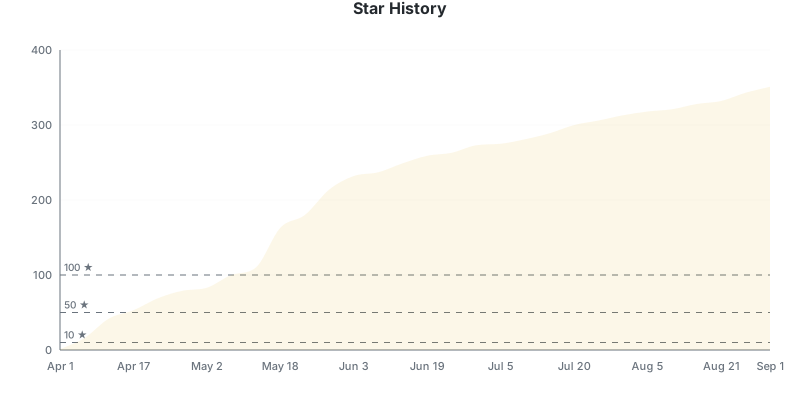
Star History
Features
Storage
- bcachefs — compression, checksumming, erasure coding, tiering, encryption, O(1) snapshots
- File sharing — NFS and SMB with per-share ACLs, including discoverable macOS Time Machine destinations with optional size limits
- Block storage — iSCSI and NVMe-oF with dedicated targets per volume, per-target portal management, and optional RDMA transports (iSER, NVMe-oF/RDMA, NFS-RDMA) for RoCE and InfiniBand NICs
- Subvolumes — filesystem and block subvolumes with quotas, compression, and tiering per subvolume
- Snapshots and recovery — instant point-in-time copies, writable clones, whole-subvolume rollback, and individual file or folder restore
- Encryption lifecycle — lock and unlock encrypted filesystems from the WebUI, with a dependents preview that lists every app, VM, share, and backup that would break before you confirm. Optional TPM2-sealed keys auto-unlock on boot when the measured-boot state matches
- File browser — browse, upload, edit, rename, copy, move, and bulk-manage files, or create password-, expiry-, and download-limited guest links
- Backups — encrypted, deduplicated, incremental backups to local, S3, SFTP, REST, or Backblaze B2 with per-profile schedules and retention — plus whole-snapshot restore, including disaster recovery onto a fresh box from an existing repository
- Storage operations — scheduled scrubs, offline fsck, device evacuation, reconcile, and copy-GC with live progress and diagnostics
Monitoring & Alerts
- Dashboards — built-in and named custom views with movable, resizable widgets and scrollable history charts (30-day retention)
- Alerts — configurable rules for filesystem usage, disk health, temperatures, scrub errors, and more
- Notifications — alert delivery via SMTP email, Telegram, webhooks, ntfy, and Signal
- Disk health — protocol-aware ATA/SATA, NVMe, and SAS/SCSI monitoring with per-disk details and topology
- Prometheus — optional metrics endpoint for external monitoring
- nasty-top — standalone TUI for live per-device IO, latency, and tuning
Apps & VMs
- Apps — Docker containers and Compose stacks with private registries, HTTPS ingress, managed networking and startup order, relocatable persistent data, live resource usage, custom
.envfiles, and anallow_unsafeescape hatch for privileged options. See Jellyfin on NASty for a complete media-server example - Virtual machines — QEMU/KVM with VNC console, disk snapshots, USB passthrough (editable on existing VMs), bridge selection, and an inline disk-import wizard for qcow2, raw, img, vdi, and vmdk images (optionally .xz/.gz/.bz2 compressed)
- Hardware passthrough — IOMMU group view, USB device inventory, vfio-pci toggles that survive reboots, and SR-IOV virtual-function management (per-VF VLAN, MAC, trust, spoof-check)
- Network bridges — Linux bridges for attaching VMs (and apps) to L2 networks alongside the host
System
- Web UI — manage filesystems, subvolumes, snapshots, shares, disks, services, and more
- Web terminal — built-in shell with command cheatsheets and diagnostic tools
- Custom NixOS config — advanced users can drop settings the WebUI doesn't expose into
/etc/nixos/custom.nix; NASty never overwrites it, so they persist across reboots and upgrades - Glossary — built-in help page with storage terms, protocol guidance, and FAQ
- Networking — NetworkManager-based with confirm-or-rollback: edits stage, apply, and auto-revert if you don't confirm in time, so a typo can't lock you out over SSH
- Let's Encrypt — automatic TLS certificates via ACME (TLS-ALPN and DNS challenges)
- Tailscale — built-in VPN with one-click setup
- Access control — role-based permissions, scoped API tokens, OIDC single sign-on, WebAuthn / passkey sign-in, a read-only file portal for authorized users, and an append-only audit log
- Active Directory (experimental) — join an existing domain as a member, or host your own: NASty as the domain controller with integrated DNS and Kerberos, WebUI user/group/computer management, domain backups, and RSAT compatibility for advanced administration
- Firewall — engine-managed nftables, deny-by-default, with per-service source/interface restrictions and user-defined custom port rules for anything running outside NASty's service model
- UPS monitoring — NUT integration for graceful shutdown on power loss (opt-in)
- Firmware and watchdog — supported-device firmware updates plus optional load, memory, and connectivity watchdog recovery
- Atomic updates — NixOS-based, with one-click rollback to any previous generation
- Secure Boot (experimental) — per-box opt-in lanzaboote-enforcing boot chain with a guided enrollment wizard from the Hardware page
- Binary cache — fast updates via cachix on both x86_64 and aarch64 (engine, webui, bcachefs-tools pre-built — no Rust + npm compile on Pi / Odroid / Rockchip boxes)
Kubernetes
NASty can serve as a storage backend for Kubernetes — provisioning persistent volumes, snapshots, and clones on demand across all four protocols (NFS, SMB, iSCSI, NVMe-oF).
- nasty-csi — CSI driver for dynamic provisioning, snapshots, cloning, and online expansion
- nasty-chart — Helm chart for one-command install
- nasty-plugin —
kubectl-nastyfor inspecting volumes, snapshots, clones, and health from the CLI
Ecosystem & Integrations
Integrations built on NASty's public WebSocket and REST APIs:
- nasty-ha — Home Assistant custom integration for local monitoring and optional VM and App controls
- nastyplugin by @WarlockSyno — Proxmox storage plugin for using NASty as a backing store for VM and container disks
Building something with NASty? Open an issue or PR and we'll add it here.
Screenshots

Dashboard

Filesystems

Subvolumes

Sharing

Apps

Terminal

Settings
Getting Started
- Download the latest ISO from Releases
- Boot it on your hardware — the installer lets you pick a disk and press Enter
- Open the WebUI at
https://<nasty-ip> - Sign in with admin / admin and set a new password when prompted
UEFI is required; Proxmox users must select OVMF. If the ISO will not boot on your firmware, see INSTALL.md for an alternative installation method from any Linux live environment.
Update Flavors
NASty has three update flavors:
| Flavor | What you get | Description |
|---|---|---|
| Mild | Tagged stable releases (v*) |
Stable releases |
| Spicy | Pre-release builds (s*) |
Pre-release builds with newer features |
| Nasty | Latest commit on main | Bleeding edge, no guarantees |
Architecture
| Component | Technology | Why |
|---|---|---|
| Engine | Rust | Async runtime, handles all storage and system operations |
| Web UI | SvelteKit + TypeScript | Reactive UI with real-time WebSocket updates |
| OS | NixOS | Atomic updates, rollback, reproducible system config |
| Filesystem | bcachefs | Checksumming, compression, tiering, snapshots, erasure coding |
| API | JSON-RPC 2.0 over WebSocket and authenticated REST/OpenAPI | Realtime WebUI plus documented external integrations |
Project Structure
engine/         Rust workspace — storage, sharing, system management
webui/          SvelteKit web interface
nixos/          NixOS modules and ISO configuration
The full ecosystem (CSI driver, Helm chart, kubectl plugin, and more) lives at github.com/nasty-project.
FAQ
See FAQ.md for common questions about bcachefs, NixOS, and project status.
Telemetry
NASty sends a random installation ID and daily aggregate usage data for mounted storage, configured VMs, apps, and sharing exports, software version/build, and CPU architecture. The report does not include names, paths, file contents, hostnames, or hardware identifiers. Disable anytime from Settings → Telemetry. Details: nasty-telemetry.
License
GPL-3.0-only